Last updated: May 13, 2026
Quick Answer: Claude WordPress MCP uses the Model Context Protocol to connect Anthropic’s Claude AI directly to your WordPress site, letting you manage posts, plugins, themes, and settings through natural language commands. The official WordPress MCP Adapter plugin translates Claude’s requests into WordPress actions, and it works with Claude Desktop, Claude Code, Cursor, and VS Code. Setup takes under 15 minutes on most sites.
Key Takeaways
- Claude WordPress MCP bridges Claude AI and your WordPress backend using the open Model Context Protocol standard
- The WordPress Core AI team released the official MCP Adapter plugin in early 2026, replacing the deprecated
wordpress-mcpGitHub repo [3] - Claude can read and write posts, manage plugins, update themes, and query your database depending on your permission settings
- Security is critical: use app passwords, limited user roles, and PHP filters to control what Claude can access [6]
- WordPress.com offers native MCP support on paid plans with OAuth authentication, no plugin required
- WordPress Playground added MCP server support in April 2026 for safe local testing
- Self-hosted sites use JWT or app passwords for authentication, while WordPress.com uses OAuth
- Both free (AI Engine) and official (MCP Adapter) plugin options exist for connecting Claude to WordPress [2]
What Is Claude WordPress MCP and How Does It Work?
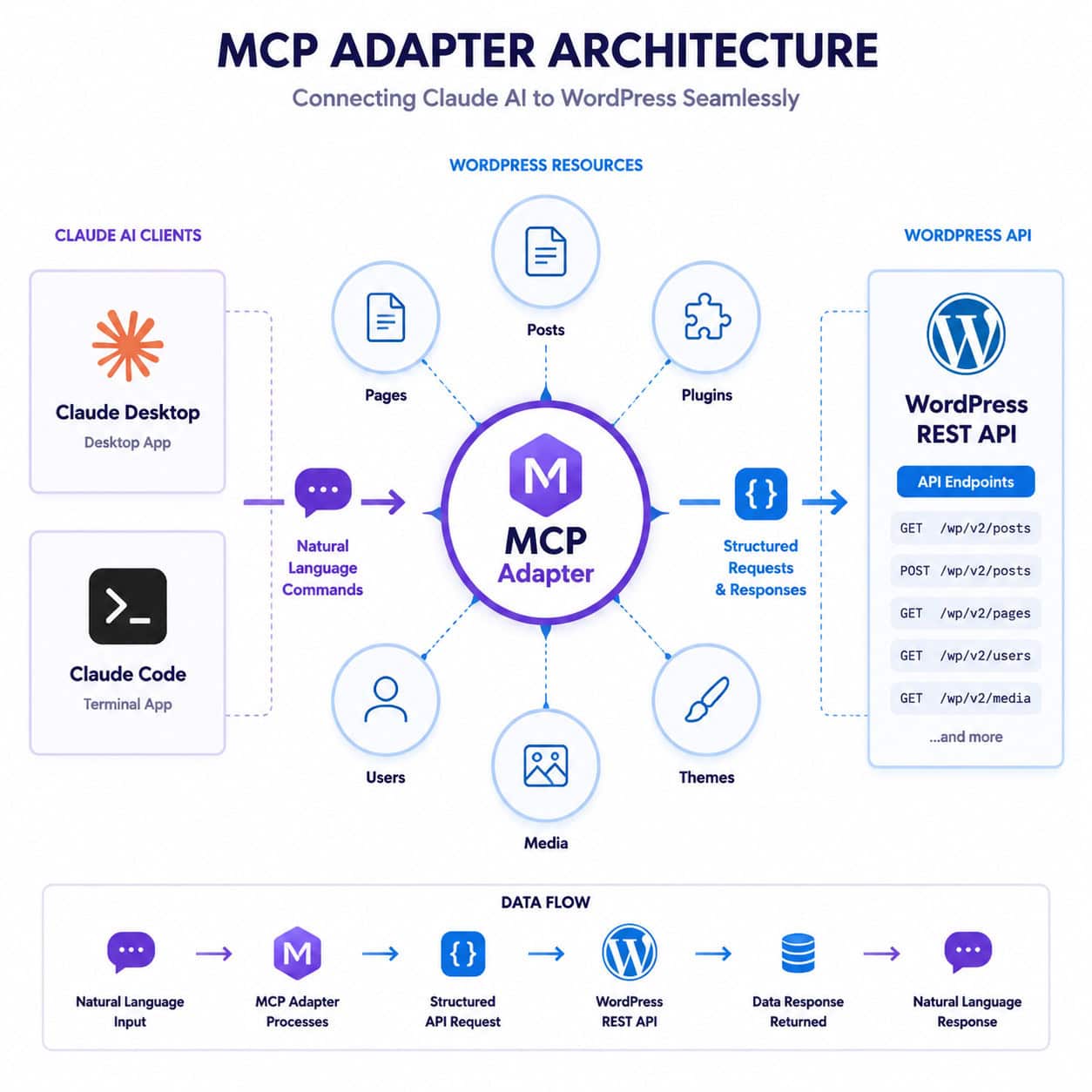
Claude WordPress MCP is the combination of Anthropic’s Claude AI and the Model Context Protocol (MCP) standard applied to WordPress sites. MCP acts as a universal translator between AI assistants and external tools, and when pointed at WordPress, it lets Claude read your site’s data and perform actions through natural language.
Here’s the basic flow:
- You type a command in Claude Desktop or Claude Code (e.g., “Draft a blog post about spring gardening”)
- Claude sends a structured request through MCP to your WordPress site
- The MCP Adapter plugin receives the request, validates permissions, and executes the corresponding WordPress action via the REST API or Abilities API
- Results return to Claude, which confirms the action or displays the requested data
The WordPress Core AI team built the MCP Adapter to expose WordPress “abilities” as MCP tools and resources [3]. This means Claude doesn’t just dump raw API calls at your site. Instead, it uses a curated set of capabilities that site owners can control with PHP filters.
Choose this approach if you want AI-assisted site management without building custom integrations or writing PHP yourself. It’s especially useful for content teams managing multiple posts, developers debugging plugin conflicts, or agencies handling several client sites.
For broader context on AI and WordPress working together, see our guide on how to integrate an AI-powered chatbot into WordPress.
How Do You Set Up Claude WordPress MCP on a Self-Hosted Site?
Setting up Claude WordPress MCP on a self-hosted WordPress site involves installing the MCP Adapter plugin, configuring authentication, and connecting your Claude client. The whole process takes about 10 to 15 minutes.
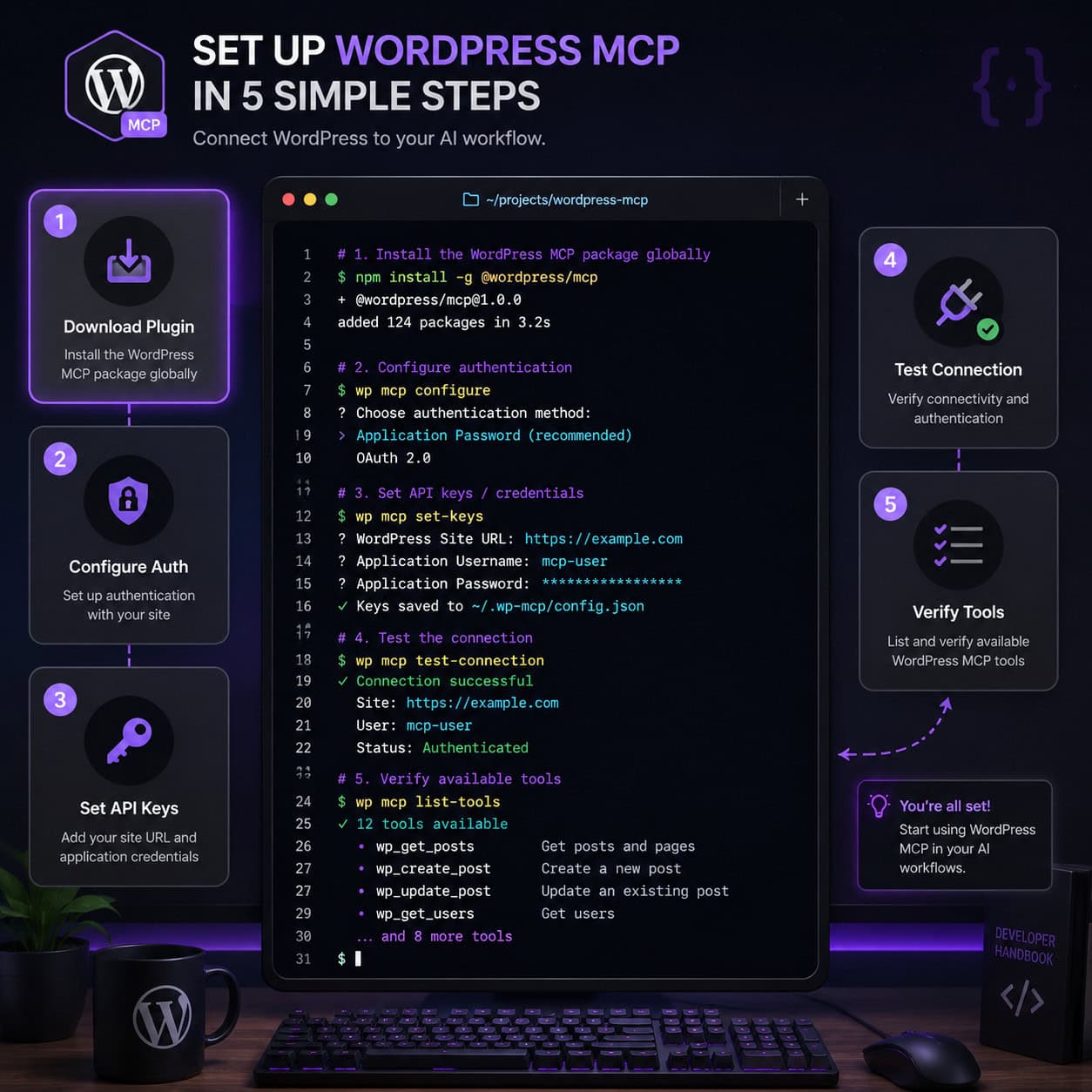
Step-by-step setup
Install the MCP Adapter plugin. Download it from the WordPress plugin repository or install via WP-CLI:
wp plugin install mcp-adapter --activate. The olderwordpress-mcprepo on GitHub was deprecated in early 2026 in favor of this stable version [3].Create a dedicated WordPress user. WebDevStudios recommends creating a user with the “Contributor” role specifically for Claude, rather than giving it admin access [6]. This limits what Claude can do on your site.
Generate an app password. Go to Users > Your Claude User > Application Passwords. Create a new password and copy it immediately. You won’t see it again.
Configure your Claude client. In Claude Desktop, open Settings > MCP Servers and add your WordPress site’s MCP endpoint URL along with the app password as a Bearer token. For Claude Code, add the server config to your
.claude/mcp_servers.jsonfile.Test the connection. Ask Claude something simple like “List my five most recent published posts.” If it returns your posts, the connection works.
Customize available abilities. Use PHP filters to control which MCP tools Claude can access. Weston Ruter detailed this approach in April 2026, recommending local-only exposure of abilities for security.
Common mistake: Using your personal admin account for Claude’s connection. If Claude has full admin access, it can create, modify, and delete anything on your site, including other users and plugin settings [9]. Always use a restricted account.
If you’re looking to extend your WordPress setup further, our essential guide to WordPress plugin development covers the fundamentals you’ll need.
What Can Claude Actually Do With WordPress MCP?
With a properly configured MCP connection, Claude can perform a wide range of WordPress management tasks. The exact capabilities depend on the user role and abilities you’ve enabled.
Content management
- Draft, edit, and publish posts and pages
- Update post metadata (categories, tags, featured images)
- Query the database for content matching specific criteria
- Bulk-edit existing content (titles, excerpts, status)
Site administration
- List installed plugins and their status
- Activate or deactivate plugins
- Check theme details and active theme info
- Review user accounts and roles
Development tasks
- Query site configuration and debug info
- Fetch error logs and recent PHP warnings
- Test REST API endpoints
- Manage custom post types and taxonomies
A May 2026 YouTube tutorial showed Claude Code working alongside WP-CLI, Novamira, and WP-Rocket to handle advanced performance optimization workflows [1]. Some Reddit users have reported building entire sites through Claude MCP without traditional themes or page builders [2].
Edge case: Claude’s write capabilities vary by platform. WordPress.com’s native MCP supports drafting and publishing on paid plans with OAuth auth. Self-hosted sites using JWT or app passwords can enable full write access, but you need to explicitly configure it.
For more on using AI tools to manage your WordPress site, check out our roundup of the 12 best AI plugins for WordPress.
How Does WordPress.com MCP Differ From Self-Hosted MCP?
WordPress.com launched native MCP support on March 20, 2026, and it works differently from self-hosted setups. Here’s a direct comparison:
| Feature | WordPress.com (Native) | Self-Hosted (MCP Adapter) |
|---|---|---|
| Authentication | OAuth | App passwords or JWT |
| Plugin required | No | Yes (MCP Adapter) |
| Write access | Draft and publish on paid plans | Full access (configurable) |
| Supported clients | Claude, ChatGPT, Cursor | Claude Desktop, Code, Cursor, VS Code |
| Setup time | ~5 minutes | ~15 minutes |
| Customization | Limited to WordPress.com features | Full PHP filter control |
| Cost | Requires paid WordPress.com plan | Free (plugin is free) |
Choose WordPress.com MCP if you want the fastest setup with minimal configuration and you’re already on a paid WordPress.com plan. Choose self-hosted MCP if you need granular control over permissions, custom abilities, or you’re running WooCommerce or other complex plugins.
Pressable, a managed WordPress host, also launched its own MCP integration on April 22, 2026, letting users manage hosting-level tasks (not just WordPress) through Claude, ChatGPT, or Gemini via natural language.
What Are the Security Risks of Claude WordPress MCP?
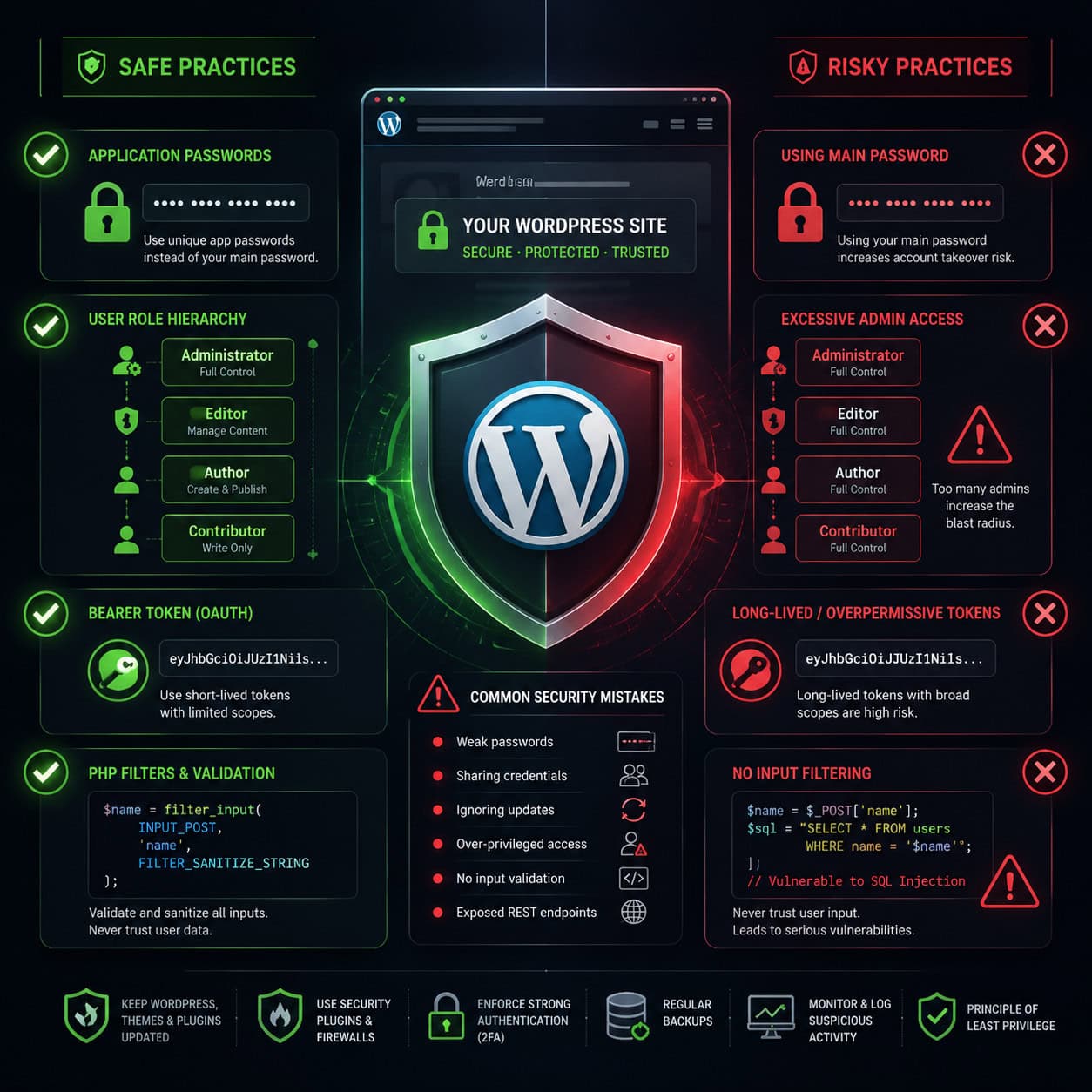
MCP grants Claude direct access to your WordPress backend, which means security mistakes can have real consequences. Meow Apps warned in January 2026 that MCP can grant Claude full admin access, including the ability to create, modify, and delete content, plugins, themes, and even Polylang translations [9].
Security best practices
- Use a Contributor-level user account for Claude, not an admin account [6]
- Rotate app passwords regularly, especially if you share your MCP config across devices
- Apply PHP filters to limit which abilities are exposed through MCP
- Keep MCP endpoints local-only when possible, especially in development environments
- Monitor Claude’s actions through WordPress audit logs
- Never expose Bearer tokens in public repositories or shared config files [9]
Decision rule: If your site handles user data, payments, or sensitive content, start with read-only access and expand permissions only as needed. TechCrunch noted that Claude’s initial WordPress connector focused on read-only access to the 43% of the web running WordPress, with write access added later and praised for its granular data controls [10].
For more on securing and optimizing your WordPress workflow, see our advanced WordPress strategies for power users.
What Are the Alternatives to the Official MCP Adapter?
The official MCP Adapter isn’t your only option. Several alternatives exist depending on your needs.
- AI Engine (AIWU plugin): A free plugin that offers Claude MCP for real-time site management. Users on Reddit reported using it to build full sites without the official Automattic plugin [2].
- WordPress Playground MCP: Added official MCP server support via the
@wp-playground/mcppackage in April 2026. This is ideal for testing and development since it runs WordPress in a sandboxed browser environment. - Make.com integration: Connects Claude to WordPress through automation workflows, useful if you want conditional logic between the two platforms [8].
- InstaWP: Offers a connection method for linking Claude with WordPress, particularly useful for staging environments [4].
- Custom MCP servers: Developers can build their own MCP server implementations using the open protocol spec, tailored to specific WordPress setups.
Choose AI Engine if you want a free, community-supported option with active development. Choose WordPress Playground MCP if you’re a developer who wants to test Claude integrations without risking a production site.
Our AI-powered content optimization guide covers additional ways to use AI tools alongside your WordPress content workflow.
Who Should (and Shouldn’t) Use Claude WordPress MCP?
Good fit for:
- Content teams publishing 10+ posts per week who want to speed up drafting and editing
- Solo developers managing multiple client WordPress sites
- Agencies that need quick site audits and bulk content updates
- WordPress developers debugging plugin conflicts or testing REST API behavior
Not ideal for:
- Sites with strict compliance requirements (HIPAA, PCI) where AI access to backend data raises regulatory concerns
- Beginners who aren’t comfortable managing user roles and authentication tokens
- Simple blogs with one author and occasional posts, where the setup overhead isn’t worth it
- Sites running outdated WordPress versions (MCP Adapter requires WordPress 6.7+)
If you’re exploring broader AI-driven approaches to WordPress SEO, our guide on using AI SEO tools for WordPress is a good next step.
Conclusion
Claude WordPress MCP is a practical tool for anyone who manages WordPress sites and wants to work faster through natural language commands. The setup is straightforward: install the MCP Adapter plugin, create a restricted user account, generate an app password, and connect your Claude client. The whole process takes about 15 minutes.
Your next steps:
- Start with read-only access. Connect Claude to a staging site first and test basic queries before enabling write capabilities on production.
- Use a Contributor-level account. Never connect Claude with admin credentials unless you have a specific, time-limited reason.
- Try WordPress Playground if you want a zero-risk testing environment before touching your live site.
- Review your PHP filters to ensure only the abilities you actually need are exposed through MCP.
The WordPress MCP ecosystem is moving fast in 2026. The official MCP Adapter, WordPress.com native support, and third-party options like AI Engine all give you different paths to the same goal: managing your WordPress site through conversation instead of clicks.
FAQ
What does MCP stand for in Claude WordPress MCP? MCP stands for Model Context Protocol. It’s an open standard created by Anthropic that lets AI assistants like Claude connect to external tools and data sources, including WordPress sites [3].
Is the WordPress MCP Adapter plugin free? Yes. The official MCP Adapter plugin is free and available from the WordPress plugin repository. WordPress.com’s native MCP support requires a paid plan, but the self-hosted plugin costs nothing.
Can Claude delete content on my WordPress site through MCP? Yes, if you give it permission. Claude can create, modify, and delete posts, pages, plugins, and more depending on the user role and abilities you configure [9]. Use a restricted account to limit this.
Does Claude WordPress MCP work with Claude Code? Yes. Claude Code, Claude Desktop, Cursor, and VS Code all support MCP server connections. Anthropic enhanced Claude Code in April 2026 with better session management, which improves MCP usability for WordPress development.
What WordPress version do I need for MCP? The MCP Adapter plugin requires WordPress 6.7 or higher. It integrates with the Abilities API introduced in WordPress 6.9 for the best experience [3].
Is Claude WordPress MCP safe to use on production sites? It can be, with proper security measures. Use a limited user role, rotate app passwords, apply PHP filters to restrict abilities, and monitor actions through audit logs [6]. Avoid exposing MCP endpoints publicly.
Can I use Claude WordPress MCP with WooCommerce? Yes, on self-hosted sites. The MCP Adapter can expose WooCommerce data through custom abilities, though you’ll need to configure the appropriate permissions and possibly write custom PHP filters.
What’s the difference between the old wordpress-mcp repo and the new MCP Adapter?
Automattic deprecated the wordpress-mcp GitHub repository (last updated July 2025) in favor of the stable MCP Adapter plugin, which aligns with WordPress 6.9’s Abilities API [3].
Can I connect ChatGPT or Gemini to WordPress MCP instead of Claude? Yes. MCP is an open protocol. WordPress.com’s native MCP and Pressable’s integration both support Claude, ChatGPT, and Gemini. The self-hosted MCP Adapter works with any MCP-compatible client.
Do I need coding skills to set up Claude WordPress MCP? Basic WordPress admin skills are enough for a standard setup. Customizing abilities with PHP filters requires some coding knowledge, but the default configuration works without writing any code.
References
[1] Watch – https://www.youtube.com/watch?v=GdyqbcmQ_1k [2] Claude Takes Over WordPress With Mcp – https://www.reddit.com/r/Wordpress/comments/1kbdrji/claude_takes_over_wordpress_with_mcp/ [3] From Abilities To Ai Agents Introducing The WordPress Mcp Adapter – https://developer.wordpress.org/news/2026/02/from-abilities-to-ai-agents-introducing-the-wordpress-mcp-adapter/ [4] Connect Claude With WordPress – https://instawp.com/connect-claude-with-wordpress/ [6] How To Connect Claude Ai Using WordPress Ai Integration – https://webdevstudios.com/2026/04/17/how-to-connect-claude-ai-using-wordpress-ai-integration/ [8] WordPress – https://www.make.com/en/integrations/anthropic-claude/wordpress [9] Claude Code WordPress Mcp – https://meowapps.com/claude-code-wordpress-mcp/ [10] It Just Got Easier For Claude To Check In On Your WordPress Site – https://techcrunch.com/2026/02/06/it-just-got-easier-for-claude-to-check-in-on-your-wordpress-site/