Last updated: May 22, 2026
Quick Answer: Mind map notebooks — whether physical or digital — use a radial, non-linear layout to organize ideas around a central topic, making it easier to brainstorm, plan, and retain information. They work because they mirror how the brain naturally connects concepts, and in 2026, AI tools like Google’s NotebookLM have turned them into interactive thinking partners. This ultimate guide to mastering creativity and productivity with mind map notebooks covers everything from choosing the right format to avoiding common beginner mistakes.
Key Takeaways
- A mind map radiates outward from one central idea using branches, keywords, colors, and images — five core characteristics that set it apart from linear note-taking [5].
- Hand-drawn mind maps activate more brain regions than typing, which can boost creativity and memory retention [7].
- Google’s NotebookLM now auto-generates interactive mind maps from uploaded documents, making digital mind mapping nearly frictionless [6][9].
- Mind mapping benefits people in non-creative roles just as much — engineers, lawyers, project managers, and students all use them for planning and analysis.
- Physical mind map notebooks typically cost $8–$30; digital tools range from free to about $10/month.
- Common beginner mistakes include writing full sentences instead of keywords and starting with branches that are too narrow.
- AI-powered mind maps in 2026 accept prompt steering, so you can control branch depth, focus areas, and perspective [4].
- Mind mapping is especially helpful for people with ADHD because it externalizes working memory and reduces cognitive load.

What Exactly Are Mind Map Notebooks and How Do They Work?
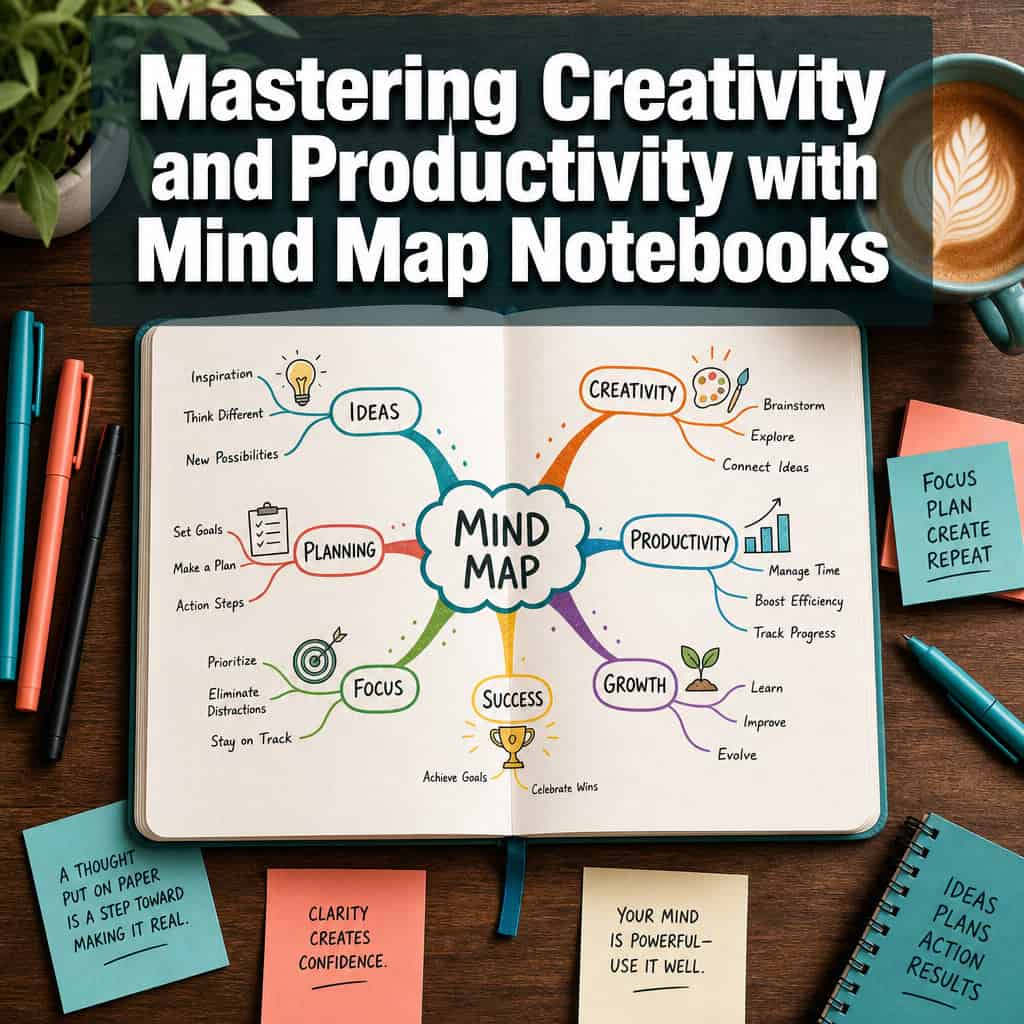
A mind map notebook is any notebook — paper or digital — designed or used to create mind maps: non-linear diagrams that radiate outward from a central concept. According to MindMapping.com, every mind map shares five essential characteristics: a central image or word, main branches radiating outward, keywords on each branch, a hierarchical structure, and connected nodes [5].
How the process works in practice:
- You write or draw your main topic in the center of the page.
- You draw curved branches outward for major sub-topics.
- Each branch gets smaller twigs for supporting details.
- You add colors, small icons, or images to strengthen visual memory.
Physical mind map notebooks often feature dot-grid or blank pages, center-weighted layouts, and larger page sizes (A4 or A3) to give branches room to grow. Digital versions — like Google’s NotebookLM — can auto-generate a mind map from uploaded PDFs, Google Docs, or web pages with a single click [9]. The result is a visual navigation hub where each node links back to the original source material.
Digital vs. Paper Mind Map Notebooks: Which Is Better?
Neither is universally better. Choose paper if creativity, memory, and deep thinking are your priorities. Choose digital if you need searchability, collaboration, or AI-assisted organization.
| Factor | Paper Mind Map Notebook | Digital Mind Map Tool |
|---|---|---|
| Creativity boost | Higher — handwriting activates more brain regions [7] | Moderate — faster but less tactile |
| Memory retention | Stronger spatial and motor encoding | Weaker unless actively reviewed |
| Collaboration | Difficult to share | Easy — real-time sharing, cloud sync |
| Scalability | Limited by page size | Unlimited canvas, collapsible branches |
| AI features | None | Prompt steering, auto-generation [4][9] |
| Cost | $8–$30 one-time | Free to ~$10/month |
| Best for | Brainstorming, studying, journaling | Research, team projects, literature reviews |
A 2025 article from The Mind Mapping Blog recommends starting with hand-drawn maps using large paper, curved lines, and multiple colors to keep thinking open and expansive [7]. But if you’re processing a 40-page research paper, NotebookLM’s ability to auto-summarize it into an interactive map where nodes link back to original sections is hard to beat [6].
Decision rule: Use paper for generative thinking (brainstorming, creative projects). Use digital for analytical thinking (research synthesis, project management). Many practitioners use both.
How Much Do Professional Mind Map Notebooks Cost?
Physical mind map notebooks range from about $8 for a basic dot-grid notebook to $25–$30 for specialty brands with pre-printed radial layouts. Digital tools vary more widely:
- Free options: Google NotebookLM (with mind map feature), FreeMind, Coggle (basic plan)
- Mid-range ($5–$10/month): MindMeister, XMind, Miro
- Premium ($10–$15/month): MindManager, Ayoa (with AI features)
You don’t need to spend much to start. A blank A4 sketchbook and a set of colored pens is a perfectly functional mind map notebook. The investment that matters most is time spent practicing the technique.
How Do I Create an Effective Mind Map Step by Step?
Start with a clear central topic, build outward with keywords (not sentences), and use color and images to create visual anchors. Here’s a reliable process:

Step-by-step checklist:
- Define your central topic. Write it in the middle of the page. Draw a small image or icon next to it if possible — this strengthens recall.
- Add 3–5 main branches. These are your major sub-topics. Use thick, curved lines and a different color for each branch.
- Extend sub-branches. Add supporting details, examples, or questions as thinner twigs off each main branch. Stick to one or two keywords per twig.
- Look for connections. Draw dotted lines between branches that relate to each other. BulletJournalJunkie notes that when many lines converge on one concept, it’s a strong signal that concept should be a main point in your final work.
- Review and refine. Step back. Add missing ideas. Circle the most important nodes. Use this map as a diagnostic tool for what you know and what you still need to research.
Common mistake: Writing full sentences on branches. This defeats the purpose. Keywords force your brain to reconstruct meaning, which deepens understanding. A branch labeled “cortisol + sleep disruption” is more useful than “cortisol levels can disrupt sleep patterns.”
If you’re working digitally, NotebookLM lets you generate a mind map from any notebook by selecting the “Mind Map” chip — the map appears in the Studio panel and can be regenerated anytime [9]. In May 2026, users reported that you can now steer the output with explicit prompts like “give only 3 main branches” or “focus on objections” [4].
What Are Common Mistakes People Make When Starting Mind Mapping?
The biggest mistake is treating a mind map like an outline. Mind maps are spatial and associative, not sequential. Here are the errors I see most often:
- Too many words per branch. Use 1–3 keywords, not phrases or sentences.
- Starting too narrow. If your first branches are already specific details, you’ll run out of room for the big picture. Start broad.
- Using only one color. Color coding is not decoration — it helps your brain distinguish categories at a glance [5].
- Ignoring cross-connections. The most valuable insights often come from linking branches that seem unrelated.
- Perfectionism. Your first mind map doesn’t need to be beautiful. Speed and flow matter more than aesthetics during brainstorming.
- Choosing too small a page. Mind Map Nation recommends using full notebook spreads (both pages) or A3 paper so your thinking isn’t cramped by page edges.
Techniques to Improve Creativity Using Mind Map Notebooks
Mind maps boost creativity by removing the pressure of linear order. You can generate ideas freely, then find structure afterward. The Vaia educational platform emphasizes that mind maps allow quick idea generation without worrying about placement, and the spatial layout helps reconstruct knowledge later.
Proven techniques:
- Rapid burst mapping. Set a 5-minute timer. Write your central topic and branch out as fast as possible without editing. Quantity over quality.
- Image-first mapping. Draw small sketches instead of words on your branches. This engages different cognitive pathways and often surfaces unexpected ideas.
- Reverse mapping. Start with your desired outcome in the center and map backward to identify what needs to happen to get there.
- Collaborative mapping. Pass a physical mind map notebook around a team. Each person adds branches in a different color. The variety of perspectives compounds.
- Cross-pollination. After creating two separate mind maps on different topics, look for connections between them. This is where genuinely original ideas tend to emerge.
For designers working on visual projects, mind mapping pairs well with other creative workflows. If you use tools like Figma, you might find that supercharging your design process with AI workflow automation complements your mind mapping habit by handling repetitive tasks so you can focus on ideation.
Are Mind Map Notebooks Worth It for Non-Creative Jobs?
Absolutely. Mind mapping is a thinking tool, not an art project. Engineers use mind maps to break down system architectures. Lawyers map case arguments and precedents. Project managers map stakeholder relationships and risk factors. The Indiana University Library recommends mind mapping specifically for academic planning and reducing cognitive overload — tasks that have nothing to do with “creativity” in the artistic sense.

Which industries benefit most from mind mapping?
- Education and research: Literature reviews, thesis planning, exam revision. NotebookLM has been described as a “perfect companion for literature reviews” because it synthesizes sources and generates navigable mind maps in one environment.
- Software development: Feature planning, bug triage, architecture decisions.
- Healthcare: Differential diagnosis, patient care planning, medical education.
- Legal: Case strategy, contract analysis, regulatory mapping.
- Marketing and content: Campaign planning, editorial calendars, audience segmentation. If you’re building content strategies, AI-powered content generation tools can work alongside mind maps to move from brainstorm to draft faster.
- Consulting and strategy: SWOT analysis, stakeholder mapping, scenario planning.
Edge case: If your work is purely procedural with no ambiguity (e.g., following a fixed checklist), mind mapping adds little value. But any role that involves planning, problem-solving, or communicating complex ideas benefits.
Can Mind Mapping Help People with ADHD or Learning Differences?
Yes. Mind mapping is particularly effective for people with ADHD because it externalizes working memory. Instead of holding multiple ideas in your head simultaneously, you put them on paper where they stay visible and organized. The Indiana University Library explicitly recommends mind mapping as a technique to reduce cognitive load and visualize what you know.
Key reasons it helps:
- Non-linear structure matches how many ADHD brains naturally process information — in webs, not lines.
- Visual and color-coded elements maintain engagement better than plain text notes.
- Low barrier to start. You don’t need to organize first. You can dump ideas and organize later.
- Short bursts work. A useful mind map can be created in 5–10 minutes, which suits shorter attention spans.
Important caveat: Mind mapping is a tool, not a treatment. It works best as part of a broader system. Combining mind maps with digital task managers or AI-powered content optimization workflows can help bridge the gap between brainstorming and execution.
What Tools or Apps Complement Mind Map Notebook Techniques?
The best companion tools depend on whether you work analog, digital, or hybrid.
For digital mind mapping:
- Google NotebookLM — Free, AI-powered, generates mind maps from uploaded sources [6][9]. Now supports prompt steering for custom branch structures [4].
- XMind — Clean interface, good for professional presentations. ~$5/month.
- MindMeister — Strong collaboration features. Free tier available.
- Miro — Infinite whiteboard with mind map templates. Good for teams.
For enhancing paper mind maps:
- Colored pen sets (Staedtler triplus, Muji gel pens) — essential for branch differentiation.
- Dot-grid notebooks (Leuchtturm1917, Rhodia) — dots guide without constraining.
- Scanner apps (Adobe Scan, Microsoft Lens) — digitize paper maps for archiving and sharing.
For the full workflow:
- Use mind maps for ideation, then move to graphic design tools for social media or Canva’s AI design features to turn those ideas into visual content.
Tips for Organizing Complex Ideas in a Mind Map Notebook
When a topic is genuinely complex, a single mind map can become overwhelming. Here’s how to manage it:
- Use a master map + detail maps. Create one high-level overview map, then dedicate separate pages to each main branch for deeper exploration.
- Number your branches. This helps when you need to reference specific sections later.
- Use the full spread. Open your notebook flat and use both pages as one canvas. This roughly doubles your working space.
- Match scope to space. A quick brainstorm fits on A5. A semester plan or project roadmap needs A3 or larger.
- Set a branch limit. For any single map, cap main branches at 5–7. More than that and the map becomes cluttered. Break excess branches into sub-maps.
- Revisit and redraw. Your first map is a draft. Redrawing it after reflection almost always produces a clearer, more insightful version.
Potential Drawbacks or Limitations of Mind Mapping
Mind mapping isn’t perfect for every situation. Being honest about its limits helps you use it more effectively.
Limitations to know:
- Complexity ceiling. Very large topics can outgrow a single page. Paper maps especially hit a wall when you need 50+ nodes.
- Not great for sequential processes. If the order of steps matters (like a recipe or deployment pipeline), a flowchart or numbered list works better.
- Subjectivity of structure. Two people mapping the same topic will produce very different maps. This is a strength for brainstorming but a weakness for standardized documentation.
- Learning curve. It takes practice to move past “messy blob” maps and create ones that are genuinely useful for review.
- Digital tool fragmentation. AI-generated maps (like NotebookLM’s) are tied to specific platforms, which can create lock-in.
When to skip mind mapping: Highly procedural tasks, real-time meeting notes where speed matters more than structure, and situations where a simple to-do list is sufficient.
Best Mind Map Notebook Brands for Students and Professionals
For physical notebooks, look for blank or dot-grid pages, lay-flat binding, and paper weight above 80gsm (to prevent bleed-through with markers).
- Leuchtturm1917 A4 Dot Grid — Lay-flat binding, numbered pages, excellent paper quality. ~$25.
- Rhodia Webnotebook A4 — Smooth ivory paper, great for colored pens. ~$20.
- Moleskine Cahier XL — Affordable, lightweight, good for portable mapping. ~$12 for a 3-pack.
- Canson XL Mix Media Pad — Heavier paper handles markers and watercolors. ~$10. Good for image-heavy maps.
- Muji Recycled Paper Notebook A4 — Budget-friendly, clean design. ~$8.
For students on a budget, any blank or dot-grid notebook works. The technique matters more than the brand.
Frequently Asked Questions
How long does it take to learn mind mapping? Most people can create a basic, useful mind map in 15–20 minutes on their first try. Developing a consistent, effective style takes about 2–4 weeks of regular practice.
Can I use mind maps for meeting notes? Yes, but it requires practice. Mind maps work best for meetings with discussion and brainstorming. For action-item-heavy meetings, a hybrid approach (mind map for discussion, linear list for actions) is more practical.
Do mind maps replace traditional outlines? Not necessarily. Mind maps are better for the early brainstorming phase. Many writers create a mind map first, then convert it into a linear outline for drafting. They serve different stages of the thinking process.
What’s the best page size for mind mapping? A4 is the minimum recommended size for meaningful mind maps. A3 is better for complex topics. Using a full two-page spread in a notebook is a practical compromise.
Is Google NotebookLM’s mind map feature free? Yes. The core mind map feature launched in March 2025 and is available in both the free version and NotebookLM Plus [6][9].
How many branches should a mind map have? Aim for 3–7 main branches per map. Fewer than 3 suggests your topic isn’t complex enough to need a map. More than 7 becomes visually overwhelming and harder to process.
Can mind maps be used for project management? Yes. Mind maps are effective for project scoping, risk identification, and stakeholder mapping. For execution tracking, you’ll want to transfer key items into a task management tool. Teams building professional websites without code often use mind maps in the planning phase before moving to build tools.
Are there mind map templates I can print? Yes. Many productivity blogs and stationery brands offer free printable mind map templates. However, starting from a blank page often produces better results because templates can constrain your thinking.
What’s the difference between a mind map and a concept map? A mind map radiates from one central topic with hierarchical branches. A concept map can have multiple central nodes and uses labeled relationships between concepts. Mind maps are faster to create; concept maps are better for showing how ideas relate to each other in complex systems.
Conclusion
Mind map notebooks — paper or digital — are one of the most practical thinking tools available in 2026. They work because they match how your brain naturally connects ideas: visually, spatially, and non-linearly.
Your next steps:
- Start today. Grab any blank notebook and a few colored pens. Pick a problem you’re currently working on and spend 10 minutes mapping it from the center out.
- Try digital. Upload a document to Google NotebookLM and generate an AI mind map to see how the digital experience compares [9].
- Build the habit. Commit to creating one mind map per week for a month. By week four, you’ll have a clear sense of whether paper, digital, or hybrid works best for your thinking style.
- Expand your toolkit. Combine mind mapping with AI-powered content tools and design workflows to move from ideas to finished work faster.
The best mind map notebook is the one you actually use. Start simple, stay consistent, and let the connections emerge.
References
[4] Dtmufvccwas – https://www.instagram.com/reel/DTmuFvcCWAs/ [5] Mind Map – https://www.mindmapping.com/mind-map [6] Google Debuts Mind Maps In Its Notebooklm Ai Notebook – https://www.rdworldonline.com/google-debuts-mind-maps-in-its-notebooklm-ai-notebook/ [7] Hand Drawn Vs Digital Mind Maps Why Going Analog Boosts Creativity And Memory – https://www.themindmappingblog.com/hand-drawn-vs-digital-mind-maps-why-going-analog-boosts-creativity-and-memory- [9] support.google – https://support.google.com/notebooklm/answer/16212283?hl=en