Last updated: May 22, 2026
Quick Answer
Google NotebookLM is a free AI research tool from Google that can turn your uploaded documents, URLs, and media into structured podcast scripts, AI-generated audio conversations, episode outlines, and show notes. It works by grounding every output in your specific sources, which means it doesn’t hallucinate random facts the way general-purpose chatbots often do [2]. For podcast creators in 2026, it’s the fastest path from raw research to a production-ready audio asset, and this guide covers exactly how to use it.
Key Takeaways
- NotebookLM is free and generates two-voice AI “Audio Overviews” directly from your uploaded sources — no subscription required [2].
- It handles PDFs, Google Docs, YouTube links, slides, and web URLs as source material, making it flexible for most research workflows [6].
- The tool can produce full conversational podcast scripts, not just outlines, but you’ll want to edit them for tone and accuracy before recording [7].
- NotebookLM’s outputs are grounded in your sources via retrieval-augmented generation (RAG), which significantly reduces hallucination compared to tools like ChatGPT [2][9].
- Creators are pairing NotebookLM with downstream tools like Recast Studio and Descript for editing, clipping, and social distribution [3].
- Educational, investigative, and niche-topic podcasts benefit most from NotebookLM’s source-grounded approach [10].
- Copyright risks exist with any AI tool — you’re responsible for ensuring your source materials are licensed for use.
- NotebookLM is currently limited to users over 18 for most features [8].

What Exactly Is Google NotebookLM and How Does It Help Podcasters?
Google NotebookLM is an AI-powered research assistant built on Google’s Gemini model that lets you upload sources and then ask questions, generate summaries, create outlines, and produce AI audio conversations based on those sources [7]. For podcasters, it’s essentially a pre-production powerhouse.
Here’s what makes it different from a generic chatbot: every answer NotebookLM gives is tied directly to the documents you’ve uploaded. As one Reddit user put it, it “never hallucinates because every answer is grounded” in your provided materials [2]. Developer Simon Willison has described the Audio Overview feature as producing “a one-off custom podcast” with “astonishingly convincing” back-and-forth between two AI hosts.
What podcasters actually use it for:
- Uploading 10-50 research sources and getting structured episode outlines in minutes
- Generating two-voice Audio Overviews as rough drafts or standalone episodes
- Creating show notes, key quotes, and talking points from dense reports
- Building multi-episode source libraries that can handle millions of words per notebook [9]
The Audio Overview feature is the headline act. You upload your sources, click generate, and NotebookLM produces a conversational MP3 with two AI voices discussing your material. You can customize the length, language, and format (deep dive vs. critique) before generation [4].
If you’re exploring other AI tools for content workflows, our comprehensive guide to AI-powered content generation tools covers the broader landscape.
How Much Does NotebookLM Cost Compared to Other AI Content Tools?
NotebookLM is completely free as of May 2026, which makes it an outlier among AI content tools [2]. There’s a NotebookLM Plus tier within Google One AI Premium (starting around $20/month) that offers higher usage limits and team features, but the core functionality — including Audio Overviews — is available at no cost.
| Tool | Base Cost | Audio Generation | Source Grounding |
|---|---|---|---|
| NotebookLM | Free | Yes (built-in) | Yes (RAG-based) |
| ChatGPT Plus | $20/month | No native audio | No (general knowledge) |
| Jasper | $49+/month | No | Limited |
| Claude Pro | $20/month | No | Upload-based, but no audio |
| Descript | $24+/month | Editing only | No |
The cost advantage is significant. A podcaster using NotebookLM for research and script generation, then Descript or a free DAW for editing, can run a complete AI-assisted production pipeline for $0-24/month.
Can NotebookLM Actually Write Full Podcast Scripts or Just Outlines?
NotebookLM can generate both. The Audio Overview feature produces what is effectively a full conversational script performed by two AI voices, and you can also ask the tool to write traditional scripts, outlines, or talking-point documents from your sources [7].
DataCamp’s guide emphasizes that the podcast feature “is not a generic text-to-speech engine but a curated, two-voice conversation tuned to your uploaded sources” [7]. That said, the scripts work best as strong first drafts. I’d recommend treating them as 70-80% done — you’ll still want to:
- Review for accuracy — even grounded AI can misinterpret nuance
- Add your voice and perspective — AI scripts sound competent but generic without personal touches
- Restructure for pacing — AI tends to be evenly paced, which can feel flat over 30+ minutes
- Insert transitions and calls to action — NotebookLM doesn’t know your audience
For tips on refining AI-generated content, check out our guide on AI-powered content optimization.
Is NotebookLM Good for True Crime or Storytelling Podcasts?
Yes, but with caveats. NotebookLM excels at synthesizing factual source material, which makes it strong for research-heavy genres like true crime, history, and investigative journalism. You can upload court documents, news articles, and interview transcripts, then generate a structured narrative overview.
Where it falls short: NotebookLM doesn’t do creative tension, dramatic pacing, or emotional storytelling well on its own. The Audio Overview will summarize and discuss your sources intelligently, but it won’t build suspense the way a skilled true crime host does.
Choose NotebookLM for storytelling podcasts if:
- You need to process large volumes of source material quickly
- Your episodes are research-driven (not primarily personal narrative)
- You want AI to handle the “information architecture” while you handle the storytelling craft
Skip it if: Your podcast relies primarily on personal anecdotes, improvisation, or emotional delivery that can’t be sourced from documents.

What Are the Biggest Mistakes Podcasters Make When Using AI Writing Tools?
The most common mistake is treating AI output as final copy. NotebookLM produces grounded, coherent content, but it still needs human editing for voice, accuracy verification, and audience fit.
Top mistakes I see:
- Over-relying on AI for originality — NotebookLM synthesizes your sources; it doesn’t generate original reporting or unique opinions
- Skipping source verification — just because NotebookLM cites your uploaded documents doesn’t mean those documents are accurate
- Ignoring audience context — AI doesn’t know if your listeners are beginners or experts unless you specify
- Publishing Audio Overviews without editing — the raw MP3 is impressive but often needs trimming, intro/outro additions, and audio cleanup
- Uploading low-quality sources — garbage in, garbage out applies strongly here
- Not customizing the generation prompt — NotebookLM lets you specify audience, focus areas, and format; skipping this step produces generic results [10]
Who Should Use NotebookLM and Who Probably Shouldn’t?
NotebookLM is best suited for podcasters who work with substantial research material and want to speed up pre-production. It’s less useful for purely conversational or personality-driven shows.
Ideal users:
- Educational and academic podcasters [10]
- News and current events commentators
- Solo creators who need a “research partner”
- Content teams producing multiple episodes per week
- Anyone repurposing written content (blogs, reports, books) into audio
Probably not for you if:
- Your podcast is unscripted interview-based
- You’re under 18 (most features are restricted) [8]
- You need real-time collaboration features (NotebookLM is primarily single-user)
- Your content requires original creative writing rather than source synthesis
How Do I Integrate NotebookLM Into My Existing Podcast Workflow?
The most effective approach is using NotebookLM as the first step in a multi-tool pipeline, handling research and initial content generation, then passing outputs to specialized editing and distribution tools [3].
Step-by-step integration:
- Gather sources — collect PDFs, articles, YouTube links, transcripts, and docs related to your episode topic
- Upload to a new notebook — NotebookLM now auto-sorts sources into categories, reducing organizational friction
- Generate an outline or brief — ask NotebookLM to create an episode structure from your sources [6]
- Create an Audio Overview — customize for length, tone, and target audience before generating
- Download the MP3 — pull it into your DAW, Descript, or Riverside for editing [3]
- Repurpose — use tools like Recast Studio to create clips, audiograms, and vertical video for social platforms [3]
- Generate show notes — ask NotebookLM to create timestamped summaries and key takeaways
This mirrors the workflow that creator tutorials in early 2026 describe as moving “from a 50-source research dump to a presentation-ready deck in under 15 minutes.” For more on building efficient AI-powered workflows, see our AI content generation tools guide.
What Podcast Genres Work Best With AI Content Generation?
Genres that rely on factual source material benefit most. NotebookLM’s grounding mechanism means it performs best when there’s substantial written material to synthesize.
Top-performing genres:
- Educational/explainer podcasts — turning complex topics into accessible audio [10]
- News analysis and commentary — synthesizing multiple news sources quickly
- Book review and summary shows — uploading full texts and generating discussion
- Science and technology — processing research papers and technical docs
- Business and finance — converting reports and earnings calls into episodes
Genres that need more human input:
- Comedy and entertainment
- Personal storytelling and memoir
- Live interview shows
- Music-focused podcasts
Are There Any Copyright Risks With Using AI to Create Podcast Content?
Yes, and this is an area where podcasters need to be careful. The copyright risk with NotebookLM comes primarily from two directions: the sources you upload and the outputs you publish.
Key considerations:
- You’re responsible for having the right to use any material you upload to NotebookLM
- AI-generated audio and text may not be copyrightable in many jurisdictions (U.S. Copyright Office guidance is still evolving on this)
- If you upload copyrighted material (books, articles behind paywalls), generating and publishing derivative content from it could create legal exposure
- Using NotebookLM to summarize your own original research, notes, and interviews carries minimal risk
Best practice: Stick to sources you own, have licensed, or that are in the public domain. When in doubt, use NotebookLM for structure and ideas, then rewrite substantially in your own voice.
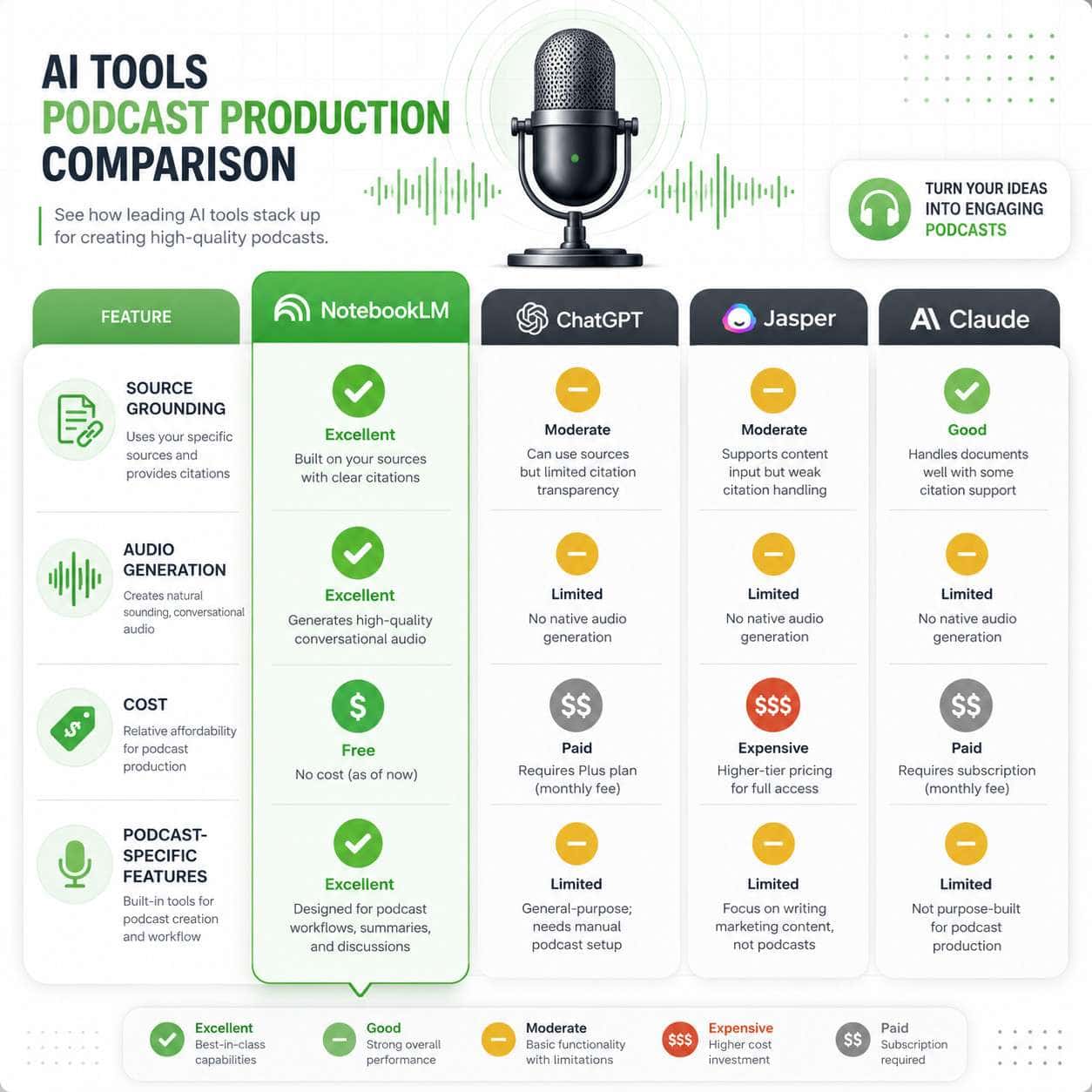
How Does NotebookLM Compare to ChatGPT, Jasper, and Other AI Writing Platforms?
NotebookLM’s key differentiator is source grounding combined with native audio generation. ChatGPT and Jasper are general-purpose writing tools; NotebookLM is a research-to-audio pipeline [2][7].
ChatGPT is more flexible for creative writing and brainstorming but doesn’t generate audio and is prone to hallucination when you need strict factual accuracy. Jasper is built for marketing copy and doesn’t serve podcast workflows well. Claude handles long documents effectively but lacks audio output.
NotebookLM wins specifically when you need to: process many sources at once, maintain factual grounding, and produce audio output. It loses when you need creative writing, real-time web search, or advanced formatting.
For a broader look at how AI tools compare across content types, our AI-powered content optimization guide covers performance benchmarks.
What Technical Skills Do I Need to Use NotebookLM Effectively?
Almost none. NotebookLM requires a Google account and basic computer literacy. There’s no coding, no API setup, and no prompt engineering certification needed.
That said, you’ll get better results if you:
- Know how to write clear, specific prompts (e.g., “Create a 20-minute episode outline for a beginner audience about climate policy” vs. “write about climate”)
- Understand basic audio editing (trimming, leveling, adding intros)
- Can evaluate AI output critically for accuracy and tone
The April 2026 updates have made the interface even more intuitive, with improved notebook guides and auto-sorting features [8].
Can NotebookLM Help With Podcast Research and Fact-Checking?
This is arguably NotebookLM’s strongest use case. Because every response includes inline citations back to your uploaded sources, you can trace any claim the AI makes to its origin document [2][9].
For investigative or educational podcasters, this is a major advantage. You can upload 50 sources, ask NotebookLM to identify contradictions between them, pull out key statistics, or summarize competing viewpoints — all with source attribution.
Important caveat: NotebookLM fact-checks against your sources, not against the entire internet. If your sources contain errors, NotebookLM will confidently repeat them. Always verify critical claims independently.
What Are the Limitations of Using AI for Podcast Script Writing?
NotebookLM is powerful but not a replacement for human creativity, judgment, or voice. Here are the real limitations:
- No original reporting — it can only work with what you give it
- Tone consistency — Audio Overviews have a fixed conversational style that may not match your brand
- No real-time information — it doesn’t browse the web; it only knows your uploaded sources
- Episode length constraints — Audio Overviews tend to run 10-20 minutes; longer episodes need manual assembly
- Voice customization is limited — you can’t clone your own voice or choose specific AI voices (as of May 2026)
- No music or sound design — the audio output is voice-only
For creators looking to complement their podcast with visual content, tools like the Canva AI design assistant can help create episode artwork and social graphics. And if you’re building a podcast website, our guide on AI website creators covers no-code options.
Conclusion
Google NotebookLM has earned its place as one of the most practical AI tools for podcast production in 2026. It won’t replace your creativity, your voice, or your editorial judgment — but it will dramatically compress the time between “I have a pile of research” and “I have a structured, source-grounded episode ready for production.”
Your next steps:
- Create a free NotebookLM account at notebooklm.google.com
- Upload sources for your next episode — start with 5-10 documents to test the workflow
- Generate an Audio Overview and evaluate the quality against your standards
- Build a multi-tool pipeline — pair NotebookLM with Descript, Recast Studio, or your preferred DAW [3]
- Iterate on your prompts — specify audience, tone, and focus areas to improve output quality [10]
The creators getting the most from NotebookLM aren’t using it as a magic “make my podcast” button. They’re using it as a research partner and first-draft engine, then applying their own expertise to turn good AI output into great content. That’s the approach I’d recommend — and it’s the one that will keep your podcast sounding like you.
For more AI-powered strategies, explore our AI content archives and automation guides.
FAQ
Is Google NotebookLM really free for podcast creators? Yes. The core features, including Audio Overviews, are free with a Google account. NotebookLM Plus offers higher limits for heavy users through Google One AI Premium [2].
Can I use NotebookLM Audio Overviews as actual podcast episodes? You can. The MP3 output is downloadable and shareable. Many creators use them as-is for quick content, though editing improves quality significantly [3].
How many sources can I upload to a single notebook? NotebookLM supports up to 50 sources per notebook, and the system can handle potentially tens of millions of words through its RAG architecture [9].
Does NotebookLM work in languages other than English? Yes. The Audio Overview feature supports multiple languages, and you can specify your preferred language before generation [4].
Can I customize the AI voices in Audio Overviews? You can adjust format (deep dive, critique, briefing) and length, but you cannot currently select specific voice profiles or clone your own voice.
Is NotebookLM safe for sensitive or confidential research? Google states that NotebookLM data is not used to train AI models, but review Google’s current privacy terms before uploading confidential material.
How long does it take to generate an Audio Overview? Typically 2-5 minutes depending on the volume of source material and the requested length.
Can students or minors use NotebookLM for school podcasts? Most features are limited to users over 18, though some study-oriented features are available more broadly [8].
Does NotebookLM replace podcast editing software? No. NotebookLM handles research, scripting, and initial audio generation. You still need editing tools like Descript, Audacity, or Adobe Audition for production-quality output.
Can I share my NotebookLM notebooks with collaborators? Yes, notebooks can be shared, though real-time collaboration features are more limited than Google Docs.
References
[1] Watch – https://www.youtube.com/watch?v=_uXnyhrqmsU [2] Googles Notebooklm Is Still The Most Slepton Free – https://www.reddit.com/r/PromptEngineering/comments/1rvhlf3/googles_notebooklm_is_still_the_most_slepton_free/ [3] How To Create Notebook Lm Podcast – https://recast.studio/blog/how-to-create-notebook-lm-podcast [4] Watch – https://www.youtube.com/watch?v=HPUtD1S5XRI [5] Notebooklm Audio Overviews – https://blog.google/innovation-and-ai/products/notebooklm-audio-overviews/ [6] Watch – https://www.youtube.com/watch?v=AQud2TtgBp8 [7] Notebooklm – https://www.datacamp.com/tutorial/notebooklm [8] Google Notebook Lm Updates April 2026 – https://teachercast.net/edtech/google-notebook-lm-updates-april-2026/ [9] Notebooklm And Googles Multimodal – https://marcwatkins.substack.com/p/notebooklm-and-googles-multimodal [10] Watch – https://www.youtube.com/watch?v=HIUxgcWO__c