
Last updated: June 14, 2026
Quick Answer: Claude AI runs on Windows through the browser-based claude.ai, the Claude desktop app (Cowork), and via API integrations. As of April 2026, Anthropic expanded Claude’s computer control capabilities directly to Windows, letting users delegate real desktop tasks like file management and document creation. This guide covers setup, pricing, best use cases, security, and limitations so you can decide whether Claude belongs in your Windows workflow.
Key Takeaways
- Claude runs on Windows through a web browser, the Claude Cowork desktop app, and API connections — no high-end hardware required.
- Anthropic released Claude Fable 5 on June 10, 2026, with state-of-the-art benchmark performance across coding, writing, and complex reasoning tasks.
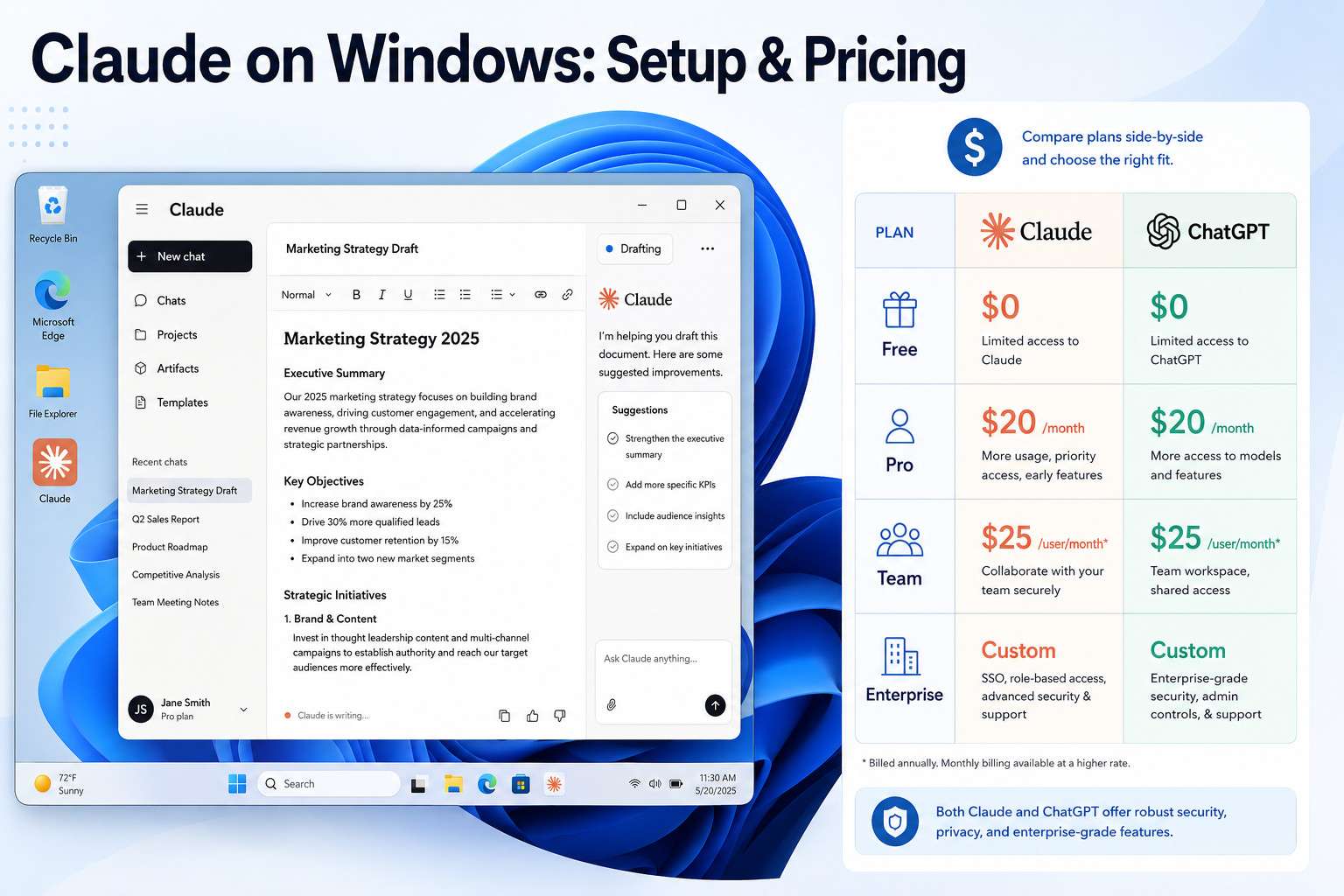
- The free tier gives meaningful access; Claude Pro costs $20/month, comparable to ChatGPT Plus.
- Claude excels at long-document writing, nuanced reasoning, and coding — analysis of over four million Claude conversations found software development and writing account for nearly half of all usage.
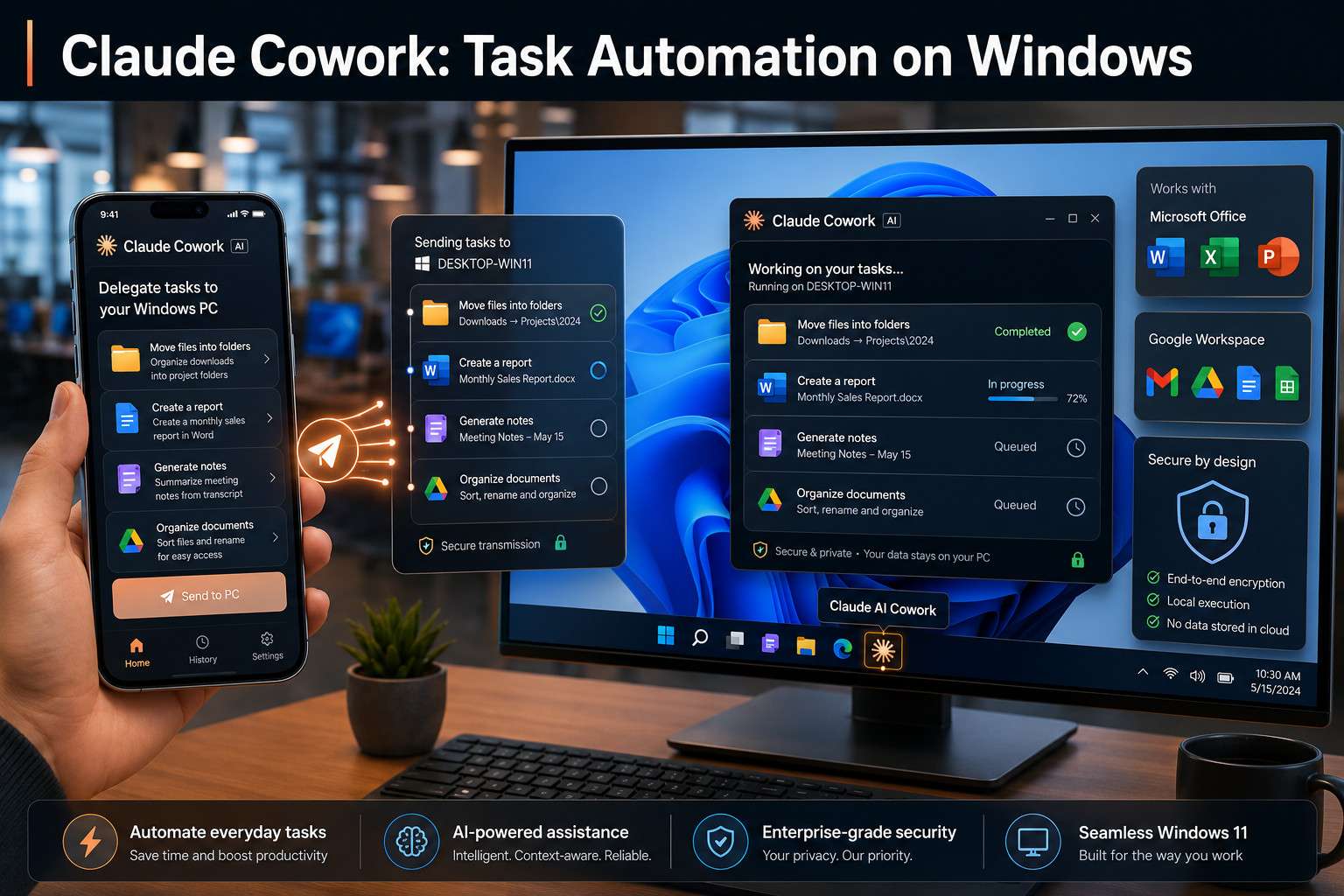
- The Claude Cowork app for Windows lets Claude control your desktop autonomously, including a “Dispatch” feature to assign tasks from your phone.
- Microsoft temporarily banned employees from using Claude Fable 5 in June 2026 over data retention concerns — a real signal that enterprise users need to review Anthropic’s privacy policies carefully.
- Avoid downloading Claude from unofficial sources: a fake “Claude-Pro” Windows installer was distributing malware as recently as May 2026.
- Claude is not the best fit for users who need deep Microsoft 365 native integration or real-time internet search out of the box.
What Exactly Is Claude AI and How Does It Work on Windows
Claude is a large language model built by Anthropic, a safety-focused AI company. On Windows, it works through three main channels: the web app at claude.ai, the Claude Cowork desktop application, and API connections that developers can embed into other tools.
The web version works in any modern browser — Chrome, Edge, Firefox — with no installation needed. The Cowork app, released for Windows in April 2026, goes further: it gives Claude direct control over your desktop, letting it move files, draft documents, and complete multi-step tasks autonomously [4]. Anthropic also introduced a “Dispatch” feature that lets you assign tasks from your phone and have Claude complete them on your Windows PC [10].
Under the hood, Claude processes your text (and in some tiers, images) through Anthropic’s cloud servers. Your input travels to Anthropic’s infrastructure, Claude generates a response, and the result returns to your screen. This means Claude itself does not run locally on your machine — it requires an internet connection.
For a broader look at how AI assistants fit into productivity workflows, the comprehensive guide to AI-powered content generation tools on WebAIStack is worth reading alongside this guide.
How Much Does Claude AI Cost Compared to ChatGPT
Claude’s pricing is competitive with ChatGPT and follows a similar tiered structure.
| Plan | Claude | ChatGPT |
|---|---|---|
| Free | Yes (limited messages) | Yes (limited) |
| Pro/Plus | $20/month | $20/month |
| Team | $25/user/month | $30/user/month |
| API (Claude Fable 5) | $10/M input tokens, $50/M output tokens | Varies by model |
Claude Fable 5, released June 10, 2026, is priced at $10 per million input tokens and $50 per million output tokens via the API, with initial free access available to select subscribers [1]. For most individual Windows users, the $20/month Pro plan is the practical starting point — it unlocks longer context windows, priority access during peak hours, and access to the most capable models.
Choose Claude Pro if: you regularly work with long documents, need deep reasoning on complex topics, or write code across large files. Stick with the free tier if: you use AI occasionally for short tasks and don’t need the latest models.
Are There Any Free Ways to Use Claude on My Windows Laptop
Yes. Claude’s free tier is available at claude.ai with no software installation required — just a browser and an Anthropic account.
The free tier includes access to a capable Claude model, though message limits apply during high-traffic periods. For casual users who need help drafting emails, summarizing documents, or answering questions a few times per day, the free tier is genuinely useful. You won’t get Claude Fable 5 or the longest context windows on the free plan, but the experience is solid.
Common mistake: Some users search for a downloadable “Claude for Windows” installer from third-party sites. In May 2026, security researchers found a fraudulent website distributing malware through a fake “Claude-Pro” Windows installer that deployed a backdoor on victims’ systems [5]. Always download Claude Cowork directly from anthropic.com or the official Microsoft Store listing.
What Are the Minimum Computer Specs Needed to Run Claude Smoothly
Because Claude runs in the cloud, your Windows PC does not need powerful hardware. The processing happens on Anthropic’s servers, not your machine.
Minimum practical requirements:
- Windows 10 or Windows 11 (for the Cowork desktop app)
- 4 GB RAM (8 GB recommended for smooth multitasking)
- A stable internet connection (10 Mbps or faster recommended)
- A modern browser: Chrome 110+, Edge 110+, or Firefox 115+
The Claude Cowork app for Windows is lightweight. It does not require a dedicated GPU or high-end processor. A mid-range laptop from 2020 onward will run it without issues. Where your hardware matters more is if you’re running Claude alongside other demanding applications simultaneously.
Can Claude Help Me Write Emails and Documents Faster
Claude is genuinely strong at writing tasks. It can draft emails, restructure reports, summarize long PDFs, write meeting agendas, and adapt tone for different audiences — all from a single prompt.
In my own workflow, I use Claude to draft first versions of client-facing documents. What used to take 45 minutes of staring at a blank page now takes about 10 minutes of editing a Claude draft. The quality of the output depends heavily on how specific your prompt is.
Practical tips for faster writing with Claude:
- Paste in existing text and ask Claude to “rewrite this more concisely” or “make this more formal.”
- Give Claude a role: “You are a project manager writing a status update for a non-technical executive.”
- Use Claude’s long context window to feed it an entire document and ask for a summary or gap analysis.
- Ask for multiple versions: “Give me three different subject lines for this email.”
For teams that want to connect Claude’s output directly into communication tools, pairing it with automation platforms can multiply the time savings. The guide to Make.com and Slack integration shows how to route AI-generated content into team channels automatically.
Is Claude Better for Coding or General Writing Tasks
Claude performs well at both, but the answer depends on what you’re comparing it to and what you need.
For general writing, Claude’s strength is nuance. It handles tone, structure, and long-form coherence better than many competitors. For coding, Claude Fable 5 can migrate large codebases, debug complex logic, and explain code in plain language [1]. An arxiv study from September 2025 found that equipping AI agents like Claude Code with collaborative tools significantly reduced costs and completion times on complex software tasks.
Coding edge cases where Claude struggles:
- Real-time documentation for libraries released after its training cutoff
- Highly proprietary or niche frameworks with little public data
- Tasks requiring live execution and debugging loops (though Claude Code addresses some of this)
For developers curious about how Claude compares to other coding-focused tools, the Replit vs. Claude Code platform showdown breaks down the differences in detail.
What Kind of Work Tasks Is Claude Most Helpful For
Analysis of over four million Claude conversations found that software development and writing tasks account for nearly half of all usage. That tracks with what most Windows users report finding useful.
Claude’s strongest use cases on Windows:
- Drafting and editing long documents (reports, proposals, white papers)
- Summarizing research or meeting transcripts
- Writing and reviewing code across multiple languages
- Answering complex questions that require multi-step reasoning
- Brainstorming and outlining content strategies
- Translating technical concepts into plain language
Where Claude adds less value:
- Tasks requiring real-time data (stock prices, live news)
- Highly repetitive data entry that a simple script handles better
- Image generation (Claude analyzes images but does not create them)
Can Claude Integrate with Microsoft Office or Google Workspace
Claude does not have a native, built-in plugin for Microsoft Office or Google Workspace as of mid-2026. However, integration is possible through several routes.
Claude Opus 4.5 became available in Microsoft Foundry and GitHub Copilot paid plans in November 2025 [8], which means enterprise users on those platforms can access Claude-powered features within Microsoft’s ecosystem. IBM and Anthropic also announced a partnership in October 2025 to integrate Claude into IBM’s enterprise software, including a new AI-first IDE [6].
For individual Windows users, the practical integration paths are:
- Copy-paste workflow: draft in Claude, paste into Word or Docs
- API + automation tools: connect Claude to Office apps via Make.com or n8n
- Claude Cowork: use computer control to have Claude interact with open Office windows directly
For building those automation bridges, the n8n workflow automation guide and the Make.com workflow automation guide for beginners are practical starting points.
How Do I Avoid Common Mistakes When Using Claude for Productivity
The biggest mistake most Windows users make is treating Claude like a search engine. Claude generates responses based on patterns in training data — it does not browse the web in real time unless a tool enables that.
Top mistakes and how to fix them:
- Vague prompts — “Write me an email” produces generic output. Instead: “Write a 150-word follow-up email to a client who missed our Tuesday call, keeping a warm but professional tone.”
- Trusting outputs without review — Claude can confidently state incorrect facts. Always verify claims in final documents.
- Ignoring context limits — Even with a large context window, extremely long inputs can degrade output quality. Break large tasks into sections.
- Downloading from unofficial sources — As noted above, fake Claude installers were distributing malware in May 2026 [5]. Use only anthropic.com or verified app stores.
- Sharing sensitive data without checking privacy settings — Anthropic’s data retention policies allow user-generated content to be retained for up to 30 days, which prompted Microsoft to temporarily restrict employee use of Claude Fable 5 in June 2026 [2].
How Secure Is Claude When Handling Sensitive Business Information
Claude’s security posture is reasonable for most individual and small-business use cases, but enterprise users need to read the fine print carefully.
Anthropic encrypts data in transit and at rest. However, the data retention policy that triggered Microsoft’s June 2026 temporary ban on Claude Fable 5 is a real concern for organizations handling proprietary or regulated data [2]. Anthropic’s policies allow retention of user-generated content for up to 30 days, which may conflict with strict data governance requirements.
Practical security guidance:
- Do not paste client contracts, financial records, or personally identifiable information into Claude unless you’ve reviewed Anthropic’s current data policy.
- Enterprise users should evaluate Claude’s API with a Business Associate Agreement (BAA) if operating in regulated industries.
- Use Claude’s “Privacy Mode” or API with zero-data-retention options where available.
- Never download Claude from third-party sites — verify the source every time [5].
Which Windows Users Should NOT Use Claude for Their Work
Claude is not the right tool for every situation. Being specific about this saves time and frustration.
Skip Claude if you:
- Need real-time data access as a core requirement (financial trading, live news monitoring)
- Work in a regulated industry with strict data residency laws and cannot verify Anthropic’s compliance for your jurisdiction
- Rely entirely on Microsoft 365 native AI features and don’t want to manage a separate tool
- Need offline AI capabilities — Claude requires an internet connection
- Are a Microsoft developer currently using GitHub Copilot CLI, given Microsoft’s active transition away from Claude Code [3]
What Are the Biggest Limitations of Claude AI Right Now
No AI assistant is without gaps. Claude’s current limitations in 2026 are worth knowing before you build workflows around it.
- No real-time web browsing by default in the standard interface
- Training data cutoff means it may lack knowledge of very recent events or software releases
- No native image generation — Claude can analyze images but won’t create them
- Context window degradation on extremely long inputs can reduce output coherence
- Microsoft’s enterprise friction — Microsoft’s temporary ban and the shift away from Claude Code licenses [3] signal that enterprise adoption on Windows-heavy organizations may face policy headwinds
How Does Claude Compare to Other AI Assistants for Windows
Claude’s main competitors on Windows are ChatGPT (OpenAI), Gemini (Google), and Microsoft Copilot.
| Feature | Claude | ChatGPT | Gemini | MS Copilot |
|---|---|---|---|---|
| Windows desktop app | Yes (Cowork) | Yes | Yes | Built into Windows 11 |
| Real-time web search | Limited | Yes (Plus) | Yes | Yes |
| Office 365 integration | Via API/automation | Via plugin | Via Google Workspace | Native |
| Long context window | Strong | Strong | Strong | Moderate |
| Coding strength | Very strong | Very strong | Strong | Strong |
| Free tier | Yes | Yes | Yes | Yes |
Choose Claude if: you prioritize nuanced long-form writing, complex reasoning, or coding tasks and don’t need deep Microsoft 365 native integration. Choose Microsoft Copilot if: you live inside Office 365 and want AI built directly into Word, Excel, and Teams. Choose Gemini if: your work is Google Workspace-centric.
For a wider view of the AI assistant landscape, the 45 must-visit AI websites guide covers the full spectrum of tools worth knowing in 2026.
FAQ
Does Claude have a dedicated Windows app? Yes. The Claude Cowork app for Windows was released in April 2026 and allows Claude to control your desktop directly, including file management and document creation. Download it only from anthropic.com.
Can I use Claude for free on Windows? Yes. The free tier at claude.ai works in any Windows browser with no installation required. Message limits apply during peak usage.
Is Claude safe to use for business documents? For most small-business use, yes — with caution. Avoid pasting highly sensitive or regulated data until you’ve reviewed Anthropic’s current data retention policy. Enterprise users should use the API with appropriate data agreements.
Does Claude work offline on Windows? No. Claude requires an active internet connection because all processing happens on Anthropic’s servers.
Can Claude write and run code on my Windows PC? Claude can write and explain code in the chat interface. The Claude Code tool and Cowork app extend this to executing tasks on your desktop, though full local code execution depends on your setup.
How does Claude Fable 5 differ from earlier Claude models? Claude Fable 5, released June 10, 2026, is Anthropic’s most capable public model, with state-of-the-art benchmark performance including large codebase migration and complex academic tasks [1].
Will Claude work with my older Windows 10 laptop? Yes. Because Claude runs in the cloud, older hardware works fine as long as you have a modern browser and a stable internet connection.
Is the Claude Cowork app different from the claude.ai website? Yes. The Cowork app adds computer control capabilities, letting Claude interact with your Windows desktop autonomously. The website is a standard chat interface.
Can I connect Claude to my email automatically? Not natively, but you can build this connection using automation tools. The n8n Gmail automation guide shows how to set up email workflows that incorporate AI.
Why did Microsoft ban Claude Fable 5 for its employees? In June 2026, Microsoft temporarily restricted employee use of Claude Fable 5 due to Anthropic’s data retention policy, which allows user-generated content to be stored for up to 30 days — a potential risk for sensitive internal data [2].
Conclusion
Claude AI on Windows: The Ultimate Collaborative Productivity Guide comes down to one practical question: does Claude fit the actual work you do every day? For writing, coding, research, and complex reasoning, Claude in 2026 is one of the strongest tools available. The Cowork app’s desktop control feature makes it genuinely useful for automating repetitive Windows tasks, not just answering questions.
Your next steps:
- Go to claude.ai and create a free account — test it on a real task from your current workload today.
- If you write, code, or analyze documents regularly, trial Claude Pro for one month at $20 and measure the time saved.
- Download Claude Cowork from anthropic.com (not third-party sites) to explore desktop automation.
- Review Anthropic’s data retention policy before using Claude with sensitive business information.
- If you use automation tools, explore connecting Claude via the API using Make.com or n8n to build workflows that run without manual input.
The tool is capable. The free entry point is low-risk. The main investment is learning to write prompts that get you what you actually need — and that skill pays off fast.
References
[1] Claude Fable 5 Brings Mythos To The Masses Anthropics Next Frontier Model Is State Of The Art On Nearly All Tested Benchmarks – https://www.tomshardware.com/tech-industry/artificial-intelligence/claude-fable-5-brings-mythos-to-the-masses-anthropics-next-frontier-model-is-state-of-the-art-on-nearly-all-tested-benchmarks
[2] Microsoft Temporarily Ban Employees From Using Claude Fable 5 Ai – https://www.windowscentral.com/artificial-intelligence/microsoft-temporarily-ban-employees-from-using-claude-fable-5-ai
[3] Microsoft Cancels Claude Code Licenses Shifting Developers To Github Copilot Cli A Move Likely Driven By Financial Motives – https://www.windowscentral.com/microsoft/microsoft-cancels-claude-code-licenses-shifting-developers-to-github-copilot-cli-a-move-likely-driven-by-financial-motives
[4] Anthropic Brings Claude Computer Use To Windows – https://www.anavem.com/en/news/tech/anthropic-brings-claude-computer-use-to-windows
[5] Claude Users Beware Hackers Are Using A Fake Website To Dupe Developers And Deliver Malware – https://www.itpro.com/security/cyber-attacks/claude-users-beware-hackers-are-using-a-fake-website-to-dupe-developers-and-deliver-malware
[6] IBM And Anthropic Partner To Advance Enterprise Software Development With Proven Security And Governance – https://newsroom.ibm.com/2025-10-07-2025-ibm-and-anthropic-partner-to-advance-enterprise-software-development-with-proven-security-and-governance
[8] Introducing Claude Opus 4 5 In Microsoft Foundry – https://azure.microsoft.com/en-us/blog/introducing-claude-opus-4-5-in-microsoft-foundry/
[9] Claude Cowork For Windows How To Download And Install The Ai Assistant – https://www.tomsguide.com/ai/claude-cowork-for-windows-how-to-download-and-install-the-ai-assistant
[10] Anthropic Claude Desktop Control Windows Cowork Dispatch – https://winbuzzer.com/2026/04/04/anthropic-claude-desktop-control-windows-cowork-dispatch-xcxwbn/