
Last updated: June 14, 2026
Quick Answer: Claude AI, developed by Anthropic, is a large language model assistant that remote teams use to draft documents, summarize meetings, delegate tasks, and coordinate work across time zones. Companies like Zoom, Canva, and Zapier have reported measurable productivity gains after integrating Claude into their workflows. For most distributed teams of 5 or more people, Claude offers a practical, scalable way to reduce communication overhead and speed up decision-making.
Key Takeaways
- Claude integrates directly with Slack, Box, and Canva, reducing app-switching for remote teams [6]
- Zoom’s integration with Claude improved meeting summary accuracy by 14%, with a 98% satisfaction rate among GitLab users [2]
- Canva achieved a 65% daily AI usage rate across 5,000 employees after deploying Claude for Work [3]
- Zapier reached 89% AI adoption company-wide using Claude-powered agents, with tenfold growth in Anthropic app usage [1]
- Claude’s Projects feature lets teams organize chats, files, and shared knowledge in one place [7]
- Privacy and data handling depend on your subscription tier; Team and Enterprise plans offer stronger data controls
- Claude works best for knowledge workers, content teams, and globally distributed teams handling high communication volume
- Teams with very specialized technical workflows or strict regulatory environments should evaluate Claude carefully before full deployment
- No advanced technical skills are required to use Claude; basic prompt writing is enough for most use cases
- Claude supports multilingual communication, making it useful for global teams working across language barriers
What Exactly Is Claude AI and How Does It Help Remote Teams
Claude is a conversational AI assistant built by Anthropic, designed to handle complex reasoning, long-form writing, summarization, and multi-step task management. For remote teams, it acts as a shared thinking partner that any team member can access at any time, regardless of their time zone.
Where Claude stands out for distributed work is its ability to hold context across long conversations and documents. A team member in Singapore can hand off a project brief to Claude, which then helps a colleague in Toronto pick up exactly where things left off, without a lengthy catch-up call.
Key ways Claude helps remote teams day-to-day:
- Summarizing long threads and documents so latecomers get up to speed fast
- Drafting meeting agendas, status updates, and client communications in minutes
- Answering internal questions by referencing uploaded team documents
- Delegating structured tasks through the Cowork and Dispatch features, which let users assign work from mobile and execute it on desktop [5]
- Integrating with existing tools like Slack, Box, and Canva so teams don’t have to leave their current workflow [6]
For more on how Claude fits into the broader AI tool landscape, the Claude Archives at WebAiStack is a useful starting point.
How Does Claude Compare to Other AI Productivity Tools Like ChatGPT
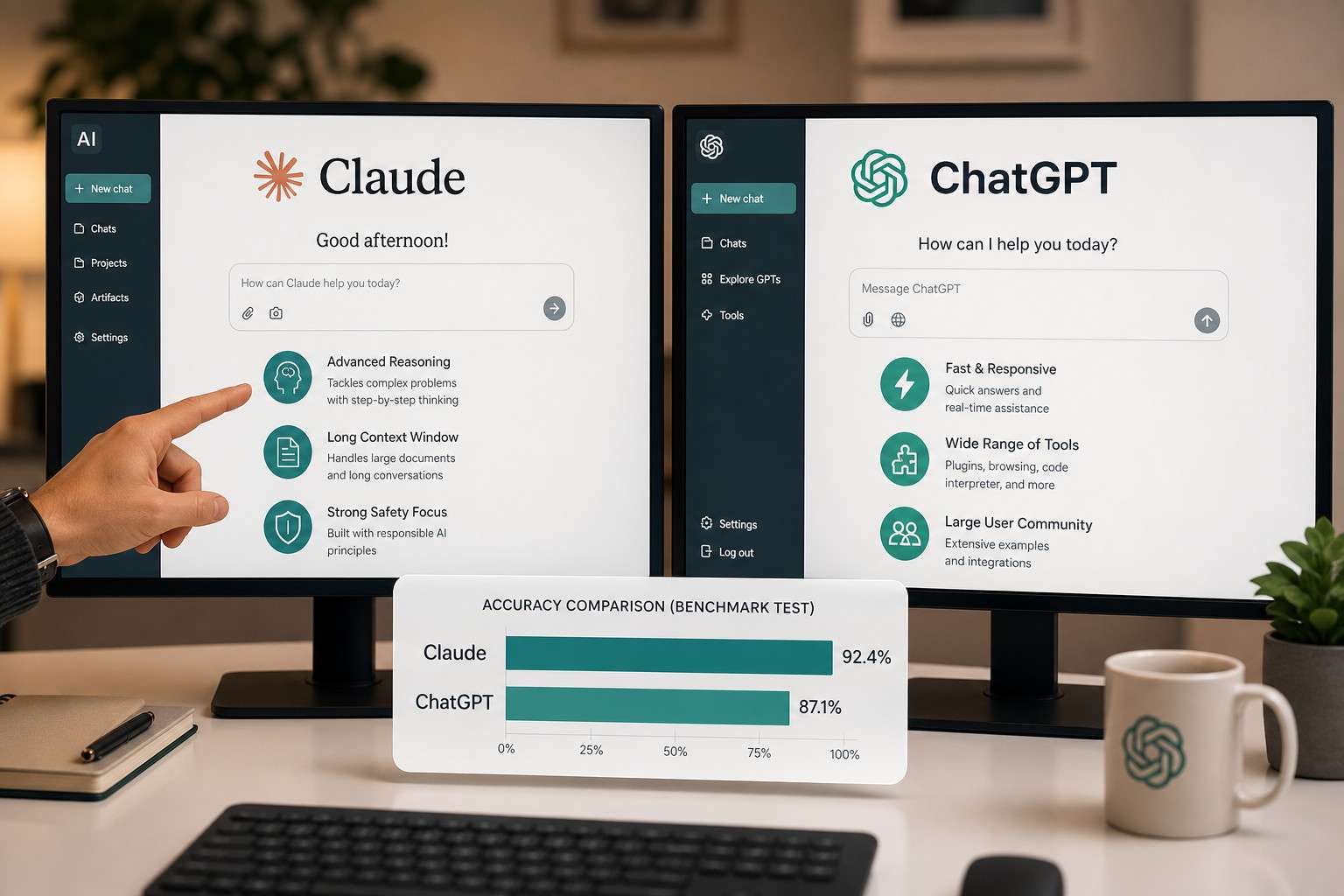
Claude and ChatGPT are both large language model assistants, but they differ in ways that matter for team use. Claude generally performs better on long-document analysis and nuanced instruction-following, while ChatGPT has a broader plugin ecosystem and wider third-party integrations as of 2026.
| Feature | Claude (Anthropic) | ChatGPT (OpenAI) |
|---|---|---|
| Context window | Up to 200K tokens | Up to 128K tokens (GPT-4o) |
| Team collaboration features | Projects, Cowork, Dispatch | GPT Teams, custom GPTs |
| Native integrations | Slack, Box, Canva | Zapier, many plugins |
| Meeting summary accuracy | 14% improvement noted (Zoom) [2] | Varies by integration |
| Pricing (Team plan) | ~$30/user/month | ~$30/user/month |
| Tone and safety | Conservative, nuanced | More flexible, broader output range |
Choose Claude if your team handles large documents, needs careful, nuanced outputs, or works inside Slack and Canva already. Choose ChatGPT if your team relies heavily on third-party plugin integrations or needs broader tool compatibility.
For a deeper look at how AI tools compare in development contexts, see this Replit vs Claude Code comparison.
How Much Does Claude AI Cost for Team Subscriptions
As of 2026, Anthropic offers three main tiers relevant to teams:
- Claude.ai Free: Limited daily messages, no team features, suitable for individual testing only
- Claude.ai Pro: Approximately $20/user/month, includes Projects and priority access, but is still primarily single-user
- Claude for Work (Team plan): Approximately $30/user/month, includes shared Projects, admin controls, and higher usage limits
- Claude Enterprise: Custom pricing, includes enhanced data privacy, SSO, audit logs, and dedicated support
For most remote teams of 10 to 50 people, the Team plan is the practical entry point. Enterprise pricing makes sense when your organization has compliance requirements or needs guaranteed data isolation.
Common mistake: Teams often start with individual Pro accounts to save money, then hit collaboration limits quickly. If more than three people will use Claude regularly for shared work, go straight to the Team plan.
Can Claude Help With Project Management and Task Delegation
Yes. Claude is not a full project management platform, but it handles a meaningful slice of project coordination work. Through the Projects feature, teams can create organized workspaces where Claude retains context about ongoing work, team goals, and relevant documents [7].
The Dispatch feature extends this further: team members can assign tasks to Claude from a mobile device, and Claude executes them on the desktop environment, useful for managers who need to delegate while away from their desk [5].
Practical project management tasks Claude handles well:
- Writing and refining project briefs
- Breaking large goals into actionable task lists
- Drafting stakeholder update emails
- Reviewing deliverables against original requirements
- Flagging inconsistencies in plans or timelines
What Claude won’t replace: Dedicated tools like Asana, Linear, or Jira for ticket tracking, dependency mapping, and sprint planning. Claude works best as a layer on top of those tools, not a replacement for them.
For teams already using automation to manage workflows, pairing Claude with an automation platform can significantly extend its reach. See how n8n automation agents transform business workflows for a practical example.
Which Types of Teams Benefit Most From Claude AI, and Who Shouldn’t Use It
Teams that get the most value from Claude:
- Content and marketing teams that produce high volumes of written output daily
- Globally distributed teams dealing with language barriers and async communication gaps
- Consulting and professional services teams that need to synthesize large amounts of client information quickly
- Product and design teams that prototype and iterate on documentation frequently (Canva’s 65% daily usage rate is a strong signal here [3])
- Operations teams managing repetitive communication and reporting tasks
Teams that should evaluate carefully before committing:
- Highly regulated industries (healthcare, legal, financial services) where AI-generated content must meet strict compliance standards
- Very small teams (1-3 people) where the overhead of setting up shared Projects may not justify the cost
- Teams with deeply specialized technical workflows where Claude’s general knowledge may not match domain-specific tools
- Organizations with strict data residency requirements who haven’t yet confirmed Claude Enterprise meets their specific standards
The research is encouraging overall: a study found that teams augmented with generative AI significantly outperformed those relying solely on human collaboration [9]. But the benefit is not automatic. It depends on how well the team integrates the tool into existing processes.
Are There Privacy Concerns and How Does Claude Handle Sensitive Team Information
Privacy is a legitimate concern, and the answer depends on which Claude plan you use. By default, Anthropic may use conversations from free and Pro accounts to improve its models. The Team and Enterprise plans include opt-out controls that prevent your data from being used for training.
For Claude Enterprise customers, Anthropic offers:
- Data encryption in transit and at rest
- No training on customer data by default
- Admin audit logs and access controls
- SSO and identity management support
What Claude does not do: It does not permanently store conversation history in a way that other users can access, and it does not share your team’s data with other Claude users.
Practical rule: Do not paste personally identifiable information, unpublished financial data, or legally privileged content into Claude unless you are on an Enterprise plan and have reviewed Anthropic’s data processing agreement with your legal team.
For a broader look at data protection practices in AI-adjacent platforms, the Make.com security guide covers similar principles worth reviewing.
Can Claude Help With Real-Time Translation for Global Teams
Claude handles multilingual communication well, though it is not a dedicated real-time translation engine. It can translate documents, rewrite content for different regional audiences, and help non-native speakers draft professional communications in English or other major languages.

For global remote teams, Claude’s most practical translation use cases are:
- Translating meeting notes or summaries into team members’ native languages
- Reviewing translated content for tone and cultural appropriateness
- Helping team members draft emails in a second language with correct grammar and register
- Localizing marketing or product copy for regional markets
Limitation: Claude does not integrate directly into video call platforms for live spoken translation. For real-time spoken translation, dedicated tools are still necessary. Claude’s strength is in written, async communication, which is where most global remote teams spend the majority of their time anyway.
What Are Common Mistakes Teams Make When First Using Claude for Collaboration
Most early failures with Claude come from treating it like a search engine rather than a collaborative thinking partner. Teams that get the most from it are the ones that invest a few hours upfront in learning how to write clear, specific prompts.
The most common mistakes:
- Vague prompts: Asking “write a project update” without specifying audience, length, tone, or key points produces generic output. Adding context doubles the quality.
- Not using Projects: Teams that run every conversation in a fresh chat lose context and repeat themselves constantly. Projects solve this.
- Over-trusting outputs: Claude can confidently produce plausible-sounding but incorrect information, especially on niche technical topics. Always verify factual claims.
- Skipping onboarding: Dropping Claude into a team without a short orientation session leads to inconsistent use and frustration. Even a 30-minute demo session significantly improves adoption.
- Ignoring integration options: Teams that use Claude only through the web interface miss the efficiency gains that come from Slack and Canva integrations [6].
Longitudinal research confirms that while AI tools like Claude reshape collaborative culture positively, they do not automatically resolve teamwork challenges without deliberate adoption practices [10].
What Technical Skills Do Team Members Need to Use Claude Effectively
Very few. Claude is designed for non-technical users, and the core skill is simply writing clear instructions, something most knowledge workers already do in emails and documents.
Skills that help (but are not required):
- Basic prompt structuring: specifying role, task, format, and constraints in a single message
- Understanding Claude’s context window: knowing that very long conversations may cause earlier context to drop off
- Familiarity with Markdown formatting if you want structured outputs
Skills that are NOT required:
- Coding or API knowledge (for standard Team plan use)
- Prompt engineering certification or formal training
- Any specific software background
For teams that want to go further and connect Claude to automated workflows, some familiarity with no-code tools helps. The comprehensive guide to ChatGPT automation with no-code workflows covers transferable concepts that apply equally to Claude integrations.
How Do I Troubleshoot Common Integration Issues With Claude
Most integration problems fall into a few predictable categories.
Claude not connecting to Slack or Canva:
- Confirm your plan includes integrations (Team or Enterprise only)
- Re-authenticate the OAuth connection from the Claude settings panel
- Check that your Slack workspace admin has approved the Claude app
Claude losing context mid-project:
- Move the conversation into a named Project rather than a general chat
- Upload key reference documents directly to the Project so Claude can reference them persistently
Outputs are inconsistent across team members:
- Create a shared system prompt or style guide document inside the Project
- Standardize the prompts your team uses for recurring tasks
Claude is slow or timing out:
- Very long documents (over 100,000 words) can cause latency; break them into sections
- Check Anthropic’s status page for service incidents before assuming a local issue
For teams building more complex automated pipelines around Claude, the n8n workflow automation guide covers debugging strategies that apply to AI-integrated workflows broadly.
FAQ
Q: Does Claude work offline? No. Claude requires an active internet connection. It is a cloud-based service with no offline mode.
Q: Can multiple team members edit the same Claude Project simultaneously? The Projects feature allows shared access, but real-time co-editing of a single conversation is not yet supported as of mid-2026. Team members can each contribute to a shared Project, but not in the same chat window at the same moment.
Q: Is Claude good for code review in remote engineering teams? Yes. Claude handles code review, documentation writing, and explaining technical concepts well. It is particularly strong at explaining code to non-technical stakeholders.
Q: How does Claude handle conflicting instructions from different team members? Claude follows the most recent instruction it receives within a conversation. For team-wide consistency, set shared instructions at the Project level rather than relying on individual prompts.
Q: Can Claude be used to onboard new remote employees? Yes, and this is one of its most underused applications. Teams can upload onboarding documents, SOPs, and culture guides into a Project, then let new hires ask Claude questions directly, reducing the burden on managers.
Q: Does Claude support audio or video input for meeting transcription? Not natively. Claude processes text. For meeting transcription, you need a separate tool (like Zoom’s AI Companion, which integrates Claude on the back end [2]). The transcript is then passed to Claude for summarization.
Q: Is there a free trial for Claude for Work? Anthropic has offered trial periods for Team plans in the past. Check the current Anthropic pricing page for the latest offer, as this changes periodically.
Q: How many users can a single Claude for Work account support? The Team plan scales to any number of seats. Enterprise plans include custom seat arrangements and volume pricing.
Conclusion
Mastering remote collaboration with Claude AI is less about the technology itself and more about how deliberately your team adopts it. The evidence from organizations like Zapier, Zoom, and Canva shows that real productivity gains come when Claude is embedded into daily workflows, not used occasionally as a novelty [1][2][3].
Actionable next steps for your team:
- Start with a pilot group of 5-10 people on the Team plan for 30 days before rolling out broadly
- Set up a shared Project with your most-used documents, style guides, and SOPs on day one
- Run a 30-minute prompt training session so everyone starts with the same baseline skills
- Connect Claude to Slack to reduce friction and meet team members where they already work
- Review outputs critically for the first few weeks, especially on factual or compliance-sensitive content
- Measure before and after: track time spent on recurring tasks like meeting summaries, status reports, and first drafts
The shift toward AI-augmented teamwork is already underway. Teams that build good habits now, with clear prompts, shared Projects, and honest evaluation of outputs, will have a meaningful head start over those that treat Claude as just another chatbot.
References
[1] Zapier – https://claude.com/customers/zapier?gsid=273b0434-5b38-44f6-957d-3159ae3aed2e&utm_source=openai [2] Zoom – https://claude.com/customers/zoom?utm_source=openai [3] Canva – https://claude.com/customers/canva?utm_source=openai [4] Claude Coworking – https://c-ai.chat/cowork/claude-coworking/?utm_source=openai [5] Assign Tasks To Claude From Anywhere In Cowork – https://support.claude.com/en/articles/13947068-assign-tasks-to-claude-from-anywhere-in-cowork?utm_source=openai [6] Anthropic Launches Claude Workplace Apps – https://www.contentgrip.com/anthropic-launches-claude-workplace-apps/?utm_source=openai [7] Anthropic Debuts Collaboration Tools For Claude AI Assistant – https://www.pymnts.com/artificial-intelligence-2/2024/anthropic-debuts-collaboration-tools-for-claude-ai-assistant?utm_source=openai [8] Claude Agents Teammates – https://www.tability.io/odt/articles/claude-agents-teammates?utm_source=openai [9] arxiv (AI-augmented team performance study) – https://arxiv.org/abs/2405.17924?utm_source=openai [10] arxiv (Longitudinal AI collaboration research) – https://arxiv.org/abs/2509.10956?utm_source=openai