Last updated: May 9, 2026
Quick Answer
Make.com (formerly Integromat) holds ISO 27001 certification and has completed SOC 2 Type II and SOC 3 audits, placing it among the more rigorously verified automation platforms available in 2026. Data at rest is protected with AES-256 encryption, and all network traffic uses TLS 1.2 or 1.3. Enterprise customers receive a 99.5% uptime SLA and access to dedicated security documentation.
Key Takeaways
- ✅ Make.com holds ISO 27001 certification and has passed SOC 2 Type II and SOC 3 audits [1][2]
- 🔒 All data at rest is encrypted with AES-256 via AWS Key Management Service (KMS) [1]
- 🌐 Network communication uses TLS 1.2 and 1.3 with AES-256 encryption [2]
- 🛡️ Infrastructure is accessible only via VPN — zero direct public internet access [2]
- 🔍 Independent third-party penetration tests run at least twice per year [2]
- ☁️ Multi-zone AWS EC2 deployment ensures high availability [2]
- 🚨 Cloudflare DDoS protection guards against denial-of-service attacks [2]
- 📋 Developers follow OWASP coding standards with SAST integrated into the SDLC [2]
- 📊 Enterprise Plan includes a 99.5% uptime SLA [1]
- 🔐 Passwords are stored encrypted and cannot be reproduced by Make staff [1]

What Security Certifications Does Make.com Hold?
Make.com has achieved three major security benchmarks: ISO 27001 certification, SOC 2 Type II, and SOC 3 audit completion. These aren’t marketing badges — they represent independent, third-party verification of security controls across the platform’s infrastructure and processes [1][2].
Here’s what each certification means in practice:
| Certification | What It Verifies | Who Can See It |
|---|---|---|
| ISO 27001 | Information security management system (ISMS) | Customers, auditors |
| SOC 2 Type II | Security, availability, and confidentiality controls over time | Enterprise customers (on request) |
| SOC 3 | Public summary of SOC 2 findings | Anyone — publicly available |
Choose Make.com if your organization requires documented audit trails for compliance reviews. The SOC 3 report is publicly accessible, which makes external verification straightforward for procurement teams [1].
“Make operates under an ISO 27001 certified information security program within infrastructure compliant with SOC 3 and SOC 2 Type II standards.” — Make.com Security Page [1]
How Does Make.com Encrypt and Protect Your Data?
Make.com uses AES-256 full-disk encryption for all data at rest, managed through AWS Key Management Service (KMS). In transit, all communication is secured with TLS 1.2 or 1.3 using AES-256 encryption [1][2].
Key encryption details:
- Passwords are stored in encrypted format and cannot be reproduced or viewed by Make employees [1]
- Database connections and FTP services allow customers to manually configure security levels where applicable [2]
- AWS KMS handles cryptographic key management, reducing the risk of key exposure
Common mistake: Some users assume that connecting a third-party app to Make.com exposes their credentials. In practice, authentication tokens and passwords are encrypted at rest and never displayed in plain text after initial entry [7].
For teams building automated workflows that touch sensitive customer data, this encryption model is a meaningful baseline — though you should still review what data each scenario module actually processes and stores.
What Does Make.com’s Infrastructure Security Look Like?
Make.com Security Unveiled: A Comprehensive Guide to Platform Safety and Data Protection would be incomplete without examining the infrastructure layer — and this is where the platform takes a notably strict approach.
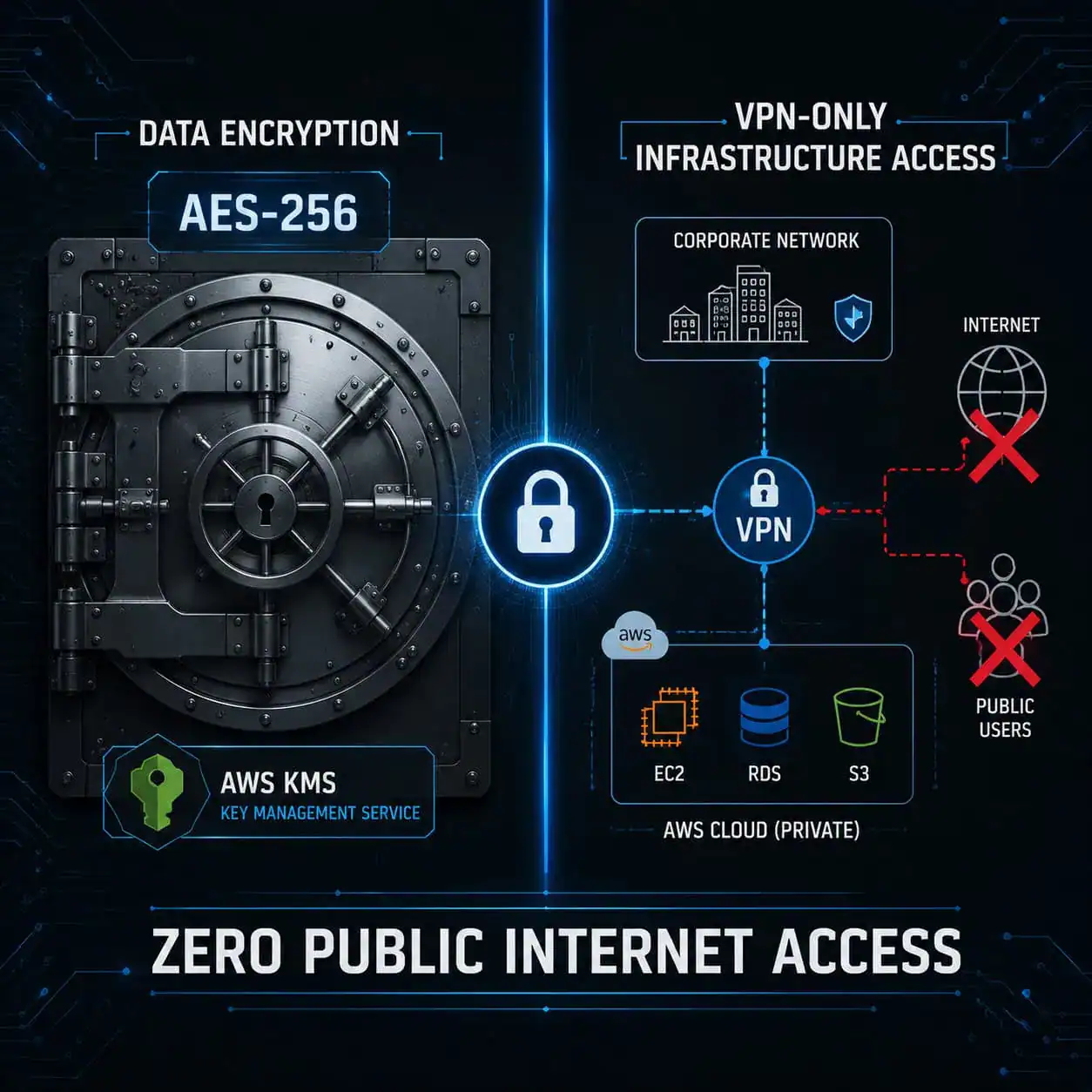
The hosting environment operates on Amazon AWS EC2 private instances, deployed across two availability zones for redundancy. Critically, this infrastructure is accessible only through VPN from private networks — there is no direct public internet access to the underlying servers [2].
Infrastructure highlights:
- Multi-zone AWS deployment with Amazon Enterprise support for guaranteed availability [2]
- VPN-only access to the hosting environment eliminates a major attack surface [2]
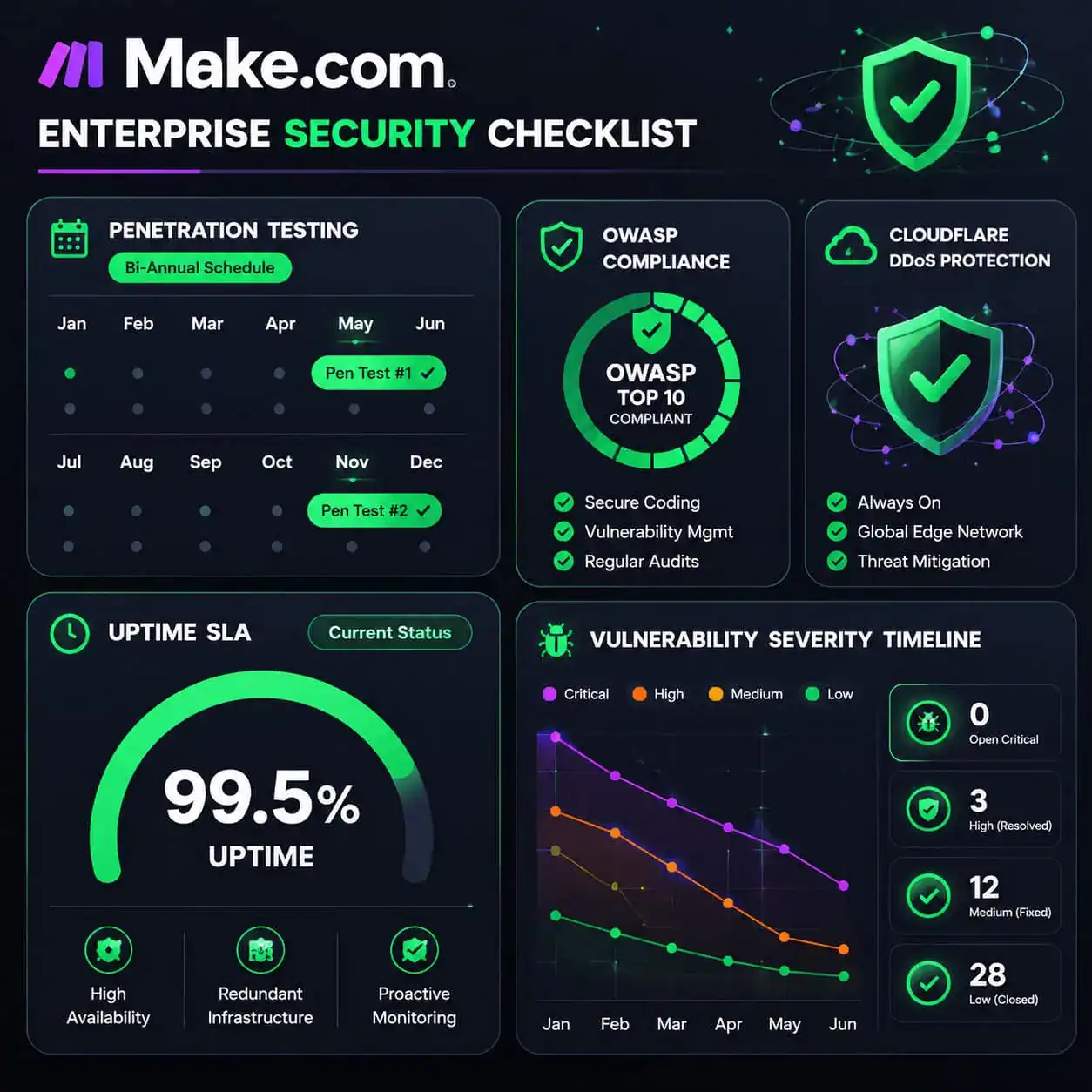
- Cloudflare DDoS protection provides resilience against volumetric attacks that could exhaust server resources [2]
- 99.5% Cloud Service Uptime SLA for Enterprise Plan customers [1]
This architecture matters for teams running mission-critical automations. If you’re integrating Make.com into production workflows — for example, auto-sharing content or syncing CRM data — the multi-zone setup means a single AWS zone failure won’t take your scenarios offline.
If you’re exploring no-code automation platforms more broadly, it’s worth comparing infrastructure guarantees. See our roundup of 11 best no-code website design software platforms for 2026 for context on how Make.com stacks up against other tools in the ecosystem.
How Does Make.com Handle Application Security and Testing?
Make.com Security Unveiled: A Comprehensive Guide to Platform Safety and Data Protection covers not just infrastructure but also the application layer — where most real-world vulnerabilities actually appear.
Make.com applies a three-layer testing approach to its application code [2]:
- Black-box testing — external testing with no internal knowledge, simulating an outside attacker
- Gray-box testing — partial knowledge testing, mimicking a compromised insider or partner
- White-box testing — full code review with complete internal access
These tests run both before and after production deployment, not just during development [2].
Additional application security measures:
- OWASP coding standards are mandatory for all developers, covering the most common web vulnerabilities (SQL injection, XSS, CSRF, etc.) [2]
- Static Application Security Testing (SAST) is integrated into the Software Development Life Cycle, catching issues before code ships [2]
- Independent third-party penetration tests are conducted at least twice per year, supplemented by ongoing in-house testing [2]
- A vulnerability management process prioritizes and resolves identified issues based on severity timelines [2]
Edge case to know: Even with strong platform-level security, scenario configurations that pass unsanitized user input between apps can introduce application-layer risks. Following OWASP principles in your own workflow design — not just relying on Make’s internal standards — is good practice [3].
Is Make.com GDPR Compliant?
Make.com provides GDPR compliance documentation and privacy controls for users operating under European data protection law. The platform’s privacy and GDPR page outlines data processing agreements, data subject rights, and how personal data is handled within scenarios [6].
Key GDPR-relevant features:
- Data Processing Agreements (DPAs) are available for enterprise and business customers [6]
- Users control what data flows through scenarios — Make.com processes it but doesn’t own it
- Data residency options exist for enterprise customers who need EU-based storage
Who this applies to: Any business using Make.com to process personal data of EU residents needs a signed DPA. This is non-negotiable under GDPR Article 28 — even if Make.com holds all the certifications above, you still need the contractual layer in place.
For teams building automated content workflows that handle user data, pairing Make.com’s compliance tools with a solid content security posture is essential. Our guide to AI-powered content generation tools covers related considerations for data handling in automated pipelines.
What Are the Practical Security Settings Users Should Configure?
Platform-level security is only half the equation. Make.com Security Unveiled: A Comprehensive Guide to Platform Safety and Data Protection also means understanding what you control as a user.
Settings and practices to implement:
- Two-factor authentication (2FA): Enable this on your Make.com account immediately. It’s the single highest-impact step for account security [7]
- Connection permissions: Review which apps have active connections. Remove any you no longer use
- Scenario access controls: Use team roles to limit who can view, edit, or run sensitive scenarios
- Data store hygiene: Don’t store sensitive personal data in Make.com data stores longer than necessary
- Webhook security: Use secret tokens or IP allowlisting on incoming webhooks to prevent unauthorized triggers [7]
- Error handling: Configure error handlers so failed scenarios don’t silently expose partial data to unintended endpoints
Quick checklist for teams:
- 2FA enabled for all team members
- Unused app connections removed
- Scenario permissions reviewed by role
- Webhook tokens set for all inbound webhooks
- DPA signed if processing EU personal data
- Sensitive data not persisted in data stores unnecessarily
For teams also managing automated WordPress workflows through Make.com, the advanced WordPress strategies for power users in 2026 guide covers how to keep those integrations secure end-to-end.
If you’re using Make.com alongside AI tools for content automation, our AI-powered content optimization guide discusses data handling considerations worth reviewing.
How Does Make.com Compare to Other Automation Platforms on Security?
Make.com’s security posture is strong relative to most no-code automation tools, primarily because of its ISO 27001 certification and completed SOC 2 Type II audit — credentials that many competitors in the mid-market space either lack or haven’t made publicly verifiable.
| Feature | Make.com | Typical Mid-Market Competitor |
|---|---|---|
| ISO 27001 | ✅ Certified | Often uncertified |
| SOC 2 Type II | ✅ Completed | Sometimes available |
| AES-256 at rest | ✅ Yes | Varies |
| TLS 1.2/1.3 | ✅ Yes | Usually yes |
| Pen testing frequency | ✅ 2x/year minimum | Often annual or ad hoc |
| DDoS protection | ✅ Cloudflare | Varies |
| Uptime SLA (Enterprise) | ✅ 99.5% | Varies |
Choose Make.com if your organization needs documented certifications for vendor security reviews or operates in a regulated industry. The publicly available SOC 3 report and ISO 27001 certification significantly reduce the due diligence burden.
For broader context on the no-code landscape, see our review of the 10 best drag-and-drop website builders in 2026.
Frequently Asked Questions
Q: Does Make.com encrypt data in transit?
Yes. All network communication uses TLS 1.2 or 1.3 with AES-256 encryption. Customers can also configure security levels for specific service types like FTP and database connections [2].
Q: Can Make.com employees see my passwords or credentials?
No. Passwords are stored in encrypted format and cannot be reproduced by Make employees [1].
Q: Is Make.com ISO 27001 certified?
Yes. Make.com operates under an ISO 27001 certified information security management system [1].
Q: How often does Make.com conduct penetration testing?
At least twice per year by independent third parties, plus ongoing in-house security testing [2].
Q: What uptime guarantee does Make.com offer?
Enterprise Plan customers receive a 99.5% Cloud Service Uptime SLA [1].
Q: Is Make.com GDPR compliant?
Make.com provides GDPR compliance documentation and Data Processing Agreements for customers processing EU personal data [6].
Q: Where is Make.com’s infrastructure hosted?
On Amazon AWS EC2 private instances, deployed across two availability zones, accessible only via VPN [2].
Q: What DDoS protection does Make.com use?
Cloudflare DDoS protection is implemented across the platform’s infrastructure [2].
Q: Does Make.com follow secure coding standards?
Yes. All developers follow OWASP coding standards, and Static Application Security Testing (SAST) is integrated into the development lifecycle [2].
Q: Where can I find Make.com’s public security documentation?
The SOC 3 report summary and security overview are available at make.com/en/security. The enterprise security PDF provides more technical detail [1][2].
Conclusion
Make.com’s security architecture is genuinely solid for a no-code automation platform. ISO 27001 certification, SOC 2 Type II completion, AES-256 encryption, VPN-only infrastructure access, and bi-annual penetration testing put it ahead of most competitors in the space.
Actionable next steps:
- Enable 2FA on your Make.com account today if you haven’t already
- Download the SOC 3 report from make.com/en/security for your vendor security review files
- Sign a DPA if your scenarios process EU personal data
- Audit your active connections — remove any apps you no longer use
- Review webhook security — add secret tokens to all inbound webhooks
- Enterprise users: Request the SOC 2 Type II report directly from Make.com for deeper compliance documentation
Security on Make.com is a shared responsibility. The platform provides a strong foundation, but the configuration choices you make — access controls, data retention, webhook setup — determine your actual exposure.
References
[1] Security – https://www.make.com/en/security
[2] Enterprise Security – https://www.make.com/en/enterprise-security.pdf
[3] Compliance By Design for make.com: guardrails and evidence packs – https://www.kriv.ai/articles/Compliance-by-Design%20for%20Make.com:%20Guardrails%20and%20Evidence%20Packs
[6] Privacy And GDPR – https://www.make.com/en/privacy-and-gdpr
[7] Methods Of Securing Data – https://help.make.com/methods-of-securing-data