

Last updated: May 1, 2026
Quick Answer
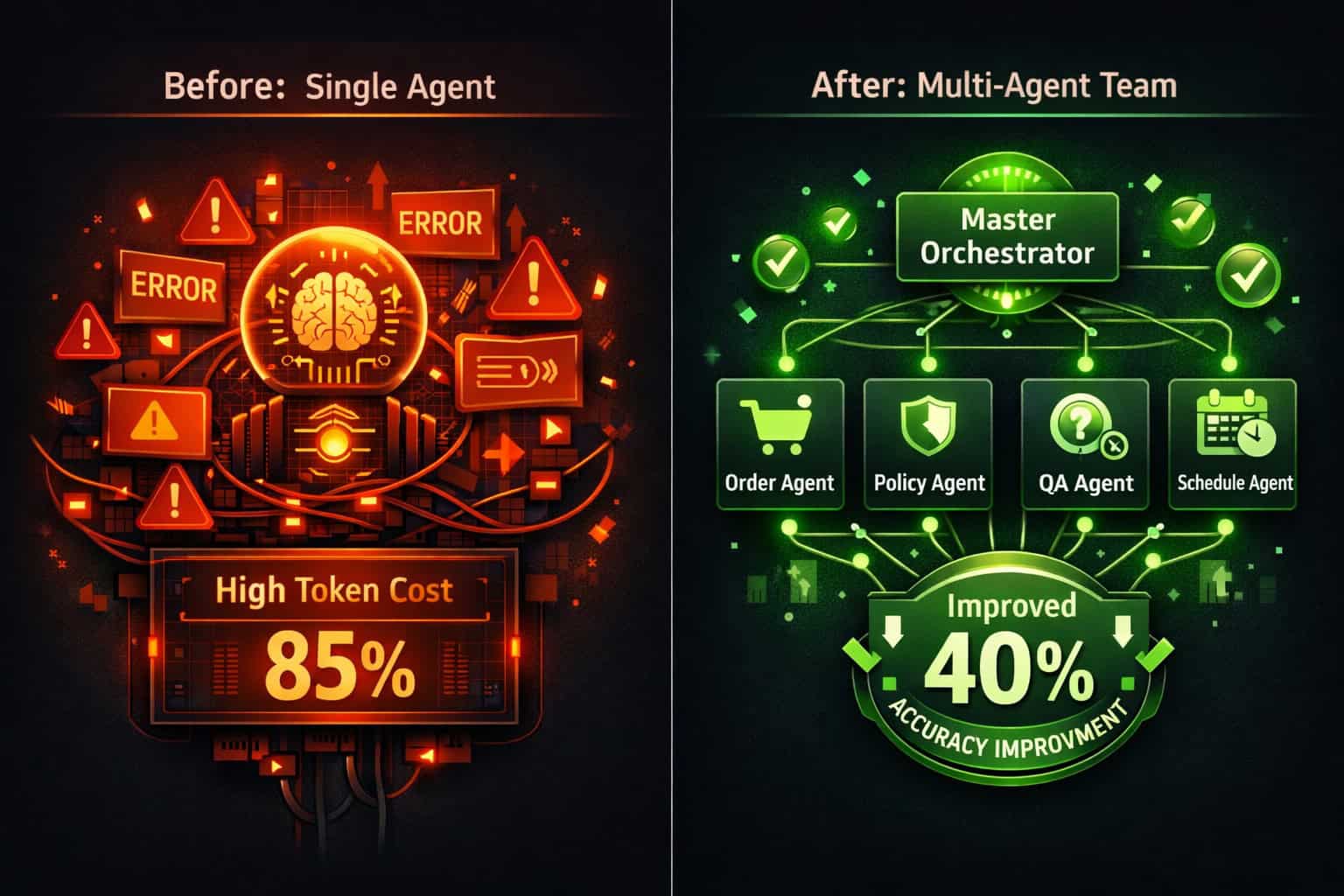
Multi-agent systems in n8n let you split complex automation tasks across specialized AI agents that work together on a single canvas, coordinated by an orchestrator node. Compared to single-agent setups, this approach can improve task accuracy by up to 40% and reduce errors by over 30% [4]. If you’re building anything beyond a simple linear workflow, multi-agent architecture is the most practical path forward in 2026.
Key Takeaways
- n8n version 1.103.0 introduced the AI Agent Tool node, enabling layered multi-agent systems on one canvas without managing multiple subworkflow tabs [1]
- Four core architectural patterns cover most use cases: chained requests, single agent with state, multi-agent with gatekeeper, and multi-agent teams [6]
- Each agent should have one focused job (orders, policy, QA, scheduling) with the orchestrator coordinating handoffs using If, Switch, and Merge nodes [5]
- Chained requests cut API costs by 30–50% by calling AI models only when needed, rather than routing everything through one monolithic agent [6]
- n8n’s queue-based execution model handles up to 220 workflow executions per second on a single instance, with horizontal scaling available [6]
- Context management matters more than agent count — sequential pass-through works for simple pipelines, while master-agent routing with structured output handles dynamic task distribution [3]
- n8n connects to 1,000+ pre-built integrations including OpenAI, Anthropic, and HuggingFace, making it practical for production AI workflows [9]
- Deterministic nodes and AI agents work best together — use deterministic nodes for strict business rules and safety checks, agents for natural language interpretation [5]
What Exactly Are Multi-Agent Systems in n8n?
Multi-agent systems in n8n are workflows where multiple AI agents, each with a specific role, collaborate under an orchestrating layer to complete tasks that would overwhelm a single agent. Think of it as a small team of specialists rather than one generalist trying to do everything.
In n8n’s implementation, built on the LangChain JavaScript framework, the system separates root nodes (which define the main agent logic) from sub-nodes (which provide specific capabilities like memory management, tool execution, and language model integration) [6]. This hierarchy is what makes complex orchestration manageable.
Why this matters for workflow automation:
- A single AI agent handling a 15-step customer onboarding process will hit context limits, make more errors, and cost more in API tokens
- Splitting that same process across four specialized agents (data validation, CRM update, email sequence, task assignment) keeps each agent’s context small and focused
- The orchestrator only routes tasks — it doesn’t try to solve them
“AI agentic workflows dynamically adapt based on context and goals, handle both structured and unstructured data, and can manage multi-step non-linear processes — combining traditional nodes, AI-powered nodes, and LangChain Agent nodes.” [2]
Choose multi-agent architecture if:
- Your workflow has more than 5–6 distinct decision points
- Different steps require different tools or data sources
- You need parallel processing to save time
- Error isolation matters (one agent failing shouldn’t crash the whole workflow)
Stick with a single agent if:
- The task is conversational and linear (simple chatbot, single-topic Q&A)
- You’re prototyping and want to validate logic before scaling
What Are the Four Core Architectural Patterns?
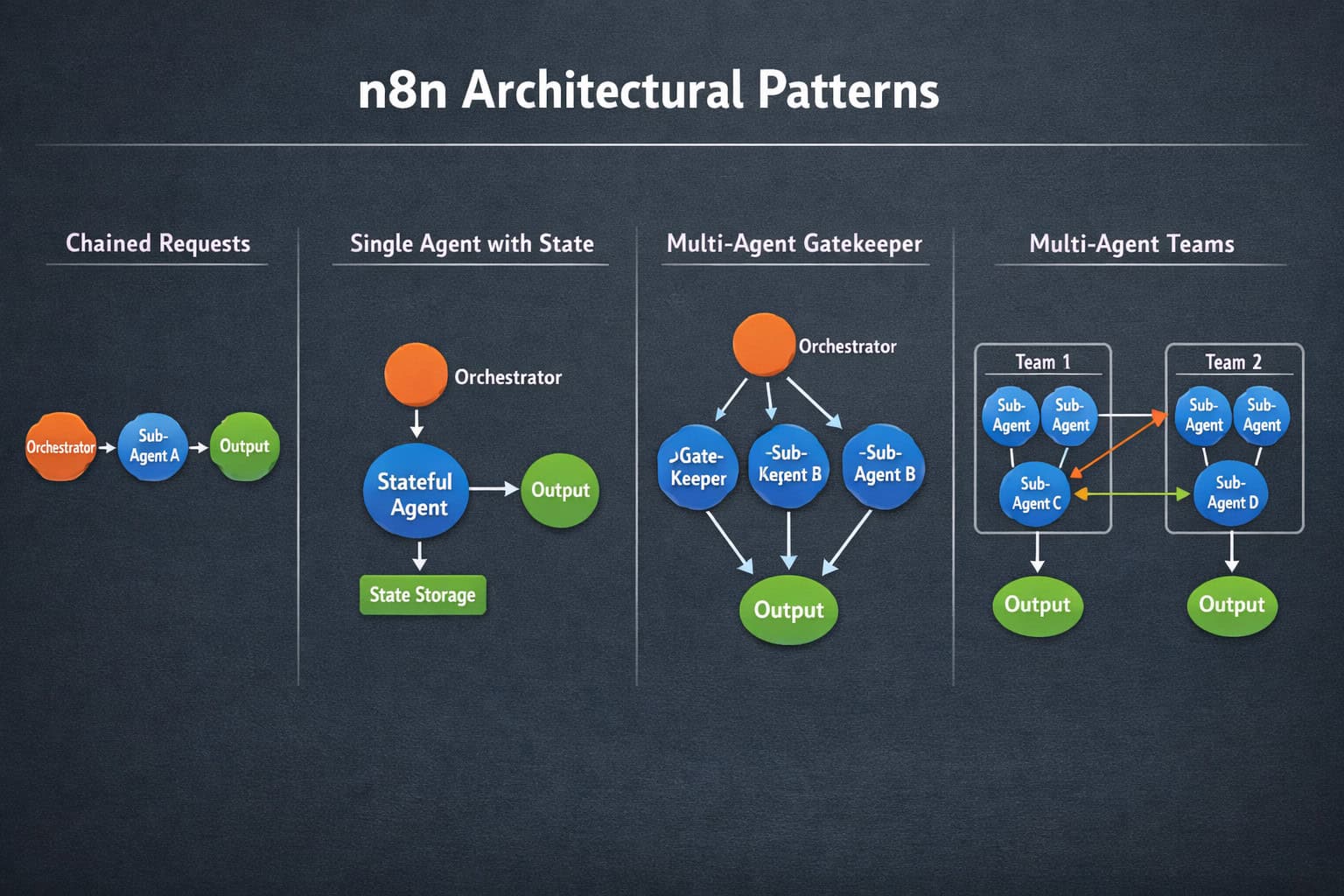
n8n supports four primary patterns for building AI agent workflows, each suited to different complexity levels and use cases [6]. Choosing the right pattern upfront saves significant rework later.
| Pattern | Best For | Key Characteristic |
|---|---|---|
| Chained Requests | Sequential data processing | Each step passes output to the next; AI called only when needed |
| Single Agent with State | Conversational interfaces | One agent with memory; handles back-and-forth dialogue |
| Multi-Agent with Gatekeeper | Centralized control + specialization | Master agent routes tasks to specialist sub-agents |
| Multi-Agent Teams | Parallel, distributed work | Multiple agents run simultaneously; distributed decision-making |
Chained Requests
This is the most cost-efficient pattern. Instead of one large agent call, you chain smaller AI model calls with intermediate processing steps between them. According to research from Strapi’s n8n build guide, this approach reduces API costs by 30–50% because you’re invoking the model only for the steps that actually require AI reasoning [6].
Use this when: You have a predictable sequence (scrape → summarize → classify → store) where each step’s output feeds the next.
Multi-Agent with Gatekeeper
A master orchestrator agent receives the incoming request, interprets it, and routes it to the right specialist agent. The specialist completes the task and returns a structured output back through the gatekeeper. This is the pattern most teams reach for when they want to revolutionize workflow automation beyond simple pipelines.
Common mistake: Making the gatekeeper too “smart.” The gatekeeper should route and validate, not solve. Overloading it defeats the purpose of specialization.
How Does n8n’s AI Agent Node Actually Work?
The AI Agent node in n8n (introduced in version 1.103.0) lets you build layered agent systems directly on a single canvas [1]. Before this release, building multi-agent systems required managing complex subworkflows across multiple tabs, which made debugging painful.
Here’s how the node system is structured:
- Root node (AI Agent): Defines the agent’s role via a system prompt, selects the language model, and connects to available tools
- Language model sub-node: Connects to OpenAI, Anthropic, HuggingFace, or other supported providers [9]
- Memory sub-node: Manages conversation history and context window (critical for stateful agents)
- Tool sub-nodes: Give the agent capabilities — HTTP requests, database queries, code execution, other n8n workflows
How agents read and act on input:
Agents in n8n read unstructured input (emails, chat messages, documents), decide which tools to call based on their system prompt and the connected model, and return structured outputs that downstream nodes can process [5]. This is what makes them genuinely useful in production: you’re not hardcoding every possible input format.
A practical example — client onboarding:
<code>Trigger (new form submission)
  → Gatekeeper Agent (classifies client type)
    → Data Validation Agent (checks required fields)
    → CRM Agent (creates/updates record in HubSpot)
    → Email Agent (sends personalized welcome sequence)
    → Task Agent (creates onboarding tasks in project tool)
  → Merge Node (confirms all steps completed)
  → Notification (Slack message to account manager)
</code>
Each agent in this chain has one job. The gatekeeper never touches the CRM. The CRM agent never writes emails. This separation is what makes the workflow debuggable and maintainable [5].
For teams already automating content tasks, this same pattern applies well to AI-powered content generation workflows where different agents handle research, drafting, and SEO review as separate steps.
How Do You Build Your First Multi-Agent Workflow in n8n?
Building a working multi-agent system in n8n follows a consistent process. Here’s a practical step-by-step approach that applies whether you’re starting from scratch or converting an existing workflow.

Step 1: Define agent roles before touching the canvas Write out each agent’s single responsibility in plain language. If you can’t describe an agent’s job in one sentence, it’s doing too much.
Step 2: Choose your architectural pattern Use the table in the previous section. Most production workflows start with “Multi-Agent with Gatekeeper” and evolve toward “Multi-Agent Teams” as complexity grows.
Step 3: Build the orchestrator first Set up the gatekeeper/master agent with a clear system prompt. Define what it receives, what decisions it makes, and what structured output it produces. Use n8n’s Switch node for routing to different specialist agents.
Step 4: Build specialist agents one at a time Add one specialist agent, test it in isolation with sample inputs, then connect it to the orchestrator. Don’t build all agents simultaneously — debugging becomes much harder.
Step 5: Configure memory and context For stateful workflows, attach a memory sub-node to agents that need conversation history. For stateless pipelines, skip memory to reduce token usage.
Step 6: Add deterministic nodes for business rules Use If nodes and Switch nodes for strict logic (e.g., “if customer tier = enterprise, route to enterprise agent”). Don’t ask an AI agent to make binary rule-based decisions — that’s what deterministic nodes are for [5].
Step 7: Test with real edge cases Run inputs that are ambiguous, malformed, or unexpected. Multi-agent systems fail most often at handoff points, so test the transitions between agents specifically.
Step 8: Monitor execution logs n8n’s execution log shows each node’s input and output. Use this to catch agents that are hallucinating, producing wrong output formats, or consuming excessive tokens.
Common mistake: Loading all agent instructions into the orchestrator’s context upfront. This wastes tokens and slows responses. Use master-agent routing with structured output instead, so each specialist only receives the context it needs [3].
How Do You Optimize Context and Reduce Costs?
Context management is where most multi-agent workflows either succeed or become expensive. The core principle: each agent should only receive the context it needs to complete its specific task.
Sequential pass-through works well for simple pipelines where each step’s output is the next step’s input. The context stays small because you’re passing only the result, not the entire conversation history.
Master-agent routing with structured output is better for dynamic workflows. The orchestrator produces a structured JSON object (task type, relevant data, routing target) and passes only that to the specialist agent [3]. This prevents token waste from carrying irrelevant context through every step.
Practical cost controls in n8n:
- Use GPT-4o-mini or Claude Haiku for routing and classification tasks (cheap, fast, accurate enough)
- Reserve GPT-4o or Claude Sonnet for tasks requiring deep reasoning or long-form generation
- Set max token limits on each agent node to prevent runaway responses
- Use chained requests instead of a single large agent call wherever the task sequence is predictable [6]
For teams running WordPress-based content operations, these same optimization principles apply when automating WordPress workflows with AI plugins — the cost-per-task logic is identical.
What Are the Most Common Mistakes and How Do You Avoid Them?
Even experienced developers run into the same set of problems when building multi-agent systems. Here are the most frequent issues and how to fix them.
Mistake 1: Giving agents overlapping responsibilities If two agents can both handle the same input type, the orchestrator will route inconsistently. Fix: write explicit routing rules in the gatekeeper’s system prompt and use Switch nodes to enforce them.
Mistake 2: Skipping structured output validation When an agent returns free-form text instead of a structured format, downstream nodes break. Fix: always specify the exact JSON schema you expect in the agent’s system prompt, and add a validation step before passing output to the next agent.
Mistake 3: Using AI for deterministic decisions Asking an agent “is this order total above $500?” wastes tokens and introduces variability. Fix: use an If node. Reserve AI for tasks that genuinely require language understanding [5].
Mistake 4: No error handling between agents If one specialist agent fails, the entire workflow stops with no useful error message. Fix: add error branches after each agent node that log the failure, notify a human, and either retry or gracefully exit.
Mistake 5: Building all agents before testing any This makes it nearly impossible to isolate which agent is causing problems. Fix: build and test each agent in isolation before connecting it to the orchestrator.
Edge case to watch for: When an agent’s memory sub-node retains context from a previous execution, it can bleed into the current task. If you’re running agents in shared environments, explicitly clear memory between sessions or use session-scoped memory configurations.
How Does n8n Compare to Other Multi-Agent Platforms?
n8n’s approach to multi-agent orchestration sits in a specific position in the market. It’s not a pure AI framework like LangGraph or AutoGen, but it’s also not a simple no-code tool. It’s a hybrid: visual workflow builder with full code access and a native LangChain integration.
| Feature | n8n | LangGraph | Zapier AI | Make (Integromat) |
|---|---|---|---|---|
| Visual canvas | ✅ Yes | ❌ Code-only | ✅ Yes | ✅ Yes |
| Multi-agent support | ✅ Native | ✅ Native | ⚠️ Limited | ⚠️ Limited |
| Self-hostable | ✅ Yes | ✅ Yes | ❌ No | ❌ No |
| Pre-built integrations | 1,000+ [9] | Few native | 6,000+ | 1,800+ |
| LangChain integration | ✅ Built-in | ✅ Core | ❌ No | ❌ No |
| Execution speed | 220/sec [6] | Varies | Varies | Varies |
| Code access | ✅ Full | ✅ Full | ❌ Limited | ⚠️ Limited |
Choose n8n if: You want visual orchestration with real code flexibility, self-hosting for data privacy, and native AI agent support without building everything from scratch.
Choose LangGraph if: You’re a Python developer building highly custom agent logic and don’t need visual tooling or pre-built integrations.
Choose Zapier AI if: Your team is non-technical and you need quick automation with popular SaaS tools, and multi-agent complexity isn’t a priority.
This same “right tool for the job” logic applies across automation categories — for example, automating social media post sharing from WordPress is a case where simpler automation tools often outperform complex multi-agent setups.
What Real-World Use Cases Benefit Most from This Approach?
Multi-agent systems in n8n deliver the clearest value in workflows that combine unstructured input, multiple data sources, and branching decision logic. Here are the use cases where teams see the strongest results.
1. Client onboarding automation Real-world applications show measurable accuracy improvements in multi-step onboarding workflows [4]. A gatekeeper classifies the client type, specialist agents handle CRM updates, contract generation, and task assignment in parallel.
2. AI-powered content pipelines A research agent pulls sources, a drafting agent writes the content, a fact-checking agent validates claims, and an SEO agent optimizes metadata — all coordinated by an orchestrator. This maps directly to how teams use AI-powered content optimization tools in production.
3. Customer support triage An intake agent reads incoming tickets, a classification agent assigns priority and category, a policy agent checks relevant rules, and a response agent drafts the reply. Human agents only see escalations.
4. E-commerce order management Order agent handles processing, inventory agent checks stock, fulfillment agent triggers shipping, and a notification agent sends customer updates. Each agent operates independently, so a fulfillment delay doesn’t block order processing.
5. Lead qualification and CRM enrichment A scraping agent collects public data, an enrichment agent calls data APIs, a scoring agent ranks the lead, and a routing agent assigns it to the right sales rep.
For teams building these pipelines alongside design and development workflows, the automation resources at WebAiStack cover complementary tools that integrate well with n8n-based systems.
Interactive Tool: n8n Multi-Agent Pattern Selector
Use this tool to find the right architectural pattern for your workflow:
n8n Multi-Agent Pattern Selector
Answer 4 questions to find the right architecture for your workflow.
Don't Miss

Revolutionizing Web Design: A Comprehensive Guide to AI Models for Modern Websites
