Last updated: May 31, 2026
Quick Answer
ElevenLabs Reader is an AI-powered text-to-speech application that converts web articles, PDFs, ePubs, and other written content into natural-sounding audio using ElevenLabs’ advanced voice synthesis engine. Available as a mobile app (iOS and Android) and a Chrome browser extension, it supports 30+ languages with over 130 voice options. A free tier offers 10 hours of listening, while the unlimited Ultra plan costs $11/month or $99/year [1][5].
Key Takeaways
- ElevenLabs Reader turns any web page, PDF, or ePub into lifelike audio using the same AI voice engine trusted by enterprise clients like IBM [6].
- The Eleven v3 model (generally available since February 2026) delivers noticeably more expressive, natural speech than previous versions.
- Free users get 10 hours of listening per month, and the unlimited Ultra plan runs $11/month or $99/year after a late-2025 price cut.
- The app supports 30+ languages and 130+ voices, covering major world languages and multiple accent variants [5].
- A dedicated Chrome extension lets you save any web page with one click and sync it for mobile listening [2].
- Students and educators get free access, making it a strong accessibility tool for academic settings.
- ElevenLabs Reader handles technical and academic content reasonably well, though complex equations and code blocks remain a challenge for all TTS tools.
- Voice customization includes controls for stability, expressiveness, clarity, and emotional tone [9].
- The underlying voice stack now powers enterprise-grade solutions through the IBM watsonx partnership [6].
What Exactly Is ElevenLabs Reader and How Does It Work?
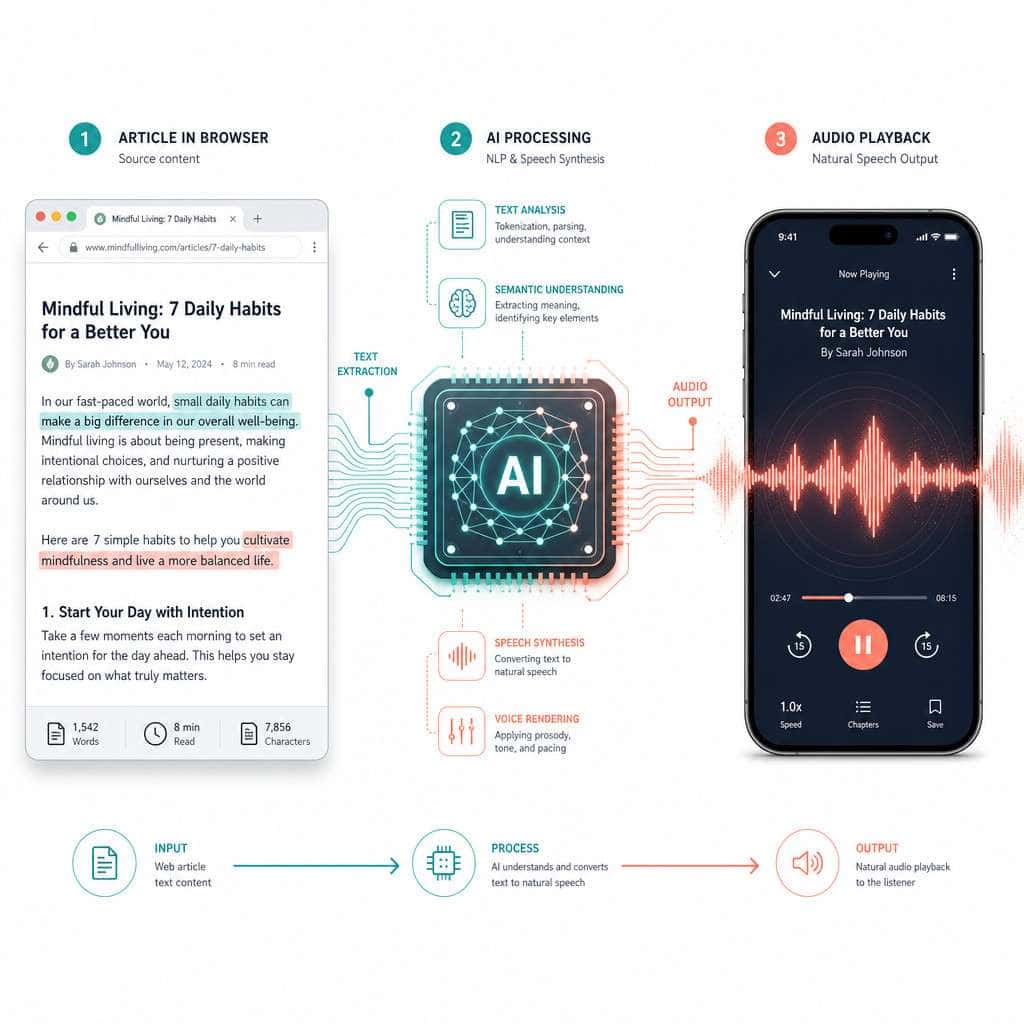
ElevenLabs Reader is a dedicated read-aloud application built on ElevenLabs’ proprietary text-to-speech engine. It takes written content from virtually any source and converts it into high-quality spoken audio you can listen to on your phone, tablet, or computer [1].
Here’s how the process works in practice:
- Input your content. You can paste a URL, upload a PDF or ePub file, or use the Chrome extension to capture a web page with one click [2][5].
- The app extracts the text. Reader strips out ads, navigation menus, and other clutter, isolating the actual article or document content.
- AI voice synthesis runs. The Eleven v3 model processes the text and generates audio that mimics natural human speech patterns, including appropriate pauses, emphasis, and intonation.
- You listen anywhere. Content syncs across devices, so you can save an article on your laptop and listen on your phone during a commute [1].
The Chrome extension specifically works by adding a small icon to your browser toolbar. Click it on any web page, and the content gets saved to your ElevenReader library instantly [2]. This is particularly useful if you’re someone who accumulates dozens of browser tabs of articles you intend to read but never do.
For those exploring how AI tools are reshaping content workflows more broadly, our comprehensive guide to AI-powered content generation tools covers the wider landscape.
How Much Does ElevenLabs Reader Cost Compared to Other Text-to-Speech Services?
ElevenLabs Reader offers a free tier with 10 hours of monthly listening, and its unlimited plan costs $11/month ($99/year) after a significant price reduction in late 2025.
Here’s how it stacks up against the main competitors:
| Feature | ElevenLabs Reader | Speechify | NaturalReader | Apple’s Built-in TTS |
|---|---|---|---|---|
| Free tier | 10 hours/month | Limited | Limited | Unlimited (basic) |
| Paid plan | $11/month (Ultra) | ~$139/year (Premium) | ~$99.50/year (Premium) | Free with device |
| Voice quality | Premium AI (v3) | High quality | Good quality | Basic/functional |
| Languages | 30+ | 30+ | 20+ | System-dependent |
| Voice count | 130+ | 200+ | 100+ | ~20-30 |
| Chrome extension | Yes | Yes | Yes | No |
| PDF/ePub support | Yes | Yes | Yes | Limited |
The broader ElevenLabs platform (for developers and creators) starts at roughly $4.17/month for the Starter plan billed annually and scales up to $1,320/month for Business use. But for pure reading and listening, the Reader-specific Ultra plan at $11/month is the relevant price point for most individuals.
Choose ElevenLabs Reader if you prioritize voice naturalness and multilingual support. Choose Speechify if you need the largest voice library. Choose Apple’s built-in TTS if you just need basic functionality at no cost.
Can ElevenLabs Reader Handle Different Languages and Accents?
Yes. ElevenLabs Reader supports over 30 languages and 130+ voice options, including multiple accent variants for major languages like English, Spanish, and French [5]. The March 2026 IBM partnership announcement referenced support for 70 languages across the broader ElevenLabs platform [6], and Reader benefits from this same underlying engine.
Languages with strong support include English (US, UK, Australian, Indian accents), Spanish (European and Latin American), French, German, Portuguese, Japanese, Korean, Mandarin, Hindi, Arabic, and Polish, among others.
A common mistake is assuming all languages sound equally natural. English voices are the most refined because they’ve had the most training data. Less common languages may sound slightly less polished, though the v3 model released in early 2026 narrowed this gap considerably.

Is ElevenLabs Reader Good for People with Reading Disabilities?
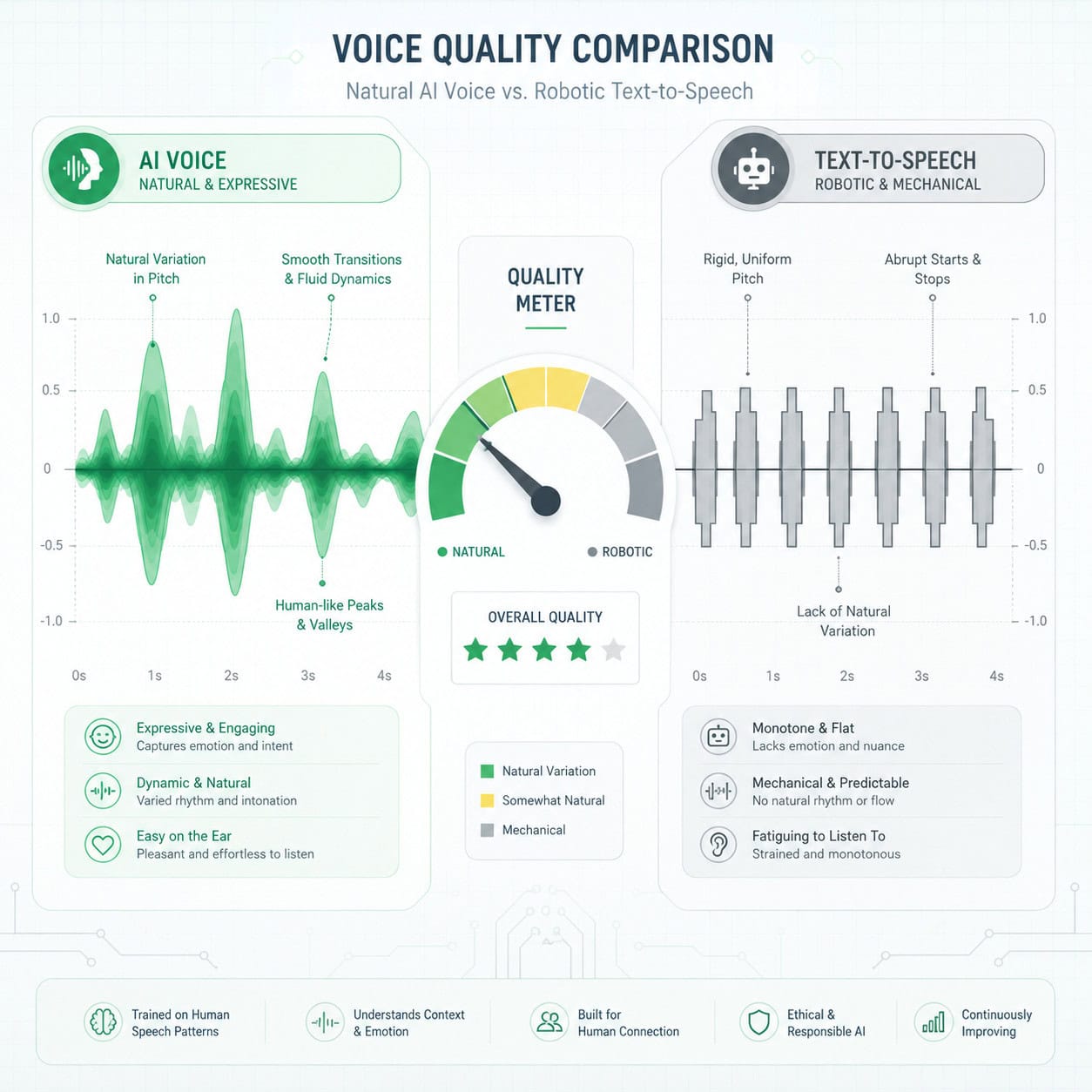
ElevenLabs Reader is one of the strongest TTS options available for people with dyslexia, ADHD, visual impairments, or other conditions that make reading difficult. The natural voice quality reduces listening fatigue compared to robotic-sounding alternatives, and the free tier provides enough hours for daily use.
Key accessibility features include:
- Adjustable playback speed so users can find their comfortable listening pace
- Text highlighting that follows along with the audio, supporting multisensory learning
- Distraction-free content extraction that removes ads and sidebars
- Mobile-first design for listening on the go
ElevenLabs specifically offers free access for students and educators, which makes it accessible for learners who need TTS support in academic settings without adding financial burden. This is a meaningful differentiator, since competitors like Speechify charge for their premium student features.
If you’re interested in how AI tools are improving accessibility across digital platforms, our guide to AI-powered content optimization explores related approaches.
What Kind of Websites or Content Can ElevenLabs Reader Convert?
ElevenLabs Reader can convert nearly any text-based digital content into audio. This includes web articles, blog posts, news stories, Google Docs, PDFs, ePub files, newsletters, and even scanned pages [1][5].
The Chrome extension works on most standard websites. When you click the extension icon, it extracts the main body content while filtering out navigation elements, ads, and footer clutter [2]. For documents, you upload files directly through the app.
Content types that work well:
- Long-form journalism and blog posts
- Academic papers and research articles
- Newsletter emails
- Standard ePub books
- Business reports and white papers
Content types that may cause issues:
- Heavily interactive pages (dashboards, web apps)
- Content behind strict paywalls (the extension can only access what your browser can see)
- Pages that load content dynamically via JavaScript (some content may not be captured)
- Image-heavy content with minimal text
How Accurate Is the AI Voice Generation Compared to Human Reading?
The Eleven v3 model produces speech that’s remarkably close to human narration for most content types, though trained listeners can still detect subtle differences. Independent reviewers describe it as “premium tier” among AI voice tools, with fine-grained control over stability, expressiveness, clarity, and emotional tone [9].
Where ElevenLabs Reader excels compared to human reading:
- Consistency: No vocal fatigue, mispronunciations from tiredness, or inconsistent pacing
- Speed: Converts a 5,000-word article in seconds rather than the 30+ minutes a human narrator would need
- Cost: A fraction of professional narration rates
Where human readers still win:
- Emotional nuance in fiction and highly dramatic content
- Context-dependent pronunciation (the AI occasionally stumbles on ambiguous words like “read” or “lead”)
- Humor and sarcasm, which require understanding intent beyond the text
Are There Any Common Problems Users Experience with ElevenLabs Reader?
The most frequently reported issues include occasional mispronunciation of proper nouns, inconsistent handling of abbreviations, and sync delays between the Chrome extension and the mobile app.
Based on community feedback and reviews:
- Proper nouns and technical terms sometimes get mangled, especially names from less common languages
- Tables and structured data don’t translate well to audio (this is a fundamental limitation of TTS, not specific to ElevenLabs)
- The Chrome extension occasionally fails to extract content from pages with complex JavaScript rendering [2]
- Character limits on the free tier can be frustrating for heavy users, though the 10-hour monthly allowance is generous compared to competitors
- Some users report the pricing changes in late 2025 caused confusion about which features were included in each tier
Quick fix for most issues: If the extension doesn’t capture content correctly, try using the “reader view” in your browser first, then activating the extension. This gives it cleaner text to work with.
Which Devices and Browsers Support ElevenLabs Reader?
ElevenLabs Reader works on iOS (iPhone and iPad), Android, and any desktop browser that supports Chrome extensions. The mobile apps are available on the Apple App Store [10] and Google Play Store, while the Chrome extension works in Chrome and Chromium-based browsers like Edge and Brave [5].
There is no dedicated desktop application. Desktop users access Reader through the Chrome extension or the web interface. Safari and Firefox do not currently support the extension natively.
For teams building websites that need to be accessible across platforms, our guide on building professional sites without code covers complementary tools.
Can I Customize the Voice Settings in ElevenLabs Reader?
Yes. ElevenLabs Reader offers meaningful voice customization, including choice of voice (130+ options), playback speed, and on the broader platform, controls for stability, expressiveness, similarity, and style [9].
Within the Reader app specifically, you can:
- Select from 130+ voices across different genders, ages, and speaking styles
- Adjust playback speed from slow to 2x or faster
- Choose your preferred language and accent variant
- Save voice preferences per content type (for example, a calm voice for evening reading and an energetic voice for news)
Power users who access ElevenLabs’ full platform can go deeper with voice cloning and fine-tuned emotional controls, but the Reader app keeps things simple for everyday listening.
Is ElevenLabs Reader Better for Students or Professionals?
Both groups benefit significantly, but for different reasons. Students gain the most from the free education tier and study-focused features, while professionals benefit from the productivity gains of converting long reports and articles into audio for commute listening.
Best for students when:
- You need to absorb large volumes of reading material
- You have a learning disability that makes reading difficult
- You want to review notes and papers while walking or exercising
- Budget is a concern (the free student plan removes this barrier)
Best for professionals when:
- You accumulate a backlog of industry articles and reports
- You commute and want to use that time productively
- You need to review long documents without screen time
- You work across multiple languages
The AI-powered chatbot integration guide for WordPress shows how similar AI voice technologies are being applied in professional website contexts.
What Makes ElevenLabs Reader Different from Other Text-to-Speech Tools?
Three things set ElevenLabs Reader apart: voice quality powered by the Eleven v3 model, aggressive pricing with a generous free tier, and deep integration between the browser extension and mobile apps [1][5].
Most TTS tools either sound robotic (like built-in OS readers) or charge premium prices for natural voices (like Speechify’s $139/year). ElevenLabs Reader occupies a middle ground with arguably the best voice quality in the market at $99/year for unlimited use.
The enterprise validation also matters. The IBM watsonx partnership [6] signals that ElevenLabs’ voice technology meets enterprise security and quality standards, which gives individual users confidence in the underlying technology.
For a broader view of how AI tools are reshaping creative and content workflows, explore our AI content generation archives.
How Does ElevenLabs Reader Protect User Privacy When Converting Text?
ElevenLabs processes text through its cloud servers to generate audio, which means your content is transmitted to their infrastructure. The company’s privacy policy outlines data handling practices, and the IBM enterprise partnership [6] suggests compliance with enterprise-grade security standards.
Key privacy considerations:
- Content you submit is processed on ElevenLabs’ servers, not locally on your device
- Avoid submitting highly sensitive or confidential documents unless you’ve reviewed the terms of service
- The Chrome extension accesses page content only when you actively click it, not passively [2]
- Enterprise users can negotiate custom data handling agreements through the Business or Enterprise plans
If privacy is your top concern, consider using the app only for publicly available content (news articles, blog posts) rather than confidential business documents.
Can ElevenLabs Reader Handle Technical or Academic Content Accurately?
ElevenLabs Reader handles standard academic prose well but struggles with mathematical equations, code snippets, chemical formulas, and heavily abbreviated technical writing. For narrative-style academic papers in humanities and social sciences, the results are excellent. For STEM papers with lots of notation, expect some awkward readings.
Works well: Literature reviews, case studies, business research, legal documents, medical narratives Works poorly: LaTeX equations, programming code, statistical tables, chemical nomenclature
A practical workaround: if you need to listen to a technical paper, pre-process it by removing or simplifying equation-heavy sections before feeding it to Reader. The core arguments and methodology sections will convert cleanly.
For those working with technical content on the web, our SEO optimization guide covers related tools for making content more accessible.
Conclusion
ElevenLabs Reader has matured into one of the most practical AI voice tools available in 2026. The combination of the Eleven v3 voice model, a generous free tier, free student access, and an unlimited plan at $99/year makes it accessible to virtually anyone who wants to convert written content into audio.
Your next steps:
- Try the free tier first. Download the app from the App Store or Google Play and test it with 10 hours of free listening.
- Install the Chrome extension to start saving articles with one click [5].
- Experiment with different voices to find one that suits your listening preference.
- If you’re a student or educator, apply for the free access program before paying for any plan.
- Evaluate after two weeks whether the free tier meets your needs or if the $11/month Ultra plan is worth the upgrade.
The technology isn’t perfect. Proper nouns get mangled sometimes, and technical notation remains a challenge. But for converting the vast majority of web content, articles, and documents into natural-sounding audio, ElevenLabs Reader is the strongest option available at its price point.
FAQ
Q: Is ElevenLabs Reader completely free? A: There’s a free tier with 10 hours of monthly listening. The unlimited Ultra plan costs $11/month or $99/year.
Q: Can I use ElevenLabs Reader offline? A: You can download audio for offline listening within the mobile app, but the initial text-to-speech conversion requires an internet connection.
Q: Does ElevenLabs Reader work with paywalled articles? A: The Chrome extension can only access content your browser can display. If you’re logged into a subscription site, it can capture that content [2].
Q: How many languages does ElevenLabs Reader support? A: Over 30 languages with 130+ voice options in the Reader app [5]. The broader ElevenLabs platform supports up to 70 languages [6].
Q: Can I clone my own voice for use in ElevenLabs Reader? A: Voice cloning is available on the main ElevenLabs platform, but the Reader app focuses on pre-built voices for listening convenience.
Q: Is ElevenLabs Reader better than Speechify? A: ElevenLabs Reader generally offers more natural-sounding voices at a lower price point. Speechify has a larger voice library and more mature browser integration. Try both free tiers to compare.
Q: Does the Chrome extension slow down my browser? A: No. The extension only activates when you click it and doesn’t run background processes [2].
Q: Can I use ElevenLabs Reader for audiobook creation? A: The Reader app is designed for personal listening. For creating audiobooks to distribute, you’d need the main ElevenLabs platform with appropriate commercial licensing.
Q: What file formats does ElevenLabs Reader support? A: PDF, ePub, web URLs, Google Docs, and plain text. You can also paste text directly into the app [1].
Q: Is there a word or character limit per conversion? A: The free tier has a monthly hour limit (10 hours). The Ultra plan offers unlimited listening with no per-document restrictions.
References
[1] Introducing ElevenLabs Reader App – https://elevenlabs.io/blog/introducing-elevenlabs-reader-app [2] How Does The ElevenReader Chrome Extension Work – https://help.elevenlabs.io/hc/en-us/articles/41076873230097-How-does-the-ElevenReader-Chrome-extension-work [5] Text To Speech Chrome Extension – https://elevenreader.io/text-to-speech-chrome-extension [6] Enterprise AI Finds Its Voice: ElevenLabs and IBM Bring Premium Voice Capabilities to Agentic AI – https://newsroom.ibm.com/2026-03-25-enterprise-ai-finds-its-voice-elevenlabs-and-ibm-bring-premium-voice-capabilities-to-agentic-ai [9] Don’t Use ElevenLabs in 2026 Until You Watch This! (YouTube) – https://www.youtube.com/watch?v=gcOPiJDQ7Cs [10] ElevenReader on the App Store – https://apps.apple.com/us/app/elevenreader-read-books-aloud/id6479373050