Last updated: May 22, 2026
Quick Answer
NotebookLM’s Audio Overview feature turns your uploaded documents, websites, and videos into a conversational podcast between two AI hosts. It’s free, built on Google’s Gemini model, and can process up to 50 sources to produce episodes typically lasting 3 to 12 minutes. In 2026, it’s one of the most accessible ways to convert dense research or content into listenable, engaging audio without recording equipment or editing software.
Key Takeaways
- NotebookLM is a free Google tool that generates AI podcast-style conversations from your own source materials [1][4]
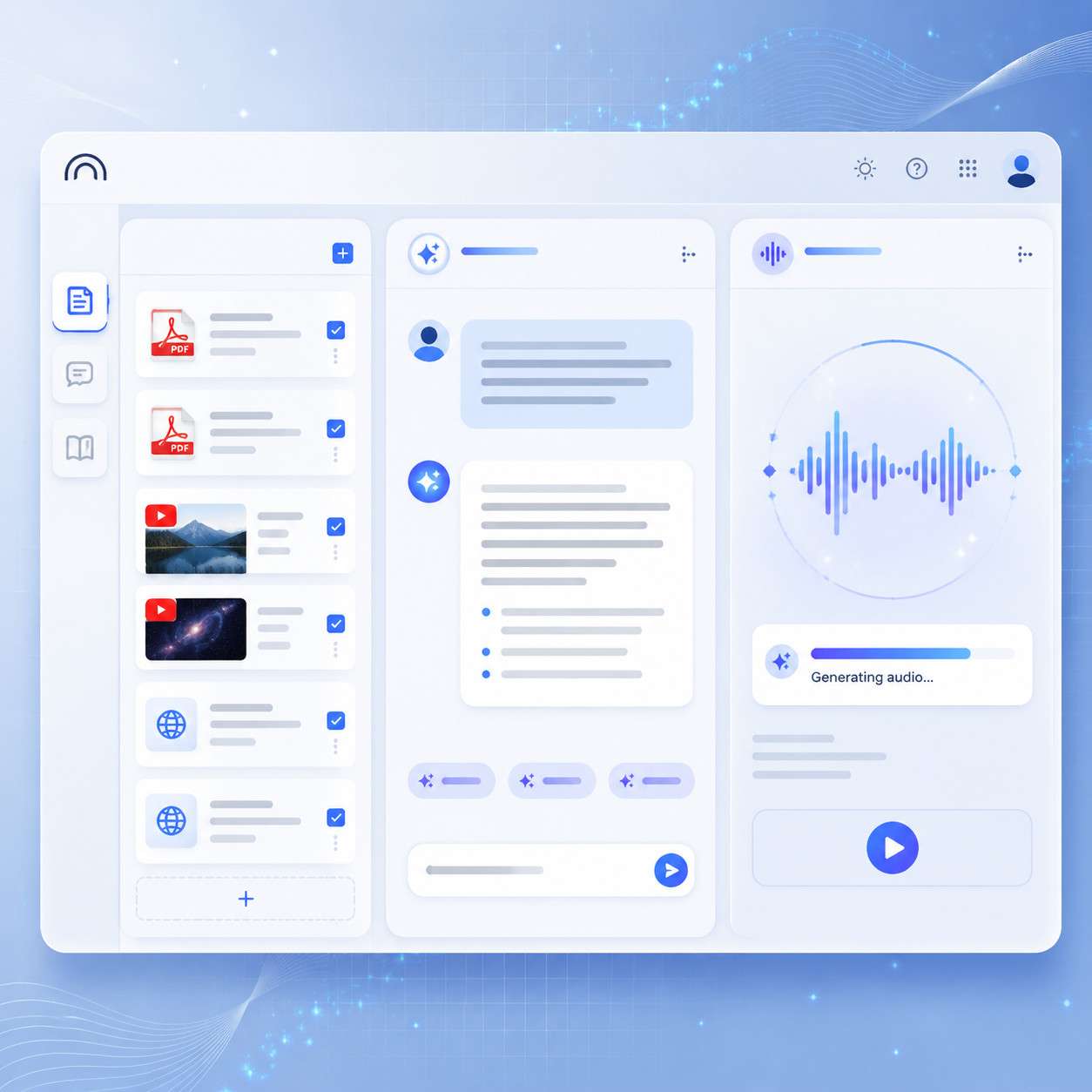
- The March 2026 interface update reorganized the tool into three panes: Sources, Chat, and Studio, making it function more like a production studio
- Audio Overviews typically run 3–12 minutes depending on source volume and customization settings [4]
- You can customize episode length (short, default, long), format (deep dive, critique), and topic focus
- Persona-level instructions allow up to ~10,000 characters of guidance for how the AI hosts behave
- The tool supports up to 50 sources per notebook, including PDFs, websites, YouTube videos, and pasted text
- It’s powered by Gemini 1.5 Pro, functioning as a user-friendly retrieval-augmented generation (RAG) system [8]
- Advanced features like Audio Overview are available to users 18 and older
- NotebookLM is especially useful for educators, students, researchers, and content creators
- It’s not a replacement for professional podcast production but works well for informational and educational content
What Exactly Is NotebookLM Podcast and How Does It Work?
NotebookLM is a free AI research tool from Google that includes an Audio Overview feature, often called the “NotebookLM podcast.” It takes documents you upload and generates a natural-sounding conversation between two AI hosts who discuss, explain, and debate the content [4].
Here’s how the process works in 2026:
- Upload your sources. Drop in PDFs, Google Docs, websites, YouTube links, or plain text. You can add up to 50 sources per notebook.
- Organize in the Sources panel. The left pane lets you manage and review everything you’ve uploaded.
- Use the Chat panel. Ask questions, generate study guides, timelines, or FAQs from your sources in the center pane.
- Generate Audio Overview in the Studio panel. The right pane is where you trigger the podcast-style output. Choose your format, length, and topic focus, then hit generate.
The March 2026 update restructured NotebookLM into these three distinct panes, turning it from a simple research chatbot into what Jeff Su described as a “production studio” for multi-format content. The AI hosts don’t just read summaries back to you. They have a back-and-forth conversation, highlight key themes, make connections across sources, and explain complex ideas in plain language [4][8].
Simon Willison, a well-known developer, described the output as “very podcast” with “convincing back-and-forth between two AI hosts” after testing it in 2024 [8]. The quality has only improved since then.
Common mistake: Uploading messy, unstructured sources directly. Power users in 2026 recommend first converting raw materials into consolidated text summaries or structured notes, then generating the Audio Overview from those cleaner inputs for more coherent episodes.
How Is NotebookLM Different From Other AI Storytelling Platforms?
NotebookLM stands apart because it generates conversations grounded in your specific sources rather than pulling from general internet knowledge. Most AI storytelling tools produce content from their training data. NotebookLM only discusses what you give it [8].
| Feature | NotebookLM | Generic AI Podcast Tools | Traditional Podcast |
|---|---|---|---|
| Source grounding | Your uploaded docs only | General AI knowledge | Host’s research/opinions |
| Cost | Free | Often $10–50/month [7][10] | Equipment + time |
| Two-host conversation | Yes, automatic | Varies | Requires two people |
| Customization | Format, length, persona | Usually voice/tone only | Full creative control |
| Production time | Minutes | Minutes | Hours to days |
| Accuracy to source | High (RAG-based) | Variable | Depends on host |
The technical difference matters. NotebookLM uses retrieval-augmented generation (RAG) powered by Gemini 1.5 Pro [8]. This means it retrieves relevant passages from your sources before generating speech, reducing hallucination compared to tools that rely solely on a language model’s training data.
Fred Jacobs at AmplifiMedia noted that NotebookLM structures “deep dives” so two hosts bounce ideas off each other, creating something structurally similar to a human-hosted show [6]. That conversational structure is what makes it feel different from text-to-speech tools or single-voice AI narration.
If you’re exploring other AI-powered content generation tools, NotebookLM occupies a unique niche: it’s specifically designed for source-grounded audio and multimedia output, not general content creation.
How Much Does NotebookLM Cost?
NotebookLM is free to use as of 2026. Google offers it at no cost, which is a significant advantage over competitors [1][2]. There is a NotebookLM Plus tier (part of Google One AI Premium) that provides higher usage limits and additional features, but the core Audio Overview functionality is available on the free plan.
Community users on Reddit have described it as “the most slept-on free AI tool” precisely because the podcast feature alone would justify a subscription price on competing platforms [1].
Choose the free plan if: You’re generating occasional Audio Overviews for personal learning, classroom use, or content experimentation.
Consider NotebookLM Plus if: You’re producing Audio Overviews frequently, working with large source sets, or need priority processing.
What Kind of Stories and Content Can You Create With NotebookLM?
You can create informational, educational, and analytical audio content from virtually any text-based source material. NotebookLM works best for content that benefits from explanation and discussion rather than pure entertainment or fiction.
Practical use cases include:
- Research summaries: Upload a 200-page paper and get a conversational breakdown of key findings [1]
- Course material reviews: Students load lecture notes and textbook chapters to create study podcasts [3]
- Book discussions: Drop in chapters or full texts for an AI-hosted book club conversation
- Business briefings: Upload reports, whitepapers, or meeting notes for audio summaries
- Content repurposing: Turn blog posts or articles into listenable episodes
- Literature analysis: Transform dense texts like The Great Gatsby into conversational explanations students can listen to before class
The format options added in early 2026 let you choose between a “deep dive” (thorough exploration) and a “critique” (evaluative discussion), giving you control over the tone and angle of the output.
For creators looking to repurpose content across formats, this pairs well with AI-powered content optimization strategies that help you get more mileage from existing material.
Who Benefits Most From Using NotebookLM Podcast?
Educators, students, researchers, and content marketers get the most value from NotebookLM’s Audio Overview. Anyone who regularly processes large amounts of text and wants an alternative way to absorb or share that information is a strong fit [3][9].
Educators use it to turn dry reading assignments into pre-class listening. A 30-page PDF becomes a 10-minute conversation students can listen to during their commute.
Students use it for spaced repetition and passive learning, reinforcing understanding of notes and readings through audio [3].
Researchers use it to quickly grasp the key arguments in papers they’ve collected, especially when reviewing literature across multiple sources.
Content marketers use it to prototype podcast concepts or create audio versions of written content without production overhead.
If you’re already using AI tools to improve your content workflows, NotebookLM fits naturally into that stack as the audio generation layer.
What Types of Creators Should Avoid NotebookLM?
NotebookLM is not the right tool if you need full creative control over voice acting, emotional delivery, scripted narratives, or branded audio identity. It’s also a poor fit for fiction podcasting, interview-format shows, or any content that relies on human personality as the core draw.
Skip NotebookLM if:
- You’re building a personality-driven podcast brand
- You need specific voice actors or custom voice cloning
- Your content is primarily entertainment or fiction
- You require fine-grained audio editing (music, sound effects, transitions)
- You need real-time live conversation or audience interaction
Professional podcasters who rely on their unique voice and interview skills won’t find a replacement here. NotebookLM generates informational discussions, not entertainment programming [6].
Is NotebookLM Good for Professional Podcasters or Just Hobbyists?
It’s useful for both, but in different ways. Professional podcasters can use NotebookLM for research and episode prep rather than final production. Hobbyists and educators can use it as a complete end-to-end solution for informational audio [6].
A professional podcaster might upload research materials and generate an Audio Overview to identify the most interesting angles before recording their own episode. That’s a research tool, not a replacement for their show.
A hobbyist or educator who just wants to share knowledge in audio form can use the output directly. The quality is good enough for internal team briefings, classroom supplements, or personal learning [9].
Common Mistakes People Make When First Using AI Storytelling Tools
The biggest mistake is dumping raw, unorganized sources and expecting polished output. AI storytelling tools, including NotebookLM, perform dramatically better with curated inputs.
Mistakes to avoid:
- Uploading too many unrelated sources. The AI tries to connect everything. If your sources don’t relate, the conversation becomes unfocused.
- Skipping the customization step. The 2026 update lets you set persona instructions, format, length, and topic focus. Default settings produce generic results.
- Expecting entertainment-quality production. AI-generated audio is informational, not cinematic. Adjust expectations accordingly.
- Not reviewing the output. AI can misinterpret nuance or emphasis. Always listen through before sharing.
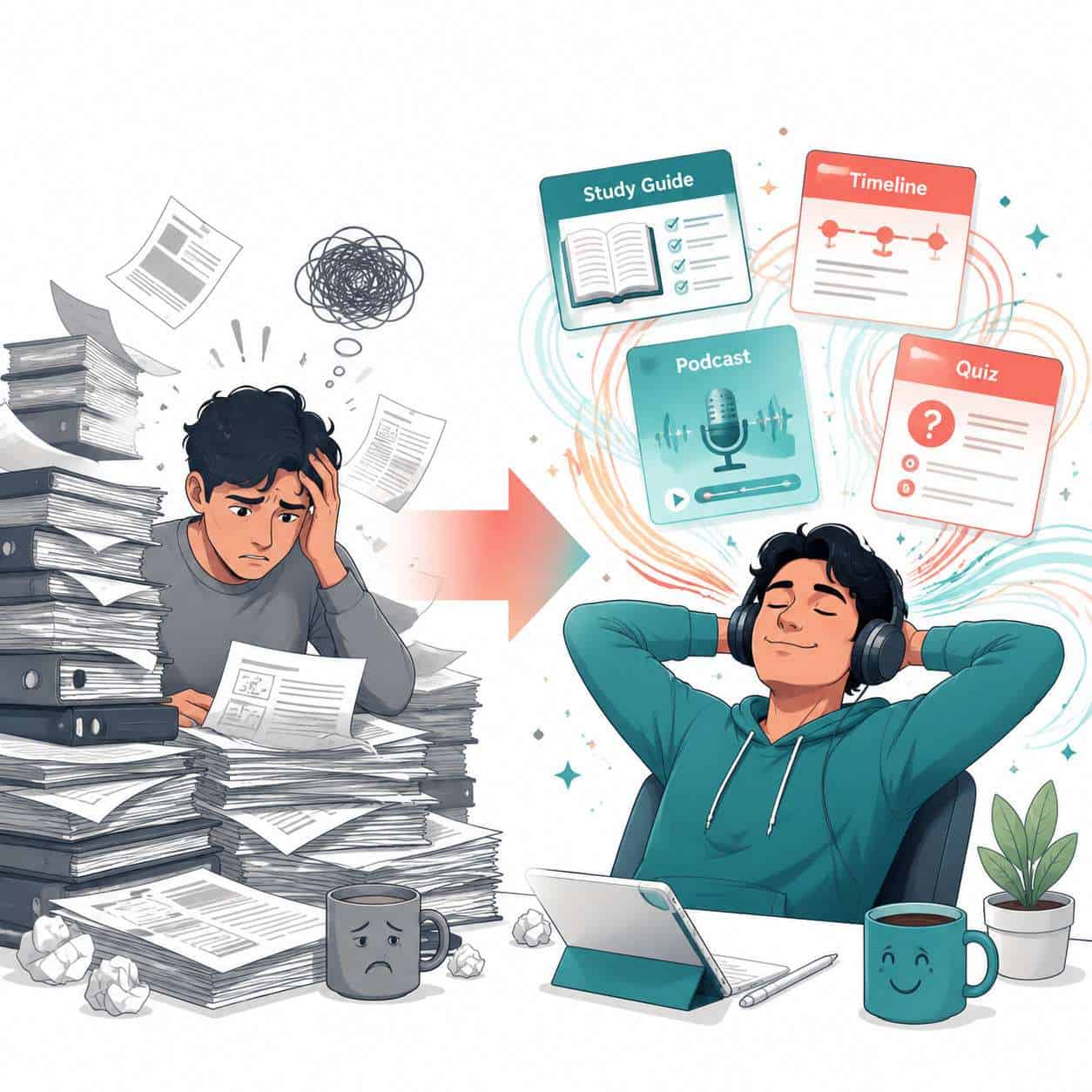
- Ignoring the structured notes step. Converting messy sources into study guides or timelines first, then generating audio from those notes, produces significantly cleaner episodes.
For broader guidance on working with AI content tools, our comprehensive guide to AI-powered content generation covers best practices that apply across platforms.
Can NotebookLM Handle Multiple Languages or Just English?
NotebookLM supports multiple languages because it’s built on Google’s Gemini model, which has multilingual capabilities. However, the Audio Overview feature works best in English as of 2026. You can upload sources in other languages, and the Chat panel will process them, but the generated podcast audio defaults to English-speaking AI hosts.
Google has been expanding language support incrementally. If your primary need is non-English audio output, check the current feature availability at notebooklm.google [2] before committing to a workflow.
What Technical Problems Might You Encounter?
The most common issues are processing failures with very large files, audio generation timeouts, and inconsistent quality when sources contain lots of tables, charts, or non-text elements.
Known issues and workarounds:
- Large PDFs stalling: Break documents over 100 pages into smaller chunks before uploading
- Audio generation failing: Reduce the number of active sources or simplify your customization instructions
- AI hosts misinterpreting data: Tables and charts don’t translate well to conversational audio. Convert key data points to plain text summaries first
- Repetitive content: If the AI hosts keep circling the same point, your sources likely repeat the same information. Deduplicate before uploading
If you’re integrating AI tools into a broader website workflow, you might also find value in understanding AI-powered chatbot integration and advanced WordPress automation strategies for distributing your generated content.

How Does NotebookLM Protect User Privacy and Content Ownership?
Google states that NotebookLM sources are private to each user’s notebook and are not used to train AI models [2]. Your uploaded documents stay within your notebook and aren’t shared with other users or made publicly accessible.
Content you generate (including Audio Overviews) can be downloaded and used as you see fit. However, you should review Google’s current terms of service for any updates to content licensing, especially if you plan to monetize generated audio.
Key privacy points:
- Sources are not used for model training
- Notebooks are private by default
- Generated audio can be downloaded for offline use
- Age restriction: advanced AI features require users to be 18+
Are There Free Alternatives to NotebookLM for AI Storytelling?
Yes, but none offer the same combination of source-grounded conversation and free access. Most alternatives either cost money or produce single-voice narration rather than two-host discussions.
Alternatives to consider:
- Speechify offers AI podcast creation but operates on a subscription model [7]
- ElevenLabs provides high-quality voice synthesis but requires scripting your own content
- Google’s own text-to-speech can read text aloud but doesn’t create conversational formats
- ChatGPT + TTS can generate scripts and read them, but lacks the integrated two-host format
NotebookLM remains the only free tool that automatically generates a two-person conversational podcast from uploaded sources [1][10]. If you’re exploring the broader AI content ecosystem, our AI archives cover additional tools and workflows.
Conclusion
NotebookLM’s Audio Overview feature has matured into a genuinely useful tool for turning dense source material into conversational audio. It’s not replacing professional podcasters or narrative storytelling, but for educators, researchers, students, and content creators who need to make information more accessible, it’s hard to beat, especially at the price of free.
Your next steps:
- Go to notebooklm.google and create your first notebook [2]
- Upload 3–5 related sources on a topic you know well (so you can evaluate quality)
- Generate a structured note first (study guide or FAQ), then create the Audio Overview from that note
- Customize the output using format, length, and persona settings
- Listen critically and compare the AI discussion to your own understanding of the sources
- Iterate: Adjust your sources and customization until the output matches your needs
The Notebook LM Podcast feature for revolutionizing digital storytelling through AI-powered conversations is still evolving. The March 2026 Studio update signals that Google sees this as a core product direction, not a novelty. Now is the time to build it into your workflow.
FAQ
How long does it take to generate an Audio Overview? Typically 2–5 minutes depending on the number and size of your sources. Larger source sets take longer.
Can I edit the generated audio? Not within NotebookLM. You can download the audio file and edit it in external software like Audacity or Adobe Audition.
How many sources can I use per notebook? Up to 50 sources per notebook, including PDFs, Google Docs, websites, YouTube videos, and pasted text [4].
Do the AI hosts sound robotic? No. Multiple reviewers describe the voices as surprisingly natural, with convincing conversational cadence and back-and-forth [8].
Can I choose different AI host voices? As of 2026, voice selection is limited. Google has been expanding customization options, but you can’t yet pick from a wide voice library.
Is NotebookLM available outside the United States? Yes, NotebookLM is available in multiple countries, though some features may roll out to different regions at different times [2].
Can I use NotebookLM for commercial purposes? You can download and use the generated audio, but review Google’s terms of service for specifics on commercial use and attribution.
Does it work on mobile? NotebookLM is primarily a web-based tool. It works in mobile browsers but is optimized for desktop use.
What file formats does it accept? PDFs, Google Docs, Google Slides, website URLs, YouTube URLs, copied text, and audio files.
Can students under 18 use it? Students under 18 can access some NotebookLM features in educational deployments, but Audio Overview and other advanced AI features are restricted to users 18 and older.
How accurate is the AI discussion? Because it uses retrieval-augmented generation, the discussion stays grounded in your sources. However, it can occasionally misemphasize or oversimplify points, so always review the output [8].
References
[1] Googles Notebooklm Is Still The Most Slepton Free – https://www.reddit.com/r/PromptEngineering/comments/1rvhlf3/googles_notebooklm_is_still_the_most_slepton_free/ [2] notebooklm.google – https://notebooklm.google [3] Watch – https://www.youtube.com/watch?v=nLheubDuFyY [4] Notebooklm Audio Overviews – https://blog.google/innovation-and-ai/products/notebooklm-audio-overviews/ [6] 6tqbkokj2de531s000udjwk4q30zg6 – https://www.amplifimedia.com/blogstein-1/6tqbkokj2de531s000udjwk4q30zg6 [7] Top Platforms To Make Ai Podcasts – https://speechify.com/blog/top-platforms-to-make-ai-podcasts/ [8] Notebooklm Audio Overview – https://simonwillison.net/2024/Sep/29/notebooklm-audio-overview/ [9] Watch – https://www.youtube.com/watch?v=m0DUstFWKbs [10] Best Article To Podcast Ai Tools 2026 Edition – https://ampifire.com/blog/best-article-to-podcast-ai-tools-2026-edition/