Last updated: May 22, 2026
Quick Answer
NotebookLM is Google’s AI-powered research assistant that works exclusively with documents you upload, not the open web. It generates summaries, audio overviews, slide decks, and structured notes from your own sources like PDFs, Google Docs, YouTube videos, and now EPUBs. The free tier supports roughly 50 sources per notebook and up to 500,000 words, making it a practical tool for professionals, students, and researchers who need to synthesize large volumes of information quickly [4].
Key Takeaways
- NotebookLM is free for any Google account holder, with expanded limits available through Google One AI Premium upgrades [4].
- Unlike ChatGPT or Gemini, NotebookLM answers only from your uploaded sources, reducing hallucination risk and making citations more reliable [9].
- As of April 2026, it supports EPUB uploads, letting users ingest full ebooks and textbooks [3].
- The tool generates artifacts like reports, summaries, and audio “podcasts” directly from your documents [2].
- Students with .edu emails may access a premium version (valued around $19.99/month) for free [4].
- Deep Gemini integration allows you to use a NotebookLM notebook as a data source inside Gemini chat [5].
- It’s best suited for research-heavy roles: academics, lawyers, consultants, and content creators.
- It’s not ideal for real-time collaboration or users who need offline access.
What Exactly Is NotebookLM and How Does It Work?
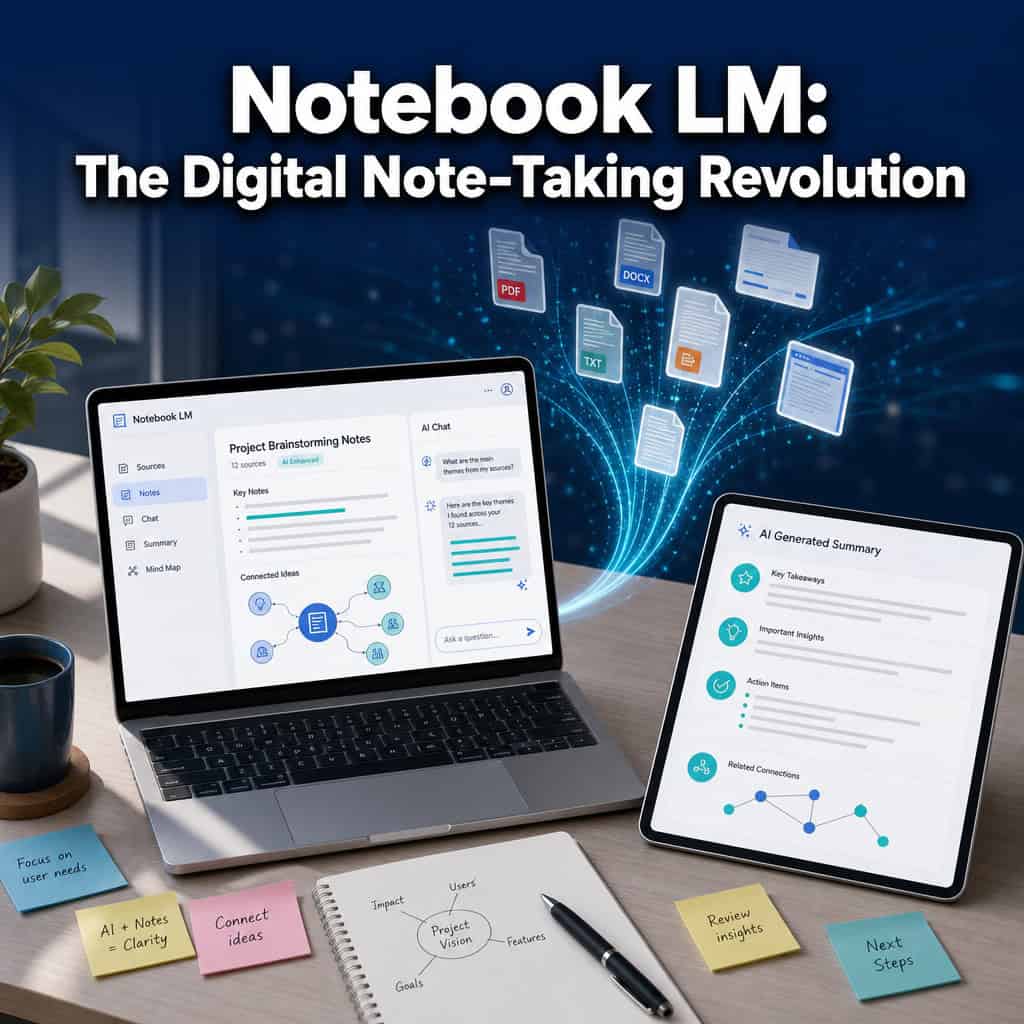
NotebookLM is a free AI research assistant built by Google that lets you upload documents and then ask questions, generate summaries, and create structured outputs based solely on those materials. It launched in 2023 and has expanded significantly, adding mobile apps for iOS and Android in 2025 and a major interface redesign in early 2026 [2].
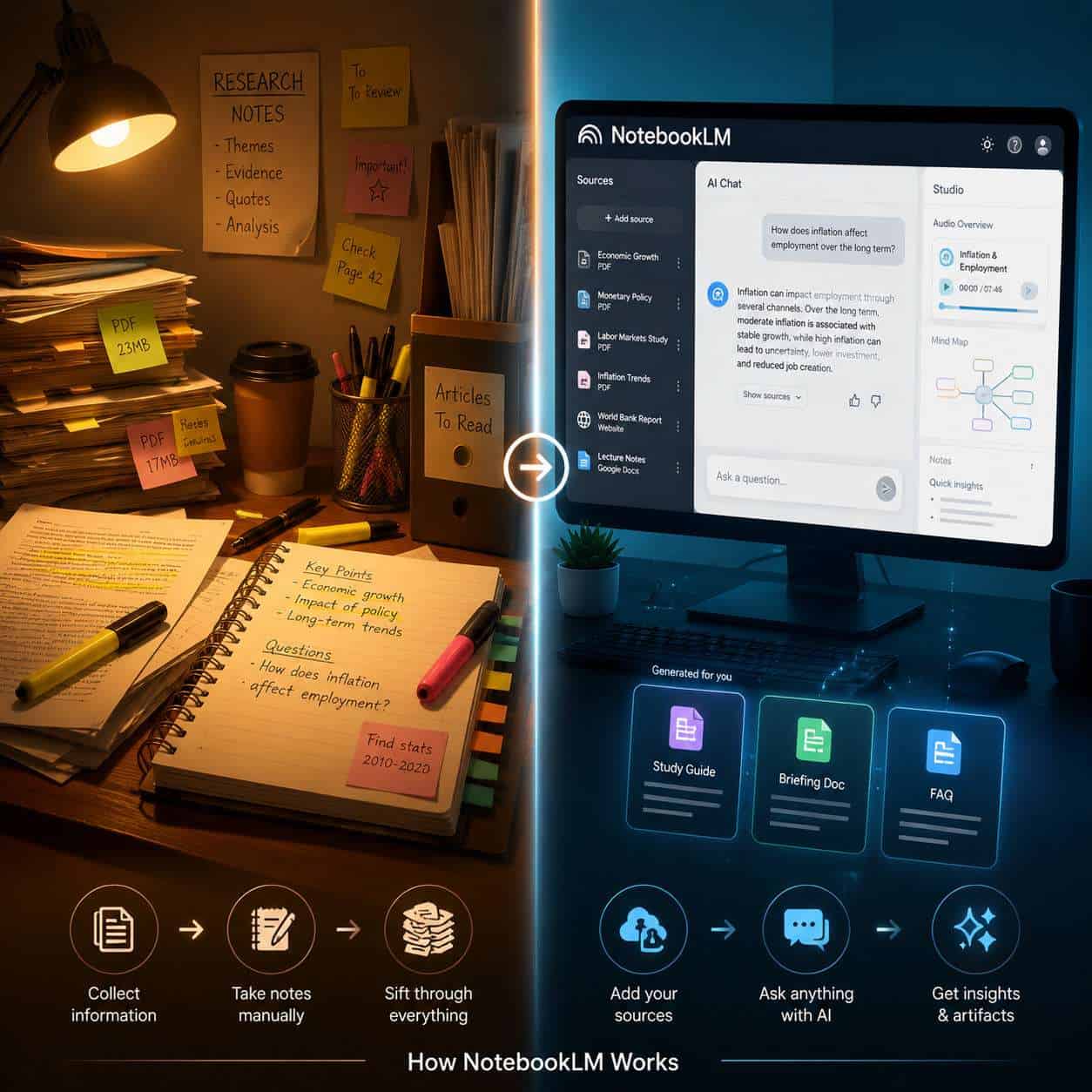
Here’s how it works in practice:
- Create a notebook in your Google account.
- Add sources: Upload PDFs, paste URLs, link Google Docs, add YouTube videos, or (as of April 2026) upload EPUB files [3].
- Chat with your sources: Ask questions, and NotebookLM generates answers grounded in your uploaded materials, with inline citations pointing back to specific passages.
- Generate artifacts: Create summaries, study guides, FAQs, slide decks, data tables, and audio overviews directly from the chat window [3].
The March 2026 redesign introduced a clearer “Sources” panel on the left and improved Studio tools, shifting NotebookLM from what Jeff Su described as a “cool AI demo” into a mature productivity product [2][1].
A key distinction: NotebookLM doesn’t search the internet. Every answer comes from what you’ve provided. This makes it fundamentally different from general-purpose AI chatbots, and it’s why many professionals trust it for work involving proprietary or sensitive documents.
Common mistake: Uploading too few sources and expecting comprehensive answers. NotebookLM is only as good as the materials you feed it. Start with at least 5-10 relevant documents for meaningful synthesis.
How Is NotebookLM Different from Evernote or Notion?
NotebookLM isn’t a traditional note-taking app. It’s an AI research assistant that generates insights from your documents, while Evernote and Notion are primarily organizational tools where you write and store notes yourself.
| Feature | NotebookLM | Evernote | Notion |
|---|---|---|---|
| Primary function | AI-powered document analysis | Note storage and organization | All-in-one workspace |
| AI capabilities | Source-grounded Q&A, artifact generation, audio overviews | Basic AI search and writing | AI writing assistant, autofill |
| Source handling | Upload PDFs, EPUBs, URLs, videos as “sources” | Clip web pages, attach files | Embed files, link databases |
| Collaboration | Limited (share notebooks) | Shared notebooks, teams | Real-time collaboration, wikis |
| Offline access | No | Yes (premium) | Yes (partial) |
| Free tier | ~50 sources/notebook, 500K words | Limited notes and storage | Generous for individuals |
| Best for | Research synthesis, document analysis | Personal note organization | Team project management |
Choose NotebookLM if your primary need is making sense of large document collections. Choose Notion if you need a team workspace with databases and project tracking. Choose Evernote if you want simple, reliable note capture with offline access.
If you’re exploring AI-powered tools for content work, NotebookLM fits into a broader ecosystem of AI productivity tools rather than replacing your existing note-taking setup.
How Much Does NotebookLM Cost Compared to Other Note-Taking Apps?
NotebookLM’s free tier is generous enough for most individual users. You get approximately 50 sources per notebook, up to 500,000 words per notebook, and access to the audio overview feature at no cost [4].
Pricing breakdown:
- Free tier: ~50 sources/notebook, audio overviews, artifact creation
- Google One AI Premium: Expands to roughly 300-600 sources per notebook, plus access to premium features like cinematic video overviews [4]
- Education: Students with .edu emails reportedly get premium access valued at ~$19.99/month for free [4]
- Workspace tiers: Cinematic video overviews are gated to Business Standard/Plus and Enterprise Standard/Plus plans [3]
For comparison, Notion’s free tier is generous for personal use but charges $10/user/month for teams. Evernote’s free tier is restrictive (limited notes), with personal plans starting around $15/month. NotebookLM’s free tier offers more AI capability than either competitor’s paid plans, though it serves a different purpose.
Decision rule: If you’re a solo researcher or student, the free tier is likely sufficient. Upgrade only if you regularly work with more than 50 sources in a single project.
What Kind of Professionals Benefit Most from NotebookLM?
Professionals who regularly synthesize large volumes of text-based information gain the most from NotebookLM. This includes academics, lawyers, consultants, content creators, and anyone doing literature reviews or policy analysis.

Specific use cases:
- Academics and researchers: Upload dozens of journal articles and ask NotebookLM to identify themes, contradictions, or gaps across the literature [9]. The Effortless Academic review specifically calls it “ideal for academics and students” doing literature review.
- Lawyers and compliance professionals: Ingest contracts, regulations, or case law and query specific provisions. The April 2026 EPUB support makes ingesting legal treatises and standards documents much easier [3].
- Consultants: Upload client documents, industry reports, and meeting transcripts to quickly generate briefing materials.
- Content creators: Turn research into structured outlines, podcast scripts, or article drafts. The audio overview feature creates a two-host “podcast” from your sources [4].
- Students: Upload course readings and generate study guides, practice questions, and summaries.
If you’re a professional who also works with AI-powered content generation tools, NotebookLM complements those workflows by handling the research and synthesis stage.
Who Should Probably Avoid Using NotebookLM?
NotebookLM isn’t the right tool for everyone. If you need real-time team collaboration, offline access, or a general-purpose writing environment, other tools serve you better.
Skip NotebookLM if you:
- Need real-time collaborative editing (use Notion or Google Docs instead)
- Work primarily offline or in low-connectivity environments
- Want a traditional note-taking app for quick capture and organization
- Need to query the open internet rather than specific documents
- Require deep integrations with non-Google ecosystems
- Prefer visual/spatial note-taking (mind maps, whiteboards)
One reviewer noted that NotebookLM excels for research and analysis but warned against overusing the audio conversation feature, calling it a “niche tool” best suited for managing large volumes of information rather than everyday note-taking [9].
What AI Features Make NotebookLM Unique from Other Note-Taking Tools?
Three AI features set NotebookLM apart: source-grounded answers with inline citations, artifact generation from chat, and audio overviews. No other note-taking tool combines all three.
Source-grounded Q&A: Every answer includes citations pointing to specific passages in your uploaded documents. This is fundamentally different from ChatGPT or Gemini, which draw from training data and can hallucinate sources [9].
Artifact creation: As of the March 2026 update, you can generate documents, summaries, study materials, slide decks, and data tables directly from the chat window without leaving the conversation view [3]. This turns NotebookLM from a Q&A tool into a production tool.
Audio overviews: NotebookLM converts your research into a two-host conversational “podcast” that summarizes key findings. This feature is available on the free tier [4].
Gemini integration: You can now select a NotebookLM notebook as a data source when chatting in Gemini, combining NotebookLM’s precise source-grounded answers with Gemini’s broader brainstorming capabilities [5].
For professionals already using AI design and automation tools, NotebookLM adds an AI research layer that feeds into creative and strategic workflows.
Can NotebookLM Integrate with Google Workspace or Microsoft Teams?
NotebookLM integrates deeply with Google Workspace but has limited direct integration with Microsoft Teams or other non-Google platforms.
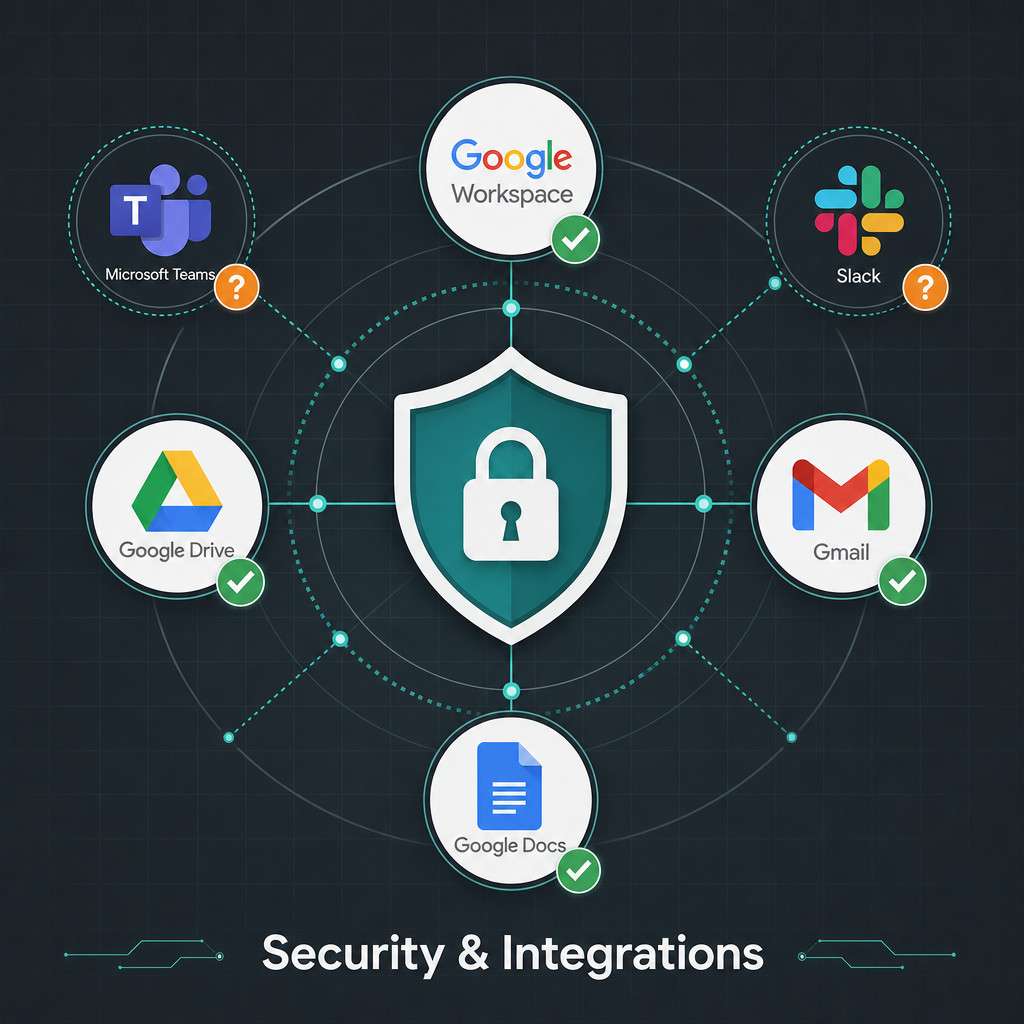
Google Workspace integration:
- Pull sources directly from Google Drive and Google Docs
- Available to all Google Workspace customers and personal Google accounts [3]
- Use NotebookLM notebooks as data sources inside Gemini chat [5]
- Works alongside Gmail, Google Slides, and other Workspace apps
Microsoft Teams / other platforms:
- No native Microsoft Teams integration as of May 2026
- No direct Slack, Notion, or Zapier connectors
- Workaround: Export artifacts as documents and share via any platform
Common mistake: Assuming NotebookLM will replace your existing project management or communication stack. It’s a research tool that feeds into those workflows, not a replacement for them. If you’re managing professional workflows, tools like Framer project management templates handle that side of things.
Is NotebookLM Good for Academic Research or Just Business Use?
NotebookLM is excellent for academic research, arguably even better suited for it than business use. Its source-grounding design means every answer traces back to specific passages in your uploaded papers, which is exactly what citation-heavy academic work demands.
The free tier supports up to 50 sources per notebook, which covers most literature review projects. Paid plans expand this to around 300 sources, enough for comprehensive systematic reviews. Users can save model responses as notes linked back to their source passages, creating a chain of evidence from raw material to synthesis.
Academic-specific strengths:
- Upload journal PDFs, textbook EPUBs, lecture YouTube videos, and course slides into one notebook
- Ask cross-source questions like “What do sources 3, 7, and 12 agree on regarding X?”
- Generate structured literature review outlines
- Create study guides and practice exam questions
For students and academics exploring broader AI-powered productivity strategies, NotebookLM is one of the most practical tools available in 2026 for research-specific workflows.
How Secure Are My Notes in NotebookLM?
NotebookLM processes your documents within Google’s infrastructure, and your uploaded sources are not used to train Google’s AI models. This is a deliberate design choice that makes it more suitable for proprietary or sensitive documents than general-purpose chatbots.
Security considerations:
- Data stays within your Google account
- Sources are not used for model training (per Google’s stated policy)
- Workspace administrators can manage access and data policies
- Enterprise customers get additional data governance controls through Workspace tiers [3]
Edge case: If you’re in a regulated industry (healthcare, finance, legal), verify that your organization’s Google Workspace agreement covers your specific compliance requirements before uploading sensitive client data. The tool’s security is only as strong as your Workspace configuration.
What Are the Most Common Mistakes People Make When Setting Up NotebookLM?
The biggest mistake is treating NotebookLM like a general AI chatbot instead of a source-specific research tool. Here are the errors I see most often:
- Uploading too few sources: With only 1-2 documents, you’re barely scratching NotebookLM’s capabilities. Aim for 5-50 sources per project.
- Mixing unrelated topics in one notebook: Keep notebooks focused. A notebook about “Q1 marketing strategy” shouldn’t also contain your vacation planning PDFs.
- Ignoring the citation links: The inline citations are NotebookLM’s superpower. Always click through to verify the source passage.
- Not saving useful responses as notes: You can save AI-generated answers as notes within the notebook, building a curated knowledge base over time.
- Expecting internet search: NotebookLM only knows what you upload. If you need web-based answers, use Gemini or a search engine.
- Skipping the audio overview feature: Many users don’t realize the free tier includes podcast-style audio summaries of their research [4].
Are There Free Alternatives to NotebookLM That Offer Similar Features?
No free tool currently matches NotebookLM’s combination of source-grounded AI, artifact generation, and audio overviews. But several alternatives cover parts of its functionality.
| Alternative | Free Tier | AI Q&A on Documents | Audio Overviews | Best For |
|---|---|---|---|---|
| ChatGPT (free) | Yes | Yes (file upload) | No | General AI chat with documents |
| Perplexity | Yes | Yes (web-sourced) | No | Web research with citations |
| Notion AI | Limited | Yes (within Notion) | No | Team workspace with AI |
| Obsidian + plugins | Yes | Community plugins | No | Local-first, privacy-focused notes |
| Elicit | Limited | Yes (academic papers) | No | Academic literature review |
If you’re evaluating broader no-code and AI-powered platforms for your workflow, NotebookLM fits as the research layer alongside design and development tools.
What Technical Requirements Do I Need to Use NotebookLM Effectively?
NotebookLM requires a Google account and a modern web browser. That’s it for the basics. There’s no software to install for the web version.
Minimum requirements:
- Google account (personal or Workspace)
- Modern browser: Chrome, Firefox, Safari, or Edge (latest versions)
- Stable internet connection (no offline mode)
- Mobile: iOS or Android app available since 2025
For best results:
- Upload sources in clean formats (well-formatted PDFs, not scanned images without OCR)
- Use Google Docs for editable source material
- Keep individual source files under reasonable size (the 500,000 word per notebook limit applies across all sources) [4]
- For EPUB uploads, ensure files are standard format without heavy DRM [3]
If you’re building professional workflows that combine research with design, consider how NotebookLM feeds into tools like Figma for UI/UX design or AI website builders in your production pipeline.
Conclusion
NotebookLM has matured from an experimental AI demo into a genuinely useful research tool in 2026. Its core strength is simple: it answers questions using only the documents you provide, with citations you can verify. That makes it more trustworthy than general-purpose chatbots for professional and academic work.
Your next steps:
- Start small: Create a free notebook at notebooklm.google.com and upload 5-10 documents from a current project.
- Test the Q&A: Ask specific questions that span multiple sources to see how synthesis works.
- Try artifact generation: Use the chat window to create a summary or study guide from your materials [3].
- Experiment with audio overviews: Generate a podcast-style summary to experience a different way of reviewing your research [4].
- Evaluate the free tier limits: Most professionals won’t need to upgrade unless they’re working with more than 50 sources per project.
NotebookLM won’t replace your note-taking app, your project management tool, or your writing environment. But for the specific task of making sense of large document collections, it’s the most capable free tool available in 2026.
Frequently Asked Questions
Is NotebookLM free to use? Yes. NotebookLM is free for any Google account holder. The free tier includes approximately 50 sources per notebook, 500,000 words per notebook, and audio overview generation [4].
Can NotebookLM read scanned PDFs? It works best with text-based PDFs. Scanned documents without OCR (optical character recognition) may not be readable. Run scanned documents through an OCR tool before uploading.
Does NotebookLM use my documents to train its AI? No. Google states that uploaded sources are not used to train AI models. Your documents stay within your Google account.
Can I share a NotebookLM notebook with colleagues? Yes, you can share notebooks with other Google account holders, similar to sharing Google Docs. However, real-time collaborative editing within the notebook is limited compared to tools like Notion.
What file types does NotebookLM support? As of April 2026: Google Docs, PDFs, EPUBs, web URLs, YouTube videos, Google Slides, and audio files [3].
How is NotebookLM different from using Gemini directly? NotebookLM restricts answers to your uploaded sources, providing grounded citations. Gemini draws from its broader training data and the web. You can use both together by selecting a NotebookLM notebook as a source in Gemini [5].
Can I use NotebookLM on my phone? Yes. Mobile apps for iOS and Android have been available since 2025.
Is there a limit to how many notebooks I can create? The free tier allows multiple notebooks. Specific limits may vary, but most individual users report no practical cap on notebook count, only on sources and words per notebook.
Does NotebookLM work with Microsoft Word files? Not directly. Convert Word documents to PDF or Google Docs format before uploading.
Can NotebookLM generate citations in APA or MLA format? NotebookLM provides inline citations pointing to source passages, but it doesn’t automatically format them in academic citation styles. You’ll need to format final citations manually or use a citation manager.
References
[1] Watch – https://www.youtube.com/watch?v=_uXnyhrqmsU [2] Notebooklm Changed Completely Heres What Matters In 2026 – https://www.jeffsu.org/notebooklm-changed-completely-heres-what-matters-in-2026/ [3] Google Notebook Lm Updates April 2026 – https://teachercast.net/edtech/google-notebook-lm-updates-april-2026/ [4] Googles Notebooklm Is Still The Most Slepton Free – https://www.reddit.com/r/PromptEngineering/comments/1rvhlf3/googles_notebooklm_is_still_the_most_slepton_free/ [5] Watch – https://www.youtube.com/watch?v=45EfWnHzw94 [9] How I Ve Improved My Research Analysis And Note Taking With Notebooklm – https://stealthesethoughts.beehiiv.com/p/how-i-ve-improved-my-research-analysis-and-note-taking-with-notebooklm