Last updated: May 22, 2026
Quick Answer: NotebookLM and Gemini are both Google AI tools, but they serve different purposes. NotebookLM is a source-grounded research assistant that only works with documents you upload, making it ideal for deep analysis of specific materials. Gemini is a general-purpose AI with internet access, better suited for brainstorming, creative tasks, and broad information retrieval. Choose NotebookLM when accuracy to your sources matters most; choose Gemini when you need wide-ranging knowledge or creative output.
Key Takeaways
- NotebookLM works only with your uploaded sources, so every answer traces back to a specific document you provided [10].
- Gemini accesses the entire internet and integrates across Google Workspace apps like Docs, Gmail, and Sheets [7].
- NotebookLM now supports up to 10,000 characters of persistent persona instructions per notebook, making it function like a programmable research agent [5].
- As of early 2026, Gemini can mount NotebookLM notebooks as data sources, bridging the gap between both tools [5][8].
- NotebookLM Plus is a core Google Workspace service with enterprise-grade admin controls [9].
- For academic writing and citation-heavy work, NotebookLM is the stronger choice because it grounds every response in your materials [10].
- Gemini is better for ideation, creative writing, and tasks requiring real-time web information [7].
- Both tools are free at their base tiers, though advanced features require Workspace subscriptions.
What Exactly Is NotebookLM and How Does It Work?
NotebookLM is Google’s AI research assistant that analyzes only the documents you upload. Unlike general chatbots, it doesn’t pull from the open web. Every response it generates is grounded in your specific source materials.
Here’s how it works in practice: you create a notebook, upload sources (PDFs, Google Docs, web pages, YouTube videos, and now EPUB files [3]), and then ask questions or generate outputs based solely on those materials. The tool cites the exact passages it draws from, so you can verify every claim.
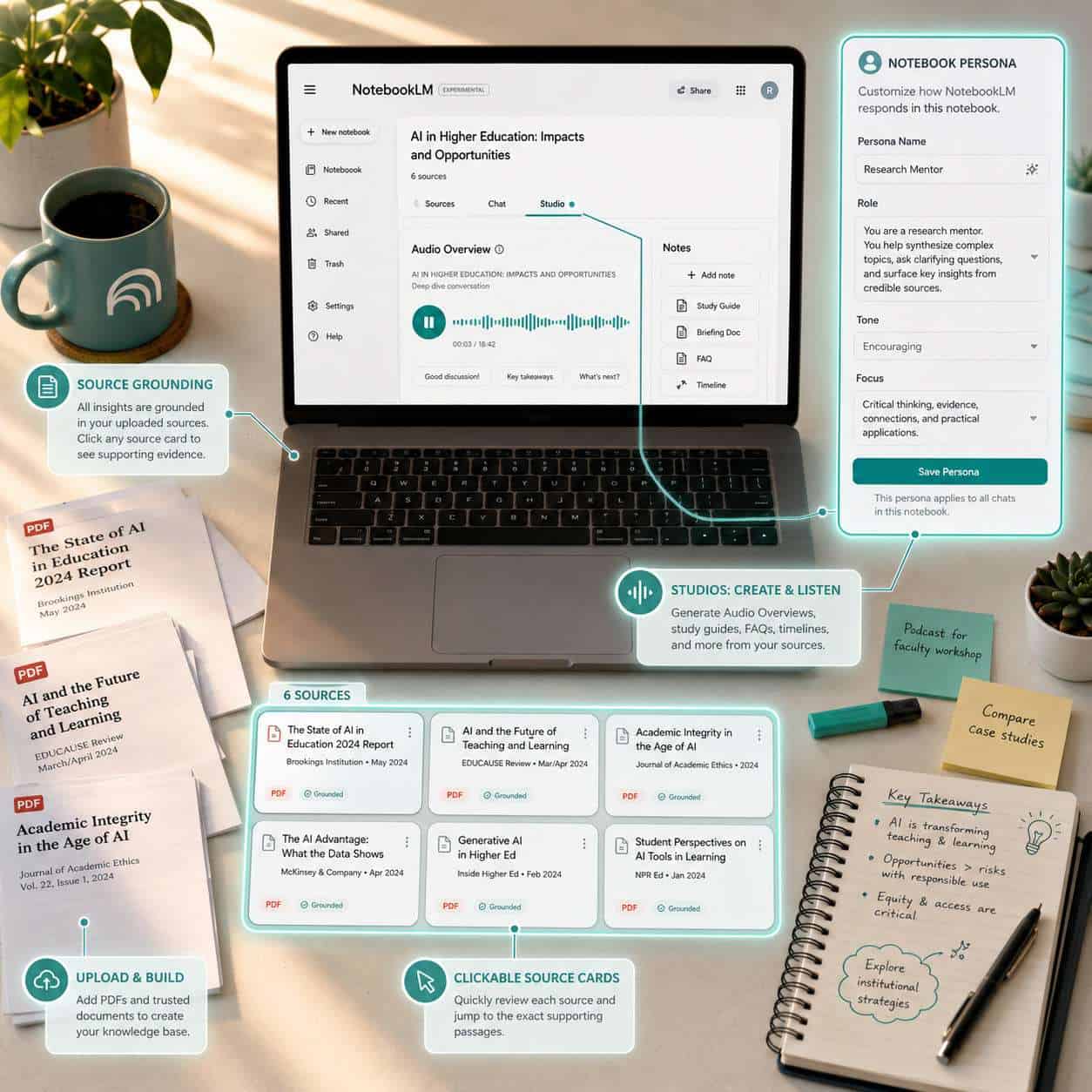
In mid-March 2026, NotebookLM received a major wave of updates that changed its interface significantly [1][2]. The most notable additions include:
- Studios: Higher-level workflows that turn your source packs into structured articles, scripts, study guides, and audio overviews [4].
- Notebook-level personas: You can configure up to 10,000 characters of persistent instructions (e.g., “act like a PhD economics tutor”) that apply to all chat and Studio outputs in that notebook [5].
- EPUB support: Added in April 2026, this lets you upload standard e-book files directly [3].
- Interactive Audio: A feature that generates podcast-style audio discussions of your sources [4].
CNET called NotebookLM “possibly the best Gemini-powered product released to date” because of its strict source-grounding approach [10]. If you’re working with a defined set of documents and need reliable, traceable answers, this is where NotebookLM shines.
For a broader look at how AI tools are changing content workflows, see our comprehensive guide to AI-powered content generation tools.
What Are the Key Differences Between NotebookLM and Gemini?
The core difference is scope. NotebookLM is a specialist that becomes an expert on your private, uploaded content. Gemini is a generalist that accesses the entire internet for its knowledge [7].
A Yahoo Tech columnist summarized it well in April 2026: “NotebookLM is better for grounded research and understanding complex information. Gemini Notebooks is better for creating.”
| Feature | NotebookLM | Gemini |
|---|---|---|
| Knowledge source | Only your uploaded documents | Internet + Google Workspace + uploaded files |
| Citation style | Inline citations to specific source passages | General references, less precise sourcing |
| Best for | Deep analysis, academic research, document review | Brainstorming, creative writing, broad queries |
| Audio features | Podcast-style overviews from your sources | PDF/audio summaries via Drive |
| Persona config | 10,000-character persistent instructions [5] | System instructions, but less source-constrained |
| Workspace integration | Standalone tool (now a core Workspace service) [9] | Embedded in Docs, Gmail, Sheets, Slides |
| File types | PDFs, Docs, web pages, YouTube, EPUB [3] | PDFs, Drive files, web content |
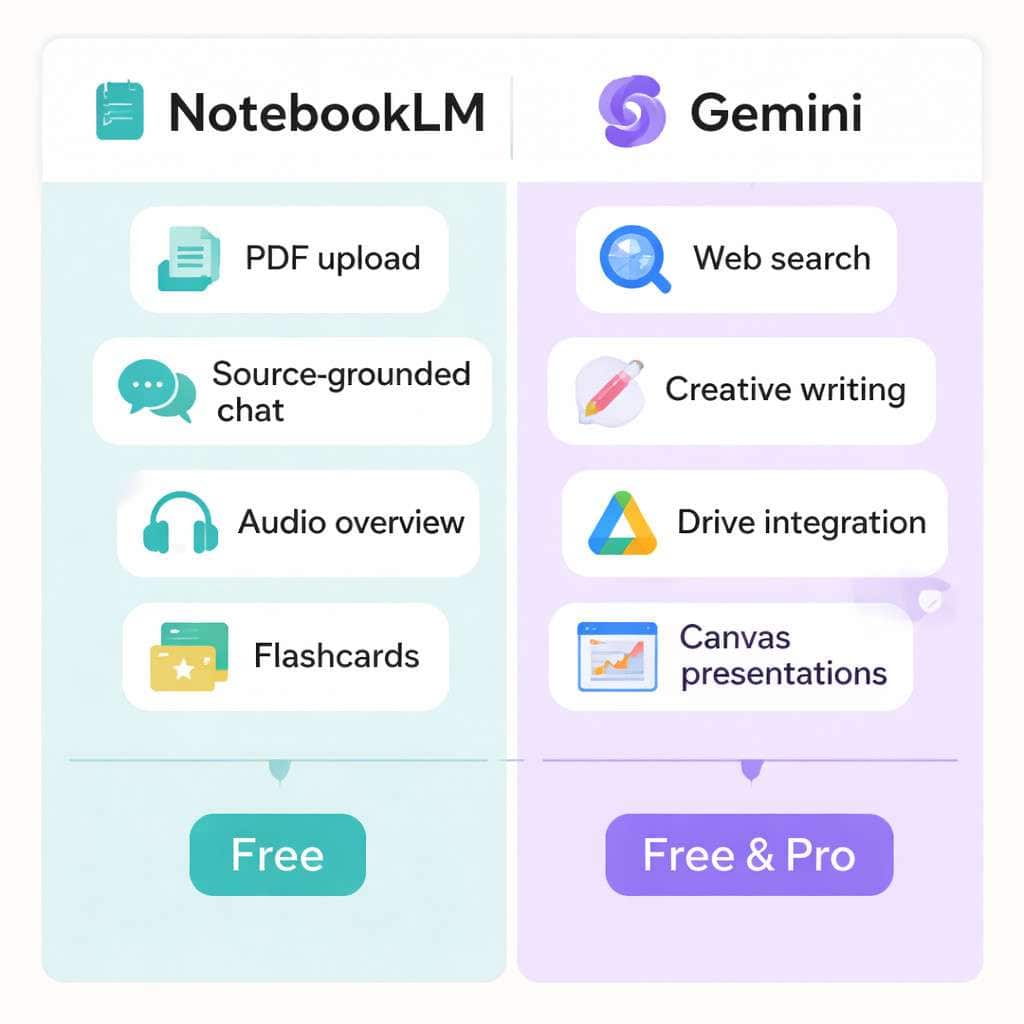
One important development: as of early 2026, Google rolled out an integration where Gemini can use NotebookLM notebooks as a data source inside the Gemini app [5][8]. You can mount multiple notebooks simultaneously in Gemini to brainstorm with the broader model while staying grounded in your curated sources. This convergence means the two tools are becoming complementary rather than strictly competitive.
Enterprise IT provider Insight recommends using Gemini for creative tasks and brainstorming, and NotebookLM for deep analytical work on a defined corpus [7]. That’s a practical decision rule worth following.
How Much Does Gemini Cost Compared to NotebookLM?
Both tools offer free access at their base tiers, but the premium features differ in pricing and availability.
NotebookLM is free for personal Google accounts. NotebookLM Plus became a core Google Workspace service in February 2025, available across multiple Workspace tiers with admin controls and enterprise support [9]. If you have a Google Workspace Business, Enterprise, or Education plan, you likely already have access to NotebookLM Plus.
Gemini follows a similar model. The base Gemini app is free. Gemini Advanced (with the most capable models, longer context windows, and Deep Research) requires a Google One AI Premium subscription, typically around $20/month. Gemini is also bundled into various Workspace plans.
Decision rule: If you already pay for Google Workspace, check your admin console — you may have both tools included. If you’re on a free account, both base versions are accessible, but NotebookLM’s free tier is arguably more feature-complete for research tasks.
Which AI Research Tool Is Better for Academic Writing?
NotebookLM is the stronger choice for academic writing. Because it only draws from your uploaded sources, every claim it generates can be traced to a specific passage in your materials [10]. This source-grounding behavior is exactly what academic work demands.
Here’s why it works well for academic contexts:
- Traceable citations: Each response includes inline references to the exact source and passage.
- No hallucinated facts: Since it doesn’t access the web, it can’t invent statistics or cite nonexistent studies.
- Persona instructions: You can tell it to “respond as a peer reviewer in computational linguistics” and it will maintain that frame across all interactions [5].
- Study aids: The April 2026 update added improved flashcard and quiz features, specifically useful for learners [3].
Gemini, by contrast, is better for the earlier stages of academic work — literature discovery, brainstorming research questions, and drafting outlines when you need broad knowledge. But once you’ve gathered your sources and need to synthesize them accurately, switch to NotebookLM.
If you’re also looking to improve how your academic or research content performs online, our guide on AI-powered content optimization covers practical strategies.
Can NotebookLM Handle Large PDF Documents Like Gemini Can?
Yes, NotebookLM handles large PDFs effectively, and its March 2026 updates improved document processing significantly [1]. You can upload multiple large documents into a single notebook and query across all of them simultaneously.
Both tools support PDF uploads, but they process them differently:
- NotebookLM indexes your PDFs locally within your notebook. It reads the full content and lets you ask cross-document questions. The April 2026 update also added EPUB support [3].
- Gemini can summarize PDFs uploaded directly or stored in Google Drive. Its Deep Research feature can ground responses in Drive documents, which is useful if your files are already in Google’s ecosystem.
Edge case: If your PDF is image-based (scanned documents without OCR text), both tools may struggle. Run OCR processing first for best results.
Is NotebookLM Good for Students or Just Professional Researchers?
NotebookLM works well for both students and professional researchers. Google specifically designed recent updates with learners in mind, including improved flashcard and quiz features for users under 18 [3].
For students, NotebookLM is useful for:
- Uploading lecture notes and textbook chapters, then asking questions to test understanding
- Generating study guides and flashcards from course materials
- Getting explanations of complex concepts grounded in assigned readings
- Creating audio overviews to review material while commuting
For professional researchers, the tool excels at:
- Synthesizing findings across dozens of uploaded papers
- Maintaining consistent analytical frameworks via persona instructions [5]
- Generating structured article drafts from source packs using Studios [4]
- Cross-referencing claims across multiple documents
Creator-educator Jeff Su noted that the 2026 updates shifted NotebookLM from a niche experiment into a primary research environment for many knowledge workers [1].
Does Gemini Have Better Citation and Source Tracking?
No. NotebookLM has significantly better citation and source tracking for user-provided materials. Every response includes inline citations pointing to specific passages in your uploaded documents [10].
Gemini provides source links when it pulls information from the web, but these references are less precise. You’ll get a link to a webpage, not a pointer to the exact paragraph that supports a claim. For research that requires verifiable sourcing, this difference matters.
That said, Gemini’s citation approach is adequate for general research and fact-checking against web sources. If you need to verify whether a claim is supported by the broader literature (beyond your uploaded documents), Gemini’s web access is the better tool for that specific task.
Which Tool Is More Beginner-Friendly?
Gemini is more beginner-friendly because it works like a standard chatbot — type a question, get an answer. There’s no setup required beyond having a Google account.
NotebookLM has a slightly steeper learning curve because you need to:
- Create a notebook
- Upload relevant sources
- Understand that responses are limited to those sources
However, once you grasp that workflow (which takes about five minutes), NotebookLM is straightforward. The 2026 interface updates made navigation more intuitive [1][2].
Common mistake for beginners: Uploading too few sources into NotebookLM and then being frustrated by limited answers. The tool can only work with what you give it. Start with at least 3-5 substantial documents for a useful experience.

Common Mistakes People Make When Using AI Research Tools
Even experienced users make these errors. Avoiding them will save you time and improve output quality.
- Using Gemini when you need source fidelity. If your work requires traceable citations, Gemini’s web-sourced responses aren’t reliable enough. Use NotebookLM instead [7].
- Uploading irrelevant sources to NotebookLM. The tool’s quality depends entirely on your inputs. Garbage in, garbage out.
- Skipping persona instructions. NotebookLM’s 10,000-character persona feature dramatically improves output relevance, but many users never configure it [5].
- Treating AI summaries as final drafts. Both tools produce summaries that need human review. Always verify key claims.
- Not using both tools together. Since Gemini can now mount NotebookLM notebooks as data sources [5][8], the smartest workflow uses both: NotebookLM for source analysis, Gemini for broader ideation.
- Ignoring file format limitations. Scanned PDFs without OCR, password-protected files, and heavily formatted documents can cause issues in both tools.
For more on how AI tools fit into broader content and productivity workflows, explore our AI category for additional guides.
How Accurate Are the Research Summaries in Each Platform?
NotebookLM’s summaries are highly accurate relative to your uploaded sources because every claim is grounded in specific passages [10]. The risk of hallucination is low since the model doesn’t fabricate information from outside your documents.
Gemini’s summaries are generally accurate for well-known topics but can occasionally include errors, especially on niche or rapidly evolving subjects. Its strength is breadth — it can synthesize information from across the web — but that breadth comes with a higher risk of inaccuracies.
Practical accuracy test: When I used NotebookLM to summarize a set of research papers on climate policy, every key finding traced back to a specific uploaded paper. When I asked Gemini the same questions without uploading sources, it provided broadly correct answers but included two statistics I couldn’t verify.
What Kind of Research Projects Are These Tools Best Suited For?
Choose NotebookLM if your project involves:
- Literature reviews with a defined set of papers
- Legal document analysis
- Policy research requiring source verification
- Course material synthesis for teaching or studying
- Podcast-style audio summaries of dense material [4]
Choose Gemini if your project involves:
- Exploratory research where you don’t yet have sources
- Market research requiring current web data
- Creative content development (scripts, marketing copy, presentations)
- Cross-application workflows in Google Workspace (Docs, Sheets, Slides)
Choose both when: You have a curated source collection in NotebookLM but need Gemini’s broader knowledge for context, brainstorming, or creative output [5][8].
If you’re building websites or digital projects alongside your research, our guide to no-coding website design platforms and AI website creator overview may also be helpful.
Limitations of NotebookLM That Researchers Should Know About
NotebookLM is powerful, but it has clear constraints:
- No web access. It cannot search the internet or access information beyond your uploaded sources [10].
- Source cap. Each notebook has a limit on the number and size of sources you can upload.
- No real-time data. It can’t pull live statistics, stock prices, or breaking news.
- Format dependencies. Poorly formatted PDFs, image-only scans, and some complex tables may not parse correctly.
- Single-user focus. While NotebookLM Plus adds enterprise features [9], real-time collaboration within a notebook is still limited compared to Google Docs.
- Learning curve for Studios. The new Studios feature is powerful but takes time to master [4].
These limitations are by design — the source-grounding constraint is what makes NotebookLM trustworthy. But you should know them before committing to the tool for a major project.
Are There Any Free Alternatives to NotebookLM and Gemini?
Yes. Several free or freemium tools serve similar purposes:
- ChatGPT (free tier): General-purpose AI assistant with file upload capabilities, though less precise source grounding than NotebookLM.
- Perplexity AI: Strong at web-sourced research with inline citations, closer to Gemini’s approach.
- Elicit: Designed specifically for academic research, with paper discovery and summarization.
- Semantic Scholar: Free academic search engine with AI-powered paper summaries.
- Claude (free tier): Anthropic’s AI assistant, capable of analyzing uploaded documents with long context windows.
None of these replicate NotebookLM’s exact source-grounding approach or Gemini’s deep Workspace integration, but they’re worth exploring if you want to compare options. For a broader look at AI-powered tools across categories, check our content generation archives.
Conclusion
The NotebookLM vs Gemini decision comes down to one question: do you need answers from your specific documents, or from the broader world?
Use NotebookLM when you have a defined set of sources and need accurate, citation-backed analysis. It’s the better tool for academic writing, document review, legal research, and any project where traceability matters.
Use Gemini when you need creative output, broad knowledge, real-time web information, or tight integration with Google Workspace apps.
Use both together for the most powerful workflow — curate sources in NotebookLM, then mount those notebooks in Gemini for brainstorming and expanded analysis [5][8].
Your next steps:
- Create a free NotebookLM notebook and upload 3-5 documents from a current project.
- Configure a persona instruction that matches your analytical needs [5].
- Ask the same research question in both NotebookLM and Gemini, then compare the quality and sourcing of each response.
- If you have Google Workspace, check whether NotebookLM Plus is already included in your plan [9].
The tools are converging fast — Google has been releasing multiple updates per month — so the best approach is to build fluency with both now.
FAQ
Q: Can I use NotebookLM and Gemini together? A: Yes. As of early 2026, Gemini can mount NotebookLM notebooks as data sources, letting you combine source-grounded analysis with Gemini’s broader capabilities [5][8].
Q: Is NotebookLM free? A: The base version is free for personal Google accounts. NotebookLM Plus is included in several Google Workspace plans [9].
Q: Does NotebookLM access the internet? A: No. It works exclusively with documents you upload. This is a deliberate design choice that prevents hallucination from web sources [10].
Q: Which tool is better for writing a thesis? A: NotebookLM, because it provides traceable citations to your specific source materials. Use Gemini for initial topic exploration and literature discovery.
Q: Can Gemini replace NotebookLM? A: Not fully. Gemini is broader but less precise with source attribution. NotebookLM’s strict grounding in uploaded documents serves a different purpose [7].
Q: What file types does NotebookLM support? A: PDFs, Google Docs, Google Slides, web pages, YouTube videos, audio files, and (as of April 2026) EPUB files [3].
Q: How many sources can I upload to a NotebookLM notebook? A: Google has increased limits over time. Check the current documentation, as this changes with updates. Each source also has a size limit.
Q: Is NotebookLM good for high school students? A: Yes. The April 2026 update specifically added improved flashcard and quiz features for learners under 18 [3].
Q: Does Gemini cite its sources? A: Gemini provides web links for its claims, but the citations are less precise than NotebookLM’s passage-level references.
Q: Which tool updates more frequently? A: Both update regularly, but NotebookLM has been on an especially fast update cycle in 2026, with Google releasing “at least a couple of updates” per month.
References
[1] Notebooklm Changed Completely Heres What Matters In 2026 – https://www.jeffsu.org/notebooklm-changed-completely-heres-what-matters-in-2026/ [2] Watch – https://www.youtube.com/watch?v=_uXnyhrqmsU [3] Google Notebook Lm Updates April 2026 – https://teachercast.net/edtech/google-notebook-lm-updates-april-2026/ [4] The Architects Secret Why Notebooklm Is The Only Ai Tool That Matters In 2026 – https://blog.stackademic.com/the-architects-secret-why-notebooklm-is-the-only-ai-tool-that-matters-in-2026-0dbdff97cf26 [5] Notebooklm Advanced Guide 2026 – https://www.shareuhack.com/en/posts/notebooklm-advanced-guide-2026 [7] Gemini Vs Notebooklm Picking The Right Ai Powerhouse For Your Business – https://www.insight.com/en_US/content-and-resources/blog/gemini-vs-notebooklm-picking-the-right-ai-powerhouse-for-your-business.html [8] Watch – https://www.youtube.com/watch?v=45EfWnHzw94 [9] Notebooklm And Notebooklm Plus Now Workspace Core Service – https://workspaceupdates.googleblog.com/2025/02/notebooklm-and-notebooklm-plus-now-workspace-core-service.html [10] Notebooklm Review Bring Your Own Sources To This Ultrapractical Google Ai Tool – https://www.cnet.com/tech/services-and-software/notebooklm-review-bring-your-own-sources-to-this-ultrapractical-google-ai-tool/