Last updated: May 22, 2026
Quick Answer
There is no public consumer API for NotebookLM as of 2026. Google offers programmatic access only through the NotebookLM Enterprise API within Google Cloud, using Discovery Engine REST endpoints [9]. Consumer developers who want automation must rely on community tools like notebooklm-py or browser extensions. This guide covers what’s actually available, how to use it, and when to consider alternatives.
Key Takeaways
- Google’s NotebookLM API is enterprise-only, accessed through Google Cloud’s Discovery Engine v1alpha endpoints [9].
- Consumer developers have no official API; Google has acknowledged demand but hasn’t announced a public release date [6].
- The Enterprise API supports full CRUD operations on notebooks, source management, audio overview generation, and enterprise security features like VPC and CMEK [9].
- Community tools such as
notebooklm-pyandnotebooklm-mcp-cliprovide unofficial programmatic access for non-enterprise users [8]. - The Web Clipper Chrome extension (10,000+ users, 4.9 rating) offers a lightweight pseudo-API workflow for researchers and analysts.
- Open Notebook is a self-hosted, open-source alternative that keeps all data on-premise and supports local LLMs [4][5].
- NotebookLM’s free tier supports up to 100 notebooks with 50 sources each (roughly 500,000 words per source), while paid tiers expand to 300 sources per notebook [10].
- NotebookLM excels at source-grounded reasoning, meaning it only answers based on your uploaded documents, not the open internet [3][10].
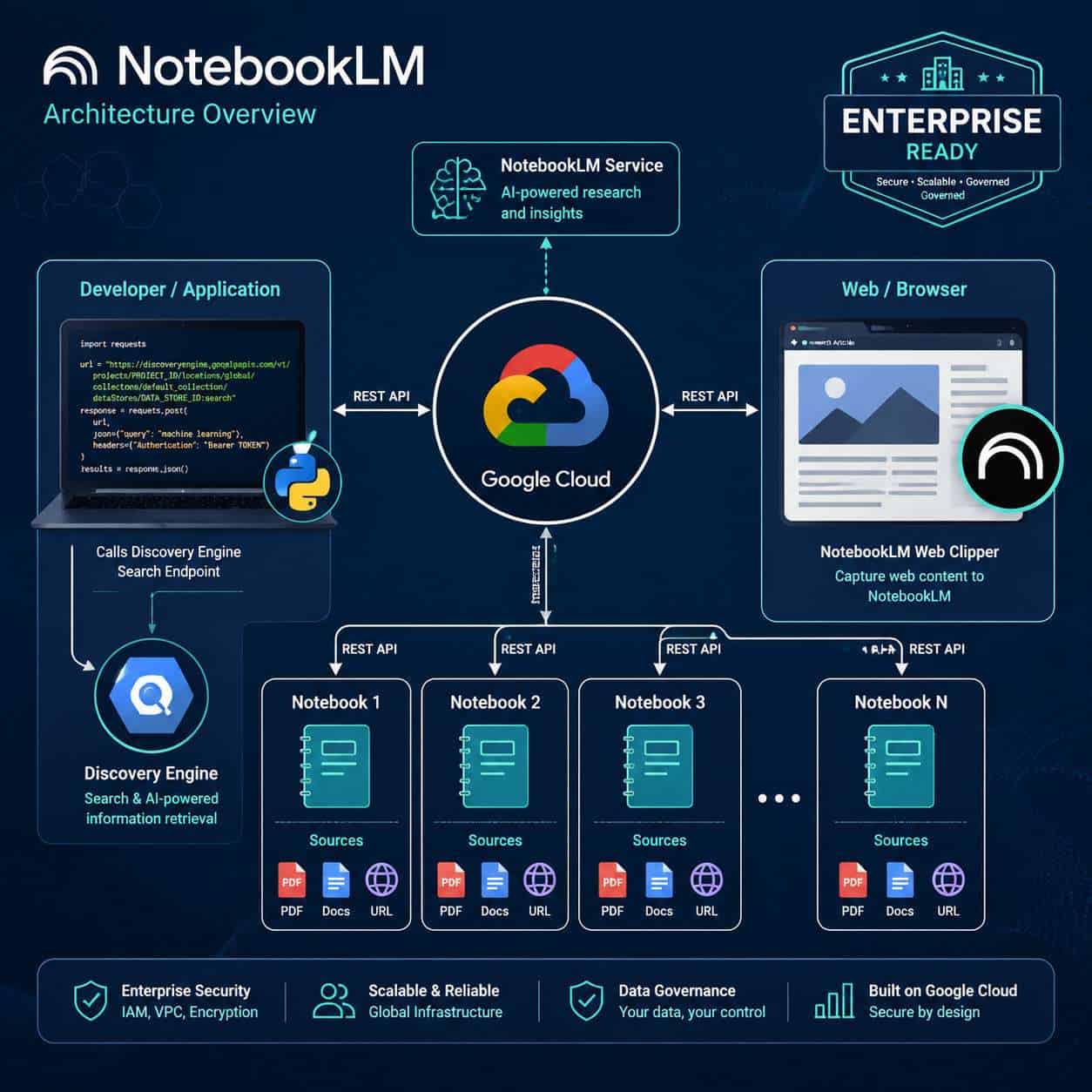
What Exactly Is the Notebook LM API and How Does It Work?
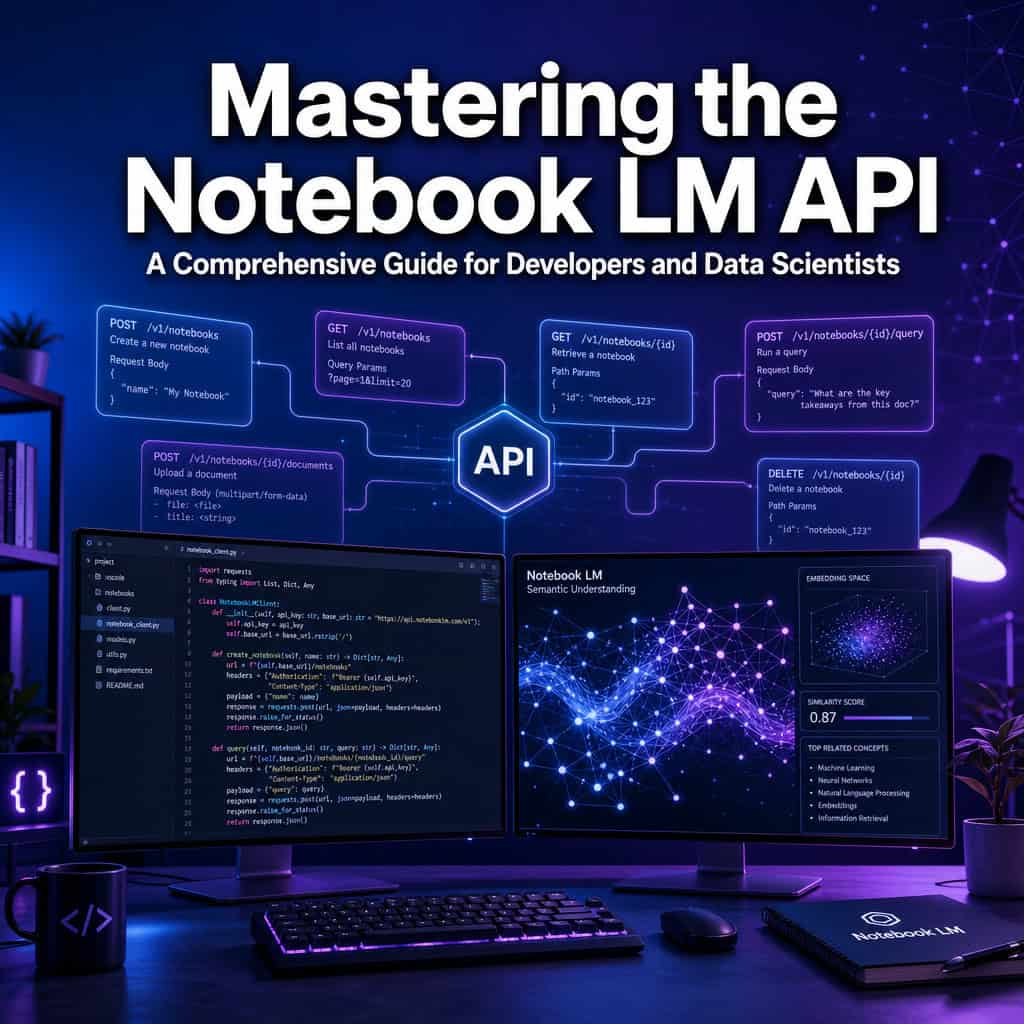
NotebookLM is Google’s AI-powered research tool that synthesizes information from documents you upload. The API, available only to enterprise customers, exposes REST endpoints through Google Cloud’s Discovery Engine v1alpha service [9].
Here’s how it works in practice:
- Authentication: You authenticate via Google Cloud IAM with a service account tied to your project.
- Endpoint structure: Requests go to
https://ENDPOINT_LOCATION-discoveryengine.googleapis.com/v1alpha/projects/PROJECT_NUMBER/locations/LOCATION/notebooks[9]. - Operations: You can create, list, retrieve, share, and delete notebooks programmatically. You can also manage sources within notebooks and trigger audio overview generation.
- Response format: Standard JSON responses with notebook metadata, source references, and generated content.
This architecture places NotebookLM squarely within the Gemini/Vertex/Discovery Engine stack, which signals Google is positioning it as an enterprise knowledge tool rather than a standalone developer product [9].
For those exploring broader AI-powered tools, our comprehensive guide to AI-powered content generation tools covers the wider ecosystem.
How Much Does NotebookLM API Cost Compared to Other AI APIs?
Google has not published granular per-call pricing for the NotebookLM Enterprise API. Access is bundled within Google Workspace Business or Enterprise plans, and enterprise pricing is typically negotiated through Google Cloud sales.
Here’s a rough comparison framework:
| Feature | NotebookLM Enterprise | OpenAI API (GPT-4o) | Anthropic Claude API |
|---|---|---|---|
| Access model | Enterprise license via Google Cloud | Pay-per-token | Pay-per-token |
| Free tier | Yes (consumer app, no API) [10] | Limited free credits | Limited free credits |
| Source grounding | Built-in (document-only) | Requires custom RAG setup | Requires custom RAG setup |
| Audio overviews | Included | Not available | Not available |
| Per-token pricing | Bundled/negotiated | ~$2.50–$10 per 1M tokens | ~$3–$15 per 1M tokens |
Decision rule: Choose NotebookLM Enterprise if you already use Google Workspace and need document-grounded AI without building your own retrieval pipeline. Choose per-token APIs if you need fine-grained control over model behavior and costs.
Which Programming Languages Are Best Supported by NotebookLM?
The NotebookLM Enterprise API is a REST API, so any language that can make HTTP requests works. That said, Google provides first-class support through its Cloud client libraries for Python, Node.js, Java, Go, and C# [9].
Python is the most common choice among data scientists and ML researchers because of its ecosystem overlap with tools like pandas, scikit-learn, and Jupyter notebooks. If you’re building web integrations, Node.js is a natural fit.
Community tools like notebooklm-py are Python-only, which further cements Python as the default for unofficial access [8].
What Are the Most Common Mistakes Developers Make with NotebookLM?
The biggest mistake is assuming a public consumer API exists. Developers frequently waste hours searching for API keys or endpoints that simply aren’t available outside enterprise accounts [6].
Other common errors include:
- Treating NotebookLM like a general chatbot: It’s designed for source-grounded reasoning. If you don’t upload relevant documents, you won’t get useful answers [3].
- Uploading too many unrelated sources: Quality matters more than quantity. Mixing unrelated documents confuses the synthesis engine.
- Ignoring source limits: Free tier caps at 50 sources per notebook and roughly 500,000 words per source [10]. Exceeding these silently degrades performance.
- Skipping IAM configuration (enterprise users): Incomplete Identity and Access Management setup is the top cause of authentication failures [9].
- Not structuring documents before upload: NotebookLM works best with well-organized content. Messy PDFs with broken formatting produce weaker results.
If you’re working with AI-powered tools for WordPress, similar principles apply: structured input produces better output.
Is NotebookLM API Good for Machine Learning Research or Just Software Development?
NotebookLM serves both audiences, but in different ways. For ML researchers, it excels at literature review, paper comparison, and contradiction detection across multiple sources [10]. For software developers, it’s valuable for technical documentation comprehension, dependency mapping, and log analysis [7].
A Reddit analysis post from 2026 argues that NotebookLM is best understood as a “second brain” rather than a chatbot. It shines when you feed it multiple curated sources and ask it to compare, synthesize, or find contradictions [3].
Choose NotebookLM for research if you need to process dozens of papers and want source-cited answers. Choose it for development if you’re navigating complex codebases or API documentation and want structured explanations.
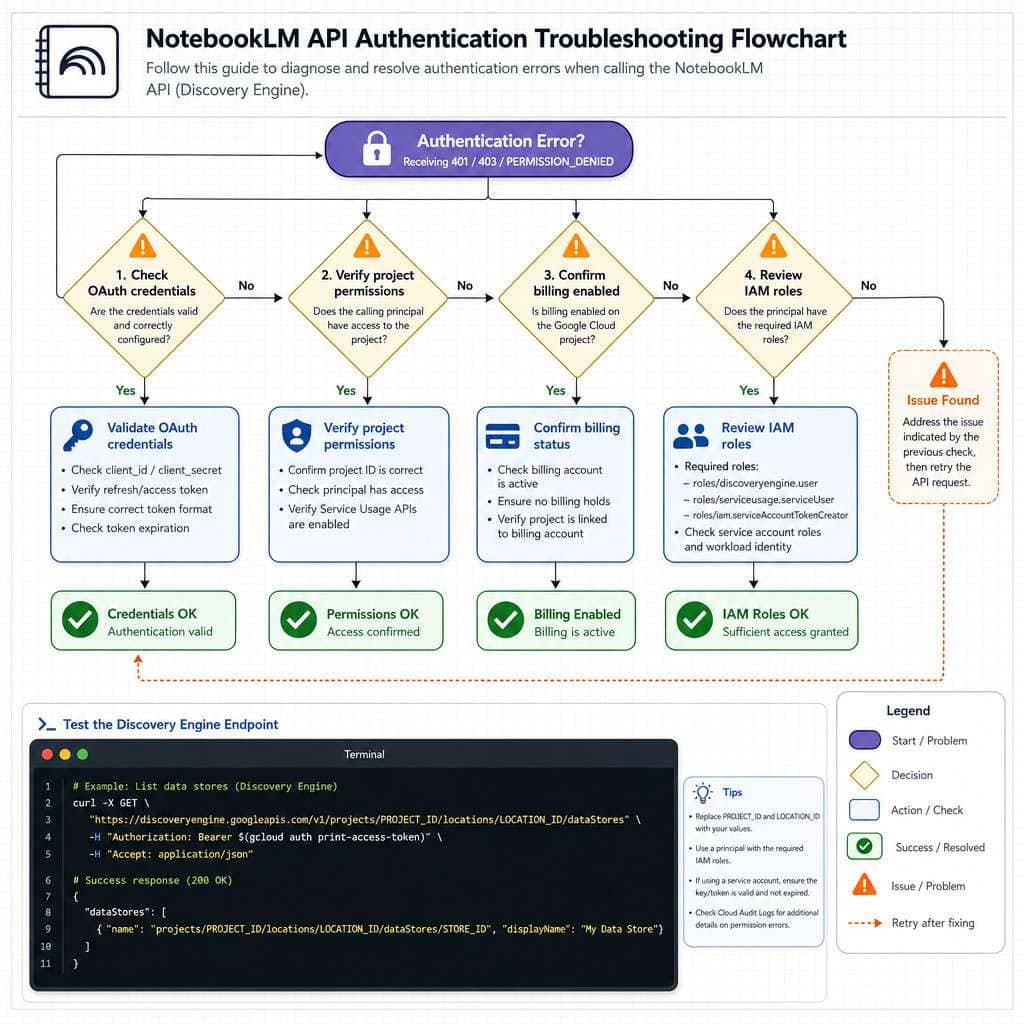
How Do I Troubleshoot Authentication Errors in NotebookLM?
Authentication errors are the most frequently reported issue when connecting to the NotebookLM Enterprise API. The root cause is almost always an IAM or OAuth misconfiguration in Google Cloud [9].
Step-by-step troubleshooting checklist:
- Verify your service account exists and is associated with the correct Google Cloud project.
- Check IAM roles: The service account needs
discoveryengine.adminor equivalent permissions. - Confirm billing is enabled on the project. Disabled billing blocks API calls even with valid credentials.
- Validate the endpoint URL: Ensure
ENDPOINT_LOCATIONandPROJECT_NUMBERmatch your project configuration [9]. - Test with curl first: Before debugging your application code, confirm the endpoint works with a simple authenticated curl request.
- Check token expiration: OAuth2 tokens expire. If you’re caching tokens, ensure your refresh logic works.
- Review API enablement: The Discovery Engine API must be explicitly enabled in your Google Cloud console.
Common edge case: If you recently migrated from a personal Google account to a Workspace account, your project permissions may not have transferred correctly. Re-grant IAM roles after migration.
Key Differences Between NotebookLM and Hugging Face Transformers
These tools solve fundamentally different problems. NotebookLM is a managed, document-grounded AI service. Hugging Face Transformers is an open-source library for building and fine-tuning ML models.
| Aspect | NotebookLM | Hugging Face Transformers |
|---|---|---|
| Primary use | Document synthesis and Q&A | Model training, fine-tuning, inference |
| Infrastructure | Google Cloud managed | Self-hosted or Hugging Face Hub |
| Model choice | Gemini (fixed) | Thousands of models (BERT, LLaMA, etc.) |
| Customization | Limited to source selection | Full model customization |
| Setup complexity | Low (upload docs, query) | High (requires ML expertise) |
| Cost model | Enterprise license | Free library; compute costs vary |
Decision rule: Use NotebookLM when you need fast, source-grounded answers without building infrastructure. Use Hugging Face when you need custom models, fine-tuning, or specific architectures.
For developers exploring AI-powered content optimization, NotebookLM can help analyze existing content, while Hugging Face enables building custom content models.
Can NotebookLM Handle Large Language Models or Just Small Ones?
NotebookLM runs on Google’s Gemini models, which are among the largest and most capable LLMs available in 2026. You don’t choose the model; Google manages the infrastructure and model selection behind the scenes [10].
The constraint isn’t model size but input size: up to 500,000 words per source and 50–300 sources per notebook depending on your tier [10]. For most research and development tasks, this is more than sufficient.
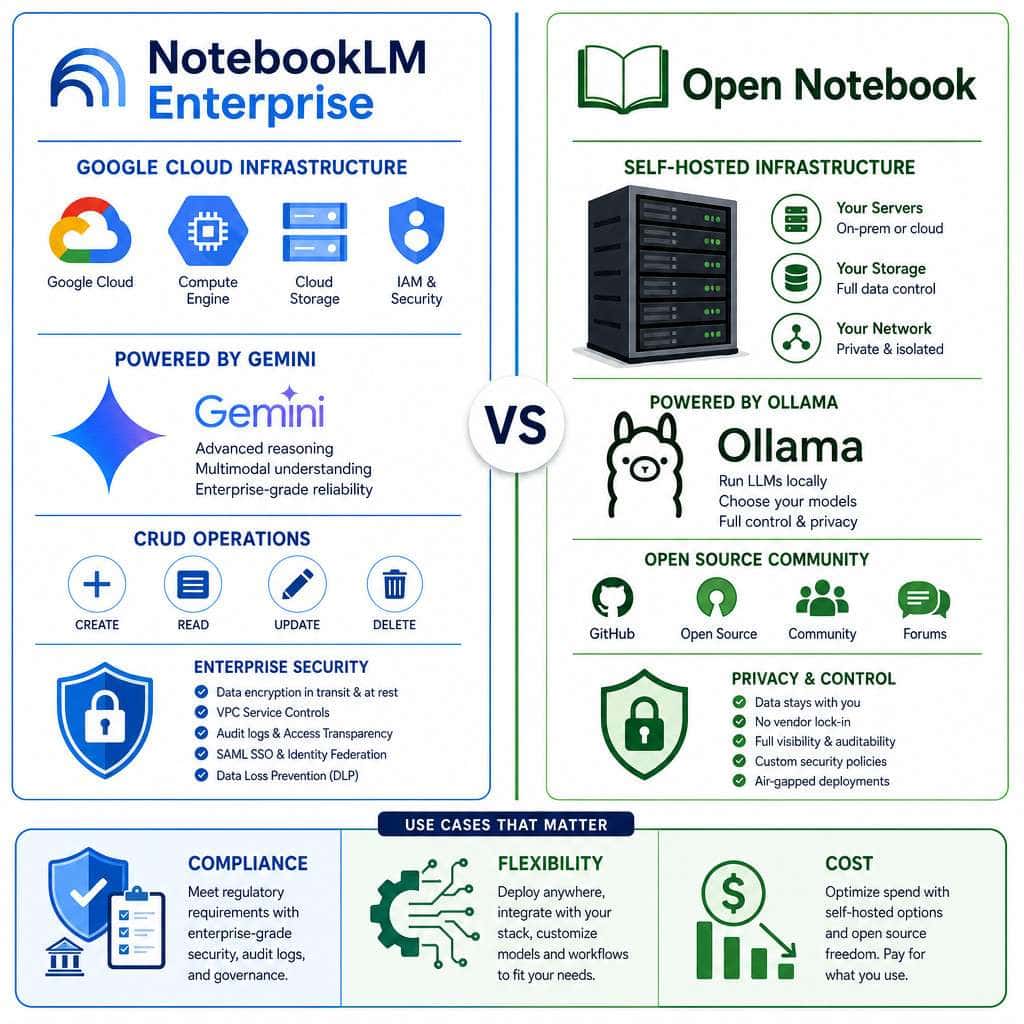
If you need to run specific models (including smaller, specialized ones), consider Open Notebook, which supports local LLMs via Ollama, including models like Qwen3-32B [4][5].
What Kind of Data Preprocessing Do I Need Before Using NotebookLM?
Minimal preprocessing is needed, but document quality directly affects output quality. NotebookLM accepts Google Docs, PDFs, URLs, plain text, and audio files.
Best practices:
- PDFs: Ensure they’re text-based, not scanned images. OCR’d PDFs work but produce noisier results.
- Structure your documents: Use headings, sections, and clear formatting. NotebookLM’s synthesis improves with well-organized content.
- Remove irrelevant content: Headers, footers, and boilerplate text add noise. Clean documents before uploading.
- Keep sources focused: A notebook about “React performance” shouldn’t include unrelated Angular documentation.
Are There Any Performance Limitations I Should Know About?
Yes. The free tier limits you to 100 notebooks with 50 sources each [10]. Paid enterprise tiers expand to 300 sources per notebook. Beyond these limits:
- Response latency increases with more sources per notebook.
- Audio overview generation can take several minutes for complex, multi-source notebooks.
- Concurrent API requests are rate-limited on enterprise accounts (specific limits depend on your contract).
- No real-time data: NotebookLM only works with uploaded sources, not live data feeds.
Who Should Use NotebookLM and Who Should Avoid It?
Best for:
- Researchers processing large volumes of academic papers [10]
- Enterprise teams needing document-grounded Q&A with compliance features
- Developers navigating complex technical documentation [7]
- Content teams synthesizing research into structured outputs
- Anyone who wants AI answers strictly based on their own documents [3]
Not ideal for:
- Developers who need a free, public API for consumer applications [6]
- Teams requiring custom model fine-tuning or specific architectures
- Organizations with strict data sovereignty requirements that prohibit Google Cloud (consider Open Notebook instead [4][5])
- Use cases requiring real-time data or internet-connected AI responses
Those building AI-powered chatbots for WordPress may find NotebookLM useful for research but will need other tools for the actual chatbot implementation.
Real-World Use Cases for the NotebookLM API
Enterprise teams are using the NotebookLM API for:
- Employee onboarding: Uploading policy documents, training manuals, and FAQs into notebooks that new hires can query conversationally.
- Legal document review: Lawyers upload contracts and regulations, then ask NotebookLM to find contradictions or missing clauses.
- Academic literature review: Researchers upload dozens of papers and generate structured comparisons, timelines, and mind maps [10].
- Technical documentation hubs: Developer teams upload API docs, architecture diagrams, and bug reports for fast, grounded answers [7].
- Audio content creation: Marketing teams use audio overview generation to turn research reports into podcast-style summaries.
For teams using AI SEO tools, NotebookLM can help analyze competitor content by uploading multiple articles as sources and asking for gap analysis.
How Secure Is the NotebookLM API for Enterprise Applications?
The NotebookLM Enterprise API inherits Google Cloud’s security infrastructure, which includes VPC Service Controls, Customer-Managed Encryption Keys (CMEK), and IAM-based access control [9]. Data uploaded to enterprise notebooks is governed by your Google Cloud data processing agreements.
Key security considerations:
- Data residency: You can specify endpoint locations to keep data in specific regions [9].
- Encryption: Data is encrypted at rest and in transit. CMEK gives you control over encryption keys.
- Access control: Granular IAM roles determine who can create, view, or delete notebooks.
- Audit logging: All API calls are logged through Google Cloud’s audit infrastructure.
For organizations that can’t use Google Cloud at all, Open Notebook offers a fully self-hosted alternative where all data stays on-premise [4][5]. You can configure it with local models via Ollama, eliminating any external data transfer.
If you’re evaluating no-code platforms alongside API-driven tools, security requirements should drive your decision.
Conclusion
Mastering the Notebook LM API in 2026 requires understanding a key reality: the API is enterprise-only. If you’re a consumer developer, your options are community tools, browser extensions, or waiting for Google to open public access.
Your next steps:
- Enterprise users: Enable the Discovery Engine API in Google Cloud, configure IAM roles, and start with the notebook CRUD endpoints [9].
- Consumer developers: Explore
notebooklm-pyfor unofficial programmatic access, or use the Web Clipper extension for lightweight automation. - Privacy-conscious teams: Evaluate Open Notebook as a self-hosted alternative [4][5].
- Researchers: Start with the free tier (100 notebooks, 50 sources each) to test whether NotebookLM’s source-grounded approach fits your workflow [10].
The NotebookLM ecosystem is evolving fast. Enterprise API capabilities are expanding, community tooling is maturing, and Google continues to acknowledge consumer API demand [6]. Position yourself now by learning the architecture and workflows, so you’re ready when broader access arrives.
FAQ
Q: Is there a free API for NotebookLM? A: No. As of 2026, the API is only available through NotebookLM Enterprise on Google Cloud. The free consumer app has no API access [6][9].
Q: Can I use NotebookLM API with Python?
A: Yes. Enterprise users can use Google Cloud’s Python client libraries. Non-enterprise developers can use the unofficial notebooklm-py package [8].
Q: How many sources can I add to a notebook? A: The free tier supports 50 sources per notebook (up to ~500,000 words each). Paid tiers support up to 300 sources [10].
Q: Does NotebookLM access the internet for answers? A: No. NotebookLM only generates answers based on the documents you upload. This is its core design principle [3][10].
Q: What file formats does NotebookLM support? A: Google Docs, PDFs, plain text files, URLs, and audio files. PDFs should be text-based rather than scanned images for best results.
Q: Is there an open-source alternative to NotebookLM? A: Yes. Open Notebook is a self-hosted alternative that supports local LLMs via Ollama and keeps all data on-premise [4][5].
Q: Can NotebookLM generate audio summaries via API? A: The Enterprise API supports audio overview generation, which creates podcast-style summaries of your notebook content [9].
Q: How does NotebookLM compare to ChatGPT for research? A: NotebookLM is source-grounded (answers only from your documents), while ChatGPT draws from its training data and the internet. NotebookLM is better for verifiable, citation-backed research [3].
Q: What models power NotebookLM? A: Google’s Gemini models. You cannot swap in different models on the hosted version, but Open Notebook allows custom model selection [4][5].
Q: Is my data safe on NotebookLM Enterprise? A: Enterprise accounts benefit from Google Cloud security including VPC, CMEK, IAM controls, and regional data residency options [9].
References
[1] Dyzl Qcp2ba – https://www.instagram.com/reel/DYZl_QCP2bA/ [3] I Tested Notebooklm In 2026 Most People Are Using – https://www.reddit.com/r/AIToolsAndTips/comments/1s6hw4r/i_tested_notebooklm_in_2026_most_people_are_using/ [4] Open Notebook A Secure Alternative To Google Notebook Lm – https://mydeveloperplanet.com/2026/01/19/open-notebook-a-secure-alternative-to-google-notebook-lm/ [5] Open Notebook – https://github.com/lfnovo/open-notebook [6] Api For Notebooklm – https://www.reddit.com/r/notebooklm/comments/1eti9iz/api_for_notebooklm/ [7] Advanced Use Cases Of Notebook Lm – https://www.geeksforgeeks.org/websites-apps/advanced-use-cases-of-notebook-lm/ [8] Dvmbygndzp2 – https://www.instagram.com/reel/DVmBYgnDzp2/ [9] Api Notebooks – https://docs.cloud.google.com/gemini/enterprise/notebooklm-enterprise/docs/api-notebooks [10] Notebook Lm Googles Newest Academic Ai Tool – https://effortlessacademic.com/notebook-lm-googles-newest-academic-ai-tool/