Last updated: May 7, 2026
Quick Answer: N8N browser automation connects a visual workflow builder to real browser engines (Browserless, BrowserAct, or Airtop), letting you scrape data, fill forms, capture screenshots, and run multi-step web tasks without writing custom scripts. The core setup involves choosing a browser backend, configuring API credentials in N8N, and wiring nodes together in a logical sequence. Most teams get a working workflow running in under two hours.
Key Takeaways
- N8N connects to browser automation tools like Browserless, BrowserAct, and Airtop through dedicated nodes and API integrations [1][3]
- Browserless exposes five primary API endpoints:
/content,/screenshot,/pdf,/function, and/chrome/bqlfor different automation tasks [1] - AI agents in N8N follow a “Reason-Act-Reflect” cycle, making browser automation transparent and easier to debug [1]
- N8N’s AI Agent node integrates with 422+ apps, enabling complex multi-step workflows that go far beyond simple scraping [4]
- Airtop’s N8N integration includes 25+ pre-built templates and accepts plain-English browser commands, reducing setup time significantly [10]
- BrowserAct supports manual column mapping and has a default 1-hour timeout, making it suitable for long-running tasks [2]
- Common mistakes include ignoring rate limits, using fragile CSS selectors, and skipping error-handling nodes
- Browser automation pairs well with AI content tools — see our guide to AI-powered content generation tools for downstream workflow ideas
What Is N8N Browser Automation and Who Is It For?
N8N browser automation means using N8N’s visual workflow platform to control a real web browser programmatically — clicking buttons, extracting text, filling forms, and capturing pages — all without manual intervention. It’s for developers, no-code builders, and operations teams who need to interact with websites that don’t offer APIs.
Who benefits most:
- Developers building data pipelines from JavaScript-heavy sites
- Marketing teams monitoring competitor pricing or scraping public data
- QA engineers running automated UI tests across environments
- Operations staff automating repetitive web-based admin tasks
Who should look elsewhere: If the target site has a well-documented REST API, use that instead. Browser automation adds overhead and is more fragile than direct API calls. Also, always check a site’s terms of service before scraping.
Browser automation in N8N isn’t a shortcut — it’s the right tool when no other tool exists.
How Does the N8N + Browserless Integration Actually Work?
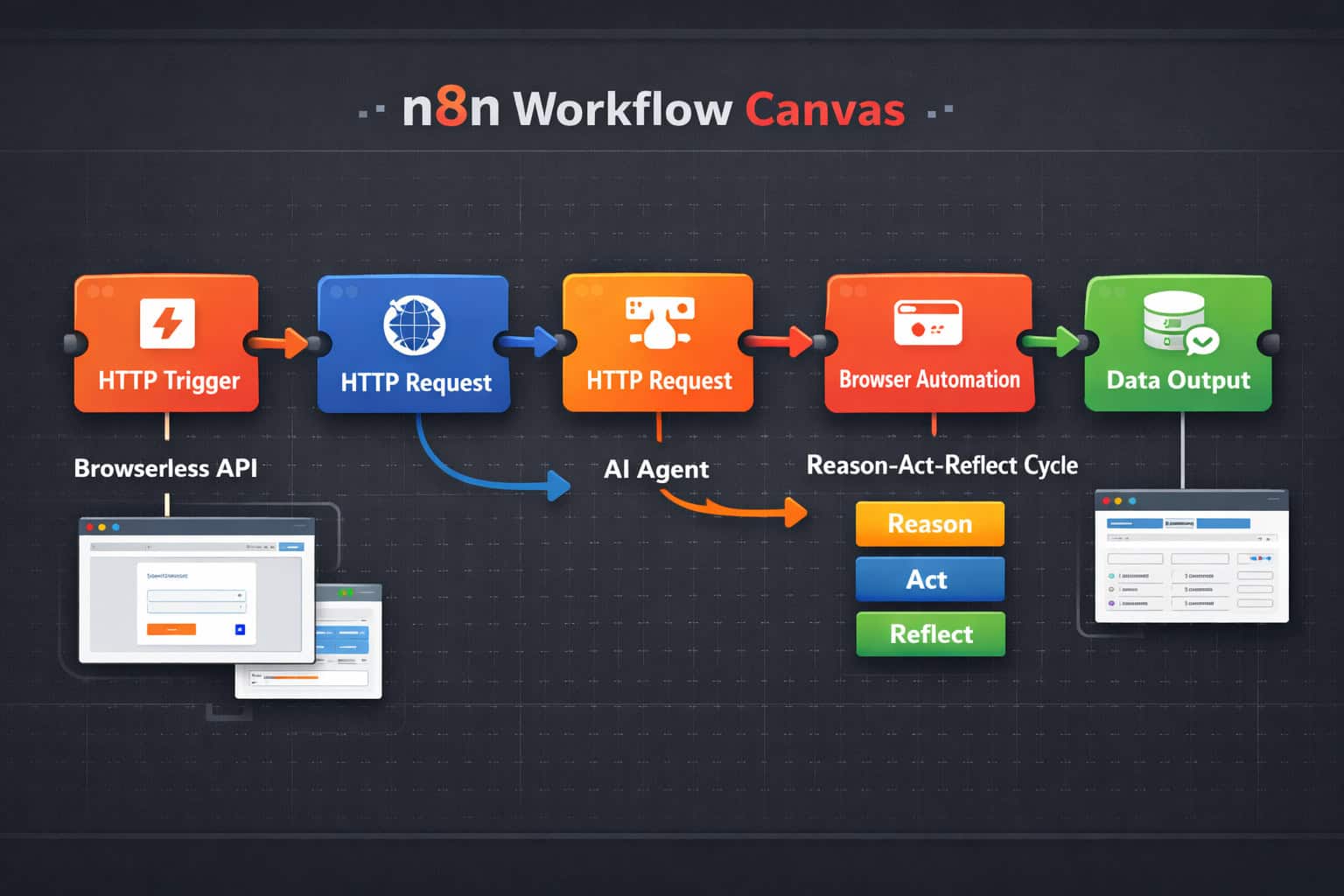
Browserless acts as a headless Chrome service that N8N talks to via HTTP requests. N8N sends instructions to Browserless API endpoints, Browserless executes them in a real browser environment, and returns structured results back to N8N for further processing [1][3].
The operational cycle for AI-driven workflows follows a structured “Reason-Act-Reflect” pattern [1]:
- Reason — The LLM (e.g., GPT-4o or Claude) decides what browser action to take next
- Act — Browserless executes the instruction through its API
- Reflect — The LLM reads the result and determines the next step
This cycle repeats until the task is complete or an error condition is met. It makes debugging straightforward because each step is logged and inspectable inside N8N’s execution view.
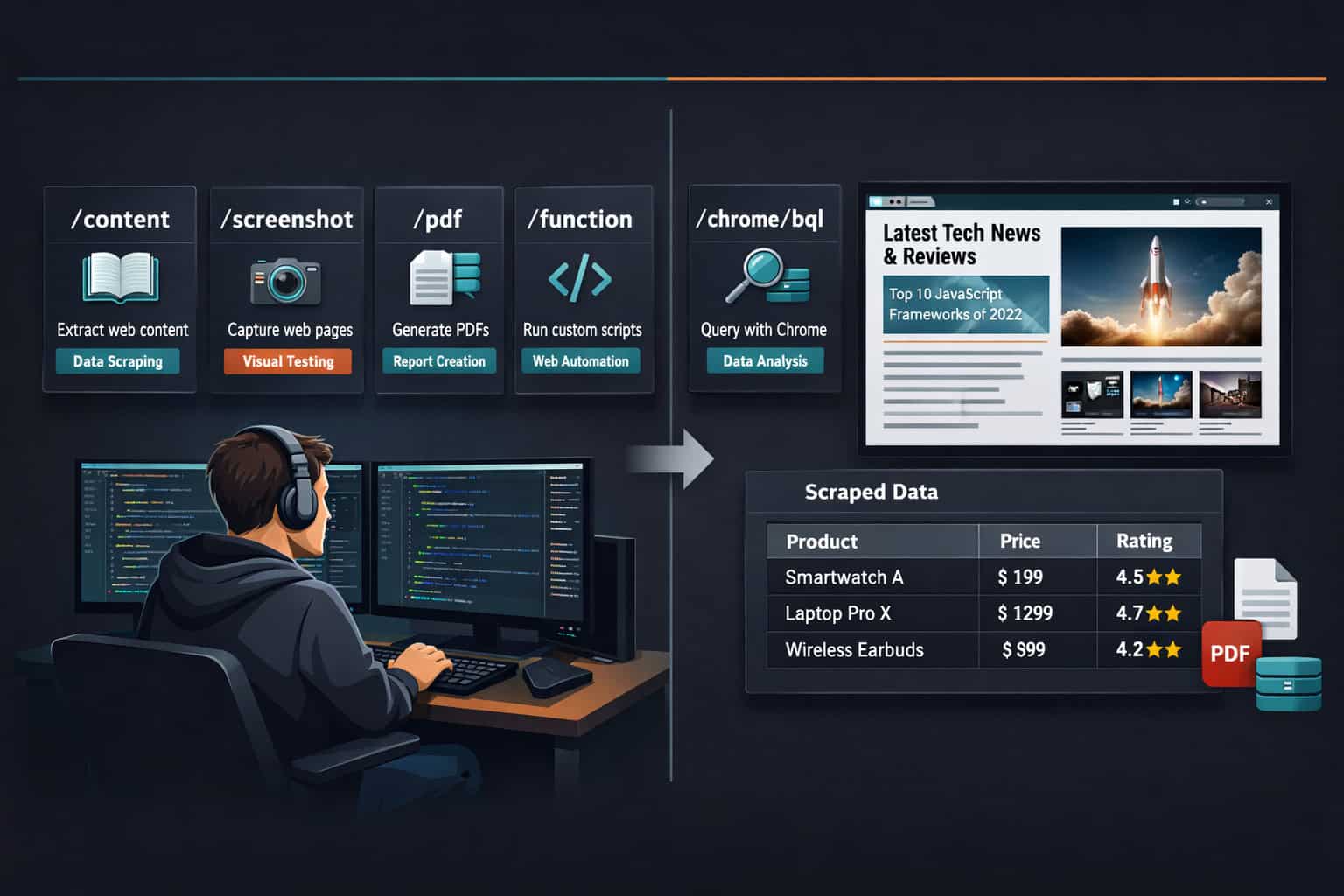
The five Browserless API endpoints you’ll use most [1]:
| Endpoint | Purpose | Best For |
|---|---|---|
/content | Extract page HTML/text | Data scraping, content monitoring |
/screenshot | Capture page as image | Visual testing, archiving |
/pdf | Generate PDF from page | Report generation, invoicing |
/function | Run custom JavaScript | Complex interactions, dynamic data |
/chrome/bql | Multi-step browser queries | Login flows, form sequences |
Common mistake: Sending requests to /content when the page renders data via JavaScript after load. Use /function or /chrome/bql for JavaScript-heavy sites, or add a wait parameter to your request.
Setting Up Your First N8N Browser Automation Workflow
Getting a basic workflow running takes five clear steps. This assumes you have an N8N instance running (cloud or self-hosted) and a Browserless API key.
Step 1: Add your Browserless credentials Go to N8N Settings → Credentials → New Credential → search “Browserless.” Paste your API key. N8N stores this securely and reuses it across workflows.
Step 2: Create a new workflow and add a trigger Use a Manual Trigger for testing, or a Schedule Trigger for recurring tasks. For event-driven automation (e.g., a form submission triggers a scrape), use a Webhook node.
Step 3: Add an HTTP Request node Point it at the Browserless endpoint you need. For a simple page extraction:
- Method:
POST - URL:
https://chrome.browserless.io/content - Body:
{ "url": "https://example.com" } - Authentication: use your saved Browserless credential
Step 4: Parse the output Add a Code node or a Set node to extract the specific data you need from the HTML response. For structured data, consider pairing this with an AI extraction node.
Step 5: Route the data Send results to a Google Sheet, Airtable, Slack message, database, or any of N8N’s 422+ connected apps [4]. This is where the real value compounds — browser automation feeds into your existing data infrastructure automatically.
For teams already using AI in their stack, pairing browser automation with AI-powered content optimization workflows can create end-to-end content intelligence pipelines.
Edge case: If your target site uses Cloudflare or similar bot protection, standard Browserless requests may be blocked. In that case, look at Browserless’s stealth mode options or consider Airtop, which is built with anti-detection in mind.
What Are the Best Browser Automation Tools to Use with N8N?
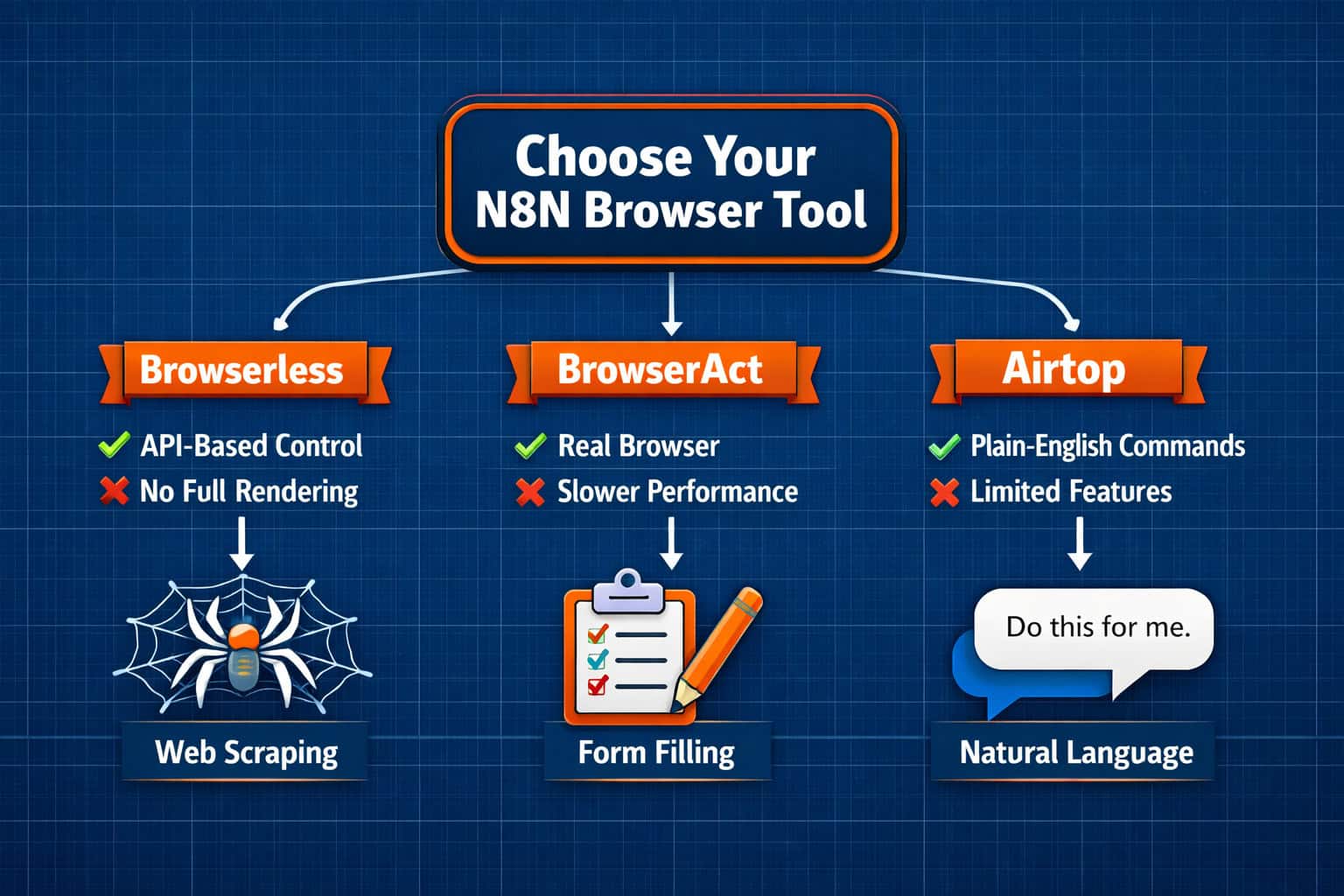
The three main options are Browserless, BrowserAct, and Airtop. Each fits a different use case and technical comfort level.
Browserless
Best for developers who want direct control. You interact with raw API endpoints, which means more flexibility but also more configuration. N8N has a native Browserless integration node, making credential management clean [3].
Choose Browserless if: You need fine-grained control, custom JavaScript execution, or you’re building complex multi-step flows with branching logic.
BrowserAct
BrowserAct integrates with N8N through a “Run a Workflow” action that bridges N8N’s orchestration layer with BrowserAct’s browser engine [2]. It supports web scraping, form filling, and UI testing. The manual column mapping feature (“Map Each Column Manually” mode) gives you precise control over how data moves between the two systems [2].
Key detail: BrowserAct’s default timeout is 3,600 seconds (one hour), which makes it practical for long-running tasks like processing large lists of URLs [2].
Choose BrowserAct if: You need structured data mapping between systems or you’re running batch jobs that take a long time to complete.
Airtop
Airtop’s N8N integration stands out for its plain-English command interface. Instead of hunting for CSS selectors or writing JavaScript, you describe what you want in natural language [10]. It also ships with 25+ pre-built workflow templates, which cuts setup time significantly.
Choose Airtop if: You want the fastest path to a working workflow, or your team isn’t comfortable with CSS selectors and DOM manipulation.
Quick comparison:
| Tool | Technical Level | Best Use Case | Pre-built Templates |
|---|---|---|---|
| Browserless | Intermediate–Advanced | Custom, complex flows | No |
| BrowserAct | Intermediate | Batch processing, data mapping | Limited |
| Airtop | Beginner–Intermediate | Rapid prototyping, AI-driven tasks | 25+ [10] |
How Do AI Agents Improve N8N Browser Automation Workflows?
AI agents in N8N transform browser automation from a rigid script into an adaptive process. Instead of hardcoding every step, the AI agent decides what to do next based on what it sees on the page [1].
N8N’s AI Agent node connects to 422+ applications and services [4], so the agent can browse a site, extract data, cross-reference it with a CRM, and send a Slack alert — all in one workflow, without manual intervention between steps.
How to add an AI Agent to a browser automation workflow:
- Add the AI Agent node to your workflow
- Connect it to a language model (OpenAI, Anthropic, etc.) via N8N’s credential system
- Give the agent access to Browserless as a “tool” — this means the agent can call browser actions as needed
- Write a clear system prompt describing the task and any constraints
- Add output parsing to extract structured data from the agent’s response
What makes this powerful: The agent can handle unexpected page states. If a login page appears mid-workflow, the agent can recognize it and respond — something a hardcoded script would simply fail on.
Common mistake: Writing vague agent prompts. “Scrape the website” produces poor results. “Extract the product name, price, and availability from each item on the first page of search results at [URL], and return them as a JSON array” produces reliable, structured output.
For teams building automated content workflows, combining AI agents with browser automation creates powerful pipelines. You might also explore advanced WordPress automation strategies for publishing the data your agents collect.
What Are the Most Useful N8N Browser Automation Workflow Templates?
Pre-built templates save hours of setup and give you a reliable starting point. Here are the most practical categories, based on real-world use cases.
Data collection workflows:
- Price monitoring: scrape competitor product pages on a schedule, log changes to a spreadsheet
- Lead enrichment: visit company websites from a CRM list, extract contact info and company descriptions
- News monitoring: scrape specific pages for keyword mentions, send digest emails
Operational workflows:
- Form submission automation: fill and submit web forms from a data source (e.g., Airtable rows)
- Screenshot archiving: capture daily screenshots of key pages for compliance or design tracking
- PDF generation: convert web-based reports to PDF and email them automatically
Testing workflows:
- UI regression testing: load pages, capture screenshots, compare to baselines
- Uptime checks with visual verification: confirm a page not only loads but displays expected content
Airtop’s 25+ pre-built N8N templates cover many of these categories and are a good starting point if you’re new to the space [10]. For teams managing content at scale, pairing these with AI-powered content generation tools can automate research-to-publish pipelines.
What Are the Most Common Mistakes in N8N Browser Automation?
Even experienced builders run into the same issues. Knowing them upfront saves debugging time.
1. Relying on fragile CSS selectors
Selectors like .product-price-v2 > span:nth-child(3) break the moment a site redesigns. Use semantic selectors ([data-testid="price"]) or switch to Airtop’s plain-English commands when selector stability matters.
2. Skipping error handling Browser automation fails more often than API calls. Always add an Error Trigger node or a try/catch pattern in your Code nodes. Log failures to a dedicated sheet or Slack channel so you know when a workflow breaks silently.
3. Ignoring rate limits Sending 500 requests to the same site in 10 minutes will get your IP blocked. Add a Wait node between iterations, or use Browserless’s built-in concurrency controls.
4. Not handling authentication state If a workflow requires login, the session may expire between runs. Build session refresh logic into your workflow, or use BrowserAct’s persistent session features.
5. Overcomplicating the first version Start with the simplest possible workflow that proves the concept. Add AI agents, branching logic, and multi-tool integrations only after the basic flow works reliably.
6. Missing the legal/ethical check
Before automating interactions with any website, review its robots.txt file and terms of service. Some sites explicitly prohibit scraping. This isn’t just an ethical issue — it can create legal liability.
For teams managing multiple automated workflows, the principles in our Framer project management templates guide apply equally well to organizing N8N workflow libraries.
Mastering Browser Automation: Advanced N8N Workflow Patterns
Once your basic flows work, these patterns significantly increase what you can do.
Parallel execution Use N8N’s SplitInBatches node to process multiple URLs simultaneously rather than sequentially. This can reduce a 100-URL scraping job from 10 minutes to under 2 minutes, depending on your Browserless plan’s concurrency limits.
Conditional branching Add an IF node after data extraction to route results based on content. For example: if a price drops below a threshold, trigger a purchase alert; otherwise, just log the data.
Webhook-triggered automation Instead of running on a schedule, trigger browser automation from external events — a new CRM record, a Slack command, or a form submission. This makes workflows reactive rather than polling-based.
Chaining multiple browser sessions Some tasks require visiting multiple sites in sequence, using data from one to inform the next. N8N handles this naturally through node chaining — the output of one HTTP Request node becomes the input for the next.
Storing session state For workflows that log into sites, store session cookies in N8N’s static data or an external key-value store. This avoids re-authenticating on every run and reduces the risk of triggering bot detection.
These patterns align with the broader workflow automation principles covered in our automation category, which includes guides on automating WordPress, social media, and more.
Mastering Browser Automation: Troubleshooting N8N Workflow Failures
When a workflow breaks, a systematic approach finds the problem faster than random debugging.
Step 1: Check the execution log N8N stores the input and output of every node for each execution. Click the failed node to see exactly what data it received and what error it returned.
Step 2: Test the browser request in isolation Copy the API call from your HTTP Request node and run it directly in a tool like Postman or curl. This confirms whether the issue is with your N8N configuration or the Browserless request itself.
Step 3: Verify the target page hasn’t changed Sites update their structure regularly. Open the target URL manually and check whether the element you’re targeting still exists in the same form.
Step 4: Check your credentials Browserless API keys expire or hit usage limits. Confirm your key is active and you haven’t exceeded your plan’s monthly session limit.
Step 5: Review timeout settings If a workflow times out on complex pages, increase the timeout parameter in your Browserless request. For very long-running tasks, BrowserAct’s 3,600-second default timeout may be more appropriate [2].
Step 6: Look for bot detection If you’re getting empty responses or redirect pages instead of content, the site may be blocking your requests. Try adding realistic headers (User-Agent, Accept-Language) to your HTTP Request node, or switch to a tool with built-in stealth capabilities.
FAQ: N8N Browser Automation
Q: Do I need to know how to code to use N8N browser automation?
Not for basic workflows. N8N’s visual editor handles most tasks without code. You’ll need basic JavaScript for complex custom actions using Browserless’s /function endpoint, but tools like Airtop let you use plain English instead.
Q: Is N8N browser automation free? N8N has a free self-hosted version with no execution limits. Browserless, BrowserAct, and Airtop each have their own pricing — Browserless offers a free tier with limited monthly sessions. Check each provider’s current pricing page for up-to-date details.
Q: How is N8N browser automation different from Selenium or Playwright? Selenium and Playwright are code-first testing frameworks. N8N browser automation is workflow-first — you build visually, connect to other apps easily, and don’t need to manage a test runner or write boilerplate code. Selenium/Playwright are better for complex UI testing; N8N is better for data workflows and business automation.
Q: Can N8N browser automation handle login-protected sites?
Yes. Use Browserless’s /function endpoint to script the login sequence, or use BrowserAct’s session management. Store session cookies between runs to avoid re-authenticating every time.
Q: What happens if a target website changes its layout? Your workflow will likely break. Build monitoring into your workflows — capture a screenshot on each run and alert yourself if the extracted data is empty or malformed. Use semantic selectors over positional ones to reduce breakage frequency.
Q: How many concurrent browser sessions can I run? This depends on your Browserless plan. Free tiers typically allow 1-2 concurrent sessions. Paid plans scale up significantly. Check Browserless’s current plan documentation for specifics.
Q: Can I use N8N browser automation for UI testing? Yes, though it’s not its primary purpose. For basic visual regression testing (capture screenshot, compare to baseline), it works well. For full test suites with assertions and reporting, dedicated tools like Playwright or Cypress are more appropriate.
Q: Is it legal to scrape websites with N8N?
It depends on the site and jurisdiction. Always check the site’s robots.txt and terms of service. Scraping publicly available data is generally lower risk, but scraping behind authentication or in violation of ToS can create legal exposure. When in doubt, consult legal counsel.
Q: How do I handle CAPTCHAs in N8N browser automation? CAPTCHAs are intentionally designed to block automation. Some Browserless configurations support CAPTCHA-solving services as an add-on. Alternatively, contact the site owner about API access — it’s a more sustainable solution.
Q: What’s the easiest way to get started today? Sign up for a free Browserless account, install N8N (cloud or Docker), and follow their official integration guide. Airtop’s pre-built N8N templates [10] are also an excellent starting point if you want working examples immediately.
Conclusion: Your Next Steps with N8N Browser Automation
Mastering browser automation through N8N workflows is genuinely achievable for most technical teams in 2026, and the tooling has matured enough that you don’t need to be a browser automation specialist to get real value from it.
Here’s a practical action plan:
- Pick one repetitive web task your team does manually today — price checks, lead research, form submissions — and build a proof-of-concept workflow around it
- Start with Airtop if you want the fastest path to results, or Browserless if you need more control
- Add error handling from day one — a workflow that fails silently is worse than no workflow at all
- Graduate to AI agents once your basic flows are stable — they handle edge cases that hardcoded scripts can’t
- Document your workflows in N8N’s built-in notes feature so your team can maintain them when you’re not available
The combination of N8N’s visual workflow builder, Browserless’s API endpoints, and AI agent capabilities creates a genuinely powerful automation stack. The teams getting the most value aren’t necessarily the most technical — they’re the ones who identified the right problems to automate and built simple, reliable solutions first.
For more automation ideas across your stack, browse our automation resources and explore how AI plugins for WordPress can complement your N8N workflows.
References
[1] AI Agents Browserless N8N Workflows – https://www.browserless.io/blog/ai-agents-browserless-n8n-workflows [2] BrowserAct N8N Integration – https://hackceleration.com/browseract-n8n/ [3] N8N Browserless Integration – https://n8n.io/integrations/browserless/ [4] N8N AI Agent Integrations – https://n8n.io/integrations/agent/ [10] N8N Airtop Integration Video – https://www.youtube.com/watch?v=ISQPV7SkQRA