Last updated: May 1, 2026
Quick Answer: AI-powered web development tools automate code generation, testing, debugging, and design-to-code conversion, making developers significantly more productive. The best tools in 2026 include GitHub Copilot, Cursor, Tabnine, Snyk, and no-code platforms like Lovable and Bolt.new. They work best as collaborators alongside human developers, not as full replacements.
Key Takeaways
- GitHub Copilot remains the most widely adopted AI coding assistant, offering real-time code suggestions across dozens of languages [4]
- Devin, launched in March 2024 by Cognition Labs at $500/month, was the first AI agent capable of building simple apps from natural language alone, though early reviews were mixed [2]
- No-code AI platforms like Bolt.new and Lovable now handle backend deployment automatically, lowering the barrier to web app creation [2]
- AI security tools like Snyk scan codebases for vulnerabilities and auto-generate pull requests for patches [5]
- Visual AI testing integrates with Selenium, Cypress, and Puppeteer to catch cross-browser rendering bugs that manual QA misses [1]
- AI tools work best when developers use them for repetitive tasks, freeing up time for architecture, UX decisions, and creative problem-solving [3]
- Design-to-code tools like TeleportHQ can generate HTML, CSS, and JavaScript directly from visual mockups [6]
- The biggest risk is over-reliance: AI-generated code still requires human review for security, performance, and maintainability

What Are AI-Powered Web Development Tools and Why Do They Matter?
AI-powered web development tools are software applications that use machine learning models to assist with writing, reviewing, testing, and deploying code. They matter because they reduce the time developers spend on repetitive, low-value tasks while improving output quality.
Before 2023, most developers wrote code manually, searched Stack Overflow for syntax help, and ran test suites by hand. Today, tools like GitHub Copilot suggest entire functions as you type, AI security scanners flag vulnerabilities before code ships, and no-code platforms let non-developers build functional web apps in hours.
Who benefits most:
- Solo developers and freelancers who need to move fast without a large team
- Agencies building multiple client sites on tight timelines
- Enterprise teams managing large, complex codebases
- Non-technical founders who want to prototype ideas without hiring engineers
Who should be cautious:
- Teams working on highly sensitive systems (financial, medical) where AI-generated code needs rigorous review
- Developers early in their learning journey who risk skipping foundational understanding
“AI is positioned as a collaborator, not a replacement — automating routine coding tasks while enabling developers to focus on creative and high-value design decisions. [3]
How Did AI-Powered Web Development Tools Evolve in 2024?
2024 was a turning point. GitHub Copilot matured from a novelty into a standard part of professional workflows, and a wave of autonomous AI agents entered the market [2].
Key milestones from 2024:
- March 2024: Cognition Labs launched Devin, the first AI agent marketed as a “software engineer.” It could take a plain-English brief and build a basic working application. Priced at $500/month, it generated significant buzz, though independent testing showed it struggled with complex, multi-step projects [2]
- Mid-2024: Cursor IDE gained rapid adoption among professional developers for its deep codebase context awareness, going beyond line-by-line suggestions to understand entire project structures
- Late 2024: Platforms like Bolt.new and Lovable added integrated backend-as-a-service and automated deployment, meaning a non-developer could go from idea to live web app without touching a server [2]
The shift that matters: Earlier AI tools were autocomplete on steroids. By late 2024, the best tools could reason about your entire codebase, suggest architectural changes, and execute multi-file edits in one action. That’s a qualitatively different capability.
Which AI-Powered Web Development Tools Are Worth Using in 2026?
The right tool depends on your role, skill level, and project type. Here’s a practical breakdown of the leading options.

Code Generation and Assistance
| Tool | Best For | Pricing (approx.) | Key Strength |
|---|---|---|---|
| GitHub Copilot | Professional developers | $10–$19/month | Real-time multi-language suggestions [4] |
| Cursor | Full-stack developers | Free / $20/month | Whole-codebase context awareness |
| Tabnine | Teams needing privacy | $12/month | On-premise deployment option |
| Amazon CodeWhisperer | AWS-heavy teams | Free tier available | Deep AWS service integration |
Design-to-Code Tools
- TeleportHQ: Converts UI designs into clean HTML, CSS, and JavaScript automatically [6]
- Figma AI plugins: Generate component code directly from Figma frames (see our guide on Figma to code plugins that streamline your design-to-development workflow)
- Relume: Builds wireframes and sitemaps using AI, then exports to Figma or Webflow (see Relume AI integration best practices)
No-Code / Low-Code AI Builders
If you want to build without writing code at all, the best no-code website design software platforms have improved dramatically. Tools like Bolt.new and Lovable handle everything from UI generation to backend logic and deployment [2].
Security and Testing
- Snyk: Scans your codebase for vulnerabilities, manages license compliance, and creates automated pull requests for security patches [5]
- Visual AI testing tools: Integrate with Selenium, Cypress, and Puppeteer to run cross-browser visual regression tests, catching rendering bugs that manual QA misses [1]
Choose GitHub Copilot if you’re a professional developer who wants the most mature, well-integrated assistant. Choose a no-code AI builder if you’re a non-developer or need to prototype quickly without writing code.
How Do AI Tools Actually Speed Up the Development Workflow?
AI tools speed up development by handling the mechanical parts of coding, so developers can focus on decisions that require judgment.

Here’s where the time savings are real and measurable:
1. Code generation GitHub Copilot generates context-aware code suggestions as you type, including complete functions, boilerplate, and API call structures. It supports dozens of languages and adapts to your project’s existing patterns [4].
2. Debugging and error explanation Instead of spending 30 minutes reading a cryptic stack trace, AI assistants can explain what went wrong and suggest a fix in seconds. This is especially useful for junior developers or when working in an unfamiliar language.
3. Design-to-code conversion Tools like TeleportHQ and Figma-to-code plugins eliminate the manual translation from design mockup to working HTML/CSS. What used to take a developer half a day can now take minutes [6].
4. Automated testing Visual AI testing tools run cross-browser and cross-device checks automatically, identifying visual discrepancies that a human tester would likely miss [1]. For teams using Webflow, pairing AI testing with Webflow grid layout optimization ensures both visual and performance quality.
5. Security scanning Snyk and similar tools continuously monitor your dependencies and codebase, flagging issues before they reach production [5].
Common mistake: Treating AI-generated code as production-ready without review. AI tools make confident-sounding suggestions that can contain subtle logic errors, security gaps, or performance issues. Always review output, especially for authentication, data handling, and payment flows.
What Are the Real Productivity Gains from AI Web Development Tools?
Productivity gains are real but vary significantly by task type and developer experience level.
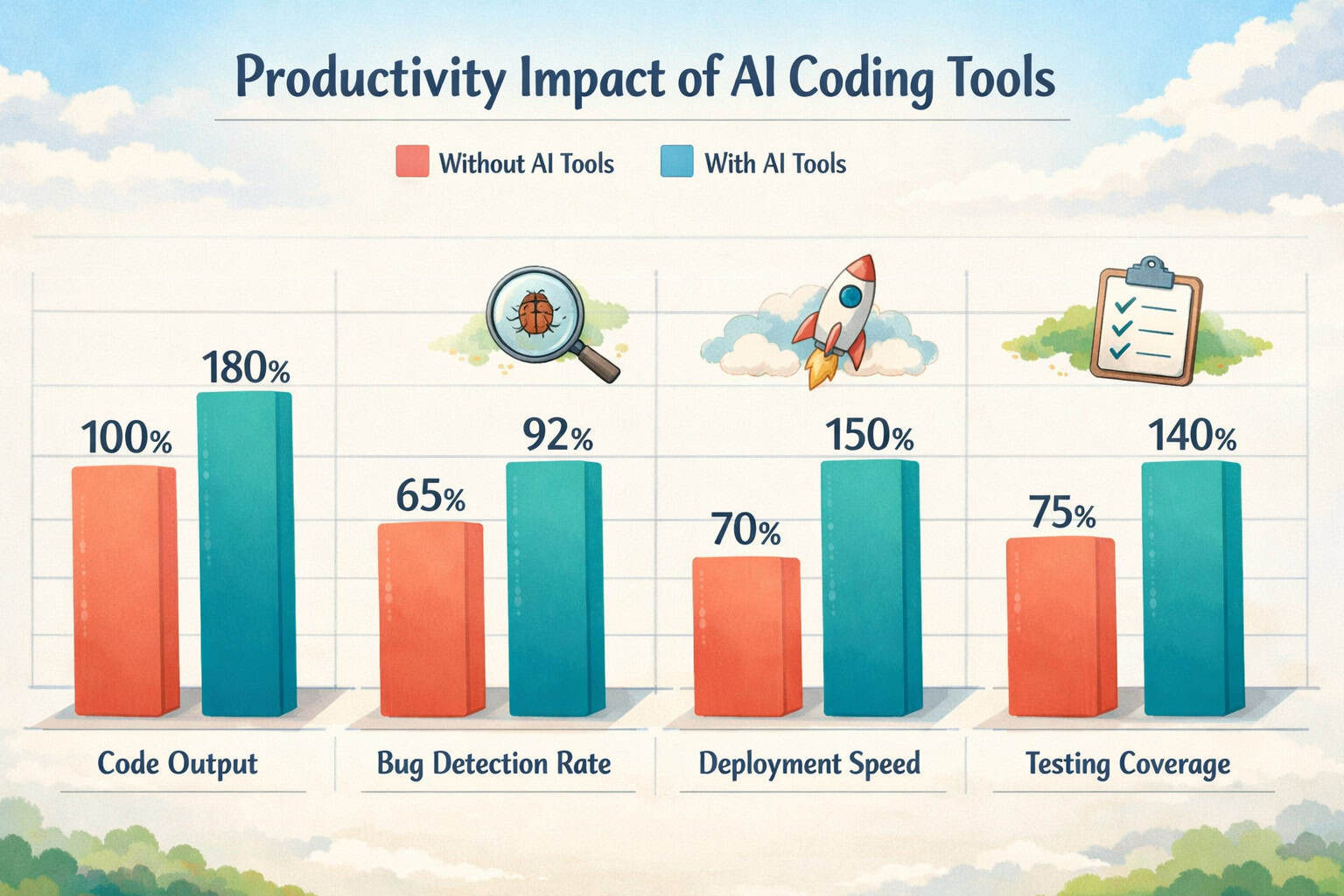
Based on available research and industry reporting:
- GitHub Copilot users report completing certain coding tasks faster, particularly boilerplate-heavy work like writing tests, API integrations, and CRUD operations [4]
- The gains are smaller for complex architectural decisions, performance optimization, and novel problem-solving, where human judgment still dominates
- Non-developers using no-code AI platforms can build functional prototypes in hours rather than weeks [3]
Where AI tools genuinely save time:
- Writing repetitive code (form validation, data fetching, utility functions)
- Generating documentation and code comments
- Translating designs to code
- Running and interpreting test results
- Scanning for security vulnerabilities
Where AI tools add less value:
- Defining system architecture for complex applications
- Making UX and product decisions
- Debugging deeply context-dependent logic errors
- Writing code for highly specialized domains (e.g., real-time trading systems)
For teams managing WordPress sites, AI tools also extend to content and plugin workflows. See our guide on the 12 best AI plugins for WordPress to automate website management for practical options.
What Are the Risks and Limitations of AI-Powered Web Development Tools?
AI-powered web development tools carry real risks that developers and teams need to manage actively.
Security risks AI models are trained on public code, which includes insecure patterns. A tool might suggest code that compiles and runs correctly but contains a SQL injection vulnerability or an insecure API call. Security-focused tools like Snyk help catch these issues, but they’re not foolproof [5].
Code quality and maintainability AI-generated code can be verbose, inconsistent in style, or structurally awkward. Over time, a codebase built heavily on AI suggestions without human curation can become difficult to maintain.
Over-reliance risk Developers who lean too heavily on AI tools early in their careers may not build the foundational understanding needed to debug complex problems or evaluate whether AI suggestions are actually correct.
Intellectual property concerns Some AI coding tools are trained on open-source code with various licenses. The legal landscape around AI-generated code and copyright is still evolving, so enterprise teams should check their tool’s terms carefully.
Data privacy When you paste code into an AI assistant, that code may be used to improve the model. For proprietary or sensitive codebases, use tools that offer private deployment options (like Tabnine’s on-premise plan).
Edge case: If you’re building a regulated application (healthcare, finance, legal), AI-generated code needs the same rigorous review as any third-party code. Don’t let the tool’s confidence substitute for your compliance obligations.
How Will AI-Powered Web Development Tools Change in the Next Few Years?
The trajectory is toward more autonomous, context-aware tools that can handle longer, more complex tasks with less human guidance.
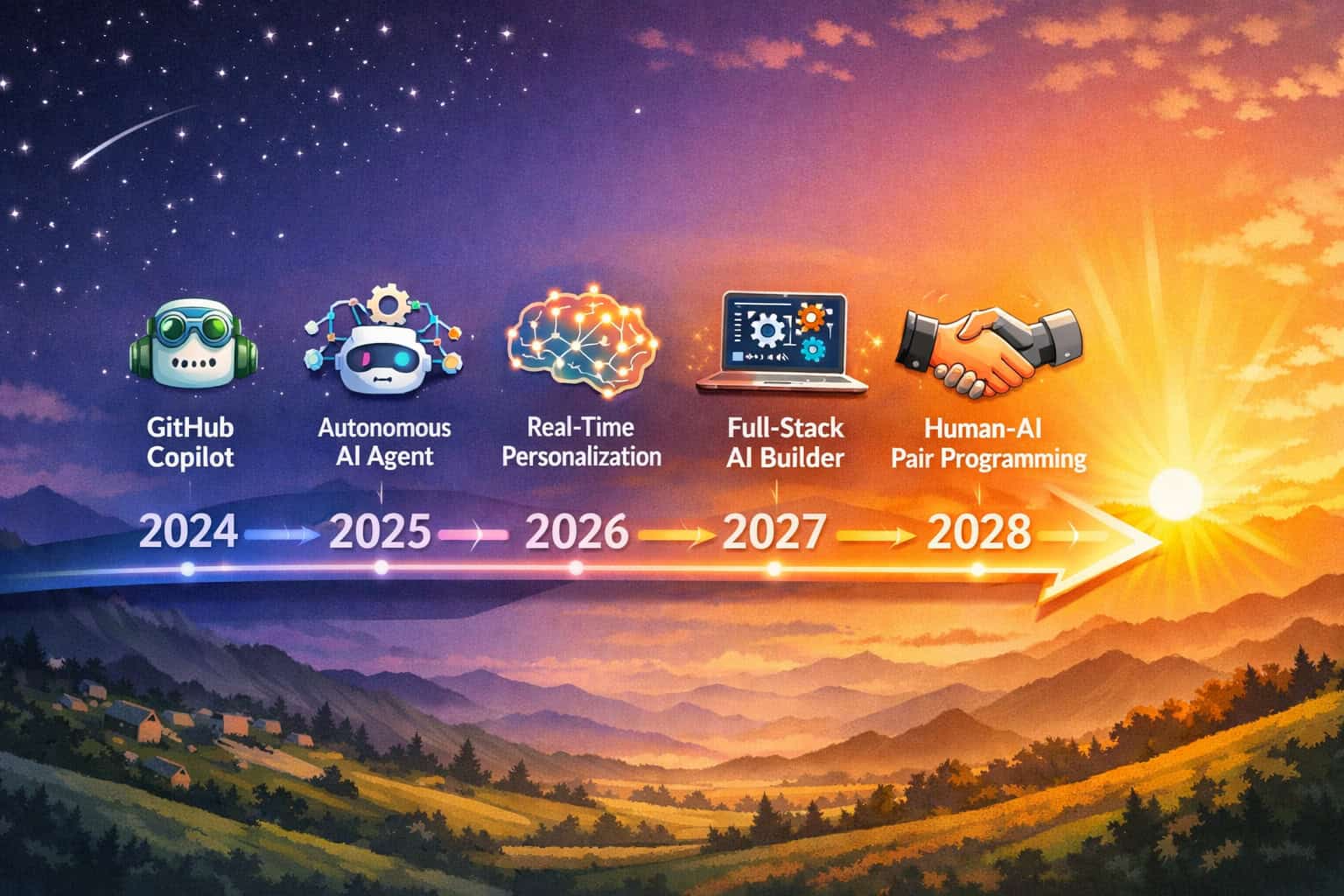
Trends already emerging in 2026:
- Real-time personalization engines: AI tools are beginning to help developers build applications that adapt dynamically to user behavior, preferences, and context, without requiring manual A/B test setup [3]
- Full-stack AI agents: Tools that can take a feature brief, write the frontend and backend code, write tests, and open a pull request, with a human reviewing rather than writing
- AI-assisted code review: Rather than just generating code, AI tools increasingly flag issues in human-written code during the review process
- Better design-system awareness: AI tools are learning to respect existing design systems and component libraries, generating code that fits your project’s conventions rather than starting from scratch
For teams already using AI in content workflows, the same principles apply. See our comprehensive guide to AI-powered content generation tools for a parallel look at how AI is changing content creation.
The core shift: AI tools are moving from “assistant that helps you type faster” to “collaborator that handles entire sub-tasks.” The developer’s role shifts toward defining requirements, reviewing output, and making judgment calls, which is arguably more interesting work.
How Do You Choose the Right AI Web Development Tool for Your Project?
Start by identifying your biggest bottleneck, then match a tool to that specific problem.
Decision framework:
| Your situation | Recommended tool type |
|---|---|
| Professional developer writing lots of boilerplate | GitHub Copilot or Cursor |
| Non-developer building a web app | No-code AI builder (Bolt.new, Lovable) |
| Designer who needs code from mockups | TeleportHQ or Figma-to-code plugin |
| Team worried about security vulnerabilities | Snyk |
| Agency building client sites fast | Relume + Webflow or Figma workflow |
| WordPress-focused team | AI WordPress plugins |
Steps to evaluate a new tool:
- Start with a free trial or free tier on a real (non-critical) project
- Test it on a task you already know how to do manually, so you can judge output quality
- Check the privacy policy for how your code is used
- Evaluate the integration with your existing IDE or workflow
- Calculate actual time saved after one month, not just the first impressive demo
For teams building in Webflow, combining AI tools with a solid Webflow SEO optimization strategy ensures that faster development doesn’t come at the cost of search visibility.
FAQ: AI-Powered Web Development Tools
Q: Can AI tools replace web developers entirely? No. Current AI tools automate specific, well-defined tasks like code generation, testing, and security scanning. They still require human developers to define architecture, review output, handle complex debugging, and make product decisions. The more accurate framing is that AI tools make individual developers more productive, not that they eliminate the need for developers. [3]
Q: Is GitHub Copilot worth the subscription cost? For most professional developers, yes. The time saved on boilerplate code, test writing, and documentation typically exceeds the $10–$19/month cost within the first week of use. The value is lower if you work primarily in a niche language or domain that Copilot wasn’t well-trained on. [4]
Q: What’s the difference between GitHub Copilot and Cursor? GitHub Copilot focuses on real-time, line-by-line code suggestions within your existing IDE. Cursor is a full IDE built around AI, with deeper codebase context awareness and the ability to make multi-file edits based on a single instruction. Cursor is generally preferred for complex, large-scale projects.
Q: Are AI-generated code outputs secure? Not automatically. AI models are trained on public code, which includes insecure patterns. Always review AI-generated code for security issues, especially in authentication, data handling, and API integrations. Pair any AI coding tool with a dedicated security scanner like Snyk. [5]
Q: Can non-developers really build web apps with AI tools? Yes, for simpler applications. Platforms like Bolt.new and Lovable can generate functional web apps from plain-English descriptions, including basic backends and deployment. However, complex apps with custom logic, performance requirements, or regulatory compliance still benefit from professional developer involvement. [2]
Q: What is Devin AI and is it actually useful? Devin, launched by Cognition Labs in March 2024 at $500/month, was the first AI agent marketed as a fully autonomous software engineer. It can build simple applications from natural language prompts. Early independent reviews found it struggled with complex, multi-step projects. It’s best viewed as a powerful prototype of where autonomous AI agents are heading, not a ready replacement for human developers. [2]
Q: How do visual AI testing tools work? Visual AI testing tools take screenshots of your web application across different browsers and devices, then use computer vision algorithms to detect rendering differences, layout shifts, and visual regressions. They integrate with test frameworks like Selenium, Cypress, and Puppeteer, running as part of your existing CI/CD pipeline. [1]
Q: What should I look for in an AI web development tool? Prioritize: IDE integration with your existing workflow, privacy policy for how your code is handled, language and framework support for your stack, quality of suggestions on complex (not just simple) tasks, and pricing relative to actual time saved. Test any tool on a real project before committing.
Q: Are there AI tools specifically for WordPress development? Yes. There are AI plugins for content generation, SEO optimization, chatbot integration, and workflow automation within WordPress. For a detailed breakdown, see our guide on AI plugins for WordPress that automate website management.
Q: How do AI tools handle design-to-code conversion? Tools like TeleportHQ analyze your UI design (from Figma or other tools) and generate corresponding HTML, CSS, and JavaScript. The output quality depends on how well-structured your design is. Clean, component-based designs with consistent spacing and typography produce better code output. [6]
Conclusion: Practical Next Steps for Adopting AI Web Development Tools
AI-powered web development tools are not a future concept. They’re active, production-ready tools that professional developers, agencies, and non-technical founders are using right now to build faster and more reliably.
The biggest mistake teams make is adopting AI tools as a replacement for process rather than a complement to it. AI-generated code still needs review. AI-built apps still need UX judgment. The developers and teams winning with these tools are the ones who use AI for the mechanical work while applying human expertise to the decisions that actually matter.
Actionable next steps:
- Identify your biggest time drain in your current development workflow (writing boilerplate, converting designs, running tests, handling security)
- Pick one tool that directly addresses that bottleneck, using the selector above or the comparison table in this article
- Run a 30-day trial on a real, non-critical project and track actual time saved
- Review all AI-generated output before it goes to production, especially for security-sensitive code
- Layer tools gradually — start with a code assistant, then add a security scanner, then explore design-to-code tools as your workflow matures
For teams already using no-code platforms, pairing them with AI-powered content optimization ensures that what you build also performs well in search. And if you’re exploring AI tools for the visual and design side of your workflow, the best AI graphic design tools are worth evaluating alongside your development stack.
The tools will keep improving. The developers who learn to work with AI effectively now will have a significant advantage as those tools become more capable.
References
[1] Top AI Tools Revolutionizing Web Development – https://artjoker.net/blog/top-ai-tools-revolutionizing-web-development/ [2] AI Development Tools In 2024 – https://danielpleus.substack.com/p/ai-development-tools-in-2024 [3] Top 10 AI Development Tools For Web Apps Must-Haves For 2024 – https://flatlogic.com/blog/top-10-ai-development-tools-for-web-apps-must-haves-for-2024/ [4] 10 AI Web Development Tools For Business Enhancement In 2024 – https://www.bernum.ca/blog/10-ai-web-development-tools-for-business-enhancement-in-2024/ [5] AI Tools For Web Development – https://ful.io/blog/ai-tools-for-web-development [6] Top 10 AI Tools For Website Development In 2024 – https://ai.plainenglish.io/top-10-ai-tools-for-website-development-in-2024-e4de4cfd01a4
Related: Mastering ChatGPT: A Comprehensive Guide to Maximizing AI Productivity
Related: Mastering ChatGPT Prompts: The Ultimate Guide to Unlocking AI's Full Potential
Related: ChatGPT Plus: A Comprehensive Guide to Advanced AI Capabilities and Value Proposition
Related: Claude Code vs Cursor: The Ultimate AI Coding Assistant Showdown in 2026