Last updated: May 10, 2026
Quick Answer
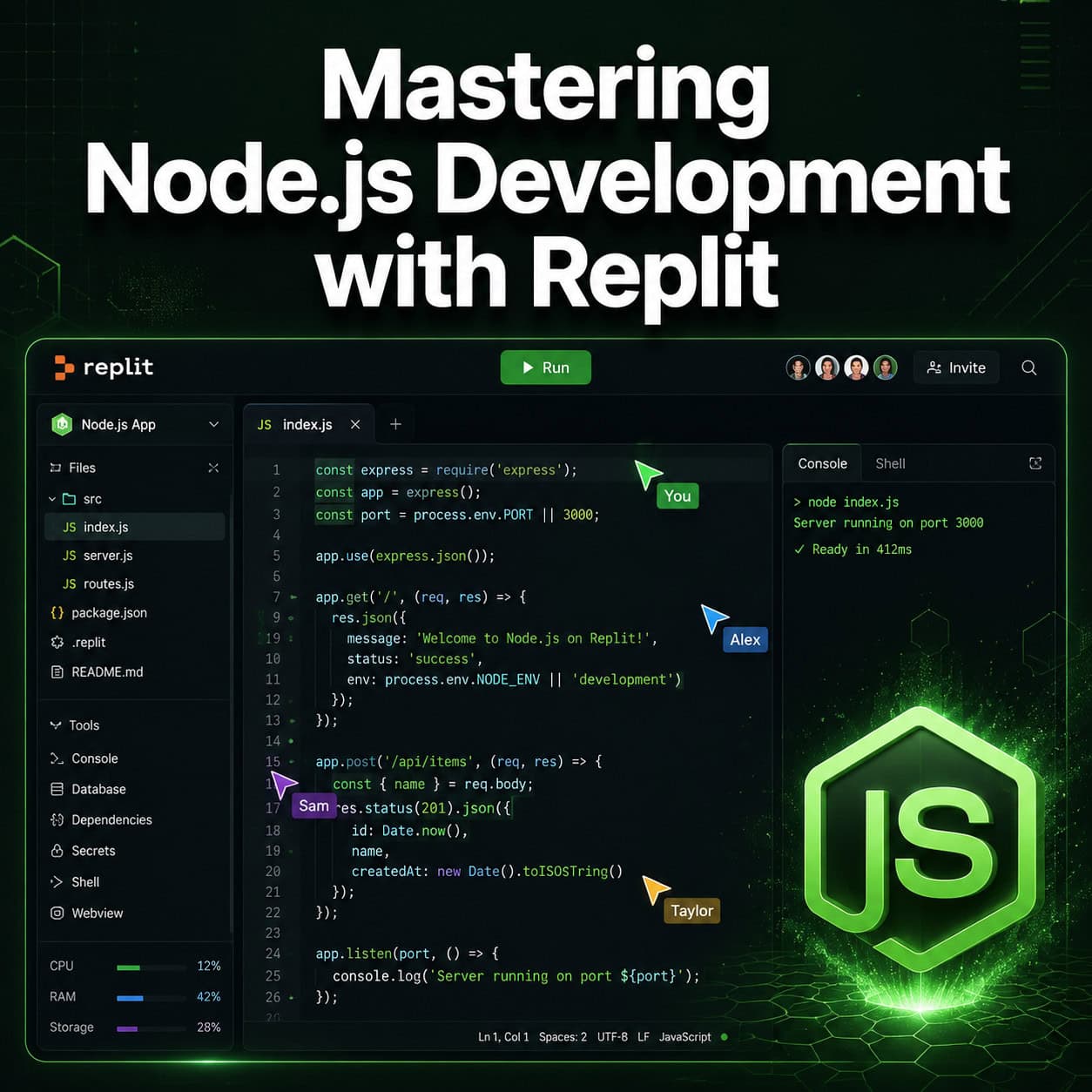
Replit provides a browser-based development environment where you can write, test, and deploy Node.js applications without any local setup. It handles dependency installation, environment configuration, and hosting from a single interface. For developers who want to skip “setup hell” and focus on writing code, Replit eliminates the friction between idea and deployed application.
Key Takeaways
- Replit auto-detects Node.js projects and installs dependencies when you create a new Repl with a
.jsentrypoint [10] - The
.replitconfiguration file controls your entrypoint, run command, and build step for deployments - Replit’s Workspace Security Center 2.0 (launched May 2026) scans Node.js dependency vulnerabilities from a centralized dashboard [7]
- Private publishing is now available on all plans, including Starter and Core, for internal tool deployments [7]
- External access tokens let services like Slack and GitHub securely call your private Node.js apps [7]
- Node.js v20 reached end-of-life on April 30, 2026; upgrade to v22+ to avoid unpatched vulnerabilities
- For production-scale apps, consider deploying from Replit to Vercel via GitHub sync for better scalability
- Replit Agent can auto-install packages like Express based on natural language prompts

Why Use Replit for Node.js Development Instead of a Local Setup?
Replit removes the entire local environment configuration process. You don’t install Node.js, configure npm, set up a code editor, or manage version conflicts. Everything runs in your browser.
Choose Replit if:
- You’re learning Node.js and don’t want tooling to slow you down
- You need to collaborate in real-time with teammates
- You want instant deployment without configuring CI/CD pipelines
- You’re building prototypes, internal tools, or Discord bots
Choose local development (VS Code + Docker) if:
- You need unlimited compute power beyond Replit’s cycle-based pricing [6]
- Your project requires specific system-level dependencies
- You’re building enterprise applications that need custom infrastructure
A common mistake: assuming Replit is only for beginners. Teams use it for production internal tools, especially now that private deployments work on all plans [7]. If you’re exploring no-code and low-code platforms for rapid development, Replit sits at the intersection of coding and instant deployment.
How Do You Set Up a Node.js Project on Replit?
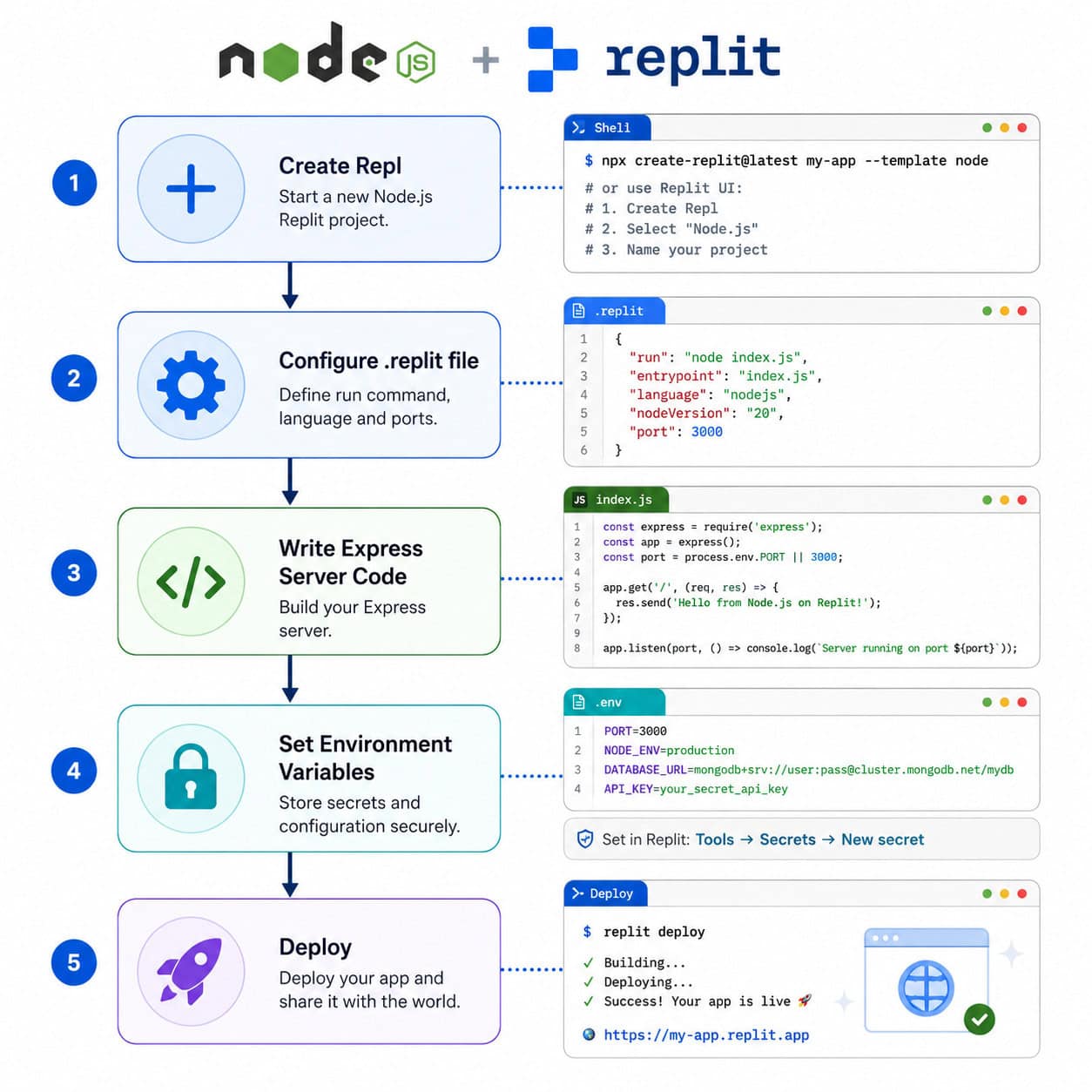
Create a new Repl, select “Node.js” as the template, and Replit automatically configures the runtime. Your project is ready to run in under 10 seconds.
Step-by-step setup:
- Create a Repl — Click “Create Repl,” choose Node.js, name your project
- Check the .replit file — Verify these settings:
entrypoint = "app.js"
run = "npm start"
build = "npm run build" - Initialize your project — Run
npm init -yin the Shell tab - Install packages — Use
npm install expressor let Replit Agent handle it via prompt - Write your server code — Replit recognizes
.jsextensions and provides syntax highlighting [10] - Set environment variables — Use the Secrets tab (never hardcode API keys)
- Hit Run — Your app starts and Replit provides a preview URL
Edge case: If Replit doesn’t detect your Node version correctly, add an engines field to your package.json:
<code class="language-json">{
  "engines": {
    "node": ">=22.0.0"
  }
}
</code>
This matters because Node.js v20 reached end-of-life in April 2026, and running outdated versions exposes your app to unpatched security issues.
What Does a Basic Express.js App Look Like on Replit?
Here’s a minimal but production-ready Express server you can deploy immediately:
<code class="language-javascript">const express = require('express');
const app = express();
const PORT = process.env.PORT || 3000;

app.use(express.json());

app.get('/', (req, res) => {
  res.json({ status: 'running', message: 'Node.js on Replit' });
});

app.get('/health', (req, res) => {
  res.status(200).json({ healthy: true });
});

app.listen(PORT, () => {
  console.log(`Server running on port ${PORT}`);
});
</code>
Pro tip: Add nodemon as a dev dependency for hot-reloading during development. Update your .replit run command to npx nodemon app.js so changes reflect instantly without manual restarts.
For developers transitioning from design tools to code, our guide on Figma to code plugins covers how to bridge that gap efficiently.
How Does Replit Handle Security for Node.js Applications?
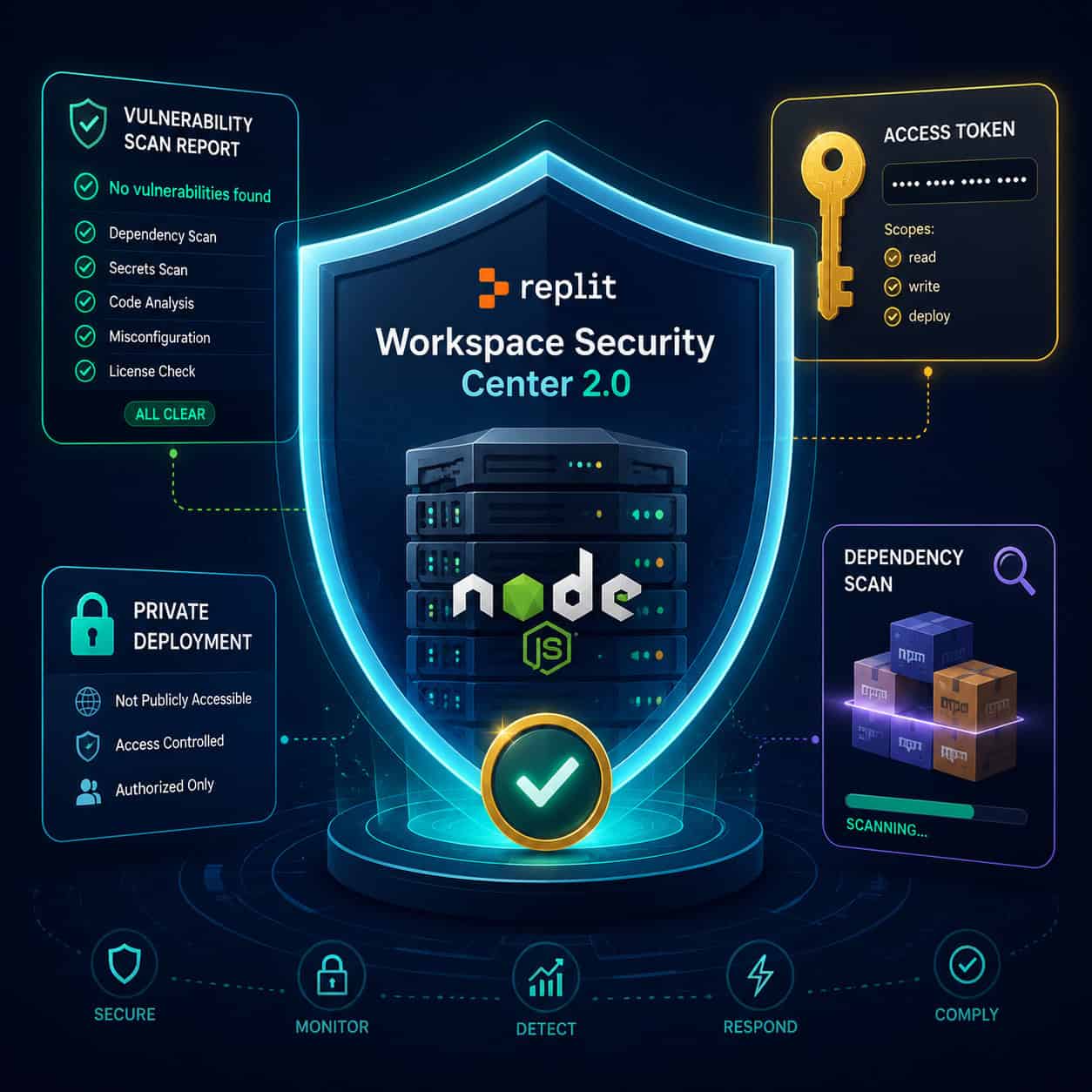
Replit’s Workspace Security Center 2.0, launched May 8, 2026, provides centralized vulnerability scanning for all Node.js dependencies [7]. It identifies known CVEs in your node_modules and suggests fixes directly in the editor.
Key security features:
| Feature | What It Does | Available On |
|---|---|---|
| Dependency scanning | Flags vulnerable npm packages | All plans [7] |
| Private deployments | Restricts app access to signed-in users | All plans (Starter/Core/Pro) [7] |
| External access tokens | Lets external services (Slack, GitHub) call private apps | All plans [7] |
| Environment secrets | Encrypts API keys and credentials | All plans |
| Auto-patching | Critical Node.js vulnerabilities patched automatically | Agent-built apps |
Common mistake: Developers often store secrets in .env files committed to version control. On Replit, always use the Secrets tab. Values stored there are encrypted and injected at runtime without appearing in your code.
The January 2026 critical Node.js vulnerability was automatically patched for Replit Agent apps, but manually created projects required developer action. Always check the Security Center dashboard after Node.js security advisories.
How Do You Deploy a Node.js App from Replit to Production?
Replit offers built-in “always-on” deployments, but you have options depending on your scale needs.
Option 1: Deploy directly on Replit
- Click the “Deploy” button in your Repl
- Choose “Reserved VM” for always-on or “Autoscale” for traffic-based scaling
- Configure your custom domain (optional)
- Set deployment-specific environment variables
This works well for internal tools, prototypes, and low-to-medium traffic apps. Private publishing means you can restrict access without upgrading to Pro [7].
Option 2: Deploy to Vercel via GitHub
For production applications that need global CDN distribution and automatic scaling:
- Push your Replit project to GitHub (use the Git tab)
- Connect the repo to Vercel
- Vercel auto-detects Node.js and deploys with zero configuration
This approach gives you Replit’s development speed with Vercel’s production infrastructure. It’s the best of both worlds for apps expecting real traffic.
Decision rule: Use Replit’s native deployment for internal tools and MVPs. Use Vercel or similar platforms when you need edge caching, automatic scaling, or guaranteed uptime SLAs.
If you’re building websites alongside your Node.js backend, check out our review of drag-and-drop website builders for frontend options that pair well with API-first backends.
What Are the Limitations of Building Node.js Apps on Replit?
Replit isn’t perfect for every use case. Understanding its constraints helps you decide when to use it and when to reach for alternatives.
Limitations:
- Compute caps — Free and Starter plans have cycle limits; heavy processing jobs may hit walls [6]
- Cold starts — Non-reserved deployments spin down after inactivity, causing 2-5 second delays on first request
- No root access — You can’t install system-level packages outside Nix configuration
- Storage limits — Large datasets or file-heavy apps may exceed plan storage
- Browser-only editing — No offline development (though the mobile app helps)
Workarounds:
- Use Reserved VM deployments to eliminate cold starts
- Configure Nix packages in
replit.nixfor system dependencies - Offload heavy computation to external services (AWS Lambda, cloud functions)
- Sync to GitHub for local VS Code editing when needed
For teams already using AI-powered tools to streamline workflows, Replit’s AI Agent fits naturally into that ecosystem by generating boilerplate code from prompts.
How Does Replit Compare to Other Node.js Development Platforms?
| Criteria | Replit | VS Code + Local | Glitch | CodeSandbox |
|---|---|---|---|---|
| Setup time | Instant | 15-60 min | Instant | Instant |
| Real-time collaboration | Yes | Via Live Share | Yes | Yes |
| Built-in deployment | Yes | No | Yes | Limited |
| AI code assistance | Yes (Agent) | Via extensions | No | Yes |
| Compute power | Plan-limited | Unlimited [6] | Limited | Limited |
| Private deployments | All plans [7] | Self-managed | Paid only | Paid only |
| Offline support | No | Yes | No | No |
Replit’s strongest advantage is the unified workflow: code, run, debug, deploy, and collaborate without switching tools. Its weakest point is compute limitations for resource-intensive applications.
For developers working across the full stack, our WordPress plugin development guide covers backend principles that translate well to Node.js architecture patterns.
What Are the Best Practices for Mastering Node.js Development with Replit?
Following these practices will save you debugging time and deployment headaches:
- Pin your Node.js version — Don’t rely on Replit’s default; specify in
package.json - Use the Secrets tab — Never hardcode credentials, even in private Repls
- Configure
.replitproperly — Explicit entrypoint and run commands prevent deployment failures - Enable Security Center scanning — Check weekly for dependency vulnerabilities [7]
- Add a health endpoint —
/healthroutes help monitoring tools verify your app is running - Use
package-lock.json— Commit it for reproducible builds - Set up Git integration — Push to GitHub regularly for backup and CI/CD options
- Test with Replit’s preview — Catch issues before deploying to production
The Coursera course “Replit Essentials” covers collaborative coding patterns in depth for teams adopting this workflow [8].
Conclusion
Mastering Node.js Development: A Comprehensive Guide to Building and Deploying with Replit comes down to understanding when this platform serves you best and how to configure it properly. Replit excels at rapid development, collaboration, and getting from zero to deployed app in minutes rather than hours.
Your next steps:
- Create a free Replit account and spin up a Node.js Repl
- Build a basic Express server using the code example above
- Configure your
.replitfile with explicit entrypoint and run commands - Set up the Security Center to scan your dependencies [7]
- Deploy using private publishing for internal tools or push to Vercel for production traffic
The platform continues evolving—private deployments on all plans and external access tokens make it viable for serious internal tooling in 2026 [7]. Start small, deploy fast, and scale out when your app demands it.
For broader AI-powered development strategies, combining Replit’s Agent with structured workflows accelerates not just coding but entire project lifecycles.
FAQ
Can I run Node.js v22 on Replit?
Yes. Replit supports current Node.js LTS versions. Specify your version in package.json under the engines field to ensure consistency.
Is Replit free for Node.js development? Yes, the free tier includes Node.js development and basic deployments. Paid plans add more compute cycles, always-on hosting, and private deployments [7].
How do I install npm packages on Replit?
Run npm install package-name in the Shell tab, or use Replit Agent to install packages via natural language prompts.
Can I use TypeScript with Node.js on Replit?
Yes. Select the Node.js (TypeScript) template, or add TypeScript manually with npm install typescript @types/node and configure tsconfig.json.
Does Replit support WebSockets for Node.js?
Yes. Libraries like ws and socket.io work on Replit. The preview URL supports WebSocket connections for real-time applications.
How do I connect a database to my Node.js app on Replit? Use environment variables (Secrets tab) to store connection strings for MongoDB Atlas, PostgreSQL, or Replit’s built-in database. Install the appropriate npm driver.
Is Replit secure enough for production apps? For internal tools and MVPs, yes—especially with Security Center 2.0 and private deployments [7]. For high-security production apps handling sensitive data, evaluate whether Replit’s shared infrastructure meets your compliance requirements.
Can multiple people edit the same Node.js project on Replit? Yes. Replit supports real-time multiplayer editing similar to Google Docs. All collaborators see live cursors and changes instantly [8].
How do I debug Node.js apps on Replit?
Use console.log for quick debugging, or the built-in debugger with breakpoints. The Shell tab also supports running Node.js in inspect mode.
What happens if my Replit deployment goes down? Reserved VM deployments auto-restart on failure. Autoscale deployments spin up new instances based on traffic. Add health checks to monitor uptime.
See also: Node.js Documentation.
References
[6] Watch – https://www.youtube.com/watch?v=eMMojWHikyY [7] Changelog – https://docs.replit.com/updates/2026/05/08/changelog [8] Replit Essentials Collaborate Create And Code Smarter – https://www.coursera.org/learn/replit-essentials-collaborate-create-and-code-smarter [10] Watch – https://www.youtube.com/watch?v=MSiue53E2uI