Key Takeaways
- Use a modular architecture to keep your code clean, maintainable, and collision-free. Use consistent prefixes for all functions and classes so that they are compatible with WP core and other plugins.
- Security, security, security – sanitize all user inputs and validate data types before processing or database entry. Use nonces for form submissions to defend your plugin from CSRF attacks.
- Load scripts and styles only where they are strictly necessary. Your plugin should be optimized for performance. Leverage the Transient API and efficient database queries to keep your store zipping along under heavy traffic.
- Add fine-grained access control. Check that the user has permission to modify the settings or product data. Protect your files from direct access by defining the base path at the beginning of your scripts.
- Create an easy to use UI that offers clear customization workflows and mobile-responsive previews. Document your hooks, filters, and features so users and other developers can make use of your plugin.
- Maintain a strict testing and release cycle, which includes debugging, version control, and compatibility. Follow WordPress plugin development best practices and use tools like Git to maintain a stable, well-documented history of your changes.
===
WordPress plugin developer best practices are to write secure, modular and well-documented code according to the official coding standards.
Take these steps to keep your plugins future-proof. Developers employ hooks, filters and the WordPress API to ensure their code integrates cleanly with core files.
Doing so steers you clear of common security pitfalls and performance bottlenecks. These practices set a solid stage for your project, which we’ll explore below.
The foundational blueprint
A solid plan serves as your compass in the initial stage of plugin development. It helps you identify issues early so you can correct them before they escalate. This stage transforms concepts into a tangible product and optimizes the plugin’s compatibility with the WordPress platform.
You should sketch out the project scope and goals before you write any code.
Strategic planning
Before starting your custom plugin, clearly define its purpose for store owners. Exploring other tools in the WordPress plugin repository can help pinpoint missing features, allowing you to target a niche market like sellers of handmade bikes or home decor effectively.
- Identify the core issue your plugin will address for WooCommerce users.
- List out the specific features needed for product customization.
- See if live previews and custom pricing are necessary.
- Confirm the project scope matches your technical skills.
Architectural design
Follow a modular pattern to keep your code clean and easy to modify later. This makes it easy to add new features, such as swatches or additional fields, without destroying your base configuration. Namespaces, always namespaces! This prevents your code from conflicting with other plugins or WordPress core.
Plan how your plugin hooks into WooCommerce APIs early. Your custom logic communicates with the store seamlessly. By planning this in advance, you avoid hours of later debugging.
File organization
Keep your wp-content/plugins/ directory clean by putting everything in one folder.
Put your main plugin file in your root folder so WordPress can read the metadata.
Build an includes/ folder of your helper functions and main logic classes. This helps maintain a tidy work space and makes it easy to locate code to update!
Stick your CSS, JavaScript, and template files into their own subfolders. This keeps things tidy as your project expands.
Core wordpress coding standards
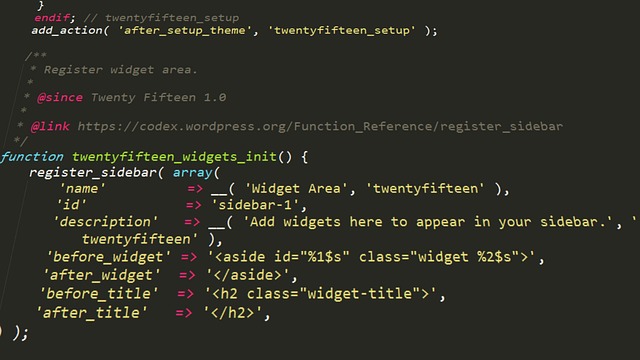
Follow official WordPress coding standards to keep your codebase readable, maintainable, and interoperable with the rest of the ecosystem. They prioritize modern PHP standards like using namespaces and strict types, in addition to uniform indentation.
By adhering to these guidelines, you simplify the process for other developers to jump in, help you with your project, or debug issues.
1. Naming conventions
Prefix all globals, classes, and functions with a unique identifier to prevent conflicts with other plugins or the core. Instead of “foo_bar,” use more descriptive names such as “my_plugin_prefix_get_data.
Keep your casing consistent across your files. It keeps the project nice, tidy, and professional.
2. Input sanitization
Clean any user provided data before it hits your system. Use built-in functions like sanitize_text_field() or sanitize_email() to strip out harmful characters.
If you let users submit HTML, use wp_kses() to whitelist tags. This simple measure stops Cross-Site Scripting (XSS) attacks.
3. Data validation
Validate data types and formats before operating on them. Use conditional logic to confirm that required fields have the expected values.
This maintains system integrity during heavy-duty tasks like product customization.
4. Secure nonces
Create unique nonces for each form submission to confirm requests come from your site. Use wp_verify_nonce() before doing sensitive stuff to prevent CSRF.
Including these tokens in AJAX tools and settings pages is an important security measure.
5. Database interaction
Leverage the $wpdb class for all queries to guarantee compatibility. Use prepare() for all SQL statements to block injection.
Use native WordPress meta tables instead of custom tables whenever possible to keep your storage lean. If you have to create custom tables, then index them appropriately to avoid bottlenecking performance on large eCommerce sites.
6. Internationalization
Wrap all translatable strings in text domains with __() or _e(). This enables your plugin to be translated into any language worldwide.
Make a ‘languages’ folder for your .pot and .mo files. Use esc_html__() to translate and escape at the same time.
This maintains your interface safe while rendering it accessible to a worldwide audience.
Always document your hooks with @param and @return tags. Make sure you use a strong logging system to capture errors during development and your interface is WCAG 2.2 AA compliant.
Fortifying your plugin
Protecting your custom plugin is paramount to any serious WordPress developer. You should adhere to rigorous WordPress coding standards and sanitize your inputs and outputs to prevent malicious actors. To avoid naming collision, use a unique plugin name that is not a common word and keep your plugin folder structure tidy so others can assist you in maintaining the code.
Role management
Always use current_user_can() to verify that the user should be allowed to make a setting change. This easy step prevents outsiders from getting access to your product data.
You’ll want to configure granular access so that shop managers and customers view different things. Limit your backend pages to admins or shop owners alone. Prevent any changes to product variations or custom fields unless the user has signed in to save them.
File access
Protect your plugin by not allowing direct browser access to your PHP files. Define ABSPATH at the top of each page. This simple test prevents attackers from executing your scripts beyond WordPress.
Structure your logic into classes or namespaces to encapsulate it. For example, you should add empty index files or use .htaccess rules to block directory listing.
Last, mind those upload folders. Just accept certain file types to prevent users from uploading malicious scripts on your server.
Error reporting
Don’t expose your users to errors. Turn off debug displays on live sites so nosy people can’t see your server paths.
Instead, log your errors to a private file. This allows you to capture bugs in development without damaging the user experience.
Manage your exceptions properly so the plugin doesn’t blow up when something breaks. If a setting doesn’t save, inform the user in the dashboard with a clear and useful message.
Never forget to test your plugin for performance with the likes of GTmetrix or Google PageSpeed Insights. Modularize your code with hooks and filters so you can quickly update it for new PHP versions. It keeps your plugin strong.
Optimizing for speed
Plugin efficiency impacts user experience and server load; a streamlined wordpress development workflow ensures your code is lean and fast, even under large traffic.
Conditional loading
Don’t load your plugin assets unless they are actually required. Use conditional tags such as is_product() or is_page() to enqueue scripts and styles only on pages where they are needed. This keeps extraneous files from bogging down the rest of the site.
Turn off plugin features on pages where they’re not active. Register assets in a function that only runs if a certain shortcode is present. This approach minimizes the site footprint. Don’t load heavy libraries globally and save memory!
Asset management
Always do wp_enqueue_scripts to load files. This will respect dependency order and loading priority. Group related files to reduce HTTP requests. Version your assets to prevent post-update browser caching headaches.
Of course, always use standard handles so you don’t conflict with themes. Minimize the number of requests by combining CSS and JavaScript files into chunks. You can use build tools to combine files automatically.
Consider a content delivery network caching those static assets globally. Compressing images instead makes your pages load faster.
Query efficiency
Too many database calls tend to be performance bottlenecks. Cache results with the Transient API to speed up rendering for repeat visits. Index custom meta fields if the plugin filters data.
Do not run queries inside a loop.
Practice | Optimized Version |
|---|---|
Query in loop | Use WP_Query with optimized args |
Direct SQL | Use get_posts() or helper functions |
Server optimization is fundamental for speed. Make sure you run the latest PHP and database versions. Turning on GZIP in your .htaccess file shrinks file sizes significantly.
Split files over several hostnames, so the browser can make more simultaneous requests. Limit third-party resources such as tracking or external widgets. These frequently add delays you cannot control.
The product mindset
A product mindset in WordPress development moves you away from just writing code towards solving actual problems for your users. It begins by inquiring if your custom plugin generates real value. You need to make your tool valuable, safe, and maintainable indefinitely.
User experience
- Keep your interface clean and simple for all users.
- Match your design to the WordPress theme style.
- Make sure the layout works well on mobile phones.
- Give users a live view of their changes.
Arrange features in a natural, sequential flow. It saves the user from useless wandering. Group complicated settings into obvious buckets to prevent confusion.
So always show price changes as the user makes new selections. This immediate reward nurtures trust. When your plugin seems like an organic native part of the site, people have more fun!
Clear documentation
A setup guide for quick installation.
A list of all plugin hooks and filters.
A guide for troubleshooting common issues.
Visual examples like screenshots or short videos.
Great documentation enables users to solve their own issues. Add information on how to manage product kits and variations. Developers will need to understand how to safely extend your code with hooks.
Some screencaps here and there go a long way to clarifying these steps.
Update strategy
You have to employ some versioning. It assists users in understanding whether a new update is a minor correction or a major revision. Please always maintain a public changelog. This file lists new features and old parts you’ve removed.
Test your code against the latest WordPress core updates often. This prevents bugs from taking a site down when it updates. You need a robust scheme for database changes so users don’t ever lose their data in an upgrade.
Check inputs and use nonces, and always think security first. This defends all of us.
The testing and release cycle
A stable plugin deserves a sane schedule for testing and release within the WordPress development workflow. You need to test code in different environments, watch metrics for interference, and verify safety before release to the public.
Enable debugging
Enable WP_DEBUG in your local setup to catch hidden warnings up front. This easy step prevents small mistakes from becoming big ones.
Use the Query Monitor plugin to observe DB queries and hooks. It gives you live analytics as to how your code integrates with WordPress core.
Please check your browser console for JS errors. This assists in dislodging problems on product pages. Log each fix before proceeding to a staging server.
Thorough testing
Performance is contingent upon testing. Be sure you always test in a separate database with MariaDB to protect your main data from being accidentally deleted.
Utilize existing frameworks, such as wp-test-framework, which you can install with Composer. One hundred percent code coverage means every function works as expected.
Regression testing means the new features do not break old features. By providing a boilerplate, you make it easier for everyone.
Conduct end-to-end tests from setup to checkout. Check that various user roles see only what they’re supposed to see. Test on new installs to identify missing files.
Gather beta feedback to catch edge cases.
Version control
Git is the industry standard for managing source code. Branch for new features or bug fixes. This approach allows you to easily monitor the evolution.
Commit often with clear notes. Descriptive notes are useful for letting others follow your progress.
Do you host your project on GitHub or something? This makes for seamless teamwork and public progress reports.
Use these workflows to keep a clean history and accelerate release. Input validation and sanitization are key here to close security holes before they hatch.
Test the whole thing, including the database indexing, before release so the final product is rock solid for everyone.
Conclusion
Develop plugins with thought to treat your users right. Adhere to the core standards to keep your code clean and secure. Run your work on as many sites as possible to flush out bugs early. Good code speed makes your plugin run smoothly for all. Remember the users of your tools. Make your files small and your logic simple. Clean code is clean code because it is easy for others to read and assist. Growth comes when you pay attention to quality and genuine usefulness because you build trust in stable updates and fast fixes. Follow these steps to build tools that endure. See our guide over on the official WordPress site for the lowdown on the latest tools. Launch your next project today and experience your ideas take flight.
Frequently Asked Questions
Why should I follow WordPress coding standards?
Adhering to coding standards in your custom plugin ensures it’s secure, readable, and easy to maintain. This practice helps prevent conflicts with other WordPress plugins, supporting overall site stability and enhancing the WordPress development workflow.
What is the best way to secure my WordPress plugin?
Always sanitize and escape all user input and output to prevent conflicts. Employ WordPress nonces to check incoming requests as part of your WordPress development workflow. Keeping your code updated and stripping out unused functions reduces risks and unexpected behavior.
How do I optimize my plugin for better performance?
To enhance your WordPress development workflow, reduce database querying and cache with transients while efficiently loading scripts and styles only when needed, preventing unexpected behavior that can slow down your plugin.
Why is a product mindset important for developers?
A product mindset in WordPress development moves you away from just writing code to solving user problems. By focusing on user experience, documentation, and long-term support, you create a more valuable and reliable tool that people will actually want to keep installed in their plugin directory.
How often should I test my WordPress plugin?
Test your custom plugin during the entire wordpress development workflow. Run unit tests, integration tests, and compatibility checks prior to every release to prevent conflicts and ensure that your plugin still works for everyone, regardless of their configuration.
What is the most important step before releasing a plugin?
The most critical phase in the WordPress development workflow is comprehensive QA. Ensure your plugin follows all WordPress standards, is secure, and well-documented to prevent conflicts. A well-tested release gives users confidence in your offering and relieves you of support nightmares.