Last updated: May 1, 2026
Quick Answer: To sign up for Character AI, visit character.ai, click “Sign Up,” choose your registration method (email, Google, or Apple), verify your account, set your username and birthday, and you’re ready to start chatting. The entire process takes under three minutes and is free.
Key Takeaways
- Character AI (character.ai) is free to join and works on both desktop browsers and mobile apps (iOS and Android) [6]
- You can register using an email address, Google account, or Apple ID
- Account setup requires a username, date of birth, and email verification
- The platform offers a free tier and a paid subscription called c.ai+ with premium features
- New features in 2026 include Scenes (immersive storytelling), Profile Redesign, and Imagine Animated Chats (c.ai+ only) [1]
- Users can chat with existing AI characters or create their own custom characters after signing up [2]
- The mobile app is available on Google Play and the Apple App Store [7]
- Age verification is required; the platform is designed for users 13 and older
What Is Character AI and Who Is It For?
Character AI is an AI-powered conversational platform where users can chat with pre-built AI characters or create their own. It’s built for anyone who wants interactive, personality-driven AI conversations — from writers developing fictional characters to students practicing a new language to people who simply enjoy creative roleplay. [4]
The platform is accessible via web browser at character.ai and through dedicated mobile apps. It’s designed to be beginner-friendly, so you don’t need any technical background to get started. [6]
Who benefits most from Character AI:
- Writers and storytellers looking for creative writing partners
- Students who want to practice conversations in a safe, low-stakes environment
- Gamers and roleplay enthusiasts
- Anyone curious about AI personality simulation
- Developers and creators who want to build and publish their own AI characters [2]
Who it may not suit: If you need factual, citation-based research assistance, a tool like ChatGPT or Perplexity may serve you better. Character AI is optimized for personality and conversation, not accuracy-first information retrieval.

Complete Guide: How to Sign Up for Character AI in 5 Easy Steps
Signing up for Character AI takes less than three minutes. Here’s the full walkthrough, whether you’re on a desktop browser or the mobile app.
Step 1: Go to the Official Website or Download the App
Open your browser and navigate to character.ai, or download the Character AI app from the Google Play Store or Apple App Store. [7]
⚠️ Common mistake: Several third-party sites mimic the Character AI branding. Always use the official URL (character.ai) or download directly from your device’s official app store to avoid fake versions.
Step 2: Click “Sign Up”
On the homepage, you’ll see two options: Sign Up and Log In. Click Sign Up. You’ll be presented with three registration methods:
- Continue with Google (fastest option if you have a Gmail account)
- Continue with Apple (available on iOS and Safari)
- Sign up with Email (works on all devices and browsers)
Choose the method that fits your setup. If you use Google Workspace for school or work, the Google option is the most convenient because it skips the email verification step.
Step 3: Verify Your Email (Email Sign-Up Only)
If you chose the email route, Character AI will send a verification link to your inbox. Open that email and click the link. It usually arrives within 60 seconds. Check your spam folder if you don’t see it.
💡 Tip: Use a real email address you have access to. You’ll need it to reset your password and receive platform updates.
Step 4: Set Your Username and Date of Birth
After verification, you’ll be prompted to:
- Choose a username — this is your public display name on the platform
- Enter your date of birth — required for age-appropriate content filtering
Your username can be changed later, so don’t stress about picking the perfect one right away. The date of birth field is mandatory and cannot be skipped.
Step 5: Start Exploring or Create Your First Character
Once your account is active, you land on the main feed. From here you can:
- Browse and chat with thousands of existing AI characters
- Use the Create button to build your own character [2]
- Explore new features like Scenes for immersive storytelling [1]
That’s the complete process. Five steps, no credit card required, and you’re in.
How to Access Character AI on Mobile vs. Desktop
Character AI works well on both platforms, but there are some differences worth knowing before you pick one.
| Feature | Desktop (Browser) | Mobile App |
|---|---|---|
| Sign-up process | Identical | Identical |
| Chat interface | Full-screen, keyboard-friendly | Swipe-friendly, optimized for touch |
| Scenes feature | Available | Available (launched on mobile first) [1] |
| Imagine Animated Chats | c.ai+ only | c.ai+ only (mobile app) [1] |
| Notifications | Browser notifications | Push notifications |
| Offline access | No | No |
| Download required | No | Yes |
Choose desktop if you prefer typing long messages or plan to create detailed characters. Choose mobile if you want push notifications and on-the-go access.
The mobile app is available on Android via Google Play [7] and on iOS via the Apple App Store. Both versions are free to download.

What Happens After You Sign Up? Exploring the Platform
Once your account is live, the platform opens up a wide range of options. Here’s what you’ll find right away.
The main feed shows featured AI characters and trending conversations. You can jump into a chat immediately by clicking any character card.
Chatting with existing characters is the fastest way to understand how the platform works. Each character has a defined personality, backstory, and conversational style. [4]
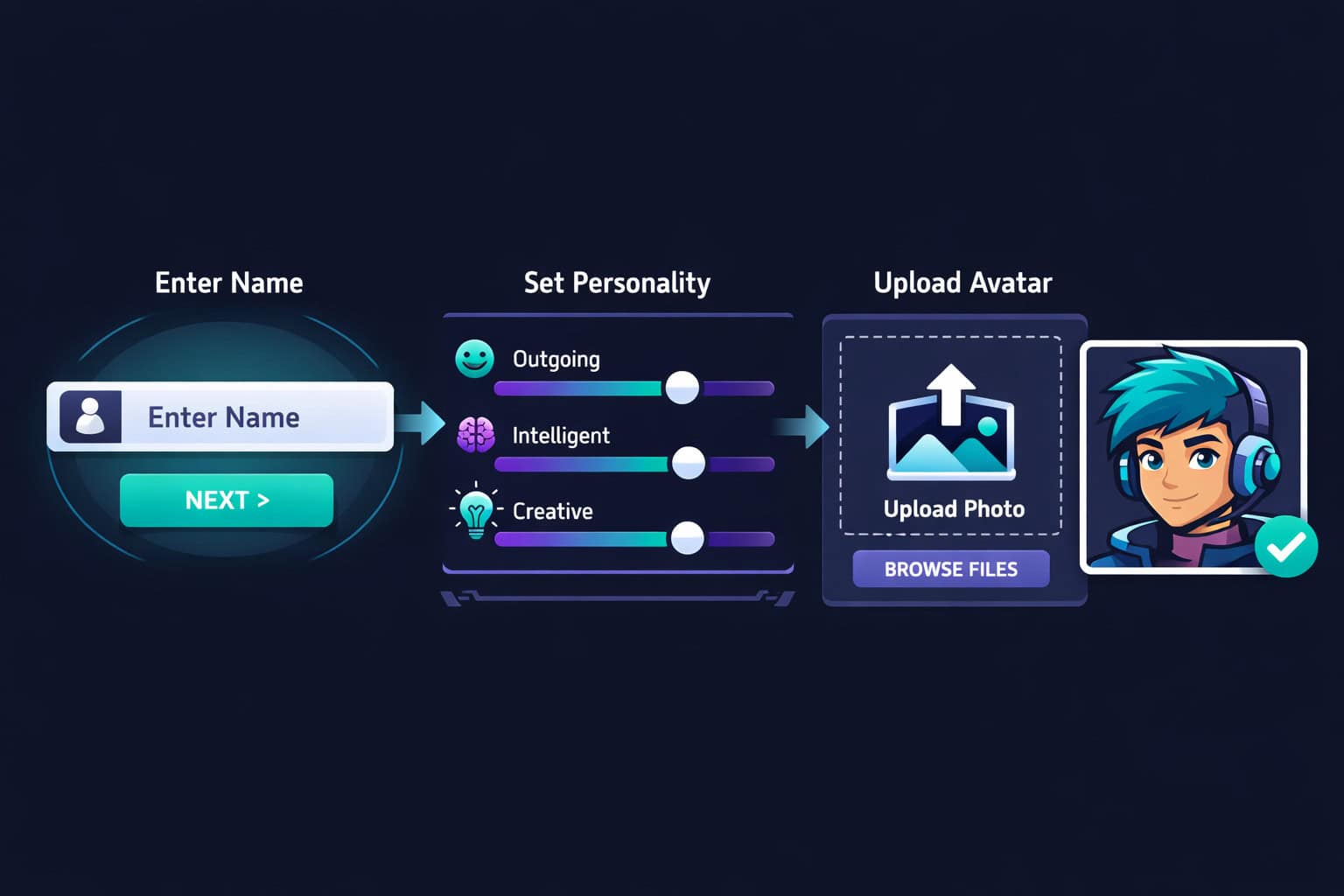
Creating your own character involves:
- Clicking the Create button in the navigation
- Selecting Create a Character
- Naming your character and writing an opening greeting
- Choosing or uploading an avatar image
- Defining personality traits (friendly, serious, humorous, etc.) [2]
Character AI also introduced a Profile Redesign feature in 2026 that lets creators showcase their characters more prominently, making it easier for other users to discover your creations. [1]
For users interested in how AI tools are reshaping creative workflows more broadly, our comprehensive guide to AI-powered content generation tools covers the wider landscape of platforms worth knowing.

How to Create Your First Character After Signing Up
Creating a character is the feature that sets Character AI apart from most AI chat tools. You don’t need coding skills or AI knowledge — just a clear idea of who your character is.
Here’s the step-by-step character creation process: [2]
- Log in to your account
- Click the Create button (top navigation bar or sidebar)
- Select Create a Character
- Name your character — be specific; a name like “Dr. Elena Vasquez, Marine Biologist” creates a stronger personality than “Science Lady”
- Write an opening greeting — this is the first message your character sends. Make it reflect their personality
- Upload or generate an avatar — you can upload a custom image or use the platform’s built-in image tools
- Set visibility — choose Public (anyone can chat), Unlisted (shareable link only), or Private (only you)
- Add a description and personality traits — the more detail you add, the more consistent the character’s responses will be
💬 Pull quote: “The more specific your character’s personality description, the more consistent and engaging the conversations will be.” — Character AI best practice, widely observed by creators on the platform [2]
Common mistake: Leaving the personality description blank. Without it, the character defaults to generic responses that don’t feel distinct. Even two or three sentences about how the character speaks and what they care about makes a significant difference.
For those interested in building visual assets to accompany their characters, tools like those covered in our guide to the best AI graphic design tools for creative workflows can help you create polished avatar images.
Free vs. c.ai+: What Do You Actually Get?
Character AI’s free tier is genuinely usable — you’re not locked out of core features. But the paid subscription, c.ai+, adds meaningful extras for power users.
| Feature | Free | c.ai+ |
|---|---|---|
| Chat with existing characters | ✅ Yes | ✅ Yes |
| Create custom characters | ✅ Yes | ✅ Yes |
| Scenes (immersive storytelling) | ✅ Yes | ✅ Yes |
| Response speed | Standard | Priority (faster) |
| Imagine Animated Chats | ❌ No | ✅ Yes (mobile) [1] |
| Early access to new features | ❌ No | ✅ Yes |
| Community Feed access | Coming soon | Coming soon [1] |
Choose the free plan if you’re new to the platform and want to explore before committing. Choose c.ai+ if you use the platform daily, want animated chat features, or need faster response times during peak hours.
Pricing for c.ai+ is listed on the official site [6] and may vary by region. Always check the current pricing page before subscribing, as rates can change.
If you’re evaluating AI tools more broadly, our AI-powered content optimization guide and the 11 best no-coding website design software platforms for 2026 offer useful context on how AI tools fit into larger digital workflows.

Troubleshooting Common Sign-Up Problems
Even a simple sign-up process can hit snags. Here are the most common issues and how to fix them.
Problem: Verification email never arrives
- Check your spam or promotions folder
- Wait 2–3 minutes, then request a new verification email
- Make sure you typed your email correctly during registration
Problem: “Username already taken” error
- Try adding numbers or underscores (e.g., ElenaV_26)
- Avoid common words and celebrity names — they’re usually claimed
Problem: App won’t load after sign-up
- Force-close the app and reopen it
- Check your internet connection
- Update the app to the latest version from the app store [7]
Problem: Date of birth field is blocking access
- The platform requires users to be at least 13 years old. If the date you entered makes you younger than 13, the system will restrict access. Enter your correct date of birth.
Problem: Google sign-in loops back to the login page
- Clear your browser cookies and cache
- Try signing in using an incognito/private window
- Disable browser extensions that might block third-party cookies
Complete Guide: How to Sign Up for Character AI — Safety and Privacy Basics
Before you dive in, it’s worth knowing how the platform handles your data and what safety features are in place.
Character AI uses content moderation to filter harmful outputs. The platform applies stricter filters for users who indicate they are minors during sign-up. [4]
Key privacy points to know:
- Your conversations are stored on Character AI’s servers
- Public characters and their chat logs may be visible to other users
- You can delete your account and request data removal through account settings
- Review the platform’s current privacy policy at character.ai for the most up-to-date terms [6]
For parents: If a minor in your household uses Character AI, review the platform’s parental guidance resources. The platform has age-based content filters, but no AI moderation system is perfect. Open conversations about AI use are still the most effective safeguard.
For those building web projects that incorporate AI tools, our guide on how to integrate an AI-powered chatbot into WordPress covers related implementation considerations worth reading.
Frequently Asked Questions
Q: Is Character AI free to sign up? Yes. Creating an account on Character AI is completely free. The paid tier (c.ai+) is optional and adds premium features like Imagine Animated Chats and faster response speeds. [6]
Q: Do I need a Google account to sign up? No. You can register with any email address. Google and Apple sign-in are available as faster alternatives, but they’re not required. [6]
Q: How old do you need to be to use Character AI? Character AI requires users to be at least 13 years old. You must enter your date of birth during sign-up, and the platform applies age-appropriate content filters based on that information. [4]
Q: Can I use Character AI without creating an account? As of 2026, full access to Character AI requires a registered account. You may be able to view some public character pages without logging in, but chatting requires sign-up. [6]
Q: What is c.ai+ and is it worth it? c.ai+ is Character AI’s paid subscription. It includes priority response speeds, Imagine Animated Chats (mobile), and early access to new features. It’s worth it if you use the platform frequently or want animated chat capabilities. [1]
Q: Can I sign up on my phone instead of a computer? Yes. The sign-up process is identical on mobile. Download the Character AI app from Google Play [7] or the Apple App Store and follow the same five steps outlined above.
Q: How do I create my own AI character after signing up? After logging in, click the Create button and select Create a Character. You’ll name your character, write an opening greeting, upload an avatar, and define personality traits. [2]
Q: What are Scenes in Character AI? Scenes is a feature that creates immersive, story-driven chat experiences. It launched on mobile in 2026 and is available to both free and c.ai+ users. [1]
Q: Can I change my username after signing up? Yes. You can update your username in your account settings after registration.
Q: What should I do if my account gets locked? Use the “Forgot Password” option on the login page to reset your credentials. If the issue persists, contact Character AI support through the official help center at character.ai. [6]
Conclusion
Signing up for Character AI is one of the simpler onboarding processes among major AI platforms. Five steps, no credit card, and you’re chatting within minutes. The platform’s real value shows up after sign-up — in the quality of conversations you can have with existing characters and the creative control you get when building your own.
Your actionable next steps:
- Sign up today at character.ai using your preferred method (Google is fastest)
- Explore three to five existing characters before building your own — this gives you a feel for what good character design looks like
- Create your first character with a detailed personality description, even if it’s just a few sentences
- Try the Scenes feature on mobile for a more immersive storytelling experience [1]
- Evaluate c.ai+ after two weeks of free use — by then you’ll know whether the premium features are worth it for your use case
Character AI continues to add new features in 2026, including the upcoming Community Feed that will make discovering creator content easier. [1] Getting your account set up now means you’ll be positioned to use those features as they roll out.
For more guides on AI tools and digital platforms, browse our AI tools and resources archive for practical, step-by-step content similar to this one.
References
[1] Character AI Unveils New Ways To Create – https://blog.character.ai/character-ai-unveils-new-ways-to-create/ [2] How Does Character AI Work – https://www.globaltechcouncil.org/artificial-intelligence/how-does-character-ai-work/ [4] Character AI – https://www.upwork.com/resources/character-ai [6] character.ai – https://character.ai [7] Character AI on Google Play – https://play.google.com/store/apps/details?id=ai.character.app&hl=en_US
Related: Bing Chat GPT: Revolutionizing AI-Powered Search and Conversational Interactions
Related: Revolutionizing Communication: The Power of AI-Driven Chat Technologies