Last updated: June 9, 2026
Quick Answer: The best ChatGPT alternatives in 2026 include Claude, Google Gemini, Microsoft Copilot, Perplexity AI, Meta AI, Mistral Le Chat, Grok, You.com, HuggingChat, and DeepSeek. Each one has a distinct strength, whether that is privacy, coding, creative writing, or cost. The right pick depends on your specific use case, not just hype.
Key Takeaways
- Claude by Anthropic is widely regarded as the top alternative for nuanced writing and safety-conscious outputs.
- Google Gemini excels at tasks that require real-time web access and integration with Google Workspace.
- Microsoft Copilot is built into Windows and Microsoft 365, making it the most accessible option for business users.
- Perplexity AI is the strongest choice when you need cited, research-backed answers quickly.
- Most of these alternatives offer a usable free tier, though paid plans unlock significantly better performance.
- Privacy policies vary widely: Mistral Le Chat and HuggingChat offer stronger data controls than most.
- For coding specifically, Claude and GitHub Copilot (a separate product) lead the field.
- Students benefit most from Perplexity AI and Google Gemini due to their research and summarization strengths.
- Common mistakes include treating AI outputs as fact without verification and ignoring context window limits.
- No single chatbot wins every category, so many power users maintain accounts on two or three platforms.
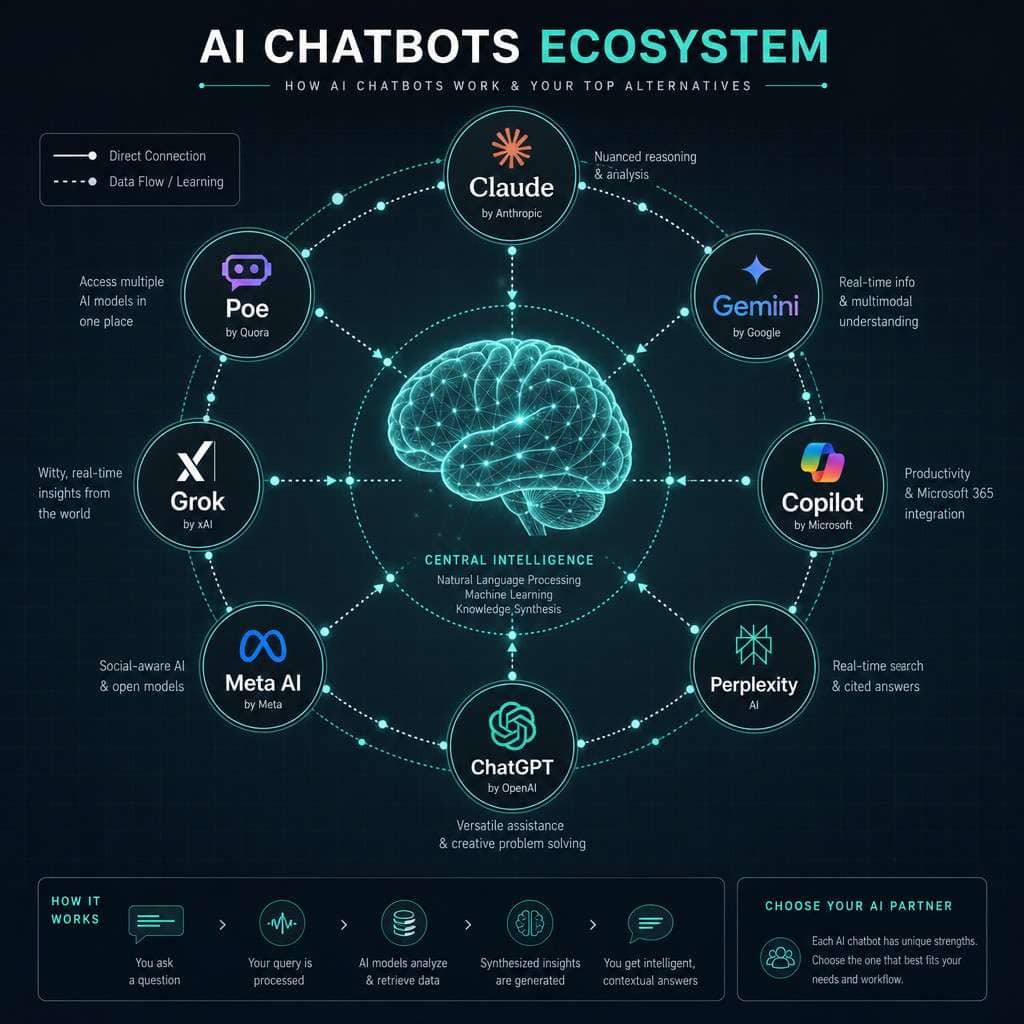
What Exactly Are AI Chatbots and How Do They Work
AI chatbots are software programs that use large language models (LLMs) to understand and generate human-like text in real time. They process your input, predict the most relevant response based on patterns learned from massive text datasets, and return a reply in seconds.
Here is what happens under the hood when you type a message:
- Your text is broken into smaller units called tokens.
- The model runs those tokens through billions of weighted parameters.
- It predicts the next most likely token, then the next, building a response word by word.
- The finished reply is returned to your screen, often in a streaming format.
The key difference between platforms is the underlying model, the training data used, and the safety guardrails applied. That is why Claude sounds more careful and measured than Grok, which is deliberately more direct and edgy.
For a broader look at AI tools beyond chatbots, the 45 must-visit AI websites guide is worth bookmarking.
Can I Use These AI Chatbots for Free
Yes, every major ChatGPT alternative covered in this ultimate AI chatbot showdown offers a free tier. However, free plans come with real limitations that matter depending on how heavily you use them.
| Chatbot | Free Tier | Paid Plan Starts At |
|---|---|---|
| Claude (Anthropic) | Yes, Claude 3.5 Haiku | ~$20/month (Pro) |
| Google Gemini | Yes, Gemini 1.5 Flash | $19.99/month (Advanced) |
| Microsoft Copilot | Yes, GPT-4o powered | Free for Microsoft 365 users |
| Perplexity AI | Yes, limited searches | $20/month (Pro) |
| Meta AI | Yes, fully free | No paid tier currently |
| Mistral Le Chat | Yes | Pro plan available |
| Grok (xAI) | Limited via X.com | Included with X Premium |
| You.com | Yes | $15/month |
| HuggingChat | Yes, open source | Self-hosted option |
| DeepSeek | Yes | API pricing only |
Decision rule: If you need a chatbot for occasional personal tasks, free tiers are genuinely sufficient. If you use AI for work more than an hour per day, a paid plan pays for itself quickly in time saved.
How Does Claude AI Compare to ChatGPT
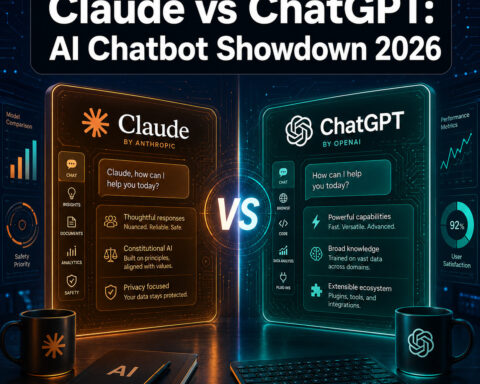
Claude, built by Anthropic, is the closest head-to-head competitor to ChatGPT in terms of general capability, and many users find it more reliable for long-form writing and nuanced reasoning. Claude’s context window on paid plans is among the largest available, letting you paste in entire documents for analysis.
Key differences:
- Tone: Claude tends to be more careful and less likely to make confident-sounding errors.
- Context window: Claude 3.5 and later models handle very long inputs well.
- Safety: Anthropic’s “Constitutional AI” approach means Claude refuses more edge-case requests, which is a feature for some and a frustration for others.
- Coding: Claude performs strongly on coding tasks, often rivaling dedicated tools.
Common mistake: Assuming Claude is always more accurate. Both models hallucinate. Always verify factual claims from either tool against a primary source.
Which AI Chatbot Is the Most Affordable Right Now
Meta AI is currently the most affordable option because it is completely free with no paid tier. For users who want premium features, You.com at roughly $15 per month is the lowest-cost paid plan among the major alternatives.
If you are comparing value rather than just price:
- Best free value: Meta AI (no limits, no login required in some surfaces)
- Best paid value under $20/month: You.com or Perplexity Pro
- Best for existing Microsoft users: Copilot, since it is included in many Microsoft 365 subscriptions at no extra cost
What Are the Best AI Chatbots for Coding Help
Claude and GitHub Copilot (a separate, IDE-integrated product) are the top choices for coding assistance. Among the alternatives in this showdown, Claude 3.5 and DeepSeek Coder stand out for their ability to write, debug, and explain code across multiple languages.
- Claude: Strong at explaining code logic and refactoring existing code.
- DeepSeek: Particularly good at Python and competitive programming tasks.
- Google Gemini: Integrates with Google Colab, making it useful for data science workflows.
- Microsoft Copilot: Works inside Visual Studio Code via the GitHub Copilot extension.
For developers who want a full cloud coding environment alongside AI assistance, see this comparison of Replit vs Claude Code for AI development and the Replit online IDE guide.
Which AI Chatbot Is Best for Students
Perplexity AI is the best chatbot for students because it cites its sources inline, which makes it far easier to verify information and use it responsibly in academic work. Google Gemini is a close second, especially for students already using Google Docs and Google Drive.
Why Perplexity works well for students:
- Every answer includes clickable source links.
- It can search the current web, so information is not stuck at a training cutoff.
- The free tier allows a reasonable number of searches per day.
- It summarizes research papers and news articles clearly.
Edge case: Students in institutions with strict academic integrity policies should check whether their school permits AI assistance before using any of these tools for assignments.
Which AI Chatbot Is Best for Creative Writing
Claude is the strongest choice for creative writing among all the alternatives reviewed in this AI chatbot showdown. Its outputs tend to have better narrative structure, more varied sentence rhythm, and fewer repetitive phrases than most competitors.
Runners-up by use case:
- Character dialogue and roleplay: Check out platforms built specifically for AI character chat and AI chatbot personas.
- Short-form marketing copy: Gemini and Copilot both perform well here.
- Poetry and experimental writing: Claude and You.com’s creative mode handle these better than more “corporate” models.
Do Any of These AI Alternatives Work Better for Business Tasks
Microsoft Copilot is the strongest option for business tasks, particularly for teams already inside the Microsoft 365 ecosystem. It drafts emails in Outlook, summarizes meetings in Teams, and generates slides in PowerPoint, all without leaving the apps you already use.
Other strong business picks:
- Google Gemini: Best for teams using Google Workspace (Docs, Sheets, Gmail).
- Claude: Preferred for long-document analysis, contract review, and detailed reports.
- Perplexity: Useful for competitive research and market summaries with cited sources.
For teams looking to automate repetitive business workflows beyond just chat, pairing any of these chatbots with automation tools can multiply productivity. The guide to ChatGPT automation and no-code workflow integration is a practical starting point, and the n8n workflow optimization guide covers deeper automation strategies.
Are There Any Privacy Concerns With AI Chatbots
Yes, privacy is a real concern with every major AI chatbot, and users should read each platform’s data policy before sharing sensitive information. Most services use your conversations to improve their models unless you actively opt out.
Key privacy facts by platform:
- ChatGPT / OpenAI: Conversations may be used for training unless you disable it in settings.
- Claude / Anthropic: Similar opt-out controls; business API users get stronger data protections.
- Microsoft Copilot: Enterprise versions include stronger compliance and data residency guarantees.
- Mistral Le Chat: European-based, subject to GDPR, generally considered more privacy-friendly.
- HuggingChat: Open-source; self-hosting is possible for maximum control.
- Meta AI: Data handling follows Meta’s broader privacy policies, which some users find less reassuring.
Rule of thumb: Never paste passwords, social security numbers, client data, or proprietary source code into a public AI chatbot interface unless you have confirmed the platform’s enterprise data agreement.
How Accurate Are These AI Chatbots Compared to ChatGPT
No AI chatbot in this showdown is consistently more accurate than ChatGPT across all task types, but several outperform it in specific areas. Perplexity AI is more accurate for current events because it retrieves live web results. Claude is often more accurate for long-document reasoning. DeepSeek performs better on certain math and coding benchmarks.
All of these models, including ChatGPT, share the same fundamental weakness: they can produce confident-sounding incorrect answers, a behavior called hallucination. The rate varies by task and model version, but no tool has eliminated it.
Practical advice: Use Perplexity for anything time-sensitive or factual. Use Claude or Gemini for reasoning tasks. Cross-check any output that will be used in a professional or academic context.
What Are the Most Common Mistakes People Make When Using AI Chatbots
The single biggest mistake is treating AI output as ground truth without verification. A close second is writing vague prompts and then blaming the tool for a vague answer.
Other frequent errors:
- Ignoring context window limits: Pasting too much text can cause the model to lose track of earlier content.
- Not iterating: The first response is rarely the best. Asking follow-up questions or requesting revisions almost always improves quality.
- Using the wrong tool for the job: Using a general chatbot for real-time data when Perplexity or a search engine would be faster and more accurate.
- Over-relying on one platform: Each tool has blind spots. Rotating between two or three gives better overall results.
- Sharing sensitive data: As noted in the privacy section, this is a real risk many users underestimate.
What Are the System Requirements to Use These AI Chatbots
All ten alternatives in this AI chatbot showdown are web-based and require no local installation. The minimum requirement is a modern browser (Chrome, Firefox, Safari, or Edge) and a stable internet connection.
Specific notes:
- Mobile apps: Claude, Gemini, Perplexity, and Copilot all have iOS and Android apps.
- Offline use: None of the cloud-based options work offline. HuggingChat models can be run locally if you have sufficient hardware (typically 8GB+ RAM for smaller models).
- API access: Developers who want to integrate these models into their own apps need API keys, which are separate from consumer accounts.
For users interested in building on top of these AI tools, the free AI tools tag and AI automation tag on webaistack.com surface relevant tutorials and comparisons.

FAQ
Q: Which ChatGPT alternative is best overall in 2026? Claude is the most well-rounded alternative for general use, with strong writing, reasoning, and long-document handling. Gemini is the best pick if you live inside Google’s ecosystem.
Q: Is Google Gemini better than ChatGPT? For real-time web search and Google Workspace integration, Gemini has a clear advantage. For creative tasks and nuanced conversation, results are close enough that personal preference matters more than raw benchmarks.
Q: Can I use multiple AI chatbots at the same time? Yes, and many power users do. There is no rule against having accounts on Claude, Perplexity, and Copilot simultaneously and using each for the tasks it handles best.
Q: Which AI chatbot has the longest context window? As of mid-2026, Claude and Gemini 1.5 Pro offer some of the largest context windows available to consumers, capable of processing hundreds of thousands of tokens in a single session.
Q: Is Perplexity AI safe to use for research? Perplexity is one of the safer options for research because it cites sources. However, you should still verify those sources directly, since the model can occasionally misrepresent what a cited article actually says.
Q: Which AI chatbot is best for non-English languages? Google Gemini and Mistral Le Chat both perform well in multiple languages. Mistral has a particular strength in French and other European languages given its Paris-based origins.
Q: Do these chatbots store my conversations? Most do by default, but all major platforms offer an option to disable conversation history or delete past chats. Enterprise plans typically offer stronger data controls.
Q: Is DeepSeek a legitimate ChatGPT alternative? Yes. DeepSeek, developed by a Chinese AI lab, has performed competitively on coding and math benchmarks. However, users with data sensitivity concerns should review its privacy policy carefully before use.
Q: Which alternative is best for summarizing long documents? Claude handles long documents particularly well due to its large context window. Upload a PDF or paste a long text and ask for a structured summary, and the results are consistently strong.
Q: Are any of these chatbots open source? HuggingChat is built on open-source models, and Mistral releases some of its models publicly. Meta’s Llama models, which power Meta AI, are also available for download and local use.
Conclusion
The landscape covered in this ultimate AI chatbot showdown makes one thing clear: ChatGPT is no longer the only serious option. Whether you need a research assistant that cites its sources, a writing partner with genuine stylistic range, a coding helper that understands context, or a business tool that lives inside your existing software, there is a purpose-built alternative that fits.
Here are your actionable next steps:
- Identify your primary use case before choosing a tool. Writing, coding, research, and business tasks each have a different winner.
- Start with free tiers. Every platform on this list lets you test before you pay.
- Try Perplexity for any factual or research task where you need to verify sources quickly.
- Try Claude for long documents and creative work where quality of output matters more than speed.
- Use Copilot or Gemini if you spend most of your day inside Microsoft or Google tools, respectively.
- Never share sensitive personal or business data with any public AI chatbot without reading the platform’s data policy.
The best AI chatbot is the one that fits your workflow today and grows with your needs. Start with one, get comfortable, then add a second for the tasks where your first choice falls short. That two-tool approach beats any single platform for most serious users.
For more coverage of AI tools, models, and platforms, browse the ChatGPT archives and the Gemini category on webaistack.com.
Useful Resources: ChatGPT by OpenAI & OpenAI research blog