Last updated: June 9, 2026. This post is your resource for ChatGPT Prompt Generation The Ultimate AI Communication Guide.
Quick Answer: A well-crafted ChatGPT prompt is a structured instruction that tells the model exactly who it is, what you need, and how you want the output formatted. Mastering AI communication through deliberate prompt generation consistently produces more accurate, useful, and relevant responses. The difference between a mediocre and an expert prompt is almost always specificity, context, and clear output expectations.
Key Takeaways
- A good prompt includes a role, clear task, relevant context, and a defined output format.
- Common mistakes include vague instructions, missing context, and ignoring the model’s tendency to agree rather than challenge.
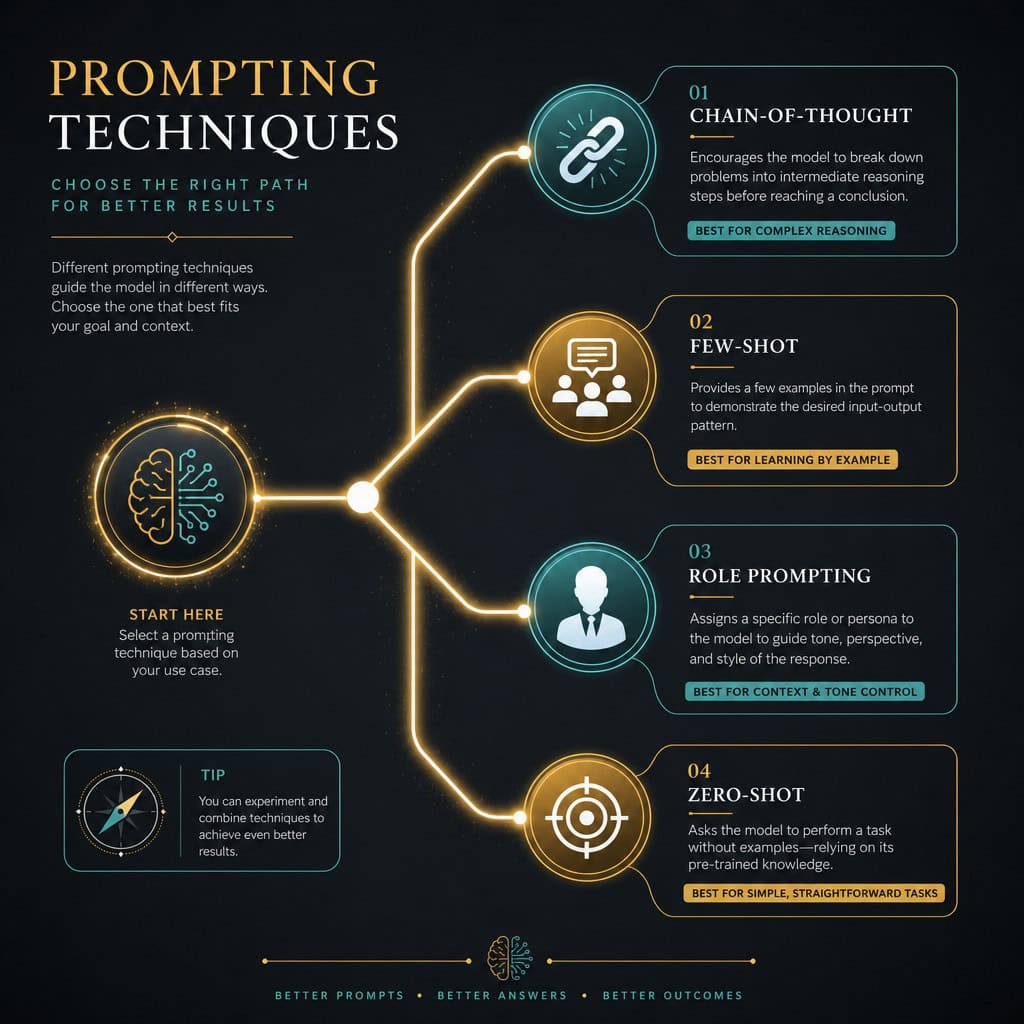
- Prompting techniques such as Chain-of-Thought, Few-Shot, and Role Prompting each serve different use cases.
- ChatGPT, Claude, and Gemini respond differently to the same prompt due to distinct training approaches.
- Prompt engineering skills are valued in marketing, software development, legal research, education, and content creation.
- Non-technical people can become effective prompt writers with practice and a basic framework.
- Free resources from OpenAI, Anthropic, and Google are available to build foundational skills.
- Background in writing, logic, or subject-matter expertise accelerates prompt quality significantly.
What Exactly Is a Good AI Prompt and How Do I Write One
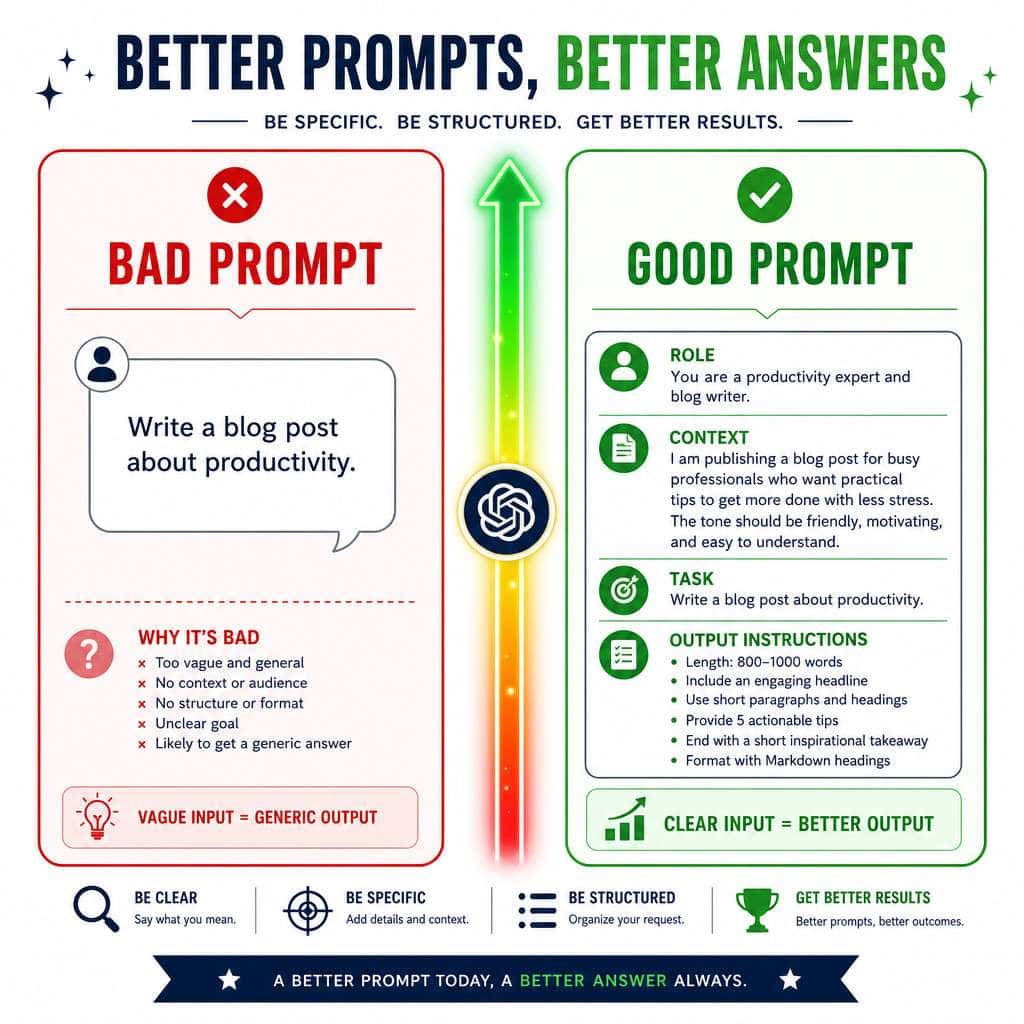
A good AI prompt is a clear, specific instruction that gives the model enough context to produce a useful response on the first try. Think of it as a job brief: the more precise you are about the role, the task, the audience, and the format, the better the output.
Here is a simple four-part framework I use consistently:
- Role – Tell the model who it should act as. (“You are a senior marketing strategist.”)
- Task – State exactly what you want. (“Write a 200-word product description for a B2B SaaS tool.”)
- Context – Add relevant background. (“The audience is IT managers at mid-size companies who care about security and uptime.”)
- Format – Specify the output structure. (“Use bullet points for features and a single closing sentence as a CTA.”)
A prompt without context is like handing someone a blank canvas and saying “paint something nice.” You’ll get output, but rarely the output you needed.
How Are Different Prompting Techniques Compared
Different prompting techniques exist because no single approach works for every task. Choosing the right one depends on complexity, how much example data you have, and whether you need the model to reason step by step.
| Technique | Best For | How It Works |
|---|---|---|
| Zero-Shot | Simple, clear tasks | No examples; just the instruction |
| Few-Shot | Consistent tone or format | Provide 2-5 examples before the task |
| Chain-of-Thought | Complex reasoning or math | Ask the model to “think step by step” |
| Role Prompting | Specialized expertise | Assign a persona before the task |
| Self-Consistency | High-stakes outputs | Generate multiple answers, compare |
Choose Few-Shot if you need the model to match a specific style or structure. Choose Chain-of-Thought if the task involves multi-step logic, analysis, or calculation. For most everyday writing tasks, Zero-Shot with a well-structured prompt is enough.
Why Do My ChatGPT Prompts Sometimes Give Bad Results
Bad results almost always trace back to one of four root causes: vagueness, missing context, conflicting instructions, or asking the model to do too much in one prompt.
The most common culprit is vagueness. A prompt like “write me a blog post about marketing” gives the model almost no constraints, so it defaults to generic, surface-level content. Adding specifics, such as target audience, word count, tone, and key points to cover, fixes this immediately.
Other common causes of poor output:
- Asking multiple unrelated tasks in a single prompt
- Not specifying the audience, which leads to mismatched reading level or depth
- Using ambiguous pronouns (“make it better” without saying what “it” is)
- Forgetting to specify length, which often produces either too little or too much
A quick fix: after getting a bad response, add one sentence that says exactly what was wrong. (“That was too formal. Rewrite it in a conversational tone for a general audience.”) This iterative approach, sometimes called prompt chaining, is one of the fastest ways to improve results without rewriting from scratch. For a deeper look at how ChatGPT fits into broader automation workflows, see this comprehensive guide to ChatGPT automation and no-code workflow integration.
What Kind of Jobs Use Prompt Engineering Skills
Prompt engineering is now a practical skill in a wide range of professional roles, not just a niche technical specialty. Marketing teams, software developers, legal researchers, educators, and content strategists all use it regularly in 2026.
Roles where prompt skills create real value:
- Content and copywriters – generating drafts, outlines, and variations faster
- Software developers – using AI for code generation, debugging, and documentation
- Data analysts – summarizing reports, generating SQL queries, and explaining findings
- Customer support teams – building response templates and FAQ drafts
- Legal and compliance professionals – summarizing contracts and flagging key clauses
- Educators – creating lesson plans, quiz questions, and differentiated materials
Dedicated “Prompt Engineer” job titles do exist, particularly at AI companies and large enterprises, though in most organizations the skill is embedded within existing roles rather than siloed. For those exploring tech career opportunities, our guide on landing tech opportunities in 2026 covers adjacent skills that complement prompt engineering well.
Is Prompt Writing Harder for Non-Technical People
No, prompt writing is not inherently harder for non-technical people. In fact, strong writing skills, domain expertise, and clear thinking often matter more than coding ability when crafting effective prompts.
The learning curve is mostly about understanding how the model interprets instructions. Non-technical users who already communicate clearly in writing tend to pick up effective prompting quickly. The main adjustment is learning to be more explicit than you would be with a human colleague, because the model has no shared context or assumed knowledge about your specific situation.
What actually helps non-technical users:
- Starting with a template (role + task + context + format) and filling it in
- Treating the model like a new employee who needs detailed instructions
- Reading the output critically and iterating rather than accepting the first response
- Practicing with low-stakes tasks before applying prompts to important work
Technical background helps when prompting for code generation or API integrations, but for writing, analysis, research, and creative tasks, it’s largely irrelevant.
What Are the Most Common Mistakes People Make with AI Prompts
The single most common mistake is treating the AI like a search engine: typing a few keywords and expecting a polished result. Effective prompt generation requires a different mental model.
Top mistakes and how to fix them:
- Being too vague – Fix: add audience, tone, length, and purpose
- Skipping the role – Fix: assign a specific persona relevant to the task
- Asking for everything at once – Fix: break complex tasks into sequential prompts
- Accepting the first output – Fix: critique it and ask for a revised version
- Ignoring format instructions – Fix: always specify structure (bullet list, table, numbered steps)
- Not testing variations – Fix: try the same task with two different prompts and compare
One mistake I see frequently in professional settings is over-trusting the model’s confident tone. ChatGPT will state incorrect information with the same fluency as correct information. Always verify factual claims, especially for anything that will be published or used in a decision.
Can Prompts Work Differently Across ChatGPT, Claude, and Gemini
Yes, the same prompt can produce meaningfully different results across ChatGPT, Claude, and Gemini because each model has distinct training data, alignment approaches, and default behaviors.
Key behavioral differences to know:
- ChatGPT (GPT-4o and later) tends to follow structured formatting instructions well and handles creative tasks with flexibility. It can be more agreeable, sometimes confirming incorrect premises rather than pushing back.
- Claude (Anthropic) is generally stronger at nuanced reasoning, longer documents, and maintaining consistent tone across extended outputs. It’s more likely to express uncertainty or decline edge-case requests.
- Gemini (Google) integrates well with real-time search and Google Workspace data, making it useful for research-heavy tasks. Its response style can vary more across versions.
Practical rule: If a prompt works well on one model but poorly on another, the fix is usually to add more explicit constraints rather than changing the core instruction. For example, adding “Do not add caveats or disclaimers unless specifically asked” often improves directness across all three platforms.
How Do I Write Prompts for Specific Industries Like Marketing or Coding
Industry-specific prompts work best when they include domain vocabulary, a clear audience, and output constraints that match professional standards in that field.
Marketing prompts: Include the brand voice, target persona, campaign goal, and channel. For example: “You are a direct-response copywriter. Write a 90-word Facebook ad for a productivity app targeting freelance designers aged 25-40 who struggle with client communication. Tone: conversational and confident. End with a clear CTA.”
For more on AI-powered content creation, our guide to AI-powered content generation tools covers the broader ecosystem that complements strong prompting skills. You can also explore AI-powered content optimization strategies for performance-focused applications.
Coding prompts: Specify the language, version, use case, and any constraints. For example: “Write a Python 3.11 function that takes a list of dictionaries and returns only those where the ‘status’ key equals ‘active’. Include error handling for missing keys. Add inline comments.”
Legal and research prompts: Always ask for structured output and explicitly request that the model flag uncertainty. “Summarize the key obligations in this contract clause. Use bullet points. If any term is ambiguous or jurisdiction-dependent, flag it with [REVIEW].”
What Advanced Techniques Do Expert Prompt Engineers Use
Expert prompt engineers go beyond basic instructions and use systematic approaches to control model behavior, reduce errors, and scale outputs across workflows.
Advanced techniques worth learning:
- Prompt chaining – Break a complex task into sequential prompts where each output feeds the next. Useful for research, multi-step analysis, and long-form content.
- Meta-prompting – Ask the model to generate or improve a prompt for you. (“What additional information would you need to answer this question more accurately?”)
- Constraint stacking – Layer multiple specific constraints to narrow the output space. (“Write in active voice, under 150 words, no jargon, no bullet points, and end with a question.”)
- Output anchoring – Provide a partial example of the desired output and ask the model to complete or match it.
- Temperature awareness – In API contexts, lower temperature settings produce more consistent, predictable outputs; higher settings increase creativity and variation.
These techniques become especially powerful when combined with automation tools. Our guide to n8n workflow optimization shows how prompt chaining integrates into automated AI pipelines for production use cases.
Are There Free Resources to Learn Prompt Engineering
Yes, high-quality free resources exist from the major AI labs and the broader developer community. You don’t need to pay for a course to build solid foundational skills.
Free resources worth starting with:
- OpenAI’s Prompt Engineering Guide (available in their documentation) covers best practices for GPT models directly from the source
- Anthropic’s Claude documentation includes detailed guidance on how Claude interprets instructions differently from GPT-based models
- Google’s Prompting Essentials course (available through Google Cloud Skills Boost) is free and covers Gemini-specific techniques
- LearnPrompting.org is a community-maintained open-source guide covering techniques from beginner to advanced
- Reddit communities such as r/PromptEngineering and r/ChatGPT share real-world examples and iterative improvements
Paid courses from platforms like Coursera, DeepLearning.AI, and LinkedIn Learning exist and can accelerate learning, with prices typically ranging from $30 to $500 depending on depth and certification. However, for most professionals, the free resources combined with deliberate practice are sufficient to reach a competent level.
What Background Skills Help with Writing Better AI Prompts
Clear writing ability is the single most transferable skill for prompt engineering. People who already communicate precisely in their professional writing adapt fastest.
Skills that accelerate prompt quality:
- Technical writing – Teaches structured, unambiguous instruction-giving
- Copywriting – Develops sensitivity to tone, audience, and persuasion
- Logic and critical thinking – Helps construct Chain-of-Thought prompts and evaluate outputs
- Subject-matter expertise – Knowing your domain lets you spot when the model is wrong or superficial
- Programming basics – Useful for API-level prompting, but not required for most applications
One background that surprises people: teaching. Experienced teachers are often excellent prompt engineers because they’re practiced at breaking complex ideas into clear, sequential instructions for an audience that doesn’t share their context. That’s exactly what good prompting requires.
Conclusion: Your Next Steps in Mastering AI Communication
Mastering AI communication through deliberate ChatGPT prompt generation is a skill that compounds over time. The gap between someone who types a vague question and someone who constructs a structured, context-rich prompt is the difference between a tool that occasionally helps and one that reliably accelerates your work.
Actionable next steps:
- Apply the four-part framework (role, task, context, format) to your next three AI interactions and compare the quality difference.
- Pick one advanced technique, such as prompt chaining or Few-Shot prompting, and practice it on a real work task this week.
- Test the same prompt across ChatGPT and one other model to understand where the outputs diverge.
- Save your best-performing prompts in a personal library so you can reuse and refine them over time.
- Explore how prompts integrate with automation tools using our comprehensive workflow automation guides to scale your AI usage beyond one-off interactions.
The ultimate guide to ChatGPT prompt generation isn’t a static document, it’s a practice. Every prompt you write and refine teaches you something about how these models think. Start specific, iterate often, and the quality of your AI communication will improve faster than you expect.
Frequently Asked Questions
What is the most important element of a good ChatGPT prompt? Context is the most important element. Without context, the model defaults to generic responses. Telling the model who the audience is, what the purpose is, and what constraints apply produces dramatically better output.
How long should a prompt be? As long as it needs to be to remove ambiguity, but no longer. A 3-sentence prompt with clear role, task, and format often outperforms a 10-sentence prompt filled with contradictory instructions.
Can I reuse prompts across different AI models? Yes, but expect to adjust them. A prompt optimized for ChatGPT may need minor rewording for Claude or Gemini due to differences in how each model interprets tone and instruction style.
Do I need to know how to code to write good prompts? No. Coding knowledge helps for API-level work and technical tasks, but for writing, research, analysis, and creative applications, clear communication skills matter far more.
How do I know if my prompt is working well? If you get the output you needed without having to ask for corrections, the prompt worked. Track how many follow-up messages you need to reach a usable result. Fewer corrections means a better prompt.
What is prompt chaining? Prompt chaining is the practice of breaking a complex task into a series of connected prompts, where the output of one becomes the input of the next. It’s particularly effective for research, multi-step writing projects, and data analysis.
Is there a difference between system prompts and user prompts? Yes. System prompts (used in API and custom GPT contexts) set persistent instructions for the entire conversation, such as tone, persona, and constraints. User prompts are the individual messages you send during the conversation.
How often should I update my saved prompt library? Review and update your prompt library every 1-3 months. As models update and your use cases evolve, older prompts may underperform or miss new capabilities.
Can a bad prompt cause the AI to give harmful or incorrect information? Vague or poorly structured prompts increase the likelihood of inaccurate outputs because the model fills in missing context with assumptions. Always verify factual claims in outputs, regardless of prompt quality.
What is the fastest way to improve my prompting skills? Deliberate practice with immediate feedback. Write a prompt, evaluate the output critically, identify what was missing, and rewrite it. Doing this 10-15 times across different tasks builds intuition faster than any course.
Useful Resources: ChatGPT by OpenAI & OpenAI research blog