


Last updated: May 9, 2026
Quick Answer: Make.com removed its native X (Twitter) integration on May 30, 2025, due to X’s API pricing and policy changes. Users who need Twitter automation through Make.com in 2026 must now use one of four workarounds: Buffer, the X API via HTTP modules, an n8n hybrid workflow, or a third-party social API like Ayrshare. Each option has different cost and complexity trade-offs.
Key Takeaways
- Make.com officially decommissioned its native X (Twitter) app on May 30, 2025 [2]
- The removal was caused by X’s API pricing changes, not a Make.com platform issue [2]
- Four practical alternatives exist: Buffer, direct HTTP/X API, n8n hybrid, and Ayrshare
- Buffer is the fastest replacement for basic tweet scheduling (free plan available) [1]
- Direct X API via HTTP modules gives the most control but requires OAuth2 PKCE setup [1]
- Ayrshare supports 12 social networks and offers a full Make.com integration guide [2]
- Make.com still connects to 3,000+ apps, so most other social media workflows remain unaffected [6]
- Choosing the wrong method can waste hours; match the approach to your technical skill level

What Happened to Make.com’s Twitter Integration?
Make.com removed its native X (Twitter) app from the platform on May 30, 2025. The decision came directly from X’s API policy changes and steep pricing requirements that made maintaining the integration unsustainable for Make.com. [2]
Before May 2025, users could add a Twitter module to any Make scenario and post tweets, search timelines, or monitor mentions without touching an API key. That native app is gone. Make.com’s community forums saw a surge of users seeking clarification almost immediately after the announcement. [3] [5]
What this means for you:
- Any existing scenario using the native Twitter/X module stopped working after May 30, 2025
- You cannot restore the old integration — it was removed platform-wide
- You need to rebuild affected scenarios using one of the workarounds covered below
“The removal was not a bug or temporary outage — Make.com confirmed it was a permanent change driven by X’s API requirements.” [2]
Who Is This Guide For?
This guide on mastering Twitter automation through Make.com integrations is written for social media managers, content creators, marketing teams, and developers who relied on the native Twitter module and now need a working replacement.
This guide is most useful if you:
- Already use Make.com for other automations and want to keep X posting inside the same platform
- Need to post tweets automatically from RSS feeds, Google Sheets, Notion, or CMS platforms
- Want to understand the cost and effort involved before committing to a solution
This guide is less relevant if you:
- Are new to Make.com entirely (start with the Automation Archives on WebAiStack for foundational concepts)
- Only need manual scheduling (a standalone tool like Buffer or Hootsuite is simpler)
What Are the Best Alternatives for Twitter Automation in Make.com?
Four alternatives cover the full range of use cases, from simple tweet scheduling to complex multi-step workflows. The right choice depends on your budget, technical comfort, and how much control you need.
| Option | Best For | Cost | Difficulty |
|---|---|---|---|
| Buffer | Quick setup, basic scheduling | Free tier available | Low |
| Direct X API (HTTP module) | Full control, custom logic | X API subscription required | High |
| n8n + Make Hybrid | Teams already using n8n | n8n hosting costs | Medium |
| Ayrshare | Multi-network + analytics | Paid plans | Medium |
| XTweetAPI.com | Lightweight data syncing | Varies | Medium |
Option 1: Buffer Integration (Easiest Path)
Buffer integrates natively with Make.com and has a free plan that covers basic tweet scheduling. [1] You connect your X account to Buffer, then use Make’s Buffer module to push content to the queue.
Steps to set this up:
- Create a Buffer account and connect your X profile
- In Make.com, search for the Buffer app in the integrations directory [6]
- Add a “Create Update” action pointing to your X channel
- Map your content fields (text, media URL, scheduled time)
- Test with a single scenario run before activating
Common mistake: Users forget that Buffer’s free plan has a limited queue size. If you’re posting more than 10 items per day, you’ll hit the cap quickly and need a paid Buffer plan.
Option 2: Direct X API via HTTP Modules (Most Control)
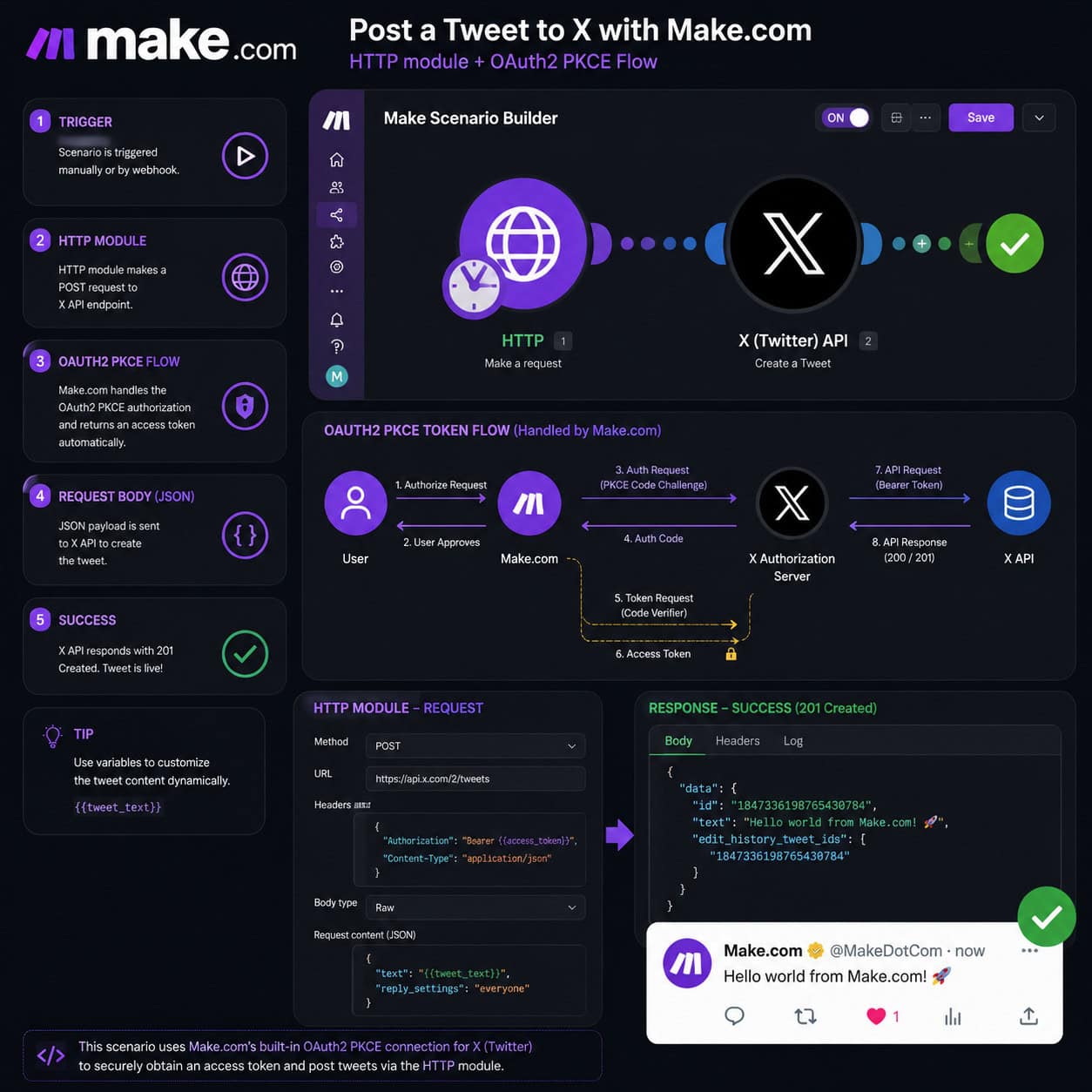
Advanced users can call the X API directly from Make.com using the HTTP module. This requires setting up OAuth2 PKCE authentication, which is more involved but gives you full access to X’s API endpoints. [1]
What you need:
- An X Developer account with an approved app
- Your app’s Client ID and Client Secret
- Make.com’s HTTP module configured with OAuth2 PKCE token flow
- The correct X API v2 endpoint (
POST /2/tweets)
Edge case: X’s free API tier only allows posting tweets — it does not support reading timelines or searching. If you need read access, you’ll need a Basic or Pro API subscription, which costs significantly more.
Option 3: n8n + Make Hybrid Workflow
n8n has built-in Twitter/X support including PKCE authentication. You can run an n8n instance, use it to handle the X API calls, and trigger it from Make.com via a webhook. [1]
This works well for teams that already have n8n running. Make sends a webhook with the tweet content, n8n receives it and posts to X. It adds a dependency but avoids the OAuth complexity inside Make.
Choose this if: You’re already using n8n for other workflows and want to minimize new API setup work.
Option 4: Ayrshare Social Media API
Ayrshare is a social media API that supports X along with 11 other networks including Facebook, Instagram, and TikTok. [2] It provides a dedicated Make.com integration guide and handles the X API authentication on its end, so you don’t need to manage OAuth tokens yourself.
Key advantages:
- Supports analytics retrieval, not just posting
- One API key works across multiple social platforms
- Useful if you’re also automating other social channels from Make
For teams managing multi-platform social media workflows, this is worth the added cost. You can also combine it with AI-powered content generation tools to build a fully automated content pipeline.
Option 5: XTweetAPI.com
XTweetAPI.com is listed directly in Make.com’s integrations directory [7] and works for workflow automation and data syncing use cases. It’s a lighter option suited to simpler scenarios where you need to post or retrieve tweet data without building a full OAuth flow.
How Do I Choose the Right Method for My Use Case?
Match the method to your situation using these decision rules:
- Choose Buffer if you need to be up and running in under an hour and don’t need advanced API features
- Choose Direct X API if you need custom logic, real-time posting, or access to specific API endpoints not covered by third-party tools
- Choose n8n hybrid if your team already runs n8n and you want to centralize X automation there
- Choose Ayrshare if you manage multiple social networks and want one API to handle all of them
- Choose XTweetAPI.com if you need a lightweight Make.com-native option for basic data syncing [7]
For teams also automating their WordPress blog posts to social media, the guide on how to auto-share WordPress blog posts to social media covers complementary workflows that pair well with these X automation setups.
What Are Common Mistakes When Setting Up Twitter Automation in Make.com?
Most failures come down to three recurring issues.
1. Not updating existing scenarios after May 2025 Any scenario built with the old native Twitter module will fail silently or throw an error. Audit your scenarios and replace the Twitter module with one of the alternatives above.
2. Ignoring X API rate limits X’s API enforces strict rate limits. If your Make scenario fires too frequently, posts will fail. Add error handling and a rate-limit delay between operations.
3. Skipping OAuth token refresh logic When using the HTTP module with direct X API calls, access tokens expire. Build a token refresh step into your scenario or use a tool like Ayrshare that manages token refresh automatically. [2]
If you’re also working on broader content automation, AI-powered content optimization can help you generate and refine tweet content before it hits your automation pipeline.
Does Make.com Still Support Social Media Automation?
Yes. Make.com still connects to over 3,000 apps [6], and social media automation remains a core use case. The X removal was specific to the native Twitter module — integrations for LinkedIn, Facebook, Instagram, Pinterest, and others are unaffected.
For broader social media graphic work, tools like Canva’s AI design features can feed directly into Make scenarios to automate visual content creation alongside your posting workflows.

FAQ
Q: Can I still use the old Twitter/X module in Make.com? No. Make.com removed the native Twitter/X app on May 30, 2025. It is no longer available in the integrations directory and cannot be restored. [2]
Q: Is Buffer free for Twitter automation in Make.com? Buffer has a free plan that covers basic tweet scheduling. For higher volume or advanced features, a paid Buffer plan is required. [1]
Q: Do I need an X Developer account to use the HTTP module method? Yes. Direct X API calls require an approved X Developer app with a Client ID and Client Secret. You also need an appropriate API tier depending on what endpoints you need.
Q: What is Ayrshare and is it worth the cost? Ayrshare is a social media API service that supports X and 11 other platforms. It’s worth the cost if you manage multiple social networks and want to avoid managing separate API credentials for each. [2]
Q: Will Make.com bring back native X integration? There is no official announcement of a return. The removal was driven by X’s API pricing, which has not changed. Plan for the current alternatives as a long-term solution. [3] [5]
Q: Can I automate replies and DMs on X through Make.com? Replying and sending DMs require specific X API endpoints and permissions. These are possible via the HTTP module method but require a higher-tier X API subscription and careful rate-limit management.
Q: Is the n8n hybrid approach reliable for production use? Yes, if your n8n instance is properly hosted and monitored. The main risk is the added dependency — if n8n goes down, your X posting stops. Use a reliable hosting provider and set up error notifications.
Q: Where can I find other Make.com users discussing X automation workarounds? The Make.com community forum has active threads on this topic. [3] [5] It’s a good place to find updated solutions as X’s API policies continue to evolve.
Conclusion
Mastering Twitter automation with Make.com integrations in 2026 means adapting to a post-native-module reality. The native X app is gone, but the platform’s flexibility means you have real, working alternatives.
Your next steps:
- Audit your existing scenarios — identify any that used the old Twitter module and flag them for rebuilding
- Pick your method — Buffer for speed, Ayrshare for multi-network scale, HTTP module for control, n8n hybrid if you’re already in that ecosystem
- Build and test — run a single scenario manually before activating automation at scale
- Add error handling — rate limits and token expiry will cause failures without it
- Monitor regularly — X’s API policies are still evolving; check the Make community forums [3] for updates
For teams building out a broader automation stack, explore the Automation Archives on WebAiStack and the guide to advanced WordPress automation strategies for complementary workflow ideas.
References
[1] How to Auto-post to X/Twitter from Make.com – https://www.youtube.com/watch?v=ZSnkr8KMAjY [2] Make.com’s X Integration Alternative – https://www.ayrshare.com/make-coms-x-integration-alternative/ [3] Make Community: Clarification on Automating X Posts via API – https://community.make.com/t/clarification-on-automating-x-formerly-twitter-posts-via-api-after-make-com-update/77649 [5] Make Community: X Twitter Integration in Make.com – https://community.make.com/t/x-twitter-integration-in-make-com/82152 [6] Make Integrations Directory – https://www.make.com/en/integrations [7] XTweetAPI.com Integration – https://www.make.com/en/integrations/xtweetapi-com


