Last updated: May 10, 2026
Quick Answer: Replit is a browser-based integrated development environment (IDE) that lets you write, run, debug, and deploy code in 50+ programming languages without installing anything locally. It combines real-time multiplayer editing, an AI coding agent, built-in hosting, and one-click deployment into a single platform. As of early 2026, Replit is tracking toward a $1 billion annual run rate, up from $2.8 million in 2024, driven largely by its AI Agent feature [9].
Key Takeaways
- Replit runs entirely in your browser, so you can code from any device with an internet connection.
- The AI Agent can scaffold full-stack applications from natural language prompts, though it works best for small to mid-sized projects.
- Real-time multiplayer editing lets multiple people code in the same file simultaneously, similar to Google Docs.
- Free tier available, but serious usage (especially AI features) requires the Core plan at $25/month or Teams plans.
- One-click deployment means you can go from code to live URL in seconds, with new app monitoring added in May 2026 [6].
- Enterprise adoption is growing, with companies like Zillow and Meta using the platform [9].
- Replit launched Security Agent and CVE Auto-Protect in April 2026 for automated vulnerability scanning [6].
What Is Replit and How Does the Cloud-Based IDE Work?
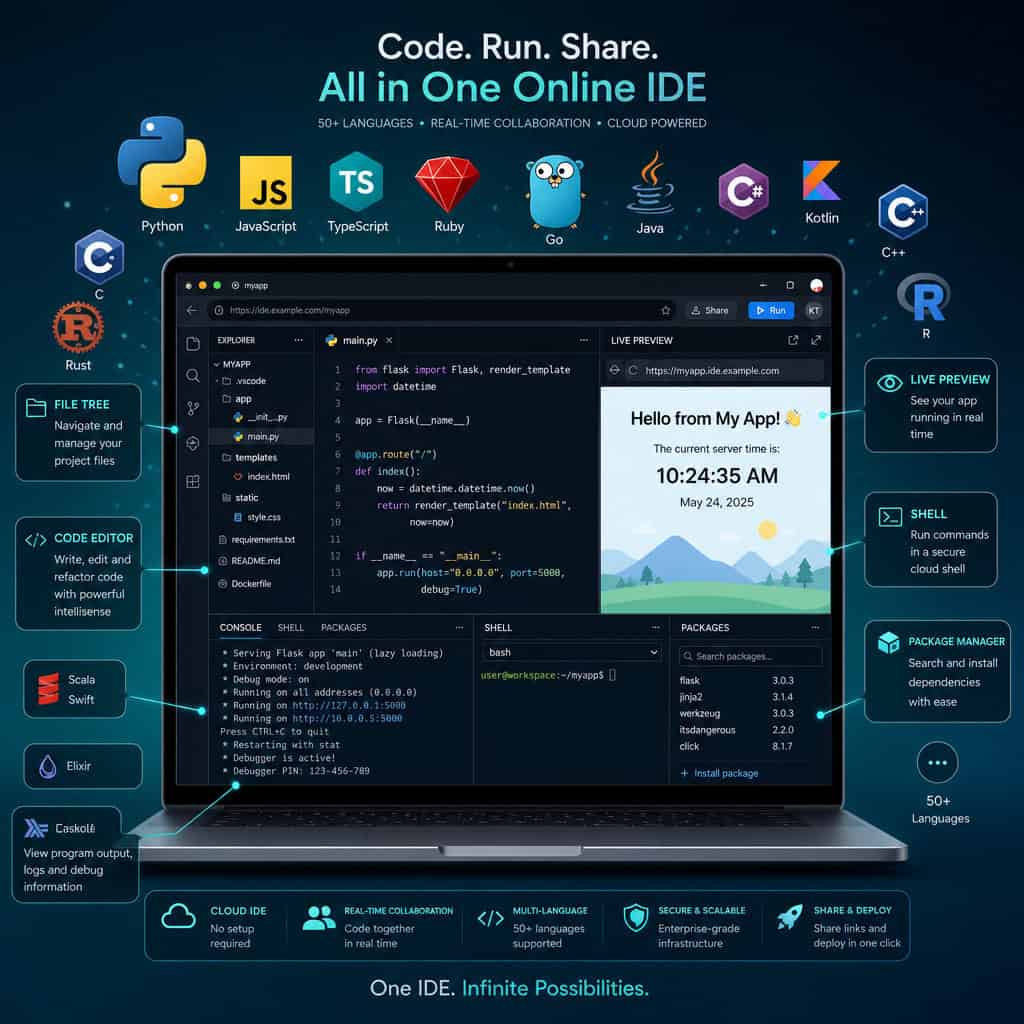
Replit is a cloud-based coding environment where everything from writing code to deploying a live application happens inside your web browser. There’s no local setup, no dependency management headaches, and no “works on my machine” excuses.
Here’s how it works in practice:
- Open your browser and go to replit.com.
- Create a new Repl by choosing a language or template (Python, JavaScript, TypeScript, Go, Ruby, C++, and dozens more).
- Write code in the built-in editor, which includes syntax highlighting, autocomplete, and an integrated terminal.
- Hit Run and see output instantly in the same window.
- Deploy your project to a live URL with one click.
The platform provisions a Linux container for each project, so you get a real development environment with shell access, package management, and file system access. This makes it more than a toy code playground. You can build and ship real web apps, APIs, bots, and data tools.
Choose Replit if you want zero-config setup, need to collaborate in real time, or want to go from idea to deployed app as fast as possible. Skip it if you need heavy local IDE extensions, work with very large codebases, or require fine-grained control over your development environment.
For those exploring other no-code and low-code approaches to building web projects, our guide to no-coding website design software platforms covers additional options worth considering.
How Does Replit’s AI Agent Change the Coding Experience?
Replit’s AI Agent is the platform’s biggest differentiator in 2026. It can take a plain-English prompt like “Build me a task management app with user authentication and a PostgreSQL database” and generate a working full-stack application, including frontend, backend, database schema, and deployment configuration.
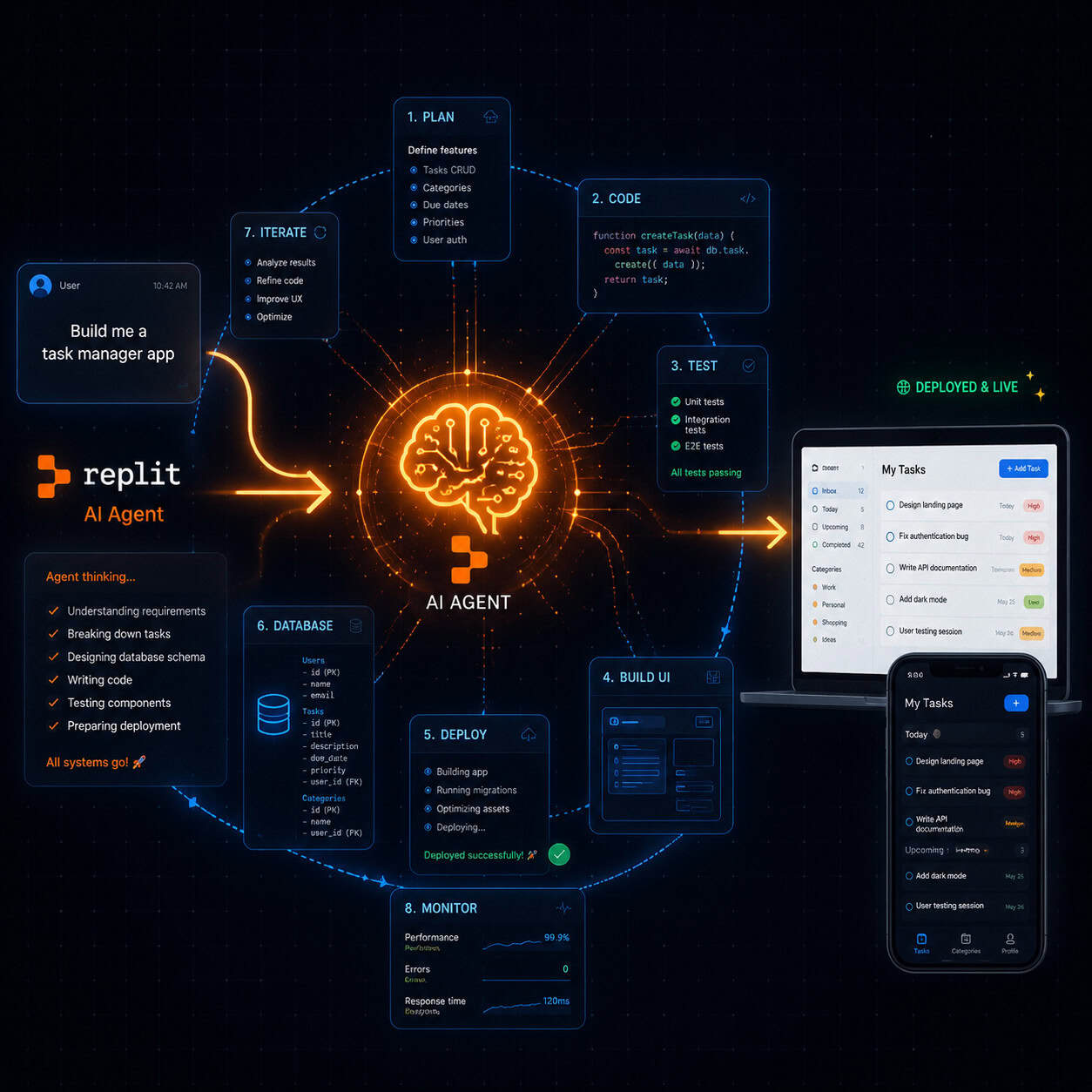
The Agent doesn’t just generate code snippets. It:
- Plans the project architecture before writing any code
- Creates files and folders in the correct structure
- Installs dependencies automatically
- Runs the app and debugs errors iteratively
- Deploys the finished product
Analyst Jeff Brines noted that this AI-first approach helped Replit reach over $100 million ARR in 2025, because it expanded the addressable market beyond professional developers to include analysts, entrepreneurs, and designers who can now build software through conversation [7].
The catch: G2 reviewers (averaging 4.3 to 4.6 stars as of April 2026) report that Agent reliability drops on larger, more complex projects. It excels at prototyping and small to mid-sized apps but can struggle with nuanced multi-service architectures. Credit consumption for AI features can also add up quickly, with some users reporting spending $700+ per month on heavy Agent usage [8].
Common mistake: Relying entirely on the AI Agent without understanding the generated code. When something breaks in production, you still need enough coding knowledge to troubleshoot. If you’re interested in how AI tools are reshaping creative workflows more broadly, check out our guide to AI-powered content generation tools.
What Are Replit’s Key Features for Collaboration?
Real-time multiplayer editing is Replit’s standout collaboration feature. Multiple users can type in the same file at the same time, with colored cursors showing who’s editing where. This is a native feature, not a bolt-on.
Additional collaboration tools include:
- Built-in chat within each project workspace
- Threads for commenting on specific lines of code
- Fork and remix so anyone can copy a public project and build on it
- Teams for Education and Teams Pro plans with admin controls, private projects, and shared environments
- Version history to track changes over time
This makes Replit especially popular in education settings, coding bootcamps, and hackathons where quick collaboration matters more than enterprise-grade Git workflows.
Edge case: If your team already relies heavily on GitHub pull requests and code review workflows, Replit’s collaboration model may feel too informal. GitHub Codespaces offers tighter integration with those workflows.
How Does Replit Compare to GitHub Codespaces and Cursor?
This is the question most developers ask before committing to a platform. Here’s a direct comparison based on 2026 capabilities:
| Feature | Replit | GitHub Codespaces | Cursor |
|---|---|---|---|
| Environment | Browser-based | Browser or VS Code | Local desktop app |
| AI Coding | AI Agent (full app generation) | GitHub Copilot | Multi-model AI (GPT-4, Claude) |
| Collaboration | Native multiplayer editing + chat | Live Share (extension) | Limited |
| Deployment | Built-in one-click deploy | Requires external setup | No built-in deploy |
| Language Support | 50+ languages | Any (Docker-based) | Any (VS Code-based) |
| Pricing | Free tier; Core $25/mo | Free tier; from $0.18/hr | Free tier; Pro $20/mo |
| Best For | Prototyping, education, solo builders | GitHub-centric teams | Power users wanting local speed + AI |
| VS Code Extensions | Limited | Full support | Full support |
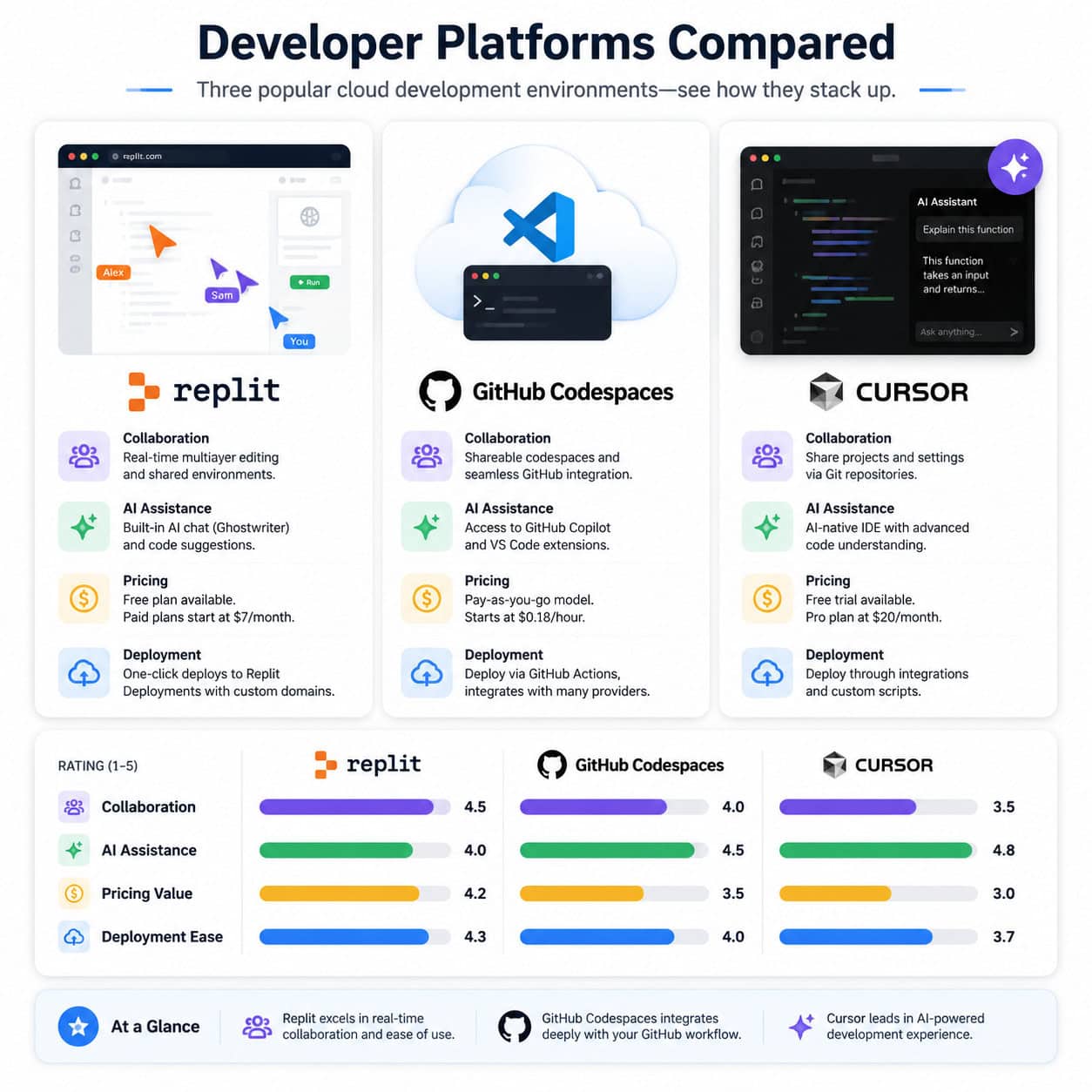
Choose Replit if you want the fastest path from idea to deployed app and value real-time collaboration. Choose Codespaces if your team lives in the GitHub ecosystem and needs full VS Code extension support. Choose Cursor if you want a local IDE with powerful multi-model AI and don’t need browser-based access [9].
One notable development: Replit CEO Amjad Masad discussed a deal with Cursor in an April 2026 TechCrunch interview, suggesting the competitive lines between these platforms may blur further [9].
If you’re building web projects and evaluating tools across the design-to-development pipeline, our article on Figma to code plugins covers how design tools connect to coding environments.
What Does Replit Cost in 2026?
Replit uses a tiered pricing model with a credit system for AI and compute resources.
| Plan | Monthly Cost | Key Inclusions |
|---|---|---|
| Free | $0 | Basic Repls, limited AI, community features |
| Core | $25/month | AI Agent access, more compute, private Repls, custom domains |
| Teams Pro | Custom pricing | Admin controls, shared environments, priority support |
Important pricing detail: AI Agent interactions consume credits beyond your base plan. Heavy users can burn through credits fast. The Reddit community has documented cases of monthly bills reaching several hundred dollars when using the Agent extensively for iterative app building [8].
Decision rule: If you’re learning to code or building small personal projects, the free tier works fine. If you’re using the AI Agent regularly or need private projects, the Core plan is the minimum. For teams and enterprise use, contact Replit directly for Teams Pro pricing.
Accenture’s April 2026 investment in Replit through Accenture Ventures signals growing enterprise confidence in the platform’s direction [5].
What Security and Monitoring Features Does Replit Offer?
Replit significantly upgraded its security posture in April and May 2026 with two major launches:
- Security Agent (April 24, 2026): Performs whole-codebase vulnerability reviews, scanning your entire project for security issues rather than just individual files [6].
- CVE Auto-Protect (April 24, 2026): Automatically patches critical known vulnerabilities (CVEs) in your dependencies without manual intervention [6].
- App Monitoring (May 1, 2026): Provides real-time uptime checks and a visual uptime bar for published apps, so you know immediately if your deployed project goes down [6].
These features address a common criticism of cloud IDEs: that they’re fine for prototyping but not production-ready. With automated security scanning and uptime monitoring, Replit is positioning itself as a viable option for apps that need to stay running reliably.
For teams already managing WordPress-based projects with security concerns, our guide on AI plugins for WordPress automation covers complementary tools.
Who Should Use Replit (and Who Shouldn’t)?
Replit is a strong fit for:
- Beginners learning to code who don’t want to wrestle with local environment setup
- Solo builders and entrepreneurs who want to prototype and ship apps quickly using AI
- Educators and students who need shared coding environments for classes and assignments
- Hackathon teams that need instant collaboration without configuration
- Non-technical founders who want to build MVPs with AI Agent assistance
Replit is not ideal for:
- Large engineering teams with established Git workflows and CI/CD pipelines
- Projects requiring specific VS Code extensions that aren’t available in the browser
- Performance-sensitive work where local compute matters (machine learning training, large compilations)
- Budget-constrained heavy users who would burn through AI credits quickly
If you’re working on web design projects alongside your coding work, our AI website creator guide explores platforms that complement Replit’s capabilities. And for those optimizing content alongside their development work, see our AI-powered content optimization guide.
Conclusion
Replit has evolved from a simple online code editor into a full development platform where you can build, collaborate on, and deploy applications entirely from your browser. The AI Agent is its most compelling feature in 2026, letting people generate working apps from descriptions, though it works best for small to mid-sized projects and requires some coding knowledge for troubleshooting.
Your next steps:
- Try the free tier at replit.com. Create a simple project in your preferred language to get a feel for the editor and workflow.
- Test the AI Agent with a small project prompt. Ask it to build something specific, like a to-do app with a database, and evaluate the output quality.
- Evaluate costs before committing. Run a one-week trial on the Core plan and track your credit usage to estimate monthly costs.
- Compare alternatives if Replit doesn’t fit. GitHub Codespaces and Cursor both have free tiers worth testing.
- Join the community. Replit’s forums and Reddit community (r/replit) are active and helpful for troubleshooting.
The platform isn’t perfect for every use case, but for rapid prototyping, learning, and getting ideas deployed fast, it’s one of the most accessible development environments available in 2026.
FAQ
Is Replit free to use? Yes. Replit offers a free tier with basic coding features, limited AI access, and public projects. Paid plans start at $25/month for the Core tier, which adds AI Agent access, private projects, and more compute resources.
Can I build a real production app on Replit? Yes, but with caveats. Replit supports full-stack development and one-click deployment. The new Security Agent and App Monitoring features (launched April-May 2026) make production use more viable. However, very large or performance-critical applications may still benefit from dedicated infrastructure [6].
What programming languages does Replit support? Replit supports over 50 languages, including Python, JavaScript, TypeScript, Go, Ruby, C++, Java, Rust, and many more. Each language comes with pre-configured environments and package managers.
How does Replit’s AI Agent differ from GitHub Copilot? Copilot suggests code completions as you type. Replit’s AI Agent takes a higher-level approach: you describe an entire application in plain English, and it builds the full project, including file structure, dependencies, and deployment. They solve different problems.
Is Replit good for learning to code? Very much so. The zero-setup environment removes the biggest barrier for beginners. The AI can explain code, and the multiplayer feature lets instructors and students work together in real time. Many coding bootcamps and schools use Replit for this reason.
Can I use Replit offline? No. Replit requires an internet connection because all code runs on cloud servers. If you need offline access, a local IDE like VS Code or Cursor is a better choice.
How does Replit handle version control? Replit has built-in version history and also supports Git integration. You can connect a Repl to a GitHub repository, push and pull changes, and use branches. However, the Git integration is more basic than what you’d get in Codespaces or a local IDE.
What is Replit’s 300% net revenue retention? This metric, cited by CEO Amjad Masad in April 2026, means existing customers are spending three times more over time than when they first signed up. It indicates strong product stickiness and expanding usage within accounts [9].
Can teams collaborate on private projects? Yes, but private projects require a paid plan. The Core plan supports private Repls for individuals, and Teams Pro plans offer shared private workspaces with admin controls.
Is Replit secure enough for enterprise use? Replit has made significant security investments in 2026, including the Security Agent for codebase-wide vulnerability reviews and CVE Auto-Protect for automatic patching. Accenture’s investment through Accenture Ventures further validates enterprise readiness [5] [6].
References
[5] Replit – https://www.distillintelligence.com/news/replit [6] Replit – https://releasebot.io/updates/replit [7] Replit 2026 Platform En – https://till-freitag.com/blog/replit-2026-platform-en [8] Ive Spent 700 This Month On Replitheres Why I – https://www.reddit.com/r/replit/comments/1reua1i/ive_spent_700_this_month_on_replitheres_why_i/ [9] Replits Amjad Masad On The Cursor Deal Fighting Apple And Why Hed Rather Not Sell – https://techcrunch.com/2026/05/01/replits-amjad-masad-on-the-cursor-deal-fighting-apple-and-why-hed-rather-not-sell/