


Last updated: May 10, 2026
Quick Answer
Replit is a browser-based development platform that combines a cloud IDE, AI-powered code generation (Replit Agent), instant deployment, and real-time collaboration into one environment. It eliminates local setup entirely, letting developers and non-developers build, test, and ship applications from any device. As of early 2026, Replit has grown from $10 million to $100 million in revenue in roughly nine months and is valued at approximately $9 billion [7][8].
Key Takeaways
- Replit provides a complete development lifecycle in the browser: write, run, debug, deploy, and monitor apps without local tooling.
- Replit Agent uses AI to generate full applications from natural language prompts, making it accessible to non-coders.
- The platform grew revenue from ~$10M to $100M in nine months, projecting $1B ARR by end of 2026 [7].
- New features in May 2026 include Workspace Security Center 2.0, App Monitoring, Agent modes, and MCP integrations [9][10].
- Accenture invested in Replit in April 2026 to advance enterprise AI-driven development.
- Replit competes with Cursor (local AI IDE) and GitHub Codespaces (cloud VS Code), each serving different user profiles.
- Pricing starts free, with paid tiers for more compute, storage, and AI usage.
- Real-time multiplayer collaboration sets Replit apart from most local-first competitors.
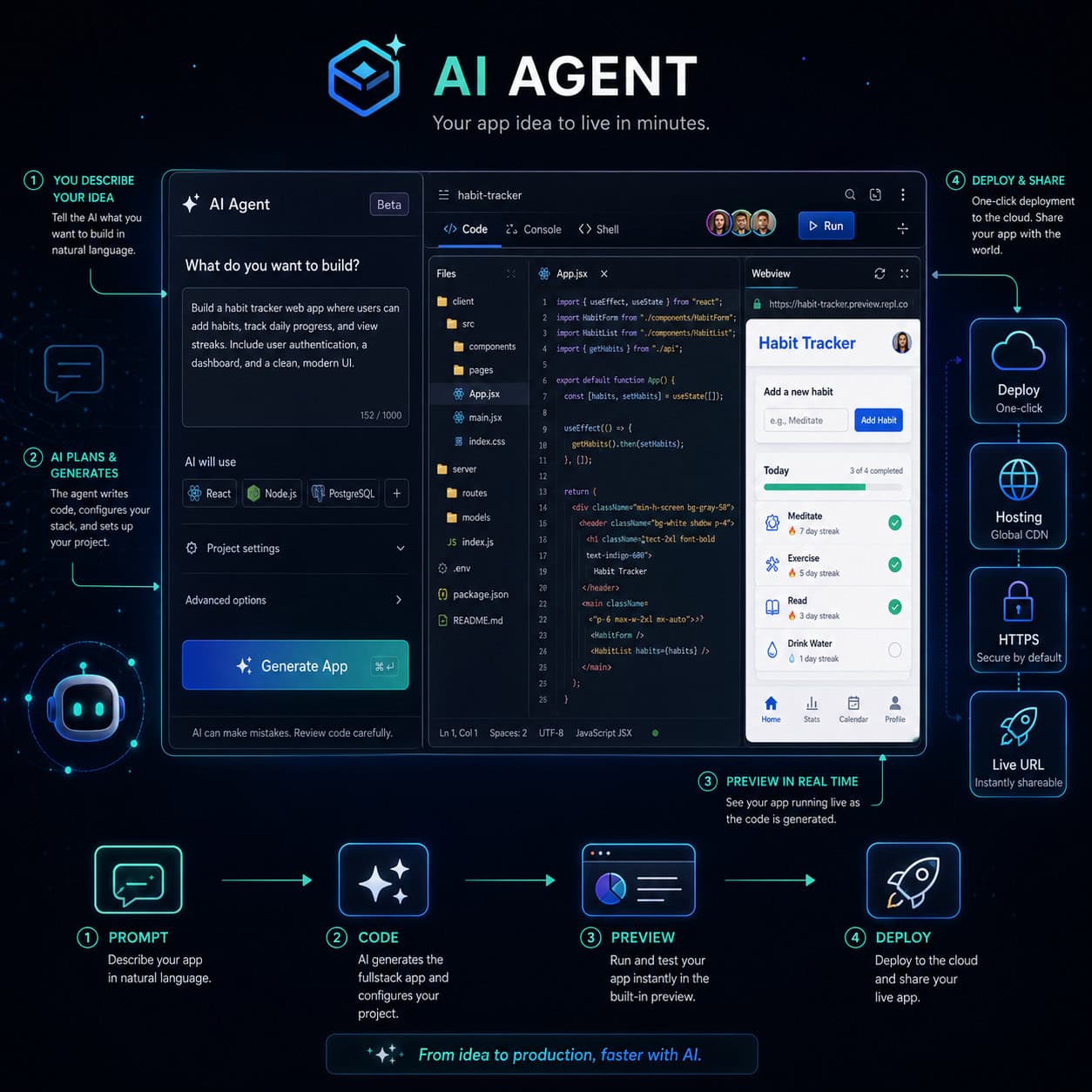
What Is Replit and Why Does It Matter for Development in 2026?
Replit is a cloud-native integrated development environment (IDE) that runs entirely in your browser. It supports over 50 programming languages and bundles hosting, databases, package management, and AI assistance into a single platform.
What makes it matter now: the rise of AI-assisted “vibe coding” has made Replit the default tool for people who want to describe what they need and have AI build it. CEO Amjad Masad has positioned the platform as the entry point for anyone—not just trained engineers—to create software [6][7].
Key capabilities include:
- Replit Agent: An AI that interprets natural language instructions and writes, debugs, and deploys entire applications.
- Instant deployment: One-click publishing with custom domains, SSL, and now uptime monitoring [10].
- Multiplayer editing: Google Docs-style real-time collaboration on code.
- Integrated databases and secrets management: No external services needed for basic persistence.
For teams already working with design-to-development workflows, Replit complements tools covered in our guide on streamlining design-to-development with Figma-to-code plugins.
How Does Replit’s AI Agent Unlock Development Potential?
Replit Agent transforms software creation from a coding task into a conversation. You describe the app you want—”build me a project management dashboard with user authentication and a Kanban board”—and Agent scaffolds the project, installs dependencies, writes code, and deploys it.
As of May 2026, Agent has expanded with new modes and capabilities [9]:
- Lite Mode: Faster responses for simple tasks, using fewer compute credits.
- Skills Search: Agent can look up documentation and APIs mid-task to produce more accurate code.
- MCP integrations: Agent connects to external services (Razorpay, analytics tools) directly through Model Context Protocol.
Common mistake: Treating Agent as a finished-product generator. Agent works best as a rapid prototyping partner. Complex business logic, edge cases, and performance tuning still benefit from human review.
Choose Replit Agent if: You need a working prototype in hours, not weeks. You’re a solo founder, a designer who codes occasionally, or a team validating ideas quickly.
This AI-first approach aligns with broader trends in AI-powered content and application generation.
What Are the Latest Features Strengthening Replit’s Value Proposition?
Replit ships updates weekly. Here are the most significant additions from April–May 2026:
| Feature | Release Date | What It Does |
|---|---|---|
| Workspace Security Center 2.0 | May 7, 2026 | Review and fix dependency vulnerabilities across all projects from one dashboard [10] |
| App Monitoring | May 1, 2026 | Real-time uptime checks with visual status bars for published apps [10] |
| Agent Lite Mode | May 8, 2026 | Faster, cheaper AI responses for straightforward tasks [9] |
| Skills Search | May 8, 2026 | Agent references documentation during code generation [9] |
| Razorpay MCP | May 8, 2026 | Direct payment integration via Agent [9] |
| Production Logs | May 8, 2026 | View runtime logs for deployed applications [9] |
The Security Center update is particularly notable for teams. You can now run bulk vulnerability scans, send notifications, and trigger Agent-powered fixes across multiple projects simultaneously [10]. This moves Replit closer to enterprise-grade tooling.
For those building production websites, these monitoring features complement strategies discussed in our guide on no-code website design platforms.

How Does Replit Compare to Cursor and GitHub Codespaces?
Each platform serves a different developer profile. Here’s a direct comparison:
| Criteria | Replit | Cursor | GitHub Codespaces |
|---|---|---|---|
| Environment | Browser-based cloud IDE | Local VS Code fork | Browser-based VS Code |
| AI capability | Agent (full app generation) | AI autocomplete + chat (code-level) | GitHub Copilot |
| Best for | Prototyping, learning, solo builders, non-coders | Professional devs on large codebases | Teams with existing GitHub repos |
| Collaboration | Real-time multiplayer | Limited (local-first) | Shared environments via repos |
| Deployment | Built-in one-click | None (separate tooling needed) | Requires external CI/CD |
| Pricing | Free tier; paid from ~$7/month | ~$20/month | ~$9+/month |
| Offline use | No | Yes | No |
Decision rule:
- Choose Replit if you want everything in one place and value speed over fine-grained control.
- Choose Cursor if you’re a professional developer working on complex, multi-file projects locally.
- Choose GitHub Codespaces if your team already lives in GitHub and needs consistent dev environments.
Replit’s weakness is performance on very large codebases. Cursor handles those better because it runs locally with full system resources.
Who Should Use Replit (and Who Shouldn’t)?
Ideal users:
- Non-technical founders building MVPs
- Educators and students learning to code
- Designers who want to prototype functional apps
- Small teams that need collaboration without DevOps overhead
- Hackathon participants and rapid prototypers
Not ideal for:
- Large engineering teams with complex CI/CD pipelines and monorepos
- Projects requiring specific local hardware (GPU-intensive ML training, for example)
- Developers who need offline access regularly
- Organizations with strict data residency requirements (check Replit’s compliance docs)
If you’re a designer exploring code, you might also benefit from our Figma for beginners guide on UI/UX workflows as a complement to Replit prototyping.
What Does Replit’s Growth Signal About the Future of Development?
Replit’s revenue trajectory—from $2.8 million in 2024 to a projected $1 billion ARR by end of 2026—reflects a fundamental shift in who builds software [6][7]. The platform’s $9 billion valuation, tripled in six months, shows investor confidence in this direction [8].
Accenture’s April 2026 investment specifically targets enterprise adoption of AI-driven development. This suggests large organizations are beginning to use Replit-style tools for internal app creation, not just startups.
CEO Masad has publicly argued that traditional computer science degrees are becoming less necessary for many software roles, because AI tools like Replit Agent handle implementation details that once required years of training [6]. Whether you agree or not, the market is voting with revenue.
For teams already using AI in their workflows, our guide on AI-powered content optimization covers related strategies for non-development use cases.

How to Get Started with Replit: A Practical Checklist
- Create a free account at replit.com. No credit card required.
- Start a new Repl and choose your language (or let Agent decide based on your prompt).
- Describe your project to Agent in plain English. Be specific about features, not implementation details.
- Review the generated code. Check file structure, dependencies, and basic logic.
- Iterate with Agent. Ask it to fix bugs, add features, or refactor.
- Test in the built-in preview. Replit shows your app running live as you develop.
- Deploy with one click. Use a custom domain or Replit’s free subdomain.
- Enable App Monitoring to track uptime after deployment [10].
- Run Security Center scans to catch vulnerable dependencies before they become problems [10].
Pro tip: Use Lite Mode for quick edits and standard Agent mode for complex feature additions. This saves compute credits on paid plans [9].
If you’re building a website specifically, you may want to compare Replit’s approach with drag-and-drop website builders to determine which fits your skill level and project scope.
What Are Common Mistakes When Using Replit?
- Over-relying on Agent without review: AI-generated code can have security issues, inefficient patterns, or incorrect business logic. Always review before deploying to production.
- Ignoring the Security Center: Dependency vulnerabilities accumulate quickly. Run scans weekly at minimum.
- Using Replit for the wrong project type: If your app needs 16GB of RAM or GPU compute, you’ll hit platform limits.
- Not setting up environment secrets properly: Hardcoding API keys in code is a common beginner mistake. Use Replit’s Secrets tab.
- Skipping monitoring: The new App Monitoring feature exists for a reason. Enable it for any app with real users.
FAQ
Is Replit free to use? Yes. The free tier includes basic compute, storage, and limited AI usage. Paid plans start around $7/month for more resources and faster AI responses.
Can I build production apps on Replit? Yes, but with caveats. Simple web apps, APIs, and internal tools work well. High-traffic or compute-heavy applications may need migration to dedicated infrastructure.
Does Replit support team collaboration? Yes. Real-time multiplayer editing is a core feature. Multiple people can code in the same file simultaneously, similar to Google Docs.
What programming languages does Replit support? Over 50, including Python, JavaScript/TypeScript, Go, Rust, Java, C++, Ruby, and more. The AI Agent works best with Python and JavaScript projects currently.
Is Replit secure for business use? Replit has added enterprise-focused features like Workspace Security Center 2.0 and SOC 2 compliance. However, evaluate your specific data sensitivity requirements before committing.
How does Replit Agent differ from GitHub Copilot? Copilot suggests code completions line-by-line. Replit Agent builds entire applications from high-level descriptions, handles deployment, and manages project structure autonomously.
Can I export my code from Replit? Yes. You can download your project files or connect to a GitHub repository for version control.
What happened with Replit and Cursor? Reports from May 2026 suggest Replit acquired Cursor to strengthen its AI coding capabilities, though official details remain limited [6].
Is Replit suitable for learning to code? Absolutely. The zero-setup environment and AI assistance make it one of the best platforms for beginners. Many coding bootcamps and schools use it.
What is “vibe coding”? A term popularized in 2025-2026 describing the practice of building software by describing what you want in natural language and letting AI handle implementation. Replit is considered a leading vibe-coding platform [7].
Conclusion
Unlocking development potential through Replit’s comprehensive value proposition comes down to one thing: removing friction between having an idea and shipping a working application. The platform’s combination of AI-powered code generation, instant deployment, real-time collaboration, and new enterprise features (security scanning, app monitoring) makes it genuinely different from traditional development setups.
Your next steps:
- Sign up for a free Replit account and build something small—a personal dashboard, a simple API, or a landing page.
- Test Replit Agent with a real project idea. Evaluate the output quality for your specific use case.
- If you’re on a team, try multiplayer editing to see if it reduces your coordination overhead.
- For production use, enable Security Center scans and App Monitoring from day one.
- Compare your experience against alternatives (Cursor for local AI coding, Codespaces for GitHub-native workflows) before committing to a paid plan.
The platform isn’t perfect for every scenario, but for rapid development, learning, and prototyping, it’s currently the most complete browser-based option available. The revenue growth and enterprise investment suggest it’ll only get more capable from here.
For more tools and strategies in the AI-powered development space, explore our AI tools and automation resources.
References
[6] Replits Amjad Masad On The Cursor Deal Fighting Apple And Why Hed Rather Not Sell – https://techcrunch.com/2026/05/01/replits-amjad-masad-on-the-cursor-deal-fighting-apple-and-why-hed-rather-not-sell/ [7] Watch – https://www.youtube.com/watch?v=pN-CK54ms2c [8] Ainews Replit Agent 4 The Knowledge – https://www.latent.space/p/ainews-replit-agent-4-the-knowledge [9] Replit – https://releasebot.io/updates/replit [10] Changelog – https://docs.replit.com/updates/2026/05/08/changelog





