Last updated: May 10, 2026
Quick Answer
Replit is a browser-based IDE that lets you write, run, and deploy Python code without installing anything locally. It supports real-time multiplayer editing, AI-assisted coding via Replit Agent, and one-click deployment. As of 2026, Replit is used by 85% of Fortune 500 companies and has grown to a $1B revenue run-rate [10], making it one of the most significant platforms for Python development and collaboration online.
Key Takeaways
- Zero setup: Write and run Python directly in your browser on any device, including Chromebooks and tablets.
- Real-time collaboration: Multiple users can edit the same project simultaneously, similar to Google Docs for code.
- AI-powered development: Replit Agent 4 builds production-ready apps with parallel task execution and multi-format support [1].
- Security built in: Auto-Protect patches critical CVEs automatically, and Security Agent reviews entire codebases in under an hour [1].
- Deployment included: Deploy Python apps (Flask, Django, FastAPI) directly from the IDE with custom domains.
- Free tier available: Start coding Python at no cost; paid plans add private projects, more compute, and advanced features.
- Private publishing: Password-protected apps now available on all paid plans for internal tools and betas [1].
- App Monitoring: Automatic downtime alerts and AI-powered diagnostics launched April 2026 [1].
What Is Replit and Why Use It for Python?
Replit is a cloud-based development environment where you can code in 50+ languages, but Python is its most popular. You get a code editor, terminal, package manager, and hosting in one browser tab.
Who it’s for:
- Beginners learning Python who don’t want to deal with local setup
- Teams that need shared coding environments for pair programming or code reviews
- Educators running classrooms where students need identical environments
- Freelancers and indie developers prototyping quickly
Who it’s NOT for:
- Developers working on large monorepos with strict latency requirements
- Projects requiring GPU-intensive machine learning training (though basic ML works fine)
- Organizations with air-gapped security requirements
The platform eliminates the “it works on my machine” problem entirely. Every collaborator sees the same environment, same dependencies, same runtime.

How to Get Started with Replit Python in 2026
Setting up your first Python project takes about 60 seconds:
- Create an account at replit.com (Google, GitHub, or email sign-up)
- Click “Create Repl” and select Python as your language
- Name your project and choose visibility (public or private)
- Start coding in the editor that appears immediately
- Click Run to execute your code in the built-in console
Common mistake: New users often try to install packages via the terminal with pip install. While this works, Replit’s built-in package manager (accessible from the “Packages” panel) handles dependencies more reliably because it persists them in the pyproject.toml file.
Quick example — Flask web app:
<code class="language-python">from flask import Flask
app = Flask(__name__)

@app.route('/')
def home():
    return "Hello from Replit!"

app.run(host='0.0.0.0', port=8080)
</code>
This runs immediately with a preview URL. No server configuration needed.
If you’re exploring ways to build websites without traditional coding, our guide to no-coding website design platforms covers additional options worth considering.
How Does Real-Time Collaboration Work?
Replit’s multiplayer feature lets multiple people edit the same file simultaneously. Each user gets a colored cursor, and changes sync instantly.
Key collaboration features:
- Live cursors: See where teammates are typing in real time
- Chat and threads: Discuss code without leaving the IDE
- Fork and remix: Clone any public Repl to build on someone else’s work
- Version history: Roll back to previous states if something breaks
Choose multiplayer if: You’re pair programming, running a coding workshop, or doing live code reviews. Choose forking if you want to experiment independently without affecting the original project.
For teams working on design-to-development workflows, this collaborative approach mirrors what tools like Figma offer for designers. You can learn more about collaborative design principles in Figma for comparison.
What AI Features Does Replit Offer for Python Developers?
Replit Agent is the platform’s AI coding assistant, and it received a major upgrade with Agent 4 in May 2026. It can build entire applications from natural language prompts, run parallel tasks, and support multiple output formats including web and mobile [1].
Current AI capabilities (May 2026):
- Code generation: Describe what you want in plain English; Agent writes the code
- Debugging: Paste an error message and get fix suggestions
- SVG uploads: Agent now accepts SVG files (sanitized for security) as design inputs [1]
- Slide Decks: Create presentations with speaker notes and Presenter view [1]
- App Monitoring: AI diagnoses downtime by analyzing logs and database state [1]
Decision rule: Use Replit Agent for prototyping and MVPs where speed matters more than architectural perfection. For production systems with complex business logic, treat Agent output as a starting point that needs human review.
Replit CEO Amjad Masad noted in a May 2026 TechCrunch interview that the platform achieved 300% net revenue retention, largely driven by AI feature adoption [10].
For broader context on AI-assisted development, see our guide to AI-powered content optimization and our overview of AI website creation tools.
How Secure Is Replit for Python Projects?
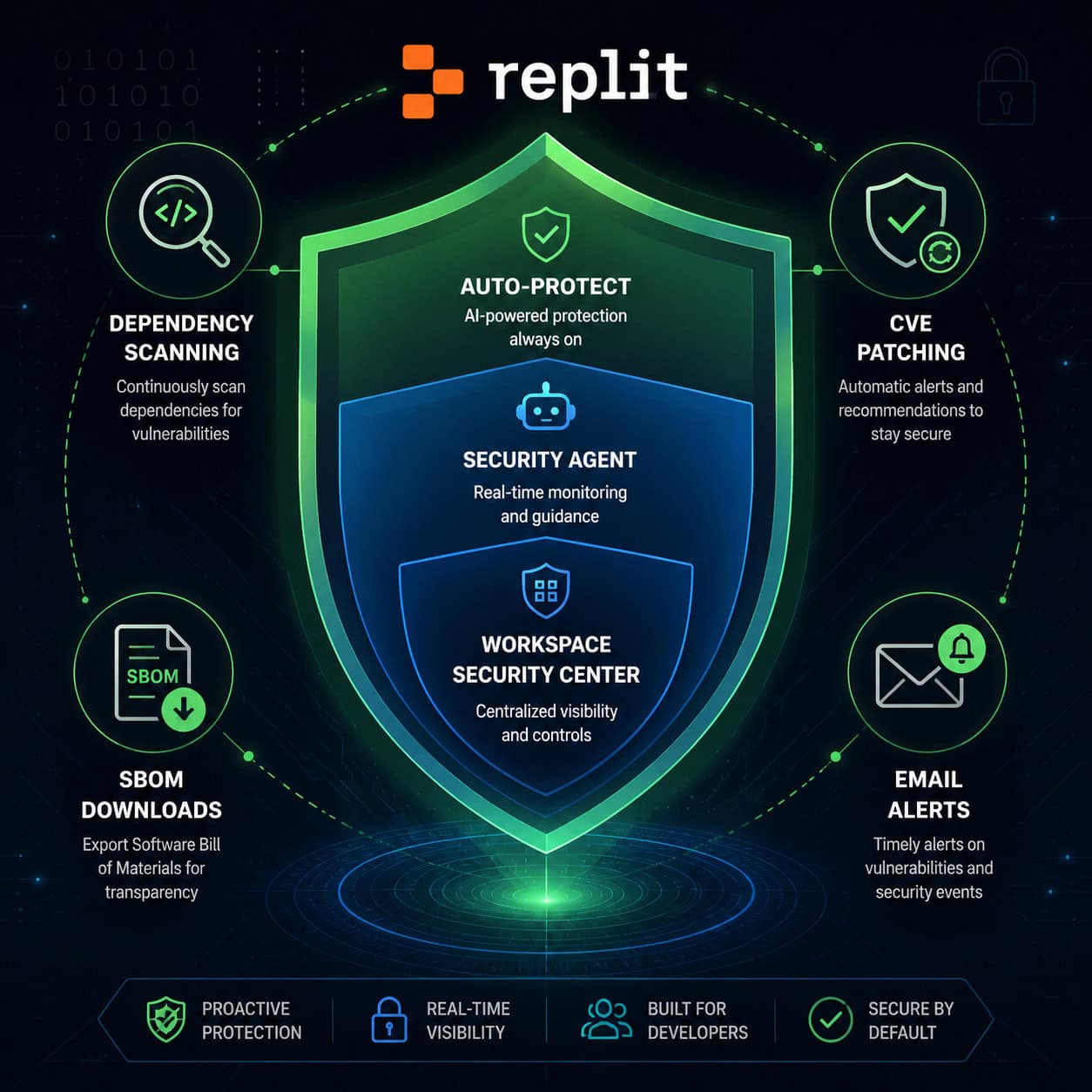
Security has been Replit’s biggest investment area in early 2026. Here’s what’s now available:
| Feature | Launch Date | What It Does |
|---|---|---|
| Security Agent | April 20, 2026 | Full codebase review in under 1 hour using Semgrep and HoundDog.ai [1] |
| Auto-Protect | April 22, 2026 | Auto-patches critical CVEs in dependencies after opt-in [1] |
| App Monitoring | April 29, 2026 | Email alerts on downtime + AI diagnostics [1] |
| Workspace Security Center 2.0 | May 8, 2026 | Bulk review/remediation of vulnerabilities, SBOM downloads [1] |
| External Access Tokens | May 8, 2026 | Secure integrations with Slack/GitHub for private deployments [1] |
Semgrep’s Head of Product, Daghan Atlas, praised the Security Agent for “combining LLMs with deterministic analysis” [1], meaning it uses both AI reasoning and rule-based scanning to catch vulnerabilities.
Edge case: If you’re building internal tools, the new private publishing feature (available on Core and Starter plans) lets you password-protect deployed apps behind Replit sign-in [1]. This is useful for beta testing or team-only dashboards.
For WordPress developers interested in security automation, our guide to WordPress AI plugins covers similar automated protection approaches.
What Does Replit Python Cost? Pricing Breakdown
Replit offers a free tier and two paid plans. Here’s the practical breakdown:
| Plan | Monthly Cost | Best For | Key Limits |
|---|---|---|---|
| Free | $0 | Learning, small scripts | Public projects only, limited compute |
| Starter | ~$9/month | Hobbyists, freelancers | Private Repls, more storage, private publishing |
| Core | ~$25/month | Professional developers, teams | Maximum compute, all AI features, priority support |
Choose Free if: You’re learning Python or building open-source projects you don’t mind sharing publicly.
Choose Starter if: You need private repositories and occasional AI assistance but aren’t deploying production apps.
Choose Core if: You’re deploying client projects, need maximum AI Agent usage, or require the full security suite.
Note: Replit won the 2026 Google Cloud AI Tooling Partner of the Year award [1], which signals strong infrastructure backing for paid-tier reliability.

How Does Replit Compare to Alternatives?
| Feature | Replit | VS Code (local) | Google Colab | GitHub Codespaces |
|---|---|---|---|---|
| Setup time | Instant | 10-30 min | Instant | 2-5 min |
| Collaboration | Built-in multiplayer | Via Live Share extension | Limited | Via VS Code |
| AI Agent | Yes (Agent 4) | Via Copilot (separate) | Gemini | Copilot |
| Deployment | One-click | Manual | No | Via GitHub Actions |
| Free tier | Yes | Yes (software only) | Yes | Limited hours |
| Best for | Full-stack prototyping | Large projects | Data science notebooks | Enterprise teams |
Choose Replit over Colab if you’re building web apps, APIs, or anything beyond data science notebooks. Choose Codespaces over Replit if your team is deeply integrated into GitHub workflows and needs enterprise SSO.
Common Mistakes and How to Avoid Them
Ignoring the .replit file: This configuration file controls how your project runs. If your app doesn’t start correctly, check here first.
Using
input()in web apps: Python’sinput()blocks the console. For web apps, use Flask routes or similar frameworks instead.Not pinning dependencies: Always specify versions in
pyproject.toml. Unpinned packages can break when Replit updates its environment.Forgetting environment variables: Store API keys in Replit’s Secrets tab, not in your code. This prevents accidental exposure in public Repls.
Overloading the free tier: CPU-intensive tasks (web scraping loops, large data processing) will hit limits quickly. Upgrade or optimize your code.
For developers moving between design tools and code, understanding design-to-development workflows can help bridge the gap.
Conclusion
Replit has evolved from a simple online code editor into a full development platform with AI agents, enterprise security, and one-click deployment. For Python developers in 2026, it eliminates setup friction and makes collaboration as easy as sharing a link.
Your next steps:
- Create a free Replit account and build a simple Flask or FastAPI project
- Invite a collaborator to test multiplayer editing
- Try Replit Agent to scaffold a project from a natural language description
- If you’re building anything production-facing, enable Auto-Protect and review the Security Center
- Evaluate whether Starter or Core makes sense based on your privacy and compute needs
The platform isn’t perfect for every use case (large monorepos and GPU-heavy ML training still belong elsewhere), but for rapid Python development and team collaboration, it’s the strongest browser-based option available in 2026.
FAQ
Can I use Replit Python for free? Yes. The free tier lets you create unlimited public Python projects with basic compute resources. You’ll need a paid plan for private projects.
Does Replit support Python libraries like NumPy, Pandas, and TensorFlow? Yes. Most popular Python packages install directly through the built-in package manager. TensorFlow works but may be slow on free-tier compute.
Can I deploy a Python web app from Replit? Yes. Replit offers one-click deployment for Flask, Django, and FastAPI apps with custom domain support on paid plans.
Is Replit suitable for professional production apps? It’s increasingly viable. With App Monitoring, Auto-Protect, and Security Agent [1], production deployments are better supported than ever. Evaluate based on your traffic and compliance needs.
How does Replit handle version control? Replit has built-in version history and also supports Git integration. You can connect to GitHub repositories for more traditional version control workflows.
Can multiple people code simultaneously in Replit? Yes. Replit’s multiplayer mode supports real-time collaborative editing with live cursors, similar to Google Docs.
What’s Replit Agent and how does it help with Python? Replit Agent is an AI assistant that can generate, debug, and deploy Python code from natural language instructions. Agent 4 supports parallel task execution [1].
Is my code private on Replit? Only on paid plans. Free-tier projects are public by default. Starter and Core plans include private Repls and private publishing [1].
Can I use Replit on mobile devices? Yes. Replit’s mobile app supports coding, running, and collaborating on Python projects from iOS and Android devices.
Python and Replit resources: Python 3 Official Documentation, Replit Documentation, and Replit Community.
References
[1] Changelog – https://docs.replit.com/updates/2026/05/08/changelog [10] Replits Amjad Masad On The Cursor Deal Fighting Apple And Why Hed Rather Not Sell – https://techcrunch.com/2026/05/01/replits-amjad-masad-on-the-cursor-deal-fighting-apple-and-why-hed-rather-not-sell/