Last updated: May 13, 2026
Quick Answer
GitHub WordPress MCP refers to the ecosystem of Model Context Protocol servers and adapters — hosted on GitHub — that let AI agents like Claude, Cursor, and VS Code directly manage WordPress sites. As of WordPress 7.0 (released April 2026), MCP support is built into WordPress core, so AI tools can create posts, edit files, execute PHP, and manage content through natural language commands without third-party plugins.
Key Takeaways
- WordPress 7.0 shipped with a native AI Connectors UI and MCP Adapter in core, removing the need for separate plugins in most cases.
- The official WordPress/mcp-adapter GitHub repository [2] replaced Automattic’s earlier wordpress-mcp repo [1], which is now deprecated.
- MCP stands for Model Context Protocol, an open standard (from Anthropic) that standardizes how AI agents communicate with external tools and services [9].
- The Stifli Flex MCP plugin adds full undo/redo support for AI actions, functioning like Git-style version tracking for your WordPress site [6].
- You can connect AI clients (Claude Desktop, Cursor, VS Code) to your WordPress site and perform real operations: publish posts, update themes, manage users, and run PHP.
- WordPress Playground also offers an MCP server (
@wp-playground/mcp) for browser-based testing without touching a live site. - The MCP Adapter works by converting WordPress’s Abilities API into MCP-compatible tools that AI agents understand [3].
What Is GitHub WordPress MCP and Why Does It Matter?
GitHub WordPress MCP is the collection of open-source repositories, adapters, and plugins on GitHub that implement the Model Context Protocol for WordPress. MCP itself is an open standard created by Anthropic that defines how AI models interact with external software [9].
For WordPress specifically, this means an AI agent can:
- Create and edit posts with proper categories, tags, and featured images
- Modify theme files and plugin code directly
- Execute PHP and WP-CLI commands
- Manage users, settings, and media through natural language
The WordPress developer blog called the MCP Adapter “foundational” for bridging the Abilities API to AI agents [3]. And PortoTheme described MCP as “the biggest shift in 2026” for WordPress AI, because it turns complex admin tasks into simple conversational requests.
This matters because it fundamentally changes how developers and site owners interact with WordPress. Instead of clicking through menus or writing code manually, you describe what you want, and the AI executes it. If you’re already exploring AI plugins for WordPress automation, MCP takes that concept much further.
How Does the WordPress MCP Adapter Work?
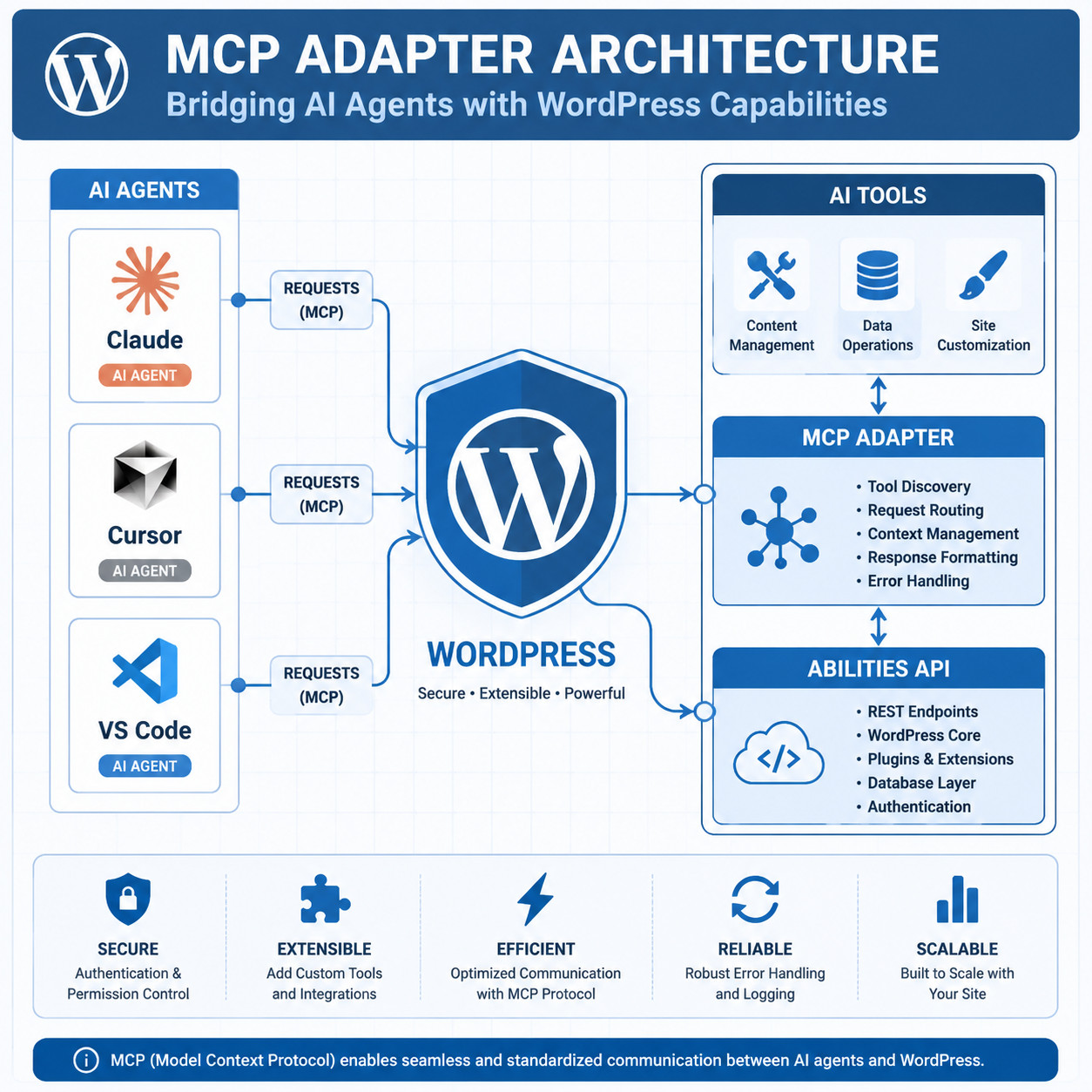
The MCP Adapter converts WordPress’s internal Abilities API into standardized MCP tools that any compatible AI client can call. It acts as a translation layer between your WordPress site and AI agents.
Here’s the flow:
- WordPress Abilities API exposes what actions are available (create post, upload media, edit theme, etc.) along with permission checks.
- MCP Adapter translates those abilities into MCP-formatted tool definitions.
- AI Agent (Claude, Cursor, etc.) discovers available tools via MCP and calls them as needed.
- WordPress executes the requested action and returns results through the same chain.
The official adapter lives at the WordPress/mcp-adapter GitHub repository [2] and is maintained by the WordPress core team. It requires either API keys or application passwords for authentication.
Common mistake: Don’t confuse the deprecated Automattic/wordpress-mcp repo [1] (622 stars, last updated July 2025) with the current official WordPress/mcp-adapter [2]. The Automattic version was deprecated in early 2026 when MCP support merged into WordPress core.
For those interested in advanced WordPress strategies, the MCP Adapter is the foundation you’ll build on.
How to Set Up GitHub WordPress MCP Step by Step
Setting up MCP on your WordPress site depends on whether you’re running WordPress 7.0+ (where it’s built in) or an older version. Here’s both paths.

For WordPress 7.0 and Later (Native Support)
- Go to Settings > AI Connectors in your WordPress admin dashboard.
- Generate an application password or configure an API key for your AI client.
- Copy the MCP endpoint URL displayed in the AI Connectors panel.
- Add the endpoint to your AI client’s MCP configuration file (e.g.,
claude_desktop_config.jsonfor Claude Desktop). - Test the connection by asking your AI agent to list recent posts or create a draft.
For WordPress 6.9 and Earlier (Manual Setup)
- Download the MCP Adapter from the GitHub releases page [5].
- Upload and activate the plugin through your WordPress admin.
- Configure authentication using application passwords (Settings > Users > Application Passwords).
- Point your AI client to the MCP endpoint (typically
https://yoursite.com/wp-json/mcp/v1). - Verify by running a simple command through your AI agent.
AI Client Configuration Example (Claude Desktop)
<code class="language-json">{
  "mcpServers": {
    "wordpress": {
      "url": "https://yoursite.com/wp-json/mcp/v1",
      "auth": {
        "type": "app-password",
        "username": "admin",
        "password": "xxxx xxxx xxxx xxxx"
      }
    }
  }
}
</code>
Decision rule: Choose the native WordPress 7.0 approach if you’re on the latest version. Use the GitHub adapter plugin only if you’re stuck on an older WordPress release or need custom tool definitions not yet in core.
If you’re building custom functionality, our guide on WordPress plugin development best practices covers the coding standards you should follow.
Which GitHub WordPress MCP Server Should You Choose?
There are several MCP server implementations available on GitHub and wordpress.org. Here’s how they compare:

| Feature | WP Core MCP Adapter [2] | Stifli Flex MCP [6] | InstaWP MCP | docdyhr/mcp-wordpress |
|---|---|---|---|---|
| Built into WP 7.0 | Yes | No (plugin) | No (external) | No (standalone) |
| Abilities API support | Yes | Yes | No (REST API) | No |
| Undo/redo tracking | No | Yes (Git-like) | No | No |
| Performance monitoring | Basic | No | No | Yes |
| Authentication | App passwords / API keys | App passwords | REST API tokens | API keys |
| Best for | Most users on WP 7.0+ | Teams needing reversibility | Non-core setups | Advanced monitoring |
Choose the Core MCP Adapter if you want the officially supported, minimal-maintenance option. Choose Stifli Flex MCP if your team needs to track and reverse AI actions — its Git-like undo system is unique and valuable for production sites [6]. Choose InstaWP’s server if you prefer a REST API approach without depending on the Abilities API.
What Can You Actually Do with GitHub WordPress MCP?
Here are concrete, real-world tasks you can perform once MCP is connected:
- Content creation: “Create a new blog post about spring gardening tips, add it to the Gardening category, and set a featured image from the media library.”
- Bulk editing: “Update all posts tagged ‘outdated’ to draft status.”
- Theme modifications: “Change the header background color to #1a1a2e in the active theme’s stylesheet.”
- User management: “Create a new editor account for [email protected] with the display name Jane Smith.”
- Site diagnostics: “List all plugins that haven’t been updated in the last 6 months.”
- PHP execution: “Run a WP-CLI command to flush the object cache.” (via WordPress Playground MCP)
These aren’t hypothetical. Reddit users have documented using Claude with MCP to fully manage WordPress sites, including creating posts with images and proper taxonomy assignments [4].
For content-heavy workflows, you might also want to explore how to auto-share WordPress blog posts to social media after AI-generated content goes live.
What Are the Risks and Limitations?
MCP gives AI agents real write access to your WordPress site. That power comes with clear risks you should manage.
Security concerns:
- AI agents operate with the permissions of the authenticated user. Use the principle of least privilege — create a dedicated user account with only the capabilities the AI needs.
- Application passwords should be rotated regularly and revoked when no longer needed.
- Never expose your MCP endpoint without HTTPS.
Current limitations:
- MCP tool definitions are still evolving. Some complex WordPress operations (multisite management, certain WooCommerce actions) may not have MCP tools yet.
- AI agents can misinterpret ambiguous instructions. Always review changes on a staging site first.
- The Abilities API doesn’t yet cover every WordPress capability, so the adapter can only expose what the API supports.
Edge case: If you’re running a WordPress multisite network, the MCP Adapter currently operates on a per-site basis. Network-wide operations require separate connections to each site.
For teams concerned about AI reliability, the AI-powered chatbot integration guide covers related trust and safety patterns.
How Does WordPress MCP Compare to Traditional REST API Automation?
The WordPress REST API has been the standard for programmatic site management since WordPress 4.7. MCP doesn’t replace it — it builds on top of it (or alongside it, depending on the implementation).
| Aspect | REST API | MCP |
|---|---|---|
| Interface | HTTP endpoints | AI agent protocol |
| Who uses it | Developers writing code | AI agents via natural language |
| Authentication | OAuth, app passwords, JWT | App passwords, API keys |
| Flexibility | Full control, any operation | Limited to defined MCP tools |
| Learning curve | Requires coding knowledge | Requires AI client setup only |
| Error handling | HTTP status codes | AI interprets and retries |
Choose REST API if you’re building custom integrations, need granular control, or are working with non-AI automation tools. Choose MCP if you want AI agents to handle WordPress tasks conversationally and you’re comfortable with the current tool limitations.
Both approaches can coexist. Many teams use MCP for day-to-day content operations and REST API for complex custom workflows. Our AI SEO tools guide covers complementary tools that work alongside these approaches.
Conclusion
GitHub WordPress MCP has moved from experimental concept to core WordPress infrastructure in 2026. With WordPress 7.0’s native MCP support, the barrier to connecting AI agents to your site is lower than ever.
Your next steps:
- Update to WordPress 7.0 if you haven’t already, to get native MCP support.
- Set up a staging site and connect your preferred AI client (Claude Desktop or Cursor are the most tested).
- Start with read-only tasks — listing posts, checking plugin status — before granting write access.
- Consider Stifli Flex MCP [6] if you need undo capability for AI actions on production sites.
- Follow the official WordPress/mcp-adapter repo [2] for updates as new tools and capabilities are added.
The WordPress ecosystem is moving fast on AI integration. Getting comfortable with MCP now puts you ahead of the curve when more sophisticated AI workflows become standard. For broader WordPress AI coverage, check out the WordPress category on WebAiStack.
FAQ
What does MCP stand for in the context of WordPress? MCP stands for Model Context Protocol, an open standard from Anthropic that defines how AI agents communicate with external tools and services [9]. In WordPress, it enables AI clients to manage your site through structured commands.
Is GitHub WordPress MCP free to use? Yes. The official WordPress/mcp-adapter [2] is open source and free. WordPress 7.0’s built-in MCP support is also free. You may need a paid subscription for the AI client itself (e.g., Claude Pro), but the WordPress side costs nothing.
Which AI clients work with WordPress MCP? Claude Desktop, Cursor, and VS Code (with MCP extensions) are the most commonly used and tested clients [3]. Any client that supports the Model Context Protocol standard should work.
Do I need coding skills to use WordPress MCP? No. Once configured, you interact with your WordPress site through natural language via your AI client. Initial setup requires following configuration steps, but no coding is needed for day-to-day use.
Is it safe to give AI agents write access to my WordPress site? It can be, with proper precautions. Use dedicated user accounts with limited permissions, enforce HTTPS, rotate application passwords, and test on staging before production. The Stifli Flex MCP plugin adds undo capability for extra safety [6].
What happened to the Automattic/wordpress-mcp repository? It was deprecated in early 2026 in favor of the official WordPress/mcp-adapter repository [2]. The Automattic repo [1] is no longer actively maintained and should not be used for new projects.
Can I use WordPress MCP with WooCommerce? Basic WooCommerce operations (creating products, updating orders) may work through the REST API-based MCP servers like InstaWP’s. The core MCP Adapter’s WooCommerce tool coverage is still expanding.
What is WordPress Playground MCP?
WordPress Playground launched an MCP server package (@wp-playground/mcp) that lets AI agents manage browser-based WordPress instances via WebSocket. It’s ideal for testing and development without affecting live sites.
How is MCP different from using the WordPress REST API directly? MCP is a protocol layer that AI agents understand natively. The REST API requires you to write code for each operation. MCP lets AI handle the API calls based on your natural language instructions.
Will MCP work with WordPress.com hosted sites? Currently, MCP support is focused on self-hosted WordPress installations. WordPress.com compatibility depends on Automattic enabling MCP endpoints on their hosted platform, which hasn’t been confirmed as of May 2026.
References
[1] WordPress Mcp – https://github.com/Automattic/wordpress-mcp [2] Mcp Adapter – https://github.com/wordpress/mcp-adapter [3] From Abilities To AI Agents Introducing The WordPress MCP Adapter – https://developer.wordpress.org/news/2026/02/from-abilities-to-ai-agents-introducing-the-wordpress-mcp-adapter/ [4] Claude Takes Over WordPress With MCP – https://www.reddit.com/r/Wordpress/comments/1kbdrji/claude_takes_over_wordpress_with_mcp/ [5] Releases – https://github.com/WordPress/mcp-adapter/releases [6] Free I Built An MCP Server For WordPress With – https://www.reddit.com/r/WordpressPlugins/comments/1sk5byv/free_i_built_an_mcp_server_for_wordpress_with/ [9] Modelcontextprotocol – https://github.com/modelcontextprotocol