Last updated: May 10, 2026
Quick Answer
Replit is a browser-based coding platform that combines a code editor, AI coding agent, hosting, databases, and deployment into a single environment. It supports 50+ programming languages and requires zero local setup. As of March 2026, Replit raised $400 million at a $9 billion valuation, with users across 85% of Fortune 500 companies [4]. It’s best suited for rapid prototyping, learning to code, and building full-stack apps without managing infrastructure.
Key Takeaways
- Replit runs entirely in the browser, so you can code from any device with an internet connection.
- The AI-powered Replit Agent can build, debug, and deploy apps from natural language prompts [9].
- Pricing starts free but scales through a credit-based system; the Core plan costs $25/month.
- New 2026 features include Security Agent, App Monitoring, iOS/Android emulator previews, and CVE Auto-Protect [6][7].
- Accenture invested in Replit in April 2026 to scale enterprise AI coding workflows [8].
- Credit consumption on AI features and hosting can spike costs unexpectedly for heavy users.
- Main alternatives: Cursor, GitHub Codespaces, Bolt.new, Vercel v0, and Taskade Genesis.
- Replit works best for prototyping and solo/small-team projects; large enterprise codebases may need local IDE options.
What Is Replit and Why Does It Matter in 2026?
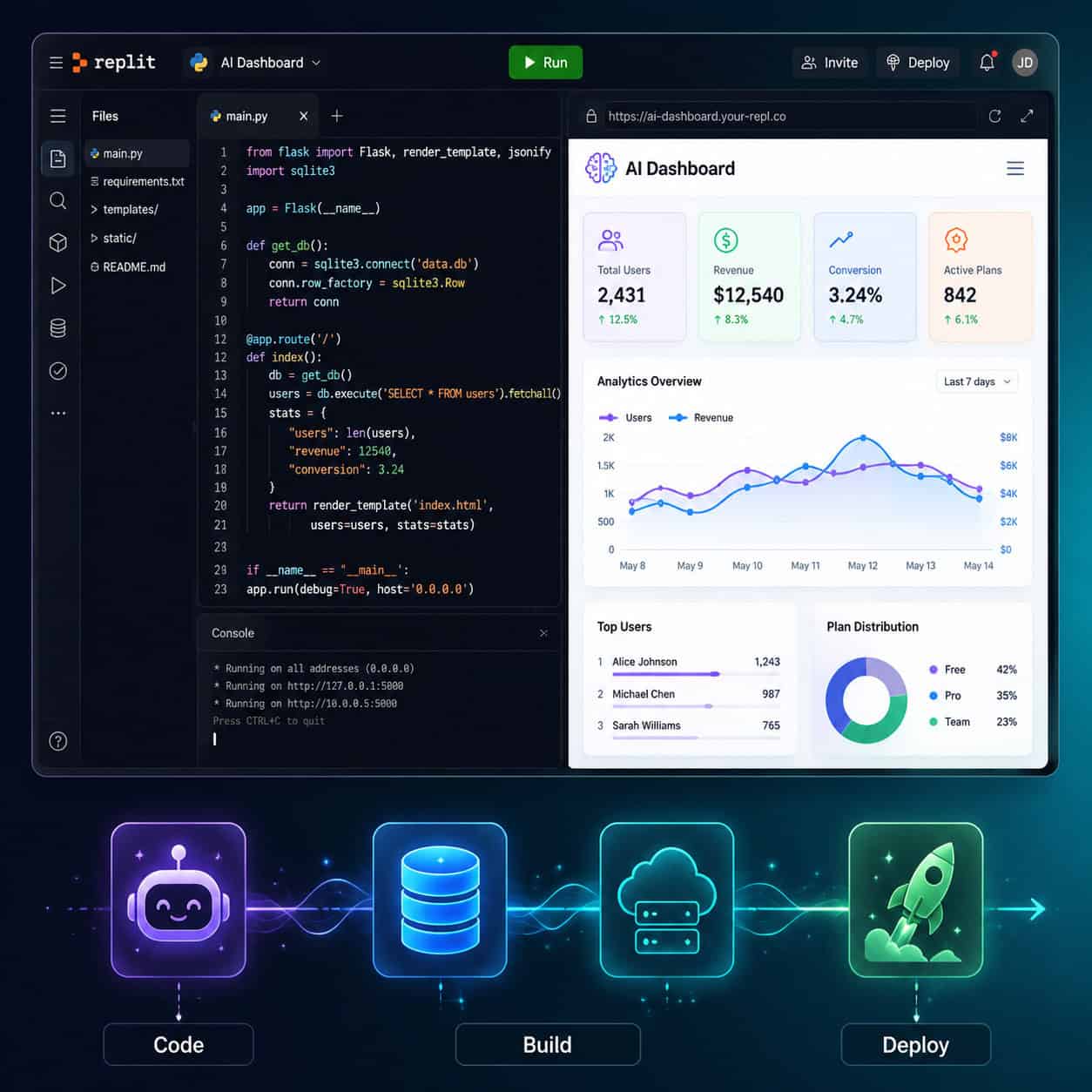
Replit is an online integrated development environment (IDE) that lets you write, run, and deploy code directly from your browser. No downloads, no terminal configuration, no dependency headaches.
What makes Replit different from a standard cloud IDE is scope. As Till Freitag noted in his March 2026 review, Replit is “the only platform combining code editor, AI agent, hosting, database, and deployment in one browser tab [5]. That’s a meaningful distinction. Most competitors handle one or two of those pieces. Replit handles all of them.
The platform has shifted heavily toward AI since 2024. After a round of layoffs and a strategic pivot, Replit rebuilt itself around AI-assisted coding. That bet paid off: the company hit a $3 billion valuation in January 2026, then tripled to $9 billion by March after launching Replit Agent 4 [4]. CEO Amjad Masad reported 300% net revenue retention in a May 2026 TechCrunch interview, with a projected $1 billion run-rate revenue by year’s end [1].
For anyone exploring no-coding platforms or AI-assisted development, Replit sits at the intersection of both worlds.
What Can You Actually Build on Replit?
You can build almost any web application, API, bot, or data tool on Replit. The platform supports Python, JavaScript, TypeScript, Go, Ruby, Java, C++, and dozens of other languages out of the box.
Here’s what people commonly build:
- Full-stack web apps with frameworks like Next.js, Flask, or Django
- REST APIs and backends with Express, FastAPI, or Hono
- Discord and Slack bots with always-on hosting
- Data dashboards using Python libraries like Streamlit or Plotly
- Mobile app prototypes with the new iOS/Android emulator previews [7]
- AI-powered tools using OpenAI, Anthropic, or other LLM APIs
The Replit Agent takes this further. You describe what you want in plain English, and the agent scaffolds the project, writes the code, installs dependencies, and deploys it. This is particularly useful for non-developers who need functional apps quickly, similar to how AI-powered content tools have changed content creation workflows.
Choose Replit if: you want to go from idea to deployed app in hours, not days. Choose something else if: you need fine-grained control over infrastructure, offline access, or you’re managing a large monorepo.
What New Features Launched in 2026?
Replit shipped several major features in early 2026 that reflect its AI-first direction.
Security Agent and CVE Auto-Protect (April 2026)
The Security Agent is an AI reviewer that audits your entire codebase and builds threat models automatically. CVE Auto-Protect patches known vulnerabilities without manual intervention [7]. This is a significant addition for teams deploying production apps.
App Monitoring (May 2026)
Published apps now get real-time uptime checks, downtime email alerts, and Agent-powered automatic fixes when something breaks [6]. Before this, monitoring required third-party tools.
Databricks Integration and Screenshot-to-UI
You can now connect Replit projects to Databricks for data workflows. The screenshot-to-UI feature lets you upload a design screenshot and have the AI generate a matching frontend [6], which pairs well with design-to-code workflows like Figma to code plugins.
Enterprise Partnerships
Accenture invested in Replit in April 2026 and formed a partnership to bring natural-language-to-code workflows to enterprise clients globally [8]. This signals Replit’s push beyond individual developers and small teams.
How Much Does Replit Cost? (Pricing Breakdown)
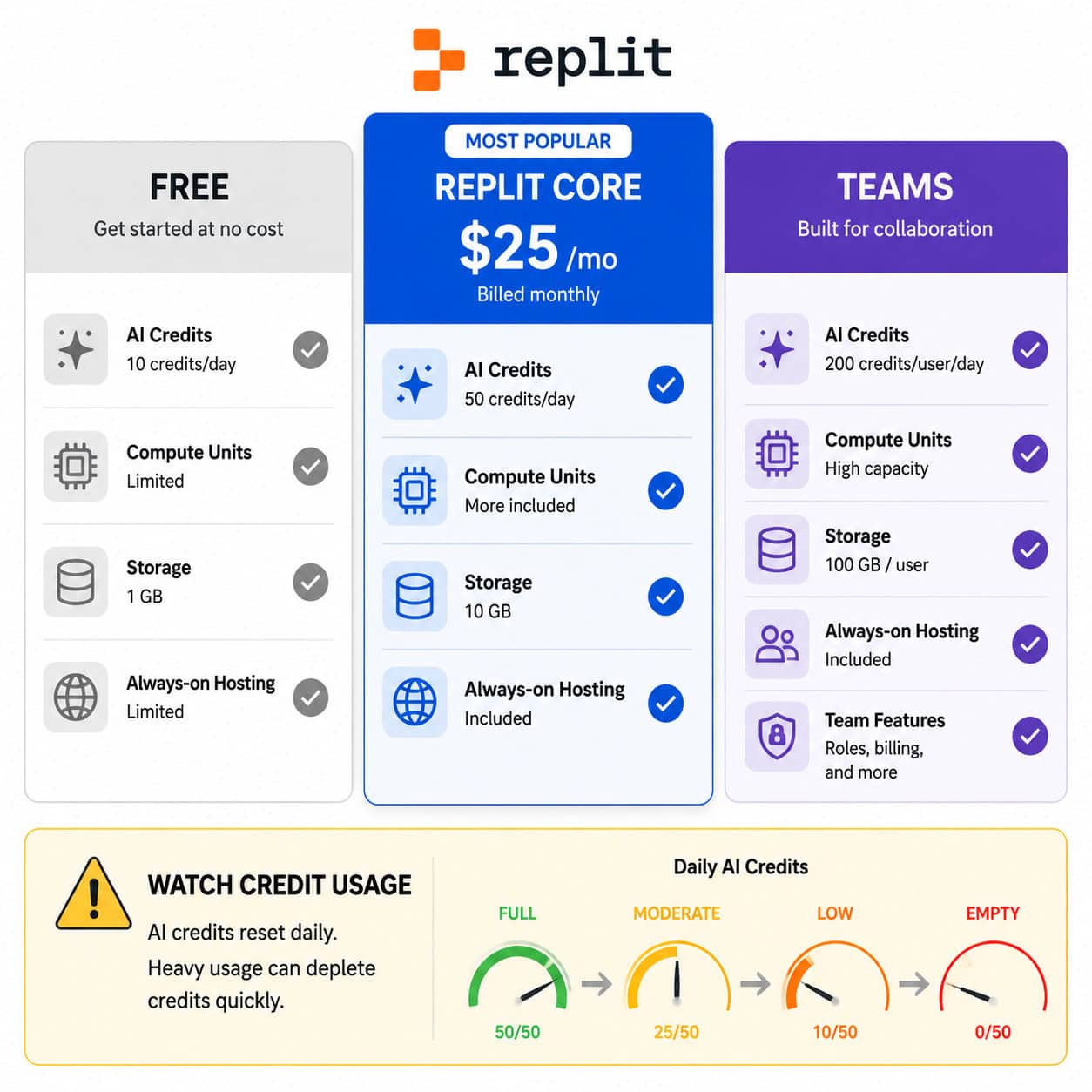
Replit uses a tiered pricing model with a credit-based system for AI and compute resources. Here’s the breakdown as of 2026:
| Plan | Monthly Cost | Key Inclusions |
|---|---|---|
| Free | $0 | Basic editor, limited AI, community Repls |
| Replit Core | $25/month | AI Agent access, more compute credits, always-on hosting, private Repls |
| Teams | Custom pricing | Collaboration tools, admin controls, priority support |
The Credit Problem
G2 reviewers and Reddit users consistently flag one issue: credit consumption is hard to predict. AI features, hosting, and compute all draw from the same credit pool. Heavy use of Replit Agent or always-on deployments can drain credits fast, leading to unexpected charges.
Common mistake: Leaving always-on hosting enabled for projects you’re not actively using. This quietly burns credits in the background.
Decision rule: If you’re a hobbyist or learner, the free tier works fine for exploration. If you’re building and deploying real apps, the Core plan at $25/month is the practical starting point. But monitor your credit usage weekly, especially during the first month.
How Does Replit Compare to Alternatives?
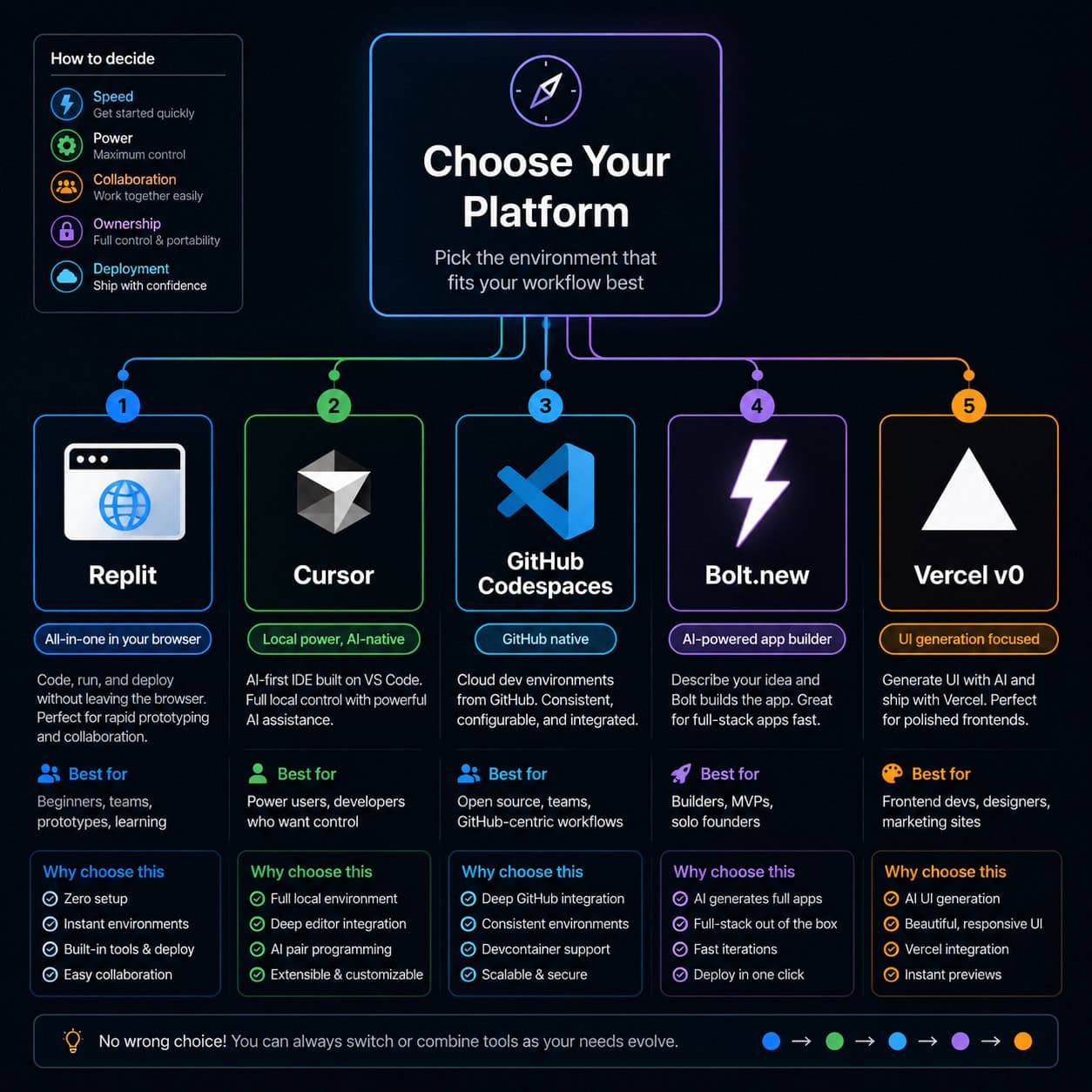
This is where the “Replit Unveiled: A Comprehensive Guide to the Ultimate Online Coding Platform” discussion gets practical. Replit isn’t the only option, and it’s not the best option for every use case.
| Platform | Best For | Price | Key Difference |
|---|---|---|---|
| Replit | All-in-one browser coding + deployment | Free / $25/mo | AI Agent + hosting + DB in one tab |
| Cursor | Professional developers wanting AI in a local IDE | $20/mo | Codebase-aware AI, runs locally |
| GitHub Codespaces | Teams already in the GitHub ecosystem | $9+/mo (60 free hours) | Full VS Code in browser, flexible environments |
| Bolt.new | Quick prompt-based prototypes | $20/mo | Fastest for throwaway prototypes |
| Vercel v0 | Design-forward web apps | Free / paid tiers | Strong for frontend and design systems |
| Taskade Genesis | No-code AI app building | $6/mo | Eliminates coding entirely |
Choose Replit over Cursor if you want zero local setup and built-in hosting. Choose Cursor over Replit if you need offline access, multi-platform deployment, or BYO-LLM support.
Choose GitHub Codespaces if your team already uses GitHub heavily and needs flexible dev environments without vendor lock-in.
For those exploring drag-and-drop website builders or AI website creators, Replit occupies a middle ground: more powerful than no-code tools, but simpler than a full local development setup.
Who Should Use Replit (and Who Shouldn’t)?
Replit is a strong fit for:
- Beginners learning to code who don’t want to fight with local environment setup
- Solo developers and freelancers building MVPs or client prototypes
- Hackathon participants who need speed above all else
- Non-technical founders using AI Agent to build functional apps from descriptions
- Educators and students running coding exercises in shared environments
Replit is not ideal for:
- Enterprise teams with large codebases that need local IDE performance and offline access
- Developers who need full control over their deployment pipeline and infrastructure
- Budget-sensitive users who can’t tolerate unpredictable credit-based billing
- Teams requiring strict data residency or on-premise requirements
This mirrors a broader pattern in the no-code and low-code space: tools that prioritize speed and accessibility often trade off control and customization.
What Are the Biggest Risks and Limitations?
Being transparent about limitations matters more than hype. Here are the real concerns with Replit in 2026:
Vendor lock-in. Your code runs on Replit’s infrastructure. Migrating to AWS, GCP, or a local setup requires manual effort. Codespaces and Cursor avoid this problem.
No offline support. If your internet drops, you can’t code. Period. This is a dealbreaker for developers who travel or work in areas with unreliable connectivity.
Credit drain. Multiple Reddit threads and G2 reviews describe AI credits disappearing faster than expected. Replit’s pricing model rewards light usage but penalizes power users.
Performance ceiling. Browser-based IDEs have inherent latency compared to local editors. For large projects with complex build steps, this lag adds up.
Apple App Store conflict. CEO Amjad Masad disclosed in May 2026 that Replit is suing Apple over App Store blocks that prevent mobile app distribution through the platform [1]. The outcome of this lawsuit could affect Replit’s mobile deployment capabilities.
How to Get Started with Replit (Step-by-Step)
Getting started takes under five minutes:
- Create an account at replit.com using Google, GitHub, or email.
- Start a new Repl by clicking “Create Repl” and selecting your language or framework.
- Write or prompt your code. Use the editor directly, or open the AI chat to describe what you want to build.
- Run your project using the green “Run” button. Output appears in the built-in console or preview pane.
- Deploy by clicking “Deploy” to get a public URL for your app. Configure always-on hosting if needed.
- Monitor using the new App Monitoring dashboard for uptime and performance [6].
Quick tip: Start with a template. Replit has hundreds of pre-built templates for common frameworks. This saves time on boilerplate setup and helps you learn the platform’s structure.
If you’re coming from a design background, you might also explore how Figma to Webflow workflows complement Replit for full project pipelines.
Frequently Asked Questions
Is Replit free to use? Yes. The free tier includes a basic code editor, limited AI assistance, and community features. Paid plans start at $25/month for Replit Core [4].
Can I use Replit for production apps? You can, and many people do. But monitor your hosting credits closely, and consider whether the performance meets your app’s needs. The new App Monitoring feature helps with this [6].
Does Replit support mobile app development? As of April 2026, Replit offers iOS and Android emulator previews for testing mobile interfaces [7]. Full native app deployment is still limited, partly due to the ongoing Apple dispute [1].
How does Replit Agent work? You describe what you want in natural language. The Agent generates code, installs packages, creates files, and deploys the result. It’s powered by AI models and improves with each iteration [9].
Is Replit good for learning to code? Very. Zero setup, instant feedback, and AI assistance make it one of the most accessible entry points for new programmers. The free tier is sufficient for learning.
Can I export my code from Replit? Yes. You can download your project files or push to a GitHub repository. But hosting configurations and database connections may need manual reconfiguration elsewhere.
What languages does Replit support? Over 50, including Python, JavaScript, TypeScript, Java, C++, Go, Ruby, Rust, and many others.
How does Replit compare to VS Code? VS Code is a local editor with extensions. Replit is a full cloud environment with built-in hosting and AI. They serve different workflows. GitHub Codespaces bridges the gap by running VS Code in the browser.
Is Replit secure for business use? The April 2026 Security Agent and CVE Auto-Protect features address code-level security [7]. For enterprise compliance requirements, consult Replit’s Teams plan documentation.
Why did Replit’s valuation jump to $9 billion? Primarily due to the success of Replit Agent 4 and strong revenue growth. The $400 million raise in March 2026 reflected investor confidence in AI-assisted coding as a category [4].
Conclusion
Replit has evolved from a simple online code editor into a full-stack, AI-powered development platform. In 2026, it’s the closest thing to a one-stop shop for building and deploying software from a browser. The $9 billion valuation, Fortune 500 adoption, and Accenture partnership back that up with real market validation [4][8].
But it’s not without trade-offs. Credit-based pricing can surprise you, browser-only access limits flexibility, and vendor lock-in is a genuine concern for long-term projects.
Your next steps:
- Try the free tier and build a small project to test the workflow.
- Experiment with Replit Agent to see how AI-assisted coding fits your process.
- Track your credit usage from day one if you upgrade to Core.
- Compare with one alternative (Cursor for local power, Codespaces for GitHub integration) before committing to a paid plan.
- Explore complementary tools like AI-powered content optimization and WordPress development for building complete web projects.
Replit won’t replace every tool in your stack. But for speed, accessibility, and AI-first development, it’s the platform to evaluate first.
More Replit resources: get help navigating Replit support for developers of all levels, and discover 5 proven strategies to unblock Replit for seamless browser-based coding.
References
[1] Replits Amjad Masad On The Cursor Deal Fighting Apple And Why Hed Rather Not Sell – https://techcrunch.com/2026/05/01/replits-amjad-masad-on-the-cursor-deal-fighting-apple-and-why-hed-rather-not-sell/ [4] Replit Raises 400 Million Dollars – https://blog.replit.com/replit-raises-400-million-dollars [5] Replit 2026 Platform En – https://till-freitag.com/blog/replit-2026-platform-en [6] Replit – https://releasebot.io/updates/replit [7] Changelog – https://docs.replit.com/updates/2026/04/24/changelog [8] Accenture Invests In Replit To Advance Ai Driven Software – https://www.stocktitan.net/news/ACN/accenture-invests-in-replit-to-advance-ai-driven-software-l9q9rpszloj5.html [9] Replit Ai Features Rapid Development 2026 – https://www.builtthisweek.com/blog/replit-ai-features-rapid-development-2026