Last updated: June 9, 2026
Quick Answer: Bing Chat GPT combines Microsoft’s Bing search engine with OpenAI’s large language model technology to deliver real-time, conversational answers directly within search. Unlike a standard search engine, it reads your question in plain language, pulls current web data, and responds in full sentences with cited sources. As of 2026, it is free to use for most users through Microsoft Edge or Bing.com, with expanded features available through Microsoft Copilot Pro.
Key Takeaways
- Bing Chat GPT is powered by a customized version of OpenAI’s GPT-4 model, integrated directly into Microsoft’s Bing search engine.
- It differs from standalone ChatGPT because it has live internet access and cites its sources, making responses more verifiable.
- Basic access is free; advanced features require a Microsoft Copilot Pro subscription (approximately $20/month as of 2026).
- It supports over 100 languages, making it broadly accessible for global users.
- Common use cases include research, writing assistance, coding help, travel planning, and professional document drafting.
- Privacy concerns exist: Microsoft collects conversation data by default, though users can limit this through account settings.
- Response accuracy is strong for factual queries with recent web data, but the tool can still produce errors on niche or rapidly changing topics.
- Getting started requires only a Microsoft account and access to Bing.com or Microsoft Edge.
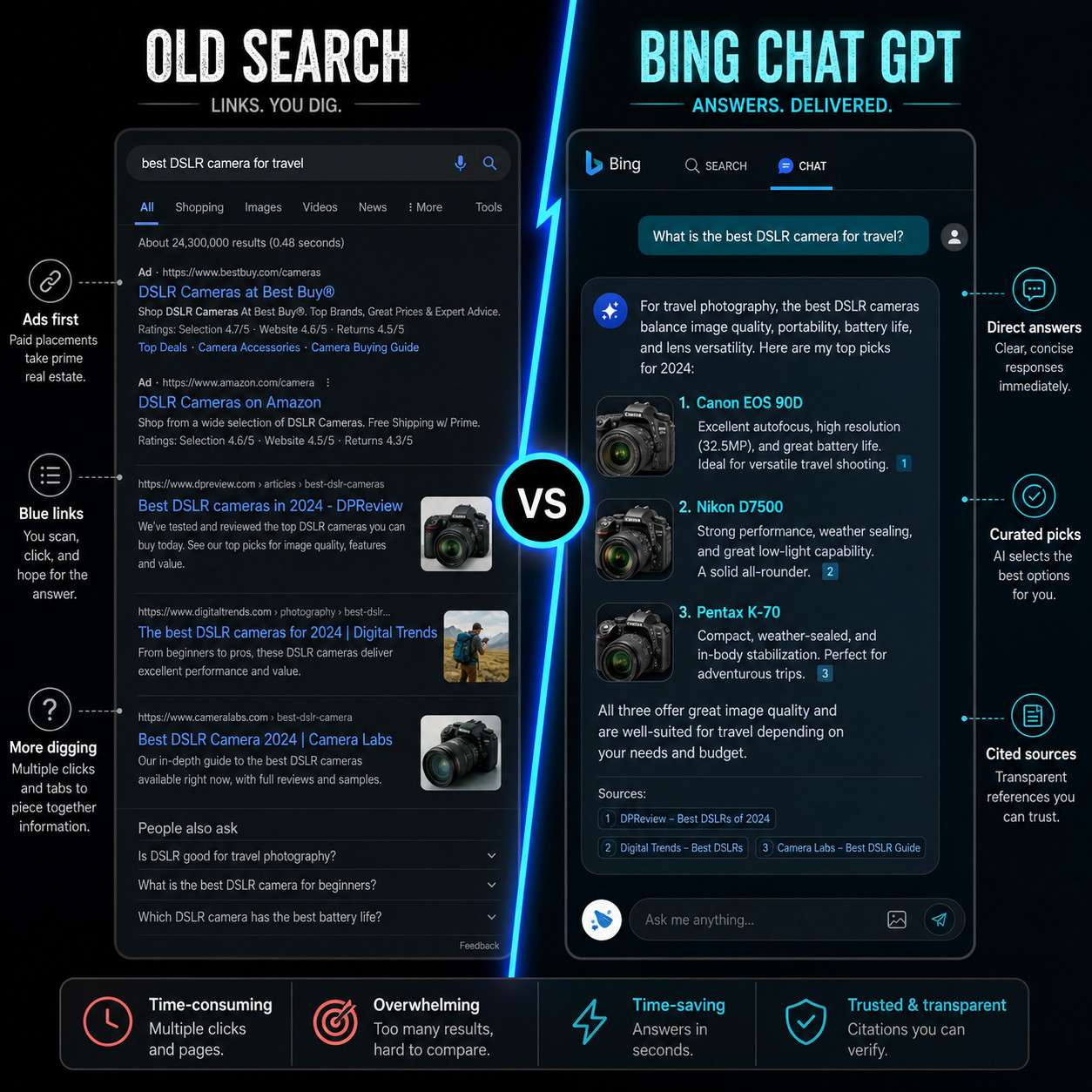
What Exactly Is Bing Chat GPT and How Does It Work
Bing Chat GPT is Microsoft’s AI-powered conversational search tool that combines the retrieval capability of the Bing search engine with the language generation power of OpenAI’s GPT-4 model. When you type or speak a question, the system queries the live web, selects relevant sources, and then uses the language model to synthesize a clear, structured answer in natural language.
Here is how the process works step by step:
- You submit a query in plain language, as you would ask a friend.
- Bing retrieves live web results relevant to your question.
- The GPT-4 model reads and synthesizes those results into a coherent response.
- Citations appear inline, so you can verify every claim against its source.
- You can follow up with additional questions, and the system remembers the context of your conversation.
This architecture is what separates Bing Chat GPT from a basic chatbot. It does not rely solely on pre-trained knowledge with a fixed cutoff date. It actively reads the web, which means answers can reflect events from this week, not just last year.
How Is Bing Chat GPT Different from ChatGPT and Google Bard
Bing Chat GPT sits in a distinct category from both standalone ChatGPT and Google’s Gemini (formerly Bard), primarily because of its live search integration and citation behavior.
| Feature | Bing Chat GPT | ChatGPT (Free) | Google Gemini |
|---|---|---|---|
| Live internet access | Yes, always | Limited (Plus only) | Yes |
| Cites sources inline | Yes | Rarely | Sometimes |
| Integrated into search | Yes (Bing) | No | Yes (Google Search) |
| Image generation | Yes (via DALL-E) | Yes (Plus) | Yes |
| Free tier available | Yes | Yes | Yes |
| Microsoft 365 integration | Yes | No | No |
The key practical difference: if you ask Bing Chat GPT about a news event from last week, it will find and cite current sources. Free-tier ChatGPT, by contrast, may rely on training data that is months or years old. For more on how these platforms compare, our comprehensive guide to AI-powered content generation tools covers the broader landscape in detail.
How Much Does Bing Chat GPT Cost to Use
For most users, Bing Chat GPT is free. You need a Microsoft account, and you can access it at Bing.com or through the Microsoft Edge browser sidebar.
Paid tier: Microsoft Copilot Pro costs approximately $20 per month (as of 2026). It offers:
- Priority access during high-traffic periods
- Faster response generation
- Integration with Microsoft 365 apps (Word, Excel, Outlook, PowerPoint)
- Higher limits on image generation via DALL-E
Choose the free tier if you need occasional research help, quick answers, or writing drafts. Choose Copilot Pro if you work daily in Microsoft 365 and want AI assistance embedded directly in your documents and emails.
There are no per-query fees. The free tier does have daily conversation limits, though Microsoft has not published the exact cap publicly.
What Kind of Users Will Find Bing Chat GPT Most Useful
Bing Chat GPT is most valuable for users who need fast, sourced answers and who work in information-heavy environments. Students, researchers, journalists, marketers, and business professionals tend to get the most from it.
Best fit for:
- Students writing papers who need cited sources quickly (see our resources on academic research tools for complementary options)
- Professionals drafting reports, emails, or presentations
- Developers looking for code explanations or debugging help
- Travelers planning itineraries with current pricing and availability
- Non-technical users who find traditional search results overwhelming
Less ideal for:
- Tasks requiring strict confidentiality (see the privacy section below)
- Highly specialized legal or medical advice where professional verification is mandatory
- Creative writing that benefits from a model without search constraints
Can Bing Chat GPT Help Me with Research and Writing Tasks
Yes, and this is one of its strongest use cases. Bing Chat GPT can summarize long documents, compare multiple sources, draft structured content, and suggest edits to existing text, all within a single conversation window.
For research, the tool’s live web access means it can pull recent studies, news articles, and reports rather than relying on outdated training data. I have personally used it to compile background research on technology topics in under ten minutes, a task that previously took an hour of tab-juggling.
Practical research and writing tasks it handles well:
- Summarizing academic papers or news articles
- Generating outlines for essays, reports, or blog posts
- Drafting professional emails or cover letters
- Translating content between languages
- Checking factual claims against current web sources
For writers and content teams, pairing Bing Chat GPT with dedicated AI-powered content optimization tools can significantly improve both speed and output quality. You can also explore ChatGPT automation workflows for integrating AI into broader content pipelines.

Are There Any Privacy Concerns with Using Bing Chat GPT
Privacy is a legitimate concern. By default, Microsoft stores conversation data and may use it to improve its AI systems. Users should understand what data is collected before sharing sensitive information.
Key privacy facts:
- Microsoft’s privacy policy (as of 2026) states that conversation logs may be reviewed by employees for safety and quality purposes.
- You can turn off personalization and chat history in your Microsoft account settings.
- Avoid sharing personally identifiable information, financial data, or confidential business details in any AI chat tool, including this one.
- Enterprise users with Microsoft 365 commercial plans receive stronger data protection commitments under Microsoft’s commercial data protection terms.
Common mistake: Many users assume that because Bing Chat GPT feels like a private conversation, it is treated like one. It is not. Treat every prompt as if it could be read by a third party.
What Languages Does Bing Chat GPT Support
Bing Chat GPT supports over 100 languages for both input and output, including major world languages such as English, Spanish, French, German, Mandarin, Japanese, Arabic, Hindi, and Portuguese. Microsoft has not published a definitive exhaustive list, but the tool generally performs best in English and other high-resource languages.
Response quality in lower-resource languages (such as regional dialects or minority languages) may be less consistent. For professional translation or multilingual content work, always have a native speaker review the output.
How Accurate Are the Responses from Bing Chat GPT
Bing Chat GPT is more accurate than many AI chatbots for current events because it retrieves live web data rather than relying solely on a static training snapshot. However, it is not infallible.
Where it performs well:
- Factual questions with clear, sourced answers available online
- Summarizing content from reputable publications
- Explaining established concepts in science, history, or technology
Where errors occur:
- Rapidly changing situations where web sources conflict
- Niche topics with limited online coverage
- Mathematical reasoning in complex multi-step problems (verify independently)
- Interpreting ambiguous or poorly worded prompts
A practical rule: always click the citations Bing Chat GPT provides. If a claim matters, verify it at the source. The tool is a starting point, not a final authority. For a deeper look at how AI tools compare on accuracy and research tasks, see our NotebookLM vs Gemini comparison.
What Are Some Limitations of Bing Chat GPT
Despite its strengths, Bing Chat GPT has real constraints that users should know before relying on it heavily.
Key limitations:
- Conversation length limits: Very long conversations can cause the model to lose context or reset.
- No memory between sessions: Each new conversation starts fresh unless you are using a feature that explicitly saves context.
- Image and file uploads: While improving, document analysis features are less capable than specialized tools.
- Hallucination risk: The model can generate plausible-sounding but incorrect information, especially when web sources are thin.
- Rate limits on free tier: Heavy users may hit daily query caps.
- No offline access: Requires an active internet connection at all times.
Understanding these limitations helps you use the tool more effectively and avoid over-relying on it for high-stakes decisions.
Can I Use Bing Chat GPT for Professional Work
Yes, with appropriate precautions. Many professionals in 2026 use Bing Chat GPT for drafting, research, summarization, and brainstorming. The Copilot Pro tier integrates directly into Microsoft 365, which makes it practical for daily office work.
Suitable professional uses:
- Drafting first versions of reports, proposals, or presentations
- Summarizing meeting notes or long email threads
- Researching competitors, industry trends, or regulatory changes
- Writing and debugging code (it handles Python, JavaScript, SQL, and others)
Caution areas:
- Do not use it to generate legal documents, medical advice, or financial recommendations without expert review.
- Check your organization’s AI usage policy before inputting company data.
- Always disclose AI assistance where required by professional standards or client agreements.
For developers integrating AI into workflows, exploring AI chatbot setup resources and search API tools can extend what Bing Chat GPT does natively.
How Do I Get Started with Bing Chat GPT
Getting started takes less than five minutes. Here is the exact process:
- Create or log into a Microsoft account at account.microsoft.com.
- Go to Bing.com or open the Microsoft Edge browser.
- Click the “Chat” tab at the top of the Bing homepage.
- Select a conversation style: Creative, Balanced, or Precise (Precise works best for factual research; Creative for brainstorming).
- Type your first question in plain language.
- Follow up with clarifying questions to refine the response.
For mobile access, download the Microsoft Copilot app (iOS or Android), which provides the same functionality on your phone.
Common beginner mistake: Typing short, vague queries like “marketing tips.” Instead, provide context: “I run a small e-commerce store selling handmade jewelry. Give me five low-budget marketing strategies for reaching customers aged 25-40 on social media.” Specific prompts produce dramatically better answers.
What Makes Bing Chat GPT Unique Compared to Other AI Chatbots
Bing Chat GPT: Revolutionizing AI-Powered Search and Conversational Interactions stands out for one core reason: it merges a world-class search index with a world-class language model in a single, free interface. Most AI chatbots are either good at generating text or good at finding current information. Bing Chat GPT does both simultaneously.
Additional differentiators:
- Deep Microsoft ecosystem integration: Works natively with Windows, Edge, Microsoft 365, and Teams.
- Multimodal input: Accepts text, images, and voice queries.
- Image generation: Powered by DALL-E, available directly in the chat window.
- Shopping and travel features: Can compare product prices and flight options using live data.
- Safety filters: Microsoft applies content moderation layers on top of the base model.
For users already embedded in the Microsoft ecosystem, this integration alone makes Bing Chat GPT more practical than switching to a standalone tool. Those interested in the broader landscape of open-source and specialized AI models can explore open-source language model developments for additional context.
Conclusion
Bing Chat GPT: Revolutionizing AI-Powered Search and Conversational Interactions is not a novelty. In 2026, it is a practical, free tool that meaningfully changes how people find and use information online. Its combination of live web access, source citations, and natural language conversation makes it more immediately useful for research and professional tasks than most standalone AI chatbots.
Actionable next steps:
- Create a free Microsoft account and try Bing Chat at Bing.com today.
- Start with a specific, detailed prompt on a topic you are actively researching.
- Always verify cited sources before using information in professional or academic work.
- Review your Microsoft privacy settings and disable chat history if confidentiality matters to you.
- If you use Microsoft 365 daily, evaluate whether Copilot Pro’s $20/month cost is justified by the time you would save.
The tool rewards users who engage with it deliberately. Vague questions get vague answers. Specific, context-rich prompts get responses that can genuinely accelerate your work.
Frequently Asked Questions
Is Bing Chat GPT the same as Microsoft Copilot? Yes, largely. Microsoft rebranded Bing Chat as Microsoft Copilot in late 2023, but the underlying technology and interface remain the same. The names are used interchangeably in most contexts.
Does Bing Chat GPT require a Microsoft 365 subscription? No. Basic access is free with any Microsoft account. A Microsoft 365 or Copilot Pro subscription unlocks deeper integration with Office apps and priority access.
Can Bing Chat GPT access paywalled content? No. It can only read publicly accessible web pages. If a source is behind a paywall, it will acknowledge the source exists but cannot retrieve the full content.
How many questions can I ask per day on the free tier? Microsoft has not published an exact daily limit, but free-tier users report hitting caps after extended sessions. Limits are subject to change based on server demand.
Is Bing Chat GPT safe for children to use? Microsoft applies content filters, but parental supervision is still recommended. For stricter controls, Microsoft Family Safety settings can limit access.
Can I use Bing Chat GPT without an internet connection? No. It requires an active internet connection because it retrieves live web data for every query.
Does Bing Chat GPT store my conversations? By default, yes. You can manage or delete conversation history in your Microsoft account privacy settings.
What is the difference between Creative, Balanced, and Precise modes? Precise mode prioritizes factual accuracy and shorter answers. Creative mode allows more expressive, imaginative responses. Balanced mode sits in between and is the default for most users.
Can Bing Chat GPT write and run code? It can write and explain code in many languages, but it cannot execute code directly in the standard interface. For code execution, tools like Replit are a better fit.
Is Bing Chat GPT available as an API for developers? Yes. Microsoft offers access to Copilot and related AI capabilities through Azure OpenAI Service, though pricing and access tiers differ from the consumer product.
References
- Microsoft. (2023). Introducing the new Bing. Microsoft Blog. https://blogs.microsoft.com/blog/2023/02/07/reinventing-search-with-a-new-ai-powered-microsoft-bing-and-edge/
- OpenAI. (2023). GPT-4 Technical Report. OpenAI. https://openai.com/research/gpt-4
- Microsoft. (2024). Microsoft Copilot Pro: Features and pricing. Microsoft. https://www.microsoft.com/en-us/store/b/copilotpro
- Mehdi, Y. (2023). Confirmed: The new Bing runs on OpenAI’s GPT-4. Microsoft Blog. https://blogs.microsoft.com/blog/2023/03/14/confirmed-the-new-bing-runs-on-openais-gpt-4/