

Last updated: May 10, 2026
Quick Answer
Running a proxy server on Replit is possible but comes with significant constraints. Replit assigns dynamic IPs to deployments, filters DNS traffic for safety, and actively enforces policies against using its platform to bypass content filters. For legitimate proxy use cases (API routing, development testing, secure outbound connections), you’ll need to combine Replit’s built-in port forwarding with external static IP services or configure transparent proxies for tool integrations.
Key Takeaways
- Replit’s internal “Port Authority” proxy forwards localhost traffic to external-facing URLs automatically, but doesn’t provide anonymity by default.
- Dynamic IP addresses on Replit deployments break session-based proxy connections; static IP services like QuotaGuard solve this [2].
- Replit’s May 2026 Workspace Security Center 2.0 update added external access tokens for private deployments, improving secure access without full public exposure [1].
- Using Replit to bypass network filters or create anonymizing proxies violates its Terms of Service and will get your Repl shut down.
- Transparent proxies for MCP integrations on Replit add OAuth headers without exposing credentials, which is a legitimate anonymity pattern for AI-tool communications [6].
- Residential or dedicated IPv4 proxies from third-party providers are the practical solution for stable anonymous networking from Replit apps.
- Alternatives like GitHub Codespaces and CodeSandbox offer similar cloud dev environments with fewer proxy restrictions.
What Is a Proxy Server on Replit and How Does It Work?
A proxy server on Replit acts as an intermediary between your Repl’s code and external services. Replit handles this through its internal Port Authority system, which maps localhost ports to publicly accessible URLs.
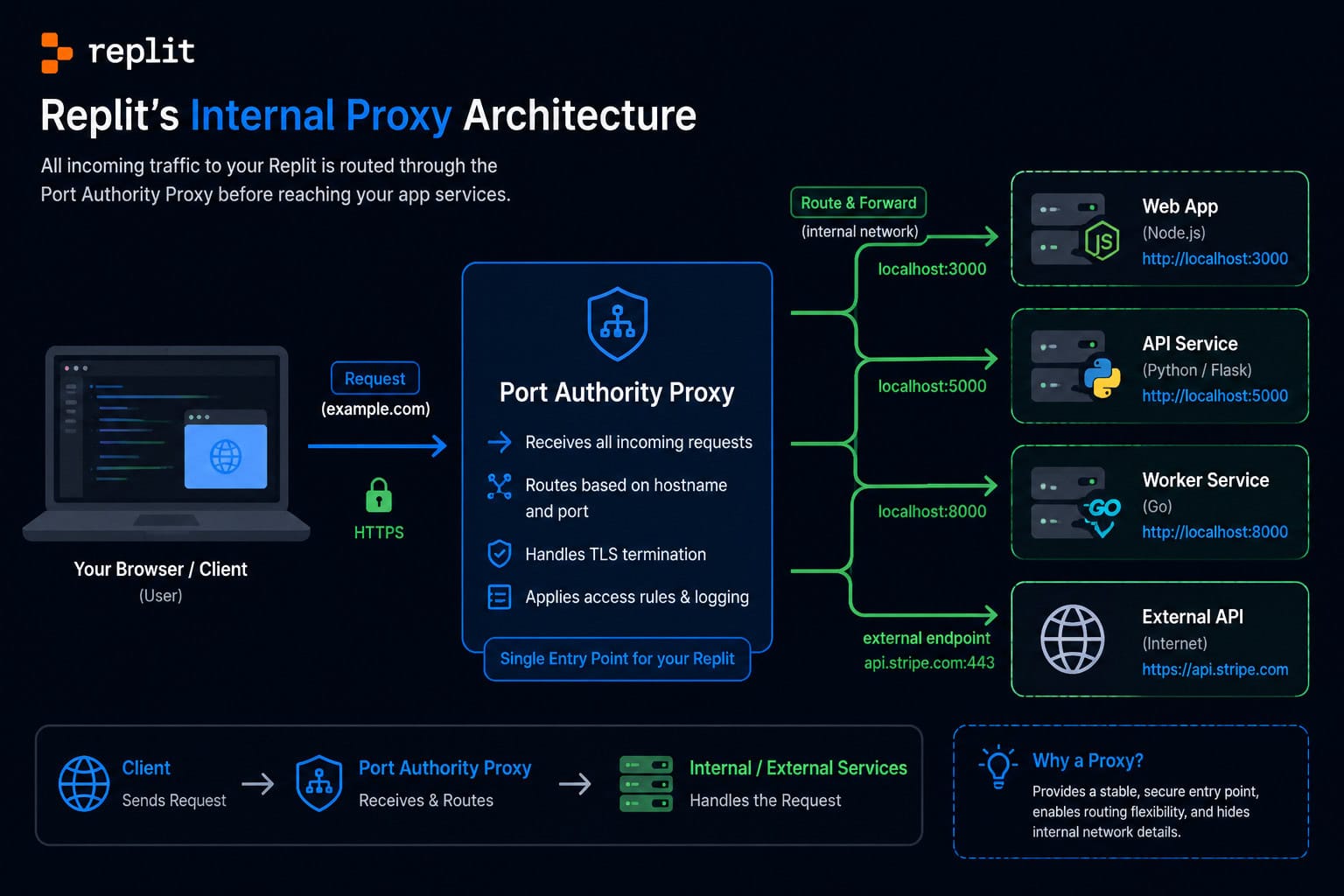
Here’s what happens when your Replit app makes an outbound request:
- Your code sends a request to an external API or website
- The request exits through Replit’s shared infrastructure
- The destination sees Replit’s IP address, not yours personally
- Responses route back through the same path
The catch: Replit’s outbound IPs are shared across thousands of users and change dynamically on redeployment. This means:
- Many services rate-limit or block known Replit IP ranges
- Session-based connections break when IPs rotate
- You get zero control over which IP your traffic exits from
Replit’s CEO Amjad Masad described their transparent proxy approach for MCP (Model Context Protocol) integrations in April 2026: these proxies inject OAuth headers into requests without exposing raw credentials to the application layer [6]. This is a security pattern, not a general-purpose anonymity tool.
For developers building web applications that need consistent outbound connections, understanding these limitations is the first step in mastering proxy servers on Replit.
Why Would You Need Anonymous Networking on Replit?
The legitimate use cases fall into a few categories. Choose your approach based on which one matches your situation.
Choose a static IP proxy service if:
- Your Replit app calls APIs that whitelist by IP address
- You’re scraping public data and need consistent session cookies
- You need to test geo-restricted content from specific locations
Choose Replit’s built-in transparent proxy if:
- You’re integrating AI tools via MCP and need credential isolation
- You want basic port forwarding for development previews
- Security (not anonymity) is your primary concern
Choose an alternative platform if:
- You need full control over networking configuration
- Your use case requires SOCKS5 or custom DNS resolution
- Replit’s content filtering interferes with your legitimate work
Common legitimate scenarios include: testing how your app behaves behind different network conditions, routing API calls through consistent endpoints for third-party service authentication, and isolating development traffic from production systems.
If you’re looking to build tools that integrate with external services securely, you might also find value in understanding AI-powered content optimization strategies that rely on similar API routing patterns.
How to Set Up a Proxy Server on Replit: Step-by-Step
Here’s the practical process for configuring proxy routing in a Replit environment.
Step 1: Create Your Repl
Start a new Repl using Python, Node.js, or any language with HTTP library support. Python with requests or Node with axios are the most common choices.
Step 2: Install a Proxy Client Library
For Python:
<code>pip install requests[socks] PySocks
</code>
For Node.js:
<code>npm install https-proxy-agent socks-proxy-agent
</code>
Step 3: Configure Your External Proxy
You’ll need credentials from a proxy provider. Store these as Replit Secrets (environment variables), never in your code:
<code class="language-python">import os
proxy_url = os.environ.get('PROXY_URL')
# Format: http://username:password@proxy-host:port
</code>
Step 4: Route Traffic Through the Proxy
<code class="language-python">import requests

proxies = {
    'http': os.environ.get('PROXY_URL'),
    'https': os.environ.get('PROXY_URL')
}

response = requests.get('https://httpbin.org/ip', proxies=proxies)
print(response.json())  # Should show proxy IP, not Replit's
</code>
Step 5: Handle Replit’s Dynamic IP Issue
When your deployment restarts, Replit assigns a new outbound IP. A static IP proxy service like QuotaGuard provides a fixed egress IP that remains constant regardless of Replit’s infrastructure changes.
Common mistake: Hardcoding proxy credentials in main.py instead of using Replit Secrets. This exposes your proxy access to anyone who forks your Repl.
For those building full web applications on cloud platforms, similar configuration principles apply when working with no-code website builders that need API integrations.
Which Proxy Types Work Best with Replit?
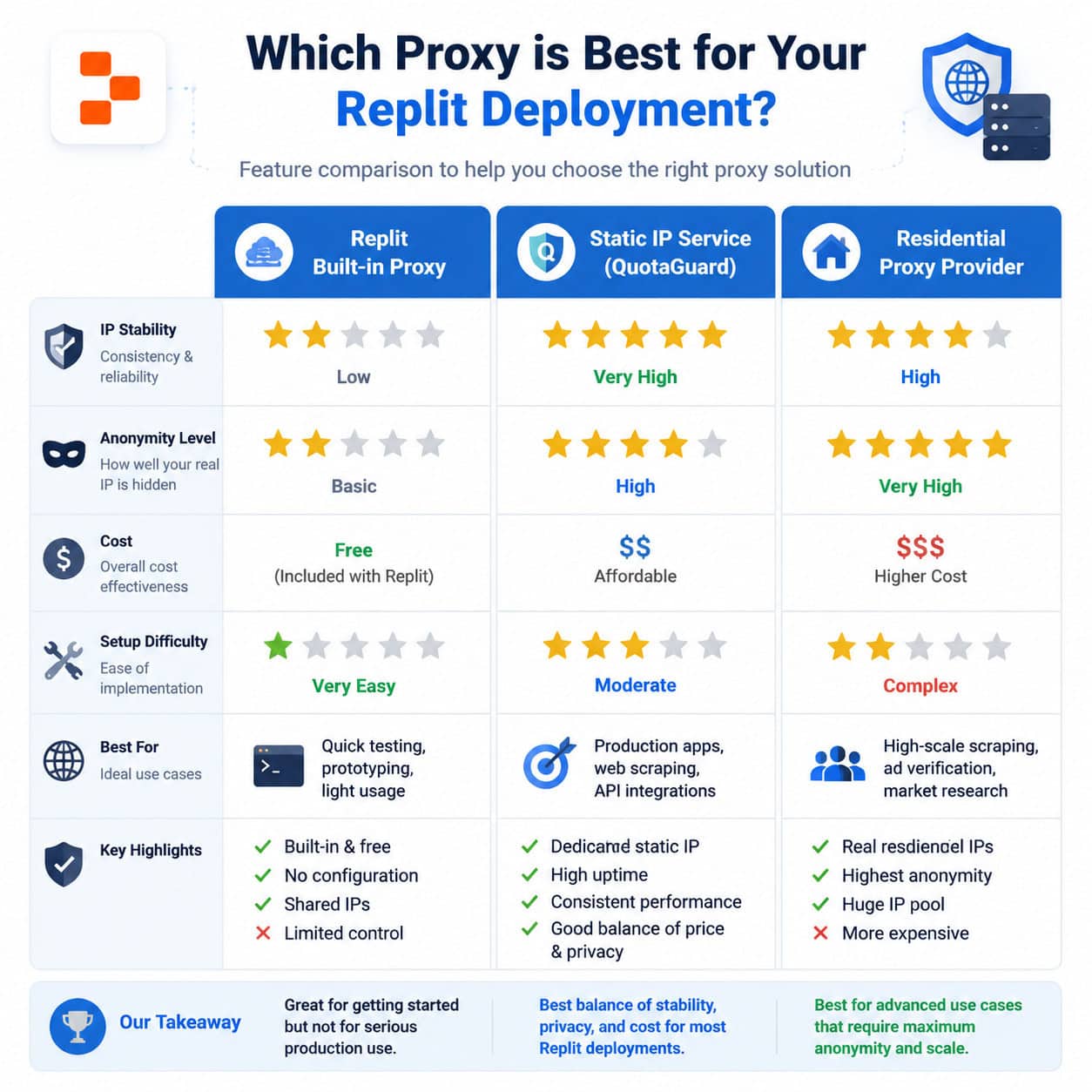
Not all proxy types are equally compatible with Replit’s environment. Here’s a direct comparison:
| Proxy Type | Works on Replit? | Best For | Typical Cost |
|---|---|---|---|
| HTTP/HTTPS | Yes | API calls, web scraping | $5-50/month |
| SOCKS5 | Yes (with library) | Full TCP tunneling | $10-100/month |
| Residential | Yes | Geo-testing, avoiding blocks | $15-300/month |
| Static IP (Datacenter) | Yes | Whitelisted API access | $20-100/month |
| Transparent (Replit built-in) | Automatic | Dev previews, MCP auth | Free (included) |
Decision rules:
- If you need to access APIs that whitelist IPs: use a static datacenter proxy
- If you need to appear as a regular user from a specific country: use residential proxies
- If you just need credential isolation for AI tool integrations: Replit’s built-in transparent proxy handles this [6]
The May 7, 2026 guide from QuotaGuard specifically addresses the dynamic IP problem on Replit deployments, recommending their static IP service as a fix for connection instability.
What Are the Limitations and Risks?
Replit imposes several restrictions that directly affect proxy usage. Understanding these prevents wasted time and account suspension.
Platform restrictions:
- Replit applies family-friendly DNS filtering that blocks certain domains regardless of your proxy configuration
- Running a proxy server (as opposed to client) that allows others to route traffic through your Repl violates Terms of Service
- Replit actively monitors and shuts down Repls used to circumvent network restrictions
- The May 2026 Security Center 2.0 update increased visibility into network activity within workspaces [1]
Technical limitations:
- No raw socket access for custom protocols
- Port scanning and network enumeration are blocked
- Outbound connections on non-standard ports may be filtered
- WebSocket connections through proxies can be unreliable on Replit’s infrastructure
What will get your Repl banned:
- Building a web proxy for others to browse anonymously
- Circumventing school or workplace content filters
- Running Tor exit nodes or relay services
- Scraping at volumes that trigger abuse reports
Google’s January 2026 disruption of the IPIDEA proxy network [10] shows that even large commercial proxy operations face enforcement action. Running unauthorized proxy infrastructure on someone else’s platform carries real risk.
If you’re working on legitimate web projects and need more networking flexibility, consider advanced WordPress strategies on self-hosted infrastructure where you control the full network stack.
What Are the Best Alternatives to Replit for Proxy Work?

When Replit’s constraints are too limiting, these alternatives offer better networking control:
GitHub Codespaces — Provides full Linux containers with root access, custom port forwarding, and no content filtering on outbound traffic. Better for developers who need unrestricted networking in a cloud IDE.
CodeSandbox VM Sandboxes — Fast disposable environments with preview URLs. Good for quick proxy testing without Replit’s dynamic IP rotation.
Self-hosted VPS (DigitalOcean, Vultr) — Full control over networking, static IPs included, run any proxy software you want. More setup work but no platform restrictions.
Railway/Render — Deploy-focused platforms with static outbound IPs available on paid plans. Less IDE-focused but better for production proxy routing.
For web designers who need reliable development environments, tools like Webflow with optimized performance or custom WordPress development on managed hosting avoid these networking headaches entirely.
Best Practices for Mastering Proxy Servers on Replit
Follow these guidelines to stay within platform rules while achieving your networking goals:
- Always use Replit Secrets for proxy credentials — never commit them to version control
- Implement connection retry logic — Replit containers restart, and your proxy connections will drop
- Log proxy responses to verify traffic is actually routing through your intended path
- Rotate user agents alongside proxy rotation to avoid fingerprinting
- Respect rate limits — proxy access doesn’t exempt you from API terms of service
- Test failover — what happens when your proxy provider is down? Your app should handle this gracefully
- Document your setup — Replit environments are collaborative, and teammates need to understand the proxy configuration
For teams building content-heavy applications, combining proxy-based data collection with AI-powered content generation tools can create efficient research-to-publication workflows.
FAQ
Can I run a free proxy server on Replit? You can configure a proxy client on Replit’s free tier, but running a proxy server for others to use violates Terms of Service and will result in your Repl being shut down.
Does Replit hide my IP address automatically? Partially. External services see Replit’s shared infrastructure IP, not your personal IP. But this isn’t true anonymity — Replit logs activity and the shared IPs are easily identified as belonging to Replit.
Why does my Replit proxy connection keep dropping? Replit containers restart periodically, and dynamic IP reassignment breaks persistent connections. Use a static IP proxy service and implement automatic reconnection in your code.
Is it legal to use proxies on Replit? Using proxy clients for legitimate purposes (API access, testing) is legal and within Replit’s terms. Using Replit to build anonymizing services for others, bypass content filters, or scrape in violation of website terms is not.
What’s the difference between Replit’s built-in proxy and an external proxy service? Replit’s built-in proxy (Port Authority) forwards your development server’s ports to public URLs. External proxy services route your outbound requests through different IP addresses. They solve different problems.
Can I use SOCKS5 proxies on Replit? Yes, with appropriate libraries (PySocks for Python, socks-proxy-agent for Node.js). SOCKS5 support isn’t built into Replit but works when you install the right packages.
How do I get a static IP for my Replit deployment? Use a third-party service like QuotaGuard that provides static IP proxies. Route your outbound traffic through their endpoints to maintain a consistent IP address.
Will Replit’s 2026 security updates affect proxy usage? The May 2026 Workspace Security Center 2.0 update [1] focuses on visibility and access control rather than blocking legitimate proxy client usage. External access tokens for private deployments actually make secure external connections easier.
What programming languages work best for proxy configuration on Replit?
Python and Node.js have the best library support. Python’s requests library with proxy parameters is the simplest approach for most use cases.
Conclusion
Mastering proxy servers on Replit requires understanding both the platform’s capabilities and its hard boundaries. Replit works well as a proxy client environment for development testing, API routing, and secure tool integrations. It does not work as a platform for building anonymizing proxy servers or bypassing content restrictions.
Your next steps:
- Determine whether you need a proxy client (routing your app’s traffic) or a proxy server (routing others’ traffic). If the latter, use a VPS instead.
- Set up Replit Secrets with your proxy provider credentials today.
- Test your proxy configuration with
httpbin.org/ipto verify traffic routing. - Implement retry logic for container restarts.
- If Replit’s restrictions are too limiting, evaluate GitHub Codespaces or a self-hosted solution.
The right tool depends on your specific use case. For development and testing with proxy clients, Replit is convenient and fast. For production proxy infrastructure or true anonymous networking, you’ll need infrastructure you control. For broader SEO and web development strategies that complement your technical setup, explore purpose-built platforms with full networking control.
See also: Replit Documentation.
References
[1] Changelog – https://docs.replit.com/updates/2026/05/08/changelog [2] Replit – https://releasebot.io/updates/replit [6] Defense In Depth How Replit Secures Every Layer Of The Vibe Coding Stack – https://blog.replit.com/defense-in-depth-how-replit-secures-every-layer-of-the-vibe-coding-stack [10] Google Disrupts Proxy Networks – https://www.infosecurity-magazine.com/news/google-disrupts-proxy-networks/





