


Last updated: May 10, 2026
Quick Answer
Replit is a browser-based development platform that lets anyone build and deploy AI-powered applications without installing software or managing servers. You describe what you want in plain English, and Replit’s AI Agent writes the code, sets up the environment, and deploys your app. The platform secured $400 million in funding in January 2026 and now serves users from 85% of Fortune 500 companies [5].
Key Takeaways
- Replit runs entirely in your browser — no downloads, no terminal setup, no DevOps knowledge required.
- The Replit Agent (version 2.0) handles complex multi-file projects with 10x greater autonomy than earlier versions [5].
- Pricing starts at $0 (free tier) with the Core plan now at $20/month after a February 2026 price reduction [10].
- You can build AI apps by describing them in natural language, then refine through conversation.
- Replit supports audio AI capabilities including speech-to-text models like gpt-4o-transcribe [9].
- Enterprise adoption is proven: Zillow runs approximately 600 seats with over 7,000 apps created in one year [5].
- Deployment is built-in — your app goes live with a URL in one click.
- Replit’s Workspace Security Center 2.0 (May 2026) lets you manage dependency vulnerabilities across all projects [6].

What Is Replit and Why Should Beginners Care?
Replit is a cloud-based integrated development environment (IDE) that pairs a code editor, runtime environment, and deployment pipeline into one browser tab. For beginners, this means you skip the hours of setup that traditionally block new developers from building anything.
What makes Replit different in 2026 is its AI-first approach. The platform’s CEO Amjad Masad describes the philosophy as “designing together with the agent” — a digital canvas where you tweak mockups, doodle drawings, and collaborate with AI in real time [5]. This concept, often called “vibe coding,” means you focus on what you want rather than how to code it.
Choose Replit if:
- You have an app idea but limited coding experience
- You want to prototype AI features (chatbots, image generators, voice apps) quickly
- You prefer working from any device with a browser
Consider alternatives if:
- You’re an experienced developer who wants granular control over your IDE (look at Cursor instead)
- You need to work offline frequently
If you’re exploring other no-code approaches to building web projects, our guide to no-coding website design software platforms covers additional options.
How Does Unleashing Creativity: A Beginner’s Guide to Building AI Apps with Replit Actually Work?
The core workflow is straightforward: you tell the AI what to build, it generates the code, and you iterate through conversation. Here’s the step-by-step process:
- Sign up at replit.com (free account works for basic projects)
- Open a new Repl and choose “Build with AI” or start from a template
- Describe your app in plain English — for example, “Build a chatbot that answers questions about nutrition using the OpenAI API”
- Review the generated code — the Agent creates files, installs dependencies, and configures the environment
- Test your app in the built-in preview panel
- Iterate by asking for changes: “Add a dark mode toggle” or “Make the responses shorter”
- Deploy with one click to get a live URL
The Replit Agent 2.0 handles complex multi-file projects with minimal intervention from you [5]. It can set up databases, configure API keys, install packages, and structure your project — tasks that would take a beginner hours to figure out manually.
Common mistake: Giving vague prompts like “make it better.” Be specific: “Change the button color to blue and add a loading spinner when the API call is processing.”
For those interested in how AI tools support content creation beyond coding, see our comprehensive guide to AI-powered content generation tools.
What Can You Actually Build? Real AI App Ideas for Beginners
Here’s where unleashing creativity becomes practical. These are real project types beginners have built on Replit:
| Project Type | Difficulty | AI Features Used | Time Estimate |
|---|---|---|---|
| FAQ Chatbot | Easy | Text generation API | 30-60 minutes |
| Voice memo transcriber | Easy-Medium | Speech-to-text (gpt-4o-transcribe) [9] | 1-2 hours |
| AI writing assistant | Medium | Text generation + prompts | 2-3 hours |
| Image description tool | Medium | Vision API | 2-3 hours |
| Full SaaS dashboard | Advanced | Multiple APIs + database | 1-2 days |
The audio capabilities added in January 2026 opened up voice-based applications [9]. You can now build apps that transcribe meetings, generate podcast summaries, or create voice-controlled interfaces — all from within Replit.
If you’re building an AI app that needs a professional front-end, you might also explore AI website creators that build professional sites without code.
How Does Replit Compare to Other AI Coding Tools?
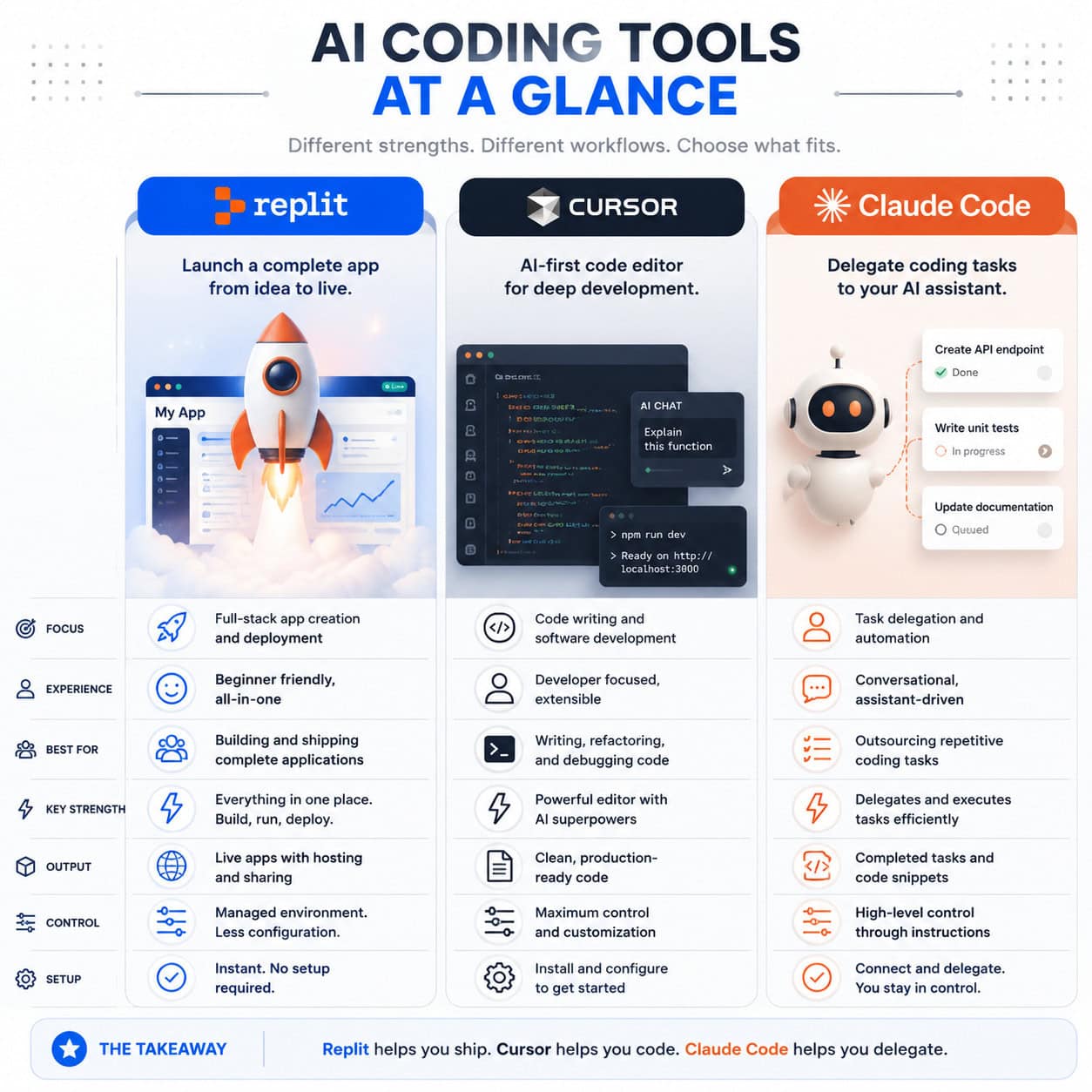
Replit occupies a specific position in the AI development tool market. According to industry analysis, the three major players serve different users [5]:
| Tool | Philosophy | Best For | Deployment |
|---|---|---|---|
| Replit | Outcome-first (prompt → running app) | Beginners, rapid prototyping, non-developers | Built-in, one-click |
| Cursor | Developer-first | Experienced coders who want AI assistance | Manual (you handle hosting) |
| Claude Code | Delegation-first | Developers who want to hand off tasks | Manual |
Replit’s strength is the complete loop: you go from idea to deployed app without leaving the platform. Cursor gives you more control but assumes you already know how to set up projects and deploy them. Claude Code excels at complex coding tasks but doesn’t provide an environment to run the code.
Decision rule: If you’ve never deployed a web app before, start with Replit. If you already use VS Code daily and want AI to speed up your workflow, Cursor is likely a better fit.
What Does Replit Cost in 2026?
Replit reduced its Core plan pricing to $20/month in February 2026 [10], making premium features more accessible. Here’s the current structure:
- Free tier: Basic IDE, limited AI completions, community hosting
- Replit Core ($20/month): Full AI Agent access, private Repls, boosted compute, custom domains
- Teams/Enterprise: Custom pricing with admin controls, SSO, and the new Workspace Security Center 2.0 [6]
The free tier is enough to experiment and build simple apps. You’ll hit limits on AI usage and compute power, but it’s sufficient for learning. The Core plan is where serious building happens — the AI Agent becomes significantly more capable with sustained context and larger project support.
For context on enterprise value: Accenture invested in Replit through Accenture Ventures in April 2026 specifically to advance AI-driven software development [7]. The company is on track to hit $1 billion in run-rate revenue by end of 2026, up from $240 million [5].
Unleashing Creativity: A Beginner’s Guide to Building AI Apps with Replit — Security and Deployment
Once your app works, you need to deploy it safely. Replit handles this better than most beginner-friendly tools.
Deployment options:
- Public deployment: Your app gets a
.replit.appURL, visible to anyone - Private deployment: New in May 2026, with external access tokens for controlled access [6]
- Custom domains: Available on Core plan — point your own domain to your Replit app
Security features (as of May 2026):
- Workspace Security Center 2.0 lets you review dependency vulnerabilities across all projects from one dashboard [6]
- Private publishing keeps your source code hidden while the app remains accessible
- Environment variables (Secrets) store API keys safely
Edge case: If you’re building an app that handles user data (like a form that collects emails), you’ll need to add your own privacy policy and ensure your database configuration follows basic security practices. Replit provides the infrastructure, but compliance is your responsibility.
For developers looking to integrate AI into existing platforms, our guide on integrating AI-powered chatbots into WordPress covers that specific workflow.

Common Mistakes Beginners Make (and How to Avoid Them)
After working with Replit and observing community patterns, these are the most frequent issues:
Writing prompts that are too broad. “Build me a social media app” gives poor results. Instead: “Build a single-page app where users can post short text updates (max 280 characters) with a timestamp, stored in a SQLite database.”
Not testing incrementally. Build one feature, test it, then add the next. Don’t ask the Agent to build everything at once.
Ignoring error messages. When something breaks, paste the error back to the AI Agent. It can usually fix the issue in one or two iterations [3].
Skipping the free tier. Start free. You don’t need the Core plan until you’re building something you want to keep running 24/7.
Forgetting to set environment variables. API keys hardcoded in your files will be exposed if you share your Repl. Always use the Secrets panel.
If you’re also working on the visual design side of your projects, our guide to AI graphic design tools can help you create assets for your apps.
Who Is Replit Not For?
Replit isn’t the right choice for everyone. Be honest about whether it fits your situation:
- Large-scale production apps with thousands of concurrent users need more infrastructure control than Replit provides
- Machine learning model training requires GPU resources that Replit doesn’t currently offer at competitive prices
- Developers who need offline access — Replit requires an internet connection
- Teams with strict compliance requirements (HIPAA, SOC 2) should verify Replit’s enterprise compliance certifications before committing
That said, for prototyping, internal tools, MVPs, and learning — Replit is hard to beat in 2026.
Conclusion
Building AI apps no longer requires years of programming experience or expensive development environments. Replit has compressed the path from idea to deployed application into a conversation with an AI agent. The platform’s $9 billion valuation and Fortune 500 adoption aren’t hype — they reflect a genuine shift in how software gets built [5][7].
Your next steps:
- Create a free Replit account today
- Start with a simple project: a chatbot that answers questions about a topic you know well
- Use specific, detailed prompts and iterate one feature at a time
- Once comfortable, explore the audio capabilities [9] or database integrations
- Upgrade to Core ($20/month) when you’re ready to deploy something permanent
The barrier to building AI applications has never been lower. The only requirement left is having an idea worth building.
For more AI-powered tools and workflows, explore our AI tools and resources collection.
FAQ
Do I need to know how to code to use Replit? No. The AI Agent generates code from natural language descriptions. Basic coding knowledge helps you make manual tweaks, but it’s not required to build functional apps [3].
Is Replit free? Yes, there’s a free tier with limited AI usage and compute. The Core plan at $20/month unlocks full Agent capabilities and always-on deployments [10].
What programming languages does Replit support? Replit supports over 50 languages including Python, JavaScript, TypeScript, HTML/CSS, Go, Ruby, and Java. For AI apps, Python and JavaScript are most common [4].
Can I use my own API keys (OpenAI, Anthropic, etc.)? Yes. Store them in Replit’s Secrets panel (environment variables) to keep them secure while your app accesses them at runtime [3].
How does Replit Agent 2.0 differ from earlier versions? Agent 2.0 offers roughly 10x greater autonomy, handling complex multi-file projects with minimal user intervention compared to the original Agent [5].
Can I collaborate with others on Replit? Yes. Replit supports real-time multiplayer editing, similar to Google Docs but for code. Teams can work on the same project simultaneously [4].
Is my code private on Replit? On the free plan, Repls are public by default. Core plan users can create private Repls. Private publishing (May 2026) lets you deploy apps without exposing source code [6].
What AI models can I integrate? You can connect to OpenAI (GPT-4o, transcription models), Anthropic (Claude), Google (Gemini), and others via their APIs. Replit also offers built-in AI features [9].
How reliable is Replit for production apps? Replit deployments are suitable for small-to-medium traffic apps. Zillow uses 600 seats with 7,000+ apps built, though enterprise deployments may use additional infrastructure [5].
Can I export my code from Replit? Yes. You can download your project files or connect to a GitHub repository for version control and portability [4].
References
[3] Replit Ai Tutorial – https://www.nocode.mba/articles/replit-ai-tutorial [4] Replit Complete Guide For Vibe Coders – https://blog.vibecoder.me/replit-complete-guide-for-vibe-coders [5] Replit Ai Guide – https://aitoolsdevpro.com/ai-tools/replit-ai-guide/ [6] Changelog – https://docs.replit.com/updates/2026/05/08/changelog [7] Accenture Invests In Replit To Advance Ai Driven Software Development For Enterprises – https://www.barchart.com/story/news/1218744/accenture-invests-in-replit-to-advance-ai-driven-software-development-for-enterprises [9] Changelog – https://docs.replit.com/updates/2026/01/23/changelog [10] News – https://blog.replit.com/category/news/2





