Last updated: June 9, 2026
Quick Answer: ChatGPT can help you build, design, debug, and write content for websites far faster than traditional methods — whether you’re a complete beginner or a seasoned developer. By using it as a code generator, content writer, UX advisor, and debugging partner, you can cut development time significantly and produce polished results without a large team or budget.
Key Takeaways
- ChatGPT can write functional HTML, CSS, and JavaScript code, but always review and test the output before deploying it
- Free and paid tiers are available; the paid ChatGPT Plus plan (around $20/month as of 2026) unlocks faster, more capable models
- Beginners benefit most from ChatGPT’s plain-English explanations; experienced developers use it to speed up repetitive tasks
- ChatGPT works best for portfolio sites, landing pages, blogs, and small business websites — complex enterprise builds still need human architects
- Common mistakes include copy-pasting code without testing, over-relying on AI for security-critical logic, and ignoring accessibility
- ChatGPT is a complement to tools like WordPress and Webflow, not a direct replacement
- You still need basic web literacy, a testing mindset, and version control skills even when using AI assistance
- Legal risks around AI-generated code are real but manageable with proper review and licensing awareness
What Exactly Is ChatGPT and How Can It Help With Web Design
ChatGPT is a large language model developed by OpenAI that generates human-like text — including code, copy, and structured instructions — based on conversational prompts. For web design specifically, it acts as an on-demand collaborator: you describe what you want, and it produces code snippets, layout suggestions, or written content in seconds.
In practical terms, ChatGPT helps web designers and developers by:
- Writing HTML, CSS, and JavaScript from plain-English descriptions
- Explaining unfamiliar code in simple language
- Suggesting color palettes, font pairings, and layout structures
- Drafting page copy, meta descriptions, and calls to action
- Debugging errors when you paste in broken code
For a broader look at how AI tools are reshaping digital work, the comprehensive guide to the most influential AI websites covers the wider ecosystem ChatGPT sits within.
How Much Does It Cost to Use ChatGPT for Website Development
ChatGPT has a free tier that gives you access to GPT-3.5-level responses, which is sufficient for basic code generation and copywriting tasks. The ChatGPT Plus subscription, priced at approximately $20 per month as of 2026, unlocks GPT-4o and other advanced models that handle longer, more complex code blocks with greater accuracy.
For developers who want to integrate ChatGPT directly into their own tools or workflows, OpenAI’s API is billed per token (roughly per word processed). Costs vary by model, but light API usage for a small project typically runs under $10 per month. Heavy usage for a production app can climb higher.
Choose the free tier if you’re experimenting or building a simple personal site. Choose Plus if you need to generate and refine multi-file codebases or long-form content regularly.
Can ChatGPT Actually Write HTML and CSS Code by Itself
Yes — ChatGPT can generate complete, working HTML and CSS files from a text description, and it can write JavaScript for interactive elements as well. The quality is good enough for real projects, provided you review and test the output.
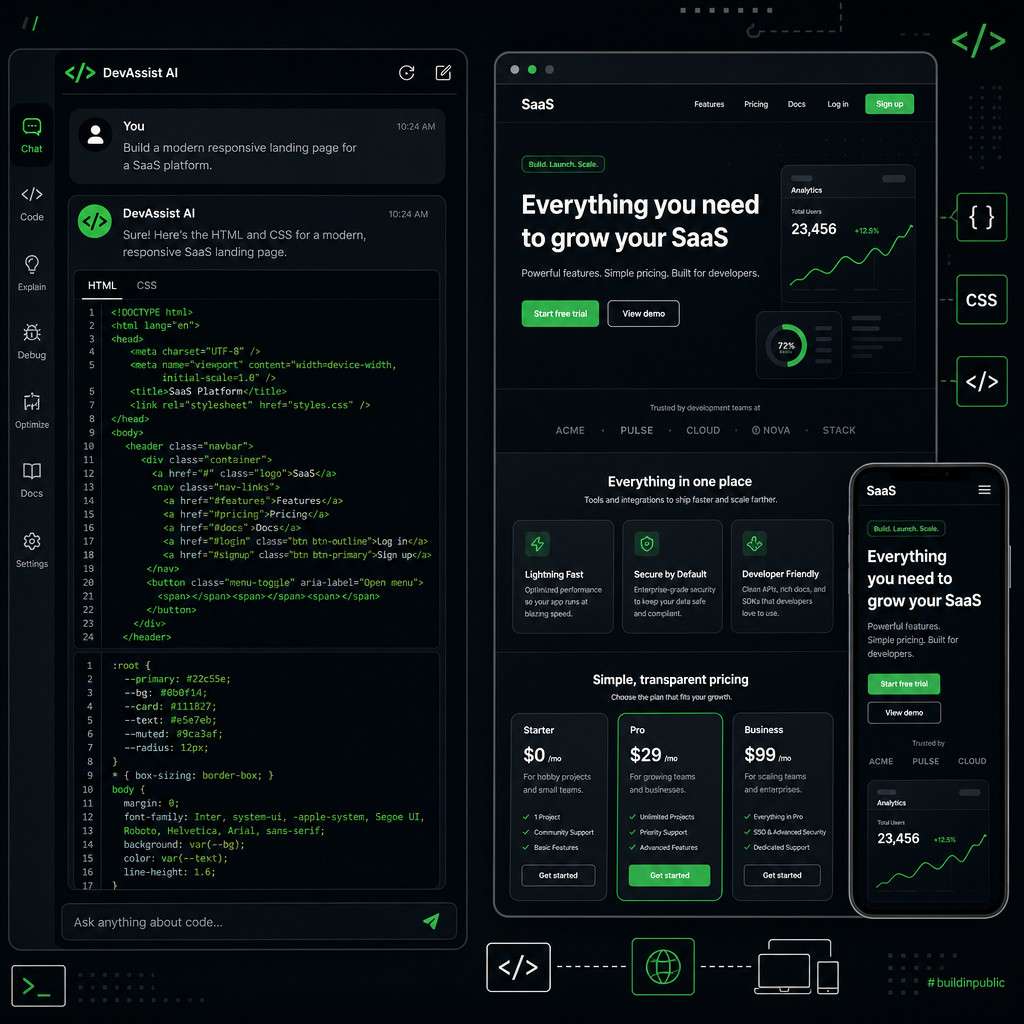
Here is a practical workflow for using ChatGPT to write code:
- Describe your goal clearly. Example: “Write a responsive HTML and CSS landing page for a freelance photographer, with a hero section, a three-column portfolio grid, and a contact form.”
- Paste the output into a code editor like VS Code and open it in a browser.
- Identify what doesn’t look right and ask ChatGPT to fix specific issues.
- Iterate in small steps rather than asking for an entire site in one prompt.
- Test on mobile before considering it done.
Common mistake: Asking for too much at once. A prompt like “build me a full e-commerce site” will produce generic, incomplete code. Break it into pages and components.
For AI-assisted coding environments that pair well with ChatGPT output, Cursor AI is worth exploring as a next-generation coding companion.
Which Types of Websites Work Best With ChatGPT Assistance
ChatGPT is most effective for portfolio sites, landing pages, blogs, small business websites, and simple web apps. These projects have clear, bounded scopes that match what a language model handles well.
It is less suited — without significant human oversight — for:
- Large-scale e-commerce platforms with complex inventory and payment logic
- Sites requiring strict accessibility compliance (WCAG AA/AAA) from the start
- Applications with sensitive authentication or financial data handling
- Projects that depend on proprietary design systems
The rule of thumb: If a junior developer could build it solo in a week or two, ChatGPT can meaningfully accelerate that work. If it requires a team of specialists, ChatGPT is a helper, not a lead.
Is ChatGPT Good for Beginners or Only for Experienced Developers
ChatGPT is genuinely useful for both groups, but for different reasons. Beginners benefit most because they can ask “why does this code work?” and get a plain-English explanation alongside the code itself — something a search engine result rarely provides. Experienced developers use it to eliminate repetitive boilerplate and speed up tasks like writing utility functions or generating test data.
If you’re a beginner, start with these entry points:
- Ask ChatGPT to explain every code block it gives you before you use it
- Use it to generate a simple one-page site, then modify it manually to learn
- Ask it to suggest free hosting options and walk you through deployment steps
For beginners who want a more guided environment, AI website builders offer a more structured alternative that pairs well with ChatGPT-generated content.
10 Innovative Ways to Leverage ChatGPT for Stunning Website Development
Here are the ten most practical and creative applications, drawn from real developer workflows in 2026:
- Rapid prototyping — Generate a working HTML mockup in minutes to validate a layout idea before committing to a full build
- Component-by-component coding — Build navigation bars, footers, modals, and cards as isolated components, then assemble them
- Responsive CSS generation — Ask for media queries tailored to specific breakpoints for mobile, tablet, and desktop
- SEO copywriting — Draft title tags, meta descriptions, header copy, and body text optimized for target keywords
- Accessibility auditing prompts — Paste your HTML and ask ChatGPT to flag missing alt attributes, poor contrast, and ARIA issues
- JavaScript interactivity — Add form validation, smooth scrolling, and dynamic content without writing JS from scratch
- Color palette and typography advice — Describe your brand and get specific hex codes and Google Font pairings
- Debugging assistant — Paste error messages or broken code and get a diagnosis with a corrected version
- Content structure planning — Ask for a recommended page structure and information hierarchy for any type of site
- API integration guidance — Get step-by-step instructions for connecting your site to third-party APIs like payment processors or email services
For no-code workflow integration that extends what ChatGPT can do, the complete guide to ChatGPT automation covers practical automation setups.
How Does ChatGPT Compare to Other Web Development Tools Like WordPress
ChatGPT and WordPress solve different problems and work best together rather than as alternatives. WordPress is a full content management system with hosting, plugins, themes, and a visual editor. ChatGPT is a text and code generation tool with no hosting, no database, and no deployment pipeline.
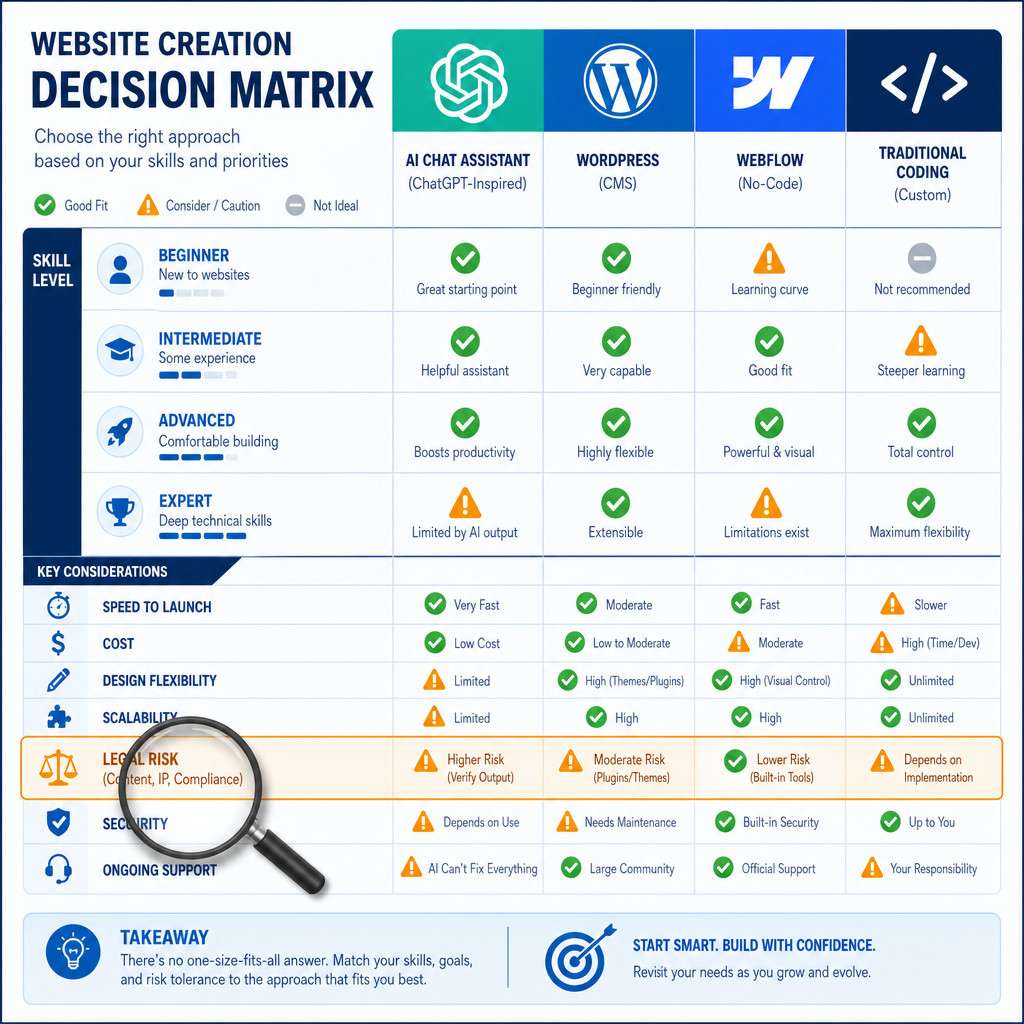
| Feature | ChatGPT | WordPress | Webflow |
|---|---|---|---|
| Code generation | Strong | None (uses plugins) | None |
| Visual editor | None | Yes | Yes |
| Hosting included | No | Via WordPress.com | Yes |
| Plugin ecosystem | No | Extensive | Limited |
| Learning curve | Low for prompts | Moderate | Moderate |
| Best for | Custom code, copy | Blogs, CMS sites | Design-heavy sites |
The practical approach: use ChatGPT to write custom code or content, then deploy it through WordPress, Webflow, or a static host. For WordPress users specifically, AI plugins for WordPress can automate much of what you’d otherwise do manually with ChatGPT.
Can ChatGPT Help Me Design Responsive Websites for Mobile
Yes, and this is one of its strongest use cases. When you specify device targets in your prompt, ChatGPT generates CSS with appropriate media queries and flexible layouts using Flexbox or CSS Grid.
A good prompt looks like this: “Write a CSS stylesheet for a three-column card layout that collapses to a single column on screens below 768px, using Flexbox and a gap of 24px.”
Always test the output on an actual device or using browser DevTools. ChatGPT’s code is logically correct most of the time, but visual edge cases — like text overflow on very small screens — need a human eye to catch. For more on adaptive design principles, the adaptive website design resources at WebAiStack cover the fundamentals well.
What Are the Limitations of Using AI for Web Development
ChatGPT has real constraints that every user should understand before relying on it for a live project.
- No live browser testing — It cannot see how its code actually renders
- Knowledge cutoff — It may suggest outdated libraries or deprecated syntax
- No memory across sessions (unless you use Projects or custom GPTs) — You have to re-establish context each time
- Security blind spots — It will not automatically flag SQL injection risks or insecure API key handling
- Hallucinated functions — It occasionally invents JavaScript methods or CSS properties that don’t exist
The fix for most of these: treat ChatGPT as a first draft generator, not a final authority. Always run code through a linter, test it in multiple browsers, and have a developer review anything security-critical.
What Common Mistakes Do People Make When Using AI for Web Design
The most damaging mistake is deploying AI-generated code without reading or testing it. Other frequent errors include:
- Vague prompts that produce generic output — specificity is everything
- Ignoring error messages instead of pasting them back into ChatGPT for diagnosis
- Skipping version control — always commit working code before asking ChatGPT to modify it
- Over-relying on AI for UX decisions — ChatGPT can suggest layouts, but real user testing reveals what actually works
- Not checking for duplicate or conflicting CSS when assembling multiple ChatGPT-generated components
Are There Any Legal Risks of Using AI-Generated Website Code
There are genuine legal considerations, though the risk level depends on how you use the output. As of 2026, AI-generated code is generally treated as a tool output rather than a copyrighted work, but this area of law is still evolving in most jurisdictions.
Key risks to be aware of:
- Third-party library licenses — ChatGPT may suggest code that includes or resembles licensed libraries; verify before commercial use
- Data privacy compliance — AI-generated forms or tracking scripts may not comply with GDPR or CCPA without modification
- No warranty — OpenAI’s terms make clear that you are responsible for how you use the output
The practical safeguard: treat AI-generated code the way you’d treat code copied from Stack Overflow — read it, understand it, and take ownership of it before it goes live.
What Skills Do I Still Need If I’m Using ChatGPT for Web Development
ChatGPT reduces the skill floor for web development but does not eliminate the need for foundational knowledge. You still need:
- Basic HTML/CSS literacy to evaluate whether the output is correct
- Browser DevTools familiarity to debug visual issues
- Version control basics (Git) to manage code changes safely
- Hosting and deployment knowledge to get your site live
- Security awareness to spot risky patterns in generated code
Think of it this way: ChatGPT is a very fast junior developer. You still need to be the senior developer who reviews the work.
How Quickly Can ChatGPT Help Me Prototype a Website Concept
A basic, functional HTML/CSS prototype can be ready in under 30 minutes using ChatGPT, assuming you have a clear brief. A more complete multi-page mockup with JavaScript interactions typically takes two to four hours of iterative prompting and testing.
For teams validating a product idea, this speed is a genuine advantage. You can present a clickable prototype to stakeholders the same day you have the concept, without waiting for a designer or developer to be available.
For even faster results, pairing ChatGPT with an AI-native builder like Bolt AI can take a concept from idea to deployed prototype in minutes rather than hours.
Frequently Asked Questions
Can ChatGPT build a complete website from scratch? It can generate all the code and content for a simple website, but you still need to handle hosting, domain setup, and deployment yourself. It does not have the ability to publish a site directly.
Does ChatGPT know the latest web frameworks like React or Vue? Yes, ChatGPT has training data covering React, Vue, Angular, and other modern frameworks. However, its knowledge has a cutoff date, so always verify that the syntax it uses matches the current version of the framework you’re working with.
Is the code ChatGPT writes production-ready? Not without review. Treat it as a strong first draft that needs testing, security checks, and optimization before going live on a public site.
Can I use ChatGPT to write content for my website and have it rank on Google? AI-generated content can rank, but Google’s quality guidelines prioritize original, helpful, and authoritative content. Edit and personalize AI drafts heavily before publishing.
What’s the best way to prompt ChatGPT for web development tasks? Be specific about the technology stack, the visual outcome you want, and any constraints (e.g., “no external libraries,” “must work in Safari”). The more context you provide, the better the output.
Can ChatGPT help with website accessibility? Yes. You can paste your HTML and ask it to identify accessibility issues, suggest ARIA labels, and improve semantic structure. It won’t catch everything, but it’s a useful first pass.
Does ChatGPT work with CSS frameworks like Tailwind or Bootstrap? Yes. Specify the framework in your prompt and ChatGPT will use the appropriate class names and syntax.
Can ChatGPT generate images for my website? Standard ChatGPT text models cannot generate images, but ChatGPT with DALL-E integration (available in Plus) can create images. For design-focused image generation, dedicated tools are generally more capable.
Is ChatGPT better than hiring a freelance developer? For simple, well-defined projects, ChatGPT can replace a basic freelance engagement. For complex, custom builds, a human developer with ChatGPT as an assistant is the stronger combination.
What happens if ChatGPT gives me code that doesn’t work? Paste the error message back into the same chat and ask it to fix the issue. Providing the full error text and the relevant code block gives it enough context to diagnose most problems accurately.
Conclusion
The 10 innovative ways to leverage ChatGPT for stunning website development covered in this guide share a common thread: they all work best when you bring a clear goal, a willingness to test, and enough web literacy to evaluate what the AI produces. ChatGPT is not a magic button that ships polished websites on its own — but used deliberately, it compresses timelines, lowers costs, and makes web development accessible to a much wider group of people than ever before.
Your next steps:
- Start with one specific task — write a landing page hero section or debug a CSS issue — rather than trying to build an entire site at once
- Learn to write precise prompts: include the technology, the goal, and any constraints
- Always test in a real browser before treating any output as done
- Build your foundational HTML/CSS knowledge alongside your AI use, not instead of it
- Explore complementary tools like AI development tools to extend what ChatGPT alone can do
The developers who get the most from ChatGPT in 2026 are not the ones who use it the most — they’re the ones who use it most precisely.
Useful Resources: ChatGPT by OpenAI & OpenAI research blog