


Last updated: May 11, 2026
Quick Answer
Cursor AI is a VS Code-based intelligent code editor that uses autonomous AI agents to write, refactor, and manage code across entire projects. With the release of Cursor 3 in April 2026, it shifted from a file-centric editor to an agent-centric workspace capable of running up to 8 parallel agents with 100K token context windows. It’s currently the leading AI coding tool for complex, multi-file tasks, outperforming GitHub Copilot on enterprise benchmarks (75% vs 62.6% success rate on complex tasks).
Key Takeaways
- Cursor 3 introduced agent-centric workspaces, natural language code generation, and unified multi-repo views [5][10]
- SpaceX announced a $10B collaboration with Cursor in April 2026, with a $60B acquisition option [7][9]
- The
/multitaskcommand enables parallel agent execution for faster development plans [1] - Cursor’s Automations feature auto-launches agents on code changes, Slack messages, or timers [8]
- A critical Git RCE vulnerability was patched in version 2.5 (May 2026) with no in-the-wild abuse reported [3]
- Opsera partnered with Cursor to embed autonomous AI agents into DevOps workflows [2]
- Cursor leads on complex tasks but GitHub Copilot still wins on simple inline completions
- Pricing starts at $20/month for Pro, with Business tiers available for teams

What Is Cursor AI and Why Is It Transforming Software Development?
Cursor AI is a code editor built on top of VS Code that integrates large language models directly into the development workflow. Unlike plugins that bolt AI onto existing editors, Cursor was designed from the ground up as an AI-native environment.
The core difference: Cursor treats AI agents as first-class participants in your codebase, not just autocomplete assistants. Since the Cursor 3 release on April 2, 2026, the tool has moved toward what the team calls “agent-centric workspaces” where developers describe intent in natural language and agents handle implementation across multiple files and repositories [5][10].
Key capabilities include:
- Multi-file refactoring with full project context (100K token window)
- Parallel agent collaboration — up to 8 agents working simultaneously
- Natural language code generation from plain English descriptions
- Unified multi-repo views for monorepo and microservice architectures
- Automations that trigger agents based on external events [8]
This positions Cursor as more than an editor — it functions as a coding companion that can handle entire feature implementations, bug fixes, and code reviews with minimal human intervention.
How Does Cursor 3’s Agent-Centric Architecture Work?
Cursor 3 fundamentally changed how developers interact with AI coding tools. Instead of switching between files and manually directing the AI, you describe what you want and agents figure out which files to modify, what tests to run, and how to structure the changes [10].
The shift from files to agents:
| Feature | Traditional Editor | Cursor 3 |
|---|---|---|
| Unit of work | Single file | Entire task/feature |
| AI interaction | Inline suggestions | Autonomous execution |
| Context window | ~8K tokens | 100K tokens |
| Parallelism | None | 8 concurrent agents |
| Trigger | Manual prompt | Events, timers, messages |
The /multitask command, released in the May 6, 2026 update, lets you split a complex plan into parallel agent executions [1]. For example, you can ask Cursor to refactor an authentication module, update related tests, and modify API documentation simultaneously — each handled by a separate agent.
Choose Cursor 3’s agent mode if: you’re working on multi-file changes, large refactors, or feature implementations that touch 5+ files. Stick with inline completions for quick single-line edits.
For developers working on WordPress plugin development or custom theme development, Cursor’s multi-file awareness is particularly useful since these projects involve coordinating PHP, JavaScript, and CSS across many files.
How Does Cursor AI Compare to GitHub Copilot, Claude Code, and Windsurf?
Cursor leads on complex, multi-file tasks but isn’t the best choice for every scenario. Here’s how the main options compare in 2026:
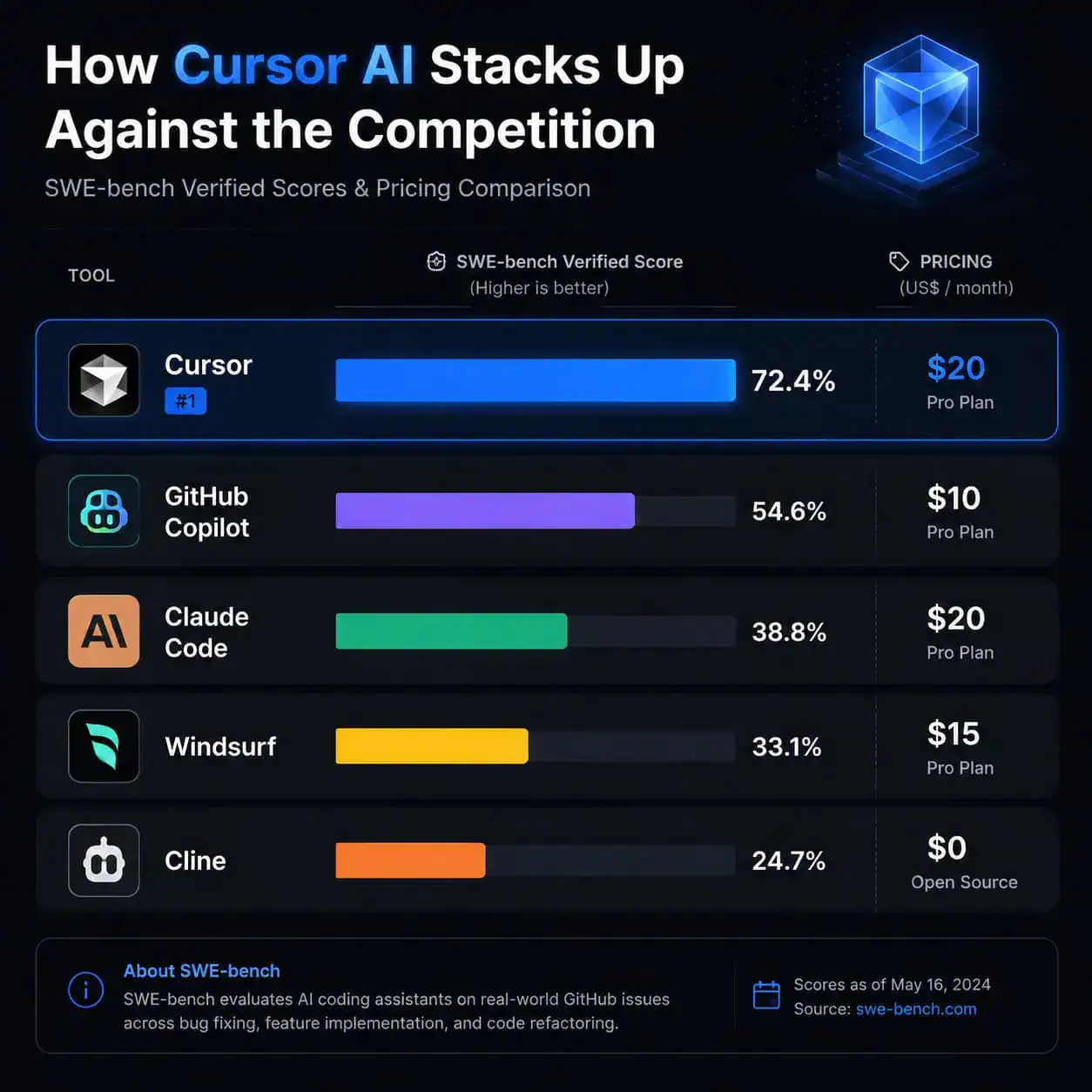
| Tool | Price/mo | SWE-bench Score | Best For | Weakness |
|---|---|---|---|---|
| Cursor | $20 (Pro) | ~75% complex tasks | Multi-file refactoring, enterprise teams | Can produce “AI-made UI feel” |
| GitHub Copilot | $10 | 55% | Simple completions, VS Code/JetBrains users | Limited on complex multi-file work |
| Claude Code | $20 | 77% | Large codebases, terminal workflows | Terminal-only, steeper learning curve |
| Windsurf | $20 | Not published | Beginners switching from VS Code | Less powerful on enterprise tasks |
| Cline | Free | Varies | Budget-conscious devs, open-source fans | Requires more manual configuration |
Decision rules:
- Choose Cursor if you need parallel agents and multi-repo support for team projects
- Choose GitHub Copilot if you want the cheapest option with solid inline completions
- Choose Claude Code if raw accuracy on large codebases matters most
- Choose Windsurf if you want the easiest transition from a standard VS Code setup
- Choose Cline if you want free, open-source flexibility
Cursor reports 42% time savings in enterprise environments compared to Copilot’s 35%. But Copilot’s ecosystem integration (GitHub Issues, PRs, Actions) gives it an edge for teams already deep in the GitHub workflow.
If you’re exploring AI-powered tools for content and development workflows, understanding these tradeoffs helps you pick the right tool for your stack.
What Are Cursor’s Automations and How Do Teams Use Them?
Cursor’s Automations feature, highlighted by TechCrunch in March 2026, allows agents to launch automatically based on external triggers — not just manual prompts [8].
Supported triggers include:
- Code changes (new commits, PR opens)
- Slack messages (specific channels or keywords)
- Timers (scheduled intervals)
- PagerDuty incidents (auto-response)
Real-world use cases:
- Incident response — When PagerDuty fires an alert, Cursor agents automatically analyze relevant logs, identify likely causes, and draft a fix PR
- Weekly codebase summaries — Scheduled agents generate documentation updates and technical debt reports
- PR review — The May 2026 update introduced a new PR review experience where agents provide contextual code review feedback [1]
This is where Cursor moves beyond a personal coding tool into team infrastructure. The Opsera partnership announced on May 8, 2026 specifically targets embedding these autonomous agents into broader DevOps and AI-SDLC workflows [2].
For teams already using automation in their workflows, Cursor’s event-driven agents represent a natural extension of the automation-first mindset.
What Security Concerns Should You Know About?
AI coding agents introduce new attack surfaces. On May 2, 2026, Cursor patched a critical Git RCE vulnerability in version 2.5 where malicious repositories could trigger arbitrary code execution through AI agents [3]. No in-the-wild abuse was reported before the patch.
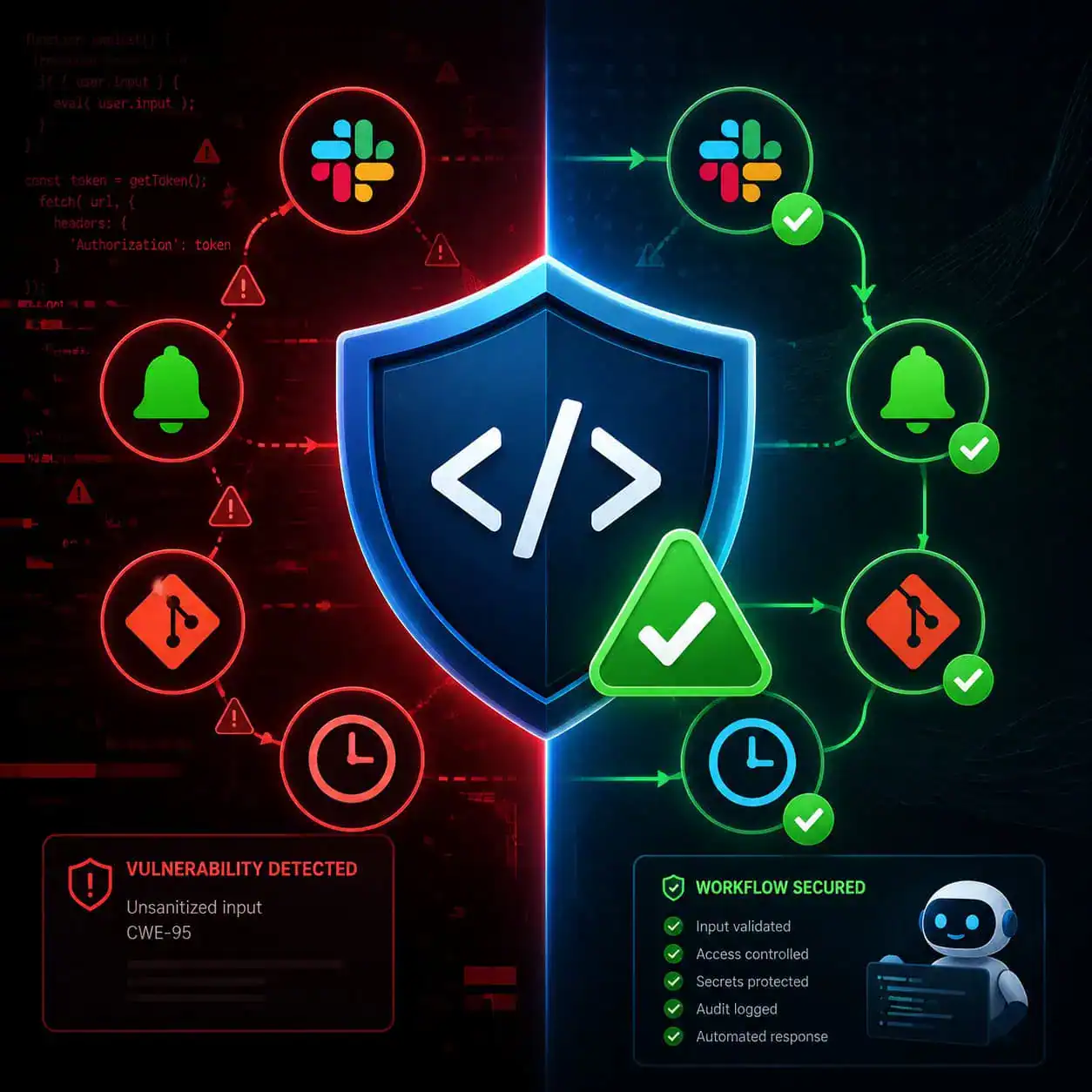
Security best practices for Cursor (post-patch):
- Update immediately — Always run the latest version
- Treat agents as semi-autonomous teammates with limited access — Don’t give them production credentials [3]
- Review agent-generated code before merging, especially for security-sensitive paths
- Use workspace-level permissions to restrict which files agents can modify
- Audit automation triggers — Ensure Slack-triggered agents can’t be exploited by external messages
Common mistake: Giving Cursor agents full repository write access including CI/CD configuration files. Restrict access to source code directories only, and require human approval for infrastructure changes.
This security posture matters more as tools like Cursor move toward full autonomy. The AI integration plugins for WordPress face similar trust boundaries — any AI with write access needs guardrails.
What Does the SpaceX Partnership Mean for Cursor’s Future?
On April 21, 2026, SpaceX announced a $10B collaboration with Cursor to develop “coding and knowledge work AI” using the Colossus supercomputer [7][9]. The deal includes a $60B acquisition option exercisable through the end of 2026.
This signals several things:
- Validation at scale — SpaceX chose Cursor over alternatives, including rejecting prior OpenAI buyout interest [9]
- Compute access — Colossus gives Cursor training infrastructure that most startups can’t access independently
- Enterprise ambition — The partnership targets knowledge work broadly, not just coding
- Valuation trajectory — A $60B option price puts Cursor among the most valuable AI startups globally [6]
For developers, the practical impact is likely better models trained on more code, faster inference, and potentially new capabilities around hardware-software co-design (relevant to SpaceX’s embedded systems work).
Who Should Use Cursor AI in 2026?
Cursor is ideal for:
- Professional developers working on medium-to-large codebases
- Teams that want AI-assisted code review and automated workflows
- Developers doing frequent multi-file refactoring
- Anyone building with modern frameworks who wants natural language code generation
Cursor is not ideal for:
- Complete beginners who haven’t learned programming fundamentals (the AI can mask understanding gaps)
- Developers who only need simple autocomplete (GitHub Copilot at $10/mo is more cost-effective)
- Teams with strict air-gapped security requirements (Cursor requires cloud connectivity)
- Those who prefer terminal-only workflows (Claude Code fits better)
If you’re working on design-to-development workflows or building no-code websites, Cursor can bridge the gap between visual design and production code, but it assumes some coding knowledge.
How to Get Started with Cursor AI
- Download from cursor.com (available for macOS, Windows, Linux)
- Import VS Code settings — Cursor migrates extensions, keybindings, and themes automatically
- Choose your plan — Free tier available with limited agent usage; Pro at $20/mo unlocks full capabilities
- Start with Tab completion to get comfortable, then graduate to agent mode
- Try
/multitaskon a real refactoring task to see parallel agents in action - Set up one Automation — Start with a simple timer-based code summary
Pro tip: Begin by using Cursor on a non-critical project. Let the agents handle a feature branch while you review their output. This builds trust and helps you understand where the AI excels versus where it needs guidance.
Conclusion
Cursor AI has moved from a promising VS Code fork to the most capable AI coding environment available in 2026. The Cursor 3 release fundamentally changed the developer-AI relationship from “assistant that suggests” to “agent that executes.” With the SpaceX partnership providing compute resources and the Opsera integration embedding agents into DevOps pipelines, Cursor is positioning itself as infrastructure for how software gets built.
Your next steps:
- Download Cursor and import your existing VS Code setup (takes under 5 minutes)
- Run a multi-file refactoring task using agent mode to evaluate quality
- Set up one Automation trigger relevant to your team’s workflow
- Establish security boundaries before giving agents broader repository access
- Monitor the SpaceX collaboration announcements for new capabilities later in 2026
The tool isn’t perfect — security vigilance is required, and simple completions don’t justify the price premium over Copilot. But for complex development work, Cursor’s agent-first approach represents where the entire industry is heading.
FAQ
How much does Cursor AI cost? Cursor offers a free tier with limited usage, a Pro plan at $20/month with full agent capabilities, and Business plans for teams. The free tier is enough to evaluate the tool but not for daily professional use.
Can I use my existing VS Code extensions with Cursor? Yes. Cursor is built on VS Code’s foundation and supports the same extension marketplace. Your existing extensions, themes, and keybindings transfer directly.
Is Cursor AI safe to use after the May 2026 vulnerability? The Git RCE vulnerability was patched in version 2.5 with no reported exploitation [3]. Keep Cursor updated and treat agents as limited-access teammates rather than trusted administrators.
Does Cursor work offline? No. Cursor requires internet connectivity for its AI features since inference happens on cloud servers. Basic editing works offline, but agent capabilities do not.
What programming languages does Cursor support? Cursor supports all languages that VS Code supports (Python, JavaScript, TypeScript, Go, Rust, Java, C++, etc.). Agent quality varies by language, with strongest performance on Python and TypeScript.
How does Cursor’s /multitask command work?
The /multitask command splits a complex development plan into parallel agent executions [1]. Each sub-task runs simultaneously, reducing wait time for large refactoring or feature implementation jobs.
Can Cursor replace a junior developer? Not entirely. Cursor excels at implementation tasks but still requires human judgment for architecture decisions, requirement interpretation, and security review. It’s best understood as a force multiplier, not a replacement.
What happened with the SpaceX deal? SpaceX committed $10B to collaborate with Cursor on coding AI using the Colossus supercomputer, with an option to acquire Cursor for $60B through end of 2026 [7][9].
Is Cursor better than GitHub Copilot? For complex multi-file tasks, yes — Cursor shows 75% success vs Copilot’s 62.6%. For simple inline completions at half the price, Copilot remains competitive. Choose based on your primary use case.
Does Cursor work with monorepos? Yes. Cursor 3’s unified multi-repo views were specifically designed for monorepo and microservice architectures [10].
References
[1] Changelog – https://cursor.com/changelog [2] May 8 2026 Ai Updates From The Past Week Coder Agents Launch Snyk Claude Partnership Opsera Cursor Partnership And More – https://sdtimes.com/ai/may-8-2026-ai-updates-from-the-past-week-coder-agents-launch-snyk-claude-partnership-opsera-cursor-partnership-and-more/ [3] Cursor News May 2026 – https://blog.mean.ceo/cursor-news-may-2026/ [5] Cursor Updates Its Platform With A Focus On Autonomous Ai Agents – https://www.techzine.eu/news/devops/140209/cursor-updates-its-platform-with-a-focus-on-autonomous-ai-agents/ [6] Spacex Strikes 60 Billion Deal Cursor – https://fortune.com/2026/04/22/spacex-strikes-60-billion-deal-cursor/ [7] Spacex And Cursor Ai Team Up To Build Coding Ai With Option To Buy Startup For 60 Billion – https://news.bitcoin.com/spacex-and-cursor-ai-team-up-to-build-coding-ai-with-option-to-buy-startup-for-60-billion/ [8] Cursor Is Rolling Out A New System For Agentic Coding – https://techcrunch.com/2026/03/05/cursor-is-rolling-out-a-new-system-for-agentic-coding/ [9] Spacex Is Working With Cursor And Has An Option To Buy The Startup For 60 Billion – https://techcrunch.com/2026/04/21/spacex-is-working-with-cursor-and-has-an-option-to-buy-the-startup-for-60-billion/ [10] Cursor 3 – https://www.datacamp.com/blog/cursor-3



