Last updated: May 10, 2026
Quick Answer
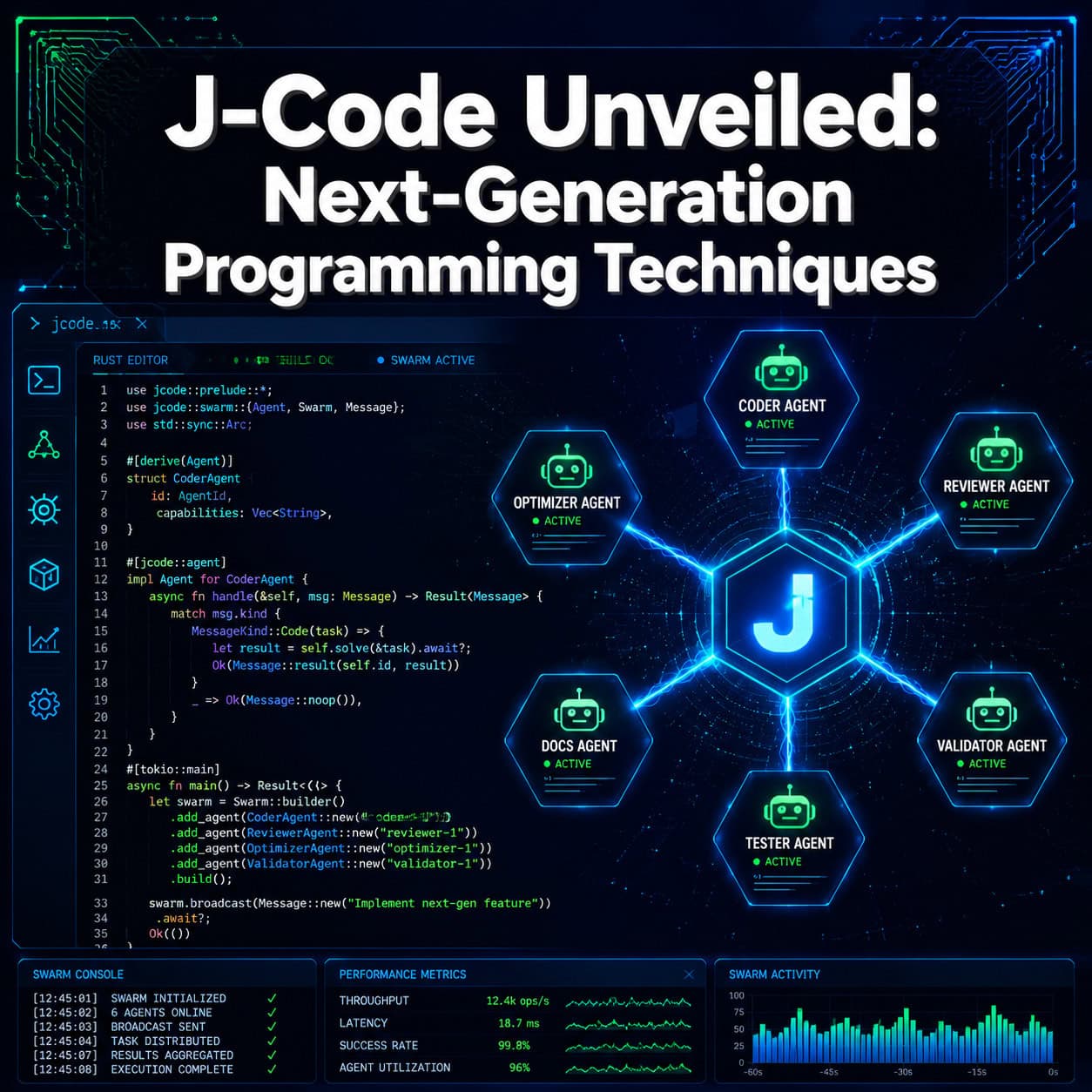
J-Code (jcode) is an open-source AI coding agent built in Rust that boots in 14ms, uses only 27.8MB of RAM, and supports multi-agent swarm workflows from the terminal. It represents a shift toward resource-efficient, self-improving programming tools that outperform Python and Node.js-based alternatives by orders of magnitude in speed and memory usage. This guide covers its architecture, practical applications, and how it fits into next-generation programming workflows in 2026.
Key Takeaways
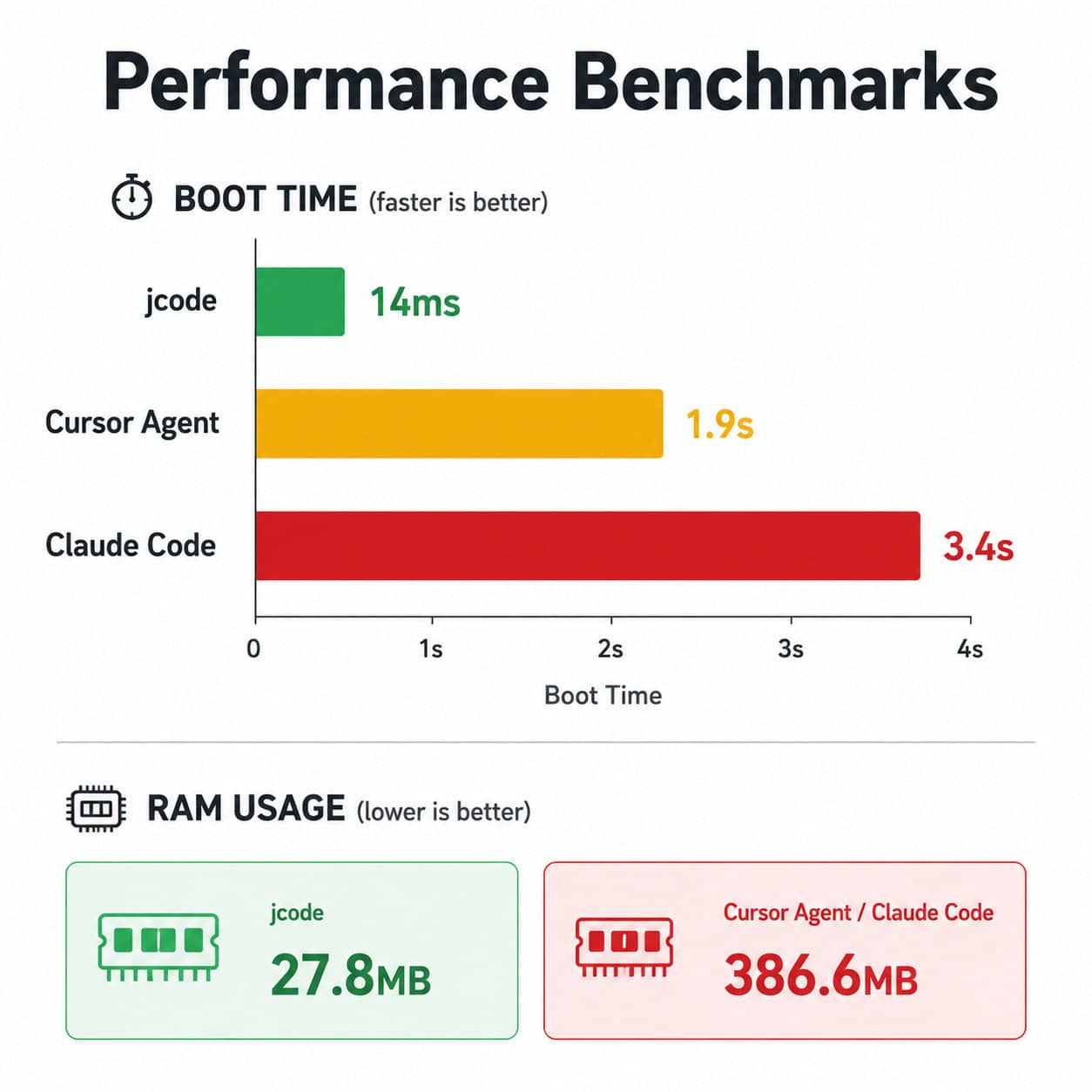
- jcode boots 245x faster than Claude Code (14ms vs. 3.4s) and uses 93% less RAM (27.8MB vs. 386.6MB)
- Built entirely in Rust for memory safety, concurrency, and zero-cost abstractions
- Native TUI (Terminal User Interface) designed for DevOps and terminal-first developers
- Supports 90K+ context handling when paired with Claude, enabling complex multi-file operations
- Self-dev mode allows jcode to modify and improve its own codebase
- Multi-agent swarm architecture enables parallel task execution across coding agents
- Semantic memory persists context across sessions without ballooning resource usage
- Open-source with active community development on GitHub (trended April 30, 2026)
- Scales to 10 sessions at 117MB total RAM vs. competitors using 3.2GB+
- No vendor lock-in: works with multiple LLM providers via OAuth integration
What Is jcode and Why Does It Matter for Next-Generation Programming?
jcode is a resource-efficient, open-source AI coding agent with a native Terminal User Interface, built entirely in Rust. It matters because it solves the core problem with existing AI coding tools: they’re slow, memory-hungry, and can’t scale to real-world multi-session workflows.
On May 5, 2026, DevOps expert Chris Short highlighted jcode on X as a “resource-efficient, open source AI coding agent with native TUI, built in Rust,” noting its growing traction in DevOps communities. The tool gained significant visibility when its GitHub repository (1jehuang/jcode) trended on April 30, 2026, following a podcast feature.
Here’s what makes jcode different from other AI coding assistants:
- Speed: 14ms boot time means it’s ready before you finish pressing Enter
- Efficiency: 27.8MB RAM footprint lets you run multiple instances without system slowdown
- Self-improvement: The self-dev mode allows the tool to iterate on its own code
- Swarm capability: Native multi-agent coordination for parallel coding tasks
For developers who spend their days in the terminal, jcode removes the friction that makes other AI tools feel like overhead rather than help. If you’re interested in how AI tools are changing development workflows, our comprehensive guide to AI-powered content generation tools covers the broader landscape.
How Does jcode’s Rust Architecture Enable These Performance Gains?
Rust’s ownership model and zero-cost abstractions allow jcode to achieve performance that’s physically impossible in Python or Node.js-based tools. There’s no garbage collector pausing execution, no interpreter overhead, and no runtime bloat.

A PyShine architecture review published on April 29, 2026, positioned jcode as achieving “order-of-magnitude” performance gains specifically because of its Rust foundation. Here’s why that matters in practice:
Memory Safety Without Garbage Collection
Rust guarantees memory safety at compile time. This means jcode never experiences the unpredictable pauses that plague Python-based tools when their garbage collectors run. For a coding agent handling 90K+ tokens of context, this difference is the gap between smooth interaction and noticeable lag.
Concurrency That Actually Scales
Rust’s async runtime (tokio) enables jcode to manage multiple agent threads without the Global Interpreter Lock (GIL) that limits Python tools. When running swarm operations with 5-10 parallel agents, jcode maintains its low memory profile because Rust threads share memory safely.
Practical Impact on Developer Workflows
| Metric | jcode (Rust) | Claude Code (Python) | OpenCode (Python) |
|---|---|---|---|
| Boot time | 14ms | 3.4s | ~2s |
| RAM (single session) | 27.8MB | 386.6MB | ~320MB |
| RAM (10 sessions) | 117MB | N/A | 3.2GB |
| Native swarm support | Yes | No | No |
| Self-dev mode | Yes | No | No |
These numbers come from PyShine’s benchmark comparison. The 10-session scaling is particularly telling: OpenCode balloons to 3.2GB while jcode stays at 117MB. For developers running multiple projects simultaneously, this is the difference between a usable system and one that’s swapping to disk.
This kind of performance optimization matters beyond coding agents. Similar principles apply when optimizing web performance in production environments.
What Is the Multi-Agent Swarm Architecture and How Do You Use It?
jcode’s swarm architecture lets you spawn multiple AI coding agents that work on different parts of a codebase simultaneously, coordinated through a central orchestrator. Think of it as parallel processing for code generation and refactoring.

How Swarms Work in Practice
- Define the task scope — You describe a high-level objective (e.g., “refactor the authentication module and add unit tests”)
- Agent spawning — jcode creates specialized agents for each subtask (refactor agent, test agent, review agent)
- Parallel execution — Agents work simultaneously on their assigned portions
- Coordination — The orchestrator manages dependencies and prevents conflicts
- Merge and validate — Results are combined and checked for consistency
When to Use Swarms vs. Single Agent
Choose swarms if:
- Your task involves multiple independent files or modules
- You need both implementation and testing done together
- You’re working on a large refactoring that can be parallelized
- Time matters more than token cost
Stick with single agent if:
- The task is sequential and each step depends on the previous one
- You’re debugging a specific, narrow issue
- Context sharing between subtasks is critical
- You’re working with a small codebase where parallelism adds overhead
Common Mistake: Over-Parallelizing
A frequent error is splitting tasks that have tight dependencies into parallel agents. If Agent A’s output is needed by Agent B, you’ll waste time on coordination overhead. The rule of thumb: if you’d need to explain one agent’s output to another, keep them sequential.
J-Code Unveiled: A Comprehensive Guide to Next-Generation Programming Techniques — The Self-Dev Mode
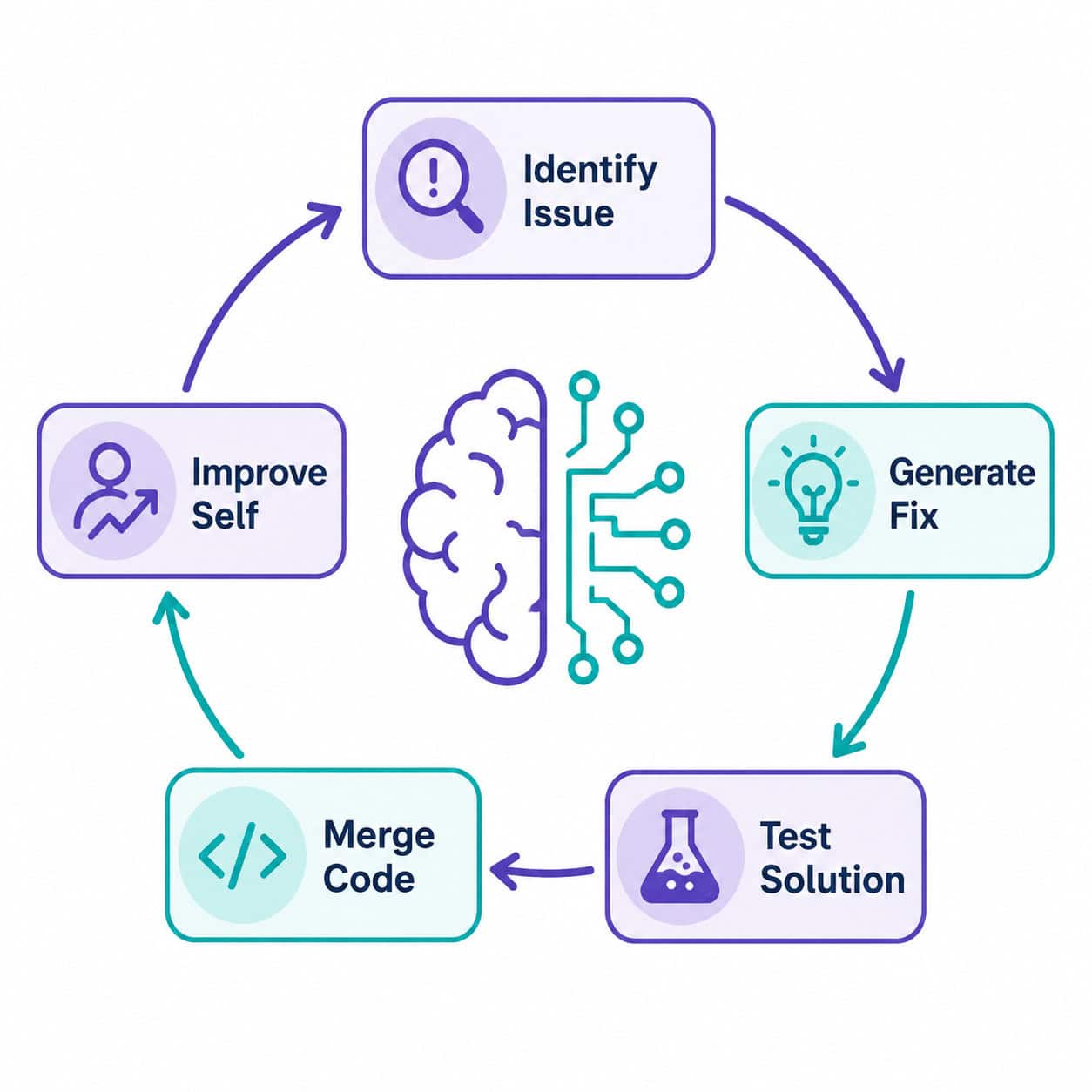
Self-dev mode is jcode’s most distinctive feature: the tool can modify, test, and improve its own source code. This creates a feedback loop where the coding agent literally gets better at being a coding agent.

How Self-Dev Works
The self-dev loop follows this cycle:
- Issue identification — jcode detects a limitation or bug in its own behavior
- Solution generation — It proposes a code change to its own Rust source
- Testing — The proposed change runs through the existing test suite
- Validation — If tests pass, the change is staged for review
- Integration — Approved changes merge into the codebase
The Risk Factor
This is where honest assessment matters. Reddit discussions (r/ClaudeAI, March 2026) note that self-improving agents risk introducing subtle bugs, especially when the underlying LLM isn’t strong enough to reason about complex system-level code. A weaker model modifying performance-critical Rust code could introduce memory issues that only surface under load.
Mitigation strategies:
- Always review self-dev changes before merging to production
- Run the full test suite, not just the tests the agent thinks are relevant
- Use self-dev mode for non-critical improvements (documentation, error messages, CLI ergonomics)
- Reserve manual review for anything touching core architecture
Who Should Use Self-Dev Mode
Self-dev is most valuable for:
- Open-source contributors who want to accelerate jcode’s development
- Teams customizing jcode for their specific workflows
- Researchers studying self-improving AI systems
It’s not recommended for production environments where stability is the priority.
How Does jcode Compare to Other AI Coding Tools in 2026?
jcode wins on raw efficiency and terminal-native workflows but trades off GUI polish and broader IDE integration. Your choice depends on whether you live in the terminal or prefer visual interfaces.
Detailed Comparison
| Feature | jcode | Claude Code | Cursor Agent | OpenCode |
|---|---|---|---|---|
| Boot time | 14ms | 3.4s | 1.9s | ~2s |
| RAM usage | 27.8MB | 386.6MB | ~200MB | ~320MB |
| Interface | TUI | TUI/Web | IDE plugin | TUI |
| Swarm support | Native | No | No | No |
| Self-dev mode | Yes | No | No | No |
| Semantic memory | Yes | Limited | No | No |
| Context window | 90K+ (Claude) | 200K (native) | Varies | Varies |
| UI/UX polish | Minimal | Good | Excellent | Basic |
| Language | Rust | Python | TypeScript | Python |
Decision Framework
Choose jcode if:
- You work primarily in the terminal
- You run multiple AI sessions simultaneously
- Resource efficiency matters (remote servers, containers, CI/CD)
- You want multi-agent workflows
- You value open-source transparency
Choose Cursor Agent if:
- You prefer visual IDE integration
- UI polish and discoverability matter to you
- You’re working on frontend code where visual preview helps
- You don’t need multi-session scaling
Choose Claude Code if:
- You need the largest context window (200K tokens native)
- You want Anthropic’s direct support and updates
- Terminal use is occasional, not primary
- Boot time isn’t a concern for your workflow
For developers building web applications, understanding how tools connect across the design-to-code pipeline is valuable. Our guide on Figma to code plugins covers that workflow.
What Is Semantic Memory and Why Does It Change Context Management?
Semantic memory in jcode means the agent remembers relevant context across sessions without storing everything in RAM. It indexes past interactions by meaning, not just recency, so it retrieves what’s actually useful for the current task.
How It Differs from Standard Context Windows
Standard AI tools use a sliding context window: once tokens fall off the end, they’re gone. You have to re-explain things. Semantic memory works differently:
- Indexed by relevance, not chronology
- Persists across sessions without keeping everything in memory
- Retrieves selectively based on the current task’s semantic similarity to past work
- Scales efficiently because only retrieved context loads into RAM
Chris Short specifically called out semantic memory as a “skill ceiling raiser” because it lets experienced developers build on previous sessions without the manual context-setting that wastes time with other tools.
Practical Example
Say you spent Tuesday refactoring an authentication module. On Thursday, you start working on the authorization layer. jcode’s semantic memory recognizes the relationship and automatically surfaces relevant decisions, patterns, and constraints from Tuesday’s session — without you asking.
Edge Case: When Semantic Memory Hurts
If you’ve made significant architectural changes between sessions, old semantic context can be misleading. The agent might suggest patterns based on code that no longer exists. The fix: use jcode’s context reset command when starting work after major refactors.
This kind of intelligent context management parallels how AI-powered content optimization tools learn from previous content performance to improve future recommendations.
Getting Started with jcode: Installation and First Steps
Setting up jcode takes under 5 minutes on most systems. Here’s the process:
Prerequisites
- Rust toolchain (rustup) installed
- An API key for your preferred LLM provider (Claude recommended for 90K+ context)
- A terminal emulator that supports modern TUI rendering (most do)
Installation Steps
Install via cargo:
cargo install jcodeConfigure your LLM provider:
jcode config --provider claude --api-key YOUR_KEYVerify installation:
jcode --versionShould display version and confirm 14ms boot (you’ll barely see the loading).
Run your first session:
jcode start --project ./your-projectEnable semantic memory (optional but recommended):
jcode config --semantic-memory on
First Session Tips
- Start with a small, well-defined task to learn the interaction model
- Use
/helpwithin the TUI to see available commands - Try
/swarmon a multi-file task to see parallel agents in action - Check RAM usage with your system monitor to confirm the low footprint
Common Setup Mistake
Don’t skip the project directory flag (--project). Without it, jcode lacks filesystem context and can’t effectively navigate your codebase. It’ll still work for general coding questions, but you lose the file-aware features that make it powerful.
For those building web projects, jcode pairs well with no-code website design platforms for rapid prototyping workflows where AI handles the backend logic.
What Are the Limitations and Risks of Using jcode?
jcode isn’t perfect. Understanding its limitations helps you use it effectively rather than fighting against its constraints.
Current Limitations
- No GUI: If you’re not comfortable in the terminal, the learning curve is steep
- LLM dependency: The quality of output depends entirely on the underlying model (Claude, GPT, etc.)
- Young ecosystem: Fewer plugins, integrations, and community resources than established tools
- Self-dev risks: Automated self-modification can introduce bugs that are hard to trace
- Limited IDE integration: No VS Code extension, no JetBrains plugin (yet)
Risk Assessment
| Risk | Severity | Mitigation |
|---|---|---|
| Self-dev introducing bugs | Medium | Review all self-dev PRs manually |
| Context hallucination from semantic memory | Low | Reset context after major refactors |
| API cost from swarm mode | Medium | Set token budgets per swarm session |
| Lock-in to terminal workflow | Low | jcode outputs standard code; switch tools anytime |
| Security of OAuth tokens | Low-Medium | Use environment variables, not config files |
Who Should NOT Use jcode
- Beginners who need visual feedback and guided interfaces
- Teams standardized on IDE-based tools where switching creates friction
- Projects requiring audit trails where self-dev mode’s automated changes complicate compliance
- Developers on Windows without WSL (TUI support is Linux/macOS-first)
For teams that prefer visual development environments, WordPress plugin development or drag-and-drop website builders might be more appropriate starting points.
FAQ
What does jcode stand for?
jcode is the project name for an AI coding agent created by developer 1jehuang. The “j” likely refers to the creator’s name. It’s not related to the J programming language [6] or medical J-codes used in healthcare billing [8].
Is jcode free to use?
Yes. jcode is open-source software available on GitHub. However, you’ll need API access to an LLM provider (like Claude or OpenAI), which has its own costs based on token usage.
What LLM providers does jcode support?
jcode supports Claude (recommended for 90K+ context handling), OpenAI models, and other providers via OAuth integration. The Reddit community (r/ClaudeAI) specifically notes its strong integration with Claude’s API.
Can jcode replace my IDE?
No. jcode is a coding agent, not an IDE. It handles AI-assisted code generation, refactoring, and analysis. You’ll still use your preferred editor for manual coding, debugging with breakpoints, and visual file management.
How does the 27.8MB RAM usage stay so low?
Rust’s zero-cost abstractions and lack of garbage collection overhead mean jcode only allocates memory it actively needs. There’s no runtime interpreter, no JIT compiler warming up, and no managed heap growing unpredictably.
Is self-dev mode safe to use?
It’s safe in the sense that changes require explicit approval before merging. The risk is subtle: an LLM might generate code that passes tests but introduces edge-case bugs. Always review self-dev output with the same rigor you’d apply to any pull request.
How does jcode handle large codebases?
Through semantic indexing. Rather than loading entire codebases into context, jcode indexes files by meaning and retrieves only relevant portions. This keeps RAM low while maintaining awareness of the full project structure.
Can I use jcode in CI/CD pipelines?
Yes, and this is one of its strongest use cases. The 14ms boot time and low RAM footprint make it practical to run in containers and automated pipelines where resources are constrained and speed matters.
What’s the difference between jcode and GitHub Copilot?
GitHub Copilot is an autocomplete tool embedded in your IDE. jcode is an autonomous agent that can plan, execute, and validate multi-step coding tasks independently. They serve different purposes and can be used together.
Does jcode work offline?
No. jcode requires API access to an LLM provider for its AI capabilities. The TUI interface itself runs locally, but code generation and analysis depend on cloud-based models.
Conclusion
J-Code Unveiled: A Comprehensive Guide to Next-Generation Programming Techniques shows that the future of AI-assisted development isn’t about bigger models or fancier UIs. It’s about efficiency, composability, and tools that respect your system resources while amplifying your capabilities.
Here’s what to do next:
- Try jcode if you’re a terminal-first developer — install it via cargo and run a small task to evaluate the speed difference yourself
- Start with single-agent mode before experimenting with swarms; learn the interaction model first
- Enable semantic memory early so it builds useful context from your first sessions
- Skip self-dev mode until you’re comfortable with the tool and have a test suite you trust
- Compare honestly — if your workflow is IDE-centric, jcode might not be the right fit, and that’s fine
The broader trend jcode represents matters more than any single tool: AI coding agents are moving toward Rust-based, resource-efficient architectures that can run everywhere from developer laptops to CI/CD containers. Whether jcode specifically becomes the standard or inspires the next generation of tools, the principles it demonstrates — speed, efficiency, multi-agent coordination, and self-improvement — are where programming is heading in 2026 and beyond.
JCode resources: Rust programming language and GitHub (open source hosting).
References
[1] Java The Comprehensive Guide To Java Programming For Professionals – https://www.scribd.com/document/911475508/Java-the-Comprehensive-Guide-to-Java-Programming-for-Professionals [6] J (programming Language) – https://en.wikipedia.org/wiki/J_(programming_language) [8] J Code Billing Updates For 2026 What Providers Must Prepare For – https://www.247medicalbillingservices.com/blog/j-code-billing-updates-for-2026-what-providers-must-prepare-for