
Last updated: May 11, 2026This article provides a comprehensive Cursor AI IDE Review, including details on its Features, Pricing, and Alternatives.
Quick Answer
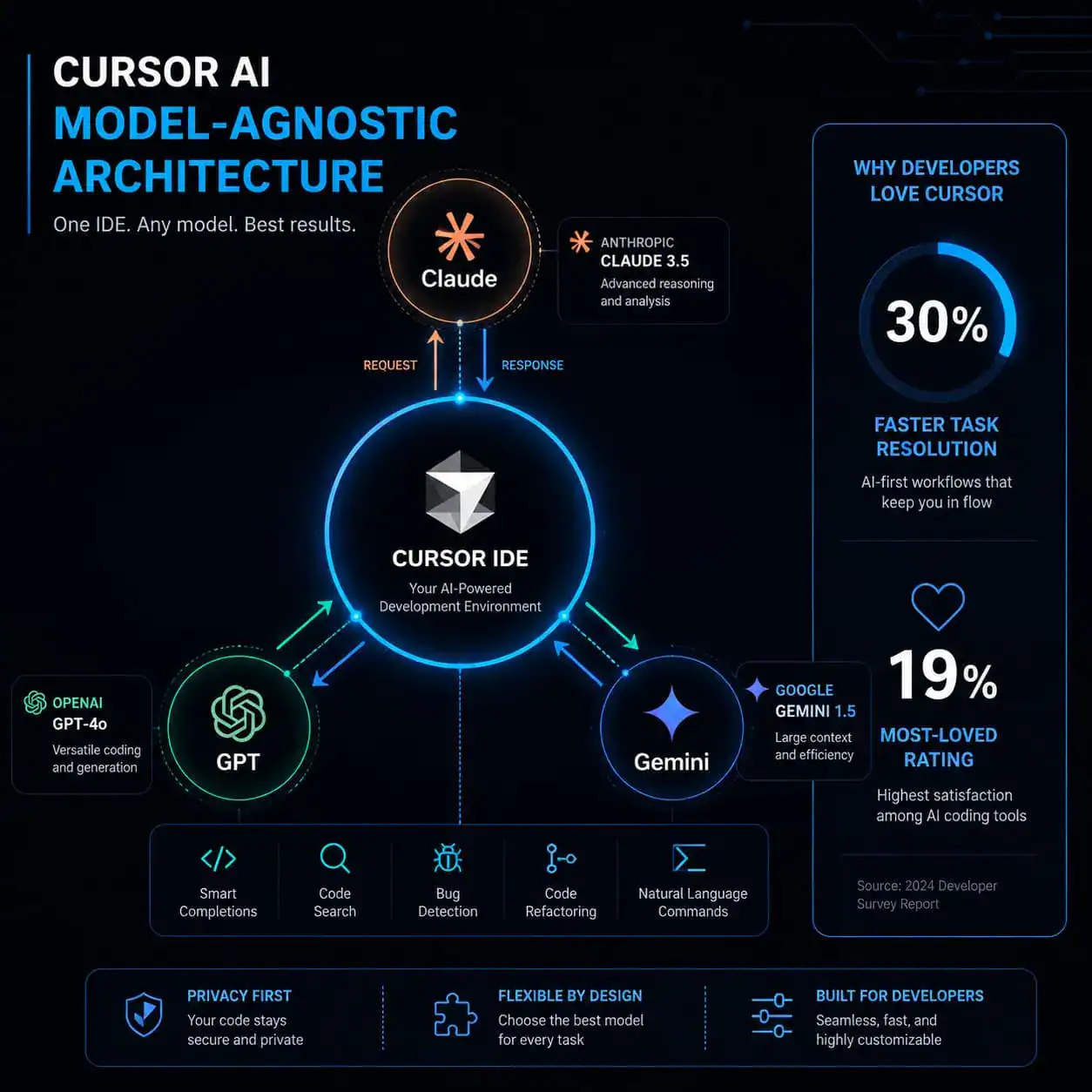
Cursor AI is a fork of VS Code that embeds large language models directly into the coding workflow, offering context-aware completions, multi-file editing, and autonomous coding agents. It supports multiple AI models (Claude, GPT, Gemini) and resolves coding tasks roughly 30% faster than GitHub Copilot according to independent benchmarks. Pricing starts at $20/month for the Pro plan, with a free tier available for evaluation.
Key Takeaways
- Cursor AI builds on VS Code’s familiar interface but adds deep AI integration including inline chat, codebase-aware suggestions, and agentic coding capabilities
- SpaceX signed a partnership deal with Cursor in April 2026, with an option to acquire the company for $60 billion [6]
- The
/multitaskfeature (released May 2026) allows parallel async subagents to handle multiple tasks simultaneously [1] - Cursor is model-agnostic: you can switch between Claude Sonnet, GPT-5.4, and other models depending on the task
- JetBrains’ April 2026 survey placed Cursor at 19% “most-loved” rating, behind Claude Code’s 46%, but Cursor leads in revenue growth at 20x Copilot’s pace
- Enterprise admin controls now include granular model blocking, spend alerts, and per-user usage analytics [4]
- A critical Git RCE vulnerability was patched in version 2.5 (May 2026), with no known in-the-wild exploits [3]
- Main competitors include GitHub Copilot ($10/mo), Claude Code ($20/mo), Windsurf ($15/mo), and Cline (free, BYOK)
What Is Cursor AI and Why Does It Matter for Developers in 2026?
Cursor AI is a code editor built by Anysphere that takes VS Code’s open-source foundation and layers AI capabilities throughout the entire development experience. Unlike plugins that bolt AI onto an existing editor, Cursor redesigns the interaction model so the AI understands your full codebase, not just the file you’re editing.
Here’s what makes it different from a standard VS Code + Copilot setup:
- Codebase indexing: Cursor scans your entire project to provide suggestions that reference functions, types, and patterns from other files
- Agent mode: The AI can autonomously create files, run terminal commands, fix errors, and iterate on solutions [10]
- Multi-model support: Switch between Claude, GPT, or Gemini models mid-conversation based on what works best for the task
- Natural language editing: Highlight code and describe what you want changed in plain English
The tool matters because it represents a shift from “AI as autocomplete” to “AI as a coding partner.” For teams working on custom WordPress theme development or complex web applications, this distinction translates directly into faster iteration cycles.
Choose Cursor if: You want deep AI integration in a familiar VS Code environment and don’t mind paying $20/month. Skip it if: You need multi-IDE support or prefer terminal-based workflows.
How Does Cursor AI Compare to GitHub Copilot, Claude Code, and Other Alternatives?
Cursor beats Copilot on depth of AI integration and task resolution speed, but Copilot wins on price and IDE flexibility. Claude Code leads on benchmark scores but requires comfort with terminal-based workflows.
| Feature | Cursor | GitHub Copilot | Claude Code | Windsurf |
|---|---|---|---|---|
| Price | $20/mo | $10/mo | $20/mo | $15/mo |
| IDE Support | VS Code fork only | 6+ IDEs | Terminal-based | VS Code fork |
| SWE-bench Score | ~75% (estimated) | 55% | 80.8% | Not published |
| Agent Mode | Yes | Limited | Yes (strong) | Yes |
| Model Options | Multi-model | GPT-based | Claude only | Multi-model |
| Best For | IDE-integrated AI coding | Budget-conscious teams | Advanced agents | Beginners |
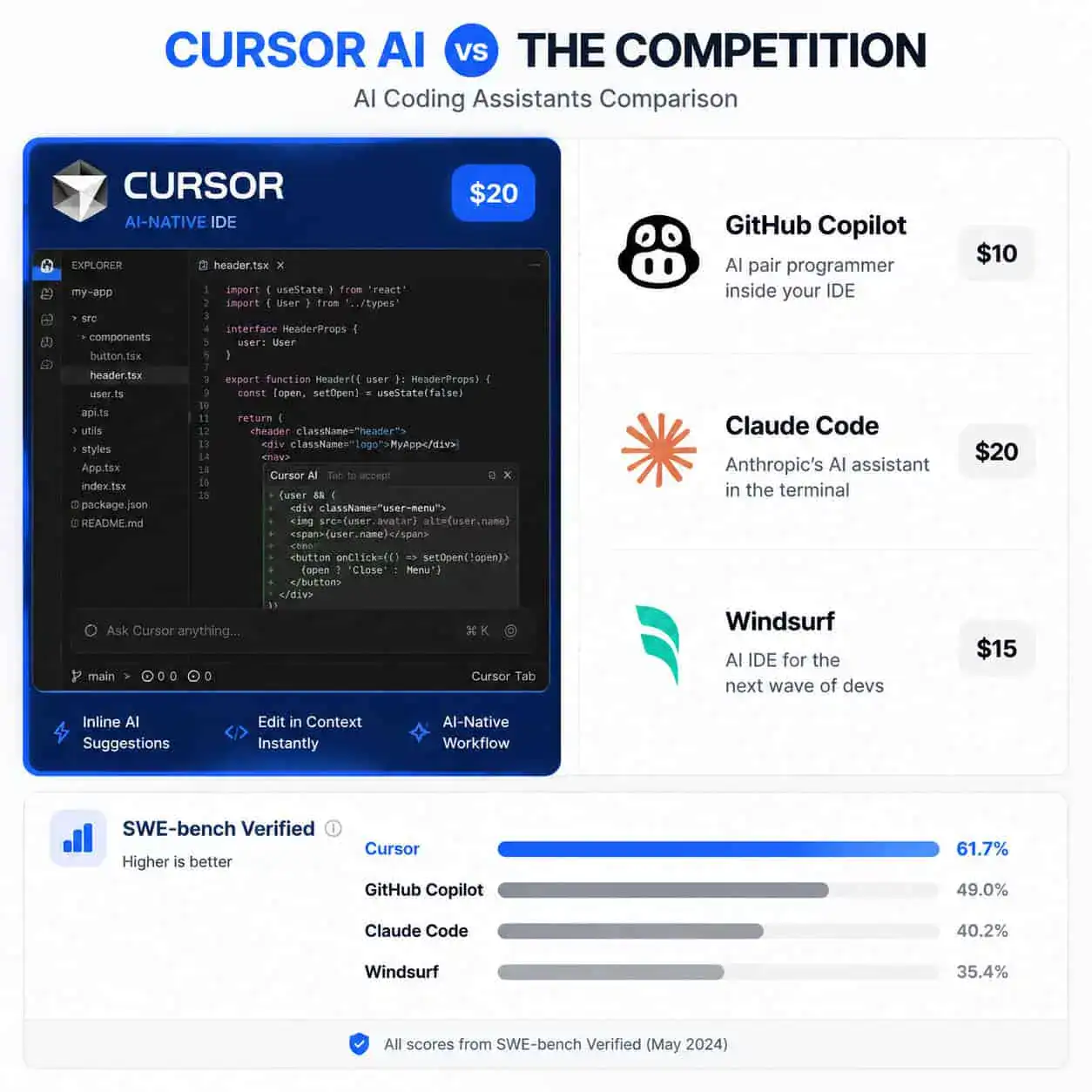
A common mistake: choosing based on benchmarks alone. SWE-bench scores measure autonomous problem-solving on specific tasks. For day-to-day coding where you’re guiding the AI with context, Cursor’s inline integration and speed often matter more than raw benchmark numbers.
If you’re exploring AI tools beyond coding, our comprehensive guide to AI-powered content generation tools covers the broader landscape.
What Are the Latest Features in Cursor AI (May 2026)?
The May 6, 2026 release introduced several features focused on speed and parallel workflows [1]:
/multitaskcommand: Spawns parallel async subagents that work on different parts of your codebase simultaneously. Useful for large refactoring jobs where multiple files need coordinated changes.- New PR review experience: AI reviews pull requests with contextual understanding of your project’s patterns and conventions.
- Faster plan execution: The agent’s planning phase now executes more quickly, reducing wait times between steps.
- Improved long-chat handling: Extended conversations no longer degrade in quality as context windows fill up.
Earlier in 2026, Cursor rolled out its agentic coding system [10], which allows the AI to:
- Create and modify multiple files without manual intervention
- Run tests and fix failures iteratively
- Execute terminal commands as part of a multi-step plan
- Self-correct when it encounters errors
Edge case to watch: The /multitask feature works best when subtasks are independent. If your parallel agents need to modify the same files, you may encounter merge conflicts that require manual resolution.
Is Cursor AI Secure Enough for Enterprise Use?
Yes, but with caveats. Cursor has invested heavily in enterprise controls since early 2026, though a recent vulnerability highlights the need for vigilance.
Security incident (May 2026): A critical Git RCE vulnerability was discovered where malicious repositories could trigger arbitrary code execution via AI agents. Cursor patched this in version 2.5 with no known in-the-wild exploits [3]. The recommendation from security researchers: treat Cursor agents as “semi-autonomous teammates with limited access” [3].
Enterprise controls added May 7, 2026 [4]:
- Granular model blocking (restrict which AI models teams can use)
- Spend alerts and budget caps per user or team
- Usage analytics filtered by user and product (Bugbot, Security Review, etc.)
Opsera partnership (May 8, 2026): Opsera embedded DevSecOps Agents directly into Cursor’s IDE, enabling real-time security scanning during code generation [2]. This addresses a key enterprise concern: AI-generated code that introduces vulnerabilities.

For teams building WordPress plugins or other production software, these controls mean you can adopt Cursor without sacrificing your security posture. But always review AI-generated code before merging, especially for authentication, data handling, and API integrations.
Who Should Use Cursor AI (and Who Shouldn’t)?
Cursor is ideal for:
- Professional developers who already use VS Code and want AI deeply integrated into their workflow
- Teams working on large codebases where context-aware suggestions save significant time
- Developers who want to switch between AI models based on the task (Claude for refactoring, GPT for speed)
- Organizations willing to pay $20/user/month for productivity gains
Cursor is NOT ideal for:
- Developers committed to JetBrains IDEs (IntelliJ, PyCharm, WebStorm) since Cursor only supports its VS Code fork
- Teams on tight budgets where GitHub Copilot at $10/month covers their needs
- Beginners who might benefit more from Windsurf’s guided experience at $15/month
- Developers who prefer terminal-first workflows (Claude Code is better here)
If you’re working in the no-code space, Cursor probably isn’t relevant to your workflow. But for anyone writing actual code, it’s worth evaluating.
How Much Does Cursor AI Cost and Is It Worth the Price?
Cursor offers three tiers:
- Free (Hobby): Limited completions and chat messages per month. Good for evaluation only.
- Pro ($20/month): Unlimited completions, 500 fast premium requests/month, access to all models.
- Business ($40/user/month): Everything in Pro plus admin controls, centralized billing, enforced privacy mode, and team analytics.
Is it worth $20/month? For most professional developers, yes. If Cursor saves you even 30 minutes per day (conservative based on reported 30-40% productivity gains), that’s over 10 hours per month. At any reasonable hourly rate, $20 pays for itself many times over.
Common mistake: Subscribing to Pro but not investing time in learning the agent mode and /multitask features. The basic autocomplete works fine, but the real value comes from using Cursor as an autonomous coding partner.
What’s the SpaceX Deal and What Does It Signal?
On April 21, 2026, SpaceX signed a deal with Cursor that includes a $60 billion acquisition option exercisable later in 2026, or alternatively a $10 billion partnership payment [6]. This signals two things:
- Enterprise validation: SpaceX choosing Cursor over alternatives confirms the tool’s capability for mission-critical software development
- Market positioning: The valuation places Cursor among the most valuable AI startups, reflecting investor confidence in IDE-integrated AI as the future of development
For individual developers, this means Cursor likely has the funding and momentum to continue rapid development. For the broader AI tools ecosystem, it signals that AI coding assistants are becoming infrastructure-level investments, not just productivity add-ons.
How to Get Started with Cursor AI
- Download: Visit cursor.com and install the editor (available for macOS, Windows, Linux)
- Import settings: Cursor can import your VS Code extensions, themes, and keybindings automatically
- Index your codebase: Open your project and let Cursor index it (takes 1-5 minutes depending on size)
- Try inline chat: Press Cmd+K (or Ctrl+K) to ask the AI to generate or modify code
- Enable agent mode: Use the chat panel to give multi-step instructions and let the agent work autonomously
- Experiment with models: Try different AI models for different tasks to find what works best for your codebase
Pro tip: Start with a small, well-defined task (like writing tests for an existing function) before asking the agent to handle complex multi-file changes. This builds your intuition for how to prompt effectively.
For developers working on design-to-development workflows, Cursor pairs well with Figma-to-code tools since you can use the AI to refine and optimize generated code.
FAQ
Can I use my existing VS Code extensions in Cursor? Yes. Cursor is a fork of VS Code and supports the vast majority of VS Code extensions. You can import them during setup or install them from the marketplace within Cursor.
Does Cursor send my code to external servers? By default, yes, code context is sent to AI model providers for processing. Business plans include a privacy mode that limits data sharing. You can also configure which files are excluded from AI indexing.
Is Cursor free to use? There’s a free tier with limited completions and chat messages. For regular use, you’ll need the Pro plan at $20/month.
Can Cursor replace a junior developer? No. Cursor accelerates experienced developers but still requires human judgment for architecture decisions, code review, and understanding business requirements. Think of it as a force multiplier, not a replacement.
What programming languages does Cursor support? All languages supported by VS Code, which includes virtually every mainstream language. AI suggestions work best for Python, JavaScript/TypeScript, Go, Rust, and Java due to training data availability.
How does Cursor handle private/proprietary code? Business plans offer zero-retention policies with AI providers. Enterprise admin controls let you restrict which models process your code and set data handling policies [4].
Is Cursor better than GitHub Copilot? For deep AI integration and agentic workflows, yes. For budget-conscious teams or those using non-VS Code editors, Copilot remains a strong choice at half the price.
What happened with the security vulnerability? A Git RCE vulnerability in early May 2026 allowed malicious repos to trigger code execution via AI agents. It was patched in version 2.5 with no known exploits in the wild [3]. Always keep Cursor updated.
Can I use Cursor offline? Basic editing works offline, but AI features require an internet connection to communicate with model providers.
Does Cursor work for web development? Absolutely. It’s particularly strong for JavaScript/TypeScript projects. Developers building advanced WordPress automation or complex web applications report significant productivity gains.
Conclusion
Cursor AI represents the most complete vision of AI-integrated development available in 2026. It’s not perfect: the VS Code-only limitation frustrates some developers, the $20/month price is double Copilot’s, and you still need to review AI-generated code carefully. But for developers who want AI woven into every part of their workflow rather than bolted on as an afterthought, Cursor is the current leader.
Your next steps:
- Download the free tier and spend a week evaluating it on a real project
- Index your largest codebase and test the context-aware suggestions
- Try agent mode for a contained task like writing tests or refactoring a module
- Compare results against your current tool (Copilot, manual coding, etc.)
- If the productivity gain justifies $20/month, upgrade to Pro
The AI coding assistant market is moving fast. Whether Cursor maintains its lead depends on execution, but right now, it’s the tool that best demonstrates what AI-native development looks like.
More Cursor AI guides: check how to maximize Cursor AI free access per Reddit users, understand Cursor AI’s valuation and financial trajectory, and get a technical look at the advanced language model powering Cursor AI.
References
[1] Changelog – https://cursor.com/changelog [2] May 8 2026 Ai Updates From The Past Week Coder Agents Launch Snyk Claude Partnership Opsera Cursor Partnership And More – https://sdtimes.com/ai/may-8-2026-ai-updates-from-the-past-week-coder-agents-launch-snyk-claude-partnership-opsera-cursor-partnership-and-more/ [3] Cursor News May 2026 – https://blog.mean.ceo/cursor-news-may-2026/ [4] Cursor – https://releasebot.io/updates/cursor [6] Spacex Is Working With Cursor And Has An Option To Buy The Startup For 60 Billion – https://techcrunch.com/2026/04/21/spacex-is-working-with-cursor-and-has-an-option-to-buy-the-startup-for-60-billion/ [10] Cursor Is Rolling Out A New System For Agentic Coding – https://techcrunch.com/2026/03/05/cursor-is-rolling-out-a-new-system-for-agentic-coding/