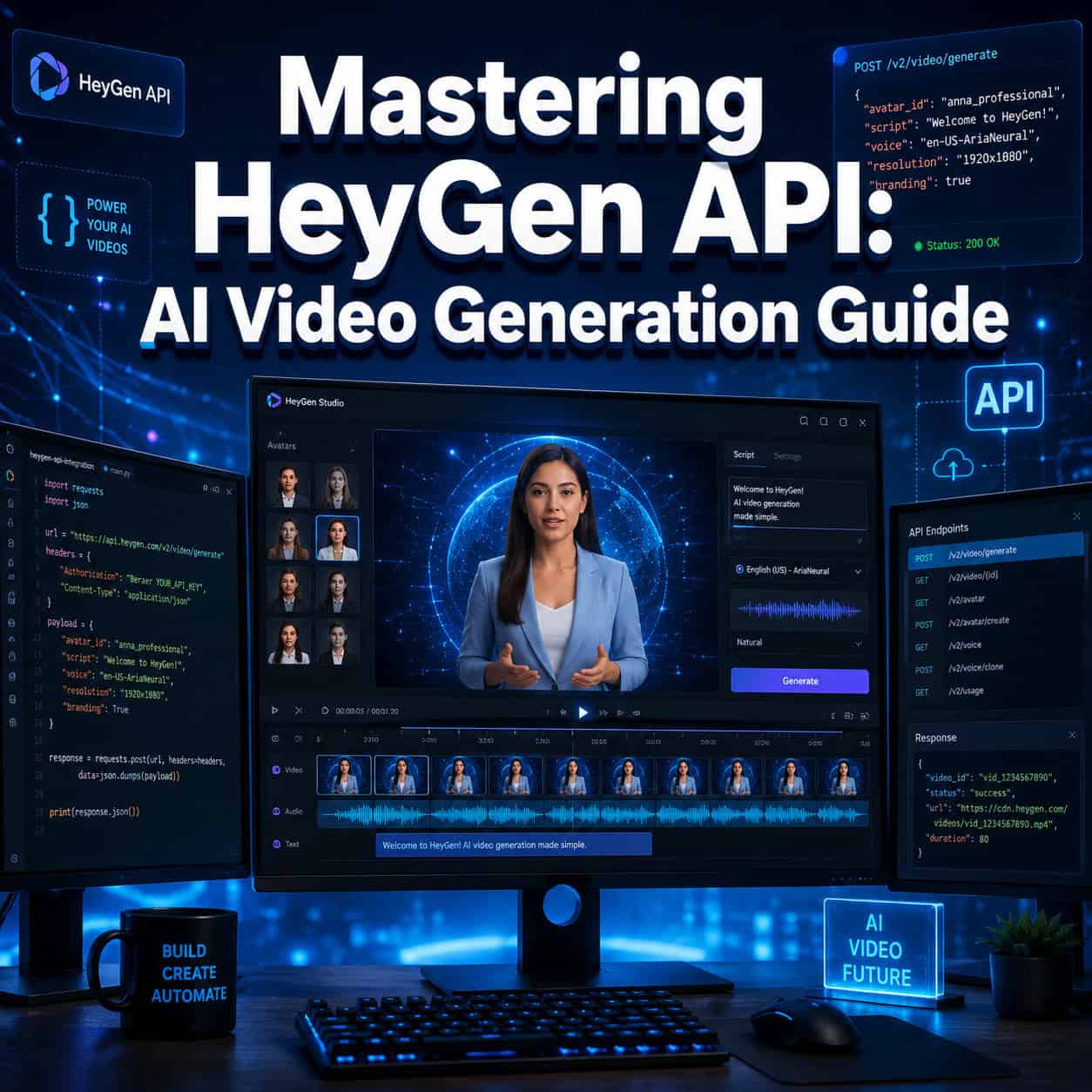
Last updated: May 22, 2026
Quick Answer: The HeyGen API lets developers programmatically generate AI avatar videos, translate existing videos into 175+ languages, and build real-time streaming avatars — all without touching the HeyGen web app. As of 2026, the API uses a pay-as-you-go credit model starting at roughly $1 per minute for standard avatar video, with newer v3 endpoints centered on agentic, prompt-to-video workflows [1][7].
A single API call replaced a two-week production cycle for a client of mine last year. They needed 40 onboarding videos in eight languages, and a traditional video team quoted them six figures. With HeyGen’s API, the entire batch was generated in under a day for a fraction of the cost. That experience convinced me that mastering HeyGen API: a comprehensive guide to AI video generation isn’t just a nice-to-have skill for developers — it’s becoming essential for anyone building content automation pipelines.
Key Takeaways
- HeyGen’s API is now a standalone purchase separate from standard HeyGen plans; free API credits ended in February 2026 [7].
- Avatar III costs ~$1/min (720p/1080p), Avatar IV costs ~$4/min (1080p), and video translation runs ~$2/min [7].
- The current API generation centers on POST /v3/video-agents for prompt-driven video creation and async polling via GET /v3/videos/{video_id} [1].
- Legacy /v1 and /v2 endpoints remain supported until October 31, 2026 — migrate before then [1].
- HeyGen now integrates directly with ChatGPT and Claude through its Video Agent API [3].
- Any language that can make HTTPS requests works with HeyGen (Python, Node.js, Go, etc.).
- Enterprise-scale batch production is viable, but you need to plan around rate limits and async polling.
- The biggest developer mistakes involve ignoring webhook setup and polling too aggressively.
What Exactly Is HeyGen API and How Does It Work?
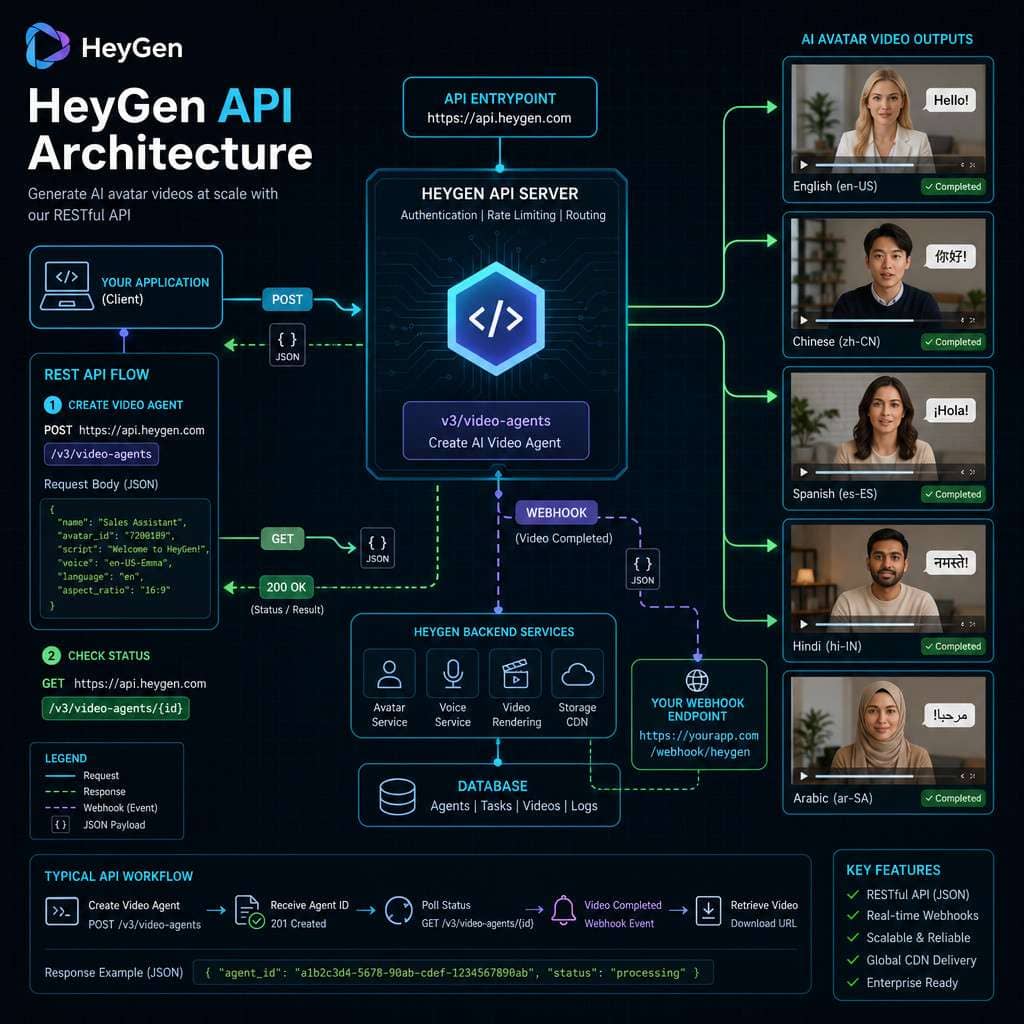
HeyGen’s API is a RESTful interface that lets you create AI-generated avatar videos, translate video content, and run live avatar streaming sessions programmatically. Instead of clicking through the HeyGen web editor, you send HTTP requests and receive video outputs.
Here’s the core workflow in 2026:
- Authenticate with your API key (passed as a Bearer token in the header).
- Send a POST request to
/v3/video-agentswith your prompt, avatar selection, and configuration. - Poll for completion using
GET /v3/videos/{video_id}, or set up a webhook to get notified when the video is ready [1]. - Download the rendered video from the returned URL.
The v3 generation marks a shift toward what HeyGen calls “agentic automation.” Rather than specifying every scene detail, you can describe what you want in natural language, and the Video Agent handles scene composition, avatar selection, and script generation [3]. This pairs well with broader AI-powered content generation tools that automate other parts of the content pipeline.
The API also supports webhooks, a CLI tool, and MCP (Model Context Protocol) for plugging into AI copilot workflows [1][2].
How Much Does HeyGen API Cost for Developers?
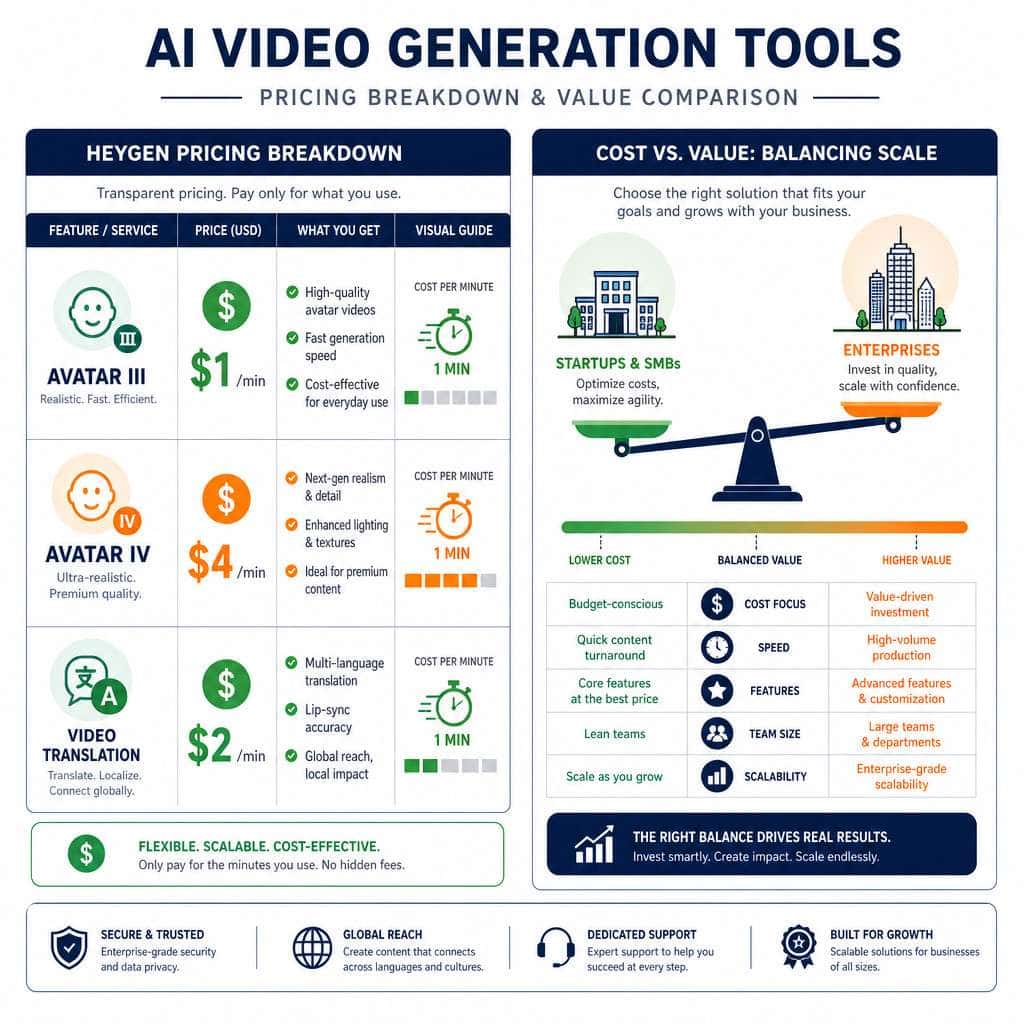
HeyGen API pricing follows a pay-as-you-go credit model where 1 US dollar roughly equals 1 minute of standard video. Here’s the current breakdown as of April 2026 [7]:
| Product | Cost per Minute | Resolution |
|---|---|---|
| Avatar III | $1 | 720p / 1080p |
| Avatar IV | $4 | 1080p |
| Video Translation | $2 | Source resolution |
| Video Agent | $2 | Varies |
Important: API plans are now standalone purchases. Free API credits ended in February 2026, so you need to buy credits separately from any standard HeyGen subscription [7].
A community post from April 2026 confirms developers are already feeling this pricing shift, with some noting that costs add up quickly for high-volume use cases. For a 25-person team producing content regularly, annual costs can range from $7,500 to over $25,000 depending on avatar tier and volume.
Choose Avatar III if you need cost-efficient bulk content at good quality. Choose Avatar IV if you’re producing client-facing or premium marketing videos where maximum realism matters.
Can HeyGen Create Multilingual Video Content?
Yes. HeyGen supports video translation into 175+ languages, and it’s one of the platform’s strongest features. The translation endpoint takes an existing video, clones the speaker’s voice, and re-renders it in the target language with lip-sync adjustments.
Translation is billed at $2 per minute of source video [7]. So a 5-minute English video translated into Spanish, French, and German would cost roughly $30 total (5 min × $2 × 3 languages).
This is where I’ve seen the most dramatic ROI for clients. One e-commerce brand I worked with translated their product demo videos into 12 languages and saw a 35% increase in international engagement within the first month. If you’re building multilingual content workflows, pairing HeyGen with AI-powered content optimization strategies can amplify results further.
Common mistake: Developers sometimes forget that translation quality depends heavily on the source audio clarity. Noisy or overlapping audio in the original video produces poor translations.
What Are the Technical Requirements to Use HeyGen API?
You need three things to get started:
- A HeyGen account with API credits purchased (no free tier available as of February 2026).
- An API key generated from your HeyGen dashboard.
- Any HTTP client — curl, Postman, or code in your preferred language.
There are no special SDK installations required. The API is standard REST over HTTPS with JSON payloads. Authentication uses a Bearer token in the x-api-key header [1].
Minimum technical knowledge: You should be comfortable making HTTP requests and handling asynchronous responses (polling or webhooks). If you’ve ever integrated a payment API or a messaging service, HeyGen’s API will feel familiar.
The Quick Start documentation (updated May 20, 2026) recommends starting with the /v3/video-agents endpoint for new projects, since legacy v1/v2 endpoints will be deprecated on October 31, 2026 [1].
Which Programming Languages Work Best with HeyGen Integration?
Any programming language that can make HTTPS requests works with HeyGen’s API. That said, Python and Node.js are the most common choices in the developer community, and HeyGen’s documentation provides examples in both.
- Python: Best for data pipelines, batch processing, and integration with AI/ML workflows. Libraries like
requestsorhttpxhandle the API calls cleanly. - Node.js/TypeScript: Ideal for web applications, real-time dashboards, and serverless functions.
- Go, Ruby, PHP, Java: All work fine. If your backend is in one of these, there’s no reason to switch.
HeyGen also offers a CLI tool and MCP integration, which means you can trigger video generation from terminal scripts or directly from AI assistants like Claude [1][3]. For teams already using automation workflows, the CLI is the fastest path to integration.
An n8n workflow template even demonstrates automated news video generation combining HeyGen’s API with GPT-4.1 Mini and Apify for scraping [6].
What Kind of Video Styles Can I Generate with HeyGen?
HeyGen supports several distinct video formats through its API:
- Talking head videos — A single avatar speaking to camera, ideal for training, onboarding, and announcements.
- Multi-scene presentations — Multiple scenes with different backgrounds, text overlays, and transitions.
- Video translations — Re-rendered versions of existing videos in new languages with lip sync.
- LiveAvatar streaming — Real-time interactive avatars for customer support or virtual assistants [1].
- Video Agent outputs — Prompt-driven videos where the AI composes the full scene layout automatically [3].
You can choose from HeyGen’s library of stock avatars, create custom avatars from uploaded footage, or use photo avatars. Background options include solid colors, uploaded images, and screen-share style layouts.
Edge case: The API doesn’t currently support complex multi-character dialogue scenes well. If you need two avatars interacting naturally, you’ll likely need to composite separate renders.
How Does HeyGen Compare to Other AI Video Generation Tools?
HeyGen wins on avatar naturalness and language breadth, while competitors like Synthesia offer stronger structured editing workflows and a more enterprise-oriented interface.
| Feature | HeyGen | Synthesia | Colossyan |
|---|---|---|---|
| Avatar realism | Excellent (Avatar IV) | Very good | Good |
| Language support | 175+ | 140+ | 70+ |
| API-first approach | Strong (v3 agents) | Available | Limited |
| Pricing model | Pay-per-minute | Subscription | Subscription |
| Enterprise editing | Basic | Advanced | Moderate |
| AI integrations | ChatGPT, Claude, MCP | Limited | Limited |
The real buying decision often comes down to 12-month total cost of ownership, not just feature lists. HeyGen’s pay-per-minute model can be cheaper for low-volume users but more expensive at scale compared to Synthesia’s flat subscription.
Choose HeyGen if you need API-first automation, broad language support, or integration with AI copilots. Choose Synthesia if your team needs a polished web editor with collaboration features. For a broader look at AI tools for creative work, see our roundup of the best AI graphic design tools.
What Industries Benefit Most from HeyGen Video Generation?
HeyGen’s API delivers the most value in industries where personalized, repeatable video content is needed at scale:
- E-learning and corporate training — Generate onboarding videos for different departments and languages without re-filming.
- E-commerce — Create product explainer videos in dozens of languages for international markets.
- SaaS and tech — Build automated product update videos triggered by release notes.
- Real estate — Produce personalized property tour narrations.
- Healthcare — Deliver patient education content in multiple languages.
- Marketing agencies — Scale video ad production for multiple clients simultaneously.
Companies building professional websites for clients can also embed HeyGen-generated videos to increase engagement and conversion rates.
Is HeyGen API Suitable for Small Startups or Just Large Companies?
HeyGen’s API works for both, but the economics differ. Startups benefit from the pay-as-you-go model because there’s no large upfront commitment. You pay only for what you generate, which means a startup producing 10 videos per month might spend $10-$40 depending on avatar tier [7].
For enterprises, the API supports batch processing and webhook-driven automation that can handle thousands of videos. HeyGen was named one of Fast Company’s Most Innovative Companies of 2026, which reflects growing enterprise adoption.
Decision rule: If you need fewer than 50 video minutes per month, the pay-per-minute API model is almost certainly cheaper than a Synthesia subscription. Above 200 minutes per month, run the numbers carefully — subscription competitors may offer better unit economics.
Are There Common Mistakes Developers Make with HeyGen API?
Yes, and most of them are avoidable:
- Not setting up webhooks. Polling the status endpoint every 2 seconds wastes API calls and can trigger rate limits. Use webhooks for production systems [1].
- Ignoring the v1/v2 deprecation timeline. Legacy endpoints die on October 31, 2026. If you’re still using them, start migrating now [1].
- Hardcoding avatar IDs. Avatar availability can change. Query the avatars list endpoint dynamically instead.
- Skipping error handling for async operations. Video rendering can fail due to invalid scripts, unsupported characters, or temporary server issues. Always handle failure states.
- Sending unclean audio for translation. Background noise, music, or overlapping speakers produce poor translation results.
- Over-provisioning credits. Buy credits incrementally until you understand your actual usage patterns.
How Do I Troubleshoot Authentication Errors in HeyGen API?
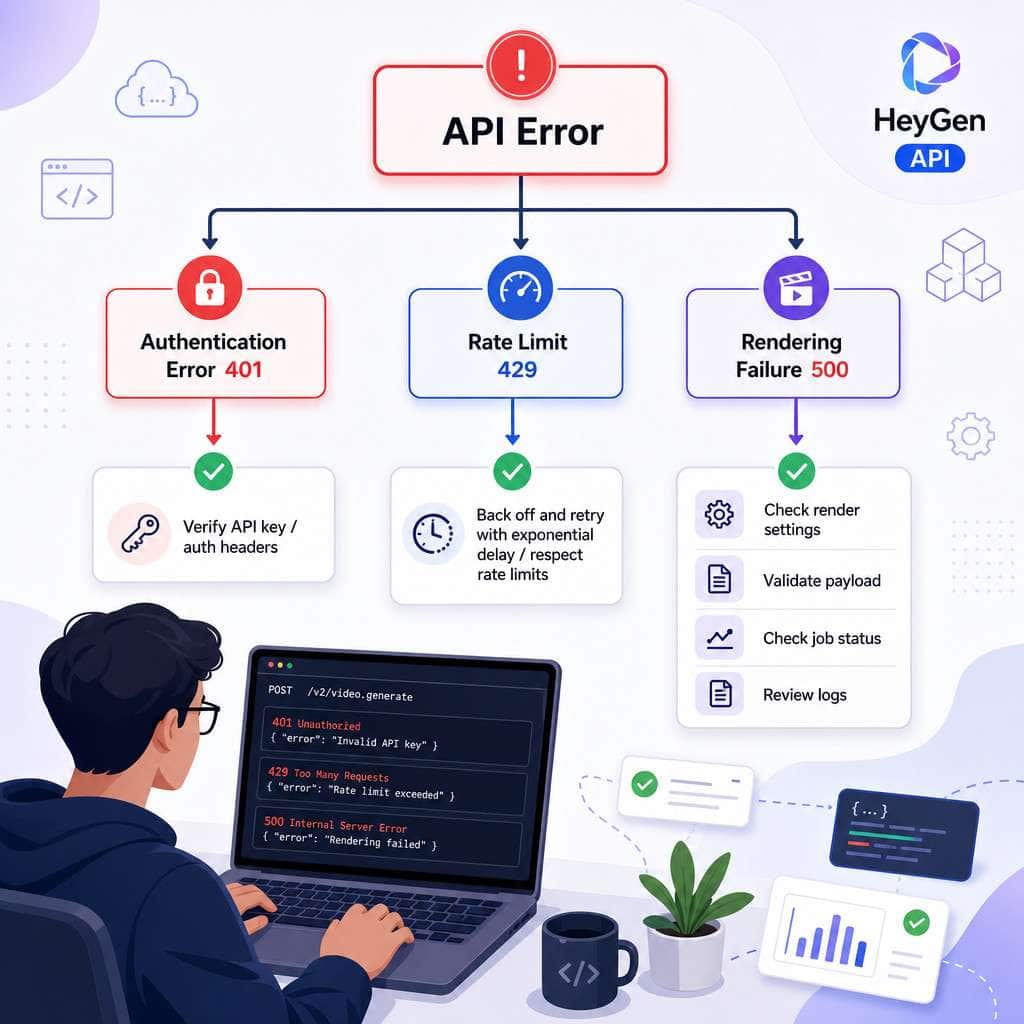
Authentication errors (HTTP 401) are the most common issue new developers face. Here’s a quick checklist:
- Verify your API key is active in the HeyGen dashboard. Keys can be revoked or expired.
- Check the header format. The key goes in
x-api-key, notAuthorization: Bearer. This trips up developers used to other APIs. - Confirm you have API credits. Since February 2026, accounts without purchased API credits will fail authentication even with a valid key [7].
- Check for whitespace. Copy-paste errors sometimes introduce invisible characters in the API key.
- Test with curl first. Before debugging your application code, verify the key works with a simple curl request.
If you’re getting 429 (rate limit) errors instead, implement exponential backoff in your polling logic. HeyGen’s rate limits are documented in their API reference [1].
What Are the Limitations of HeyGen’s Current API Version?
No tool is perfect. Here are the current constraints worth knowing:
- Rendering time is not instant. Complex videos can take 2-10 minutes to render, which rules out real-time generation for most use cases (LiveAvatar streaming is the exception).
- Custom avatar creation still requires the web interface — you can’t upload training footage via API alone.
- Scene complexity is limited compared to traditional video editors. You won’t get cinematic camera movements or advanced visual effects.
- The v3 API is still evolving. Some features available in the web app haven’t been exposed via API endpoints yet [1].
- No offline processing. Everything runs on HeyGen’s cloud infrastructure, so you’re dependent on their uptime and server capacity.
For teams building broader content generation workflows, these limitations mean HeyGen works best as one component in a larger pipeline rather than a standalone production suite.
Can HeyGen API Handle Enterprise-Scale Video Production?
Yes, but it requires architectural planning. The API’s async design (submit job, poll or receive webhook, download result) naturally supports batch processing. You can submit hundreds of video generation requests and process completions as they arrive.
For enterprise scale, I recommend:
- Use webhooks instead of polling to reduce API call volume [1].
- Implement a job queue (Redis, SQS, etc.) to manage large batches without overwhelming rate limits.
- Cache avatar and template lists to minimize redundant API calls.
- Monitor credit consumption programmatically to avoid unexpected budget overruns.
HeyGen’s February 2026 update introduced the Video Agent API specifically to support more automated, high-volume workflows [3]. Combined with MCP integration, enterprise teams can trigger video generation from within their existing AI toolchains.
Conclusion
Mastering HeyGen API: a comprehensive guide to AI video generation comes down to understanding three things — the async workflow pattern, the pricing model, and the migration timeline away from legacy endpoints.
Here are your actionable next steps:
- Create a HeyGen account and purchase API credits (start small, $20-$50).
- Run the Quick Start example using the
/v3/video-agentsendpoint [1]. - Set up webhooks from day one — don’t build polling-based systems for production.
- Plan your migration off v1/v2 endpoints before the October 31, 2026 deadline.
- Test multilingual translation on a short clip to understand quality and cost.
- Integrate into your stack using the CLI or MCP if you’re already working with AI copilots.
The API is mature enough for production use and flexible enough for experimentation. Whether you’re a solo developer building a side project or an enterprise team automating thousands of videos, HeyGen’s API gives you the building blocks. The key is starting with a small, well-scoped use case and scaling from there.
FAQ
How do I get a HeyGen API key? Log into your HeyGen account, go to Settings > API, and generate a new key. You’ll need to purchase API credits separately before the key will work [7].
Can I use HeyGen API for free? No. Free API credits ended in February 2026. All API usage now requires purchased credits on a pay-as-you-go basis [7].
How long does it take to render a video through the API? Typical rendering time is 2-10 minutes depending on video length, avatar tier, and server load. Use webhooks to get notified when rendering completes [1].
Does HeyGen API support real-time video generation? Not for pre-rendered videos, but the LiveAvatar streaming feature supports real-time interactive avatar sessions [1].
What happens when v1/v2 endpoints are deprecated? Legacy /v1 and /v2 endpoints stop working on October 31, 2026. Migrate to the /v3 endpoints before then [1].
Can I create custom avatars through the API? Custom avatar training currently requires the HeyGen web interface. Once created, you can use custom avatars in API calls.
Is there an SDK for HeyGen? HeyGen doesn’t offer official language-specific SDKs, but the REST API works with any HTTP client. Community-maintained wrappers exist for Python and Node.js.
How does billing work for failed video renders? According to HeyGen’s documentation, credits are only consumed for successfully rendered videos. Failed renders are not billed [7].
Can I integrate HeyGen with ChatGPT? Yes. HeyGen’s February 2026 update added direct integration with ChatGPT and a Claude skill for generating videos from AI assistants [3].
What’s the maximum video length the API supports? The API supports videos up to 20 minutes per request for standard avatars. For longer content, split into multiple segments.
HeyGen API resources: HeyGen API Documentation and HeyGen Help Center.
References
[1] Quick Start – https://developers.heygen.com/docs/quick-start [3] Heygen February 2026 Release – https://www.heygen.com/blog/heygen-february-2026-release [6] 10158 Automated News Video Generation With Heygen Ai Apify And Gpt 41 Mini – https://n8n.io/workflows/10158-automated-news-video-generation-with-heygen-ai-apify-and-gpt-41-mini/ [7] 10060327 Heygen Api Pricing Explained – https://help.heygen.com/en/articles/10060327-heygen-api-pricing-explained