Last updated: May 13, 2026
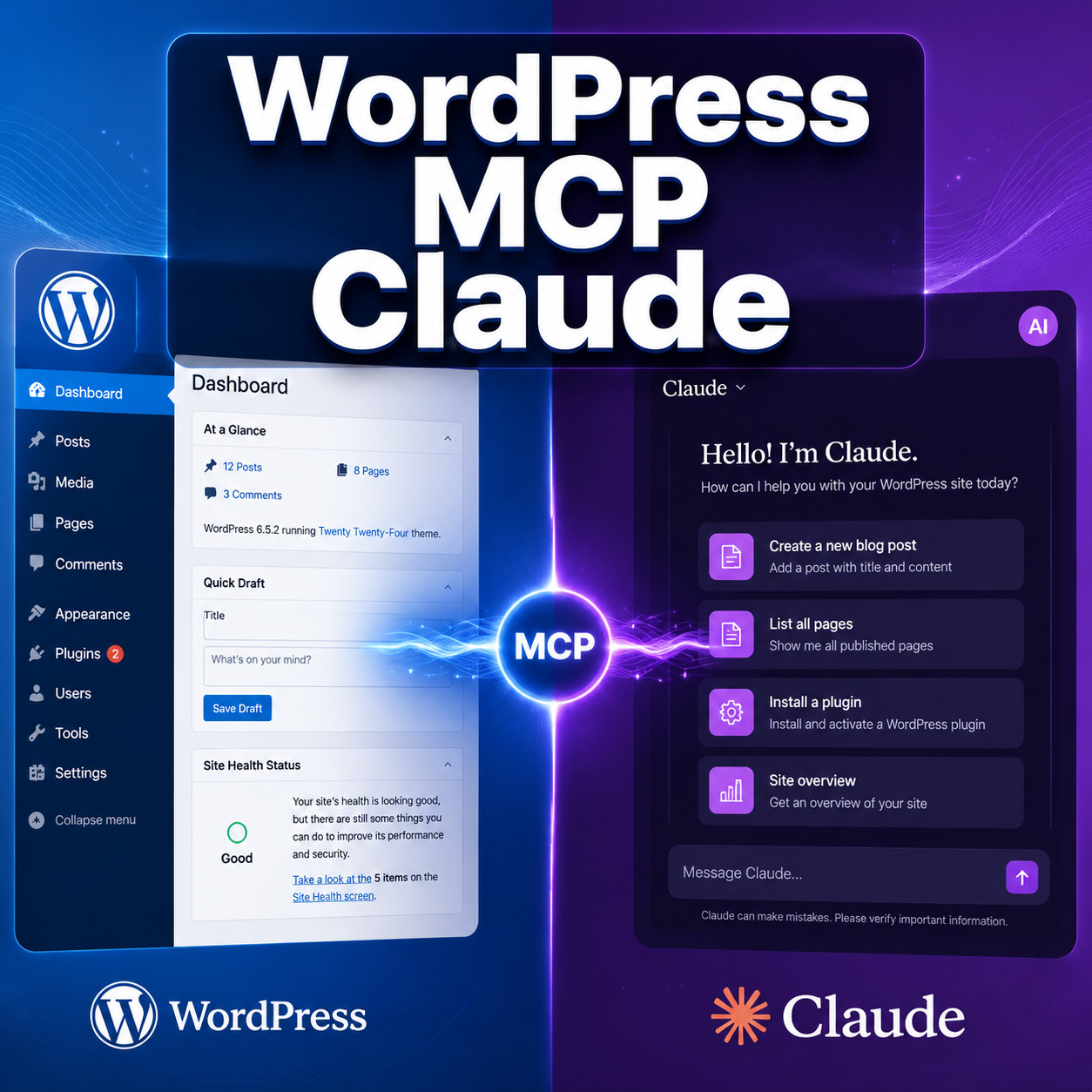
Quick Answer: WordPress MCP Claude refers to using the Model Context Protocol (MCP) to connect Anthropic’s Claude AI directly to a WordPress backend. This lets Claude read, create, and manage WordPress content, plugins, and settings through a standardized protocol — no copy-pasting between tools. Setup takes under 15 minutes with the right plugin and a Claude Desktop or Claude Code subscription.
Key Takeaways
- MCP is a standard protocol that lets AI assistants like Claude interact with external tools, including WordPress, through structured server connections [1].
- WordPress.com launched a native Claude Connector in early 2026, offering OAuth 2.1 authentication with no plugin required for hosted sites [5][6].
- Self-hosted WordPress sites can use the MCP Adapter plugin or third-party servers like Stifli Flex to connect Claude Desktop or Claude Code [1][9].
- Claude gains admin-level access through MCP, so token-based authentication and role restrictions are essential for security [9].
- WordPress Playground added MCP support in April 2026, letting developers test Claude integrations in a browser-based sandbox [2].
- Alternatives exist — Cursor and Aider can handle WordPress development tasks, but neither has native MCP depth for WordPress specifically.
- Write access is expanding — initial Claude Connector access was read-only for analytics; full content management capabilities are rolling out through 2026 [6].

What Is WordPress MCP Claude and Why Does It Matter?
WordPress MCP Claude is the combination of three things: WordPress as your CMS, the Model Context Protocol as the communication layer, and Claude as the AI agent performing tasks. MCP acts as a universal adapter — think of it like USB-C for AI tools — that gives Claude structured access to your WordPress site’s data and functions.
Before MCP, connecting an AI to WordPress meant clunky workarounds: REST API scripts, custom plugins, or manual copy-paste workflows. MCP changes this by providing a standardized way for Claude to:
- Read posts, pages, comments, and site analytics
- Create and edit content directly in WordPress
- Manage plugins, themes, and settings
- Execute WP-CLI commands on local development environments [1]
Anthropic’s Claude was one of the first major AI models to adopt MCP, and WordPress — powering roughly 43% of the web — was a natural early integration target. The WordPress core team introduced the MCP Adapter plugin in early 2026, converting WordPress “Abilities” (its internal capability system) into AI-executable tools [1].
If you’re already exploring AI-powered automation for WordPress, MCP represents the next step: instead of plugins that add AI features inside WordPress, MCP lets an external AI agent operate WordPress directly.
How Does the MCP Protocol Work With WordPress?
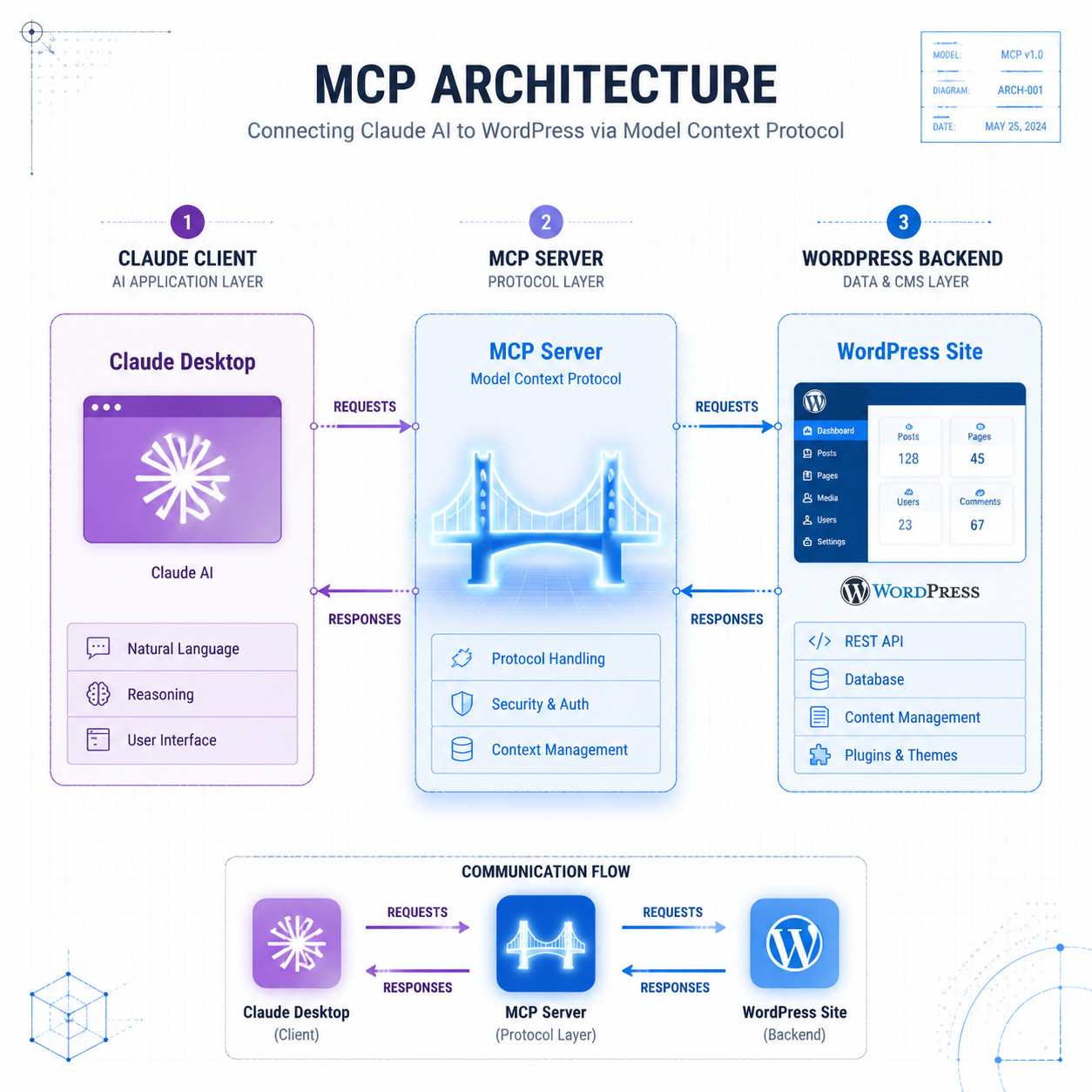
MCP uses a client-server model. Claude (the client) connects to an MCP server that exposes WordPress capabilities as structured “tools.” When Claude needs to create a post, it sends a request to the MCP server, which translates that request into WordPress API calls.
Here’s the flow:
- Claude Desktop or Claude Code initiates a connection to the MCP server
- The MCP server (running as a WordPress plugin or standalone service) receives the request
- WordPress processes the action (create post, update plugin, fetch analytics)
- Results return to Claude through the same MCP channel
There are currently three main ways to set up this connection:
| Setup Method | Best For | Auth Type | Plugin Required? |
|---|---|---|---|
| WordPress.com Claude Connector | WordPress.com hosted sites | OAuth 2.1 | No [5] |
| MCP Adapter Plugin (core) | Self-hosted WordPress | Token-based | Yes [1] |
| Stifli Flex / third-party servers | Advanced users, multi-tool setups | API key | Yes |
| WP Playground MCP | Development and testing | Local/WebSocket | No [2] |
A key distinction: WordPress.com’s native connector handles authentication automatically through OAuth 2.1, making it the simplest path for hosted sites [5][6]. Self-hosted sites require more manual configuration but offer greater control.
How to Set Up WordPress MCP Claude (Step-by-Step)
Setting up WordPress MCP Claude on a self-hosted site takes about 10-15 minutes. Here’s the process using the MCP Adapter plugin approach.
Prerequisites:
- WordPress 6.7+ (or WordPress 7.0 beta for Abilities API support)
- Claude Desktop app or Claude Code CLI
- Admin access to your WordPress site
- Node.js installed (for some MCP server options)
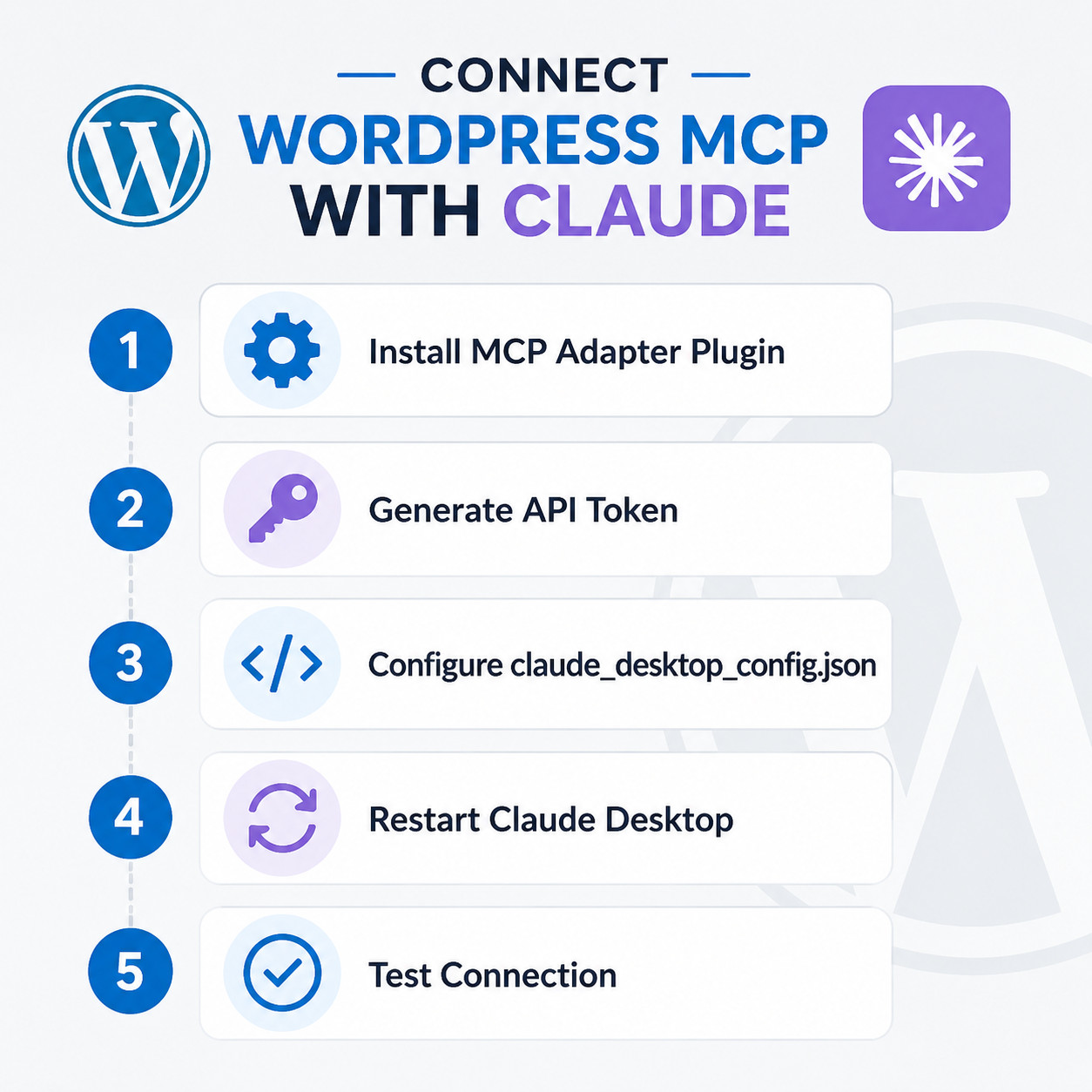
Step 1: Install the MCP Adapter plugin. Download from the WordPress plugin repository or install via WP-CLI: wp plugin install mcp-adapter --activate [1].
Step 2: Generate an authentication token. In your WordPress admin panel, navigate to Settings > MCP Adapter. Create a new application password or API token. Copy this token — you’ll need it for Claude’s configuration [9].
Step 3: Configure Claude Desktop. Open your claude_desktop_config.json file (found in ~/.config/claude/ on most systems) and add your WordPress MCP server:
<code class="language-json">{
  "mcpServers": {
    "wordpress": {
      "url": "https://yoursite.com/wp-json/mcp/v1",
      "token": "your-generated-token"
    }
  }
}
</code>
Step 4: Restart Claude Desktop. The MCP connection initializes on startup. You should see WordPress listed as an available tool in Claude’s interface.
Step 5: Test the connection. Ask Claude something like “List my 5 most recent WordPress posts” to confirm everything works.
Common mistake: Forgetting to set proper permissions on the token. Meow Apps specifically warns that MCP can grant Claude full admin access, so restrict the token’s scope to only the capabilities you need [9]. For content-only workflows, avoid granting plugin installation or theme modification permissions.
For WordPress.com users, the process is simpler: enable the Claude Connector from your site’s settings panel, authorize via OAuth, and Claude can access your site immediately [5].
If you’re new to WordPress plugin configuration, our guide to plugin development best practices covers the fundamentals of safe plugin management.
What Can You Actually Do With WordPress MCP Claude?
Once connected, Claude can perform a wide range of WordPress tasks. Here are the most practical use cases I’ve seen working well in 2026:
Content management:
- Draft, edit, and publish posts and pages
- Bulk-update metadata, categories, and tags
- Generate SEO-optimized content directly into WordPress (pairs well with AI SEO tools for WordPress)
Site administration:
- Review and update plugin settings
- Check site health and performance metrics
- Manage user roles and permissions
Analytics and reporting:
- Pull traffic summaries and content performance data [6]
- Generate reports on post engagement
- Identify underperforming content for optimization
Development and testing:
- Run WP-CLI commands through Claude Code on local environments [1]
- Test theme changes in WordPress Playground via MCP [2]
- Debug PHP errors with Claude analyzing error logs directly
Choose MCP if you manage multiple posts per week and want to reduce context-switching between Claude and your WordPress dashboard. Skip it if you publish rarely and a simple copy-paste workflow meets your needs.
For teams already using Claude for content strategy, connecting it to WordPress via MCP eliminates the manual transfer step entirely. This is especially valuable when combined with automated social media sharing for end-to-end content workflows.
WordPress MCP Claude vs. Alternative AI Coding Tools
Claude isn’t the only AI tool that can work with WordPress. Here’s how the main options compare for WordPress-specific workflows:
| Feature | Claude Code + MCP | Cursor | Aider |
|---|---|---|---|
| Monthly cost | ~$20/mo (Claude Pro) | $20/mo | Free (bring your own API key) |
| Native WordPress MCP | Yes, deep integration [1][2] | No native MCP for WP | No native MCP for WP |
| Model options | Claude only | Claude, GPT, Gemini | Any OpenAI-compatible model |
| Best for | WordPress content + admin tasks | Code editing with visual diffs | Budget-conscious developers |
| IDE integration | CLI-based | Full IDE (VS Code fork) | Terminal-based |
| WordPress admin access | Yes, via MCP | No | No |
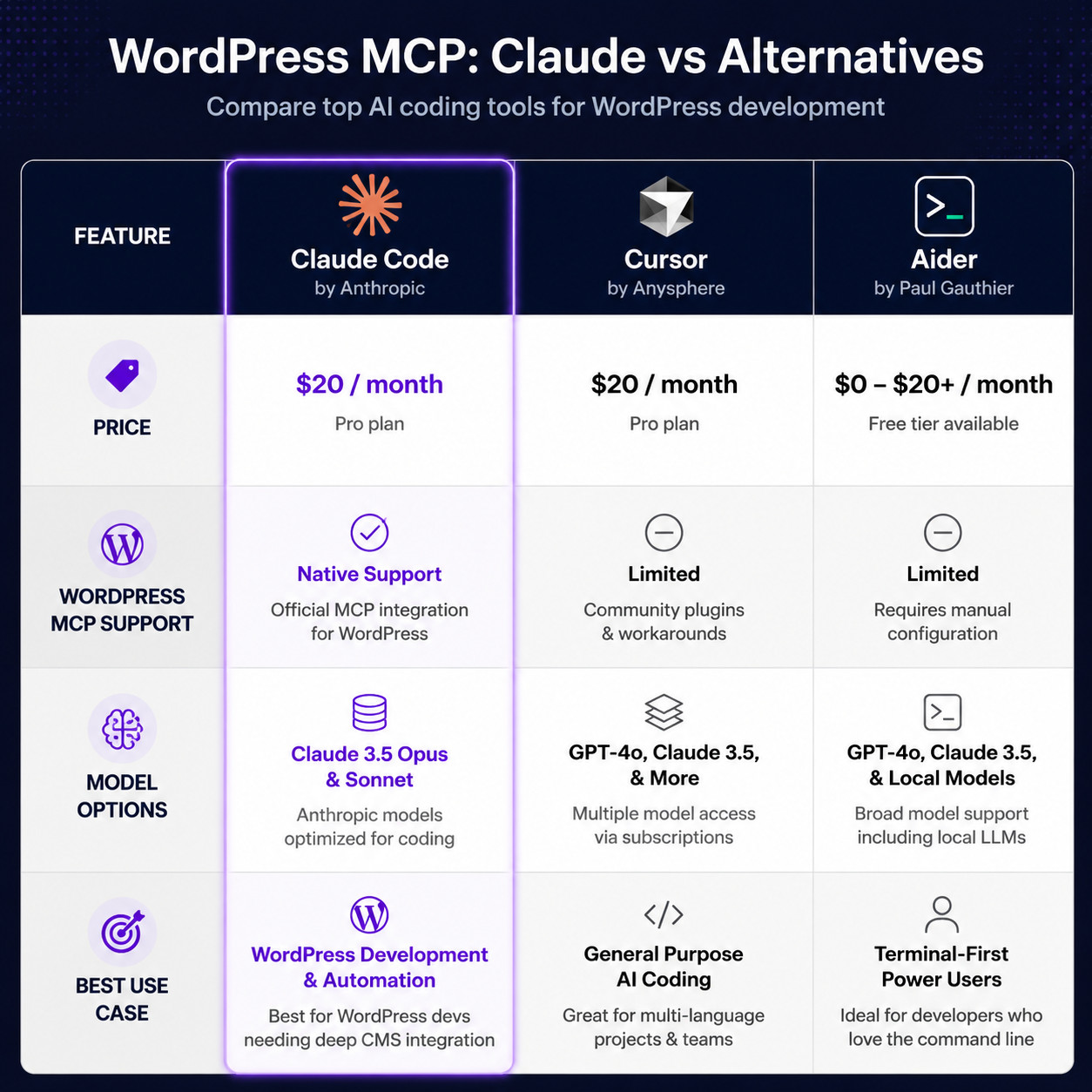
Choose Claude Code + MCP if your primary goal is managing WordPress content and settings through AI, not just writing code. Choose Cursor if you’re primarily editing theme or plugin code and want multi-model flexibility with visual diffs. Choose Aider if you want zero subscription cost and only need code-level WordPress work.
The key differentiator is that Claude’s MCP integration goes beyond code — it gives Claude actual WordPress admin capabilities. Cursor and Aider are excellent code editors, but they can’t publish a post or update a plugin setting without additional scripting.
For a broader look at AI tools that work with WordPress, see our roundup of advanced WordPress strategies for power users.
Security Considerations for WordPress MCP Claude
Granting an AI agent admin access to your WordPress site introduces real security risks. Here’s what to watch for:
- Use scoped tokens. Never give Claude a full admin token unless absolutely necessary. Create application passwords with limited capabilities [9].
- Audit actions regularly. Enable logging on your MCP Adapter to track what Claude does on your site.
- Use HTTPS only. MCP transmits authentication tokens — never run this over unencrypted HTTP.
- Test in Playground first. WordPress Playground’s MCP support lets you validate Claude’s behavior in a sandboxed environment before connecting to production [2].
- Review Claude’s proposed changes. Claude Code includes confirmation prompts before executing destructive actions, but you should still review bulk operations carefully.
Anthropic published a postmortem in April 2026 addressing Claude Code quality issues that affected some MCP integrations, tracing problems to three specific changes in their system. Fixes were deployed, but the incident underscores the importance of not giving AI tools unchecked write access to production sites.
If you’re building AI-powered chatbots into your WordPress site, the same security principles apply: scope permissions tightly and monitor activity.
Conclusion
WordPress MCP Claude brings a practical, working connection between the world’s most popular CMS and one of the most capable AI assistants available in 2026. The setup is straightforward — install a plugin or enable a connector, generate a token, configure Claude, and start managing your site through natural language.
Your next steps:
- Decide your setup path: WordPress.com Connector for hosted sites [5], MCP Adapter plugin for self-hosted [1]
- Start with read-only access to test the connection safely before enabling write capabilities
- Scope your tokens to only the permissions Claude actually needs [9]
- Test in WordPress Playground if you want a risk-free sandbox [2]
- Explore complementary tools like AI content optimization to build a complete AI-powered WordPress workflow
MCP is still maturing — WordPress 7.0’s Abilities API will expand what’s possible when it ships — but the foundation is solid enough to use today for content management, site administration, and development workflows.
FAQ
What does MCP stand for in WordPress MCP Claude? MCP stands for Model Context Protocol. It’s an open standard created by Anthropic that lets AI models like Claude connect to external tools and data sources through a structured server interface [1].
Is WordPress MCP Claude free to use? The MCP Adapter plugin is free. However, you need a Claude Pro subscription (approximately $20/month) or Claude Code access to use Claude as the AI client. WordPress.com’s Claude Connector is included with WordPress.com plans [5].
Can Claude delete my WordPress content through MCP? Yes, if the authentication token grants delete permissions. This is why scoped tokens with limited capabilities are strongly recommended [9].
Does WordPress MCP Claude work with self-hosted WordPress? Yes. Self-hosted sites use the MCP Adapter plugin or third-party MCP servers. WordPress.com hosted sites can use the native Claude Connector instead [1][5].
What version of WordPress do I need? WordPress 6.7 or later works with the MCP Adapter plugin. WordPress 7.0 (beta as of May 2026) adds the Abilities API for deeper MCP integration [1].
Can I use GPT-4 or Gemini instead of Claude with WordPress MCP? MCP is an open protocol, so other AI models could theoretically connect. However, Claude currently has the most mature MCP client implementation. Cursor supports multiple models but lacks native WordPress MCP integration.
Is WordPress MCP Claude safe for production sites? It can be, with proper precautions: use HTTPS, scope authentication tokens, enable action logging, and test in WordPress Playground before connecting to production [2][9].
What’s the difference between the Claude Connector and the MCP Adapter? The Claude Connector is WordPress.com’s built-in integration using OAuth 2.1 — no plugin needed [5]. The MCP Adapter is a plugin for self-hosted WordPress that converts site capabilities into MCP-compatible tools [1].
Can Claude manage WooCommerce through MCP? If the MCP server exposes WooCommerce endpoints, yes. The MCP Adapter plugin can be extended to include WooCommerce capabilities, though this requires additional configuration.
Does MCP work with Claude’s free tier? MCP connections require Claude Desktop or Claude Code, which are part of paid plans. The free web interface does not support MCP connections.
References
[1] From Abilities To AI Agents: Introducing The WordPress MCP Adapter – https://developer.wordpress.org/news/2026/02/from-abilities-to-ai-agents-introducing-the-wordpress-mcp-adapter/ [2] WordPress MCP (GitHub) – https://github.com/Automattic/wordpress-mcp [5] Claude Connector – https://wordpress.com/blog/2026/02/05/claude-connector/ [6] It Just Got Easier For Claude To Check In On Your WordPress Site (TechCrunch) – https://techcrunch.com/2026/02/06/it-just-got-easier-for-claude-to-check-in-on-your-wordpress-site/ [9] Claude Code WordPress MCP (Meow Apps) – https://meowapps.com/claude-code-wordpress-mcp/