Last updated: May 13, 2026
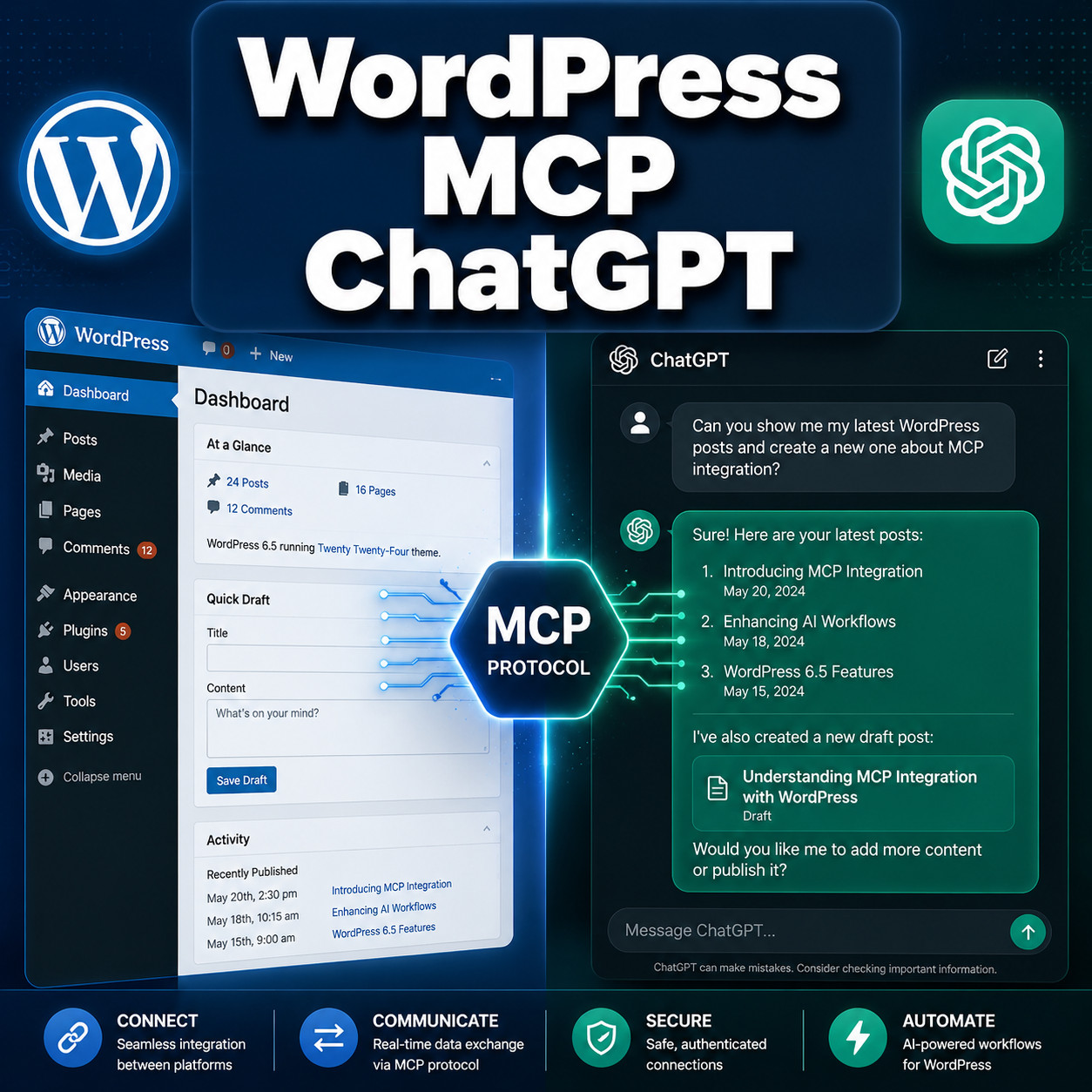
Quick Answer: WordPress MCP ChatGPT refers to using the Model Context Protocol (MCP) to create a direct, standardized connection between ChatGPT and your WordPress site. This lets ChatGPT read, create, edit, and publish content on WordPress without custom API integrations or copy-pasting. Since WordPress 7.0 shipped with a native MCP Adapter in April 2026 [7], setting this up takes minutes instead of hours.
Key Takeaways
- MCP is a standard protocol that lets AI tools like ChatGPT interact with WordPress through a single, secure connection.
- WordPress 7.0 (April 2026) includes a built-in MCP Adapter, so self-hosted sites can connect without third-party plugins [7].
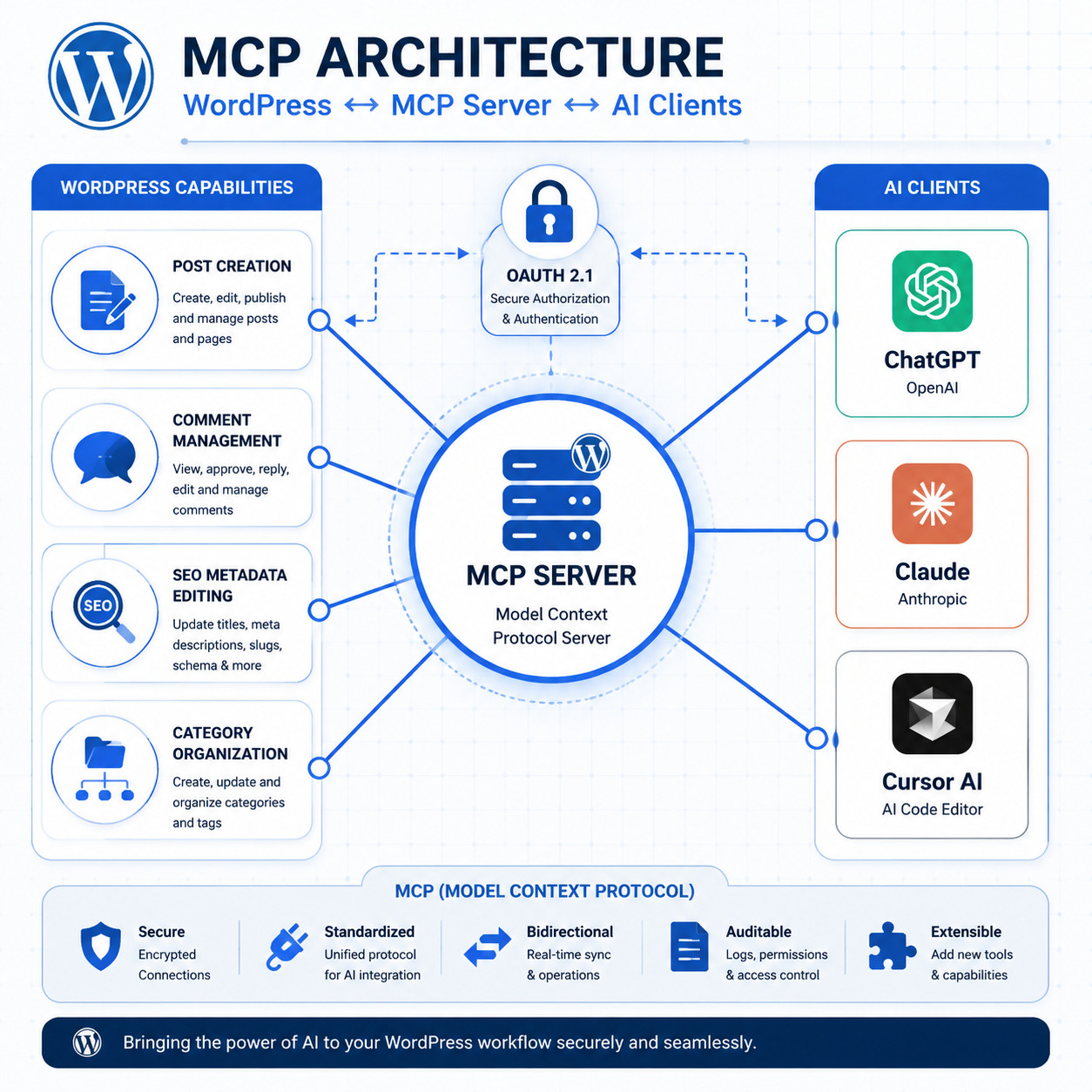
- WordPress.com added MCP write capabilities in March 2026 for paid plans, covering posts, comments, SEO metadata, and categories at no extra cost.
- Security matters: All MCP actions require user approval and are logged. OAuth 2.1 is the recommended authentication method, with legacy no-auth deprecated by July 2026 [3].
- You’re not locked into ChatGPT. Claude, Cursor, and other MCP-compatible clients work with the same WordPress MCP server.
- Plugins like Royal MCP and Stifli Flex add features the native adapter doesn’t yet offer, including rate limiting, undo/rollback, and advanced logging.
- Common use cases: drafting blog posts, bulk-updating SEO metadata, managing comments, reorganizing taxonomies, and generating landing pages.
- Early community feedback calls the native WP 7.0 MCP support “basic but functional,” with plugins needed for advanced workflows [7].
What Is MCP and Why Does It Matter for WordPress ChatGPT Integration?
MCP (Model Context Protocol) is an open standard that defines how AI clients like ChatGPT communicate with external tools and data sources. Think of it as a USB-C port for AI: one standardized connection that replaces dozens of custom integrations.
Before MCP, connecting ChatGPT to WordPress meant juggling REST API keys, custom webhooks, or brittle plugin-specific setups. Each AI tool needed its own connector. DYNO Mapper’s 2026 analysis described the pre-MCP era as an “integration mess” for site owners trying to use multiple AI tools.
MCP changes this by exposing WordPress capabilities as tools (like wp_create_post, wp_update_seo_meta, wp_manage_comments) through a single server endpoint. Any MCP-compatible AI client can discover and use these tools automatically [3].
Why this matters for WordPress users specifically:
- WordPress powers roughly 40% of the web, making it the largest potential MCP integration surface
- Content teams can use ChatGPT to draft, edit, and publish without leaving the AI interface
- Developers get a standardized way to build AI-powered workflows instead of writing custom glue code
Rootstack identifies MCP as the “silent 2026 AI trend” for enterprise use, noting it goes beyond individual AI models to enable secure coordination across platforms like WordPress [10].
How Does WordPress MCP ChatGPT Actually Work?
The connection follows a client-server model. WordPress runs an MCP server (either the native adapter or a plugin), and ChatGPT acts as the MCP client. Here’s the flow:
- WordPress exposes tools through its MCP server endpoint (e.g., create post, read posts, update metadata)
- ChatGPT discovers available tools by querying the MCP server
- You give ChatGPT a natural language instruction like “Write a 1,000-word post about email marketing and publish it as a draft”
- ChatGPT translates your request into the appropriate MCP tool calls
- WordPress executes the action and returns confirmation
- All changes are logged and require your approval before going live
The Meow Apps team (creators of AI Engine) notes that MCP simplifies this process significantly by using OAuth 2.1 authentication, exposing 30+ WordPress tools without needing separate API tokens for each one [3].
Common mistake: Assuming ChatGPT will make changes without your knowledge. All MCP implementations for WordPress require explicit user approval. The TechCrunch analysis of WordPress.com’s March 2026 MCP update confirmed that every change is logged and gated behind user confirmation.
For a broader look at AI-powered tools for WordPress, check out our guide to AI plugins for WordPress that automate website management.
How to Set Up WordPress MCP ChatGPT (Step-by-Step)

Setting up the WordPress MCP ChatGPT connection depends on whether you use self-hosted WordPress or WordPress.com. Here are both paths.
Self-Hosted WordPress (WordPress 7.0+)
- Update to WordPress 7.0 or later (released April 9, 2026) [7]
- Go to Settings > AI Connectors in your WordPress admin dashboard
- Enable the MCP Adapter and configure OAuth 2.1 credentials
- Copy the MCP server URL displayed in the settings panel
- Open ChatGPT Desktop (or another MCP client) and add a new MCP server connection
- Paste the server URL and authenticate with your WordPress credentials
- Test the connection by asking ChatGPT to list your recent posts
WordPress.com (Paid Plans)
- Log into WordPress.com and navigate to Settings > AI & Automation
- Enable MCP access (available on paid plans at no extra cost since March 2026)
- Authorize ChatGPT through the OAuth flow when prompted
- Start using natural language commands in ChatGPT to manage your site
Choose the native adapter if you want a zero-plugin setup and your needs are basic (drafting posts, reading content, simple metadata updates).
Choose a plugin like Royal MCP if you need API key authentication, rate limiting, detailed logging, or work in a team environment where granular access control matters.
If you’re building custom functionality alongside MCP, our guide to WordPress plugin development best practices covers the fundamentals.
Which WordPress MCP ChatGPT Tools and Plugins Are Available?
Several options exist in 2026, each with different strengths. Here’s a comparison:
| Solution | Best For | Key Features | Cost |
|---|---|---|---|
| WP 7.0 Native Adapter | Self-hosted, basic needs | Built-in, OAuth 2.1, 30+ tools | Free (core) |
| WordPress.com MCP | WordPress.com users | Posts, comments, SEO, categories | Included in paid plans |
| Royal MCP Plugin | Security-focused teams | API key auth, rate limiting, logging | Free (WordPress.org) |
| Stifli Flex MCP | Landing page builders | Undo/rollback for ChatGPT edits | Free/Premium |
| AI Engine Pro | Advanced AI workflows | Full MCP + custom AI features | Premium |
| Ottokit | WooCommerce/CRM users | Plugin-specific tools (FluentCRM, Woo) | Premium |
| miniOrange GPT App | No-code setup | Visual MCP configuration | Free/Premium |
The Royal MCP plugin (released April 29, 2026) stands out for security-conscious users because it adds API key authentication and request logging on top of the standard MCP connection.
Stifli Flex (May 10, 2026) solves a real pain point: the ability to undo or roll back ChatGPT edits on landing pages, which the native adapter doesn’t support yet.
For users exploring advanced WordPress automation strategies, combining MCP with tools like Ottokit opens up workflows that span WooCommerce, email marketing, and CRM platforms [4].

What Can You Actually Do with WordPress MCP ChatGPT?
Here are the practical use cases that work well today:
- Draft and publish blog posts directly from a ChatGPT conversation, including setting categories, tags, and featured images
- Bulk-update SEO metadata across dozens of pages by describing what you want changed
- Moderate and respond to comments using AI-suggested replies
- Reorganize categories and tags by describing your desired taxonomy structure
- Generate landing page content with Stifli Flex’s rollback safety net
- Audit existing content by asking ChatGPT to read and summarize your published posts
Edge case worth noting: MCP works best for content operations. It’s not designed for theme changes, plugin installation, or server configuration. For those tasks, you still need direct WordPress admin access or WP-CLI.
If you’re interested in using AI for SEO specifically, our guide on AI SEO tools for WordPress covers complementary approaches.
ChatGPT vs. Claude: Which MCP Client Works Better with WordPress?
Both ChatGPT and Claude support the same WordPress MCP tools, but they behave differently in practice.
Claude Desktop tends to perform better for coding tasks and long-form content generation. It scored 80.8% on the SWE-bench coding benchmark and generally follows complex multi-step instructions more precisely. If you’re asking the AI to create structured content with specific formatting requirements, Claude often produces more consistent results.
ChatGPT has a larger user base and more polished conversational interface. It’s better for quick, iterative content tasks where you want to go back and forth refining a draft.
Decision rule: Choose Claude if your primary MCP use case involves structured content creation or code-related WordPress tasks. Choose ChatGPT if you prefer a conversational workflow and plan to iterate frequently on drafts.
Both clients connect to the same WordPress MCP server, so you can switch between them without reconfiguring WordPress. For a deeper dive into AI chatbot options, see our guide on integrating AI-powered chatbots into WordPress.
What Are the Security Risks and How Do You Mitigate Them?
MCP introduces a new attack surface. Here’s what to watch for:
- Authentication: Always use OAuth 2.1. Legacy no-auth connections are deprecated as of July 2026 [3].
- Rate limiting: Without it, a misconfigured AI client could flood your site with requests. Royal MCP plugin adds this by default.
- Audit logging: Every MCP action should be logged. The native adapter logs to the WordPress activity log; plugins like Royal MCP provide more detailed records.
- Scope control: Limit which MCP tools are available. If you only need post creation, disable comment management and taxonomy tools.
- User approval: Never enable auto-publish without review. All current MCP implementations gate publishing behind user confirmation.
Common mistake: Granting MCP access to admin-level WordPress accounts. Create a dedicated editor-level account for MCP connections so the AI can’t access plugin settings, user management, or site configuration.
Pros and Cons of Using WordPress MCP ChatGPT
Pros:
- Eliminates copy-paste workflows between ChatGPT and WordPress
- Standardized protocol means one setup works with multiple AI clients
- Native support in WordPress 7.0 reduces dependency on third-party plugins
- All actions are logged and require approval
- Free to use with the native adapter
Cons:
- Native adapter is still “basic” according to community feedback [7]
- Requires WordPress 7.0+ for built-in support
- Risk of increased machine-generated content on the web (noted by TechCrunch analysts)
- Plugin ecosystem is young and rapidly changing
- OAuth 2.1 setup can be confusing for non-technical users
For broader context on AI content tools, our guide to AI-powered content generation covers the landscape beyond WordPress-specific solutions.
FAQ
Do I need a paid ChatGPT plan to use WordPress MCP? ChatGPT’s MCP client features are available on Plus and Team plans. The free tier does not currently support MCP server connections.
Does WordPress MCP ChatGPT work with WooCommerce? The native adapter focuses on content operations. For WooCommerce-specific tools (products, orders), use Ottokit or similar plugins that expose WooCommerce actions through MCP [4].
Can ChatGPT break my WordPress site through MCP? MCP actions are scoped to content operations (posts, pages, comments, metadata). It cannot modify themes, plugins, or server settings. All changes require your approval.
Is the WordPress MCP connection free? Yes, for self-hosted sites running WordPress 7.0+. WordPress.com includes it on paid plans. Some third-party plugins offer premium tiers with additional features.
What happens if ChatGPT makes a mistake in my content? Standard WordPress revision history applies. You can revert any post to a previous version. Stifli Flex adds dedicated undo/rollback specifically for MCP edits.
Do I need coding skills to set up WordPress MCP ChatGPT? No. The native adapter and WordPress.com both offer GUI-based setup. Plugins like miniOrange provide visual configuration tools [4].
Will MCP replace WordPress REST API? No. MCP is built on top of the REST API. It adds a standardized AI-friendly layer but doesn’t replace the underlying API infrastructure.
Can multiple AI tools connect to the same WordPress MCP server? Yes. ChatGPT, Claude, Cursor, and other MCP clients can all connect simultaneously to the same WordPress MCP endpoint.
Is my content sent to OpenAI’s servers? When you use ChatGPT as the MCP client, your content passes through OpenAI’s infrastructure. Review OpenAI’s data usage policies, especially for sensitive content. Claude routes through Anthropic’s servers instead.
Conclusion
WordPress MCP ChatGPT represents a genuine shift in how content teams interact with their WordPress sites. The combination of WordPress 7.0’s native MCP Adapter, WordPress.com’s built-in support, and a growing plugin ecosystem means most site owners can set this up today.
Your next steps:
- Update to WordPress 7.0 if you haven’t already
- Enable the native MCP Adapter in Settings > AI Connectors
- Connect ChatGPT (or Claude) using OAuth 2.1 authentication
- Start with low-risk tasks like drafting posts or auditing existing content
- Add a security plugin like Royal MCP if you need rate limiting or detailed logging
- Explore advanced workflows with AI-powered content optimization tools as you get comfortable
The technology is functional but still maturing. Start simple, keep human review in the loop, and expand your MCP usage as the ecosystem stabilizes.
References
[1] We Connected ChatGPT To WordPress Via MCP And It – https://www.reddit.com/r/Wordpress/comments/1nizdus/we_connected_chatgpt_to_wordpress_via_mcp_and_it/ [3] ChatGPT WordPress MCP – https://meowapps.com/chatgpt-wordpress-mcp/ [4] Connect LLMs To WordPress GPT App – https://www.miniorange.com/blog/connect-llms-to-wordpress-gpt-app/ [7] WordPress 7.0 Ships Thursday With Native AI Write – https://www.reddit.com/r/Wordpress/comments/1sfmrfr/wordpress_70_ships_thursday_with_native_ai_write/ [8] Smart Search AI Model Context Protocol MCP Server – https://wpengine.com/builders/smart-search-ai-model-context-protocol-mcp-server/ [10] MCP Trend 2026 AI – https://rootstack.com/en/blog/mcp-trend-2026-ai