Last updated: May 13, 2026
Quick Answer
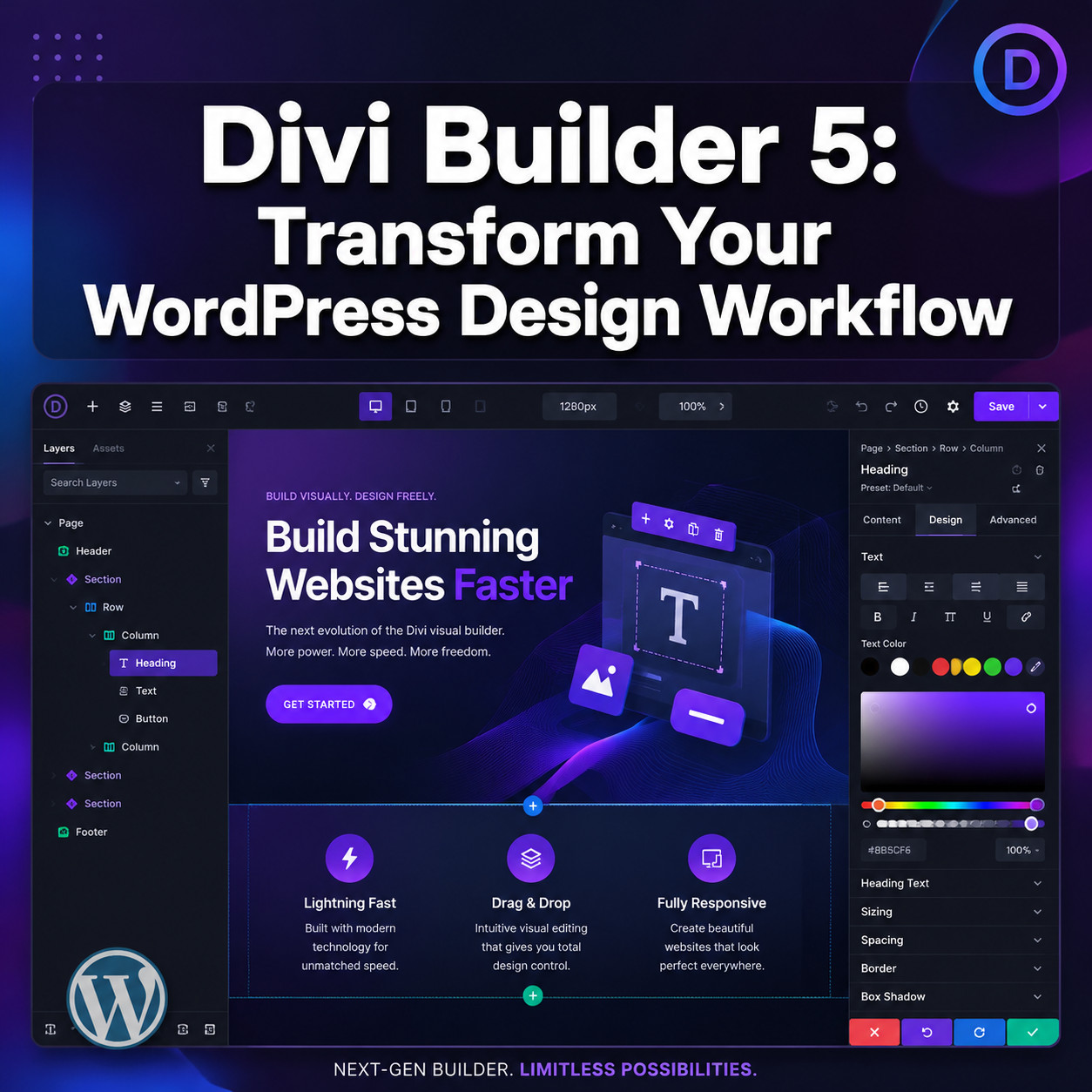
Divi Builder 5 is a complete ground-up rebuild of the Divi page builder, officially released on February 26, 2026 [3]. It replaces the legacy architecture with a React-based UI, block-based storage for Gutenberg compatibility, 7 responsive breakpoints, CSS variables, and a global variable manager [6]. If you’re building or maintaining WordPress sites in 2026, Divi 5 represents the most significant builder update in a decade, but it comes with migration considerations and plugin compatibility challenges you need to plan for.
Key Takeaways
- Divi 5 launched February 26, 2026, and is now the primary version; Divi 4 will be supported until at least August 2026 [3][5]
- The entire builder was rebuilt from scratch using React, not patched on top of old code [6]
- Block-based storage means your content is now compatible with the WordPress block editor (Gutenberg)
- Seven responsive breakpoints replace the previous three, giving much finer control over mobile layouts
- CSS variables and a global variable manager allow site-wide design consistency without manual updates
- The new Canvases Editor lets you design headers, footers, and templates in a unified workspace [6]
- Divi 5.3 (released April 23, 2026) added form styling, field presets, and Contact Form 7 integration
- Third-party plugin compatibility issues remain a real concern post-launch
- Migration from Divi 4 works but isn’t flawless; test on staging first
- Approximately 40% of Divi customers started new projects on Divi 5 over Divi 4 within weeks of launch
What Is Divi 5 and Why Does It Matter for WordPress Designers?
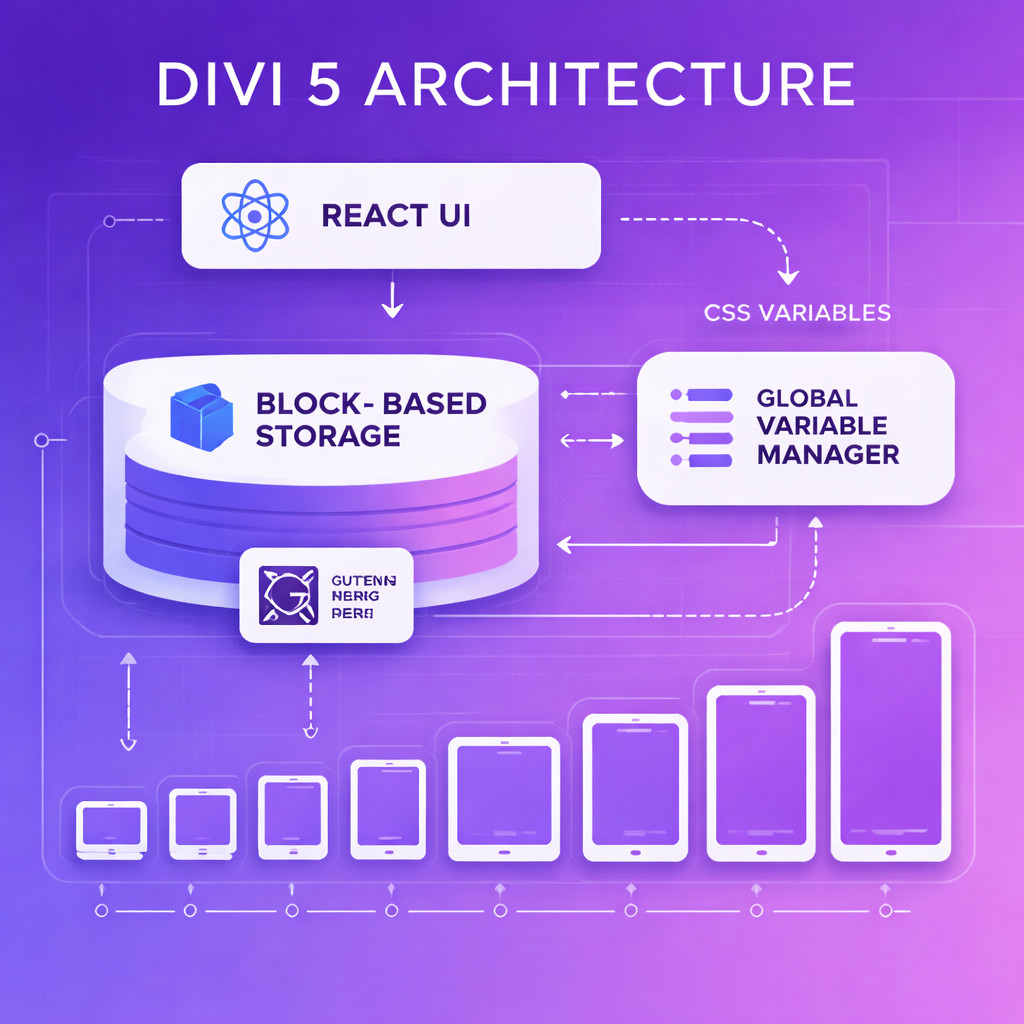
Divi 5 is not an incremental update. It’s a complete architectural rebuild of Elegant Themes’ flagship page builder, designed to address performance limitations, modern development standards, and future WordPress compatibility [6].
Here’s what changed at the foundation level:
- React-based UI: The entire visual builder interface runs on React, making interactions faster and more responsive than the jQuery-dependent Divi 4
- Block-based storage: Content is stored in a format compatible with WordPress’s native block editor, so you’re no longer locked into shortcodes
- CSS variables and functions: Instead of inline styles, Divi 5 uses CSS custom properties, resulting in cleaner code output and easier global changes
- Global variable manager: Define colors, fonts, spacing, and other tokens once, then reference them across your entire site [6]
- 7 responsive breakpoints: Design for phone portrait, phone landscape, tablet portrait, tablet landscape, small desktop, desktop, and large desktop
For context, Divi 4’s architecture dated back to 2013. The web has changed enormously since then, and this rebuild positions Divi to remain relevant alongside modern tools. If you’re working on custom WordPress theme development, understanding how Divi 5 fits into the ecosystem is essential.
Who it’s for: Freelancers, agencies, and site owners who want visual design control without writing code, and who value a large ecosystem of pre-built layouts and third-party extensions.
Who it’s not for: Developers who prioritize minimal code output above all else (consider Bricks), or teams deeply invested in the block editor who don’t need a page builder at all.
How Does the Divi 5 Visual Editor Actually Work?
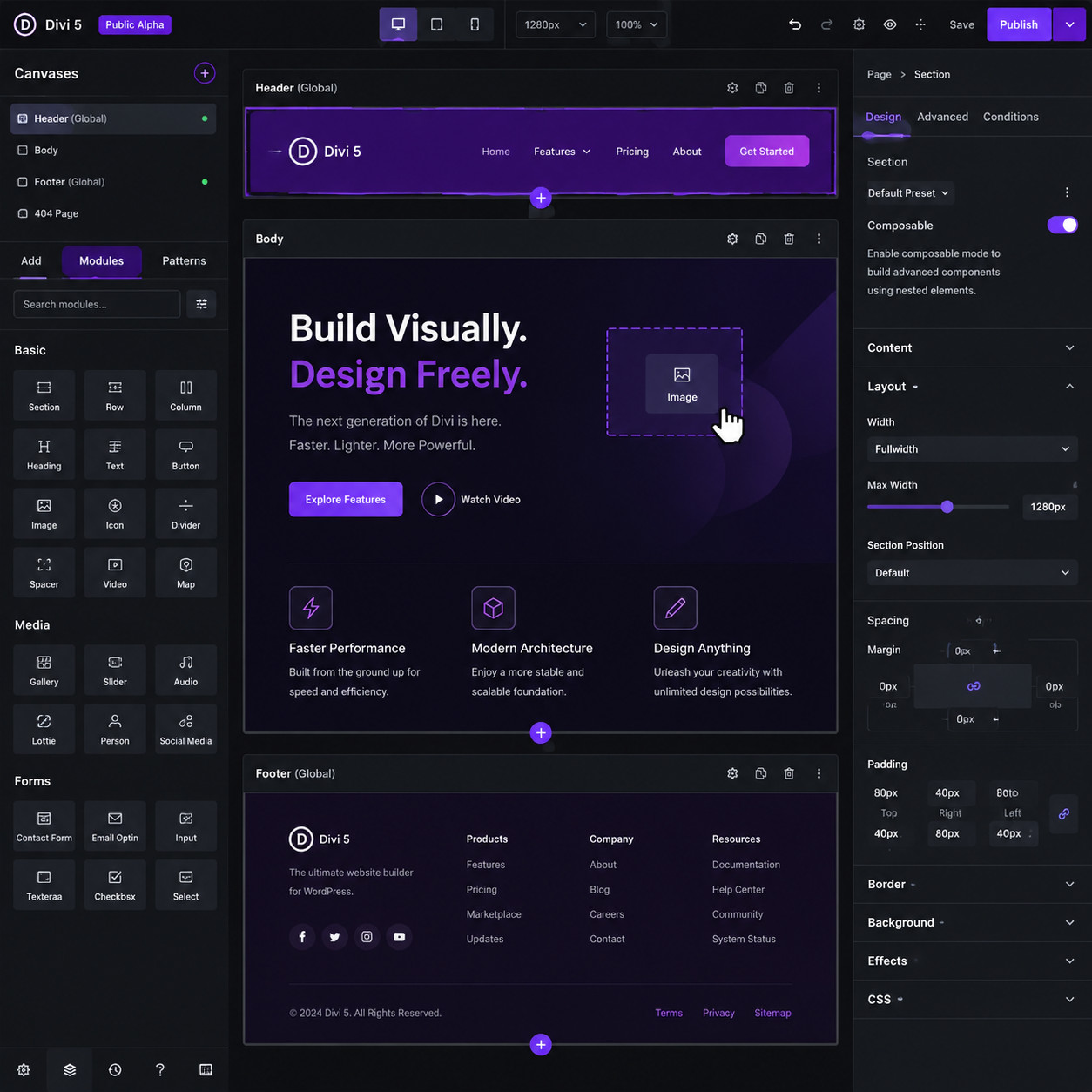
The visual editing experience in Divi 5 centers on the new Canvases Editor, which lets you design every part of your site (headers, footers, body content, template parts) from a single unified workspace [6].
Core editing features
| Feature | What it does | Why it matters |
|---|---|---|
| Canvases Editor | Edit headers, footers, and content in one view | No more switching between theme builder and page editor |
| Composable settings | Mix and match design options per module | More flexible than rigid preset panels |
| Focus editing mode | Isolate a single element for distraction-free editing | Faster workflow for complex layouts |
| Nested option presets | Apply default styles to child elements automatically | Consistent styling without repetitive clicks |
| Inline text editing | Click and type directly on the page | WYSIWYG without modal popups |
The workflow in practice
- Open any page or template in the Divi 5 editor
- Choose a canvas (header, body, footer) to work on
- Add modules using the searchable module picker
- Adjust settings using the composable panel on the right
- Switch between breakpoints to fine-tune responsive behavior
- Save, and Divi outputs clean CSS variable-based code
Common mistake: Trying to edit everything at once across all canvases. Use focus editing mode (introduced in Divi 5.3) to isolate sections when layouts get complex.
The design workflow integrates well with broader web design practices. If you’re coming from tools like Figma, you’ll appreciate how the design-to-development workflow concepts translate into Divi 5’s component-based approach.
What Performance Improvements Does Divi 5 Deliver?
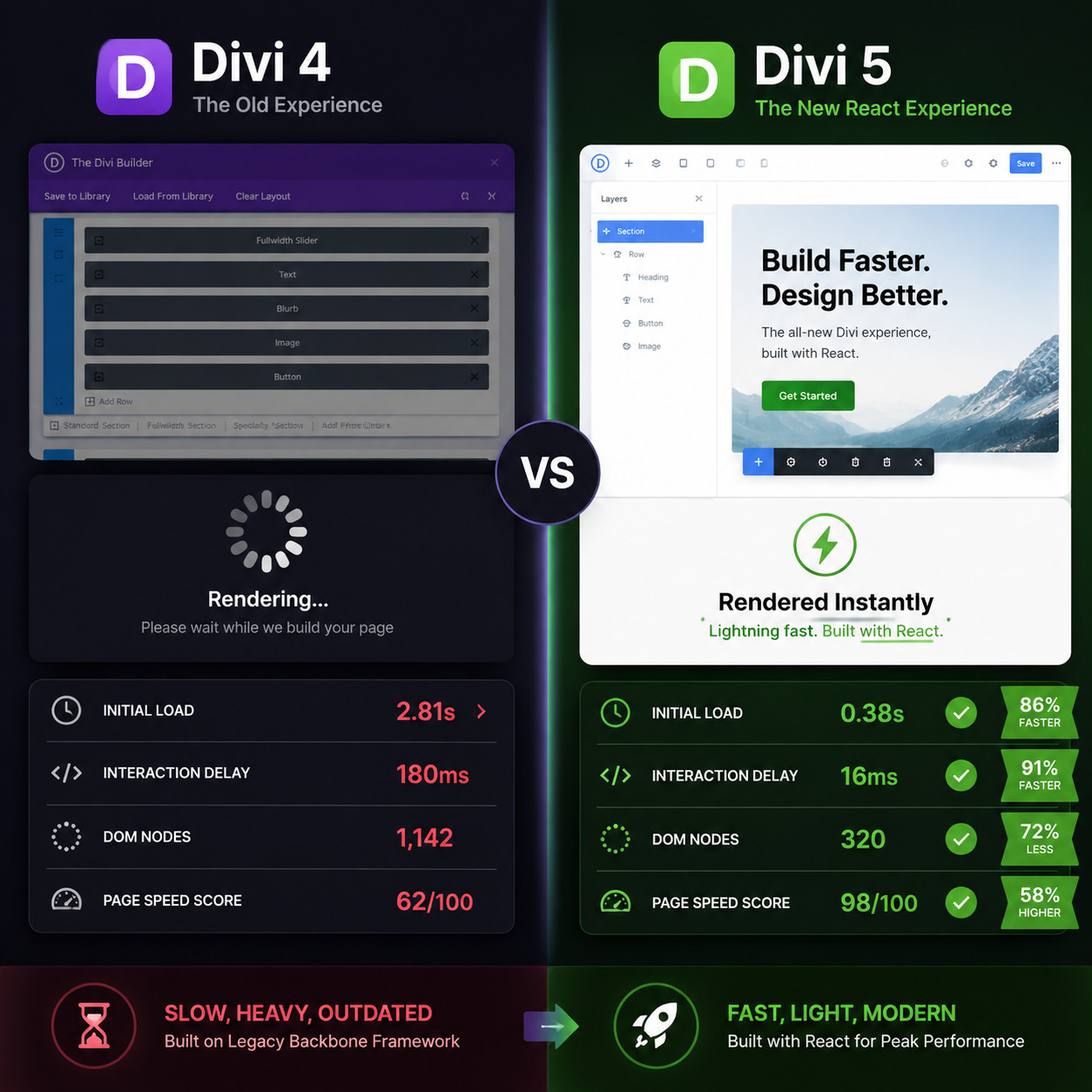
Divi 5 is measurably faster than Divi 4 in both the editor and on the front end. The React rebuild eliminates the heavy jQuery dependency, and CSS variables replace bloated inline styles.
Editor performance
- Module loading and rendering happens through React’s virtual DOM, so the editor doesn’t reload the entire page when you make changes
- Settings panels open instantly rather than requiring server round-trips
- The module library loads asynchronously, so you can start editing before all modules are fully cached
Front-end performance
- CSS variables reduce total stylesheet size because repeated values are defined once
- Block-based storage eliminates shortcode parsing overhead on page load
- Cleaner HTML output with fewer wrapper divs
Important caveat: Front-end speed still depends heavily on your hosting, image optimization, and number of third-party scripts. Divi 5 improves the baseline, but it won’t fix a site loaded with unoptimized images and 15 plugins.
For sites where performance is critical, consider pairing Divi 5 with proper WordPress automation strategies for caching, CDN configuration, and image optimization.
Decision rule: If your Divi 4 site scores below 50 on Google PageSpeed Insights, upgrading to Divi 5 alone won’t solve the problem. Address hosting and asset optimization first, then upgrade.
How Do You Migrate from Divi 4 to Divi 5 Safely?
Migration is possible and mostly automated, but it’s not risk-free. Elegant Themes built backward compatibility into Divi 5, meaning your existing Divi 4 layouts should render correctly after the update [6]. However, real-world reports indicate some glitches occur, particularly with complex layouts and third-party Divi plugins.
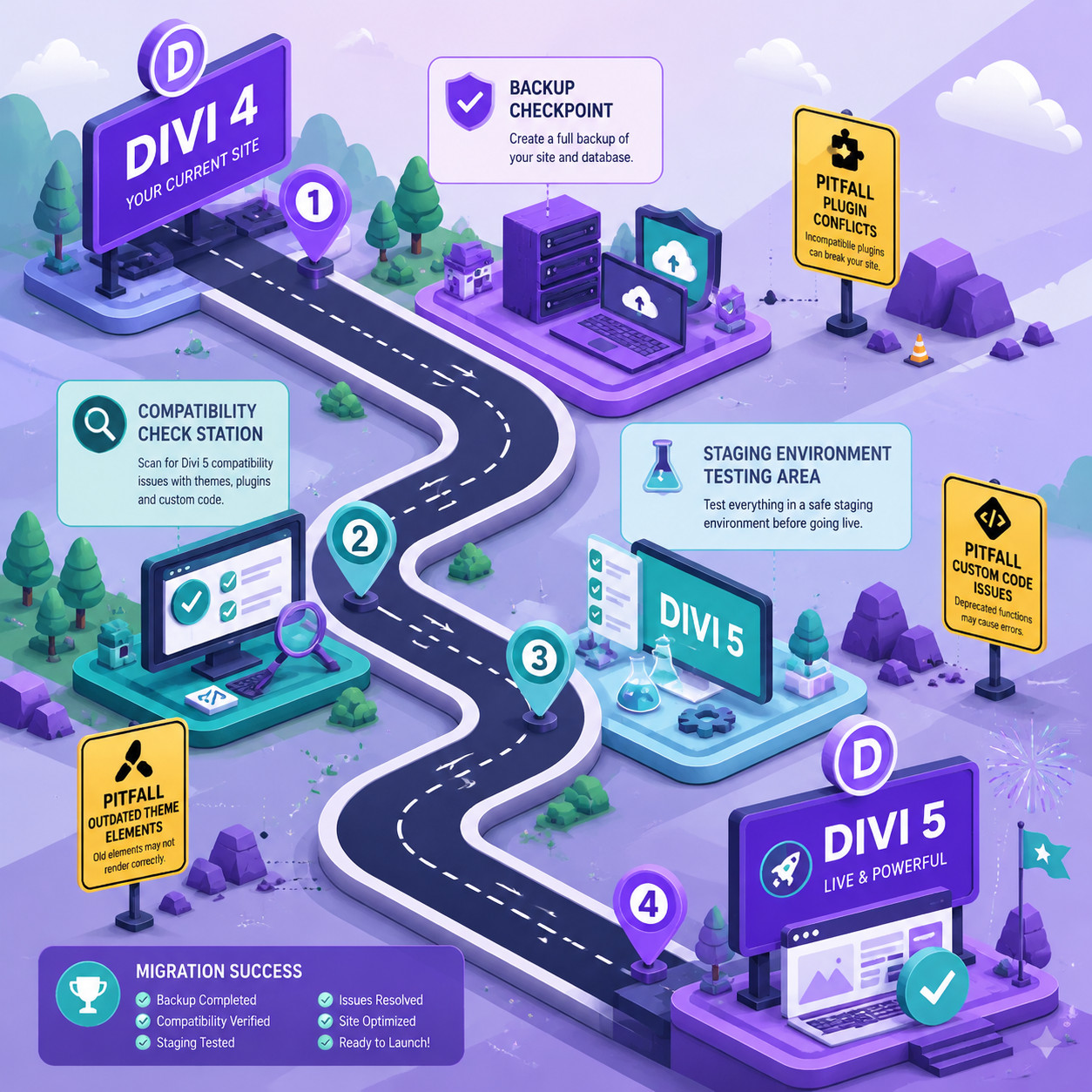
Step-by-step migration checklist
- Back up everything — full site backup including database and files
- Check plugin compatibility — verify all third-party Divi plugins have Divi 5 support
- Set up a staging environment — never test on your live site first
- Update Divi on staging — let the migration process run
- Test every page — check layouts, forms, dynamic content, and custom CSS
- Test responsive views — the 7-breakpoint system may shift some elements
- Fix issues — adjust any layouts that didn’t convert cleanly
- Push to production — once staging looks good, update your live site
Known issues to watch for
- Third-party plugin conflicts: A May 2026 analysis highlighted ongoing compatibility challenges with plugins not yet updated for Divi 5’s new architecture
- Custom CSS adjustments: If you wrote CSS targeting Divi 4’s specific class names or inline styles, some selectors may break
- Layout library imports: Older saved layouts may need manual adjustment in the new editor
- Form modules: Divi 5.3 introduced new form handling; older form configurations may need reconfiguration
Edge case: If you’re running a WooCommerce store with heavy Divi customization, test the checkout flow thoroughly. E-commerce layouts tend to have the most migration friction.
Timeline: Divi 4 will be supported until at least August 2026 [3], so you have time. Don’t rush the migration if your site is generating revenue.
How Does Divi 5 Compare to Other WordPress Page Builders?
Divi 5 enters 2026 in a competitive landscape. Here’s how it stacks up against the main alternatives.
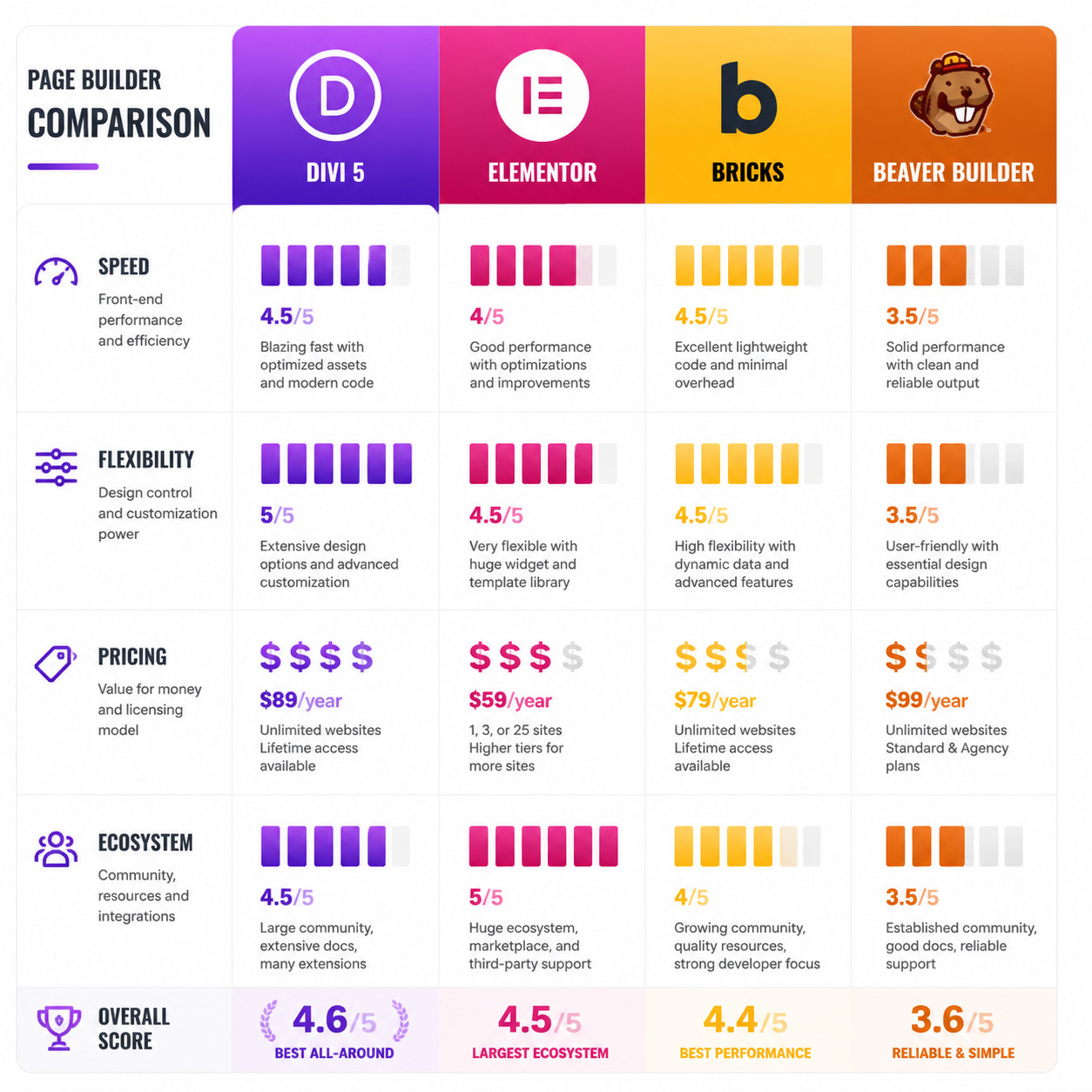
Comparison table
| Builder | Best for | Pricing (2026) | Key strength | Key weakness |
|---|---|---|---|---|
| Divi 5 | All-in-one site building | $89/year or $249 lifetime | Massive ecosystem, global design system | Plugin compatibility growing pains |
| Elementor | Largest community, free tier | Free core; Pro from $59/year | Biggest template library, wide plugin support | Performance concerns with complex pages |
| Bricks | Performance-focused developers | $79/year or $199 lifetime | Cleanest code output, fastest rendering | Smaller ecosystem, steeper learning curve |
| Beaver Builder | Simplicity and stability | From $99/year | Rock-solid reliability, minimal bloat | Fewer design options, dated interface |
| Thrive Architect | Marketers and conversions | $149/year (Thrive Suite) | Built-in A/B testing, conversion tools | Not a full site builder |
| Breakdance | Visual flexibility | From $149 lifetime | Modern interface, light code | Newer, smaller community |
Choose Divi 5 if:
- You want one tool for pages, headers, footers, and templates
- You value a lifetime pricing option
- You need access to thousands of pre-built layouts
- You’re already in the Divi ecosystem and want to stay
Choose something else if:
- Code output weight matters most → Bricks
- You need a free starting point → Elementor
- Conversion optimization is your priority → Thrive Architect
- You want maximum stability with minimal updates → Beaver Builder
For a broader view of builder options, see our review of the best drag-and-drop website builders in 2026.
What New Features Arrived in Divi 5.2 and 5.3?
Elegant Themes has been shipping updates rapidly since launch. Here’s what the two major post-launch releases added:
Divi 5.2 (April 2, 2026)
- 69 bug fixes addressing launch-day issues
- Composable settings enhancements for more granular module control
- Foundation work for upcoming form modules
- Stability improvements for the Canvases Editor
Divi 5.3 (April 23, 2026)
- Better form styling: Visual controls for form appearance without custom CSS
- Field presets: Default styles for inputs, checkboxes, and radio buttons
- Focus editing mode: Isolate elements for distraction-free design
- Contact Form 7 module: Native integration with the popular form plugin
- Nested option presets: Apply parent styles to child elements automatically
The pace of updates suggests Elegant Themes is prioritizing stability and feature parity with Divi 4 before adding entirely new capabilities.
If you’re using AI tools alongside your WordPress workflow, you might also benefit from exploring AI plugins for WordPress automation that complement Divi 5’s capabilities.
What Are the Common Mistakes When Using Divi 5?
Based on community reports and early adopter feedback, these are the most frequent problems people encounter:
- Upgrading production sites without staging — Always test first. Migration glitches are real.
- Assuming all plugins work — Check compatibility lists before updating. Some popular Divi 4 plugins haven’t been updated yet.
- Ignoring the global variable manager — This is Divi 5’s most powerful feature for consistency. Use it from day one instead of setting colors manually per module.
- Not using all 7 breakpoints — Many designers only check desktop and mobile. The intermediate breakpoints catch layout issues that frustrate users on tablets and small laptops.
- Over-nesting modules — Divi 5’s composable settings reduce the need for deeply nested structures. Simpler layouts perform better.
- Skipping the new documentation — Divi 5’s interface looks similar to Divi 4 in some areas, but the underlying logic is different. Old tutorials may lead you astray.
Quick fix for most issues: If something looks wrong after migration, clear your site cache, clear Divi’s static CSS cache, and check the browser console for JavaScript errors from incompatible plugins.
For broader WordPress best practices that apply alongside Divi 5, our guide to WordPress theme customization covers foundational concepts.
Who Should Upgrade to Divi 5 Right Now (and Who Should Wait)?
Upgrade now if:
- You’re starting a brand new project with no legacy dependencies
- Your existing site uses only core Divi modules (no third-party Divi plugins)
- You have time to test thoroughly on staging
- You want access to the 7-breakpoint responsive system immediately
Wait if:
- Your site relies heavily on third-party Divi plugins that haven’t confirmed Divi 5 support
- You’re in a high-traffic period where any downtime costs money
- Your site uses extensive custom PHP hooks into Divi 4’s architecture
- You don’t have a staging environment set up
The safe middle ground: Install Divi 5 on a staging copy of your site today. Spend a week testing. If everything works, migrate. If not, you still have until August 2026 before Divi 4 support ends [3].
For teams exploring no-code solutions beyond WordPress, our overview of no-code website design platforms provides useful context for comparing approaches.
Conclusion
Divi Builder 5 is the most significant WordPress page builder release in years. The React rebuild, block-based storage, CSS variables, and 7-breakpoint system genuinely modernize what was becoming an aging architecture. But “most significant” doesn’t mean “upgrade blindly.”
Your action plan:
- Set up a staging environment this week
- Test your existing site with Divi 5 installed
- Check every third-party plugin for compatibility
- Start any new projects on Divi 5 immediately (there’s no reason to use Divi 4 for fresh builds)
- Plan your production migration for when all your plugins are confirmed compatible
- Learn the global variable manager early — it’s the feature that will save you the most time long-term
The window for running Divi 4 closes in August 2026. Use the next few months to prepare, test, and transition at your own pace.
FAQ
Is Divi 5 free for existing Elegant Themes members? Yes. If you have an active Elegant Themes subscription or lifetime membership, Divi 5 is included at no additional cost [3].
Will my Divi 4 layouts break when I upgrade? Most layouts transfer correctly due to built-in backward compatibility [6]. However, complex layouts with heavy customization or third-party plugins may need manual fixes. Always test on staging first.
Can I use Divi 5 with the WordPress block editor? Yes. Divi 5 uses block-based storage, making it compatible with Gutenberg. You can mix Divi modules and native blocks on the same page [6].
How many responsive breakpoints does Divi 5 have? Seven: phone portrait, phone landscape, tablet portrait, tablet landscape, small desktop, desktop, and large desktop [6].
Is Divi 5 faster than Elementor? Divi 5’s CSS variable approach and React UI make it competitive on performance. Direct speed comparisons depend on page complexity, hosting, and configuration. Neither builder is universally faster in all scenarios.
When will Divi 4 stop receiving updates? Elegant Themes committed to supporting Divi 4 for at least 6 months after Divi 5’s launch, meaning until at least August 2026 [3][5].
Does Divi 5 work with WooCommerce? Yes, but test your specific WooCommerce setup thoroughly. E-commerce layouts with custom checkout flows are the most common source of migration issues.
What happened to Divi’s shortcodes? Divi 5 stores content in block-based format instead of shortcodes. Existing shortcode content is converted during migration, but the new system no longer generates shortcodes for new content [6].
Can I roll back to Divi 4 if something goes wrong? Yes, as long as you have a backup. Elegant Themes provides Divi 4 downloads for members during the transition period.
Is the Divi 5 lifetime deal still available? As of May 2026, Elegant Themes still offers a lifetime access option at $249, which includes Divi 5 and all future updates.
References
[1] Divi 5 Official Release Date – https://www.elegantthemes.com/blog/general-news/divi-5-official-release-date [2] Divi 5 Official Release Date Is February 26 – https://www.reddit.com/r/divi/comments/1qcvaeo/divi_5_official_release_date_is_february_26/ [3] Divi 5 Official – https://www.elegantthemes.com/blog/theme-releases/divi-5-official [5] Divi 5 Release Date – https://divigallery.com/blog/divi-5-release-date/ [6] Divi 5 Is Here Everything Website Owners Need To Know About The Most Significant WordPress Builder Update In A Decade – https://www.pageprogressive.com/divi-5-is-here-everything-website-owners-need-to-know-about-the-most-significant-wordpress-builder-update-in-a-decade/