Last updated: May 13, 2026
Quick Answer
The InstaWP WordPress MCP server is a hosted bridge that connects AI assistants like Claude, ChatGPT, and Cursor directly to your WordPress site using the Model Context Protocol (MCP). It offers 25+ tools for managing content, plugins, taxonomies, and more, with a setup time of roughly two minutes through the InstaWP dashboard. Unlike self-hosted alternatives that require CLI and Node.js configuration, InstaWP handles authentication, staging, and multi-site support automatically [1][10].
Key Takeaways
- InstaWP MCP connects 13 AI clients to WordPress, including Claude Desktop, Cursor, ChatGPT, and GitHub Copilot [3].
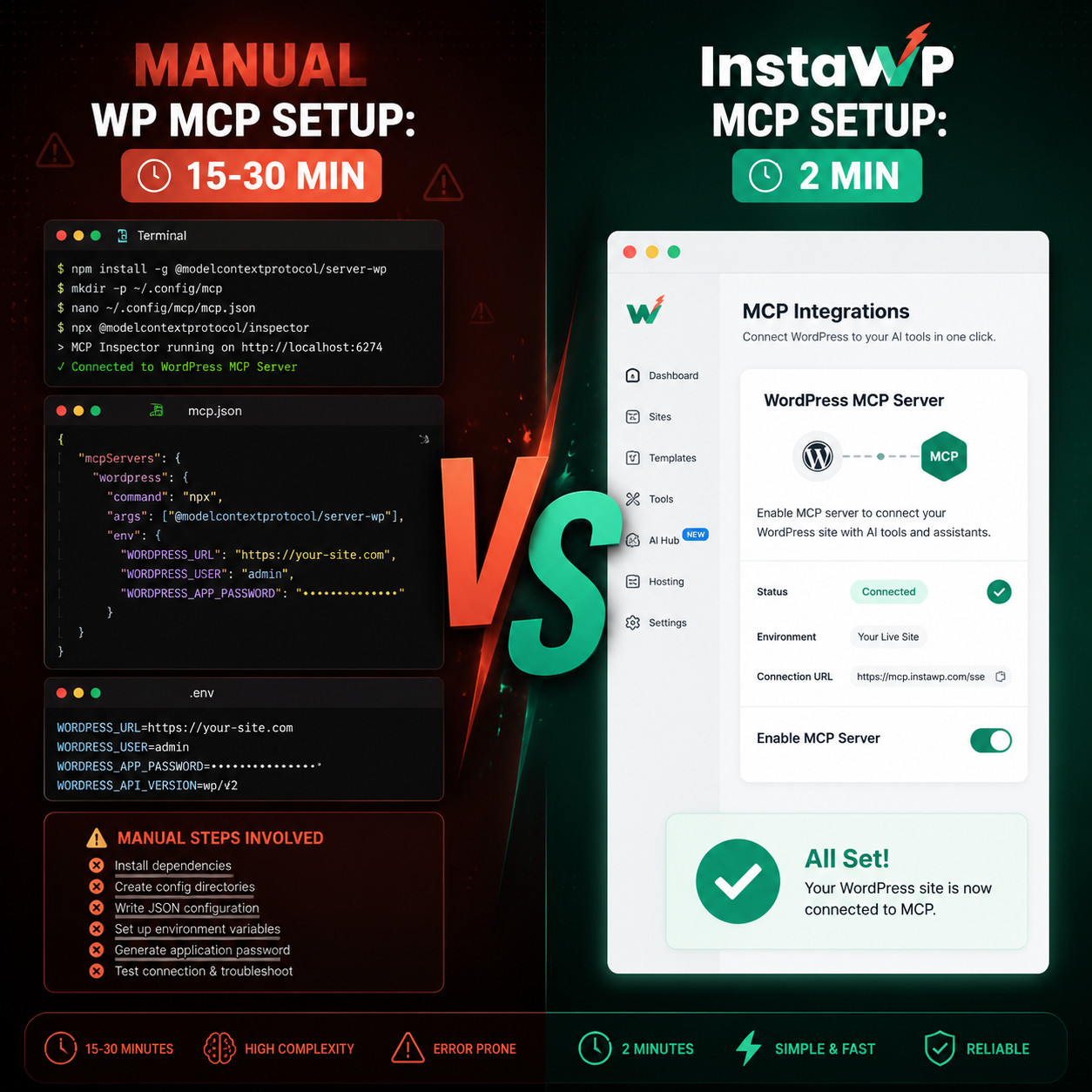
- Setup takes about 2 minutes via the InstaWP dashboard, compared to 15-30 minutes for manual MCP server configuration [4].
- 25+ built-in tools cover posts, pages, plugins, taxonomies, media, and custom post types with OAuth-secured access [10].
- Version 1.1.0 (May 2026) added the
execute_phptool for full PHP access with opt-in safeguards [3]. - Free sandbox available so you can test before committing to a paid plan [1].
- WordPress 6.9 Abilities API integration allows native tool registration within WordPress itself [3].
- Best suited for agencies and developers who manage multiple WordPress sites and want AI-assisted workflows without DevOps overhead.
- Alternatives exist (Automattic WP MCP, WP-MCP, WooCommerce-MCP), each with different trade-offs around control, setup complexity, and feature scope [4].

What Is the InstaWP WordPress MCP Server?
The InstaWP WordPress MCP server is a managed service that implements the Model Context Protocol to let AI assistants read and write WordPress data in real time. Instead of generating code snippets that you copy-paste, the AI directly interacts with your live or staging WordPress site through structured API calls [1].
MCP itself is an open standard (originally developed by Anthropic) that defines how AI models communicate with external tools and data sources. Think of it as a USB port for AI: any compatible client can plug into any MCP server and immediately access its capabilities.
InstaWP’s implementation stands out because it’s fully hosted. You don’t install Node.js, configure environment variables, or manage API tokens manually. The InstaWP dashboard handles all of that, which makes it particularly appealing for agencies managing dozens of client sites [4].
The server exposes tools for:
- Content management: Create, update, delete, and list posts, pages, and custom post types
- Plugin and theme control: Install, activate, deactivate, and update plugins and themes
- Taxonomy operations: Manage categories, tags, and custom taxonomies
- Media handling: Upload and organize media library items
- Site configuration: Adjust WordPress settings programmatically
- PHP execution (opt-in): Run arbitrary PHP with a 30-second timeout and admin-level permissions [3]
If you’re exploring how AI can automate WordPress tasks more broadly, our guide to AI plugins for WordPress automation covers additional options.
How Does InstaWP MCP Compare to Other WordPress MCP Servers?
InstaWP is the fastest to set up but trades some customization for convenience. Here’s how it stacks up against the main alternatives in 2026:
| Feature | InstaWP MCP | Automattic WP MCP | WP-MCP (Node.js) | WooCommerce MCP |
|---|---|---|---|---|
| Setup time | ~2 minutes | 10-15 minutes | 15-30 minutes | 10-20 minutes |
| Requires CLI/Node.js | No | No (plugin-based) | Yes | Yes |
| Built-in staging | Yes | No | No | No |
| Multi-site support | Yes (dashboard) | Per-site plugin | Manual config | Manual config |
| AI clients supported | 13 | Varies | Varies | Varies |
| PHP execution | Yes (opt-in) | Via Feature API | No | No |
| Authentication | OAuth (automatic) | Application passwords | Manual .env | Manual .env |
| Cost | Included in plans (free tier available) | Free plugin | Free (self-hosted) | Free (self-hosted) |
Sources: [1][3][4]
Choose InstaWP if you manage multiple sites, want minimal setup, and prefer a dashboard over a terminal.
Choose self-hosted options if you need full control over the server, want to modify the MCP tools themselves, or have strict data residency requirements.
A common criticism of InstaWP is platform lock-in, but the free sandbox tier reduces that risk. You can test the full MCP workflow before committing [3].
For power users who want to push WordPress automation further, our advanced WordPress strategies guide covers complementary techniques.
How to Set Up the InstaWP WordPress MCP Server
Setting up InstaWP MCP takes three main steps. No terminal required.
Step 1: Connect your WordPress site to InstaWP
- Create an InstaWP account (free tier works for testing).
- From the dashboard, click Connect Site and enter your WordPress site URL.
- Install the InstaWP Connect plugin when prompted. This establishes the secure link between your site and InstaWP’s infrastructure [1].
Step 2: Enable MCP in the InstaWP dashboard
- Navigate to the MCP section in your InstaWP dashboard.
- Toggle MCP access on for your connected site.
- InstaWP automatically generates OAuth tokens and configures the MCP endpoint. Copy the server URL provided [1][4].
Step 3: Configure your AI client
Each AI client has a slightly different configuration method, but the pattern is the same: add the InstaWP MCP server URL to your client’s MCP settings.
For Claude Desktop, add this to your claude_desktop_config.json:
<code class="language-json">{
  "mcpServers": {
    "instawp": {
      "command": "npx",
      "args": ["-y", "@anthropic-ai/mcp-client", "--server-url", "YOUR_INSTAWP_MCP_URL"]
    }
  }
}
</code>
For Cursor and ChatGPT, follow the MCP server connection flow in their respective settings panels and paste the InstaWP server URL [3].
Common mistake: Forgetting to save the config file and restart your AI client. MCP connections are established at launch, so changes require a restart.
If you want to pair your MCP-powered workflow with AI chatbot features on the frontend, see our guide on integrating an AI-powered chatbot into WordPress.

What Can You Actually Do With InstaWP MCP?
Once connected, your AI assistant can perform real WordPress operations through natural language. Here are practical examples:
- “Create a draft blog post about summer travel tips with three H2 sections and a featured image from the media library.” The AI uses the content creation and media tools to build the post directly in WordPress.
- “Deactivate the Yoast SEO plugin and activate Rank Math instead.” Plugin management happens without touching wp-admin.
- “List all posts in the ‘tutorials’ category published in the last 30 days.” The AI queries your site’s taxonomy and content data in real time.
- “Run a PHP snippet to check the current WordPress version and active theme.” With the
execute_phptool enabled, the AI can run diagnostics directly [3].
The execute_php tool deserves special attention. Added in version 1.1.0 (May 2026), it’s opt-in only and includes safeguards: a 30-second execution limit, admin-level permission requirements, and logging of all executed code [3]. Use it for diagnostics and quick fixes, but avoid running untested code on production sites.
For developers building custom solutions, our WordPress plugin development guide covers best practices that complement MCP-driven workflows.
Who Should (and Shouldn’t) Use InstaWP WordPress MCP Server?
Good fit:
- WordPress agencies managing 5+ client sites who want to speed up content operations and site maintenance
- Developers who use AI coding assistants (Cursor, Copilot) and want direct WordPress integration during development
- Content teams that want AI to draft, edit, and publish posts without manual wp-admin workflows
- Freelancers who need quick staging environments with AI access for client demos
Not ideal for:
- Enterprise teams with strict data policies who can’t route WordPress data through a third-party platform
- Developers who want to modify MCP tools at the source code level (self-hosted forks like those on GitHub offer more flexibility) [4]
- Simple single-site bloggers who don’t need the overhead of an MCP connection for occasional content updates
What’s New in the MCP Ecosystem for WordPress in 2026?
The MCP ecosystem has grown rapidly. Public MCP server registries tracked over 9,400 servers as of April 2026, up from roughly 1,200 in early 2025. GitHub repositories tagged with mcp-server exceeded 7,800, with about 18% month-over-month growth in Q1 2026.
WordPress-specific developments include:
- WordPress 6.9 Abilities API: Allows MCP tools to register natively within WordPress, which InstaWP 1.1.0 already supports [3][7].
- WordPress Playground MCP (
@wp-playground/mcp): A separate project from WordPress.org that lets AI manage browser-based WordPress instances via WebSocket. Useful for testing but not for production sites [7]. - Hosting-level MCP servers: Automattic’s Pressable launched its own MCP for hosting operations (provisioning, PHP version changes), signaling that hosting companies see AI control as a competitive feature [9].
For broader AI-driven SEO strategies that pair well with MCP workflows, check out how to use AI SEO tools for WordPress.
Security Considerations for InstaWP MCP
Connecting an AI assistant to your WordPress site introduces real security surface area. Here’s what to know:
- OAuth authentication is handled automatically by InstaWP, reducing the risk of leaked API keys compared to manual
.envfile setups [10]. - The
execute_phptool is off by default. Only enable it if you understand the implications. Even with the 30-second timeout, arbitrary PHP execution on a production site carries risk [3]. - All MCP operations run with the permissions of the connected WordPress user. Use a dedicated admin account for MCP access rather than your personal account.
- InstaWP’s staging environments are the safest place to experiment. Test AI-driven changes on a staging site before applying them to production [1].
Edge case: If your WordPress site uses custom REST API authentication (like JWT), you may need to adjust your setup. InstaWP’s default OAuth flow works with standard WordPress authentication.
Our WordPress theme customization guide covers safe practices for making AI-assisted theme changes.
Conclusion
The InstaWP WordPress MCP server removes the friction between AI assistants and WordPress. For agencies and developers who manage multiple sites, the two-minute dashboard setup and 25+ built-in tools make it the most accessible MCP option available in 2026. The May 2026 release (v1.1.0) added PHP execution and support for 13 AI clients, which significantly expanded what’s possible.
Your next steps:
- Sign up for InstaWP’s free tier and connect a test site to explore MCP capabilities without risk [1].
- Configure your preferred AI client (Claude Desktop, Cursor, or ChatGPT) using the server URL from your dashboard.
- Start with content operations (creating posts, managing categories) before enabling advanced features like
execute_php. - Test on staging first. Always validate AI-driven changes before pushing to production.
- Explore complementary tools from our WordPress automation archive to build a complete AI-powered workflow.
FAQ
What AI clients work with InstaWP WordPress MCP server? As of May 2026, InstaWP MCP supports 13 clients including Claude Desktop, Cursor, ChatGPT, GitHub Copilot, Windsurf, and others [3].
Is InstaWP MCP server free? A free sandbox tier is available for testing. MCP functionality is included in InstaWP hosting plans without additional cost [1].
Do I need to install a WordPress plugin? Yes, the InstaWP Connect plugin is required to establish the secure connection between your WordPress site and InstaWP’s MCP infrastructure [1].
Can InstaWP MCP modify my live production site? Yes, but it’s strongly recommended to test changes on a staging environment first. InstaWP provides built-in staging for this purpose [1].
Is the execute_php tool safe to use?
It’s opt-in with safeguards (30-second timeout, admin permissions, logging), but arbitrary PHP execution always carries risk. Use it on staging sites or for read-only diagnostics on production [3].
How is InstaWP MCP different from the WordPress Playground MCP? WordPress Playground MCP manages browser-based WordPress instances for testing. InstaWP MCP connects to real WordPress sites (live or staging) for actual content and site management [7].
Can I use InstaWP MCP with WooCommerce? InstaWP MCP’s content and plugin tools work with WooCommerce sites, but for eCommerce-specific operations (orders, products, inventory), a dedicated WooCommerce MCP server may be more appropriate [4].
Does InstaWP MCP work with custom post types? Yes, the content management tools support custom post types registered in WordPress [10].
What happens if my AI assistant makes a mistake? Changes are applied in real time. Using staging environments and WordPress revision history are your best safeguards against unwanted modifications.
Can multiple team members use the same MCP connection? Yes, but each connection operates under the permissions of the linked WordPress user account. Consider creating separate MCP-specific user accounts for different team members.
References
[1] WordPress MCP Server – https://instawp.com/wordpress-mcp-server/ [3] MCP WP (GitHub) – https://github.com/InstaWP/mcp-wp [4] InstaWP MCP vs WordPress MCP – https://instawp.com/instawp-mcp-vs-wordpress-mcp/ [7] What’s New for Developers April 2026 – https://developer.wordpress.org/news/2026/04/whats-new-for-developers-april-2026/ [9] The Diff: AI in WordPress, Week of April 13, 2026 – https://miriamschwab.me/the-diff-ai-in-wordpress-week-of-april-13-2026/ [10] InstaWP WordPress (PulseMCP) – https://www.pulsemcp.com/servers/instawp-wordpress