Last updated: May 13, 2026
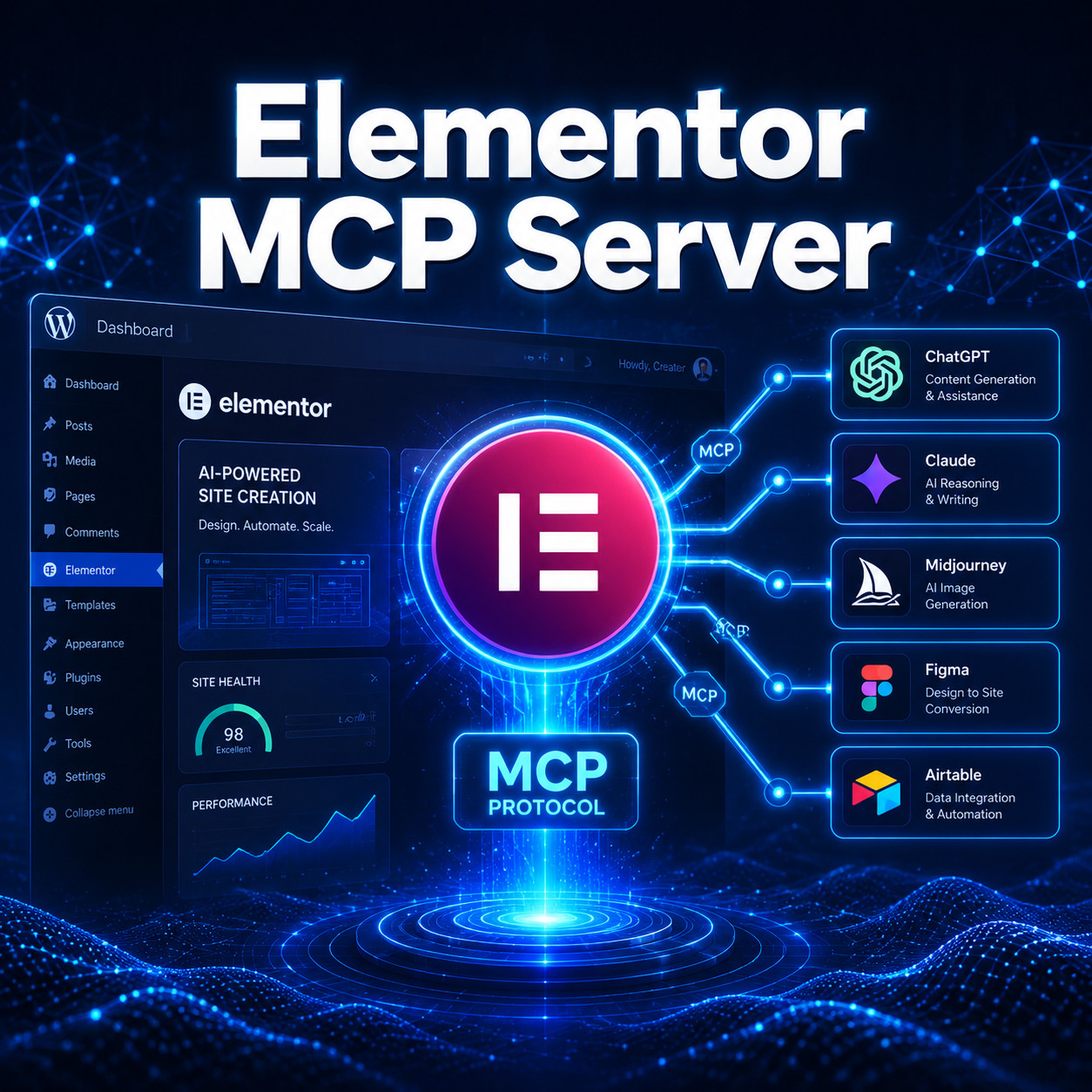
Quick Answer: An Elementor MCP server is a bridge that lets AI tools like Claude, ChatGPT, and other large language models directly build, edit, and manage Elementor page designs on your WordPress site. It uses the Model Context Protocol (MCP), an open standard that gives AI agents structured access to your Elementor installation, so you can create full page layouts through natural language prompts instead of manual drag-and-drop work [4] [9].
Key Takeaways
- An Elementor MCP server exposes your Elementor page builder to AI agents through a standardized protocol, enabling AI-driven web design [4].
- At least five distinct implementations exist, with the msrbuilds/elementor-mcp repository offering 97 AI-ready tools as of May 2026 [6].
- Elementor officially describes MCP as a “USB-C port for AI,” providing a unified way for language models to interact with your site [4].
- Setup typically requires Node.js, an API key or WordPress credentials, and a compatible AI client like Claude Desktop [1] [6].
- MCP adoption is accelerating fast: 9,400 published MCP servers existed across registries by the end of Q2 2026, growing 58% quarter-over-quarter.
- Elementor’s own Angie AI framework uses MCP technology for autonomous WordPress task execution [4].
- You don’t need deep coding skills to use an Elementor MCP server, but basic comfort with a terminal and JSON config files helps.
What Is an Elementor MCP Server and Why Does It Matter?
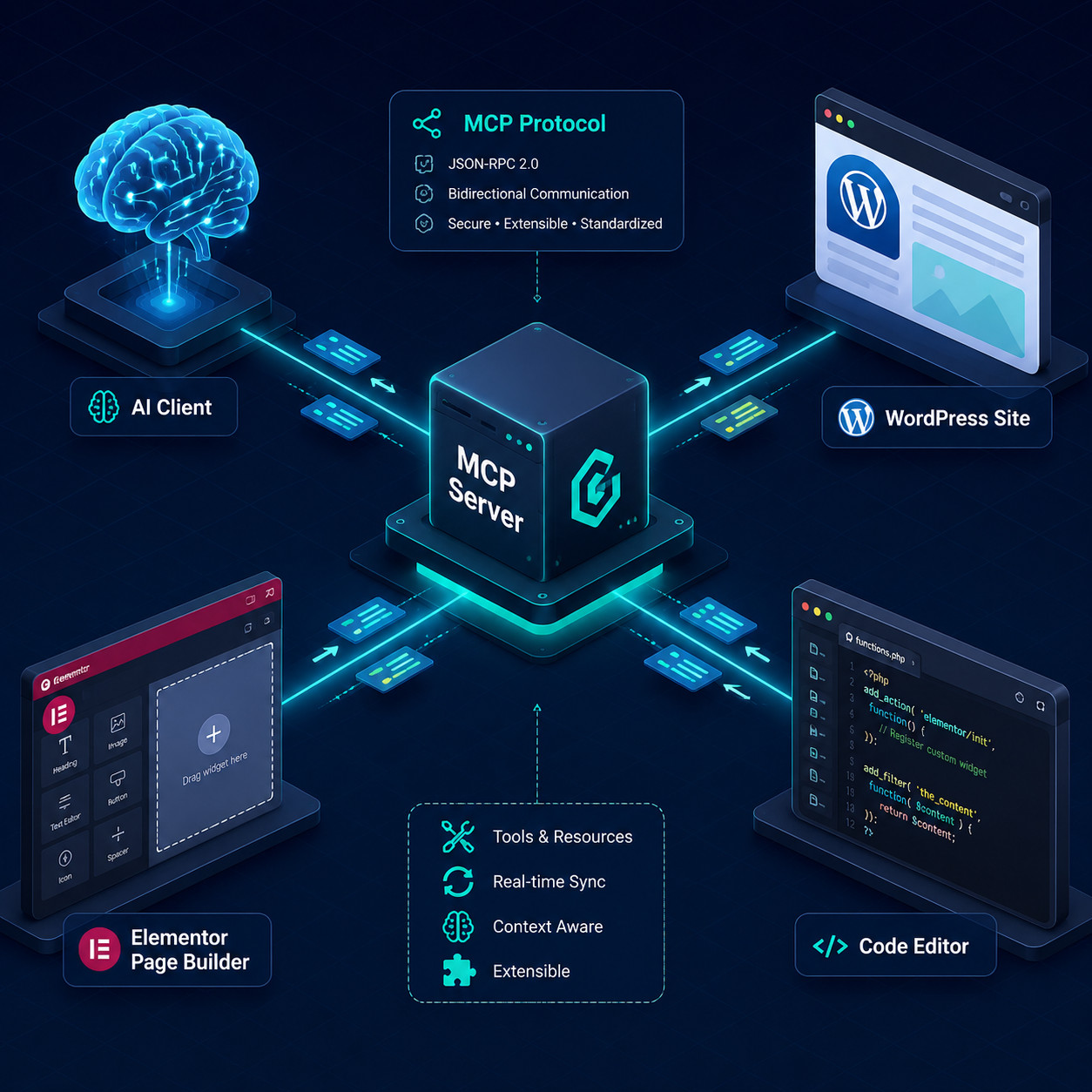
An Elementor MCP server is a local or remote service that translates AI requests into Elementor actions. It follows the Model Context Protocol, an open standard originally developed by Anthropic, which defines how AI models discover and call external tools in a consistent, secure way [9].
Here’s why this matters for web creators:
- Before MCP: You’d copy-paste content into Elementor manually, describe layouts in chat, then rebuild them by hand. AI couldn’t “see” or “touch” your actual page builder.
- After MCP: An AI agent connects directly to your Elementor setup. You say “create a hero section with a CTA button and testimonial slider,” and the AI executes it on your live or staging site [4].
Elementor’s official blog identifies four problems MCP solves: content misinterpretation by AI, repetitive context requests, layout mismatches, and unhelpful chatbot responses [4]. The protocol eliminates these by giving the AI structured access to your site’s actual data and design tools.
This shift fits into a broader trend. If you’re already exploring AI-powered tools for WordPress, MCP represents the next logical step: not just AI assistance, but AI agency.
Which Elementor MCP Server Implementations Are Available?
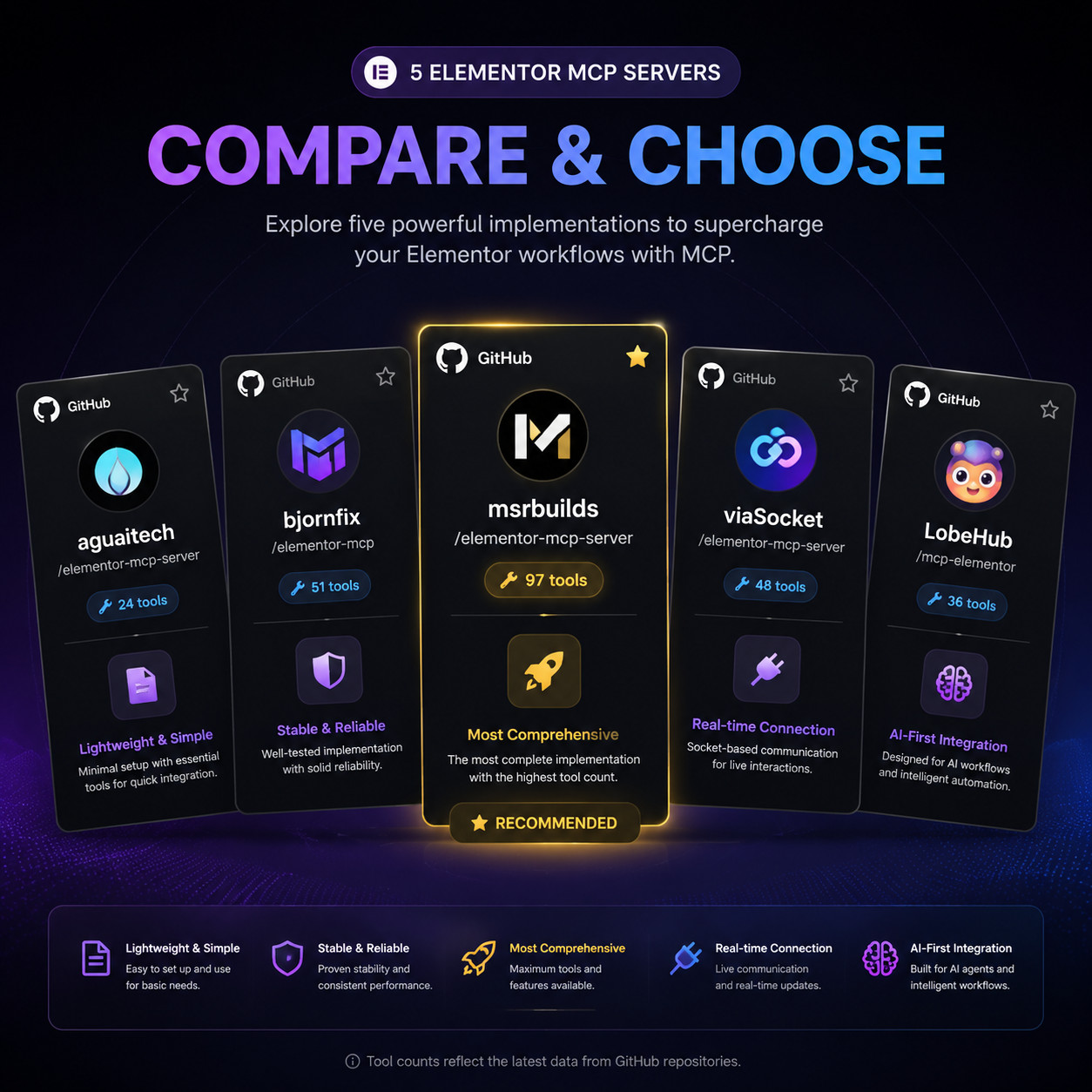
Multiple open-source and third-party Elementor MCP server projects exist. Here’s a comparison of the main options as of May 2026:
| Implementation | Tools/Capabilities | Primary Use Case | Source |
|---|---|---|---|
| msrbuilds/elementor-mcp | 97 AI-ready tools | Full page building, editing, management | [6] |
| aguaitech/Elementor-MCP | Core page/widget tools | General Elementor automation | [1] |
| bjornfix/mcp-abilities-elementor | Focused ability set | Specific Elementor operations | [10] |
| viaSocket Elementor MCP | Integration-focused | Connecting Elementor with other services | [5] |
| Elementor Angie (official) | Agentic AI framework | Full WordPress AI agent | [4] |
Choose msrbuilds/elementor-mcp if you want the broadest tool coverage right now (97 tools covering page creation, widget management, and design editing) [6]. Choose the official Angie framework if you want Elementor’s supported, first-party solution and don’t mind waiting for full release [4].
For those comparing page builder ecosystems, our guide to no-coding website design platforms covers how Elementor stacks up against alternatives.
How Do You Set Up an Elementor MCP Server?
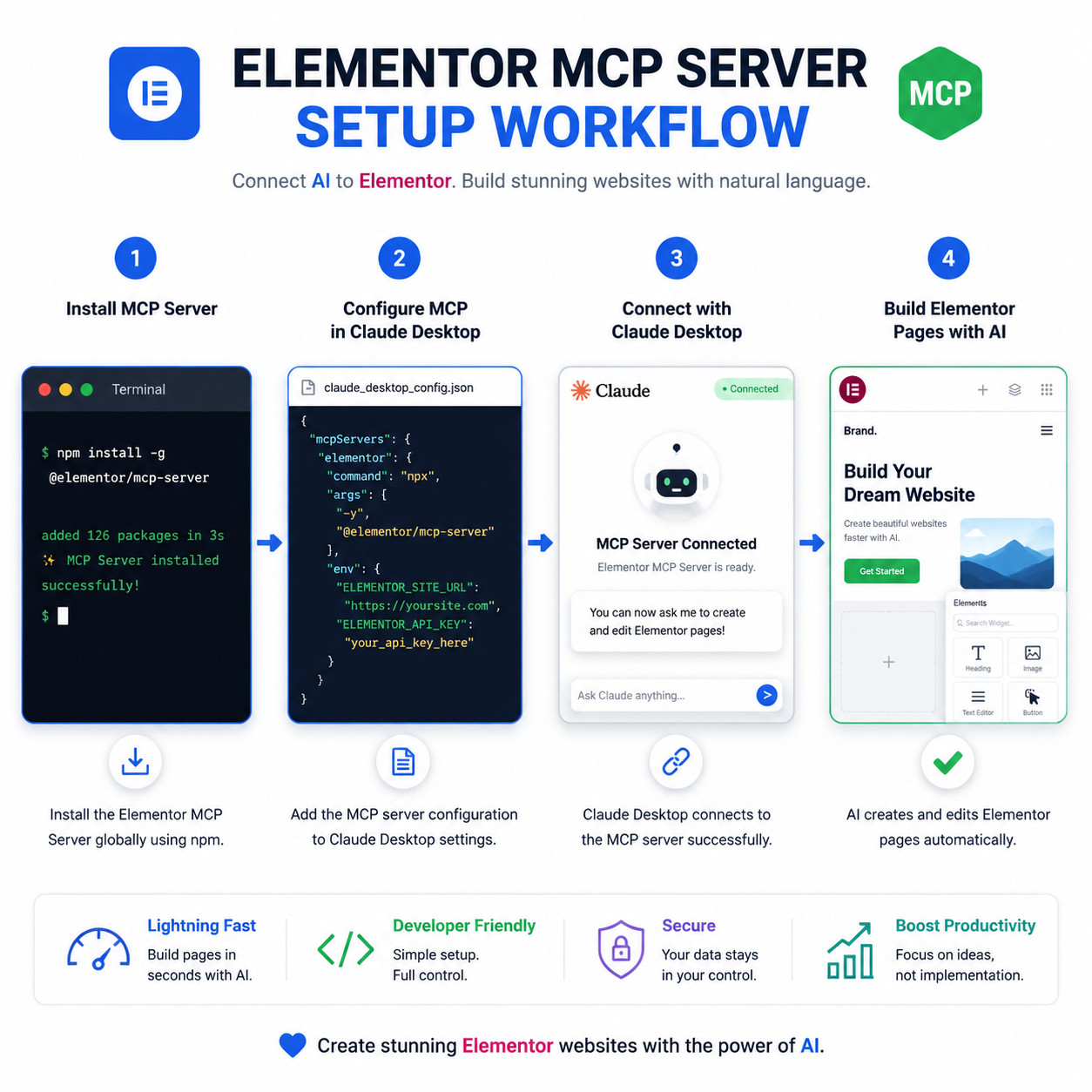
Setting up an Elementor MCP server involves installing the server package, configuring your WordPress connection, and linking it to an AI client. The process takes about 15 to 30 minutes for someone comfortable with a command line.
Step-by-step setup (using msrbuilds/elementor-mcp)
- Prerequisites: Install Node.js (v18+) and ensure your WordPress site has Elementor Pro active with REST API access enabled [6].
- Clone or install the server:
git clone https://github.com/msrbuilds/elementor-mcp.git
cd elementor-mcp
npm install - Configure your WordPress credentials: Edit the config file with your site URL, application password, and any API keys required [6].
- Start the MCP server:
npm start - Connect your AI client: In Claude Desktop (or another MCP-compatible client), add the server to your MCP configuration JSON. Point it to the running server’s address [1] [6].
- Test with a simple prompt: Ask the AI to list existing pages or create a basic section to verify the connection works.
Common mistakes during setup
- Forgetting to enable WordPress application passwords. Without this, the MCP server can’t authenticate with your site.
- Running the server against a production site without a staging environment. Always test on staging first. AI-generated layouts may need manual review.
- Mismatched Node.js versions. Some implementations require Node 18 or higher.
A practical video walkthrough titled “How I Use Elementor MCP + Claude Code to Create Custom Websites” demonstrates the full workflow from installation to page creation [2].
If you’re also customizing your WordPress theme alongside Elementor, our complete guide to WordPress theme customization covers the fundamentals.
What Can You Actually Do With an Elementor MCP Server?
The msrbuilds/elementor-mcp implementation exposes 97 tools that cover most of what you’d do manually in Elementor [6]. Here’s what that looks like in practice:
Page and template management:
- Create, duplicate, and delete pages
- Apply and switch between Elementor templates
- Set page-level settings (layout, background, metadata)
Widget and section control:
- Add, remove, and reorder widgets within sections
- Configure widget settings (text content, image sources, link targets)
- Build complex layouts with inner sections and columns
Design and styling:
- Adjust typography, colors, spacing, and responsive breakpoints
- Apply global styles and design system tokens
- Modify hover states and animation settings
Content operations:
- Populate pages with AI-generated content
- Update existing text, images, and media across multiple pages
- Manage dynamic content connections
Edge case to watch: AI agents can sometimes produce layouts that look correct structurally but have accessibility issues (missing alt text, poor color contrast). Always run an accessibility check after AI-generated builds.
For teams already using AI for content, pairing an Elementor MCP server with AI-powered content generation tools creates a full pipeline from writing to publishing.
How Does Elementor’s Official Angie AI Fit Into the MCP Ecosystem?
Elementor is building Angie, an agentic AI plugin purpose-built for WordPress that uses MCP as its communication layer [4]. Unlike the community-built MCP servers, Angie is designed to be a first-party, fully integrated solution.
Key differences between Angie and community MCP servers:
- Angie is an autonomous agent that can plan multi-step tasks (e.g., “redesign my about page to match my new brand guidelines”). Community servers typically handle one tool call at a time.
- Angie will integrate directly with Elementor’s UI, so non-technical users won’t need terminal access.
- Community servers are available now and fully open-source. Angie is in early access with signups available through Elementor’s site [4].
Elementor’s framing of MCP as a “USB-C port for AI [4] signals that they view this protocol as foundational infrastructure, not a temporary experiment. This aligns with broader industry movement: 67% of CTOs surveyed in Q1 2026 said MCP is or will be their default agent-integration standard within 12 months, according to Digital Applied.
Who Should (and Shouldn’t) Use an Elementor MCP Server?
Good fit:
- WordPress agencies building multiple client sites who want to speed up page creation
- Solo developers comfortable with basic terminal commands and JSON configuration
- Teams already using AI coding assistants (Claude, Cursor, GitHub Copilot) who want to extend AI into design
- Anyone building sites with repetitive page structures (landing pages, product pages, blog templates)
Not a good fit (yet):
- Non-technical site owners who aren’t comfortable with command-line tools (wait for Angie)
- Sites running Elementor Free only, as most MCP implementations require Pro features
- High-security environments where exposing WordPress REST API endpoints creates compliance concerns
If you’re exploring advanced WordPress strategies for power users, an Elementor MCP server fits naturally into an automation-heavy workflow.
What Are the Pros and Cons of Using an Elementor MCP Server?
Pros:
- Dramatically speeds up page creation for repetitive layouts
- Lets you describe designs in natural language instead of clicking through menus
- Open-source implementations are free to use [1] [6]
- Works with multiple AI clients (Claude, compatible LLM tools)
- Standardized protocol means improvements benefit the whole ecosystem
Cons:
- Requires technical setup that may intimidate beginners
- AI-generated layouts still need human review for quality and accessibility
- Community implementations may lag behind Elementor version updates
- REST API exposure adds a potential attack surface if not properly secured
- Limited documentation for some implementations
How Does an Elementor MCP Server Compare to AI Website Builders?
Standalone AI website creators generate entire sites from scratch but give you less control over the underlying platform. An Elementor MCP server, by contrast, works within your existing WordPress and Elementor setup.
| Factor | Elementor MCP Server | Standalone AI Website Builder |
|---|---|---|
| Platform control | Full WordPress ownership | Vendor-dependent |
| Design flexibility | Full Elementor widget library | Limited to builder’s components |
| Setup complexity | Moderate (terminal required) | Low (browser-based) |
| Content portability | WordPress standard | Varies by platform |
| AI integration depth | Deep (97+ tools) | Surface-level generation |
| Cost | Free (open-source) + Elementor Pro | Monthly subscription |
Choose an Elementor MCP server if you’re already invested in WordPress and Elementor and want AI to accelerate your existing workflow. Choose a standalone AI builder if you’re starting from zero and want the fastest path to a live site.
Conclusion
The Elementor MCP server bridges the gap between AI language models and hands-on page building. It’s not a distant future concept; multiple working implementations exist today, with the msrbuilds version alone offering 97 tools for AI-driven design [6]. Elementor’s own investment in Angie and MCP infrastructure confirms this is the direction WordPress page building is heading [4].
Your next steps:
- Try a community implementation on a staging site. The msrbuilds/elementor-mcp repo [6] is the most feature-complete option right now.
- Sign up for Elementor’s Angie early access if you want the official, integrated experience [4].
- Pair it with your existing AI tools. If you’re using Claude Desktop or similar, adding Elementor MCP to your config takes minutes.
- Review AI-generated output carefully. Check accessibility, mobile responsiveness, and brand consistency before publishing.
For more on integrating AI into your WordPress workflow, explore our guides on AI-powered chatbot integration for WordPress and WordPress plugin development best practices.
FAQ
What is MCP in the context of Elementor? MCP stands for Model Context Protocol, an open standard that lets AI models interact with external tools. For Elementor, it means AI agents can directly create and edit page designs on your WordPress site [9].
Is the Elementor MCP server free to use? The community-built implementations (msrbuilds, aguaitech, bjornfix) are free and open-source [1] [6] [10]. You still need an Elementor Pro license for full functionality.
Which AI clients work with an Elementor MCP server? Claude Desktop is the most commonly demonstrated client [2]. Any AI tool that supports the MCP standard can connect, and the list is growing as MCP adoption expands.
Can I use an Elementor MCP server on a live production site? Technically yes, but it’s strongly recommended to use a staging environment first. AI-generated layouts should be reviewed before going live.
Do I need coding experience to set up an Elementor MCP server? Basic comfort with a terminal, Git, and JSON files is needed for community implementations. Elementor’s upcoming Angie framework aims to remove this requirement [4].
How many tools does the most complete Elementor MCP server offer? The msrbuilds/elementor-mcp repository provides 97 AI-ready tools covering page creation, widget management, styling, and content operations [6].
What’s the difference between community MCP servers and Elementor’s Angie? Community servers are open-source tools you install and configure yourself. Angie is Elementor’s official agentic AI plugin that uses MCP but adds autonomous multi-step task planning and a user-friendly interface [4].
Is MCP the same as a REST API? No. MCP is a higher-level protocol that defines how AI agents discover and use tools. It often communicates over REST APIs underneath, but it adds standardized tool discovery, schema definitions, and security layers that raw REST APIs don’t provide [9].
Can an Elementor MCP server handle responsive design? Yes. Most implementations include tools for adjusting responsive breakpoints and mobile-specific settings, though you should always preview the result on actual devices [6].
Will MCP replace manual Elementor editing? Not entirely. MCP excels at repetitive tasks and initial page scaffolding. Fine-tuning visual details, brand nuances, and creative decisions still benefit from human judgment.
References
[1] Elementor MCP – https://github.com/aguaitech/Elementor-MCP [2] How I Use Elementor MCP + Claude Code to Create Custom Websites – https://www.youtube.com/watch?v=tCRt5m4jsY8 [4] Make Your Website AI Ready With MCP – https://elementor.com/blog/make-your-website-ai-ready-with-mcp/ [5] Elementor MCP (viaSocket) – https://viasocket.com/mcp/elementor [6] Elementor MCP (msrbuilds) – https://github.com/msrbuilds/elementor-mcp [9] MCP Explained For Web Creators – https://elementor.com/blog/mcp-explained-for-web-creators/ [10] MCP Abilities Elementor – https://github.com/bjornfix/mcp-abilities-elementor