Last updated: May 13, 2026
Quick Answer
WordPress 7.0 is scheduled for release on May 20, 2026, after being delayed from its original April 9 date to allow for architectural improvements [1]. The update brings a refreshed admin interface, new block types, PHP-only blocks, an AI Connectors API, and DataViews for managing content. Real-time collaboration (RTC) was removed from the release due to stability concerns and will be reconsidered for WordPress 7.1 [10].
Key Takeaways
- Release date: May 20, 2026, pushed back from April 9, 2026 [1]
- Current status: Release Candidate 3 (RC3) shipped May 8, 2026, with RC4 expected May 14 [4][6]
- Real-time collaboration dropped: RTC was pulled due to server load issues, race conditions, and metabox incompatibilities [10]
- New admin design: Updated color palette, DataViews for posts/pages management, and refreshed navigation
- PHP-only blocks: Developers can now create blocks entirely in PHP without JavaScript
- AI Connectors API: A new standardized way for plugins to integrate AI services into WordPress
- Block editor improvements: New blocks including Query Total, Content Visibility controls, and enhanced media handling
- Minimum requirements: PHP 7.4+ remains the floor, but PHP 8.2+ is recommended for best performance
- Backward compatibility: Most well-maintained plugins and themes should work, but testing before updating is essential
- Who should wait: Sites running business-critical custom code or outdated plugins should test on staging first
What Is the Official WordPress 7.0 Release Date and Schedule?
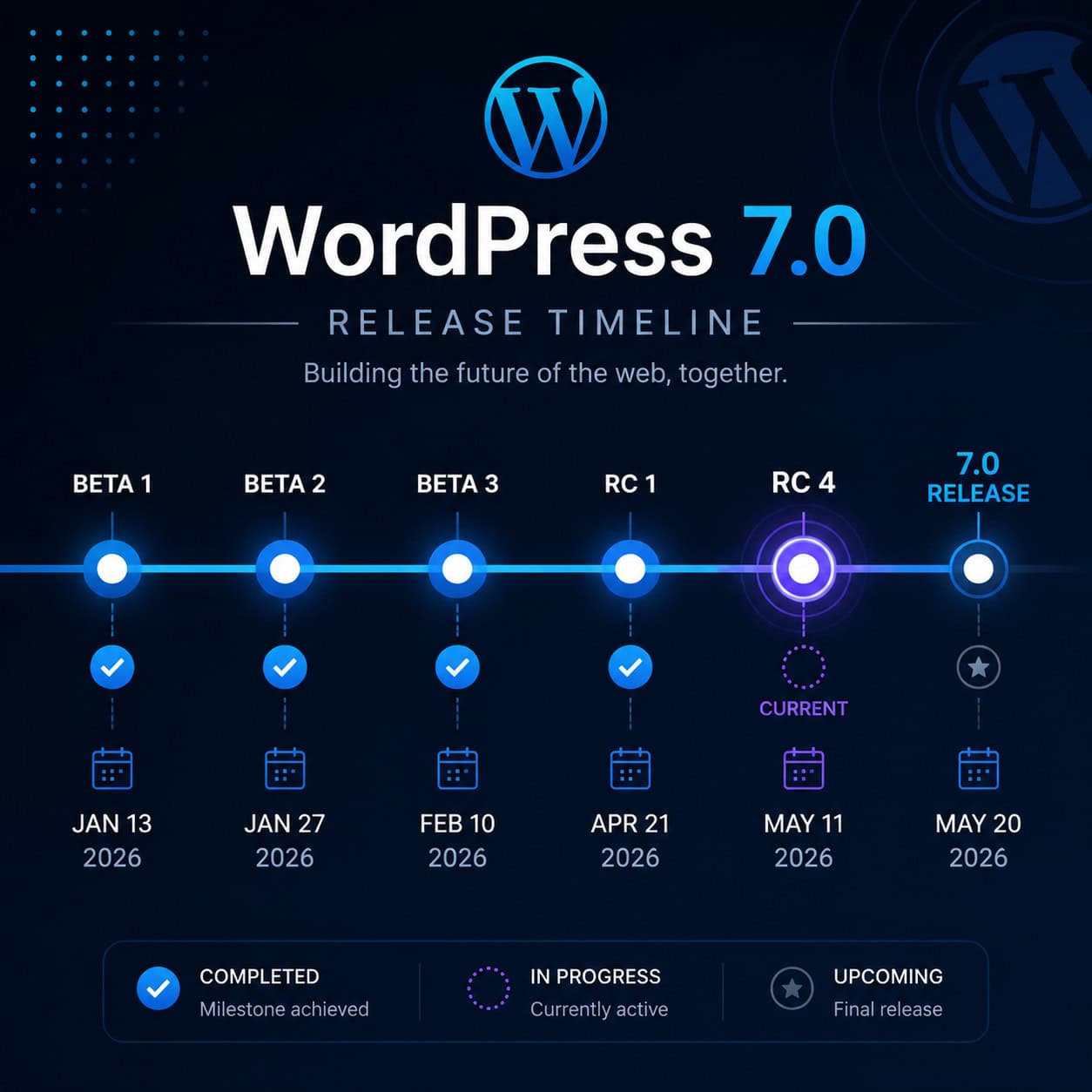
WordPress 7.0 will officially launch on May 20, 2026. The WordPress core team announced the revised date on April 22, 2026, after pushing back from the original April 9 target to address architectural stability and performance concerns [1].
Here’s the complete release timeline:
| Milestone | Date | Status |
|---|---|---|
| Beta 1 | February 2026 | Complete |
| Beta 2 | March 2026 | Complete |
| Release Candidate 1 | April 2026 | Complete |
| Release Candidate 3 | May 8, 2026 | Complete [4] |
| Release Candidate 4 | May 14, 2026 | Upcoming [6] |
| Code freeze and dry run | May 19, 2026 | Upcoming [6] |
| Final release | May 20, 2026 | Upcoming [1] |
The delay wasn’t a red flag. Pushing back a major release to get stability right is standard practice in WordPress development. The extra weeks gave the team time to remove features that weren’t ready (more on that below) and run additional host compatibility testing [6].
Common mistake: Assuming you’ll get the update automatically on May 20. WordPress auto-updates depend on your hosting configuration. Many managed hosts stagger major version rollouts over days or weeks. Check with your host if you want it immediately.
What New Features Are Coming in WordPress 7.0?
WordPress 7.0 introduces meaningful changes to the admin experience, block editor, and developer tooling. It’s not a visual overhaul on the level of WordPress 5.0 (which introduced Gutenberg), but it moves the platform closer to modern web application standards [7][9].

Refreshed Admin Interface and DataViews
The admin panel gets a new color scheme and updated navigation patterns. The biggest functional change is DataViews, which replaces the traditional post list tables with a more flexible, filterable grid-and-list interface. You can switch between table view, grid view, and customize which columns display.
DataViews apply to posts, pages, and custom post types. For site owners managing hundreds of posts, this is a practical improvement over the legacy list table that hasn’t changed much in over a decade [8].
If you’re interested in deeper customization of your admin experience, our guide to WordPress theme customization covers how themes interact with admin styling.
New Block Types
WordPress 7.0 adds several new blocks to the editor:
- Query Total block: Displays the total number of results in a query loop (useful for archive pages showing “Showing 42 results”)
- Content Visibility controls: Toggle content visibility based on conditions without custom code
- Enhanced media blocks: Client-side image processing reduces server load when uploading and editing images
PHP-Only Blocks
This is a big deal for developers. Previously, creating a custom Gutenberg block required both PHP and JavaScript. WordPress 7.0 introduces the ability to register and render blocks entirely in PHP [10]. This lowers the barrier for developers who are comfortable with PHP but less experienced with React/JavaScript.
If you build custom blocks, check out our essential guide to WordPress plugin development best practices for updated patterns.
AI Connectors API
WordPress 7.0 ships with a new AI Connectors API, a standardized interface that lets plugins connect to external AI services (like OpenAI, Anthropic, or self-hosted models) through a consistent WordPress-native method [10]. This doesn’t add AI features to WordPress core directly. Instead, it gives plugin developers a reliable foundation to build on.
For site owners already using AI tools, our roundup of the best AI plugins for WordPress covers what’s available today and what’s likely to adopt this new API.
Iframe-Based Gutenberg Isolation
The block editor now loads inside an iframe by default, isolating it from the admin page’s CSS and JavaScript. This reduces style conflicts between the editor and admin themes, and it makes the editing experience more consistent with what visitors see on the front end [9].
Why Was Real-Time Collaboration Removed from WordPress 7.0?
Real-time collaboration (RTC), which would have allowed multiple users to edit the same post simultaneously (like Google Docs), was officially pulled from WordPress 7.0 on May 8, 2026 [10]. The feature will be reconsidered for WordPress 7.1.

The core team cited four specific problems:
- Stability issues: RTC introduced intermittent crashes during concurrent editing sessions
- Server load: The feature required persistent WebSocket connections that many shared hosting environments can’t handle reliably
- Race conditions: When two users edited the same block simultaneously, data conflicts occurred that the sync engine couldn’t always resolve
- Metabox incompatibility: Legacy metaboxes (used by thousands of plugins like ACF, Yoast, and WooCommerce) didn’t play well with the real-time sync layer [10]
Was this the right call? Most analysts think so. ALM Corp noted that shipping RTC with known metabox conflicts could have broken critical workflows for millions of sites [2]. The WordPress ecosystem’s strength is its plugin library, and releasing a core feature that conflicts with popular plugins would cause more harm than good.
If you need real-time collaboration now: Platforms like Google Docs or Notion can handle the collaborative drafting phase, with content pasted into WordPress for publishing. It’s not elegant, but it works. Alternatively, hosted platforms like Squarespace already include built-in team editing features.
How Should You Prepare Your Site for WordPress 7.0?
Start preparing now, not on release day. WordPress major versions can introduce breaking changes, and the gap between “works on 6.x” and “works on 7.0” is wider than a typical minor update.

Pre-Update Checklist
Follow these steps before updating to WordPress 7.0:
- Create a full backup of your site (files and database). Use your hosting provider’s backup tool or a plugin like UpdraftPlus.
- Set up a staging environment. Never test a major update on your live site first. Most managed WordPress hosts offer one-click staging.
- Check PHP version. WordPress 7.0 requires PHP 7.4 minimum, but PHP 8.2+ is strongly recommended. Run
php -vvia SSH or check your hosting dashboard. - Update all plugins and themes to their latest versions before testing 7.0. Developers have had access to the beta and RC builds since February.
- Test on staging. Install WordPress 7.0 RC3 or RC4 using the WordPress Beta Tester plugin or WP-CLI (
wp core update --version=7.0-RC3) [4]. - Check plugin compatibility. Pay special attention to page builders (Elementor, Beaver Builder), SEO plugins, and WooCommerce. Visit each plugin’s support forum for 7.0 compatibility threads.
- Review custom code. If you have custom theme functions or mu-plugins, test them against the new iframe-based editor and DataViews changes.
- Test forms, checkout flows, and membership areas. These are the most common points of failure after major updates.
Choose to wait if: You run a WooCommerce store during a high-sales period, use more than 30 plugins, or rely on heavily customized themes. Give it 2-3 weeks after release for plugin authors to patch any issues.
Update early if: You run a simple blog or brochure site with fewer than 10 plugins, all from well-maintained sources.
For power users looking to automate parts of this process, our advanced WordPress strategies guide covers automation workflows for updates and testing.
How Does WordPress 7.0 Compare to Alternatives in 2026?
WordPress powers an estimated 40%+ of the web, but the competitive landscape has shifted. Here’s how WordPress 7.0 stacks up against the main alternatives for different use cases.

| Feature | WordPress 7.0 | Squarespace | Wix | Static Site Generators |
|---|---|---|---|---|
| Hosting | Self-hosted (you choose) | Included | Included | Deploy to Netlify/Vercel |
| Starting cost | Free (core) + hosting ($3-30/mo) | $16/month | $17/month | Free (hosting often free) |
| Real-time collaboration | Not in 7.0 | Built-in | Built-in | Via Git workflows |
| AI features | API for plugins | Built-in AI writer | Built-in AI tools | Varies by toolchain |
| Plugin ecosystem | 60,000+ plugins | ~30 extensions | 300+ apps | Varies widely |
| Customization depth | Unlimited (code access) | Template-limited | Moderate | Unlimited (code access) |
| Learning curve | Moderate to steep | Low | Low | Steep (developer-focused) |
| Best for | Flexibility, scale, ownership | Design-focused small business | Quick launch, beginners | Speed, security, developers |
Choose WordPress 7.0 if:
- You need full control over your code, hosting, and data
- You rely on specific plugins that don’t exist on other platforms
- You’re building something complex (membership site, marketplace, LMS)
- You want to own your content without platform lock-in
Consider alternatives if:
- You want built-in collaboration features right now
- You prefer an all-in-one platform with no server management
- You’re building a simple portfolio or small business site and want minimal setup
- Speed and security are your top priorities and you’re comfortable with Markdown (static generators)
If you’re exploring other platforms, our comparison of the best no-coding website design platforms covers the full landscape.
AI-Powered Alternatives Worth Watching
AI site builders like Butternut AI can generate complete websites from text prompts in seconds. Tools like 10Web combine WordPress with AI-powered site generation on Google Cloud. These are interesting for rapid prototyping, but they lack the depth and ecosystem maturity of a full WordPress installation.
WordPress 7.0’s AI Connectors API is the platform’s answer to this trend. Rather than building AI into core, WordPress provides the plumbing for plugin developers to integrate any AI service. For practical AI integration today, see our guide on how to integrate an AI-powered chatbot into WordPress.
What Do Developers Need to Know About WordPress 7.0?
WordPress 7.0 introduces several changes that directly affect theme and plugin developers. The May 2026 developer notes from the official WordPress developer blog outline the key technical shifts [10].
Breaking Changes and Deprecations
- Iframe editor is now default. If your plugin injects CSS or JS into the editor, it may no longer work as expected. You’ll need to use the
enqueue_block_editor_assetshook correctly and test within the iframe context. - DataViews replaces list tables in some contexts. If your plugin extends the posts list table with custom columns, verify those customizations still render correctly.
- New block registration patterns. PHP-only blocks use a simplified registration process. Existing JavaScript-based blocks continue to work, but new blocks can skip the JS build step entirely.
AI Connectors API for Plugin Developers
The AI Connectors API provides:
- A standardized authentication flow for connecting to external AI services
- Consistent request/response formatting across different AI providers
- Built-in rate limiting and error handling
- User permission controls (site admins can restrict which roles access AI features)
This means plugin developers no longer need to build their own AI integration layer from scratch. If you’re developing plugins that use AI, this API should be your starting point.
Testing Your Code
The WordPress core team strongly recommends testing plugins and themes against RC3 (available now) and RC4 (May 14) [4][6]. Use the Beta Tester plugin or run:
<code>wp core update --version=7.0-RC4
</code>
Report bugs through the official WordPress Trac system. The code freeze on May 19 means only critical fixes will be accepted after that date [6].
For developers building custom themes, our ultimate guide to custom WordPress theme development has been updated with 7.0 compatibility notes.
What Comes After WordPress 7.0?
WordPress 7.0 is a stepping stone, not a destination. The features that didn’t make it into this release tell you where the platform is heading.
WordPress 7.1 (expected late 2026) will likely include:
- Real-time collaboration (revisited): The core team plans to address the metabox compatibility and server load issues that caused RTC’s removal from 7.0 [10]
- Further admin modernization: The DataViews interface will expand to more admin screens
- Expanded AI integration: Building on the Connectors API, expect tighter AI workflows in the editor
- Performance improvements: Continued work on client-side media processing and reduced server-side rendering overhead
The broader WordPress roadmap through 2026 focuses on making the admin experience feel like a modern web application while maintaining backward compatibility with the massive existing ecosystem [8].
Frequently Asked Questions
When exactly does WordPress 7.0 come out?
WordPress 7.0 is scheduled for May 20, 2026. The release was delayed from April 9 to allow additional stability testing and architectural improvements [1].
Is WordPress 7.0 a free update?
Yes. WordPress core is open-source and free. The update will be available through your WordPress dashboard, WP-CLI, or manual download from WordPress.org.
Will my plugins break after updating to WordPress 7.0?
Some plugins may have compatibility issues, especially those that modify the post editor or extend admin list tables. Check each plugin’s changelog and support forum for 7.0 compatibility before updating. Always test on a staging site first.
What happened to real-time collaboration in WordPress 7.0?
RTC was removed on May 8, 2026, due to stability problems, server load concerns, race conditions during concurrent editing, and incompatibilities with legacy metaboxes used by popular plugins [10]. It’s expected to return in WordPress 7.1.
What PHP version does WordPress 7.0 require?
WordPress 7.0 requires PHP 7.4 as the minimum. However, PHP 8.2 or higher is recommended for best performance and security.
Should I update to WordPress 7.0 on release day?
It depends on your site’s complexity. Simple blogs with few plugins can update within the first week. E-commerce sites, membership platforms, and sites with heavy customization should wait 2-3 weeks and test on staging first.
What are PHP-only blocks?
PHP-only blocks let developers create custom Gutenberg blocks using only PHP, without writing any JavaScript or React code. This simplifies block development for PHP-focused developers [10].
What is the AI Connectors API?
It’s a new WordPress core API that provides a standardized way for plugins to connect to external AI services like OpenAI or Anthropic. It handles authentication, request formatting, rate limiting, and permissions [10].
How do I test WordPress 7.0 before it’s released?
Install the WordPress Beta Tester plugin on a staging site, or use WP-CLI: wp core update --version=7.0-RC4. RC4 is expected on May 14, 2026 [4][6].
Is WordPress 7.0 faster than WordPress 6.x?
WordPress 7.0 includes performance improvements like client-side image processing and iframe-based editor isolation, which reduce server load during editing. Front-end performance gains depend largely on your theme, plugins, and hosting setup.
Will my theme still work with WordPress 7.0?
Most actively maintained themes will work. However, themes that haven’t been updated in over a year may have issues with the new iframe-based editor or DataViews changes. Test before updating.
Conclusion
WordPress 7.0 is a meaningful but measured update. The new admin interface with DataViews, PHP-only blocks, and the AI Connectors API move the platform forward without breaking what works. The removal of real-time collaboration was disappointing but responsible, prioritizing ecosystem stability over feature hype.
Here’s what to do right now:
- Check your PHP version and upgrade to 8.2+ if you haven’t already
- Set up a staging environment if you don’t have one
- Install RC4 on staging when it drops on May 14 and test your critical workflows
- Update your plugins and themes to their latest versions
- Plan your update window for late May or early June, depending on your site’s complexity
- Follow the official Make WordPress Core blog for any last-minute changes before May 20
WordPress 7.0 isn’t a revolution. It’s a solid step toward a more modern, developer-friendly, and AI-ready platform. For the 40%+ of the web running WordPress, that’s exactly what’s needed.
For more WordPress insights, strategies, and tutorials, explore our WordPress resource hub.
References
[1] WordPress 7.0 Release Party Updated Schedule – https://make.wordpress.org/core/2026/04/22/wordpress-7-0-release-party-updated-schedule/
[2] WordPress 7.0 Gets A New May 20 Release Date – https://www.therepository.email/wordpress-7-0-gets-a-new-may-20-release-date
[4] WordPress 7.0 Release Candidate 3 – https://wordpress.org/news/2026/05/wordpress-7-0-release-candidate-3/
[6] WordPress 7.0 Release Date – https://www.inmotionhosting.com/support/edu/wordpress/wordpress-news/wordpress-7-0-release-date/
[7] WordPress 7 – https://briteweb.com/insights/wordpress-7/
[8] WordPress Release Roadmap 2026 – https://rockbell.studio/en/blog/wordpress-release-roadmap-2026/
[9] WordPress 7.0 Update – https://www.bigcloudy.com/blog/wordpress-7-0-update/
[10] What’s New For Developers May 2026 – https://developer.wordpress.org/news/2026/05/whats-new-for-developers-may-2026/