Last updated: May 13, 2026
Quick Answer
WordPress 7.0 is scheduled for final release on May 20, 2026, after being delayed from the original April 9 target date [1][2]. This major update introduces a provider-agnostic AI integration layer (WP AI Client), performance improvements including client-side image processing, PHP-only blocks, and Gutenberg’s full iframe transition. Real-time collaboration was removed from this release and deferred to WordPress 7.1 [4].
Key Takeaways
- Release date: May 20, 2026 (delayed from April 9 for stability testing) [1][2]
- PHP requirement: Minimum PHP 7.4, but PHP 8.3 is strongly recommended [6]
- AI integration: New WP AI Client provides a standardized, provider-agnostic interface for connecting external AI models
- Real-time collaboration: Removed from 7.0 and pushed to the 7.1 development cycle [4]
- Editor changes: Gutenberg blocks now run in full iframe isolation for better performance and security
- PHP-only blocks: New block type that renders entirely server-side without JavaScript
- Admin redesign: Updated color scheme and animations (controversial among some developers)
- Testing status: Release Candidate 3 (RC3) was published May 8, 2026 for final community testing [4]
- Host compatibility: Web hosts are actively testing ahead of release; sites should verify plugin and theme compatibility before updating

Why Was WordPress 7.0 Delayed and When Does It Actually Ship?
WordPress 7.0 releases on May 20, 2026. The original April 9 date was pushed back after the core team paused pre-releases through April 17 to address architectural issues [1][3].
On April 22, 2026, core contributors @desrosj (Jonathan Desrosiers) and @jeffpaul announced the revised schedule, citing the need for additional stability testing and host compatibility verification [1]. The delay wasn’t caused by a single bug but rather a decision to give web hosts like Kinsta, GoDaddy, and others more time to test their environments against the new codebase [2].
The revised timeline looked like this:
| Milestone | Date |
|---|---|
| Original target | April 9, 2026 |
| Pre-release pause | Through April 17, 2026 |
| Updated schedule announced | April 22, 2026 |
| Release Candidate 3 | May 8, 2026 |
| Final release | May 20, 2026 |
RC3 was treated as a beta for broader community feedback, with the WordPress.org announcement specifically calling on hosting companies to run compatibility tests [4]. If you manage WordPress sites professionally, this extra testing window is a good sign—it means fewer day-one breakages.
What Is the WP AI Client and How Does WordPress 7.0 Handle AI?
The WP AI Client is WordPress 7.0’s most forward-looking feature: a standardized, provider-agnostic interface that lets plugins and themes connect to external AI models without building custom integrations for each provider.

Rather than locking users into a single AI vendor, the WP AI Client acts as a middleware layer. Plugin developers can write one integration that works with OpenAI, Anthropic, Google, or any compatible model. This approach mirrors how WordPress handles databases—you write to the abstraction layer, not directly to MySQL or MariaDB.
What this means in practice:
- Plugin developers don’t need separate codebases for different AI providers
- Site owners can switch AI providers without reinstalling plugins
- The API follows WordPress coding standards, so it’s familiar to existing developers
- Content generation, image analysis, and chatbot features can all use the same client
Weston Ruter and John Parris from WP Engine described this as foundational infrastructure for building an “intelligent web” on WordPress [7]. The rtCamp team noted that this integration layer is one of the most exciting additions for agency workflows.
If you’re already using AI tools on your WordPress site, check out our guide on how to use AI SEO tools for WordPress and our roundup of the 12 best AI plugins for WordPress automation.
Common mistake: Don’t assume the WP AI Client replaces existing AI plugins. It provides the plumbing—plugins still handle the specific use cases (content writing, image generation, chatbots). Think of it as WordPress providing the standard electrical outlets so appliance makers don’t each need their own wiring.
What Are the Major Editor and Block Changes in WordPress 7.0?
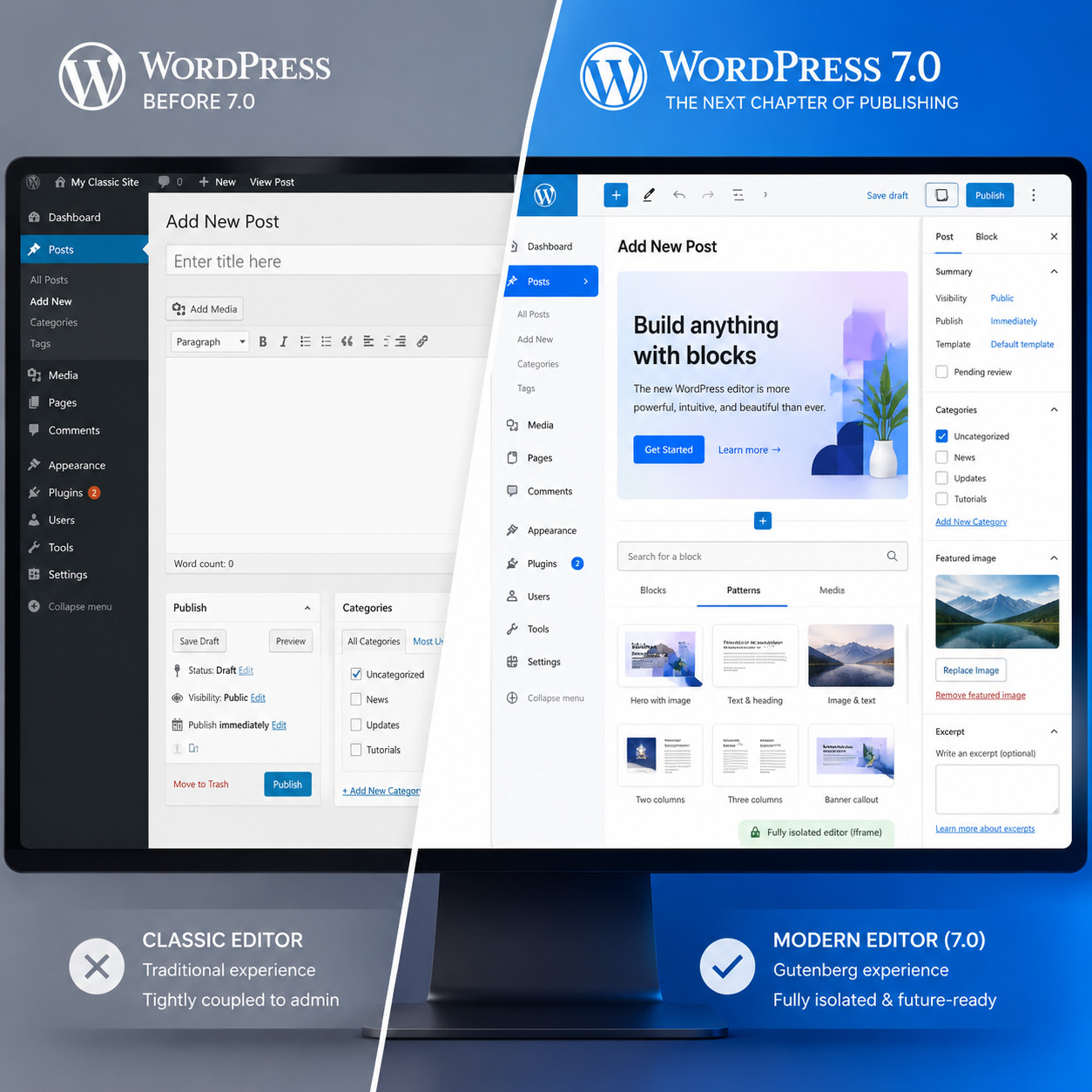
WordPress 7.0 completes Gutenberg’s transition to full iframe isolation and introduces PHP-only blocks, giving developers more flexibility in how they build custom block types.
Gutenberg Iframe Isolation
The block editor now renders content inside an iframe by default. This matters because:
- Theme styles can’t leak into the editor UI (and vice versa), reducing visual conflicts
- Plugin JavaScript conflicts decrease since editor scripts run in a sandboxed environment
- What you see in the editor more closely matches the front end
Vitalii Kaplia, a senior developer who reviewed WordPress 7.0 Beta 2 in March 2026, praised this change as one of the most impactful for theme developers, though he noted it may require updates to plugins that inject custom CSS into the editor.
PHP-Only Blocks
These blocks render entirely on the server without requiring JavaScript. They’re ideal for:
- Dynamic content that depends on server-side data (user roles, database queries)
- Simple output blocks where a React component adds unnecessary complexity
- Developers who are comfortable with PHP but less experienced with JavaScript
Choose PHP-only blocks if your block doesn’t need interactive client-side behavior. Choose standard blocks if users need to manipulate the content visually in the editor.
Enhanced Editorial Notes with @Mentions
Building on the editorial notes feature from WordPress 6.9, version 7.0 adds @mention support. Content teams can tag specific users in notes attached to blocks, making collaborative editing workflows more practical even without full real-time collaboration.
For developers building custom themes around these new capabilities, our guide to custom WordPress theme development covers the foundational patterns you’ll need.
What Happened to Real-Time Collaboration?
Real-time collaboration was removed from WordPress 7.0 and deferred to the 7.1 development cycle. The feature wasn’t stable enough for a major release [4].
This was one of the most anticipated features heading into 7.0. The idea: multiple users editing the same post simultaneously, similar to Google Docs. During testing, however, the core team found issues that couldn’t be resolved within the release timeline.
The RC3 announcement on May 8, 2026 confirmed the deferral, stating that stability took priority over feature completeness [4]. This is consistent with WordPress’s general philosophy—ship when it’s ready, not when it’s scheduled.
What you can do now instead:
- Use the enhanced editorial notes with @mentions for async collaboration
- Consider plugins that provide basic co-editing functionality
- Plan for real-time collaboration arriving in WordPress 7.1 (likely late 2026)
If you work in a team environment and need collaboration features today, our article on advanced WordPress strategies for power users covers workflow automation approaches that bridge the gap.
How Does WordPress 7.0 Improve Performance?
WordPress 7.0 introduces client-side image processing and several under-the-hood optimizations that reduce server load and improve page rendering speed.

Client-Side Image Processing
Previously, when you uploaded an image, your server handled all the resizing, cropping, and format conversion. In 7.0, much of this work shifts to the browser before the file even hits your server. Benefits include:
- Reduced server CPU usage during media uploads
- Faster upload experience for users on modern browsers
- Lower hosting costs for sites that process large volumes of images
Additional Performance Gains
- Reduced database queries on common page loads
- Better asset loading through improved script dependency management
- Optimized REST API responses for headless WordPress implementations
The PHP 8.3 recommendation isn’t just about compatibility—sites running PHP 8.3 will see measurably better performance than those on PHP 7.4 or 8.0 [6]. If your host supports it, upgrade PHP before updating to WordPress 7.0.
Edge case: Sites using custom image processing plugins (like those that convert to WebP or AVIF on upload) should test carefully. The new client-side processing may conflict with server-side image manipulation workflows.
What Are the System Requirements and How Should You Prepare?
WordPress 7.0 requires minimum PHP 7.4 but strongly recommends PHP 8.3. You should test your site in a staging environment before updating on launch day [6].
Minimum Requirements
| Requirement | Minimum | Recommended |
|---|---|---|
| PHP | 7.4 | 8.3 |
| MySQL | 5.7 | 8.0+ |
| MariaDB | 10.4 | 10.6+ |
| HTTPS | Required | Required |
Pre-Update Checklist
- Back up everything — database, files, uploads, wp-config.php
- Check PHP version — upgrade to 8.3 if your host supports it
- Test plugins — deactivate and test one by one in staging
- Test your theme — especially if it uses custom editor styles or JavaScript in the block editor
- Review the RC3 changelog — look for deprecated functions your code might use [4]
- Contact your host — confirm they’ve tested WordPress 7.0 compatibility
- Wait 48-72 hours after release — unless you’ve already tested RC3 successfully
Decision rule: If you run a business-critical site with custom plugins, wait at least one week after May 20 before updating production. If you run a personal blog with standard plugins from the WordPress.org repository, updating within the first week is generally safe once your plugins confirm compatibility.
For plugin developers preparing their code, our guide to WordPress plugin development best practices covers testing strategies and compatibility patterns.

What About the Controversial Admin Redesign?
WordPress 7.0 introduces an updated admin color scheme and new animations that have divided the developer community.
Vitalii Kaplia’s March 2026 review of Beta 2 specifically criticized the new color choices and animation patterns, calling them a step backward in usability. Other developers have praised the modernized look.
What changed:
- Updated default admin color palette (more muted tones)
- New micro-animations on menu interactions and panel transitions
- Refreshed typography in some admin areas
If you dislike the changes: WordPress still supports custom admin color schemes. Plugins that override admin styles will continue to work. The core team has historically been responsive to accessibility concerns, so expect refinements in 7.0.x point releases.
For those looking to customize their site’s appearance beyond the admin, our complete guide to WordPress theme customization walks through the options available.
How Does WordPress 7.0 Compare to Alternatives in 2026?
WordPress remains the dominant CMS, but alternatives have grown more capable. WordPress 7.0’s AI infrastructure and extensibility keep it competitive for complex sites, while simpler projects may benefit from all-in-one platforms.
| Platform | Best For | AI Features | Learning Curve | Hosting |
|---|---|---|---|---|
| WordPress 7.0 | Complex sites, full control | WP AI Client (extensible) | Moderate | Self-hosted or managed |
| Squarespace | Small business, portfolios | Built-in AI writer | Low | Included |
| Webflow | Design-heavy sites | Limited | Moderate-High | Included |
| Wix | Beginners | Wix ADI | Low | Included |
| Framer | Interactive prototypes | AI site generation | Moderate | Included |
| Butternut AI | Quick AI-generated sites | Full AI builder | Very Low | Included |
Choose WordPress 7.0 if: You need full control, plan to scale, want plugin flexibility, or need the new AI Client for custom integrations.
Consider alternatives if: You want zero maintenance, don’t need plugins, or prefer visual-first design without code.
Headless WordPress (using 7.0 as a backend with React or Next.js on the front end) is gaining traction thanks to improved REST API performance. But this approach adds complexity—it’s best suited for teams with dedicated front-end developers.
For a broader comparison of website building options, see our review of the 10 best drag-and-drop website builders.
What Should Plugin and Theme Developers Know?
If you build WordPress plugins or themes, WordPress 7.0 introduces breaking changes you need to address before May 20.
Key developer concerns:
- Iframe isolation: Any plugin that injects CSS or JS directly into the editor DOM needs testing. The iframe boundary means you may need to use the
enqueue_block_editor_assetshook differently. - PHP-only blocks: If you’ve been building blocks that don’t need client-side interaction, consider converting them to PHP-only blocks for simpler maintenance.
- WP AI Client: Start building against the new API now. Early adopters who integrate the AI Client will have a competitive advantage in the plugin marketplace.
- Deprecated functions: Review the RC3 release notes for any functions marked for removal [4].
Quick example: If your plugin adds a custom sidebar panel to the block editor, test it against RC3 immediately. The iframe transition has broken several popular plugins during beta testing.
Our AI-powered content optimization guide covers practical ways to use AI tools within WordPress workflows that will integrate well with the new WP AI Client.
Conclusion
WordPress 7.0 ships May 20, 2026, bringing meaningful infrastructure changes rather than flashy surface features. The WP AI Client, iframe-isolated editor, PHP-only blocks, and client-side image processing represent the kind of foundational work that makes WordPress more capable for the next several years.
Your action steps:
- This week: Check your PHP version and upgrade to 8.3 if possible
- Before May 20: Test your site against RC3 in a staging environment
- May 20-22: Monitor plugin compatibility announcements from your key plugins
- After confirming compatibility: Update production with a full backup in place
- Long-term: Explore the WP AI Client documentation for integration opportunities
The deferral of real-time collaboration to 7.1 is disappointing but responsible. WordPress has historically been at its best when it prioritizes stability over deadlines—and this release reflects that philosophy.
FAQ
When does WordPress 7.0 release? May 20, 2026. It was originally scheduled for April 9 but delayed for additional testing [1][2].
What PHP version do I need for WordPress 7.0? Minimum PHP 7.4, but PHP 8.3 is strongly recommended for best performance and compatibility [6].
Is real-time collaboration included in WordPress 7.0? No. It was removed during development and deferred to WordPress 7.1 due to stability concerns [4].
What is the WP AI Client? A provider-agnostic API built into WordPress core that lets plugins connect to external AI models (OpenAI, Anthropic, Google, etc.) through a single standardized interface.
Will my existing plugins break after updating? Possibly. The Gutenberg iframe transition is the most likely source of conflicts. Test in staging before updating production.
Can I still use PHP 7.4 with WordPress 7.0? Yes, but it’s not recommended. Performance will be significantly worse, and future WordPress versions will likely drop PHP 7.4 support entirely [6].
What are PHP-only blocks? A new block type that renders entirely on the server without requiring JavaScript. Ideal for dynamic content blocks that don’t need client-side interactivity.
Should I update on day one? Only if you’ve tested RC3 successfully. For business-critical sites, waiting 3-7 days for the community to identify issues is prudent.
How do I test WordPress 7.0 before it launches? Install RC3 on a staging site or local development environment. Never test release candidates on production [4].
What’s the biggest change for theme developers? The full iframe isolation in the block editor. Theme styles now need to properly enqueue for the iframe context, and any direct DOM manipulation in the editor may break.
Does WordPress 7.0 support headless setups? Yes, and better than before. REST API performance improvements make headless WordPress (with React, Next.js, or similar frontends) more viable.
Is WordPress still worth using in 2026 with so many alternatives? For sites that need extensibility, custom functionality, or full ownership of data and hosting, WordPress remains the strongest option. Simpler sites may benefit from all-in-one platforms.
References
[1] WordPress 7 0 Release Party Updated Schedule – https://make.wordpress.org/core/2026/04/22/wordpress-7-0-release-party-updated-schedule/ [2] WordPress 7 0 Gets A New May 20 Release Date – https://www.therepository.email/wordpress-7-0-gets-a-new-may-20-release-date [3] WordPress 70 Releases On For 9 April 2026 – https://www.reddit.com/r/CloudwaysbyDO/comments/1se6ooc/wordpress_70_releases_on_for_9_april_2026/ [4] WordPress 7 0 Release Candidate 3 – https://wordpress.org/news/2026/05/wordpress-7-0-release-candidate-3/ [6] WordPress 7 0 Release Date – https://www.inmotionhosting.com/support/edu/wordpress/wordpress-news/wordpress-7-0-release-date/ [7] Watch – https://www.youtube.com/watch?v=I5zzcC9DKwU