Last updated: May 11, 2026This post provides a Base44 tutorial, a complete beginner guide for anyone interested in no-code solutions.
Quick Answer
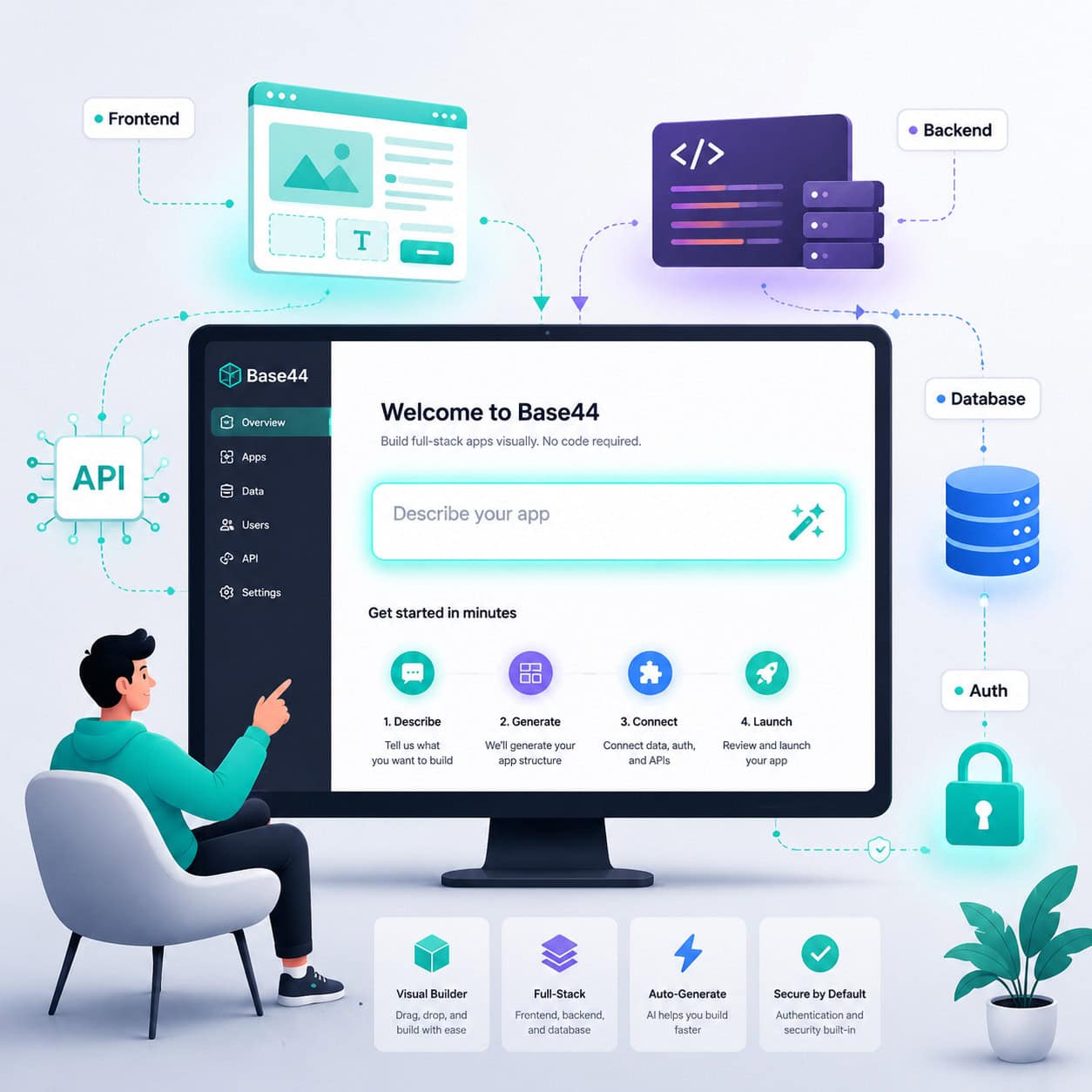
Base44 is an AI-powered no-code platform that lets you build full-stack web applications by describing what you want in plain English. This base44 tutorial walks you through everything from creating your first app to deploying autonomous AI agents, all without writing a single line of code. The platform generates working frontends, backends, databases, and authentication systems from natural language prompts [8].
Key Takeaways
- Base44 generates complete web apps (UI, backend, database, and auth) from text descriptions, not just mockups [8].
- No coding experience required. The platform is built for entrepreneurs, founders, and beginners who want to ship software fast.
- Superagents, launched in March 2026, let you create autonomous AI agents that run tasks on schedules and respond to triggers [9].
- You can interact with Superagents through WhatsApp and Telegram for real-time monitoring.
- Base44 is not Base44 encoding. The platform shares a name with a data encoding scheme used for QR codes, but they’re completely different things.
- Multiple tutorials from creators like George Vlasyev, Nate O’Brien, and others have been published in early 2026, showing strong community growth [1][2][3][4][5].
- The learning curve is low, but understanding how to write good prompts makes a significant difference in output quality.
- Base44 competes with platforms like Bubble, Lovable, and Bolt in the no-code app builder space.
What Is Base44 and Why Should Beginners Care?
Base44 is a full-stack AI app builder that turns plain English descriptions into working web applications. For beginners with no programming background, it removes the biggest barrier to building software: knowing how to code.
Here’s what makes it different from older no-code tools. Traditional platforms like Bubble or Adalo still require you to learn their visual programming interfaces, which can take weeks. Base44 uses AI to interpret what you describe and generates the entire application stack automatically. According to No-Code MBA’s 2026 guide, this includes working user interfaces, backend logic, databases, and user authentication systems [8].
I first heard about Base44 in late 2025 when a friend who runs a small e-commerce business told me he’d built a customer portal in an afternoon. No developer. No freelancer. Just a text description and some back-and-forth with the AI. That conversation is what pushed me to dig deeper into the platform.
Who is Base44 for?
- Entrepreneurs who need an MVP (minimum viable product) fast
- Non-technical founders testing a business idea
- Freelancers building client tools
- Students learning about app development concepts
- Small business owners who need custom internal tools
Who is it NOT for (yet)?
- Teams building enterprise-grade software with complex compliance requirements
- Developers who need full control over every line of code
- Projects requiring highly specialized integrations not yet supported
If you’re exploring no-code tools more broadly, our guide to AI website creators that build professional sites without code covers the wider landscape.
How to Get Started With Base44: A Step-by-Step Base44 Tutorial
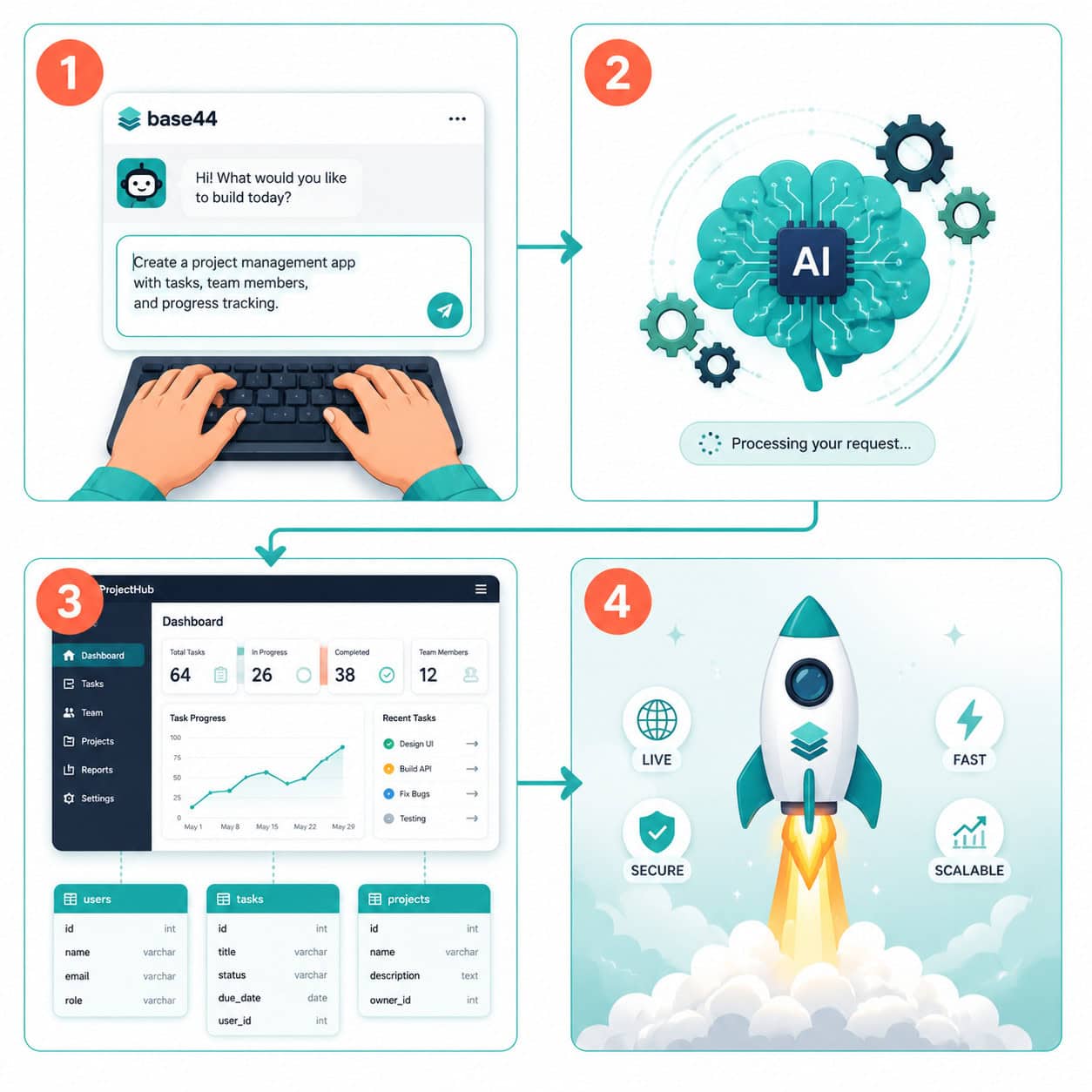
Getting started takes about five minutes. You sign up, describe your app, and Base44’s AI builds a working first version. Here’s the full walkthrough.
Step 1: Create Your Account
Go to base44.com and sign up with your email or Google account. The onboarding process asks a few questions about what you want to build. Be honest about your experience level because the platform adjusts its suggestions accordingly.
Step 2: Describe Your App in Plain English
This is where the magic happens. Base44 gives you a text input where you describe what you want your application to do. For example:
“Build me a project management tool where team members can create tasks, assign them to each other, set deadlines, and track progress with a kanban board view.”
The more specific your description, the better the output. Here are some tips for writing effective prompts:
- Name the user roles. “Admins can do X, regular users can do Y.”
- Describe the data. “Each task has a title, description, deadline, status, and assigned user.”
- Mention the layout. “I want a sidebar navigation with a dashboard as the default view.”
- Specify features explicitly. Don’t assume the AI will include things like search, filtering, or notifications unless you ask.
Step 3: Review the Generated App
Base44 produces a working application with:
| Component | What Base44 Generates |
|---|---|
| Frontend/UI | Pages, navigation, forms, tables, and interactive elements |
| Backend logic | API endpoints, data processing, business rules |
| Database | Tables, relationships, and data storage |
| Authentication | User signup, login, and role-based access |
Review each section. Click through the pages. Test the forms. Check if the data relationships make sense.
Step 4: Iterate and Refine
Your first generated version won’t be perfect, and that’s expected. Use the chat interface to request changes:
- “Add a search bar to the task list page.”
- “Change the color scheme to dark blue and white.”
- “Add an email notification when a task is assigned.”
Each iteration refines the app. Most creators report needing 3-10 rounds of iteration to get a solid working version [3][4].
Step 5: Deploy Your App
Once you’re satisfied, Base44 handles deployment. Your app gets a live URL that you can share with users. No server configuration, no hosting setup, no DNS headaches.
Common mistake: Trying to build everything in one prompt. Start with core features, get those working, then add complexity in layers. This approach produces much better results than a massive initial description.
How to Build Your First App: A Practical Base44 Tutorial Example
Let’s walk through a real example. Say you want to build a simple booking system for a tutoring business.
The Initial Prompt
“Create a tutoring appointment booking app. Students can browse available tutors, see their subjects and hourly rates, and book 1-hour sessions. Tutors can set their availability and view their upcoming bookings. Include a simple admin dashboard that shows total bookings and revenue.”
What Base44 Generates
Based on tutorials published in April-May 2026, here’s roughly what you’d get [1][4]:
For students:
- A browse page showing tutor cards with name, subjects, rating, and rate
- A booking form with date/time selection based on tutor availability
- A “My Bookings” page showing upcoming and past sessions
For tutors:
- An availability calendar where they set open time slots
- A bookings dashboard showing confirmed appointments
- Profile editing for subjects, bio, and rate
For admins:
- Summary statistics (total bookings, revenue, active tutors)
- User management table
Refining the Output
After reviewing, you might notice the booking form doesn’t prevent double-bookings. You’d type:
“Add validation so students can’t book a time slot that’s already taken. Show a message saying ‘This slot is no longer available’ if someone else books it first.”
Base44 updates the logic. You test again. Maybe you also want:
“Add a confirmation email to both the student and tutor when a booking is made.”
This iterative process is the core workflow. Think of it like directing a very fast developer who needs clear instructions.
If you’re interested in how AI tools can help with other parts of your workflow, check out our comprehensive guide to AI-powered content generation tools.
What Are Base44 Superagents and How Do They Work?
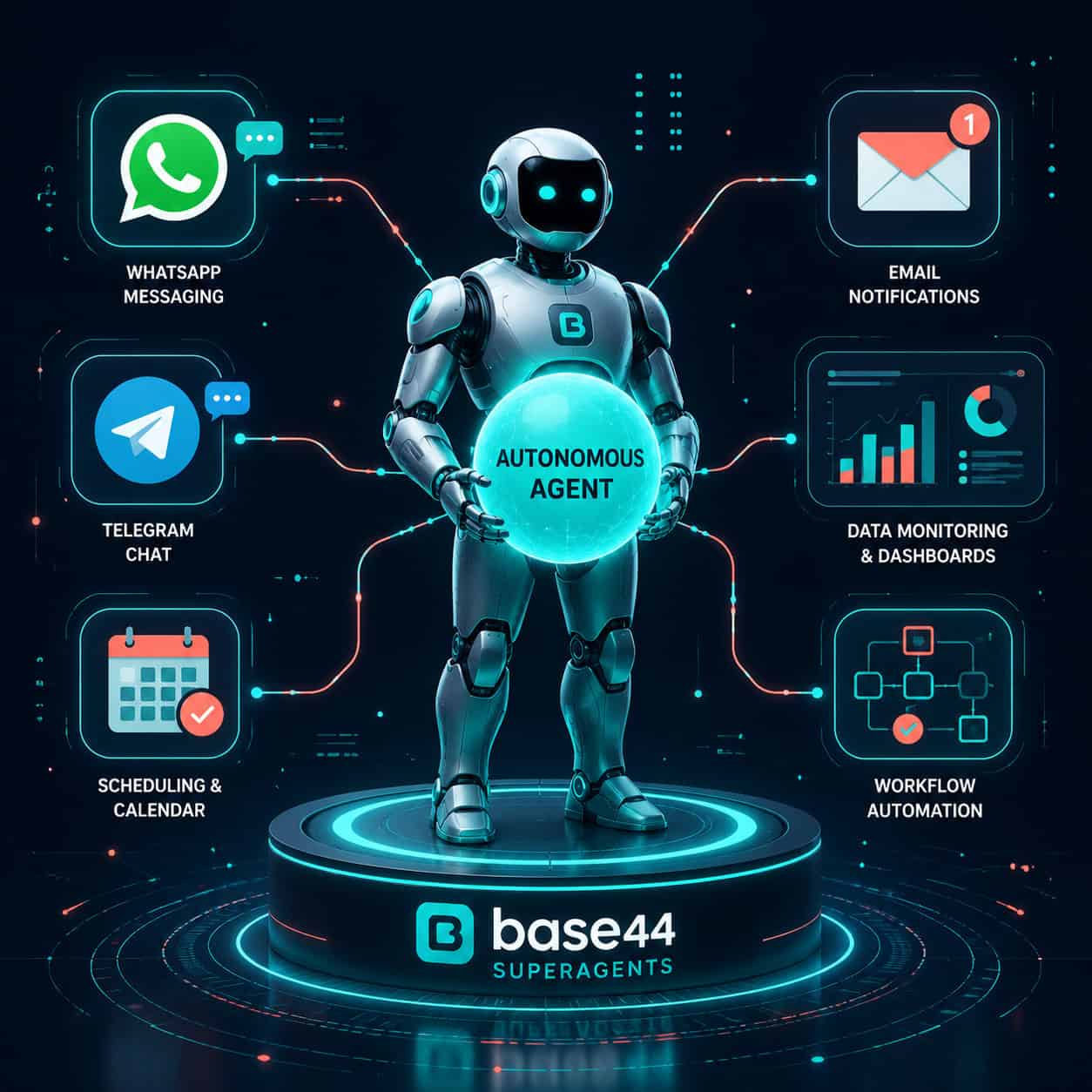
Superagents are autonomous AI agents you create inside Base44 using natural language. Launched on March 11, 2026, they represent a major expansion beyond app building into AI-powered automation [9].
Instead of building an app, you describe a task or workflow, and Base44 constructs an agent that runs it independently. The agent operates in the background, reacting to triggers, following schedules, and executing tasks without you needing to intervene.
How to Create a Superagent
- Navigate to the Superagents section from the Base44 homepage.
- Describe what you want the agent to do. For example: “Monitor my Shopify store for new orders over $500 and send me a WhatsApp message with the order details.”
- Base44 builds the workflow automatically, connecting the necessary tools and APIs.
- Deploy the agent. It starts running based on the triggers or schedule you defined.
What Superagents Can Do
- React to triggers: New form submission, database change, incoming webhook
- Run on schedules: Daily reports, weekly summaries, hourly checks
- Monitor systems: Watch for specific conditions and alert you
- Execute tasks: Send messages, update records, generate reports
- Communicate via messaging apps: Send updates through WhatsApp and Telegram
Real-World Superagent Examples
| Use Case | Trigger | Action |
|---|---|---|
| Lead follow-up | New form submission | Send personalized email within 5 minutes |
| Inventory alert | Stock drops below threshold | Notify team via WhatsApp |
| Daily summary | 8 AM every morning | Compile and send yesterday’s metrics |
| Customer feedback | New review posted | Categorize sentiment and flag negatives |
Edge case to watch for: Superagents are still a relatively new feature. Community discussions on Reddit’s r/Base44 show users requesting additional capabilities like push notifications, which suggests the feature set is still expanding as of May 2026.
For those interested in adding AI automation to existing websites, our guide on integrating an AI-powered chatbot into WordPress covers a related approach.
How Does Base44 Compare to Other No-Code Platforms?
Base44’s main advantage is speed: you go from idea to working app faster than with any drag-and-drop builder. But it’s not the only option, and the right choice depends on your specific needs.
Base44 vs. Bubble
Bubble is the most established no-code platform for building web apps. It uses a visual editor where you drag elements onto a canvas and define workflows through a point-and-click interface.
- Choose Base44 if you want the fastest possible path from idea to working prototype and you’re comfortable with AI-generated output.
- Choose Bubble if you need granular control over every element and don’t mind a steeper learning curve (weeks to months).
Base44 vs. Lovable (formerly GPT Engineer)
Lovable also uses AI to generate apps from text descriptions. It’s the closest direct competitor.
- Choose Base44 if you want the Superagents automation layer and prefer an all-in-one platform.
- Choose Lovable if you want more control over the generated code and plan to export it for further development.
Base44 vs. Bolt
Bolt by StackBlitz generates full-stack apps in the browser with AI assistance.
- Choose Base44 if you want a fully managed platform where you never touch code.
- Choose Bolt if you’re a developer who wants AI-assisted coding rather than pure no-code.
Quick Comparison Table
| Feature | Base44 | Bubble | Lovable | Bolt |
|---|---|---|---|---|
| AI app generation | Yes | No (manual) | Yes | Yes |
| Full-stack output | Yes | Yes | Yes | Yes |
| Visual editor | Limited | Extensive | Limited | Code-based |
| Autonomous agents | Yes (Superagents) | No | No | No |
| Learning curve | Low | High | Low | Medium |
| Best for | Fast MVPs + automation | Complex custom apps | Code-exportable prototypes | Developer-assisted building |
If you’re evaluating website builders more broadly, our review of the 10 best drag-and-drop website builders in 2026 and our roundup of no-coding website design software platforms provide additional context.
What Are the Most Common Mistakes in This Base44 Tutorial Workflow?
Even though Base44 simplifies app building dramatically, beginners consistently run into the same problems. Here are the ones I see mentioned most often in tutorials and community discussions.
Mistake 1: Vague Prompts
Writing “build me a CRM” gives the AI too little to work with. You’ll get a generic result that needs heavy iteration. Instead, specify:
- What data you’re tracking (contacts, deals, activities)
- What user roles exist (sales reps, managers, admins)
- What the key workflows are (lead capture, pipeline stages, deal closing)
Mistake 2: Trying to Build Everything at Once
A 500-word initial prompt describing every feature you can think of usually produces a messy result. Better approach:
- Start with the core feature (the one thing your app must do)
- Get that working and tested
- Add secondary features one at a time
- Test after each addition
Mistake 3: Ignoring the Database Structure
Base44 generates database tables automatically, but beginners often don’t review them. If the relationships between your data tables are wrong, everything built on top will have problems. Take five minutes to check:
- Are the right fields in the right tables?
- Do relationships between tables make sense? (e.g., a booking should link to both a student and a tutor)
- Are there any missing fields you’ll need later?
Mistake 4: Not Testing With Real Data
The generated app works with sample data, but real-world data often reveals issues. Enter actual examples. Try edge cases: What happens with a very long name? What if someone leaves a required field blank? What if two users try to do the same thing simultaneously?
Mistake 5: Skipping User Authentication Setup
If your app has different user roles, make sure the authentication and permissions are set up correctly from the start. A common issue is building an app where any logged-in user can see or edit everything, which is rarely what you want.
Is Base44 Encoding the Same as the Base44 App Builder?
No. They share a name but are completely unrelated. This confusion comes up frequently, so let’s clear it up.
Base44 (the platform) is the AI-powered no-code app builder we’ve been discussing throughout this tutorial.
Base44 (the encoding scheme) is a data encoding method designed specifically for QR codes. It uses a 44-character alphabet that fits within QR codes’ 45-character alphanumeric set (digits 0-9, uppercase A-Z, and nine special symbols). This is a technical encoding standard, not a software product.
For context, you’ve probably heard of Base64 encoding, which is widely used across the internet for encoding binary data as text [7][10]. Base64 uses a 64-character alphabet. When Base64-encoded strings are placed in QR codes, they force the QR code into less efficient “byte mode.” Base44 encoding solves this by using a character set that keeps QR codes in their more efficient “alphanumeric mode,” allowing more data to fit in the same physical QR code space.
Bottom line: If you’re here to learn about building apps, you’re in the right place. If you’re looking for the encoding scheme, this isn’t the tutorial you need.
Tips for Getting the Best Results From Base44
These practical tips come from watching multiple tutorial creators work through real projects [1][2][3][4][5] and from my own experience with the platform.
Write Prompts Like You’re Briefing a New Team Member
Don’t write technical specifications. Write clear descriptions of what the app should do from the user’s perspective. “When a customer places an order, they should see a confirmation page with their order number and estimated delivery date” is better than “create a POST endpoint that returns order confirmation data.”
Use the Preview Frequently
After every significant change, preview the app. Click through every page. Fill out every form. This catches issues early when they’re easy to fix, rather than after you’ve built ten more features on top of a broken foundation.
Keep a Change Log
As you iterate, keep a simple list of what you’ve asked for and what changed. This helps if you need to backtrack or if a new change breaks something that was working before.
Learn From Published Tutorials
The Base44 tutorial ecosystem has grown significantly in early 2026. Multiple creators have published comprehensive walkthroughs [1][2][3][4][5]. Watching someone else build an app gives you a feel for the iteration rhythm and prompt style that works best.
Start With a Template or Example
If Base44 offers templates for your use case, start there and customize. It’s almost always faster than starting from scratch, and the template gives the AI a better foundation to work from.
For related tips on using AI tools effectively in your creative workflow, see our practical guide to AI-powered content optimization.
What Can You Actually Build With Base44?
The range is broader than most beginners expect. Here are categories of apps people are building successfully, based on community examples and tutorial demonstrations:
Business tools:
- Customer relationship management (CRM) systems
- Project management dashboards
- Invoice and billing platforms
- Employee scheduling tools
Marketplace and booking apps:
- Service booking platforms (tutoring, consulting, fitness)
- Simple marketplaces connecting buyers and sellers
- Event registration systems
Internal tools:
- Data entry and tracking dashboards
- Approval workflow systems
- Inventory management
Customer-facing apps:
- Client portals with document sharing
- Feedback and survey collection tools
- Membership and subscription platforms
What you probably can’t build (yet):
- Mobile-native apps (Base44 builds web apps, not iOS/Android apps)
- Apps requiring real-time collaboration features (like Google Docs)
- Applications with extremely complex data processing or machine learning pipelines
- Software that needs to meet specific regulatory compliance standards (HIPAA, SOC 2, etc.)
If your project involves building a website rather than a web application, you might also want to explore how to create a professional Wix website or our Figma for beginners guide for design fundamentals.
What’s Next for Base44 in 2026?
The platform is evolving quickly. Based on official announcements and community activity, here’s what’s on the horizon [6][9]:
- Expanded Superagent capabilities. Community members are actively requesting features like push notifications and more integration options.
- Improved app customization. More granular control over generated UI and logic is a consistent request from power users.
- Growing tutorial and education ecosystem. The surge of creator-published tutorials in April-May 2026 suggests the community is scaling rapidly [1][2][3][4][5].
- Platform updates and new features. Base44’s official blog and LinkedIn presence show regular feature announcements and platform improvements [6][9].
The no-code space is competitive, and Base44’s bet on AI-first app generation plus autonomous agents positions it differently from traditional visual builders. Whether that bet pays off long-term depends on how well the AI output quality improves and how the Superagents feature matures.
Frequently Asked Questions
Is Base44 free to use? Base44 offers a free tier that lets you build and test apps. Paid plans unlock additional features, more app capacity, and Superagents functionality. Check base44.com for current pricing, as plans have been updated several times in 2026.
Do I need any coding knowledge to use Base44? No. The entire platform is designed for people with zero coding experience. You describe what you want in plain English, and the AI generates the code. That said, understanding basic concepts like databases and user roles helps you write better prompts.
How long does it take to build an app on Base44? Simple apps (landing pages with forms, basic CRUD tools) can be built in under an hour. More complex applications with multiple user roles, workflows, and integrations typically take a few days of iterative work [3][4].
Can I export the code Base44 generates? This depends on your plan and the current feature set. Some no-code platforms lock you into their ecosystem. Check Base44’s current documentation for the latest on code export capabilities.
What’s the difference between Base44 and Base64? Base44 (the platform) is an AI app builder. Base64 is a widely used data encoding scheme [7][10]. They’re unrelated. There’s also a Base44 encoding scheme used for QR code optimization, which is also unrelated to the app builder platform.
Can Base44 build mobile apps? Base44 builds web applications that are accessible via mobile browsers. It does not currently generate native iOS or Android apps. The web apps it creates are responsive, meaning they adapt to different screen sizes.
What are Superagents? Superagents are autonomous AI agents you create within Base44 using natural language descriptions. They can run tasks on schedules, react to triggers, monitor systems, and communicate via WhatsApp and Telegram [9].
Is Base44 good for building SaaS products? Several tutorial creators position Base44 as suitable for building SaaS MVPs [3][5]. It can handle user authentication, subscription-like features, and multi-tenant data. For a production SaaS with thousands of users, you’d want to evaluate performance and scalability carefully.
How does Base44 handle data security? Base44 includes built-in user authentication. For specific security certifications or compliance requirements, consult their official documentation or contact their team directly.
Can multiple people work on the same Base44 project? Collaboration features vary by plan. Check the current offering on base44.com for team and collaboration capabilities.
What happens if Base44 shuts down? This is a valid concern with any platform. Understanding whether you can export your app’s code and data is important before building anything mission-critical. This applies to all no-code platforms, not just Base44.
Where can I find more Base44 tutorials? YouTube has the largest collection of Base44 tutorials as of May 2026, with multiple creators publishing comprehensive guides [1][2][3][4][5]. The r/Base44 subreddit is also an active community for questions and tips.
Conclusion
Base44 represents a genuinely new approach to building software. Instead of learning a programming language or even a visual builder’s interface, you describe what you want and get a working application. For beginners in AI and no-code development, it’s one of the most accessible entry points available in 2026.
Here are your concrete next steps:
- Sign up for a free Base44 account at base44.com and spend 30 minutes exploring the interface.
- Build something simple first. A to-do list, a contact directory, or a basic booking form. Get comfortable with the prompt-iterate-test cycle.
- Watch at least one full tutorial from creators who’ve published guides in 2026 [1][3][4]. Seeing someone else’s workflow teaches you patterns you won’t discover on your own.
- Try creating a Superagent for a simple automation, like a daily summary or a notification trigger. This feature is what sets Base44 apart from most competitors.
- Join the community. The r/Base44 subreddit and Base44’s official channels are where you’ll find answers to specific questions and stay updated on new features.
The gap between having an idea and having a working app has never been smaller. Base44 doesn’t eliminate the need for clear thinking about what you’re building and who it’s for, but it does eliminate the need to hire a developer or spend months learning to code before you can test your idea. That’s a meaningful shift, and this base44 tutorial should give you everything you need to take advantage of it.
References
[1] Watch – https://www.youtube.com/watch?v=g6MRoCtJOLc [2] Watch – https://www.youtube.com/watch?v=M_JBV-ly3wg [3] Watch – https://www.youtube.com/watch?v=FN9fyZ9IPWs [4] Watch – https://www.youtube.com/watch?v=Vkz50l_F_DA [5] Watch – https://www.youtube.com/watch?v=aoAUymP9LxI [6] Maor Shlomo – Base44 Updates And Features – https://www.linkedin.com/posts/maor-shlomo-1088b4144_base44-updates-and-features-1-every-app-activity-7307807270501773312-eyX5 [7] Guide Encode Decoded Base64 – https://www.sentinelone.com/blog/guide-encode-decoded-base64/ [8] Base44 Ultimate Guide – https://www.nocode.mba/articles/base44-ultimate-guide [9] Announcements – https://base44.com/blog/explore/categories/announcements [10] Base64 – https://florian.github.io/base64/