Last updated: May 9, 2026
Quick Answer: Zapier is a no-code workflow automation platform that connects over 5,000 business apps, letting teams automate repetitive tasks without writing a single line of code. It works best for small to mid-sized businesses that need fast, reliable integrations between tools like Gmail, Slack, Salesforce, and Google Sheets. Costs start around $299/month for meaningful business use, and AI features like Zapier Central now allow natural language commands to trigger actions across 8,000+ applications.
Key Takeaways
- Zapier connects 5,000+ apps and supports over 30,000 predefined AI-powered actions [2]
- Zapier Central lets you build AI agents using plain English, no coding required [2]
- Model Context Protocol (MCP) allows large language models to act across the Zapier ecosystem without custom API work [2]
- Businesses using AI-powered workflows report 37% faster response times on average [1]
- Pricing starts free but scales quickly; enterprise-level automation can cost $299+/month [1]
- Migrating to alternatives like n8n can cut costs by 70–90% for high-volume users [3]
- Zapier stores data on third-party servers, which may concern compliance-heavy industries [4]
- The traditional if-this-then-that model has limits with complex, context-dependent logic [1]
What Is Zapier and How Does It Work?
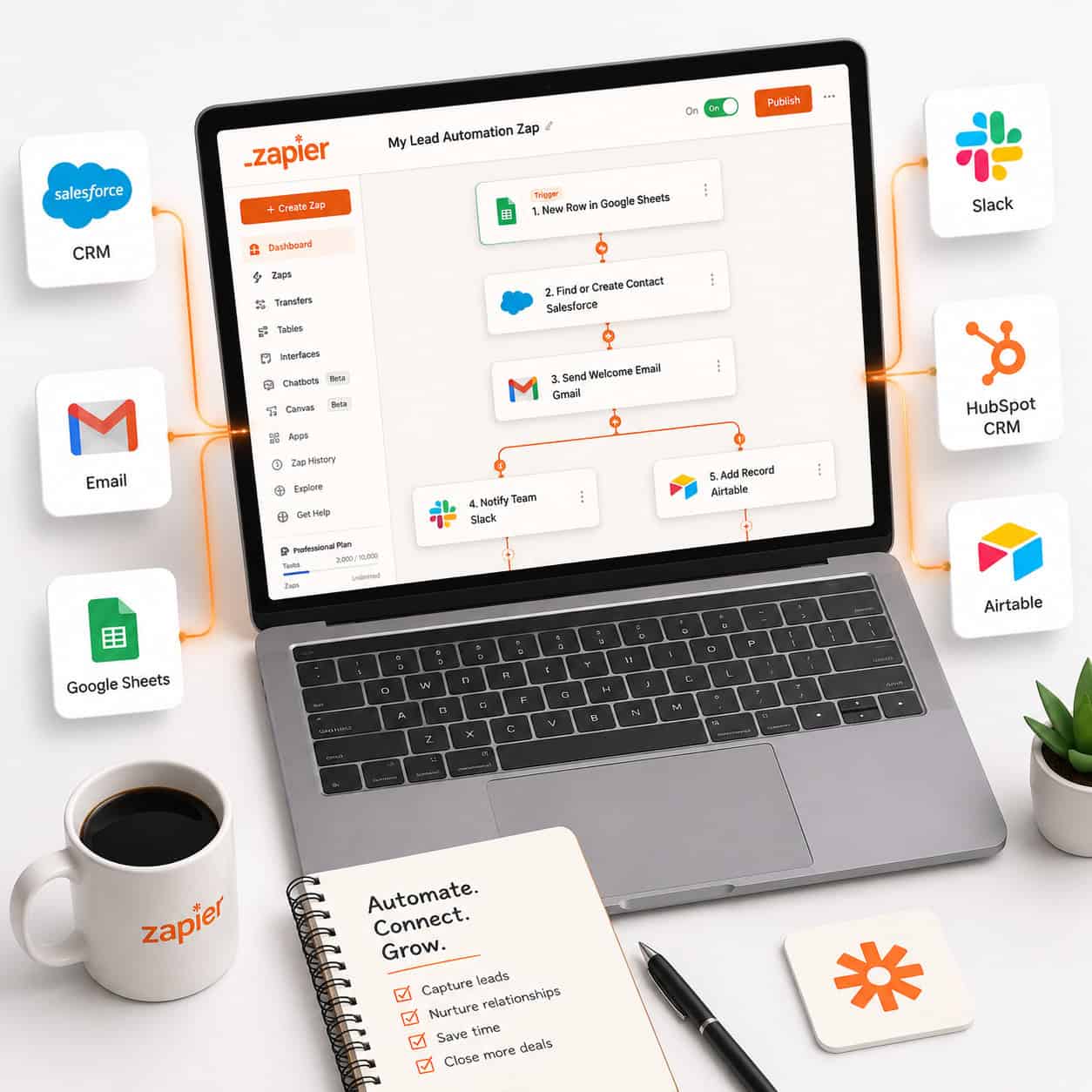
Zapier is a cloud-based integration platform that connects web applications through automated workflows called “Zaps.” Each Zap has a trigger (something that happens in one app) and one or more actions (things that happen automatically in other apps as a result).
For example: when a new lead fills out a form on your website (trigger), Zapier can automatically add them to your CRM, send a welcome email, and post a notification in Slack (actions), all without anyone touching a keyboard.
Core components of a Zap:
- Trigger: The event that starts the workflow (e.g., “New row in Google Sheets”)
- Action: What happens next (e.g., “Create contact in HubSpot”)
- Filter: Optional rules that let the Zap run only when specific conditions are met
- Paths: Branching logic that sends data down different routes based on conditions
Zapier also supports JavaScript and Python code steps for users who need custom data handling beyond what standard actions offer [2]. Developers can access a Command Line Interface (CLI) to build private integrations for proprietary tools.
Choose Zapier if: You need fast setup, a massive app library, and minimal technical overhead. It’s especially well-suited for marketing, sales, and operations teams at growing companies.
For teams already exploring broader automation strategies, our Automation Archives cover complementary tools and approaches worth reviewing.
How Does Zapier’s AI Integration Work in 2026?
Zapier’s AI capabilities have moved well beyond simple rule-based triggers. The platform now includes Zapier Central, a dedicated workspace for building and training AI agents using natural language commands across 8,000+ integrated applications [2].
The biggest technical shift came with the implementation of the Model Context Protocol (MCP), a standardized interface that allows large language models to perform real-world actions inside the Zapier ecosystem without requiring custom API development [2]. This means an AI assistant can now retrieve an invoice from QuickBooks, summarize it, and post the summary directly to a Slack channel, all from a single prompt.
What AI adds to Zapier workflows:
- Processing unstructured data (emails, PDFs, free-text fields) that traditional Zaps couldn’t handle [6]
- Natural language commands to build or modify automations
- Over 30,000 predefined AI actions ready to deploy [2]
- Faster deployment: standard AI tasks like summarizing leads and posting to Slack can be live within minutes [2]
“Companies implementing AI-powered workflows through platforms like Zapier report 37% faster response times and dramatic improvements in operational efficiency.” [1]
If you’re also using AI tools to generate or optimize content, our guide on AI-powered content optimization shows how automation and AI content tools can work together.
What Are the Most Useful Zapier Automation Use Cases?

Zapier’s value shows up most clearly in repetitive, multi-step tasks that cross multiple tools. Here are the highest-impact use cases for modern businesses:
Marketing and Lead Management
- Auto-add Facebook Lead Ads contacts to Mailchimp or ActiveCampaign
- Send Slack alerts when a new lead hits a score threshold in your CRM
- Create follow-up tasks in Asana when a deal stage changes in Salesforce
Sales Operations
- Log new Stripe payments to a Google Sheet for real-time revenue tracking
- Notify the sales team in Slack when a contract is signed in DocuSign
- Auto-create onboarding tasks in Trello when a deal closes in HubSpot
Customer Support
- Create Zendesk tickets from Gmail emails tagged with a specific label
- Escalate support tickets to a manager’s Slack DM when priority is marked “urgent”
- Send NPS surveys via Typeform 30 days after a new customer signs up
Content and Social Media
- Publish new blog posts to social channels automatically (see our guide on how to auto-share WordPress blog posts to social media)
- Save RSS feed items to a Notion content calendar
- Post YouTube video uploads to LinkedIn and Twitter simultaneously
Common mistake: Building Zaps before mapping the workflow manually. Always sketch the trigger-action chain on paper first. Zaps that skip this step often break when edge cases appear (e.g., a form submission with missing fields).
What Does Zapier Cost, and Is It Worth It?
Zapier uses task-based pricing, meaning you pay based on how many tasks (individual actions) your Zaps run each month. The free plan is useful for testing but limited in task volume and multi-step Zaps.
| Plan | Starting Price | Tasks/Month | Multi-Step Zaps | AI Features |
|---|---|---|---|---|
| Free | $0 | 100 | No | No |
| Starter | ~$29/month | 750 | Yes | Limited |
| Professional | ~$73/month | 2,000 | Yes | Yes |
| Team | ~$103/month | 2,000+ | Yes | Yes |
| Enterprise | $299+/month | Custom | Yes | Full |
Pricing estimates based on published ranges as of 2026. Confirm current rates on Zapier’s pricing page.
For businesses running thousands of automated tasks monthly, costs can grow quickly. High-volume users (those paying $1,000+/month) often find that migrating to self-hosted alternatives like n8n reduces automation costs by 70–90% [3].
Worth it if: You’re a small to mid-sized team that values speed of setup over cost optimization, and your monthly task volume stays under 10,000.
Not worth it if: You have complex conditional logic needs, strict data compliance requirements, or very high task volumes where per-task pricing becomes prohibitive [1].
What Are Zapier’s Limitations You Should Know About?
Zapier is widely used, but it has real constraints that matter for certain business types.
Key limitations:
- Logic depth: The traditional if-this-then-that model struggles with nuanced, context-dependent decisions or complex conditional chains without manual reprogramming [1]
- Data security: Zapier routes data through third-party servers and offers limited security controls compared to self-hosted platforms, which can be a concern for healthcare, legal, or financial companies with strict compliance rules [4]
- Cost at scale: Task-based pricing becomes expensive as automation volume grows [1]
- Error visibility: Debugging failed Zaps can be time-consuming, especially in multi-step workflows with many conditions
Edge case to watch: If your workflow involves sensitive customer data (PII, financial records, health information), check whether Zapier’s data handling meets your regulatory requirements before building. Self-hosted tools may be a better fit.
For teams building automation alongside no-code web tools, our roundup of no-code website design software platforms covers complementary options.
How Does Zapier Compare to Its Main Alternatives?

Zapier isn’t the only player in workflow automation. Here’s a quick comparison of the most common alternatives:
| Tool | Best For | Pricing Model | Coding Required | AI Features |
|---|---|---|---|---|
| Zapier | SMBs, fast setup | Per task | No | Yes (Central, MCP) |
| Make (Integromat) | Visual logic, complex flows | Per operation | No | Growing |
| n8n | Developers, self-hosted | Per workflow (or free self-host) | Optional | Yes |
| Workato | Enterprise, compliance | Custom | No | Yes |
| Microsoft Power Automate | Microsoft 365 users | Per flow/user | No | Yes (Copilot) |
Choose Zapier if you want the largest app library, fastest setup, and don’t need self-hosting.
Choose n8n if cost control and data sovereignty are priorities and you have developer resources.
Choose Make if you need visual, branching logic and want lower per-operation costs.
Teams using WordPress-based workflows may also find value in exploring advanced WordPress automation strategies that can complement Zapier integrations.
How Do You Build Your First Zap? A Step-by-Step Guide
Building a Zap takes under 10 minutes for most standard use cases. Here’s the process:
- Create a Zapier account and log in at zapier.com
- Click “Create Zap” from your dashboard
- Choose your trigger app (e.g., Google Forms) and connect your account
- Select the trigger event (e.g., “New Form Response”)
- Test the trigger to pull in sample data from the app
- Add an action app (e.g., Slack) and connect your account
- Configure the action (e.g., “Send Channel Message”) and map the data fields from your trigger
- Test the action to confirm it works as expected
- Name and turn on your Zap
Pro tip: Use Zapier’s built-in “Filter” step between trigger and action if you only want the Zap to run under specific conditions. This prevents unnecessary task consumption and keeps your workflows clean.
For teams that also automate content workflows, our guide on AI-powered content generation tools pairs well with Zapier-based publishing automations.
Frequently Asked Questions
Q: Is Zapier safe for sensitive business data?
Zapier routes data through its own cloud servers, which may not meet strict compliance standards (HIPAA, GDPR, SOC 2 Type II). Enterprises with sensitive data should verify Zapier’s compliance certifications or consider self-hosted alternatives [4].
Q: Can Zapier replace a developer?
For standard integrations, yes. For complex, context-aware logic or custom API work, a developer is still needed. Zapier’s code steps (JavaScript/Python) help bridge the gap for moderate complexity [2].
Q: How many apps does Zapier connect?
Zapier supports 5,000+ app integrations across marketing, CRM, finance, support, and more, making it one of the most widely adopted integration platforms for SMBs [4].
Q: What is Zapier Central?
Zapier Central is a workspace within Zapier for building and training AI agents using natural language. It connects to 8,000+ apps and allows users to create multi-step AI-driven workflows without coding [2].
Q: What is a “task” in Zapier’s pricing?
A task is one successful action step completed by a Zap. A three-step Zap that runs 100 times uses 300 tasks. Task counts directly affect your monthly bill.
Q: Can Zapier handle if-else logic?
Yes, through “Paths” (branching logic). However, deeply nested or context-dependent logic can become difficult to manage and may require a more visual tool like Make [1].
Q: How fast can I deploy a Zapier automation?
Simple automations (trigger + one action) can go live in under 5 minutes. AI-powered workflows using Zapier Central may take slightly longer to configure but still deploy within minutes for standard tasks [2].
Q: What happens when a Zap fails?
Zapier sends an email alert and logs the error in your dashboard. You can replay failed tasks after fixing the issue, though replays count against your task limit.
Q: Is there a free plan?
Yes. The free plan allows 100 tasks/month and single-step Zaps. It’s useful for testing but not sufficient for real business automation.
Q: Can Zapier work with WordPress?
Yes. Zapier integrates with WordPress via its official plugin and can trigger actions based on new posts, comments, or form submissions. See our guide on 12 best AI plugins for WordPress for complementary automation tools.
Conclusion: Your Next Steps with Zapier Automation
This complete guide to Zapier automation services covers the core concepts, AI capabilities, pricing realities, and practical limitations that matter most for modern businesses in 2026. The platform genuinely reduces manual work for teams that use it well, but it’s not a one-size-fits-all solution.
Actionable next steps:
- Audit your manual workflows this week. List every repetitive task your team does that involves copying data between apps.
- Start with one Zap that solves a real pain point (lead capture to CRM is a great first choice).
- Track your task usage for 30 days before upgrading to a paid plan.
- Explore Zapier Central if your team already uses AI tools, since the natural language agent builder can significantly speed up workflow creation.
- Reassess costs at 6 months. If your monthly bill exceeds $500, compare n8n or Make to see whether a migration makes financial sense.
Automation works best when it’s intentional. Start small, measure the time saved, and build from there.
References
[1] Best Zapier Alternatives 2026 – https://arahi.ai/blog/best-zapier-alternatives-2026
[2] Zapier Vs Make Which Is The Best Hub For Ai Automation – https://zouhall.com/insights/zapier-vs-make-which-is-the-best-hub-for-ai-automation
[3] Best Zapier Experts – https://nextautomation.us/blog/best-zapier-experts
[4] No Code Builder Automation – https://www.knack.com/blog/no-code-builder-automation/
[6] Building Companies Using Zapiers Ai Automations – https://mixergy.com/interviews/building-companies-using-zapiers-ai-automations/