


Last updated: May 8, 2026
Quick Answer: Zapier is a no-code automation platform that connects over 7,000 apps, letting you build automated workflows (called Zaps) that move data and trigger actions between tools without writing a single line of code. Mastering Zapier means fewer repetitive tasks, faster processes, and more time for work that actually matters.
Key Takeaways
- A Zap is a Zapier automation made up of a trigger (what starts it) and one or more actions (what happens next).
- Zapier connects 7,000+ apps including Gmail, Slack, Salesforce, HubSpot, and Google Sheets.
- In 2026, Zapier’s platform includes AI agents, Copilot, Canvas, Tables, and Interfaces for end-to-end no-code workflows. [1]
- You can start free, with paid plans scaling based on task volume and advanced features.
- The biggest productivity wins come from automating lead management, reporting, and communication workflows. [3]
- Filters, formatters, and paths are the core tools that separate basic Zaps from powerful multi-step automations.
- Common mistakes include skipping Zap testing, ignoring error notifications, and over-complicating early builds.
- Zapier works best for teams and solo operators who use multiple SaaS tools and spend hours on manual data entry.

What Is Zapier and How Does It Work?
Zapier is a web-based automation platform that connects apps and moves information between them automatically, based on rules you set. It works by watching one app for a specific event (the trigger) and then performing one or more actions in other apps when that event happens.
Here’s the basic structure of every Zap:
| Component | What It Does | Example |
|---|---|---|
| Trigger | Starts the Zap when an event occurs | New email received in Gmail |
| Filter | Only continues if a condition is met | Subject line contains “invoice” |
| Action | Does something in another app | Creates a row in Google Sheets |
| Formatter | Transforms data before passing it on | Converts date format |
| Path | Branches the workflow based on conditions | Sends to Slack OR email |
Choose Zapier if: you use multiple SaaS tools, handle repetitive data-moving tasks daily, and don’t have developer resources. It’s not the right fit if you need complex custom logic, real-time processing under one second, or deep database operations.
Why Does Mastering Zapier Automation Matter in 2026?
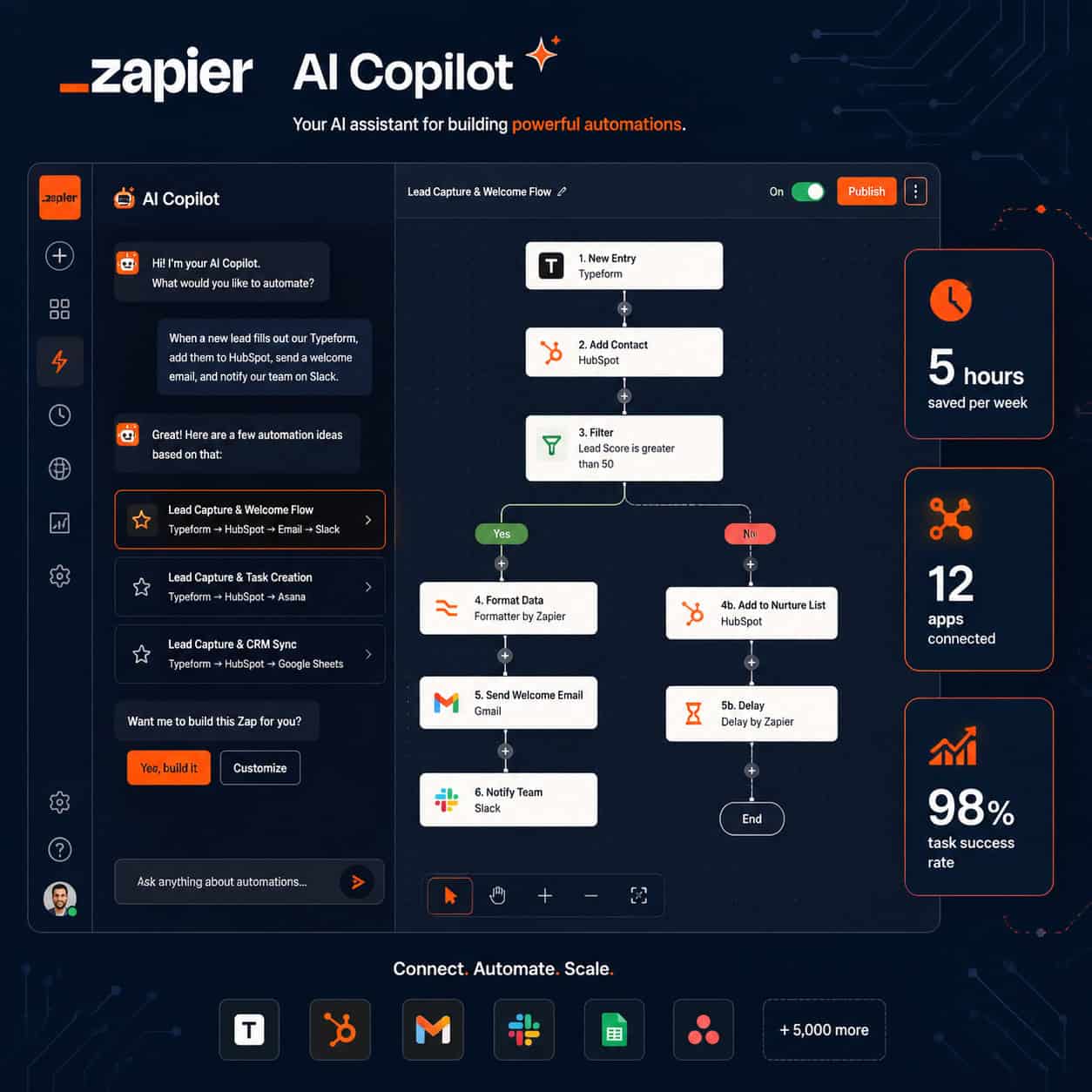
Automation is no longer optional for competitive teams. Zapier’s 2026 platform goes far beyond simple two-step Zaps. It now includes AI agents that can make decisions, a Copilot that suggests automations in plain English, a visual Canvas for mapping workflows, and Tables for storing data natively inside Zapier. [1]
This means the gap between teams that automate and those that don’t is wider than ever. A marketer who automates lead routing, follow-up emails, and CRM updates can handle three times the pipeline without adding headcount. A solo creator who auto-posts content and tracks metrics across platforms reclaims hours every week.
Unleashing Productivity: A Comprehensive Guide to Mastering Zapier Automation isn’t just about saving a few minutes. It’s about restructuring how work flows through your tools entirely. [2]
For teams already using AI tools in their stack, pairing Zapier with AI-powered content generation tools creates a fully automated content pipeline from creation to distribution.
How Do You Build Your First Zap Step by Step?
Building your first Zap takes under 10 minutes. Here’s the exact process:
- Log in to Zapier and click “Create Zap.”
- Choose your trigger app (e.g., Gmail) and connect your account.
- Select the trigger event (e.g., “New Email Matching Search”).
- Test the trigger to pull in sample data from your app.
- Add an action (e.g., Google Sheets: “Create Spreadsheet Row”).
- Map the fields: drag trigger data (sender, subject, body) into the action fields.
- Test the action to confirm it works correctly.
- Turn the Zap on.
💡 Pro tip: Always test with real data before turning a Zap on. Sample data from Zapier’s test step doesn’t always match the format of live data, and mismatched fields cause silent failures.
Common mistake: Skipping the test step and assuming it works. A Zap that fails silently can drop leads, miss notifications, or corrupt data for days before you notice.

What Are the Most Valuable Zapier Automation Use Cases?
The highest-ROI automations fall into four categories. [3]
1. Lead Management
- New form submission → Add to CRM → Send welcome email → Notify sales rep in Slack
- This alone can cut lead response time from hours to seconds.
2. Reporting and Metrics
- Pull data from ad platforms, CRMs, and email tools into a single Google Sheet daily.
- Trigger a summary Slack message every Monday morning automatically.
3. Content and Social Media
- New blog post published → Auto-share to social platforms → Log in Airtable.
- If you run a WordPress site, check out how to auto-share WordPress blog posts to social media for a practical setup guide.
4. Internal Operations
- New invoice in email → Create task in project management tool → Update accounting software.
- Employee form submission → Create onboarding checklist → Send welcome Slack message.
Choose your first automation based on: the task you repeat most often, not the most impressive one. Start simple, prove the value, then build complexity.
What Advanced Zapier Features Should Power Users Know?
Once you’re comfortable with basic Zaps, these built-in tools unlock far more power. [5]
Paths: Branch your Zap into two or more routes based on conditions. For example, a new lead from a “Enterprise” form goes to Salesforce, while a “SMB” lead goes to HubSpot.
Formatter by Zapier: Transform text, numbers, and dates before passing them to the next step. Convert “2026-05-08” to “May 8, 2026,” split a full name into first and last, or extract a number from a sentence.
Delay by Zapier: Pause a Zap for minutes, hours, or days. Useful for sending a follow-up email 48 hours after a trial signup.
Code by Zapier: Write small JavaScript or Python snippets for logic that no built-in app covers. This is the bridge between no-code and light custom development.
Zapier Tables and Interfaces: Store data natively and build simple internal tools without a separate database. [1]
Zapier AI Copilot: Describe what you want in plain English (“When someone fills out my Typeform, add them to Mailchimp and text me”), and Copilot builds the Zap structure for you. [1]
For teams building automated workflows alongside design systems, Figma AI workflow automation is a natural complement to Zapier’s automation stack.
How Much Does Zapier Cost and Is It Worth It?
Zapier’s pricing (as of 2026) is task-based, meaning you pay for the number of tasks your Zaps run each month.
| Plan | Monthly Tasks | Price (approx.) | Best For |
|---|---|---|---|
| Free | 100 | $0 | Testing and simple single-step Zaps |
| Starter | 750 | ~$19.99/mo | Freelancers and small teams |
| Professional | 2,000+ | ~$49/mo | Growing teams with multi-step Zaps |
| Team | 50,000+ | ~$69/mo | Departments with high task volume |
| Enterprise | Custom | Custom | Large organizations, SSO, admin controls |
Is it worth it? For most businesses, yes. If a $49/month plan saves one employee two hours per week, the ROI is clear within the first month. The free plan is genuinely useful for learning and low-volume personal automations.
Edge case: If your task volume spikes unpredictably (e.g., a viral campaign floods your lead form), costs can jump fast. Set up task usage alerts inside Zapier to avoid surprise bills.
For WordPress-based businesses, pairing Zapier with AI plugins for WordPress automation can reduce the total number of Zap tasks needed by handling some logic natively.
What Are the Most Common Zapier Mistakes and How Do You Fix Them?
Even experienced users make these errors. [2]
Mistake 1: Not enabling error notifications
Fix: Go to Zap settings and turn on email alerts for errors. A broken Zap you don’t know about is worse than no Zap at all.
Mistake 2: Using live data in tests
Fix: Create test records in your apps specifically for Zap testing. Don’t test on real customers or live orders.
Mistake 3: Building one giant Zap instead of modular ones
Fix: Break complex workflows into two or three connected Zaps. Smaller Zaps are easier to debug and update.
Mistake 4: Ignoring data formatting
Fix: Always add a Formatter step when passing dates, names, or numbers between apps. Formatting mismatches cause field errors that are hard to trace.
Mistake 5: Automating a broken manual process
Fix: Map out your manual workflow first. If the process is unclear or inconsistent, fix it before you automate it. Automation amplifies both good and bad processes.
For teams also managing automated content workflows, AI-powered content optimization pairs well with Zapier’s distribution automations.
How Does Zapier Compare to Alternatives Like Make (Integromat) and n8n?
Zapier is not the only automation platform, and it’s not always the best choice for every situation.
| Platform | Best For | Pricing Model | Learning Curve |
|---|---|---|---|
| Zapier | Speed, ease of use, 7,000+ apps | Per task | Low |
| Make (Integromat) | Complex logic, visual mapping, lower cost | Per operation | Medium |
| n8n | Self-hosted, developer-friendly, open source | Free (self-host) or cloud | High |
| Power Automate | Microsoft 365 heavy teams | Per user/flow | Medium |
Choose Zapier if: you need the fastest setup, the widest app library, and you’re not a developer.
Choose Make if: you want more visual control over data flow and lower per-operation costs.
Choose n8n if: you have technical resources and want full control over your data and hosting.
FAQ: Mastering Zapier Automation
Q: What is a “task” in Zapier?
A: Each time a Zap successfully completes an action step, that counts as one task. A three-step Zap that runs 100 times uses 300 tasks.
Q: Can Zapier run automations in real time?
A: Most Zaps run on a polling interval (every 1–15 minutes depending on your plan). Instant triggers are available for apps that support webhooks and run within seconds.
Q: Is Zapier safe for sensitive data?
A: Zapier uses encryption in transit and at rest, and is SOC 2 Type II certified. For highly sensitive data (medical, financial), review their data handling policies and consider self-hosted alternatives.
Q: How many Zaps can I have on the free plan?
A: The free plan allows up to 5 active Zaps with single-step automations and 100 tasks per month.
Q: Can I use Zapier without any coding knowledge?
A: Yes. The core platform is fully no-code. The Code by Zapier step is optional and only needed for edge cases.
Q: What happens if a Zap fails?
A: Zapier logs the error and (if enabled) sends you an email alert. You can replay failed tasks from the Zap history panel once you’ve fixed the issue.
Q: Can Zapier handle conditional logic?
A: Yes. Use Filters to stop a Zap unless conditions are met, and Paths to branch into different actions based on data values.
Q: Does Zapier work with AI tools?
A: Yes. Zapier integrates with OpenAI, Anthropic, and other AI platforms, and its own AI Copilot and Agents are built into the 2026 platform. [1]
Q: How do I find automation ideas for my business?
A: Zapier’s official resource hub has pre-built templates and guides organized by industry and use case. [4] Start there before building from scratch.
Q: Can Zapier replace a developer for complex workflows?
A: For most business automation needs, yes. For real-time processing, complex database operations, or custom UI needs, you’ll still need development resources.
Conclusion: Your Next Steps for Mastering Zapier Automation
This guide to Unleashing Productivity: A Comprehensive Guide to Mastering Zapier Automation covers the full spectrum from first Zap to advanced AI-powered workflows. The path forward is straightforward.
Start here:
- Sign up for a free Zapier account and build one Zap this week based on a task you repeat daily.
- Explore Zapier’s template library for your specific apps and industry. [4]
- Once comfortable, add Filters and Formatter steps to your existing Zaps.
- Try Zapier Copilot: describe a workflow in plain English and let it build the structure.
- Set up error notifications for every active Zap so nothing breaks silently.
Automation compounds over time. One Zap saves you 20 minutes a week. Ten Zaps save you hours. The teams winning in 2026 aren’t working harder — they’ve built systems that work while they focus on what only humans can do. [2]
For more automation strategies and no-code workflow guides, browse the Automation Archives at WebAiStack.
References
[1] How to Use Zapier in 2026: Complete Setup & Strategy – https://www.youtube.com/watch?v=AqVB9ZU9cGg
[2] Zapier Blog: Productivity Tips & Workflow Automation Guides – https://zapier.com/blog/
[3] Mastering Automation in Zapier: A Step-by-Step Guide – https://www.youtube.com/watch?v=M2_lmeG0-9I
[4] Zapier Guides – https://zapier.com/resources/guides
[5] Chapter 11: Advanced Built-In Apps by Zapier – https://www.packtpub.com/en-us/product/automate-it-with-zapier-9781800208971/chapter/chapter-11-advanced-built-in-apps-by-zapier-13/section/chapter-11-advanced-built-in-apps-by-zapier-ch13lvl1sec78


