Last updated: May 8, 2026
Quick Answer
Zapier is a no-code automation platform that connects over 8,000 apps using a trigger-action model called “Zaps.” [1] It lets individuals and teams automate repetitive tasks, like adding new email contacts to a CRM or posting Slack alerts when a form is submitted, without writing a single line of code. [2] For most small-to-midsize teams, Zapier is the fastest way to connect the tools they already use and reclaim hours lost to manual work.
Key Takeaways
- Zapier connects 8,000+ apps through a visual, no-code interface accessible to non-developers. [1]
- Zaps are the core unit: one trigger event in App A automatically fires one or more actions in App B (or C, D, etc.).
- Zapier Copilot lets you describe a workflow in plain English and builds the automation for you. [1]
- Zapier Agents act as autonomous AI teammates that handle multi-step tasks across your entire tech stack. [1]
- Built-in ChatGPT access means you can add AI-powered text generation and data analysis to any Zap without API keys. [1]
- Pricing starts free, with paid plans scaling by task volume and team size. [3]
- Tables and Interfaces extend Zapier beyond simple automation into lightweight data management and custom dashboards.
- Pre-built templates cut setup time significantly, especially for common use cases like lead routing, email marketing, and project management.
What Is Zapier and How Does It Work?
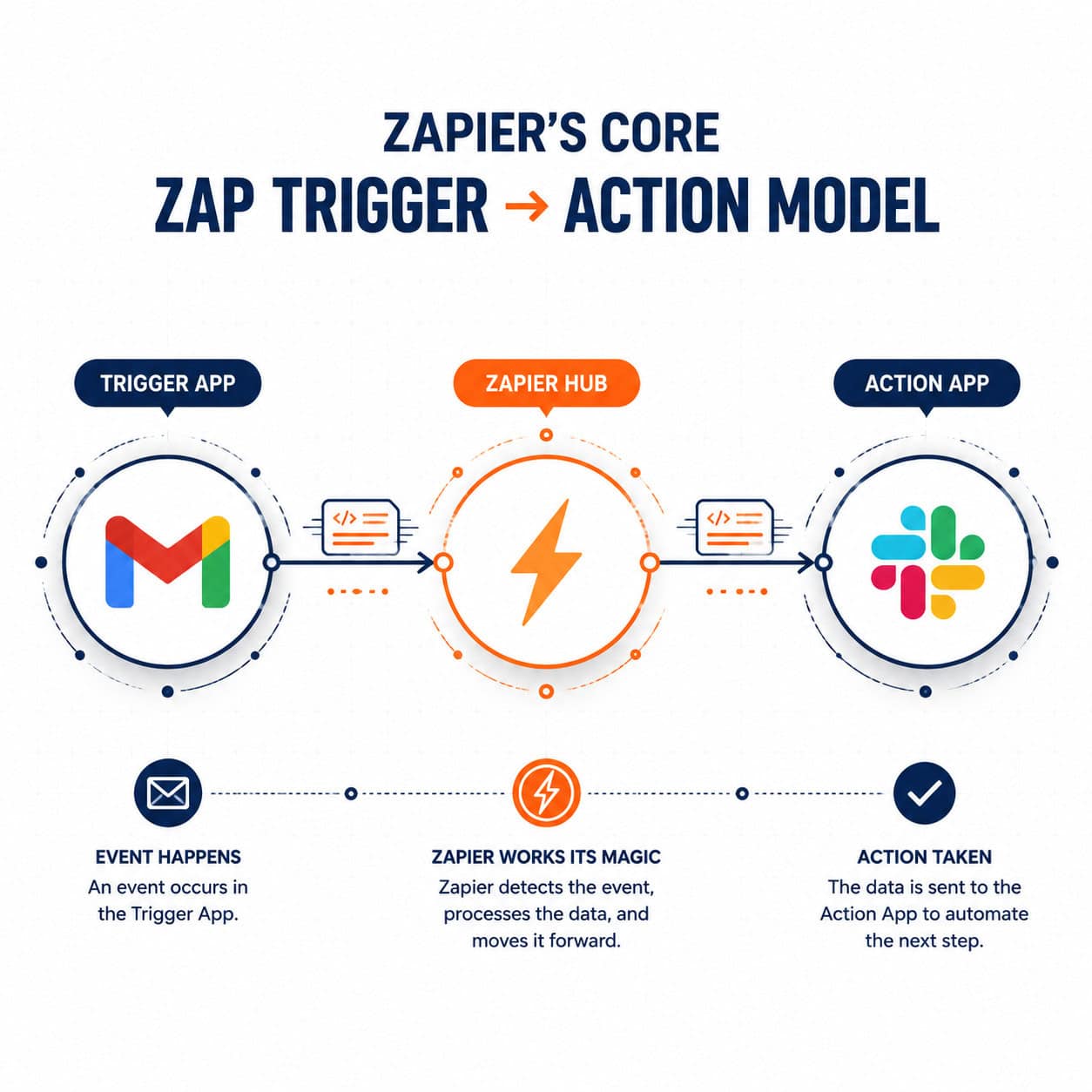
Zapier is a web-based automation platform that connects apps through a trigger-action system. When a specific event happens in one app (the trigger), Zapier automatically performs a task in another app (the action), with no manual intervention required. [2]
The core building blocks:
- Zap: A single automated workflow. Each Zap has at least one trigger and one action.
- Trigger: The event that starts a Zap (for example, “a new row is added to Google Sheets”).
- Action: What Zapier does in response (for example, “create a contact in HubSpot”).
- Multi-step Zaps: Paid plans allow a single trigger to kick off multiple actions in sequence.
- Filters and Paths: Conditional logic that routes data differently based on set criteria.
Quick example: A marketing team uses Zapier so that every time someone fills out a Typeform survey, the response is saved to Airtable, a welcome email goes out via Mailchimp, and the sales team gets a Slack notification, all within seconds, automatically.
“Zapier eliminates the need for developer implementation, allowing users to connect applications like Gmail, Slack, and Mailchimp within minutes.” [2]
Who Should Use Zapier Automation Tools?
Zapier works best for individuals and teams who rely on multiple SaaS tools and spend time on repetitive, rule-based tasks. It’s not the right fit for every situation, so here’s a clear breakdown.
Choose Zapier if you:
- Use 3 or more cloud apps that don’t natively sync with each other
- Spend more than 2 hours per week on manual data entry or copy-paste tasks
- Have no in-house developer but need app integrations
- Run a small-to-midsize business, agency, or solo operation
Zapier may not be ideal if you:
- Need real-time, high-volume data processing (enterprise ETL pipelines are better suited here)
- Require complex custom logic that goes beyond conditional branching
- Already use an all-in-one platform that handles your integrations natively
For teams building automated content or design workflows, pairing Zapier with tools covered in our comprehensive guide to AI-powered content generation tools can multiply the impact.
How to Build Your First Zap: A Step-by-Step Guide
Building a Zap takes most users under 10 minutes for a basic workflow. Here’s the exact process. [2]
Step 1: Create a Zapier account
Go to zapier.com and sign up. The free plan is enough to start.
Step 2: Click “Create Zap”
From your dashboard, hit the orange “Create” button.
Step 3: Choose your trigger app and event
Search for the app (e.g., Gmail) and select the trigger event (e.g., “New Email Matching Search”).
Step 4: Connect your account
Zapier will ask you to authenticate the app. Follow the OAuth prompts.
Step 5: Set up the action
Choose the destination app (e.g., Trello) and the action (e.g., “Create Card”). Map the data fields from the trigger to the action.
Step 6: Test and activate
Zapier runs a test to confirm everything works. If the test passes, turn the Zap on.
Common mistake: Skipping the test step. Always run the test with real data before activating, because field mapping errors only show up when actual data flows through.
What Are Zapier’s AI Features in 2026?

Zapier has moved well beyond simple app-to-app connections. Its AI layer now handles tasks that previously required human judgment. [1]
Zapier Copilot
Describe what you want in plain English, for example: “Send me a Slack summary of new leads from my CRM every morning.” Copilot drafts the workflow, connects your accounts, maps the data fields, and tests each step automatically. [1]
Zapier Agents
These are autonomous AI teammates that can execute multi-step tasks across your entire app stack without you triggering each step manually. Think of an Agent as a junior team member who monitors inboxes, drafts responses, updates records, and prepares reports. [1]
Built-in ChatGPT
Zapier includes native ChatGPT access inside Zaps, so you can add steps like “summarize this email,” “classify this support ticket,” or “generate a product description” without needing your own OpenAI API key. [1] This is particularly useful for teams already exploring AI-powered content optimization.
Zapier Tables
A spreadsheet-style database built directly into Zapier. Automations and Agents read from and write to Tables, making it easy to store leads, track orders, or manage any structured data without a separate database tool. [1]
Custom Chatbots (Interfaces)
You can build no-code chatbots trained on your own help center or website content. These bots answer customer questions, handle internal requests, and update automatically when your content changes. [1]
For teams also automating their WordPress publishing, the guide on auto-sharing WordPress blog posts to social media pairs naturally with Zapier-based content workflows.
Zapier Pricing: What Does It Actually Cost?
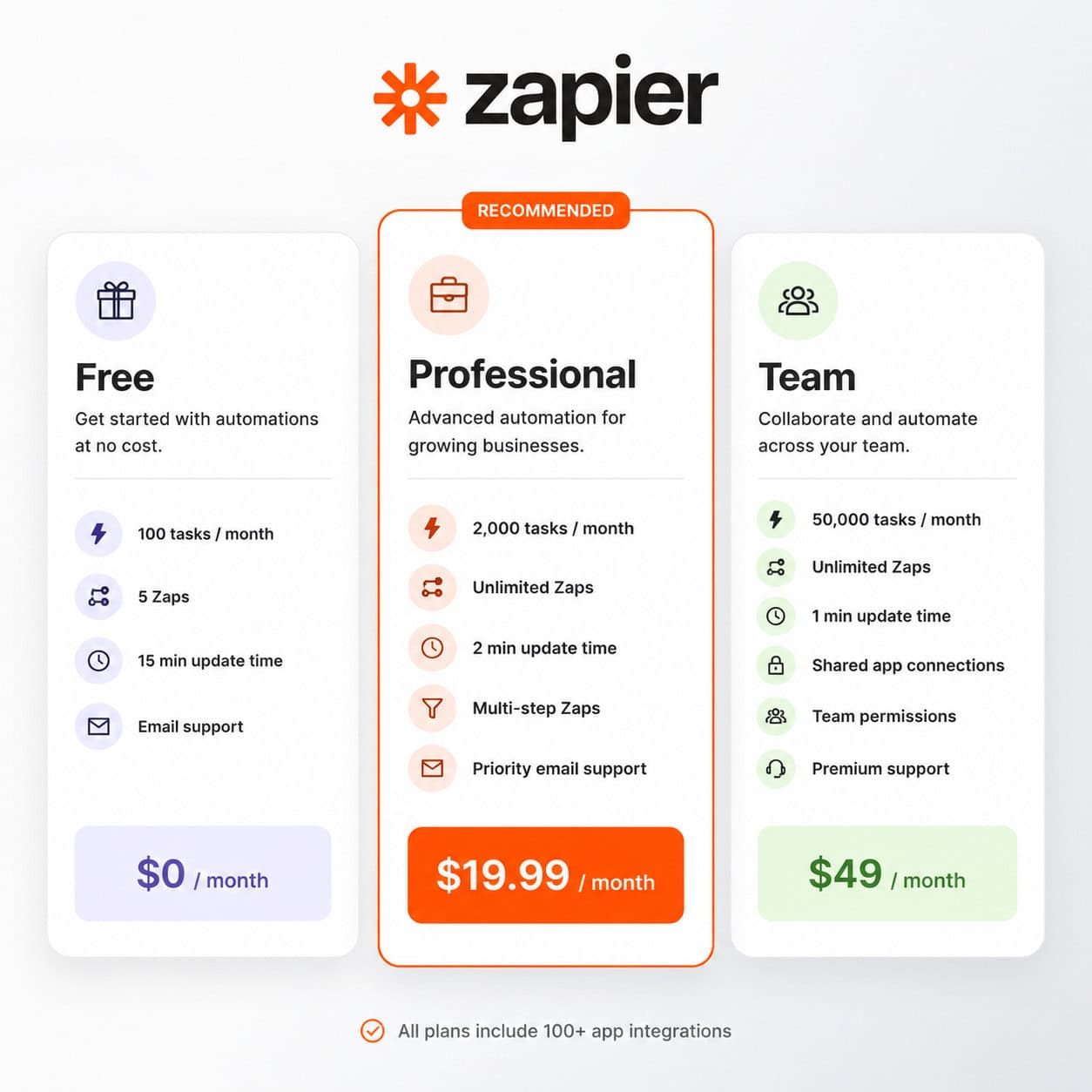
Zapier uses a tiered pricing model based on the number of tasks (actions completed) per month and the features you need. [3]
| Plan | Best For | Key Limits |
|---|---|---|
| Free | Individuals, testing | 100 tasks/month, 5 Zaps, single-step only |
| Professional | Freelancers, small teams | Unlimited Zaps, multi-step, filters, Copilot |
| Team | Growing teams | Shared workspaces, collaboration features |
| Enterprise | Large organizations | SSO, advanced admin, dedicated support |
What counts as a “task”? Each action step that completes successfully counts as one task. A three-step Zap that runs 100 times per month uses 300 tasks.
Cost tip: Start on the free plan to map out your workflows. Once you know your monthly task volume, upgrade to the plan that covers it with a small buffer (around 20% headroom is reasonable).
What Are the Best Zapier Use Cases by Industry?
Zapier’s trigger-action model applies across almost every industry, but some use cases deliver the clearest return on time invested.
Marketing teams:
- Sync new leads from Facebook Lead Ads to a CRM automatically
- Post new blog content to social channels without manual sharing
- Add webinar registrants to email sequences
Sales teams:
- Route inbound leads to the right rep based on territory or deal size
- Log calls and meetings to CRM from calendar events
- Send follow-up emails when a deal stage changes
Operations and HR:
- Onboard new hires by triggering document creation, Slack invites, and task assignments from a single form submission
- Sync time-tracking data to payroll software
Customer support:
- Create support tickets from emails or chat messages automatically
- Escalate high-priority tickets based on keyword detection with ChatGPT [4]
Real estate teams, for example, use Zapier templates to capture leads from multiple listing sources and route them into a single CRM, a workflow detailed in practical guides for that sector. [6]
Teams running automated workflows alongside their broader automation stack should also explore the automation resources at WebAiStack for complementary tools and strategies.
How Does Zapier Compare to Alternatives?
Zapier is the most widely used workflow automation tool, but it’s not the only option. Here’s a direct comparison for common alternatives.
| Tool | Best For | Coding Required? | App Connections |
|---|---|---|---|
| Zapier | Broad app coverage, ease of use | No | 8,000+ |
| Make (Integromat) | Complex, visual data flows | No (visual) | 1,000+ |
| n8n | Self-hosted, developer teams | Optional | 400+ |
| Microsoft Power Automate | Microsoft 365 ecosystems | No | 1,000+ |
| IFTTT | Simple personal automations | No | 700+ |
Choose Zapier if you need the widest app coverage and the simplest setup. Choose Make if you need complex branching logic with a visual canvas. Choose n8n if you want self-hosted control and have developer resources.
For teams also using no-code website builders alongside their automation stack, our review of the best no-code website design software platforms covers tools that integrate cleanly with Zapier.
Common Zapier Mistakes and How to Avoid Them
Even experienced users run into predictable problems. Knowing these in advance saves hours of troubleshooting.
1. Not using filters early enough
Without filters, Zaps fire on every trigger event, including ones you don’t want. Add a filter step right after the trigger to narrow down which events actually proceed.
2. Ignoring task limits
A Zap that runs more than expected can exhaust your monthly task quota quickly. Set up Zapier’s task usage alerts and review high-volume Zaps weekly.
3. Mapping the wrong data fields
When you update an app’s form or schema, Zapier doesn’t automatically update field mappings. Re-test Zaps after any change to connected apps.
4. Over-building a single Zap
A Zap with 15 steps is fragile. Break complex workflows into 2-3 smaller Zaps that hand off data via a shared Table or spreadsheet. This makes debugging much easier.
5. Skipping error notifications
Zapier can email you when a Zap fails. Enable this in your account settings so errors don’t silently pile up.
FAQ
What is a Zap in Zapier?
A Zap is a single automated workflow in Zapier. It consists of a trigger (an event in one app) and one or more actions (tasks performed in other apps) that run automatically whenever the trigger fires. [2]
Is Zapier free to use?
Yes. Zapier’s free plan allows up to 100 tasks per month and up to 5 single-step Zaps. Paid plans unlock multi-step Zaps, higher task limits, and advanced features like filters and Copilot. [3]
Does Zapier require coding skills?
No. Zapier is designed specifically for non-developers. Its visual interface and pre-built templates let anyone build automations without writing code. [2]
How many apps does Zapier connect?
Zapier connects with over 8,000 applications, making it one of the broadest integration platforms available. [1]
What is Zapier Copilot?
Zapier Copilot is an AI feature that builds automations from plain English descriptions. You describe what you want the workflow to do, and Copilot drafts the Zap, connects your accounts, maps fields, and tests the steps. [1]
Can Zapier work with AI tools like ChatGPT?
Yes. Zapier includes built-in ChatGPT access inside Zaps, so you can add AI steps for text generation, summarization, classification, or data analysis without needing a separate API key. [1] [4]
What are Zapier Agents?
Zapier Agents are autonomous AI workers that can execute multi-step tasks across your apps independently. They handle things like drafting emails, updating records, and preparing reports without requiring manual triggers for each step. [1]
Is Zapier suitable for large enterprises?
Zapier offers an Enterprise plan with SSO, advanced admin controls, and dedicated support. However, very high-volume or highly complex data pipelines may be better served by dedicated ETL or iPaaS platforms.
What is the difference between Zapier and Make?
Zapier prioritizes ease of use and app coverage (8,000+ apps). Make (formerly Integromat) offers a more visual, canvas-based interface suited for complex data transformation workflows. Zapier is generally faster to set up; Make offers more granular control.
How do I avoid running out of tasks on Zapier?
Use filters to limit which trigger events actually proceed, consolidate redundant Zaps, and monitor your task usage dashboard weekly. Upgrading to a higher plan is also straightforward once you know your actual usage.
Conclusion
Zapier automation tools remain one of the most practical investments a team can make in 2026. The platform’s combination of broad app coverage, a genuinely no-code interface, and a growing AI layer means that almost any repetitive, rule-based task can be automated without developer resources.
Your actionable next steps:
- Audit your week: Write down every task you repeat more than three times. These are your automation candidates.
- Start with one Zap: Pick the highest-friction task and build a single Zap for it this week.
- Use a template: Browse Zapier’s template library before building from scratch. Someone has likely already solved your use case.
- Test before activating: Always run the test step with real data.
- Scale gradually: Once your first Zap runs cleanly for two weeks, add the next one.
For teams also looking to automate their content and publishing workflows, explore our guide to AI-powered content generation tools and the WordPress AI integration plugins that pair well with Zapier-based pipelines.
The goal isn’t to automate everything at once. It’s to reclaim time, one Zap at a time.
References
[1] Best AI Productivity Tools – https://zapier.com/blog/best-ai-productivity-tools/
[2] How To Use Zapier – https://nocodeuniversity.net/blog/how-to/how-to-use-zapier/
[3] Ultimate Guide Workflow Automation – https://www.automake.io/blog/ultimate-guide-workflow-automation
[4] How Do I Use Zapier With GPT To Analyze Form Data Suggest Services Email Quotes – https://community.zapier.com/how-do-i-3/how-do-i-use-zapier-with-gpt-to-analyze-form-data-suggest-services-email-quotes-33589
[6] Zapier Templates For Real Estate Leads Ultimate Guide 2024 – https://www.neura.market/blog/zapier-templates-for-real-estate-leads-ultimate-guide-2024
Tags: Zapier automation, workflow automation, no-code tools, Zapier Zaps, Zapier Copilot, Zapier AI agents, app integration, business automation, Zapier pricing, automation tools 2026, ChatGPT integration, productivity tools