}
Last updated: May 8, 2026
Quick Answer
Zapier’s AI orchestration capabilities let teams build multi-step, intelligent workflows that connect 8,000+ apps using dynamic logic, autonomous AI agents, and built-in AI model support — all without writing code [1]. For SMBs and growth teams, this means converting manual, repetitive processes into automated pipelines in hours, not weeks. The platform is best suited for marketing, sales, and operations teams that need fast deployment across non-native tools.
Key Takeaways
- 🔗 Zapier connects 8,000+ apps and 300+ AI tools, making it one of the broadest integration platforms available [1]
- 🤖 Zapier Agents act as autonomous AI copilots that make decisions based on natural language goals, replacing dozens of individual Zaps [1]
- 🧠 Supported AI models include ChatGPT, Claude, Gemini, and Perplexity — each suited to different task types [1]
- 📊 Zapier Tables centralizes workflow data with AI auto-populate fields, column-level permissions, and role-based access [1]
- 💰 Pricing starts free (100 tasks/month) with paid plans from $19.99/month billed annually [2]
- 🗺️ Zapier Canvas provides a visual, drag-and-drop interface for mapping complex orchestrated workflows [1]
- ⚠️ Complex enterprise logic can become cumbersome — Zapier is optimized for SMBs, not large-scale enterprise scenarios [2]
- ✅ Pre-built templates dramatically cut time-to-deployment for common use cases [2]
What Is AI Workflow Orchestration and Why Does It Matter?
AI workflow orchestration is the practice of coordinating multiple AI models, data sources, and apps into a single, intelligent pipeline that adapts based on real-time inputs. Unlike basic automation that follows fixed rules, orchestration allows systems to make decisions dynamically.
Traditional rule-based automation asks: “If X happens, do Y.” AI orchestration asks: “Given the current context, sentiment, and history, what’s the best next step?” [1] This shift matters because it removes the need for humans to manually handle edge cases, exceptions, and branching logic.
Who it’s for: Teams that deal with high-volume, variable tasks — lead routing, content generation, customer support triage, or data enrichment — benefit most. Teams with simple, predictable workflows may not need this level of complexity.
How Does Zapier’s AI Orchestration Framework Actually Work?
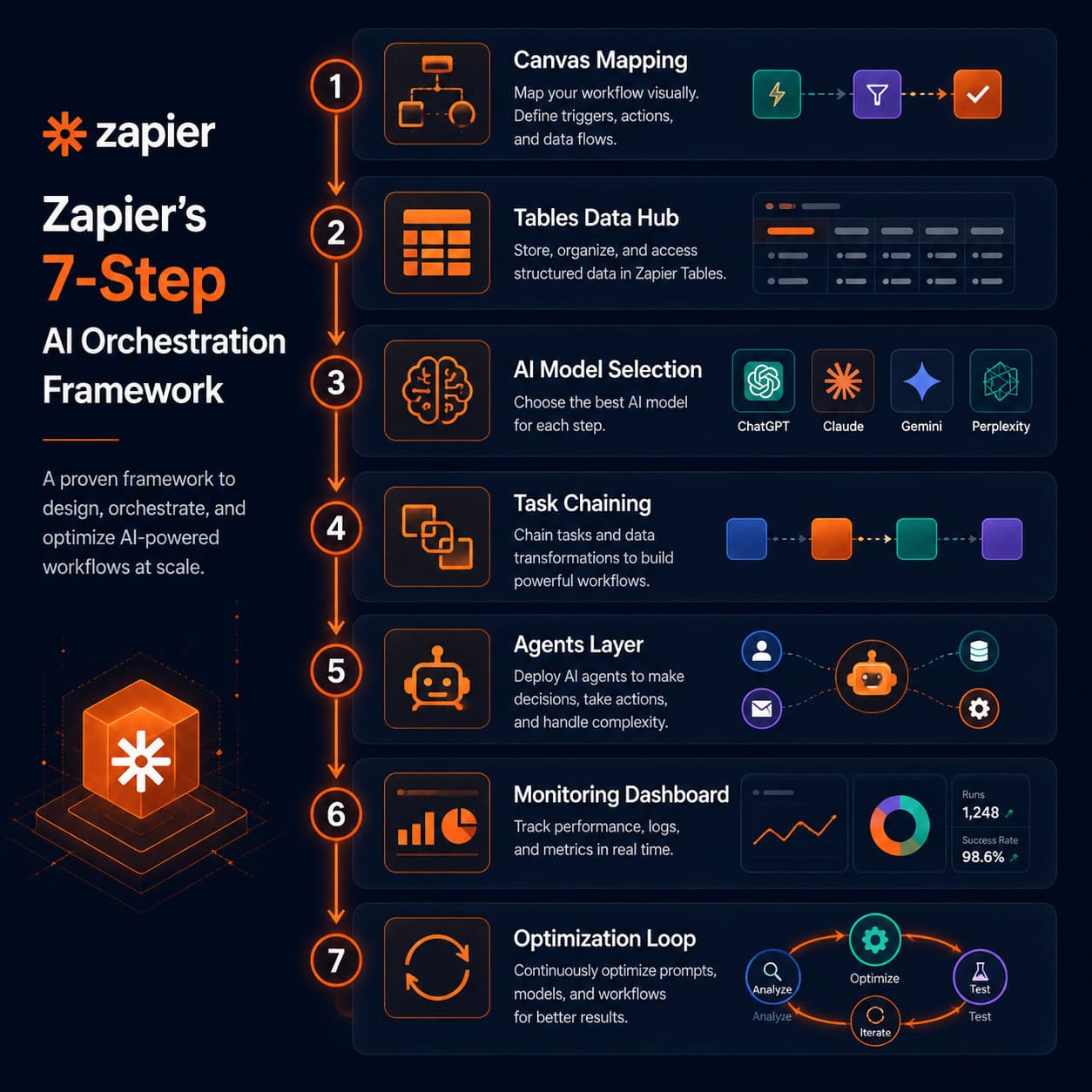
Zapier structures AI orchestration into a repeatable 7-step process that takes a workflow from concept to production [1]:
- Map the workflow in Canvas — Use Zapier’s visual drag-and-drop builder to lay out triggers, actions, and decision branches
- Centralize data in Tables — Pull all relevant data into Zapier Tables so every step in the workflow accesses the same source of truth
- Select the right AI model — Choose ChatGPT for general tasks, Claude for coding, Gemini for Google ecosystem work, or Perplexity for research-heavy workflows [1]
- Chain tasks with conditional logic — Connect steps using filters, paths, and delay logic to handle branching scenarios
- Add Zapier Agents — Deploy agents for autonomous decision-making on complex, multi-variable tasks
- Monitor performance — Track task success rates, errors, and latency through Zapier’s built-in logs
- Optimize iteratively — Use performance data to refine prompts, swap models, or restructure logic
“The shift from rules-based automation to AI orchestration is the difference between a flowchart and a thinking system.” — Zapier Blog [1]
This framework is what makes Mastering AI Workflow Automation: A Comprehensive Guide to Zapier’s AI Orchestration Capabilities practically useful rather than just conceptually interesting. Each step has a clear owner and a clear output.
If you’re also automating content workflows, see this comprehensive guide to AI-powered content generation tools for complementary strategies.
Static vs. Dynamic Logic: What Makes Zapier’s AI Approach Different?
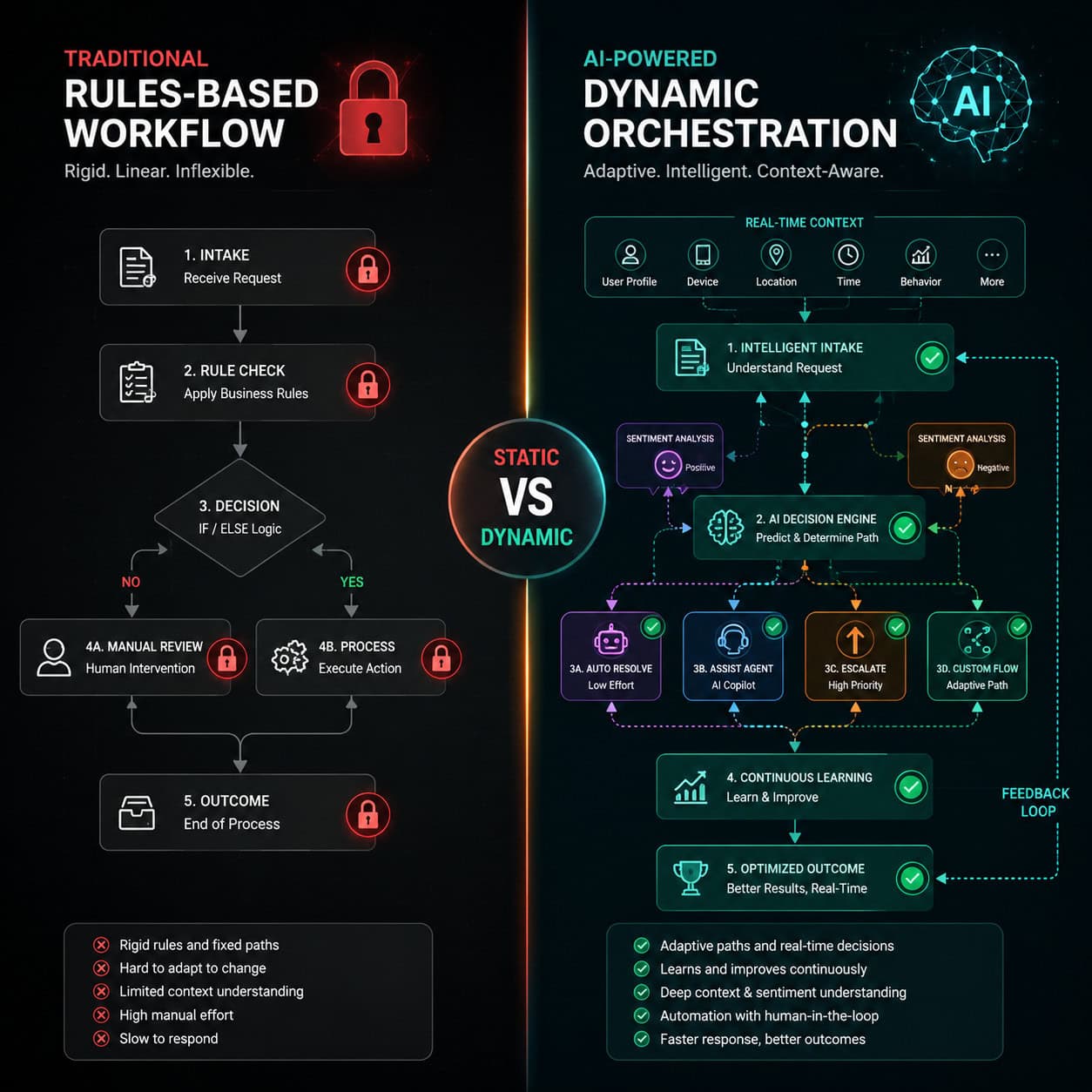
Most automation tools operate on static, rules-based logic: a trigger fires, a fixed action runs. Zapier’s AI orchestration layer introduces dynamic logic, where the system evaluates real-time inputs — including sentiment, context, and historical performance — before deciding what to do next [1].
Practical example: A lead comes in through a form. A static Zap routes all leads to the same email sequence. An AI-orchestrated workflow classifies the lead’s intent, scores it based on firmographic data, drafts a personalized email using the appropriate AI model, and routes high-intent leads to a sales rep — all automatically.
| Feature | Rules-Based Automation | AI Orchestration |
|---|---|---|
| Decision logic | Fixed if/then paths | Dynamic, context-aware |
| Adaptability | Manual updates required | Learns from real-time inputs |
| Setup complexity | Low | Moderate |
| Best for | Predictable, repetitive tasks | Variable, high-judgment tasks |
| Error handling | Fails on edge cases | Can route exceptions intelligently |
Choose AI orchestration if your workflows involve variable inputs, multiple decision points, or tasks that currently require human judgment to handle exceptions.
For teams automating their WordPress publishing pipeline, the guide on auto-sharing WordPress blog posts to social media shows a practical entry point for workflow automation.
What Are Zapier Agents and When Should You Use Them?
Zapier Agents are task-specific AI copilots that operate autonomously based on natural language instructions and real-time context [1]. Rather than requiring you to pre-define every possible path, agents interpret goals and take action — pulling data, running sub-tasks, and making decisions without manual intervention.
Use Agents when:
- A workflow has too many conditional branches to map manually
- Tasks require judgment calls (e.g., “Is this customer complaint urgent enough to escalate?”)
- You want to replace a cluster of point-to-point Zaps with a single intelligent process
Don’t use Agents when:
- The workflow is simple and predictable (a basic Zap is faster and cheaper)
- You need full auditability of every decision step
- The task involves sensitive data where autonomous decisions carry compliance risk
Agents are particularly powerful for sales and marketing teams. Built-in AI steps handle lead summarization, intent classification, and personalized email drafting — converting manual SDR tasks into automated workflows [2].
For broader AI tool context, explore our AI-powered content optimization guide which covers complementary AI automation strategies.
How Do You Centralize Data for AI Orchestration in Zapier?
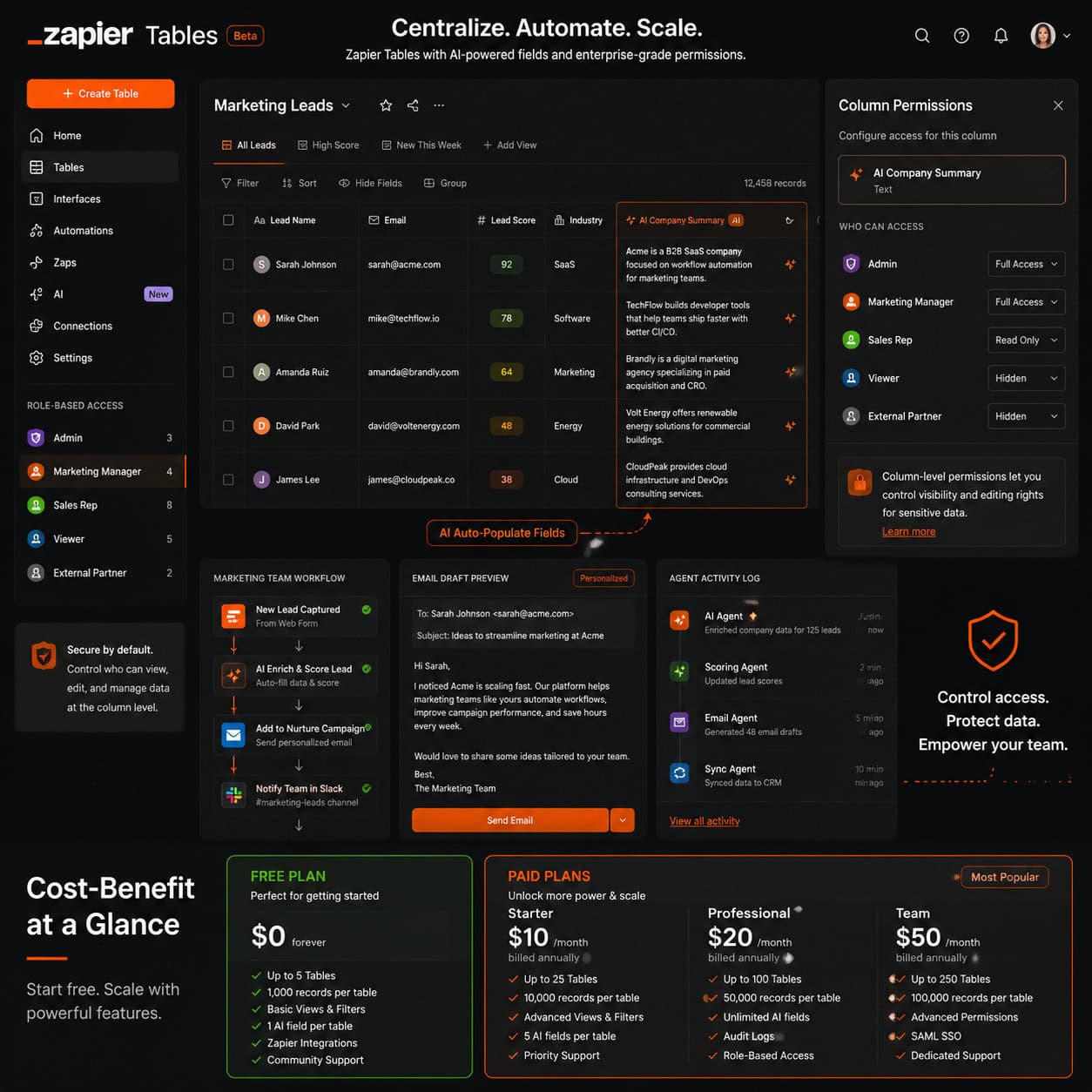
Zapier Tables is the data layer that makes orchestrated workflows reliable. It provides column-level permissions, role-based access control, and AI fields that auto-populate based on pre-defined prompts [1].
Why centralization matters: AI models are only as good as the data they receive. If each step in a workflow pulls from a different source, inconsistencies accumulate. Tables gives every step a single, structured data source.
Setting up Tables for orchestration:
- Create a table for each data entity (leads, orders, support tickets)
- Define AI fields that auto-populate on record creation (e.g., “Summarize this lead’s company in 2 sentences”)
- Set column permissions so only relevant team members can edit sensitive fields
- Connect Tables as the data source for downstream Zaps and Agents
This approach is especially useful for cross-functional teams where marketing, sales, and ops all touch the same records but need different levels of access.
Teams managing complex digital projects can also benefit from Framer project management templates to complement their workflow automation stack.
What Does Zapier’s AI Orchestration Cost — and Is It Worth It?
Zapier’s free plan covers 100 tasks per month, which is enough to test basic orchestration setups. Paid plans start at $19.99/month billed annually [2]. Costs scale with task volume, so high-frequency workflows can become expensive quickly.
Cost considerations:
- Each action in a multi-step Zap counts as a task
- AI steps (model calls) count as tasks and may carry additional usage costs depending on the model
- Agents running autonomously can consume tasks faster than static Zaps
Is it worth it? For SMBs replacing manual processes that currently require staff time, yes — the ROI calculation is straightforward. A workflow that saves two hours of manual work per week at $25/hour generates $200/month in value against a $20-$50/month Zapier bill [2].
Where it gets expensive: Enterprise-scale automation with thousands of daily tasks. At that volume, purpose-built platforms like Make (formerly Integromat) or custom API integrations may offer better cost efficiency [3].
For teams also managing WordPress automation, check out 12 best AI plugins for WordPress to extend your automation stack cost-effectively.
Common Mistakes When Building AI Orchestration Workflows in Zapier
Even experienced users run into predictable problems. Here are the most common ones and how to avoid them:
1. Skipping the Canvas mapping step
Jumping straight into building Zaps without mapping the full workflow leads to logic gaps. Always sketch the full flow first.
2. Using one AI model for everything
ChatGPT handles general tasks well, but Claude outperforms it on code-related tasks, and Perplexity is better for research. Matching the model to the task type improves output quality [1].
3. Not testing edge cases
AI orchestration workflows fail on unexpected inputs. Test with malformed data, empty fields, and unusual values before going live.
4. Over-relying on Agents for simple tasks
Agents add overhead. A simple two-step Zap doesn’t need an Agent. Save Agents for genuinely complex, multi-variable decisions.
5. Ignoring task consumption rates
Autonomous Agents can burn through your monthly task allocation quickly. Set task limits and monitor usage weekly during the first month.
Conclusion: Your Next Steps for Mastering AI Workflow Automation
Mastering AI Workflow Automation: A Comprehensive Guide to Zapier’s AI Orchestration Capabilities comes down to one practical truth: start simple, then layer complexity. Don’t begin with Agents and multi-model pipelines. Start with a single workflow that has a clear pain point — a manual task your team does daily — and automate that first.
Actionable next steps:
- Audit one manual process this week — pick something your team does at least five times per day
- Map it in Zapier Canvas before touching any settings
- Build a basic Zap with one trigger and two actions to validate the logic
- Add an AI step (start with ChatGPT for general tasks) once the basic flow works
- Introduce Agents only after you’ve validated that the workflow handles edge cases correctly
- Monitor task consumption for the first 30 days and adjust your plan tier accordingly
The teams that get the most value from Zapier’s AI orchestration aren’t the ones who build the most complex workflows. They’re the ones who identify the highest-impact processes and automate those first — then expand methodically.
For more on building AI-powered workflows across your stack, explore the automation resources at WebAiStack for practical guides across tools and platforms.
FAQ
What is Zapier AI orchestration?
Zapier AI orchestration is the coordination of multiple AI models, apps, and data sources into a single intelligent workflow that makes dynamic decisions based on real-time inputs, rather than following fixed rules [1].
How many apps does Zapier connect?
Zapier connects 8,000+ applications, including 300+ AI-specific tools designed for orchestration workflows [1].
What AI models does Zapier support?
Zapier supports ChatGPT (general tasks), Claude (coding), Gemini (Google ecosystem), and Perplexity (research workflows) [1].
Is Zapier free to use for AI automation?
Zapier offers a free plan with 100 tasks per month. Paid plans start at $19.99/month billed annually [2].
What is Zapier Canvas?
Zapier Canvas is a visual, drag-and-drop workflow builder that lets teams map and design complex AI orchestration flows without writing code [1].
What are Zapier Agents?
Zapier Agents are autonomous AI copilots that make decisions based on natural language goals and real-time context, replacing multiple individual Zaps with a single intelligent process [1].
Is Zapier suitable for enterprise automation?
Zapier is optimized for SMBs and growth teams. Complex enterprise logic can become cumbersome, and high task volumes can make it cost-inefficient compared to alternatives [2].
How does Zapier Tables support AI workflows?
Zapier Tables centralizes data with AI auto-populate fields, column-level permissions, and role-based access control — giving every workflow step a consistent, structured data source [1].
Can I use Zapier without coding skills?
Yes. Zapier’s visual tools (Canvas, Tables, pre-built templates) are designed for non-technical users. No coding is required for most orchestration setups [1].
How long does it take to build a Zapier AI workflow?
Simple workflows with pre-built templates can be deployed in under an hour. Complex multi-agent orchestrations with custom logic typically take one to three days to build and test properly.
What’s the biggest mistake teams make with Zapier AI automation?
The most common mistake is skipping the workflow mapping phase and building directly in Zapier, which leads to logic gaps and difficult-to-debug errors.
How does Zapier compare to Make (Integromat) for AI workflows?
Zapier offers faster setup and a larger template library. Make offers more granular control and better cost efficiency at high task volumes. Choose Zapier for speed; choose Make for complex, high-volume scenarios [3].
Zapier resources: Zapier Learn and Zapier Help.
References
[1] AI Orchestration Workflows – https://zapier.com/blog/ai-orchestration-workflows/
[2] AI Workflow Automation Tools – https://samueljwoods.com/ai-workflow-automation-tools/
[3] AI Workflow Management Tools – https://stackby.com/blog/ai-workflow-management-tools/