Last updated: May 7, 2026
Quick Answer: n8n Version 2 is a major release of the open-source workflow automation platform that overhauls how subworkflows exchange data, deepens AI agent integration, and adds production-grade enterprise security features. It’s best suited for developers, technical teams, and businesses that want self-hosted, code-optional automation without vendor lock-in. If you’re migrating from Version 1, expect breaking changes in subworkflow behavior that require immediate attention before upgrading.
Key Takeaways
- Subworkflow data return is fundamentally different in Version 2 — subworkflows now pass data directly back to the parent workflow or AI agent, which is a breaking change from Version 1 [1]
- AI agent integration is built-in, allowing n8n workflows to serve as tools inside LLM-powered agents natively
- Enterprise security features include SSO, role-based access control (RBAC), audit logging, and encrypted credential storage [2]
- Self-hosting remains a core advantage, giving teams full data control and preventing vendor lock-in [3]
- No-code and custom code coexist — you can build visually and drop into JavaScript/Python nodes when needed
- Production deployments require webhook security, retry logic, error handling, and version control from day one [8]
- n8n supports 400+ integrations and handles conditional branching, loops, and multi-step approval flows [2]
- Pricing is flexible — free for self-hosted, with cloud plans starting at a modest monthly fee for teams that prefer managed hosting

What Is n8n Version 2 and Why Does It Matter?
n8n Version 2 is the most significant architectural update to the n8n workflow automation platform since its launch. At its core, n8n is a fair-code licensed tool that lets teams build automated workflows connecting apps, APIs, databases, and AI models — either visually or with code [4].
Version 2 matters for three concrete reasons:
- It changes how workflows communicate with each other (the subworkflow breaking change)
- It makes AI agents a first-class citizen in the automation stack
- It adds enterprise controls that make self-hosted deployments viable for larger organizations
If you’re evaluating whether this guide — n8n Version 2: A Comprehensive Guide to the Latest Workflow Automation Breakthrough — applies to you, here’s the short answer: it does if you automate any business process involving multiple apps, data transformations, or AI-assisted decisions.
Who this is for:
- Developers building internal tools and integrations
- Operations teams automating repetitive cross-platform tasks
- Businesses that need data privacy (self-hosted)
- Teams already using n8n Version 1 who need to migrate safely
Who should look elsewhere:
- Non-technical users who want a fully managed, point-and-click-only tool (Zapier may fit better)
- Teams with zero tolerance for any setup overhead
What Changed in Version 2? The Subworkflow Breaking Change Explained

The single most important change in n8n Version 2 is how subworkflows return data. In Version 1, subworkflows operated more independently. In Version 2, subworkflows return data directly back to the parent workflow, populating output in either the Execute Workflow node or within AI agents when the subworkflow is used as a tool [1].
This is a breaking change. If you upgrade without updating your existing workflows, parent workflows that rely on subworkflow output will behave incorrectly or fail silently.
What exactly changed?
| Behavior | Version 1 | Version 2 |
|---|---|---|
| Subworkflow data return | Limited/indirect | Direct return to parent node |
| AI agent tool support | Manual workaround | Native, built-in |
| Execute Workflow node output | Required extra mapping | Auto-populated |
| Error propagation | Inconsistent | Structured and predictable |
How to handle the migration
Before upgrading any production instance:
- Audit all workflows that use the Execute Workflow node — list every parent workflow that calls a subworkflow
- Check data mapping downstream — any node that reads subworkflow output needs to be re-mapped to the new data structure
- Test in a staging environment first — clone your production instance, upgrade it, and run regression tests
- Update AI agent tool configurations — if you use subworkflows as tools inside agents, verify the output schema matches what the agent expects [1]
Common mistake: Teams upgrade n8n without auditing subworkflow dependencies first, then spend hours debugging silent data failures. Always test in staging.
How Does n8n Version 2 Handle AI Agent Integration?
n8n Version 2 treats AI agents as native workflow components, not bolt-on features. You can wire a language model (like GPT-4 or Claude) directly into a workflow, give it tools (including subworkflows), and let it make decisions mid-process [4].
This matters because most automation platforms still treat AI as a separate layer. n8n Version 2 merges them.
Key AI integration capabilities:
- LLM nodes connect to OpenAI, Anthropic, Google Gemini, and local models via Ollama
- Subworkflows as agent tools — an AI agent can call a subworkflow to fetch data, run a calculation, or trigger an action, then use the result in its reasoning [1]
- Memory nodes let agents retain context across conversation turns
- Output parsers structure raw LLM responses into usable JSON for downstream nodes
For teams already exploring AI-powered content workflows, this pairs well with broader strategies around AI-powered content optimization — n8n can automate the pipeline that feeds and processes AI-generated content.
Choose AI agent mode if: your automation requires dynamic decision-making that can’t be fully pre-scripted — for example, triaging support tickets, classifying documents, or generating personalized responses at scale.
Stick to standard workflows if: your logic is deterministic and rule-based. AI adds latency and cost where it isn’t needed.
What Enterprise Security Features Does n8n Version 2 Include?

n8n Version 2 includes production-ready enterprise security that makes it viable for regulated industries and larger teams. These features address the most common blockers for enterprise adoption of open-source automation tools [2].
Security features at a glance:
- SSO (Single Sign-On): Integrates with SAML and OAuth providers, so teams don’t manage separate n8n credentials
- Role-Based Access Control (RBAC): Assign viewer, editor, or admin roles per user or team, limiting who can modify or trigger workflows
- Audit logging: Every workflow execution, credential access, and configuration change is logged with timestamps and user attribution
- Encrypted credential storage: API keys and passwords are encrypted at rest, not stored in plain text
- Multi-environment deployment: Separate development, staging, and production environments with controlled promotion paths [2]
For self-hosted deployments specifically, these features combine with the open-source architecture to give organizations full visibility into their data — no third party can access your workflow data or credentials [3].
Users value n8n’s self-hosting capability, which provides greater control over workflows compared to closed-source alternatives, addressing data privacy and infrastructure concerns.” — G2 user feedback [5]
Edge case: RBAC in n8n Version 2 is powerful but requires upfront planning. If you add team members without defining roles first, everyone defaults to admin access. Set up your role structure before inviting users.
How Does n8n Version 2 Compare to Zapier and Make?
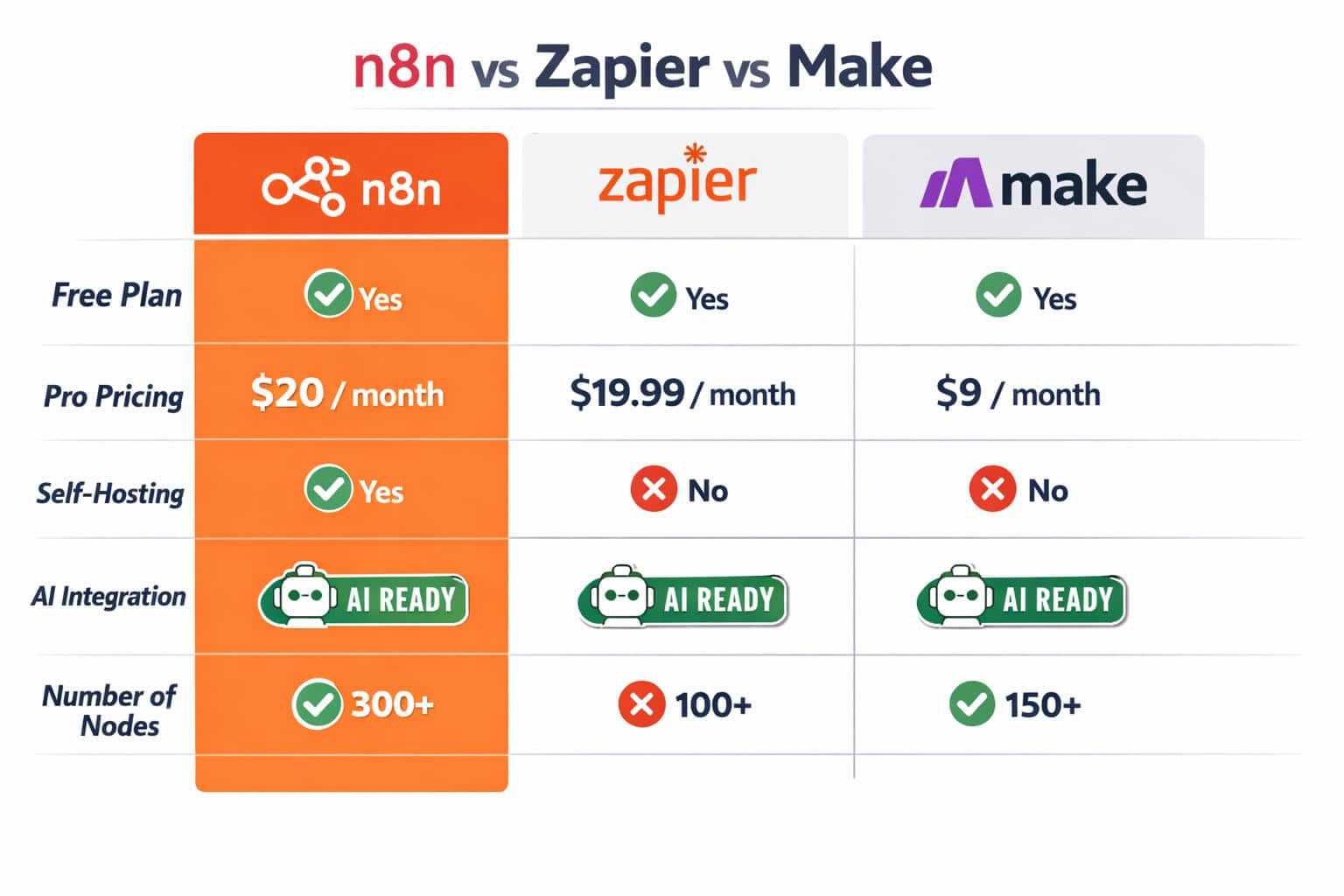
n8n Version 2 occupies a distinct position in the workflow automation market. It’s not trying to be the simplest tool — it’s trying to be the most flexible one without sacrificing usability [3].
Head-to-head comparison
| Feature | n8n v2 | Zapier | Make |
|---|---|---|---|
| Self-hosting | ✅ Yes | ❌ No | ❌ No |
| Open source | ✅ Fair-code | ❌ No | ❌ No |
| AI agent support | ✅ Native | ⚠️ Limited | ⚠️ Limited |
| Custom code nodes | ✅ JS + Python | ❌ No | ⚠️ Limited |
| Free tier | ✅ Self-hosted | ⚠️ Limited tasks | ⚠️ Limited ops |
| Visual builder | ✅ Yes | ✅ Yes | ✅ Yes |
| Learning curve | Medium | Low | Medium |
| Vendor lock-in risk | Low | High | Medium |
Choose n8n Version 2 if:
- You need self-hosting for data privacy or compliance
- Your workflows involve custom logic that exceeds what drag-and-drop tools support
- You want AI agents embedded in automation, not layered on top
- You’re comfortable with a moderate setup investment for long-term flexibility
Choose Zapier if:
- Your team is non-technical and needs the simplest possible interface
- You’re automating straightforward, linear tasks between popular SaaS apps
- Setup time is more expensive than subscription cost
For teams building automated content or social media workflows, n8n pairs naturally with strategies like auto-sharing WordPress posts to social media — n8n can handle the trigger, transformation, and posting logic in a single workflow.
How Do You Build Your First Workflow in n8n Version 2?
Building a workflow in n8n Version 2 follows a consistent pattern regardless of complexity. The visual canvas is the starting point, and every workflow begins with a trigger node [4].
Basic workflow structure:
- Trigger node — defines what starts the workflow (webhook, schedule, app event, manual)
- Action nodes — perform operations (HTTP request, database query, send email, call API)
- Logic nodes — branch, loop, merge, or filter data based on conditions
- Output nodes — write results to a destination (Slack, Google Sheets, database, webhook response)
Step-by-step: Build a simple data sync workflow
- Open the n8n canvas and click Add first step
- Choose a Schedule Trigger (e.g., every hour)
- Add an HTTP Request node to fetch data from an external API
- Add an IF node to filter records based on a condition
- Add a Google Sheets node to write filtered records
- Add a Slack node to send a summary notification [7]
- Click Save and Activate
n8n supports dynamic data mapping between steps — you can reference output from any previous node using the expression editor, which uses {{ $node["NodeName"].json.fieldName }} syntax [7].
For teams integrating n8n into broader automation stacks, exploring the automation category on WebAiStack provides useful context on complementary tools and approaches.
Common mistake: Skipping error handling on HTTP request nodes. If an external API returns a 429 or 500 error, an unhandled failure stops the entire workflow. Always add a Try/Catch or Error Trigger node in production workflows.
What Are the Best Practices for Production Deployment?
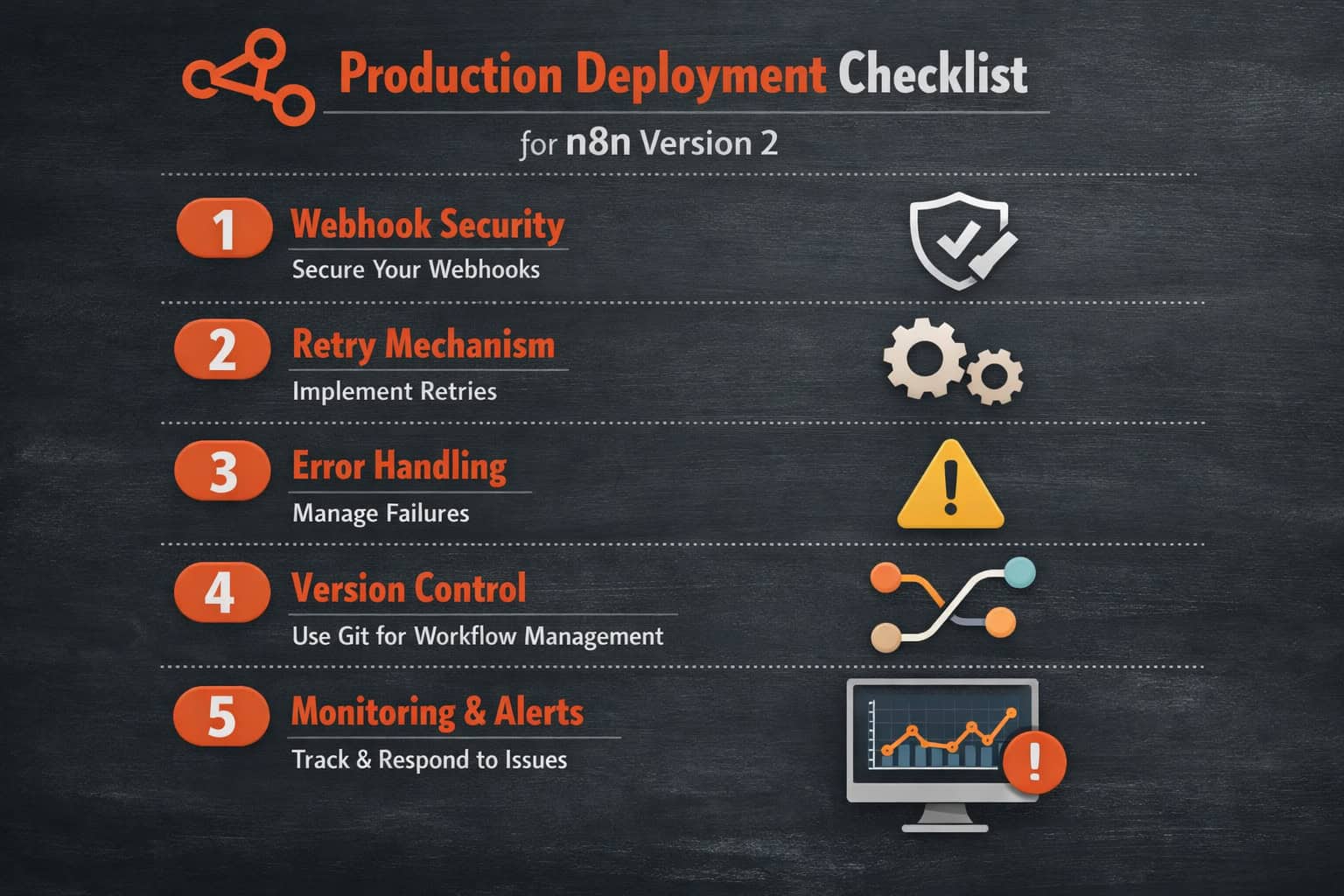
Production deployment of n8n Version 2 requires more than just installing the software. According to expert analysis, several critical practices separate reliable production instances from fragile ones [8].
Production readiness checklist:
- Webhook security: Add authentication (header token or basic auth) to all inbound webhooks — public webhooks without auth are an attack surface
- Retry mechanisms: Configure retry logic on AI agent nodes and external API calls — transient failures are normal and shouldn’t break workflows [8]
- Error handling: Add Error Trigger workflows that log failures to a monitoring system (e.g., send to Slack or PagerDuty)
- Version control: Export workflow JSON files to a Git repository — this gives you rollback capability and change history
- Environment separation: Use separate n8n instances or projects for dev, staging, and production
- Credential rotation: Set a schedule for rotating API keys stored in n8n’s credential vault
- Resource limits: Set execution timeout limits to prevent runaway workflows from consuming server resources
- Monitoring: Use n8n’s built-in execution log plus external monitoring (uptime checks on your n8n instance)
For teams running n8n alongside WordPress-based systems, advanced WordPress automation strategies complement n8n workflows well — particularly for content publishing and CMS-triggered automations.
Edge case: Multi-environment deployments require careful credential management. Credentials don’t automatically sync between environments — you’ll need to re-enter them in each instance or use a secrets manager integration.
What Does n8n Version 2 Cost?
n8n Version 2 pricing depends on how you deploy it. The self-hosted option is free, which is a meaningful differentiator from Zapier and Make [3].
Pricing tiers (as of 2026):
| Plan | Cost | Best for |
|---|---|---|
| Self-hosted (Community) | Free | Developers, technical teams |
| Cloud Starter | ~$20/month | Small teams, low volume |
| Cloud Pro | ~$50/month | Growing teams, higher execution volume |
| Enterprise | Custom pricing | Large orgs, SSO, RBAC, SLA |
The self-hosted path has infrastructure costs (server, domain, SSL), but for teams with existing cloud infrastructure, these are often negligible. The trade-off is that you manage updates, backups, and uptime yourself.
Choose cloud hosting if: your team doesn’t have DevOps capacity to maintain a self-hosted instance. Choose self-hosting if: data privacy, compliance, or cost at scale are priorities.
FAQ: n8n Version 2 Common Questions
Q: Is n8n Version 2 backward compatible with Version 1 workflows? Mostly, but not fully. The subworkflow data return behavior is a breaking change. Most standard workflows will work, but any workflow using the Execute Workflow node needs review before upgrading [1].
Q: Can I use n8n Version 2 without coding? Yes. The visual builder handles most use cases without any code. Code nodes (JavaScript or Python) are available for advanced logic but not required [3].
Q: How many integrations does n8n support? n8n supports 400+ native integrations, plus any HTTP API via the HTTP Request node, which effectively extends coverage to thousands of services [2].
Q: Is n8n suitable for large enterprises? Yes, with the enterprise plan. SSO, RBAC, audit logging, and multi-environment support address common enterprise requirements [2].
Q: What happens if an external API fails mid-workflow? Without error handling, the workflow execution fails at that node. With a Try/Catch block or Error Trigger workflow, you can catch the failure, log it, and optionally retry or alert your team [8].
Q: Can n8n Version 2 run AI models locally? Yes. n8n integrates with Ollama, which lets you run local LLMs on your own infrastructure — useful for air-gapped environments or when data can’t leave your network [4].
Q: How does n8n handle data privacy for AI workflows? When self-hosted, data never leaves your infrastructure. When using cloud AI providers (OpenAI, Anthropic), data is sent to those APIs per their privacy policies — the same as calling them directly.
Q: What’s the best way to learn n8n Version 2? Start with the official quickstart workflow [6], then work through the docs at docs.n8n.io [4]. The n8n community forum and YouTube tutorials cover most advanced scenarios.
Q: Does n8n Version 2 support webhooks? Yes. n8n has a built-in webhook node that can receive HTTP requests and trigger workflows in real time. Production webhooks should include authentication [8].
Q: Can I migrate from Zapier to n8n? Yes, but it’s a manual process — there’s no automated migration tool. You rebuild workflows in n8n’s canvas. The effort is front-loaded but pays off in flexibility and cost savings at scale [3].
Conclusion: Is n8n Version 2 Worth Adopting?
n8n Version 2 is a genuinely strong choice for teams that need flexible, self-hosted workflow automation with AI capabilities built in. This guide to n8n Version 2: A Comprehensive Guide to the Latest Workflow Automation Breakthrough has covered the core changes, migration requirements, enterprise features, and production best practices you need to make an informed decision.
The subworkflow breaking change is real and requires attention before upgrading, but it’s a one-time migration cost that results in a cleaner, more predictable architecture. The AI agent integration is the most forward-looking feature — it positions n8n workflows as active participants in AI-driven processes, not just passive connectors.
Your next steps:
- If you’re new to n8n: Start with the self-hosted Community edition and work through the official quickstart [6]
- If you’re on Version 1: Audit your subworkflow dependencies before upgrading — use a staging environment
- If you’re evaluating n8n vs. alternatives: Run a 2-week proof of concept with a real workflow from your stack
- If you’re deploying to production: Follow the production checklist above before going live [8]
- For AI workflows: Start with a single LLM node connected to a real use case (email triage, document classification) before building complex agent chains
For broader context on AI-powered automation tools that complement n8n, see our comprehensive guide to AI-powered content generation tools and explore more automation resources in the automation category.
References
[1] Watch (n8n Version 2 Subworkflow Changes) – https://www.youtube.com/watch?v=ecFf_hcqN-0 [2] N8n Review – https://www.siit.io/tools/trending/n8n-review [3] N8n Workflow Automation – https://www.helloroketto.com/articles/n8n-workflow-automation [4] docs.n8n – https://docs.n8n.io [5] G2 Reviews – https://www.g2.com/products/n8n/reviews [6] Very Quick Quickstart Workflow – https://n8n.io/workflows/1700-very-quick-quickstart/ [7] Watch (Data Transformation & Mapping) – https://www.youtube.com/watch?v=4cQWJViybAQ [8] Watch (Production Deployment Best Practices) – https://www.youtube.com/watch?v=ASnwt2ilg28