
Last updated: June 3, 2026
Quick Answer: Higgsfield AI is a unified creative platform that lets you generate images and short videos using multiple AI models (including its own Higgsfield Soul engine, plus integrated third-party models like Sora, Kling, and Google Veo) through a single interface. This guide to mastering Higgsfield AI: a comprehensive tutorial for beginners and advanced developers covers everything from first login to advanced multi-model routing, pricing, hardware needs, and troubleshooting.
A single platform now routes your creative prompts through over a dozen generative AI models, and most developers still treat it like a basic image generator. That gap between what Higgsfield AI can do and what most users actually do with it is exactly why this tutorial exists. Whether you’re generating your first 3-second video clip or building production pipelines that switch between Kling 3.0 and Higgsfield Sora depending on the shot, this guide walks you through every step.
Key Takeaways
- Higgsfield AI is primarily a generative media platform for images and short videos, not a general-purpose ML framework like TensorFlow.
- The platform integrates multiple third-party AI models (Sora, Kling, Google Veo, GPT) alongside its own Higgsfield Soul models [3].
- Free tiers exist with limited credits; paid plans scale from individual creators to enterprise teams.
- You don’t need a powerful local GPU because processing happens on Higgsfield’s cloud infrastructure.
- Python developers can pick up the platform quickly since the interface is prompt-driven and low-code.
- Higgsfield excels at computer vision tasks like video generation and image synthesis, with growing NLP integration.
- Common beginner mistakes include burning credits on default settings and ignoring model-specific strengths.
- Official how-to guides [6] and recent YouTube tutorials [1][2] are the best free learning resources available in 2026.
What Exactly Is Higgsfield AI and How Does It Work?
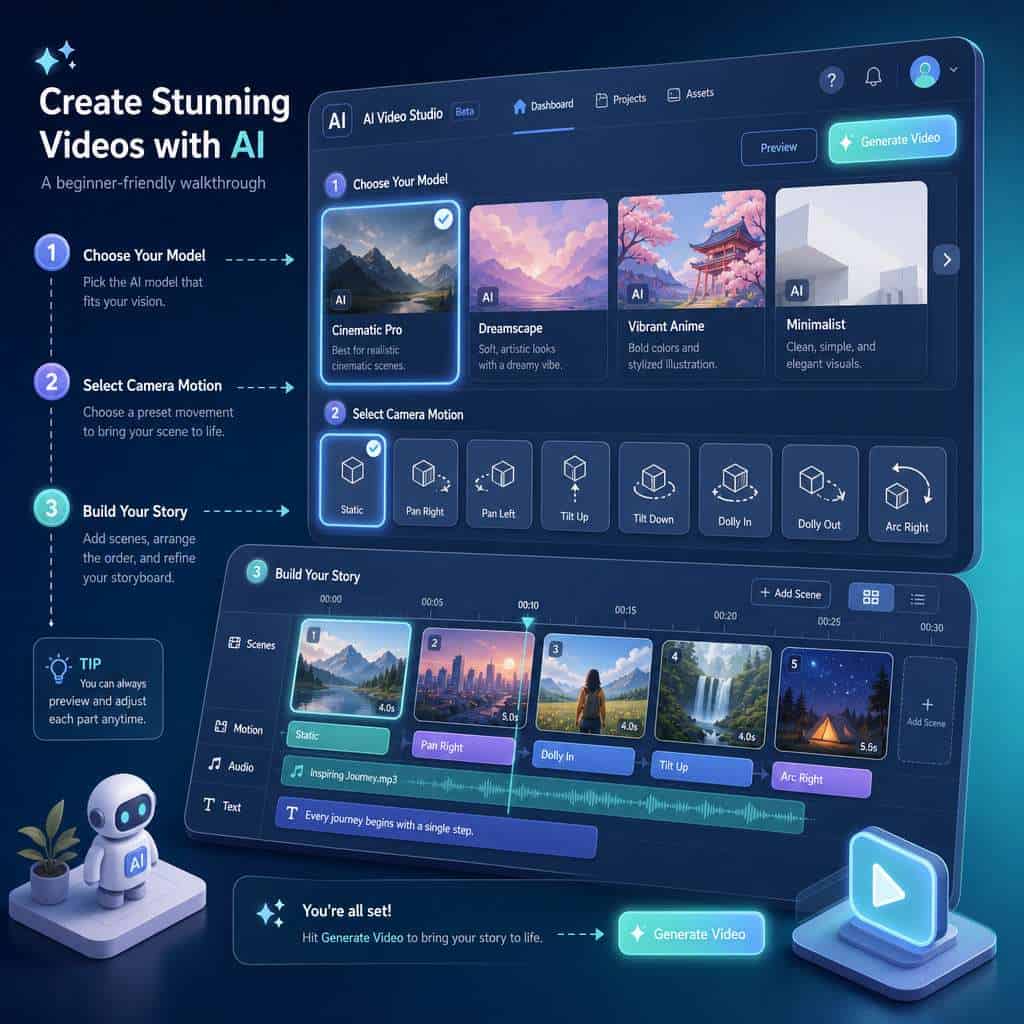
Higgsfield AI is a cloud-based generative media platform that creates images and short video clips (typically 3-5 seconds as MP4s) with lifelike motion and camera dynamics [4][8]. It works by giving users a unified interface to access multiple generative AI models, both proprietary and third-party.
Here’s the basic workflow:
- Start with an image — either upload your own or generate one using models like Nano Banana, Nano Banana Pro, Higgsfield Soul Cinema, Higgsfield Soul 2.0, or GPT [3].
- Select your video model — choose from Kling 3.0, Kling 2.6, Grok, Higgsfield Sora, or others depending on the visual style you need [3].
- Configure camera motion — pick from presets for panning, zooming, or custom dynamics [1].
- Generate — one click sends your prompt to the selected model, and you get back a short video clip.
This multi-model routing is what sets Higgsfield apart. Instead of signing up for five different AI video tools, you access them all from one dashboard. Think of it as a creative hub rather than a single model.
How Much Does a Higgsfield AI License Cost for Developers?
Higgsfield uses a credit-based pricing system rather than a traditional software license. Each generation (image or video) costs a set number of credits depending on the model and output settings [4][8].
Pricing Tiers for Higgsfield AI: Enterprise vs. Individual Developers
| Tier | Target User | Key Features | Approximate Cost |
|---|---|---|---|
| Free | Hobbyists, evaluators | Limited monthly credits, access to basic models | $0 |
| Creator | Individual developers, freelancers | More credits, priority generation, all models | Mid-range monthly subscription |
| Pro | Studios, advanced developers | Higher credit allotment, batch processing | Higher monthly subscription |
| Enterprise | Teams, agencies | Custom credit volumes, API access, dedicated support | Custom pricing |
Exact dollar amounts change frequently, so check the Higgsfield pricing page for current rates. The important thing to know: credits are consumed differently by different models. Generating a video with Kling 3.0 costs more credits than a basic image with Nano Banana. Plan your budget around your actual model usage, not just the number of outputs.
Higgsfield AI vs. TensorFlow: Which Is Better for Machine Learning?
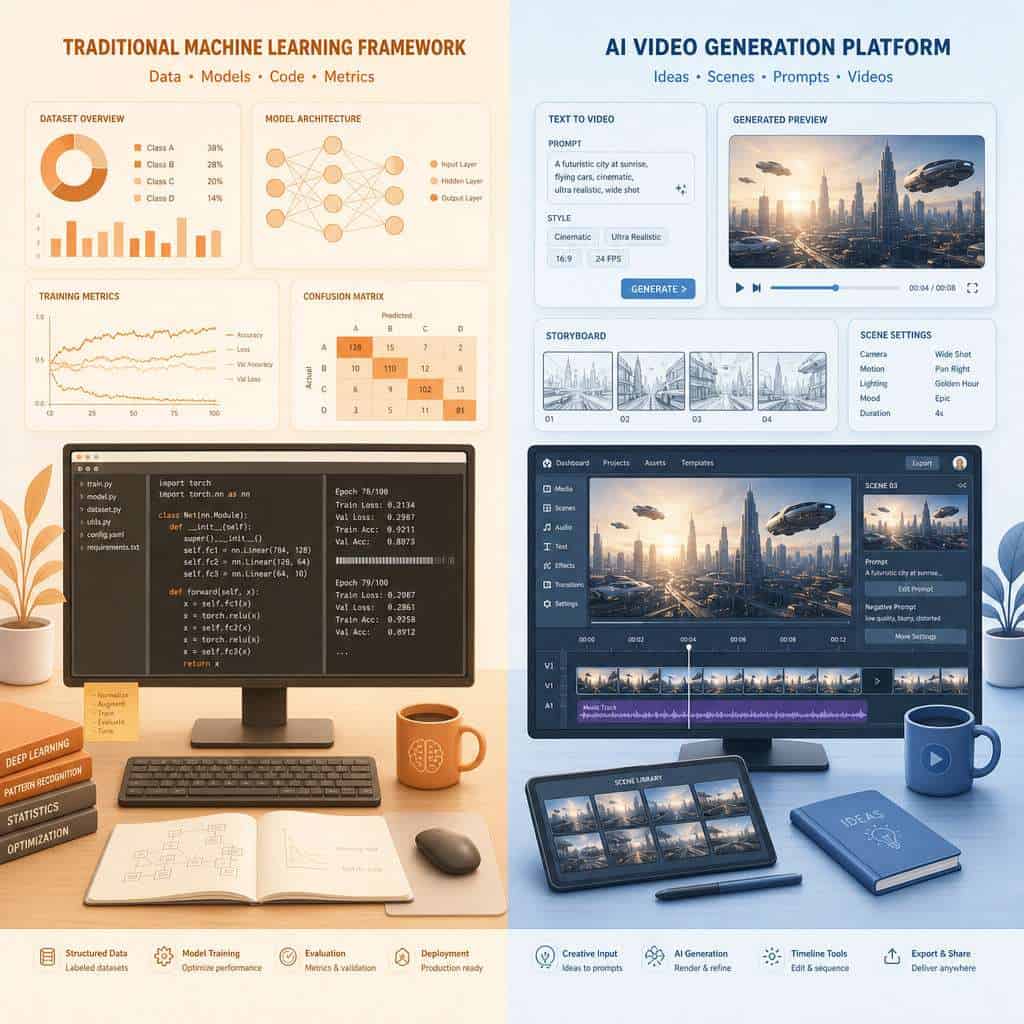
They solve fundamentally different problems. TensorFlow is a general-purpose machine learning framework for building, training, and deploying custom models. Higgsfield AI is a generative media platform that lets you use pre-built models to create images and videos.
Choose Higgsfield AI if:
- You want to generate creative visual content without training your own models
- Your project needs quick video prototyping or content production
- You prefer a no-code or low-code workflow
Choose TensorFlow if:
- You need to train custom models on your own datasets
- Your project involves classification, regression, or other traditional ML tasks
- You need full control over model architecture and training parameters
Common mistake: Developers sometimes evaluate Higgsfield as a TensorFlow replacement. It isn’t one. If you need to build a custom image classifier for medical imaging, use TensorFlow or PyTorch. If you need to generate a 5-second product video from a still image, Higgsfield is the faster path. For a broader look at AI-powered creation tools, see our comprehensive guide to AI-powered content generation tools.
Common Mistakes Beginners Make When Learning Higgsfield AI
The learning curve for Higgsfield is gentle, but beginners consistently waste time and credits on the same avoidable errors.
- Using default model selection for every task. Each model has different strengths. Higgsfield Soul Cinema produces more cinematic output, while Nano Banana Pro works better for stylized illustrations [3]. Match the model to your goal.
- Writing vague prompts. “A cool video of a city” burns credits and produces generic results. Specify lighting, camera angle, movement type, and mood.
- Ignoring credit costs per model. Advanced models like Kling 3.0 with motion control cost more credits. Test with cheaper models first, then upgrade for final output.
- Skipping the official how-to guides. Higgsfield organizes tutorials by use case (images, videos, characters, locations), and they cover credit-saving tips that most users miss [6][8].
- Not using storyboarding features. The platform supports multi-angle scene generation and auto-scene creation [2]. Beginners often generate clips one at a time instead of planning sequences.
Is Higgsfield AI Good for Data Science or Just Software Engineering?
Higgsfield AI is primarily a creative generation tool, not a data science platform. It doesn’t offer data analysis, statistical modeling, or dataset manipulation features.
That said, data scientists working on computer vision research can use Higgsfield to rapidly generate synthetic training data, prototype visual outputs, or create demonstration videos for presentations. If your data science work involves NLP or tabular data, Higgsfield won’t be relevant to your daily workflow.
For developers exploring AI-driven automation in other domains, our guide on ChatGPT automation and no-code workflow integration covers complementary tools.
How Hard Is It to Learn Higgsfield AI Coming from a Python Background?
If you already know Python, you’ll find Higgsfield AI straightforward. The platform is primarily prompt-driven through a web interface, so there’s no new programming language to learn. Most interactions happen through the GUI rather than code.
For advanced developers, Higgsfield’s API (available on higher-tier plans) follows standard REST conventions. Python developers can integrate it into existing pipelines using standard requests or httpx libraries. The 2026 YouTube tutorials [1][2] walk through the entire interface in under 30 minutes, and I found that developers with any scripting background can produce their first video within an hour of signing up.
If you’re comfortable with tools like Replit for cloud-based development, you’ll adapt to Higgsfield’s browser-based workflow quickly.
What Kind of Hardware Do I Need to Run Higgsfield AI Projects?
You don’t need specialized hardware. All model inference runs on Higgsfield’s cloud servers. Any device with a modern web browser and a stable internet connection works.
Minimum requirements:
- A computer, tablet, or phone with a current browser (Chrome, Firefox, Safari, Edge)
- Stable internet connection (for uploading source images and downloading generated clips)
- Enough local storage to save your generated MP4 files
No local GPU required. This is a major advantage over frameworks like TensorFlow or PyTorch, where training and even inference can demand expensive NVIDIA GPUs. Higgsfield handles all the compute.
Are There Free Tutorials or Do I Need to Pay for Training?
The best Higgsfield AI learning resources in 2026 are free. You have three main options:
- Official Higgsfield Blog and How-to Guides — organized by use case (images, videos, characters, locations) with step-by-step instructions [6][8].
- YouTube tutorials — “The ONLY Higgsfield AI Tutorial You Need 2026 [1] and “Higgsfield AI Ultimate Tutorial (2026)” [2] both function as comprehensive free courses covering platform navigation, model selection, and storyboarding.
- Third-party reviews — Sites like TheCreatorsAI provide detailed walkthroughs with credit cost breakdowns [4].
There is a Udemy course available [7], but given the quality of free resources, paid training isn’t necessary for most users. Start with the official guides, supplement with YouTube, and you’ll cover everything from beginner to intermediate.
What Types of Projects Can I Build with Higgsfield AI?
Higgsfield AI supports a wide range of creative projects centered on visual content generation:
- Short-form social media videos — product showcases, animated posts, story content
- Concept art and storyboarding — generate multiple angles and scenes for pre-production [2]
- Marketing materials — animated ads, hero images, brand visuals
- Music video prototypes — stylized clips with camera motion presets
- Synthetic data generation — create training images for computer vision models
- Educational content — animated explainers and visual demonstrations
For automating the distribution of generated content, check out our guide to Instagram automation with n8n workflows.
Does Higgsfield AI Work Well for Computer Vision and NLP?
Higgsfield AI excels at computer vision outputs — it’s built for generating and manipulating visual content. Image generation, video synthesis, camera motion control, and multi-angle scene creation are all core strengths [3].
For NLP, the platform integrates GPT-based models for prompt interpretation and can generate text-informed visuals, but it’s not an NLP development tool. You won’t use it to build chatbots or text classifiers. If your project combines visual generation with text processing, Higgsfield handles the visual side while you’d use a separate NLP service for text analysis.
What Programming Languages Are Compatible with Higgsfield AI?
The primary interface is the web-based GUI, which requires no programming language at all. For API access (available on paid plans), any language that can make HTTP requests works: Python, JavaScript, Ruby, Go, Java, C#, and others.
Python is the most common choice among developers integrating Higgsfield into automated pipelines, thanks to libraries like requests and the broader AI/ML ecosystem. If you’re building automation workflows, our n8n workflow optimization guide shows how to connect AI tools into larger pipelines.

Troubleshooting Tips When Higgsfield AI Models Won’t Train Correctly
Since Higgsfield AI uses pre-trained models rather than user-trained ones, “training failures” typically mean generation failures. Here are the most common issues and fixes:
- Generation stuck or timing out: Switch to a less busy model. During peak hours, popular models like Kling 3.0 can have longer queues.
- Output doesn’t match prompt: Be more specific. Add details about lighting, perspective, and style. Also try a different base model — Higgsfield Soul 2.0 interprets prompts differently than Nano Banana Pro [3].
- Low-quality or distorted output: Check your source image resolution. Uploading a 200×200 pixel image and expecting 4K video output won’t work.
- Credits consumed but no output: This occasionally happens during server issues. Contact support through the platform; credits are typically refunded.
- Motion looks unnatural: Experiment with different camera motion presets [1]. Some presets work better with certain subject types.
“Start with cheaper models to test your prompts, then switch to premium models for final output. This single habit can save 40-60% of your credit budget.”
Mastering Higgsfield AI: A Comprehensive Tutorial for Beginners and Advanced Developers — FAQ
Q: Can I use Higgsfield AI commercially? A: Yes, paid plans include commercial usage rights for generated content. Check the specific terms for your plan tier, as enterprise plans offer broader licensing.
Q: How long does it take to generate a video? A: Most 3-5 second clips generate in 30 seconds to 3 minutes depending on the model and current server load [4].
Q: Can I upload my own images as starting points? A: Yes. The standard workflow starts with either an uploaded image or one generated within the platform [1].
Q: Does Higgsfield AI support batch processing? A: Higher-tier plans support batch generation. Free and basic plans process one generation at a time.
Q: Is there an API for Higgsfield AI? A: API access is available on Pro and Enterprise plans. It follows REST conventions and works with any HTTP-capable programming language.
Q: Can I generate videos longer than 5 seconds? A: The platform currently generates short clips (3-5 seconds). For longer videos, you storyboard multiple clips and combine them using the scene sequencing feature [2].
Q: Which model should beginners start with? A: Start with Nano Banana for images and Kling 2.6 for video. Both are credit-efficient and produce reliable results for learning the platform [3].
Q: Does Higgsfield AI work on mobile devices? A: Yes, the web interface is accessible from mobile browsers, though the experience is better on desktop for detailed storyboarding work.
Q: How often are new models added? A: Higgsfield regularly integrates new third-party models. In 2026, they added Kling 3.0 motion control and expanded their Higgsfield Soul lineup [3].
Q: Can I fine-tune models on Higgsfield? A: Currently, Higgsfield does not support user fine-tuning. You work with pre-trained models and control output through prompts and settings.
Related Higgsfield guides: explore the Higgsfield AI mobile app and open Higgsfield AI platform.
Conclusion
Mastering Higgsfield AI doesn’t require a machine learning PhD or expensive hardware. The platform’s strength is its unified access to multiple generative models through a single, browser-based interface. Start with the free tier and the official how-to guides [6], work through one of the 2026 YouTube tutorials [1][2], and focus on learning which model fits which creative task.
Your concrete next steps:
- Sign up for a free Higgsfield account and generate your first image using Nano Banana.
- Watch one of the 2026 tutorial videos [1][2] to understand the full workflow.
- Experiment with at least three different models to learn their visual styles.
- Build a short storyboard using the multi-scene feature before committing credits to final renders.
- Explore API access once you’re ready to integrate Higgsfield into automated content pipelines.
For more on connecting AI tools into broader development workflows, explore our guide to Google Vertex AI capabilities and our overview of Bolt AI for developer productivity.
References
[1] The ONLY Higgsfield AI Tutorial You Need 2026: Step-by-Step – https://www.youtube.com/watch?v=R7GZjRMsrzM [2] Higgsfield AI Ultimate Tutorial (2026) – https://www.youtube.com/watch?v=cksEVv1tArI [3] A Beginner’s Guide to Mind-Blowing AI Video! – https://www.youtube.com/watch?v=N0X5naSpqTk [4] Higgsfield AI Review Tutorial – https://thecreatorsai.com/p/higgsfield-ai-review-tutorial [6] How-to Guides – https://higgsfield.ai/blog/How-to-guides [7] Udemy Course – https://www.udemy.com/course/dgikaos3/ [8] Higgsfield Blog – https://higgsfield.ai/blog