Last updated: June 3, 2026
Quick Answer: Higgsfield AI is a generative AI platform focused on creating short-form videos, particularly personalized avatar-based content. As of 2026, the platform has offered limited free access through its mobile app with basic video generation capabilities, while more advanced features require a paid subscription. Pricing details have shifted since the platform’s early 2024 launch, so understanding what you get for free versus what costs money is essential before committing.
Key Takeaways
- Higgsfield AI specializes in AI-generated video content, with a focus on personalized avatars and social media clips.
- A free tier exists through the Diffuse app (Higgsfield’s consumer product), but it comes with significant generation limits and watermarks.
- Paid plans unlock higher resolution output, more generation credits, and commercial usage rights.
- The platform is best suited for content creators, social media marketers, and small creative teams.
- Alternatives like Runway, Pika, and Synthesia serve overlapping but distinct use cases.
- There are no widely reported hidden fees, but credit-based systems can lead to unexpected costs if you’re not tracking usage.
- Higgsfield AI requires a stable internet connection and a modern device; there are no heavy local hardware requirements.
- Data privacy practices align with standard industry norms, though enterprise-grade compliance details remain limited.
What Exactly Is Higgsfield AI and What Do They Do?
Higgsfield AI is a generative AI company that builds tools for creating short-form video content using artificial intelligence. Founded by Alex Mashrabov, a former Meta engineer who worked on video infrastructure, the company launched its consumer-facing app called Diffuse in early 2024.
The core product lets users generate personalized video clips from selfies and text prompts. You upload a photo of yourself (or someone else, with permission), and the AI creates a short video featuring that person in various scenarios, styles, or settings. Think of it as a video version of AI image generators like Midjourney, but with motion and personalization baked in.
Key capabilities include:
- Avatar-based video generation from a single selfie
- Text-to-video creation for social media content
- Style transfer that places your likeness into different visual themes
- Short-form output optimized for platforms like TikTok, Instagram Reels, and YouTube Shorts
The company raised funding in 2024 and positioned itself as a competitor in the rapidly growing AI video space. If you’re exploring free AI tools for creative work, Higgsfield sits in a specific niche: personalized, avatar-driven video rather than general-purpose video generation.
Can I Use Higgsfield AI for Free, or Do I Need a Paid Plan?
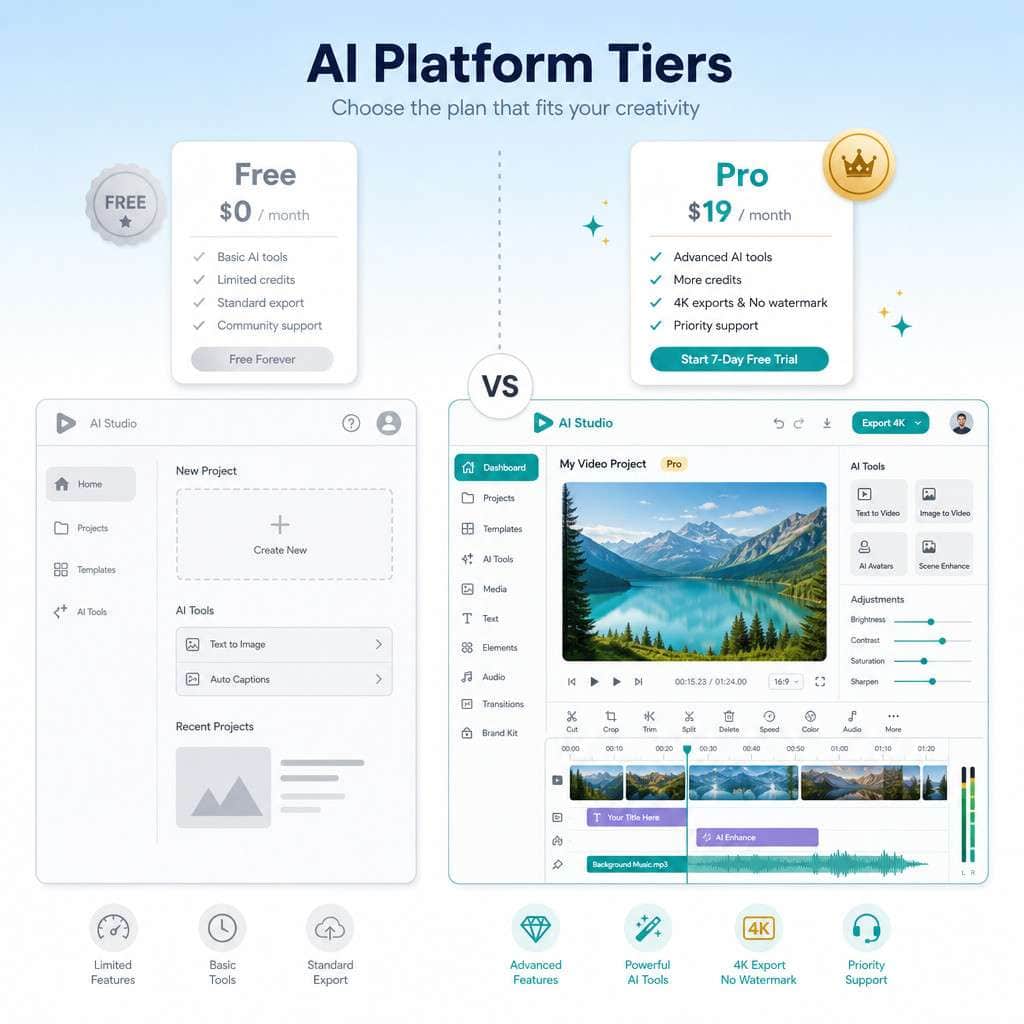
Yes, you can use Higgsfield AI for free through its Diffuse app, available on iOS. The free tier gives you a limited number of video generations per day (typically around 2-5 depending on the current offering), and outputs include a watermark.
Here’s what free access typically includes:
- A small daily allotment of generation credits
- Access to basic video styles and templates
- Standard resolution output (not HD)
- Watermarked videos
- No commercial usage rights
The free tier works well for testing the platform and creating casual content for personal social media. But if you need clean, unwatermarked video for professional use, you’ll need to upgrade.
Common mistake: Many users burn through their free credits experimenting with prompts that don’t produce great results. I’d recommend starting with simple, well-lit selfies and straightforward prompts to get a feel for what the AI handles well before using up your daily limit.
What Are the Limitations of the Free Version of Higgsfield AI?
The free version of Higgsfield AI is functional but restrictive. The biggest limitations are the daily generation cap, watermarked output, and lower resolution.
Specific constraints include:
| Feature | Free Tier | Paid Tier |
|---|---|---|
| Daily generations | 2-5 | 50+ (varies by plan) |
| Video resolution | Standard | HD / Full HD |
| Watermark | Yes | No |
| Commercial use | No | Yes |
| Priority processing | No | Yes |
| Advanced styles | Limited selection | Full library |
| Video length | Short clips only | Extended options |
The watermark alone makes the free tier unsuitable for professional content. And because generation credits reset daily rather than accumulating, you can’t save up credits for a larger project. This is a deliberate design choice that nudges serious users toward paid plans.
How Much Does Higgsfield AI Cost Compared to Other AI Platforms?
Higgsfield AI’s paid plans have been priced in the range of $10-$30 per month for individual users, based on available app store subscription data. This places it in the mid-range for AI video tools.
Here’s how it stacks up against competitors:
| Platform | Starting Price (Monthly) | Primary Use Case |
|---|---|---|
| Higgsfield AI (Diffuse) | ~$10-$30 | Personalized avatar videos |
| Runway Gen-3 | ~$12-$28 | General text-to-video |
| Pika | ~$8-$28 | Stylized short video clips |
| Synthesia | ~$22-$67 | Corporate avatar presentations |
| HeyGen | ~$24-$48 | Talking head videos |
Choose Higgsfield if your primary need is creating fun, personalized social media videos with your own likeness. Choose Synthesia or HeyGen if you need professional talking-head videos for business presentations. Choose Runway if you want the most flexible general-purpose video generation.
For teams exploring broader AI workflow tools, the cost of Higgsfield is modest enough to include alongside other tools in a content creation stack.
How Does Higgsfield AI’s Pricing Work for Small Businesses and Startups?
For small businesses, Higgsfield AI’s individual subscription plans are the primary option. As of the platform’s current structure, there isn’t a widely advertised enterprise or team plan with volume discounts.
This means a small team of three content creators would each need their own subscription, which can add up. At $20/month per person, that’s $720/year for a three-person team.
Practical advice for startups:
- Start with one paid account and share output files rather than giving everyone a subscription
- Use the free tier for brainstorming and concept testing
- Reserve paid credits for final, publish-ready content
- Track your monthly generation usage to see if you’re actually using enough to justify the cost
If your startup is also looking at business automation tools to streamline operations, factor Higgsfield’s cost into your overall software budget rather than evaluating it in isolation.

Which Industries or Professionals Is Higgsfield AI Best Suited For?
Higgsfield AI is best suited for social media content creators, digital marketers, and small creative agencies that produce high volumes of short-form video content.
Specific use cases where it shines:
- Social media managers creating personalized video content for brands
- Influencers and creators who want to produce avatar-based content quickly
- E-commerce marketers making product-adjacent video ads
- Entertainment and meme creators generating viral-style content
It’s less suitable for:
- Corporate training video production (Synthesia is better)
- Long-form documentary or film work (Runway is more flexible)
- Technical product demos (screen recording tools are more appropriate)
- Industries with strict compliance requirements (healthcare, finance) where AI-generated likenesses could raise legal concerns
If you work in web design or development, you might find more value in AI website builders for your specific needs, while reserving Higgsfield for social content.
Are There Any Hidden Costs or Additional Fees with Higgsfield AI?
There are no widely reported hidden fees with Higgsfield AI, but the credit-based system can create unexpected costs if you’re not careful.
Watch out for:
- Overage charges if your plan uses a credit system and you exceed your monthly allotment
- Auto-renewal on subscriptions through the App Store or Google Play
- Resolution upgrades that may consume more credits per generation than standard outputs
- Re-generation costs when results don’t match expectations and you need multiple attempts
The biggest “hidden” cost is actually the learning curve. Your first dozen generations will likely be experimental, and those credits are spent whether the output is usable or not. Budget for a trial period where you’re learning the tool rather than producing final content.
Are There Common Mistakes People Make When First Using Higgsfield AI?
The most common mistake is uploading low-quality selfies and expecting high-quality output. AI video generation is heavily dependent on input quality.
Other frequent errors:
- Vague prompts: Writing “make a cool video” instead of specifying style, setting, and action
- Ignoring lighting: Poorly lit source photos produce inconsistent avatar results
- Wasting free credits: Using all daily free generations on random tests instead of planned experiments
- Expecting long-form content: The platform is built for short clips, not multi-minute videos
- Skipping the style library: Many users write custom prompts when pre-built styles would produce better results faster
Edge case: If you upload a group photo, the AI may struggle to isolate the correct person. Always use a clear, single-person selfie with a simple background for best results.
What Kind of Customer Support Does Higgsfield AI Offer?
Higgsfield AI offers customer support primarily through in-app feedback channels and email. As a relatively young startup, it does not currently provide live chat or phone support.
Support options include:
- In-app bug reporting and feedback forms
- Email support (response times vary, typically 24-72 hours)
- Social media channels (Twitter/X) for general inquiries
- Community forums and Discord servers where users share tips
For users accustomed to the robust support infrastructure of larger platforms, this can feel limited. If responsive customer support is a priority for your workflow, this is worth considering when comparing Higgsfield to more established competitors like Synthesia, which offers dedicated account managers on higher-tier plans.
How Does Higgsfield AI Handle Data Privacy and Security?
Higgsfield AI processes facial data and personal images, which raises legitimate privacy questions. The platform’s privacy policy states that uploaded images are used for video generation and may be stored temporarily for processing purposes.
Key privacy considerations:
- Facial data: Your selfies are processed by AI models, and you should review the privacy policy regarding data retention
- Generated content: Check whether Higgsfield retains rights to generated videos or if you own the output
- Third-party sharing: Standard privacy policies typically address whether data is shared with partners or advertisers
- GDPR compliance: If you’re based in the EU, verify that the platform complies with GDPR requirements for biometric data
For organizations with strict data security requirements, reviewing Higgsfield’s terms of service carefully is essential. You can also explore how other platforms approach this topic in our guide on platform safety and data protection.

What Technical Requirements Do I Need to Use Higgsfield AI Effectively?
Higgsfield AI runs primarily as a mobile app (Diffuse) and through web-based interfaces, so the technical requirements are minimal. You don’t need a powerful GPU or specialized hardware.
Basic requirements:
- Mobile: iOS device (iPhone) with a recent OS version; Android availability may vary
- Internet: Stable broadband connection (video generation happens in the cloud)
- Storage: Enough local storage to save generated video files
- Camera: A decent smartphone camera for selfie input (front-facing cameras on phones from the last 3-4 years work fine)
- Browser: For any web-based features, a modern browser like Chrome, Safari, or Firefox
Because processing happens server-side, even older devices can use the platform effectively. The bottleneck is your internet connection speed, not your device’s processing power. If you’re interested in other tools with low technical barriers, check out our overview of Replit’s free tier for no-cost coding.
What Alternatives Should I Consider If Higgsfield AI Doesn’t Meet My Needs?
If Higgsfield AI doesn’t fit your workflow, several strong alternatives exist depending on your specific use case.
For general AI video generation:
- Runway Gen-3 Alpha/Turbo offers the most versatile text-to-video and image-to-video capabilities
- Pika provides stylized, creative video generation with a user-friendly interface
For professional avatar and talking-head videos:
- Synthesia is the industry leader for corporate-style avatar presentations
- HeyGen excels at multilingual talking-head videos with lip-sync
For AI-powered video editing (not generation):
- Descript combines transcription-based editing with AI features
- CapCut offers free AI-enhanced editing for social media content
When evaluating alternatives, consider whether you need AI content generation capabilities beyond video, such as text, images, or audio, which might make a multi-purpose platform more cost-effective.
Conclusion
Higgsfield AI occupies a specific and interesting niche in the AI video generation space: personalized, avatar-based short-form video content. The free tier through the Diffuse app gives you enough access to test the platform, but serious creators will need a paid plan to remove watermarks and access higher quality output.
Your next steps:
- Download the Diffuse app and use the free tier with a high-quality selfie to test output quality
- Compare your results against free trials from Runway and Pika to see which platform best matches your creative needs
- If you decide to subscribe, start with the lowest paid tier and track your actual usage for one month before upgrading
- Review the privacy policy carefully before uploading personal images, especially if you’re creating content for clients
- Budget for a 1-2 week learning curve where you’re optimizing prompts and input photos rather than producing final content
The AI video space is evolving fast. What Higgsfield offers in 2026 may look quite different from its 2024 launch. Keep testing, stay flexible, and choose the tool that actually fits your workflow rather than the one with the most hype.
Related Higgsfield guides: explore the Higgsfield AI promo codes guide and our comprehensive Higgsfield AI pricing guide.
Frequently Asked Questions
Is Higgsfield AI completely free to use? No. Higgsfield AI offers a limited free tier through its Diffuse app with daily generation caps and watermarked output. Full features require a paid subscription.
What is the Diffuse app? Diffuse is Higgsfield AI’s consumer-facing mobile application where users can generate personalized AI videos from selfies and text prompts.
Can I use Higgsfield AI videos for commercial purposes? Only on paid plans. The free tier restricts commercial usage, and outputs include watermarks that make them unsuitable for professional content.
Does Higgsfield AI work on Android? The platform initially launched on iOS. Android availability has been limited, so check the Google Play Store for current availability.
How many free videos can I generate per day? The free tier typically allows 2-5 generations per day, though this number can change as the platform updates its offerings.
Is my facial data safe with Higgsfield AI? Higgsfield processes facial images for video generation. Review their privacy policy for specifics on data retention, storage, and third-party sharing before uploading personal photos.
Can I cancel my Higgsfield AI subscription anytime? Yes. Subscriptions purchased through the App Store or Google Play can be canceled through your device’s subscription management settings.
Does Higgsfield AI offer team or enterprise plans? As of 2026, Higgsfield AI primarily offers individual subscription plans. Dedicated team or enterprise pricing has not been widely advertised.
What makes Higgsfield AI different from Runway or Pika? Higgsfield specializes in personalized avatar-based videos from selfies, while Runway and Pika focus on general-purpose text-to-video and image-to-video generation.
Do I need a powerful computer to use Higgsfield AI? No. Video generation happens on Higgsfield’s cloud servers. You only need a smartphone with a stable internet connection.
Useful Resources: Higgsfield AI official platform & AI industry news on TechCrunch