
Last updated: May 22, 2026
Quick Answer
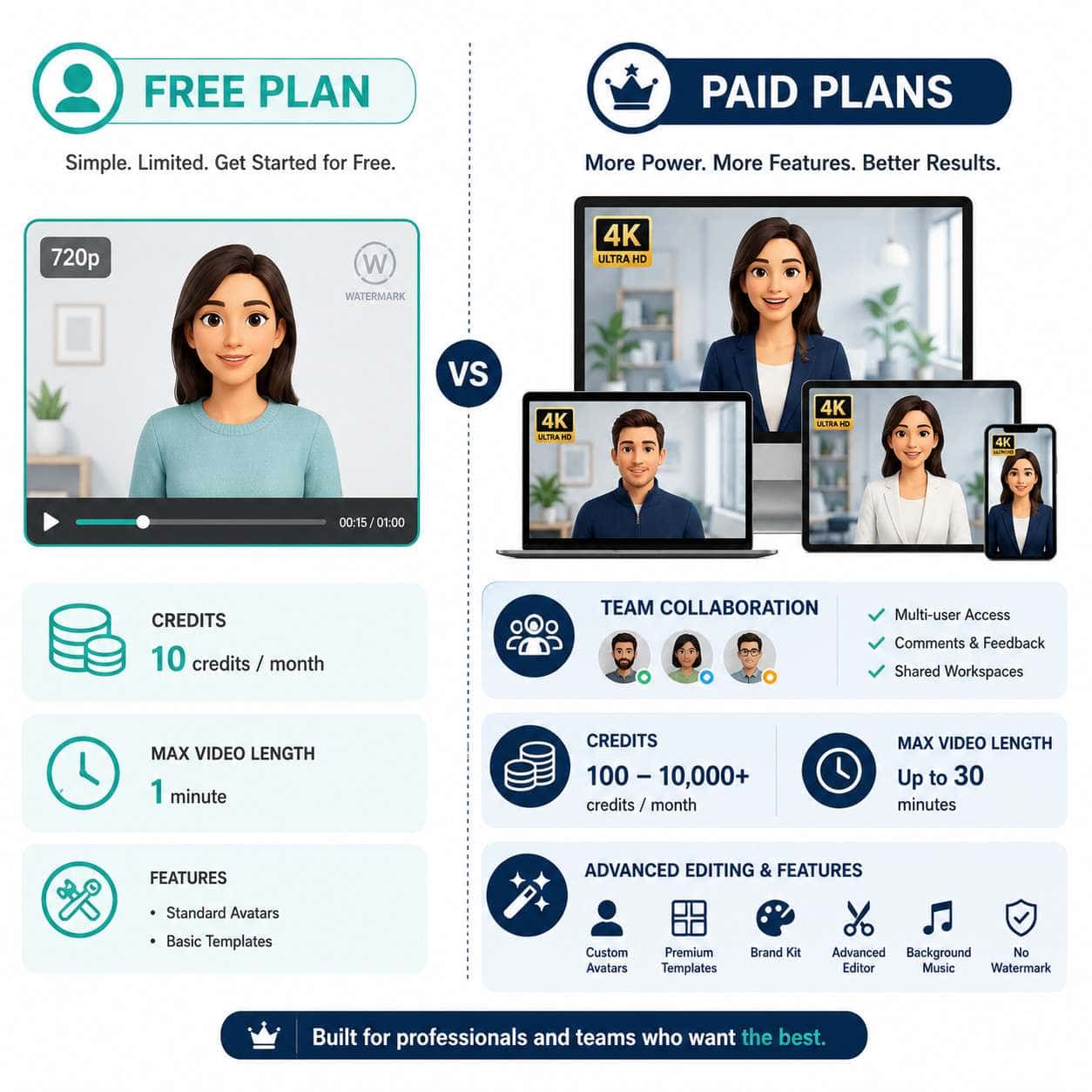
HeyGen’s free plan gives you up to 3 AI-generated videos per month, each limited to about 1 minute at 720p resolution, with a watermark. You get access to 500+ stock digital twins, one custom avatar, and 30+ languages. It’s designed for testing and small experiments, not full-scale production. If you need more volume, higher resolution, or watermark-free exports, you’ll need to upgrade to a paid tier starting at around $24/month.
Key Takeaways
- HeyGen’s free tier costs $0/month and provides roughly 1 credit (about 1 minute of video) with up to 3 videos per month [4][6].
- Videos are capped at 720p with a HeyGen watermark, though the pricing grid sometimes lists “up to 1080p” [4][8].
- You can create one custom digital twin and access 500+ stock avatars [4].
- The free plan supports 30+ languages for basic dubbing and script input [4].
- API access is no longer free as of February 2026; the free tier applies only to HeyGen’s web Studio [1].
- Interactive video features (quizzes, branching, CTAs) and advanced admin controls are locked to Business/Enterprise plans [1].
- Free-plan videos work best as short talking-head clips, product teasers, LinkedIn intros, and internal demos.
- No credit card is required to sign up, and there are no hidden fees on the free tier itself.
- The free plan is a trial environment, not a production workflow [6][8].
- Competitors like Runway and Pika offer free tiers too, but each has different strengths (generative video vs. avatar-based).
What Exactly Can You Do With HeyGen’s Free Plan?
HeyGen’s free plan lets you create short AI avatar videos using a browser-based editor with no video production experience required. You pick an avatar, type or paste a script, choose a language, and HeyGen generates a video of that avatar “speaking” your words.
Here’s what’s included at the $0 tier [4][6]:
- Up to 3 videos per month (region-dependent; some users report 1 credit per month)
- 1-minute maximum per video
- 500+ stock digital twins (pre-made avatars)
- 1 custom digital twin (your own face/likeness)
- 30+ languages for script input
- Avatar IV technology (HeyGen’s latest avatar generation)
- 3 Video Agent videos per month
- Basic templates for common video formats
You can also pair your videos with branding tools. HeyGen’s Brand Systems feature (launched March 2026) auto-extracts your logo, fonts, and colors from a URL [1], which is available even on the free plan for basic use.
What you can’t do: access interactive video features, remove the watermark, export above 720p reliably, use the API, or create videos longer than 60 seconds.
How Does HeyGen’s Free Tier Compare to Paid Options?
The free plan is a testing environment. Paid plans remove the most frustrating constraints: watermarks, resolution caps, and the tight video limit. Here’s a direct comparison based on HeyGen’s 2026 pricing structure [4][5][8]:
| Feature | Free ($0/mo) | Creator (~$24/mo) | Business (~$72/mo) |
|---|---|---|---|
| Videos per month | Up to 3 | Credit-based (varies) | Credit-based (higher) |
| Video length | 1 minute max | Up to 5+ minutes | Up to 20+ minutes |
| Resolution | 720p (with watermark) | 1080p (no watermark) | Up to 4K |
| Custom avatars | 1 | Multiple | Unlimited |
| Stock avatars | 500+ | 500+ | 500+ |
| Languages | 30+ | 175+ | 175+ |
| Interactive video | No | No | Yes |
| API access | No | Paid add-on | Included |
| Audio dubbing | Limited | Unlimited | Unlimited |
| Brand Systems | Basic | Full | Full + admin controls |
The jump from Free to Creator is where most users see the biggest practical difference. You lose the watermark, gain longer videos, and get enough credits for weekly content. If you’re building a content pipeline or running campaigns, the Creator tier is the minimum viable option [6][9].
For context on pairing AI video with your broader design workflow, our guide to AI-powered content generation tools covers how these tools fit together.
Is HeyGen’s Free AI Video Creation Actually Useful or Just a Gimmick?
It’s genuinely useful, but only for a narrow set of purposes. The free plan lets you evaluate whether HeyGen’s avatar quality, lip-sync accuracy, and editing workflow meet your standards before spending money. That’s real value.
I tested it myself when I needed a quick 45-second explainer for an internal team presentation. The avatar looked natural enough, the lip sync was solid, and the whole process took about 15 minutes from script to export. For that use case, it worked perfectly.
Where it falls short: if you need to produce content regularly, the 1-3 video monthly cap and watermark make the free plan impractical. Multiple third-party reviewers in 2026 describe it as “a trial, not a production tier” [6][10]. That’s an honest assessment.
Bottom line: Use the free plan to test avatar quality, try different languages, and decide if HeyGen fits your workflow. Don’t plan a content calendar around it.
What Are the Key Limitations of the HeyGen Free Plan?
The free plan has five major constraints that affect real-world usability [4][6][8]:
- Video count cap: 1-3 videos per month depending on your region.
- Duration limit: Each video maxes out at 1 minute.
- Resolution: Capped at 720p in practice, with a watermark on every export.
- No API access: As of February 2026, HeyGen removed free API credits entirely [1].
- Feature lockouts: No interactive video, no advanced admin controls, no priority rendering.
Additional constraints worth knowing:
- Rendering speed on the free tier is slower than paid plans. Expect wait times during peak hours.
- Template selection is more limited. Premium templates require a paid subscription.
- Audio dubbing is restricted compared to paid tiers, where it’s unlimited [8].
These limitations are intentional. HeyGen positions the free plan as “Testing the Waters” [9], and the constraints push users toward upgrading once they see the platform’s potential.

How Many Videos Can You Make Per Month With HeyGen for Free?
HeyGen’s free plan allows up to 3 videos per month, though some users and regions may see as few as 1 credit (roughly 1 minute of video) [4][6][9]. The discrepancy comes from HeyGen’s shift to a credit-based model, where 1 credit equals approximately 1 minute of Avatar IV video.
In practical terms: plan on getting 1-3 short videos per month. If you need more, you’ll hit the wall fast.
How Long Can AI-Generated Videos Be on the Free Plan?
Each video is limited to 1 minute maximum [4][6]. There’s no way to extend this on the free tier. If your script runs longer than 60 seconds, you’ll need to either trim it or upgrade.
For comparison, the Creator plan supports videos of 5+ minutes, and Business plans allow 20+ minutes per video [5].
Which Types of Videos Work Best With HeyGen’s Free Tier?
Short, script-driven talking-head videos are the sweet spot. The 1-minute cap and single-avatar format naturally suit these formats:
- LinkedIn profile introduction videos (30-45 seconds)
- Quick product feature highlights (under 60 seconds)
- Internal team updates or announcements
- Social media teasers for longer content
- Course or training module previews
- Email campaign video snippets
Choose the free plan if your video is a single speaker delivering a concise message. Avoid it for multi-scene narratives, long tutorials, or anything requiring branching/interactive elements.
If you’re creating social media content alongside your videos, our guide on graphic design for social media marketing pairs well with short-form AI video.
What Video Quality Can You Expect From HeyGen’s Free Tier?
Free-plan videos export at 720p with a visible HeyGen watermark [6][8]. The avatar animation quality itself is the same Avatar IV technology used on paid plans; the difference is purely in output resolution and branding.
At 720p, videos look acceptable on mobile screens and social media feeds where compression already reduces quality. They’ll look noticeably soft on larger displays or in professional presentations projected on a big screen.
Common mistake: Assuming the pricing page’s “up to 1080p” label applies to free users. The comparison grid on HeyGen’s pricing page can be misleading; help center articles and third-party reviews consistently confirm 720p as the real free-tier ceiling [4][8].
Are There Any Hidden Costs or Catches With HeyGen’s Free Plan?
No hidden fees. The free plan is genuinely $0, and no credit card is required to sign up [4]. But there are catches worth understanding:
- The watermark is permanent on free exports. You can’t remove it without upgrading.
- Credits don’t roll over. Unused monthly credits expire.
- API usage requires payment. If you’re a developer hoping to integrate HeyGen into your app for free, that door closed in February 2026 [1].
- Legacy unlimited plans are gone. If you previously had an older unlimited tier and downgrade, you land on the current credit-capped free plan [1].
- Premium credits (formerly Generative Credits) are separate. Some advanced features consume premium credits even on paid plans [8].
The free plan itself is straightforward. The “catch” is simply that it’s designed to convert you to a paying customer, and the constraints make that transition feel necessary pretty quickly.
Who Should Use HeyGen’s Free Plan and Who Might Need to Upgrade?
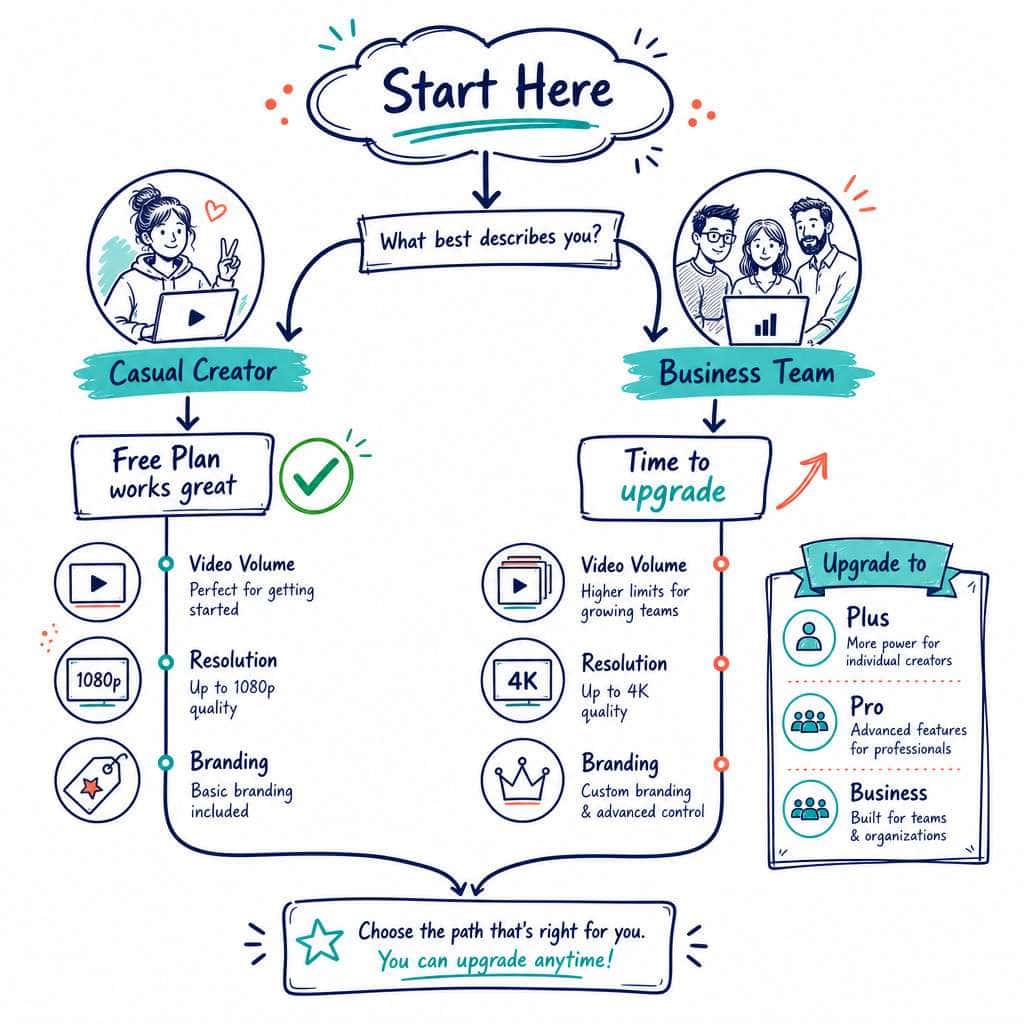
Use the free plan if you:
- Want to evaluate HeyGen before committing money
- Need 1-2 short videos for a one-time project
- Are comparing AI video tools and want hands-on experience
- Create content infrequently (monthly or less)
Upgrade to Creator or above if you:
- Publish video content weekly or more
- Need watermark-free exports for client or public-facing work
- Require videos longer than 1 minute
- Want 1080p or 4K output
- Need API access for automation or integration
- Run marketing campaigns with video components
If you’re building websites for clients and want to include video content, you might also explore no-code website design platforms that integrate well with embedded video.
What Skills Do You Need to Use HeyGen’s Free AI Video Creation?
None, really. HeyGen’s editor is browser-based and requires no video editing, coding, or design experience. If you can type a script and click through a menu, you can make a video.
That said, a few skills improve your results:
- Scriptwriting: A clear, concise script matters more than any technical skill. Write conversationally, keep sentences short, and aim for 130-150 words per minute of video.
- Basic branding sense: Choosing the right avatar, background, and tone for your audience makes a difference.
- Familiarity with your audience: Knowing what length and style resonates helps you make the most of that 1-minute window.
For broader design skills that complement AI video, check out our Canva AI design assistant guide for creating thumbnails and supporting visuals.
Common Mistakes People Make When Starting With HeyGen’s Free Version
- Writing scripts that are too long. A 1-minute video fits roughly 130-150 words. New users often write 300+ word scripts and then scramble to cut.
- Expecting production-quality output. The 720p watermarked result is a preview, not a final deliverable for client presentations.
- Not testing multiple avatars. With 500+ stock options, spending time finding the right avatar for your brand pays off.
- Ignoring pronunciation settings. AI avatars can mispronounce names, acronyms, or technical terms. Use HeyGen’s pronunciation controls to fix these before rendering.
- Burning all credits on one attempt. Make your first video a short test (15-20 seconds) to check avatar quality and lip sync before using a full credit on your real project.
- Assuming API access is included. Developers who sign up expecting free API credits will be disappointed; that ended in February 2026 [1].
Are There Better Free Alternatives to HeyGen for AI Video?
It depends on what type of video you need. HeyGen is the strongest free option for avatar-based talking-head videos. But other tools excel in different areas:
| Tool | Best For | Free Tier Limits |
|---|---|---|
| HeyGen | Avatar/talking-head videos | 1-3 videos/month, 1 min, 720p, watermark |
| Runway | Image-to-video, creative/generative video | Limited credits, short clips |
| Pika | Pure generative/artistic video | Limited generations per day |
| Synthesia | Avatar videos (competitor) | Very limited free trial |
| Canva | Simple video editing with templates | Generous free tier, no AI avatars |
A March 2026 comparative guide rated HeyGen as the best free avatar-video option for structured, repeatable content, while noting that Runway and Pika are better for creative, non-avatar generative video.
If you’re already using Canva for design, our Canva features guide covers its video capabilities alongside its design tools. And for optimizing your content strategy around AI-generated assets, see our AI-powered content optimization guide.
Conclusion
HeyGen’s free plan is a legitimate way to test AI video creation without spending a dollar. You get real access to Avatar IV technology, 500+ stock avatars, and multi-language support. But the 1-3 video monthly cap, 1-minute duration limit, 720p resolution, and watermark make it a trial environment, not a production tool [6][8][9].
Here’s what to do next:
- Sign up for free at HeyGen.com. No credit card needed.
- Write a short script (under 150 words) for your first test video.
- Pick an avatar that matches your brand voice and audience.
- Render a 20-second test before committing a full credit to your real video.
- Evaluate the output honestly. If you need more volume, longer videos, or no watermark, budget for the Creator plan at ~$24/month.
The free plan does exactly what it promises: it lets you test the waters. For anyone exploring AI video for the first time, that’s a smart place to start.
FAQ
Q: Do I need a credit card to sign up for HeyGen’s free plan? A: No. HeyGen’s free plan requires only an email to create an account. No payment information is needed [4].
Q: Can I remove the watermark on free-plan videos? A: No. The HeyGen watermark is permanently applied to all free-tier exports. Watermark removal requires a paid subscription [6][8].
Q: How many credits do I get per month on the free plan? A: You get approximately 1 credit per month, which equals about 1 minute of Avatar IV video. HeyGen lists up to 3 videos per month depending on region and usage [4][6].
Q: Can I use HeyGen’s API on the free plan? A: No. HeyGen removed free API credits in February 2026. All API usage now requires a paid plan or pay-as-you-go credits [1].
Q: What resolution are free-plan videos? A: Free-plan videos export at 720p in practice, though HeyGen’s pricing grid sometimes shows “up to 1080p.” Help center documentation and third-party reviews confirm 720p as the realistic output [4][8].
Q: Can I create a custom avatar on the free plan? A: Yes. You can create 1 custom digital twin (using your own likeness) on the free tier [4].
Q: Do unused free credits roll over to the next month? A: No. Free-plan credits expire at the end of each billing cycle and do not accumulate.
Q: Is the free plan available worldwide? A: Yes, but the exact number of videos allowed per month may vary by region [1].
Q: Can I use HeyGen free videos for commercial purposes? A: The watermark and resolution limits make free-tier videos impractical for most commercial use. Check HeyGen’s terms of service for specific licensing details.
Q: What happened to HeyGen’s unlimited plans? A: Legacy unlimited plans were retired in favor of a credit-based pricing model. Users who downgrade from legacy plans now land on the current free tier with standard limitations [1].
Q: How long does it take to render a free-plan video? A: Rendering times vary, but free-tier users typically experience slower processing than paid subscribers, especially during peak usage hours.
Q: Can I collaborate with team members on the free plan? A: No. Team collaboration and admin controls are restricted to Business and Enterprise plans [1].
References
[1] HeyGen Legacy Unlimited Plans – https://help.heygen.com/en/articles/9204682-heygen-legacy-unlimited-plans [4] HeyGen Pricing – https://www.heygen.com/pricing [5] HeyGen Pricing 2026: Free vs Creator vs Business – https://flowith.io/blog/heygen-pricing-2026-free-vs-creator-vs-business/ [6] HeyGen Pricing 2026 – https://fluxnote.io/guides/heygen-pricing-2026 [8] HeyGen Pricing Reviews Pros and Cons – https://prospeo.io/s/heygen-pricing-reviews-pros-and-cons [9] HeyGen Pricing – https://www.photonpay.com/hk/blog/article/heygen-pricing?lang=en [10] HeyGen Review: Is It the Best AI Video Generation Tool – https://bigvu.tv/blog/heygen-review-is-it-the-best-ai-video-generation-tool/