Last updated: May 13, 2026
Quick Answer: An llms.txt file is a plain-text Markdown file placed at your site’s root (yoursite.com/llms.txt) that tells AI language models what your site is about and which pages matter most. On WordPress, you can generate and manage this file automatically using plugins like Yoast SEO or Website LLMs.txt. However, as of mid-2026, no major LLM provider (OpenAI, Anthropic, Google) officially reads or acts on llms.txt files [3], so it remains a forward-looking move rather than a proven ranking factor.
Key Takeaways
- LLMs.txt is a proposed standard, not an official protocol. It’s designed to help AI models understand your site’s structure and key content.
- WordPress plugins like Yoast SEO, Website LLMs.txt (v8.4.0), and LLMs.txt Generator (v3.0) can auto-create and maintain the file for you [1][2][6].
- No major AI provider currently uses llms.txt to determine citations or responses, according to Google’s John Mueller and independent analyses [3].
- SE Ranking’s April 2026 study of 300,000 domAIns found no direct impact on AI citations, despite a 10.13% adoption rate among surveyed sites.
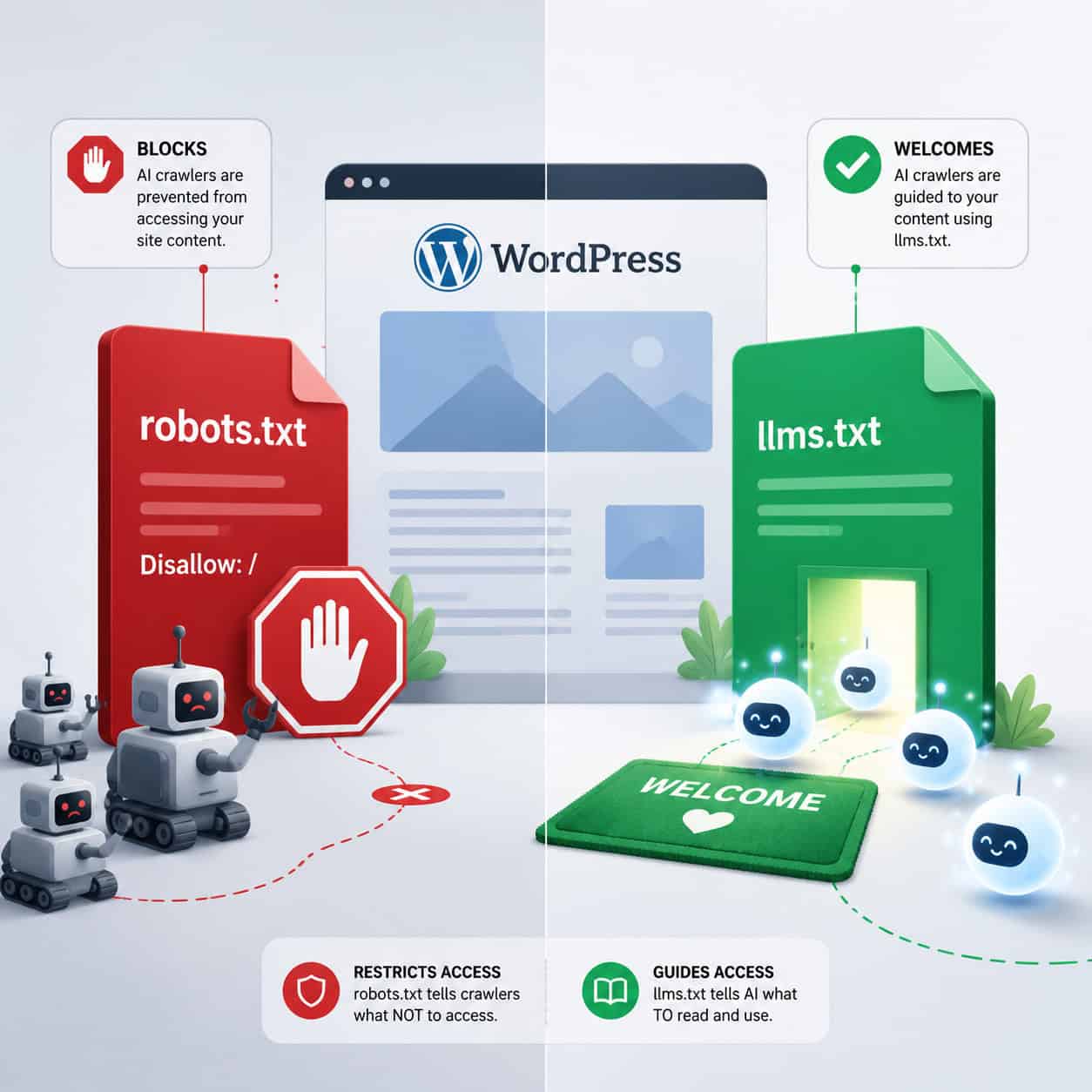
- It differs from robots.txt: robots.txt blocks crawlers, while llms.txt invites them with curated content summaries.
- Setup takes under 10 minutes on WordPress with the right plugin.
- The risk is low: adding an llms.txt file won’t hurt your site, and it could pay off if AI providers adopt the standard later.
What Is an LLMs.txt File and Why Does It Matter for WordPress?
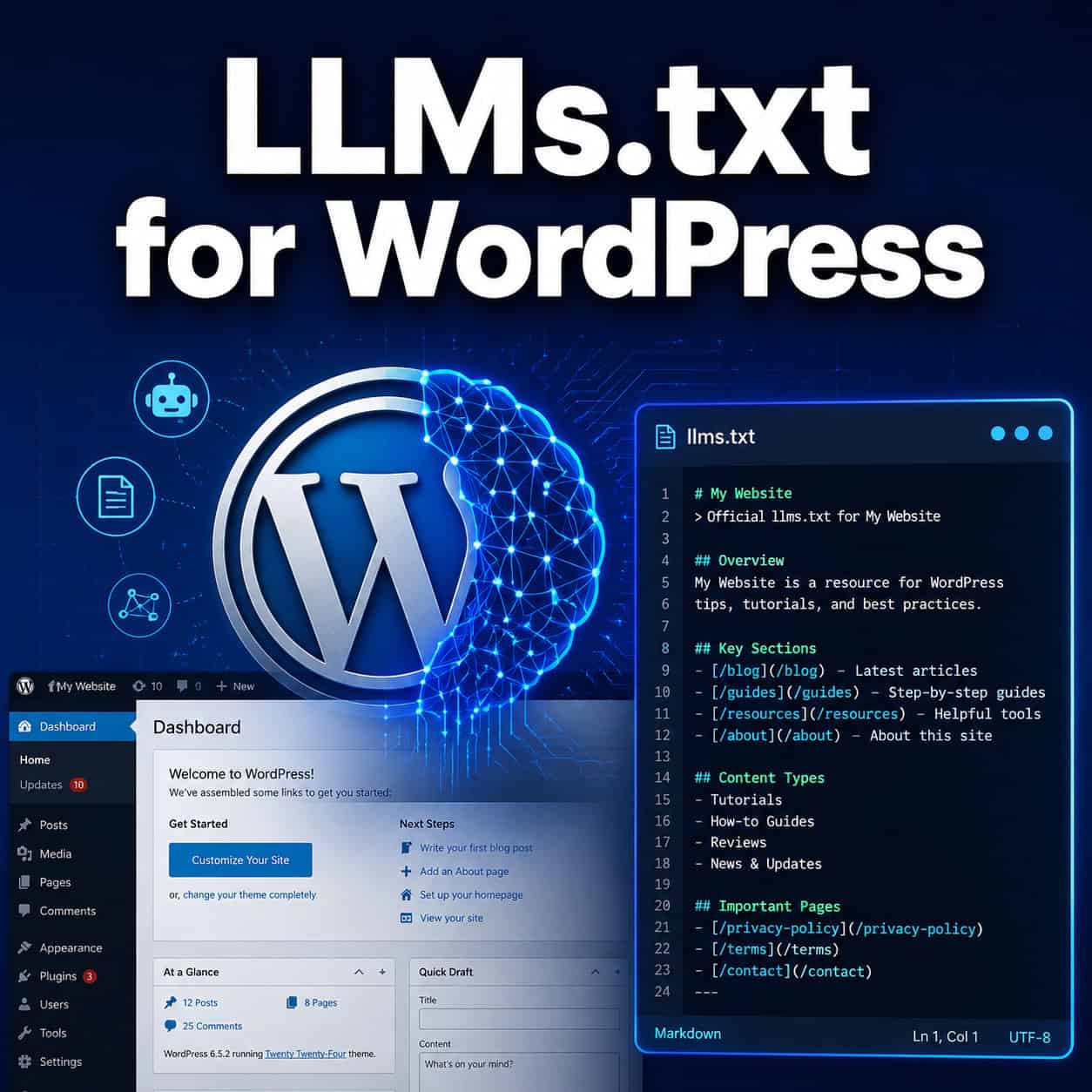
An llms.txt file is a Markdown-formatted text file that sits at your website’s root directory. It provides AI language models with a structured summary of your site: what it does, which pages are most important, and how content is organized [8].
Think of it as a “welcome packet” for AI crawlers. Where a sitemap.xml lists every page for search engines, and robots.txt sets access rules, llms.txt offers a curated guide specifically for large language models.
For WordPress site owners, this matters because AI-driven search (like ChatGPT, Perplexity, and Google’s AI Overviews) is changing how people find information. If these systems eventually start reading llms.txt files, sites with well-structured files could have an advantage in how they’re represented in AI-generated answers.
A typical llms.txt file includes:
- Your site name and a brief description
- Links to your most important pages (in Markdown format)
- Optional: links to a full-content version (llms-full.txt)
How Does LLMs.txt Differ from Robots.txt and Sitemaps?
These three files serve different purposes, and they’re not interchangeable.
| Feature | robots.txt | sitemap.xml | llms.txt |
|---|---|---|---|
| Purpose | Block or allow crawlers | List all indexable pages | Curate key pages for AI models |
| Format | Plain text directives | XML | Markdown |
| Audience | Search engine bots | Search engines | AI language models |
| Control type | Restrictive (block access) | Comprehensive (list everything) | Selective (highlight best content) |
| Current AI support | Yes (GPTBot respects it) | Yes (widely used) | No major LLM reads it yet |
The key distinction: robots.txt is about control and restriction. You use it to block GPTBot or ClaudeBot from scraping your content. LLMs.txt takes the opposite approach: it invites AI systems in and says “here’s what matters most” [3].
If you’re concerned about AI companies using your content without permission, robots.txt is your tool. If you want to be visible and well-represented in AI outputs, llms.txt is the bet you’re making on the future. Many site owners use both, which is a reasonable strategy. For more on how AI tools interact with WordPress, see our guide on AI-powered chatbot integration for WordPress.
Which LLMs.txt WordPress Plugins Should You Use?
Three plugins dominate this space in 2026. Here’s how they compare:
Yoast SEO (llms.txt feature)
Yoast added llms.txt support in June 2025, auto-generating the file from your existing sitemaps [2][7]. It’s the most convenient option if you already use Yoast because there’s nothing extra to install. The file updates automatically when you publish or modify content. Yoast’s team frames this as “future-proofing” your site for AI search, though they acknowledge it offers guidance, not guarantees [2].
Website LLMs.txt (v8.4.0)
Updated in early May 2026, this dedicated plugin added server-side AI bot classification through its Visibility Kit API. It can detect GPTBot, ClaudeBot, and other AI crawlers in real time without needing plugin updates for each new bot [1]. This is the best choice if you want granular control over how AI bots interact with your llms.txt file.
LLMs.txt Generator (v3.0)
Released April 23, 2026, this plugin focuses on automated file management with full changelog tracking [6]. It’s lightweight and purpose-built, making it a good pick if you don’t want a full SEO suite just for llms.txt support.
Choose Yoast if you already run it and want zero extra setup. Choose Website LLMs.txt if you want advanced bot detection and control. Choose LLMs.txt Generator if you want a simple, dedicated tool.
For a broader look at automation plugins, check out our list of the best AI plugins for WordPress.
How to Set Up LLMs.txt on WordPress: Step-by-Step
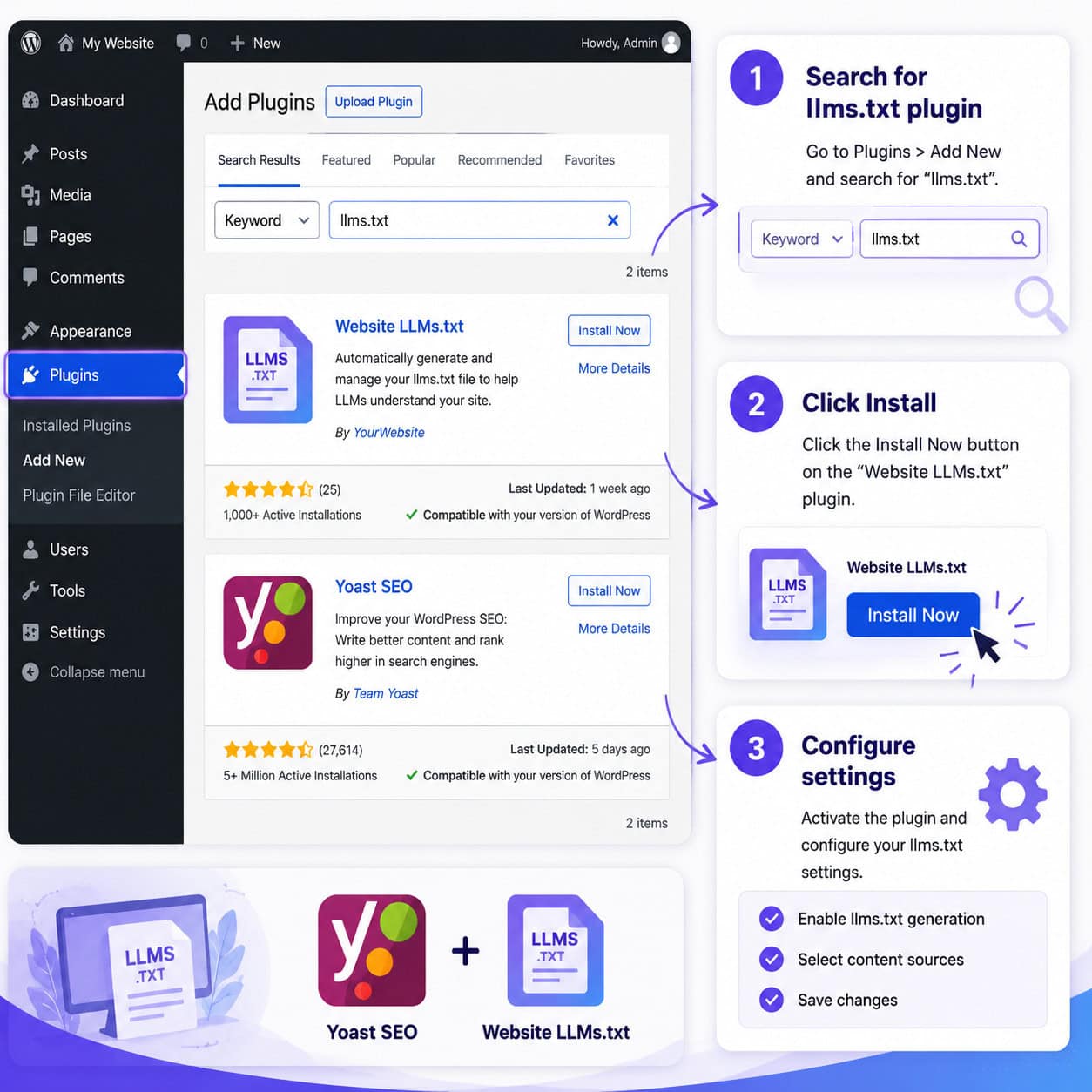
Setting up llms.txt WordPress takes about 5 to 10 minutes. Here’s the process using the most common approach:
Step 1: Choose and install your plugin Go to your WordPress dashboard, navigate to Plugins > Add New, and search for “llms.txt.” Install and activate your chosen plugin (Yoast SEO, Website LLMs.txt, or LLMs.txt Generator).
Step 2: Configure basic settings
- Set your site name and description as you want AI models to see them
- Select which post types to include (posts, pages, custom post types)
- Choose whether to generate an llms-full.txt file (a more detailed version)
Step 3: Select priority content Most plugins let you pick which pages appear in your llms.txt file. Focus on:
- Your homepage and main service/product pages
- Cornerstone content and pillar articles
- About and contact pages
- Any content you’d want an AI to cite when describing your business
Step 4: Review the generated file Visit yoursite.com/llms.txt in your browser. Verify the Markdown formatting looks clean and the right pages are listed.
Step 5: Test and monitor Check that the file is accessible and doesn’t return a 404. If you’re using Website LLMs.txt, review the bot detection logs to see which AI crawlers are visiting [1].
Common mistake: Including every page on your site. The whole point of llms.txt is curation. A 500-line file defeats the purpose. Stick to your 10 to 30 most important pages.
If you want to pair this with broader SEO work, our guide on using AI SEO tools for WordPress covers complementary strategies.
Does LLMs.txt Actually Improve AI Visibility in 2026?
Here’s where honesty matters more than hype: the evidence says no, not yet.
SE Ranking’s April 2026 study analyzed 300,000 domains and found no direct correlation between having an llms.txt file and being cited in AI-generated responses. Their XGBoost models actually predicted AI citations better without llms.txt as a variable, leading analysts to conclude the file currently adds “noise rather than value.”
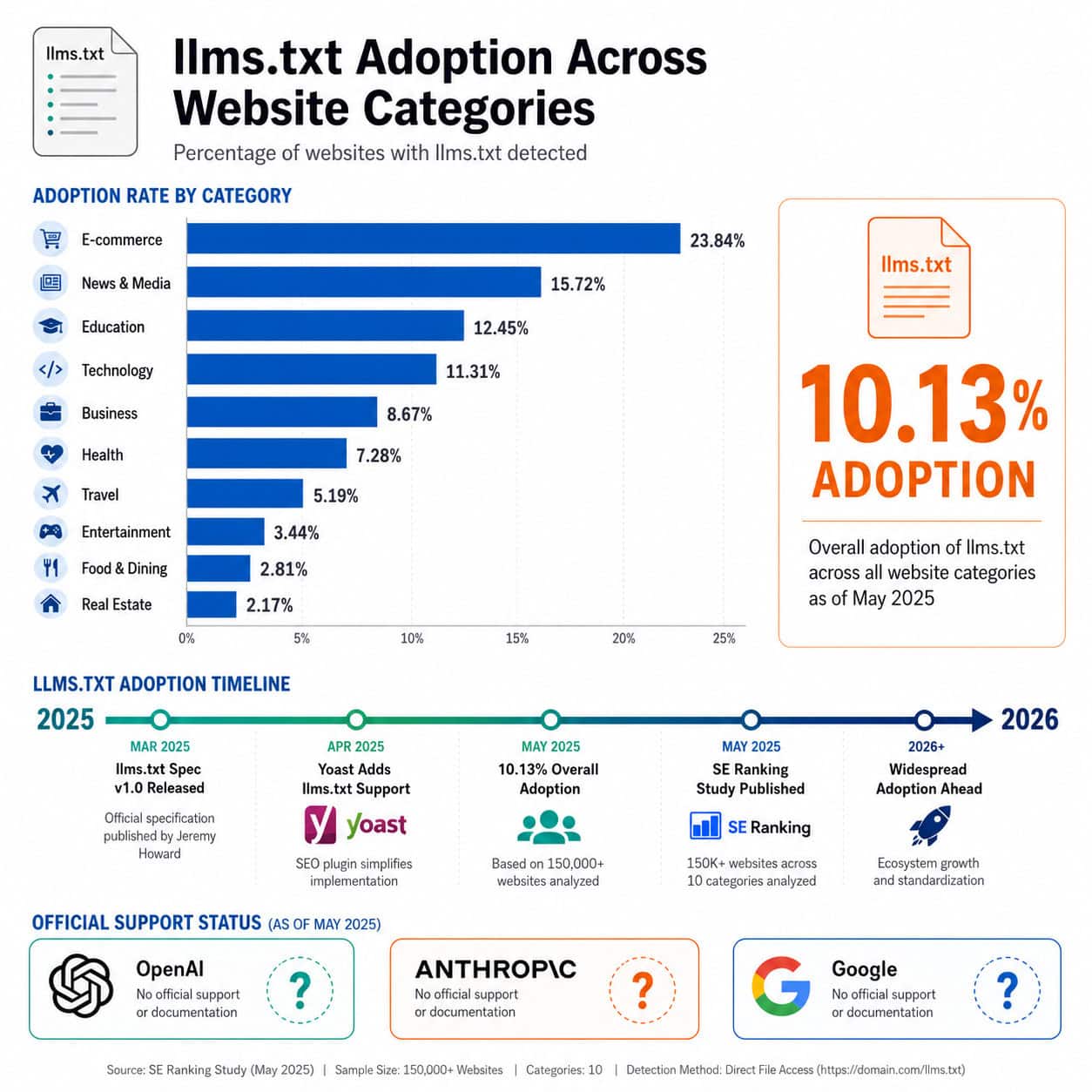
Google’s John Mueller stated bluntly on Bluesky in early 2026: “No AI system currently uses llms.txt” [3]. Ahrefs’ March 2026 analysis echoed this, noting that no major LLM provider (OpenAI, Anthropic, or Google) officially supports the standard.
And adoption remains thin. Rankability’s 2026 research found only 3 out of 1,000 top-ranking sites use llms.txt. Even with a broader 10.13% adoption rate in SE Ranking’s dataset, the file hasn’t moved the needle on actual AI citations.
So why bother? Two reasons:
- Low cost, potential upside. Adding an llms.txt file takes minutes and won’t hurt anything. If the standard gains traction, early adopters won’t need to scramble.
- The AI search landscape is shifting fast. What’s irrelevant today could matter in six months. The llms.txt proposal has enough industry attention that dismissing it entirely seems premature.
For more on staying ahead of AI-driven changes, explore our advanced WordPress strategies for power users.
Should You Use a Plugin or Create LLMs.txt Manually?
You don’t need a plugin. You can create an llms.txt file manually in any text editor, format it in Markdown, and upload it to your WordPress root directory via FTP or your hosting file manager. Tools like Firecrawl and llmstxt.new can generate one-off files without touching WordPress at all.
Choose manual creation if:
- You have a small, static site with few content changes
- You want full control over every line in the file
- You don’t want another plugin running on your site
Choose a plugin if:
- You publish content regularly and need auto-updates
- You want bot detection and analytics
- You prefer managing everything from the WordPress dashboard
The main downside of manual files is maintenance. Every time you add or remove important content, you need to remember to update the file. Plugins handle this automatically, which matters for active blogs and content-heavy sites.
For guidance on building custom functionality without bloating your plugin stack, see our WordPress plugin development best practices.
What Are the Risks and Downsides of Adding LLMs.txt?
The risks are minimal, but they exist:
- False sense of security. Don’t assume an llms.txt file means AI models will represent your content accurately. They currently don’t read it.
- Content exposure. By curating your best content in a public file, you’re making it easier for anyone (not just AI) to identify and scrape your most valuable pages.
- Plugin overhead. Adding another plugin, even a lightweight one, increases your site’s attack surface and maintenance burden.
- Distraction from proven tactics. Time spent on llms.txt is time not spent on structured data, content quality, backlinks, and other factors that demonstrably affect both traditional and AI search visibility.
Conclusion
LLMs.txt for WordPress is a low-effort, speculative investment in how AI systems might discover and represent your content in the future. The setup is straightforward, the plugins are mature, and the downside risk is close to zero. But don’t mistake it for a proven strategy: as of mid-2026, no major AI provider reads these files, and the data shows no citation benefit.
Your action plan:
- Install a plugin (Yoast if you already use it, Website LLMs.txt for advanced control) and generate your file in under 10 minutes.
- Curate carefully. Include only your 10 to 30 most important pages.
- Don’t stop there. Keep investing in structured data, quality content, and AI-powered content strategies that have proven impact.
- Monitor the space. If OpenAI or Anthropic announce llms.txt support, you’ll already be ready.
The sites that benefit most from emerging standards are the ones that prepare early without betting everything on unproven tactics. LLMs.txt fits that description perfectly.
FAQ
What is llms.txt in simple terms? It’s a plain-text file at your website’s root that tells AI language models what your site is about and which pages are most important. Think of it as a curated guide for AI, written in Markdown format [8].
Do I need llms.txt if I already have a sitemap? They serve different purposes. Sitemaps list all indexable pages for search engines. LLMs.txt curates your best content specifically for AI models. You can (and should) have both.
Is llms.txt an official web standard? No. It’s a community proposal, not an official standard endorsed by the W3C or any major AI provider. It was proposed by Jeremy Howard and has gained plugin support but not LLM provider adoption [3].
Will llms.txt help my Google rankings? No. LLMs.txt has no effect on traditional Google search rankings. It’s designed for AI language models, not search engine crawlers.
Does ChatGPT read llms.txt files? As of May 2026, OpenAI has not confirmed that ChatGPT or GPTBot uses llms.txt files to inform responses [3].
How often should I update my llms.txt file? If you use a WordPress plugin, it updates automatically when you publish or modify content. Manual files should be updated whenever you add or remove important pages.
Can llms.txt hurt my website? There’s no evidence it causes any harm. The only risk is spending time on it at the expense of proven SEO tactics.
What’s the difference between llms.txt and llms-full.txt? The standard llms.txt file contains summaries and links. The llms-full.txt file includes complete page content in Markdown, giving AI models more detail to work with [5].
Is the Website LLMs.txt plugin free? Yes, the core plugin is free on WordPress.org. It was updated to v8.4.0 in May 2026 with AI bot classification features [1].
Should I block AI crawlers with robots.txt or invite them with llms.txt? It depends on your goals. Block them if you don’t want your content used for AI training. Use llms.txt if you want to be visible in AI-generated responses. Some site owners do both selectively.
How many pages should I include in my llms.txt file? Keep it focused: 10 to 30 of your most important pages. The file is meant to be a curated summary, not a comprehensive directory.
References
[1] Website Llms Txt – https://wordpress.org/plugins/website-llms-txt/ [2] Llms Txt – https://yoast.com/features/llms-txt/ [3] How Do You Guys Manage Llmstxt And Llmsfulltxt On – https://www.reddit.com/r/ProWordPress/comments/1q3mdw9/how_do_you_guys_manage_llmstxt_and_llmsfulltxt_on/ [5] Add Llms Txt To Your Site – https://wordpress.com/support/add-llms-txt-to-your-site/ [6] Llms Txt Generator – https://wordpress.org/plugins/llms-txt-generator/ [7] Yoast SEO WordPress Plugin Adds Support for LLMs.txt – https://www.searchenginejournal.com/yoast-seo-wordpress-plugin-adds-support-for-llms-txt/549220/ [8] What Is An Llms Txt File And Why Your Website Needs One – https://foxxweb.co.uk/blog/what-is-an-llms-txt-file-and-why-your-website-needs-one/